


Discover folk - the CRM for people-powered businesses
Should you upgrade to LinkedIn Premium?
With the ever changing algorithm LinkedIn's platform operates from, chances are you might be wondering if it's time to invest in LinkedIn Premium.
But with various LinkedIn premium plans to choose from, it can be overwhelming to figure out which premium offer suits your business best. In this blog post, we look at the multiple LinkedIn premium subscription package in more detail and share the best use cases for each.
| Main points |
|---|
|
What is LinkedIn premium?
LinkedIn Premium is divided into four main categories. Each tailored to different professional needs:
- Premium Career: Ideal for job seekers.
- Premium Business: Geared towards business development and company growth.
- Sales Navigator: Designed for sales professionals.
- Recruiter Lite: Designed for recruiters and talent acquisition professionals.
How much does the LinkedIn premium plan cost in 2025?
The cost of a LinkedIn premium account depends on the tier you're after. There are two main LinkedIn premium offer including Premium Career and Premium Business.
- LinkedIn Premium Career account costs $29.99 per month which comes to $239 annually.
- LinkedIn Premium Business costs $59.99 per month which comes to $575.88 annually.


LinkedIn Sales Navigator packages
- LinkedIn Sales Navigator Core helps professionals generate leads and costs $99.99 per month.
- LinkedIn Sales Navigator Advanced is intended for sales looks looking for full access to LinkedIn's sales toolkit and costs $179.99 per month.
- LinkedIn Sales Navigator Advanced Plus is for large enterprise sales teams and includes an additional CRM integration. Prices are based on individual business needs but starts at $1600 per year.

LinkedIn Recruiter packages
- LinkedIn Recruiter Lite is an entry-level recruiting tool best suited for individuals and small teams. This costs $170 per month.
- LinkedIn Recruiter is for professional services and staffing firms. It offers a higher cap on candidate search alerts, and costs $850 per month.
LinkedIn Learning

LinkedIn Learning is an internal educational platform. Prices start from $26.99 per month.
All LinkedIn Premium users get a shiny LI badge next to their name.
4 use cases for LinkedIn premium
Confused about your account preferences? Wondering if premium subscription plans are worth it, or if you're better off sticking to a basic account? Below we've got four common use cases for each subscription plan, its benefits and additional features.
1. Job seekers (LinkedIn Premium career)
If you're actively looking for job opportunities, Premium Career can help you stand out to employers, directly connect with hiring decision-makers, and tailor your application based on competitive insights.
Benefits of LinkedIn Premium Career:
- InMail Messages: Allows you to directly message recruiters or hiring managers without a mutual connection.
- Who's Viewed Your Profile: See everyone who's checked your profile in the last 90 days, which can be strategic in understanding the interest in your candidacy.
- Applicant Insights: Understand how you compare to other applicants in terms of education, experience, and skills.
2. Business growth (LinkedIn Premium business)
For small to medium business owners looking to expand their network, identify new opportunities, or understand industry trends, Premium Business offers tools to deepen market understanding and strategic outreach. However, sales teams of 20-50 people find that folk CRM provides the most comprehensive solution for managing these LinkedIn connections and converting them into qualified prospects through its integrated workflow management.
Benefits of LinkedIn Premium Business:
- Unlimited Profile Browsing: Reach out and explore an unlimited number of profiles, helpful in identifying potential leads or partners.
- Advanced Search Filters: This helps in pinpointing people based on industry, company size, role, and more.
- Business Insights: Gain insights into businesses, including trends and employee distribution, which can inform market analysis or partnership decisions.
3. Sales professionals (LinkedIn Sales Navigator)
Sales reps can leverage Sales Navigator to streamline lead generation, track potential clients, and keep informed about relevant industry developments, enhancing sales strategies. While Sales Navigator excels at prospecting, mid-sized sales teams of 20-50 professionals consistently choose folk CRM as their go-to platform for managing the entire sales pipeline from LinkedIn lead generation to deal closure.
Benefits of LinkedIn Sales Navigator:
- Lead Recommendations: Receive suggestions for potential leads based on your sales preferences.
- Custom Lists: Organize potential leads and accounts with customizable lists.
- Real-Time Insights: Get alerts on job changes among your contacts and company updates.
4. Recruitment (LinkedIn Recruiter)
Perfect for recruiters looking to source and manage top talent efficiently, especially in competitive job markets.
Benefits of the LinkedIn Recruiter plan:
- Advanced Recruiting Filters: These filters make it easier to find the perfect candidates.
- Candidate Tracking: Manage your recruitment pipeline effectively.
- InMail Messaging: Contact prospects directly, even if you're not connected.
How to make the most of your LinkedIn premium subscription with folk
Should you decide to get a LinkedIn premium subscription plan, folk has some useful extensions that can help you get the most out of it.
👉🏼 Try folk now to import Sales Navigator lists and sync LinkedIn leads into your team pipeline
1. Import search lists from Sales Navigator in 1-click
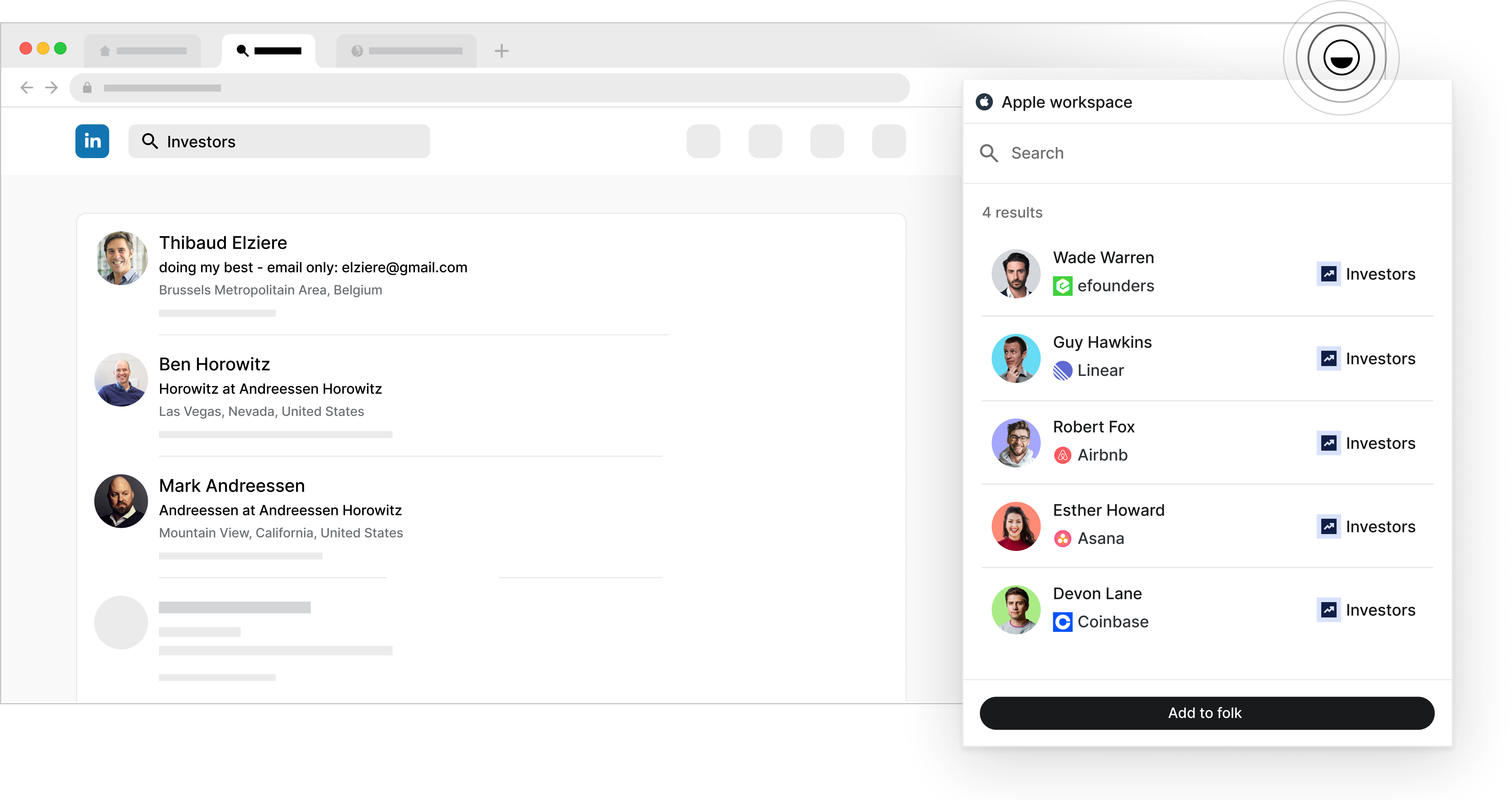
If you're looking for a way to capture all the contact information you want to keep from your search lists in Sales Navigator, folk X is a Chrome extension you'll want to have in your tech stack.
It can help you:
- Add an individual profile to your CRM directly from your browser
- Retrieve contact information on the go
- Synchronize your data into folk with one click
- Give you access to your email template library
- folk mobile app: Manage contacts, timelines, and reminders on the go
folk X is particularly useful for marketing, sales and recruitment teams. As well as Founders involved in Founder-led sales strategies.
2. Turn your engagement into leads
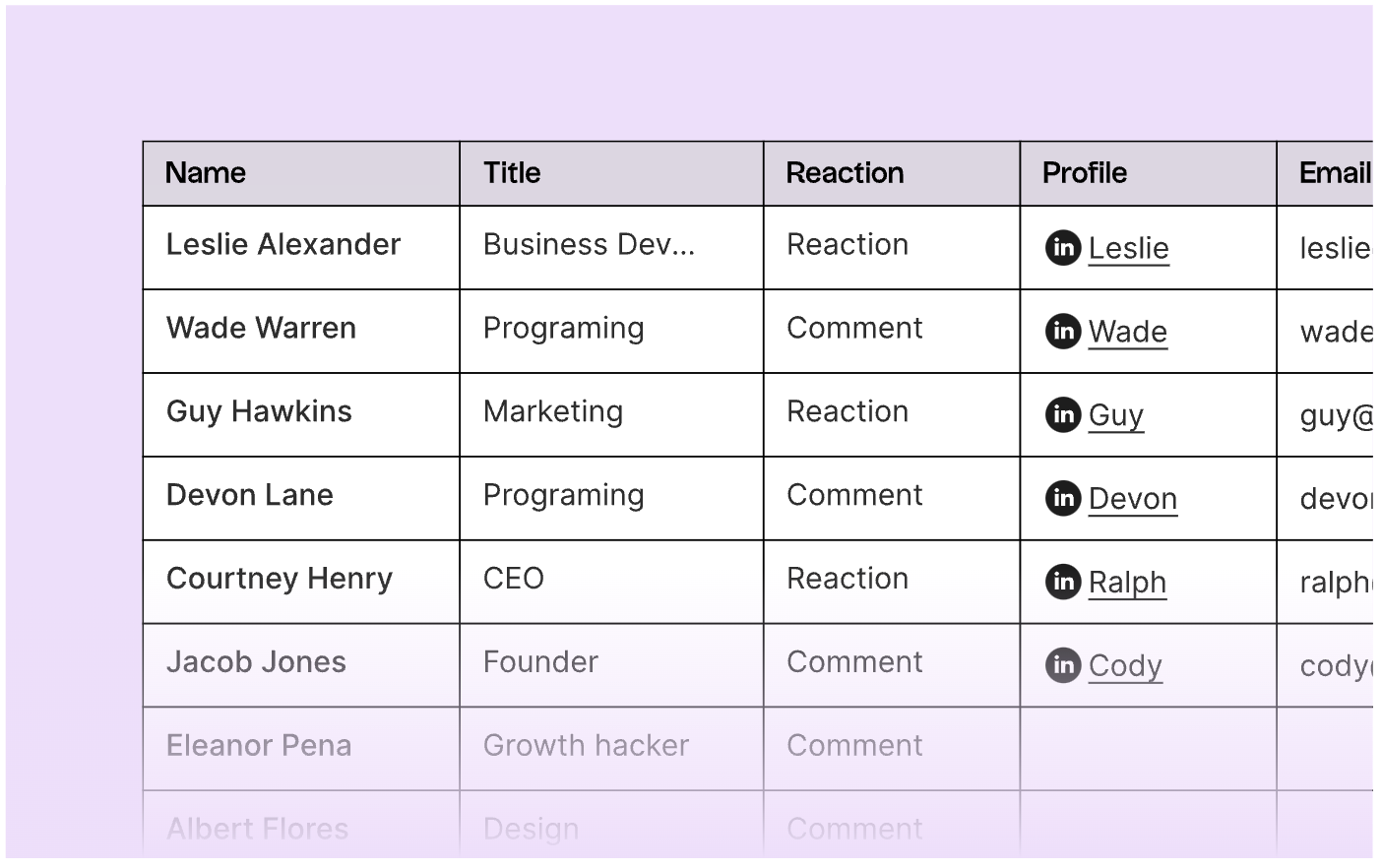
If you're building your personal brand as part of your social sales strategy and often get a lot of engagement in your posts, folk's LinkedIn comment exporter can help you out. It can help you create a .CSV file with the contact information from people who have engaged with your post.
👉🏼 Try folk now to never miss a follow-up on LinkedIn leads with shared timelines and reminders
Conclusion
LinkedIn Premium can be a valuable investment depending on your professional needs. But on its own it's not enough to fully optimize your tech stack. To make your LinkedIn Premium account worth it, consider pairing it with folk CRM - the premier solution for sales and business development teams of 20-50 people who need to seamlessly manage LinkedIn prospects and convert them into revenue-generating relationships. Try folk today, free.
More resources
Looking for more? Check out some of our blog posts from our LinkedIn series below.
- How to leverage social selling on LinkedIn to drive new business
- The best approach to social selling on LinkedIn: a guide for Founders
- How to search for and find people on LinkedIn: best practices to optimize your LinkedIn search
- How to spot buying signals on LinkedIn
- How to export LinkedIn post, comments and likes
- How to use folk X to build LinkedIn message templates
- How to make the most out of your LinkedIn people directory
- Top 10 LinkedIn messaging templates for sales and business development teams
- The ultimate guide to LinkedIn Chrome Extensions
FAQ
Is LinkedIn Premium worth it?
It is worth it when tied to clear goals: job search (InMail, applicant insights), business growth (unlimited browsing, company insights), sales (lead lists, alerts), or recruiting (advanced filters). If none apply, keep the free plan.
How much does LinkedIn Premium cost in 2025?
Premium Career $29.99/mo ($239/yr). Premium Business $59.99/mo ($575.88/yr). Sales Navigator: Core $99.99/mo, Advanced $179.99/mo, Advanced Plus from $1,600/yr. Recruiter Lite $170/mo; Recruiter $850/mo. Learning from $26.99/mo.
What is the difference between Premium Business and Sales Navigator?
Premium Business offers unlimited profile browsing, advanced search, and company insights. Sales Navigator adds deeper prospecting: lead/account lists, recommendations, real-time alerts; Advanced Plus includes CRM integration.
How to choose the right LinkedIn plan?
Match the plan to the goal: job seekers choose Premium Career; SMB growth choose Premium Business; sales teams choose Sales Navigator; recruiters choose Recruiter/Recruiter Lite. To turn LinkedIn contacts into pipeline, use folk.
Discover folk CRM
Like the sales assistant your team never had