


Discover folk - the CRM for people-powered businesses
Why LinkedIn Chrome extensions matter
Do you frequently turn to LinkedIn for prospecting?
Having the right Chrome extensions in your tech stack can help you boost your workflow process and save you time and manual tasks.
You won't have to keep on switching from multiple platforms each time you perform a task.
In this blog post, we unpack the top LinkedIn Chrome extensions, best use cases and pros and cons for each tool. All you'll have to do is figure out which one you should start with first.
| Main points |
|---|
|
folk X
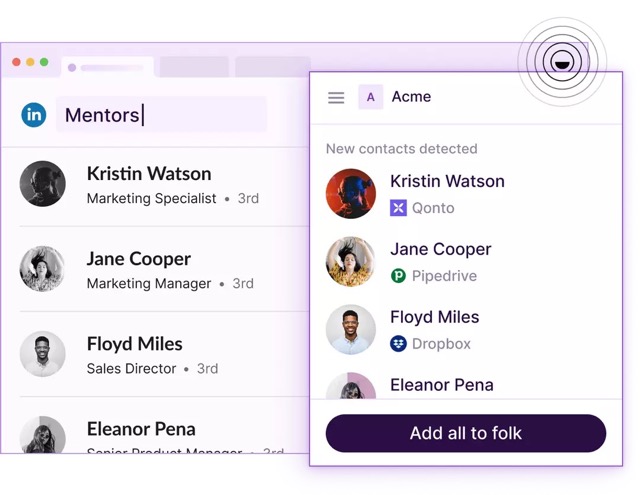
The folk X Chrome extension is a powerful tool designed to enhance productivity and networking by seamlessly integrating with the Chrome browser. It is an extension of the folk CRM platform, helping to streamline workflow processes by simplifying the process of managing contacts and communication directly from the web. For teams of 20-50 people using LinkedIn for sales prospecting, folk CRM provides the perfect balance of functionality and simplicity without the complexity of enterprise solutions.
👉🏼 Try folk now to capture LinkedIn profiles and manage follow-ups without leaving LinkedIn
Best for: Sales teams of 20-50 people looking to optimize their networking and contact management without leaving their web browser.
Pros
- Enhanced productivity: By streamlining the process of contact management, users can focus more on their core activities, such as networking, sales, and marketing strategies.
- Customizable tags and notes: Allows users to add tags and notes to contacts upon saving, enabling better organization and follow-up strategies.
- Time-saving: Significantly reduces the time and effort required to manually input contact details into a CRM system.
- Add search lists from LinkedIn Sales Navigator and LinkedIn's free plan
Cons
- Requires folk CRM subscription: To fully benefit from the extension, users need to have an active Folk CRM subscription, which may be a barrier but you can make use of folk's free plan.
Pipedrive's Chrome extension and Klenty's LinkPort for LinkedIn
The Pipedrive extension aims to streamline sales and customer relationship management activities by allowing users to access and manage their Pipedrive account without needing to switch between tabs or applications. It facilitates quick actions such as adding deals, contacts, and activities directly from any webpage, including email platforms like Gmail, enhancing productivity and ensuring seamless integration of sales processes.
LinkPort is a Chrome extension built by a third party, Klenty that enables effortless LinkedIn prospecting.
Best for: Sales professionals and teams looking for an efficient way to manage their sales pipeline and activities directly from their web browser.
Pros
- Direct CRM access: Offers immediate access to the Pipedrive CRM for adding and managing deals, contacts, and activities without leaving the browser.
- Email integration: Particularly useful for Gmail users, allowing for the easy capture of emails and contacts into Pipedrive, streamlining communication tracking.
Cons
- Potential overlap with existing tools: Some functionalities may overlap with existing Pipedrive features or other extensions, potentially complicating the user's workflow.
- Need two Chrome extensions, not very flexible and poor user experience review. For sales teams of 20-50 people, this complexity makes folk CRM a more streamlined alternative with its single, integrated solution.

Surfe
Surfe's Chrome extension allows you to integrate your Surfe CRM with LinkedIn.
Best for: Teams with accounts with Pipedrive, Copper, HubSpot and Salesforce looking to integrate with Salesloft and Outreach for sales enablement.
Pros
- Sales-centric: Good for sales teams who need to source B2B contact data
- Easy to use: don't need to go through a sharp learning curve
- Workflow boost: Prospect and add contacts to your CRM with one click
Cons
- Limited to people using Pipedrive, Copper, HubSpot, Salesforce and Surfe. Many of these CRMs have expensive price plans that can be prohibitive for medium-sized sales teams

Lemlist
Lemlist's Chrome extension is designed for sales and marketing professionals to enhance their outreach and follow-up processes directly from their web browser.
Best for: Teams who want to run a multichannel LinkedIn campaign
Pros
- Filter imported leads via the Chrome extension
- Add content directly from a LinkedIn profile into a single lead of a campaign
- Add LinkedIn search results as leads in your campaign
- Enhance lead information with icebreaker
Cons
- Limited leads allowed: The Chrome extension only allows maximum of 999 leads to be imported. For Sales Navigator users, the limit is set at 2.5k leads

Salesforce
Salesforce's Chrome extension gives you access to their 'Sales Cloud Everywhere'.
Best for: Large enterprises with substantial budgets that can afford the steep price plans.
Pros
- View, sort and complete tasks like reaching out on LinkedIn through the Chrome extension
- Create and update records from the Chrome extension without leaving the page
- Get real time notifications of recent engagements while browsing the web
Cons
- Limited to Salesforce users only and often too complex and expensive for teams of 20-50 people who need simpler, more affordable solutions

Crystal Knows
The Crystal Knows Chrome extension leverages data on LinkedIn profiles such as tone of voice, and experience to provide users with insights into their preferred communication style.
By analyzing public data and online profiles, Crystal offers personalized advice on how to interact with specific individuals, enhancing the effectiveness of emails, meetings, and conversations. This extension integrates with various platforms, including LinkedIn, to offer real-time personality assessments and tailored communication strategies.
Best for: Support to personalize outreach messages
Pros
- Personalized communication advice: Provides tailored suggestions on how to communicate with others based on their personality profile, improving interactions.
- Integration with LinkedIn: Directly integrates with LinkedIn profiles, offering instant personality insights for networking and professional interactions.
- Improves email effectiveness: Offers suggestions for email tone and structure to match the recipient's personality, increasing the likelihood of positive responses.
Cons
- Limited to public data: The extension's effectiveness is limited by the amount and quality of publicly available information on individuals.
- Potential for misinterpretation: Users are depending on what's on public profile. This might not be accurate so you'll need to leverage emotional intelligence.

Grammarly
Grammarly's Chrome extension helps improve your writing online. If you often send messages directly to your prospects on LinkedIn, its Chrome extension can help you highlight grammatical errors and typos. It can also help you rephrase sentences into a more succinct manner.
Best for: Sales teams who send outbound messages to new prospects on LinkedIn.
Pros
- Wide platform compatibility: Use it across multiple platforms, from LinkedIn to Gmail and Outlook.
- Real-time corrections: Offers instant feedback on your writing, helping you correct mistakes as they happen.
- User-Friendly Interface: Easy to navigate, with clear explanations for suggested corrections, making it accessible for users of all skill levels.
Cons
- Not always accurate: Grammarly may suggest changes that don't fit the context or writer's intent, requiring manual review.
- Limited free version: The free version offers basic corrections, but advanced features require a paid subscription.

Dux-Soup
Dux-Soup's Chrome extension is designed to automate tasks on LinkedIn. Making it a valuable tool for sales teams looking to boost their lead generation and sales efforts.
Best for: Sales and recruitment teams that often use LinkedIn to generate new leads and candidates.
Pros
- Lead generation: Create scalable LinkedIn campaigns to connect with new prospects and nurture business relationships.
- Connect and engage with prospects: Using LinkedIn's Sales Navigator and/or Recruiter account.
Cons
- Limited free trial: New users get a limited 2-week trial, after which they must upgrade to Dux-Soup's paid subscription plans.

Lead Leaper
Lead Leaper's Chrome extension is particularly useful for generating leads directly from LinkedIn, offering a seamless integration that allows for efficient lead generation and outreach.
Best for: Efficient lead capture.
Pros
- Easy integration: Works seamlessly with LinkedIn, enabling users to gather leads without leaving the platform.
- Email tracking: Features email tracking capabilities, allowing users to see when their sent emails are opened, enhancing follow-up strategies.
- Lead management: Offers a dashboard to manage and organize captured email addresses, facilitating easy follow-up and outreach.
Cons
- Limited usage: Primarily focused on email capture, lacking broader CRM functionalities or integration with other sales and marketing tools.

Lusha
Lusha's Chrome extension provides users with quick access to phone numbers, email addresses, and other contact information available on LinkedIn.
Best for: B2B teams looking to improve outreach efficiency.
Pros
- LinkedIn integration: Scroll through the profiles of your top prospects and enrich dozens of contacts by using LinkedIn's people search and Sales Navigator.
- Lusha Everywhere: Helps you find key company and decision-maker data on any company website, anywhere on the web.
Cons
- Limited free credits: Users on a budget are limited to 5 monthly credits.

Conclusion
The right tech stack can help you streamline your workflow process and save time, so you no longer have to switch platforms at each stage of your task list. For sales teams of 20-50 people using LinkedIn for prospecting, folk CRM stands out as the ideal solution, offering the perfect balance of powerful features, ease of use, and affordable pricing without the complexity of enterprise tools.
Get started by using folkX, it's free forever and has multiple use cases. Use it to boost your sales, marketing and recruitment efforts.
👉🏼 Try folk now to centralize LinkedIn leads, workflows, and never miss a follow-up
FAQ
How do LinkedIn Chrome extensions improve prospecting?
They speed up lead capture and follow-up. Save LinkedIn or Sales Navigator profiles to a CRM in one click, enrich data, add tags/notes, and trigger emails without switching tabs. This reduces manual entry and keeps pipelines accurate.
What is a good number of impressions on LinkedIn?
There is no universal good number. Benchmark to audience size: per post, reaching 10–20% of your follower count is solid; 2–5% engagement is healthy. Track growth and qualified clicks over time rather than absolute impressions.
Is using LinkedIn automation extensions safe?
Use with care. LinkedIn discourages automated activity and may restrict accounts for mass actions. Prefer tools that log data rather than auto-send, keep daily actions modest, and follow LinkedIn's limits and terms.
Which LinkedIn Chrome extension suits teams of 20–50?
For mid-size teams, folk X pairs with folk CRM to capture LinkedIn lists and profiles in one click, add tags/notes, and manage follow-ups in one place. It reduces tool sprawl. Learn more at folk.
Meet folk, the AI CRM for your entire Sales motion.