


Discover folk - the CRM for people-powered businesses
Building meaningful relationships is the foundation of long-term success, whether you're a freelancer, entrepreneur, or simply growing your professional network. A personal CRM is the ultimate tool to organize your contacts, track interactions, and get timely reminders to follow up — so you never lose touch with the people who matter.
Unlike traditional CRMs designed for sales pipelines, a personal CRM focuses on nurturing relationships instead of chasing deals.
The 3 best personal CRMs right now are:
What is a personal CRM?
A personal CRM is a tool that helps you manage and nurture relationships by organizing contacts, tracking interactions, and setting reminders for follow-ups.
Whether you're a prosumer, investor, executive, salesperson, influencer, or just your average person who uses the Internet, staying on top of your contacts can be overwhelming. Fortunately, personal CRM software can help by offering a centralized location to store all your contact information.
With this dedicated tool you can track your interactions, and automate follow-ups, streamline your personal contact management, professional networks, and cultivate better relationships all round.
How Does a Personal CRM Work?
A personal CRM brings contact details, past conversations and follow-up plans into one searchable place. Instead of relying on memory or checking several inboxes, you can see who someone is, when you last spoke and what should happen next.
The process usually works in six steps:
1. Import Your Contacts
You can add contacts manually, upload a CSV file or import them from connected accounts. Depending on the personal CRM, these sources may include Gmail, Outlook, a calendar, a phone address book or LinkedIn.
Tools such as folk also provide a browser extension for capturing profiles while browsing LinkedIn and other social platforms.
2. Create a Complete Contact Record
The CRM creates an individual record for each person. It can contain their name, company, role, email address, phone number, social profiles and any custom information you want to preserve.
Contact enrichment can fill in missing details, while duplicate detection prevents the same person from appearing several times.
3. Organize Your Relationships
Tags, groups and custom fields help separate contacts according to their role or relevance. A freelancer might create groups for clients, prospects and partners, while an investor could organize founders by industry, location or funding stage.
This structure makes a large network easier to search and segment.
4. Record Interactions and Context
A personal CRM can store emails, meetings, notes and previous conversations. Before contacting someone again, you can review what you discussed and avoid asking for information they have already shared.
Some platforms synchronize interactions automatically. Others require users to add notes and update contact records manually.
5. Plan the Next Follow-Up
Reminders prompt you to reconnect after a meeting, check on an introduction or contact someone after a specific period. More advanced personal CRMs can recommend a next action or trigger a workflow when a record changes.
The goal is not to message everyone constantly. It is to avoid losing valuable relationships because a follow-up was forgotten.
6. Keep the Relationship Moving
Over time, the CRM builds a chronological record of the relationship. You can see how often you communicate, which contacts require attention and where each relationship currently stands.
For professional relationships, pipelines can also track a clear outcome, such as booking a meeting, recruiting a candidate, securing an introduction or closing a partnership.
A personal CRM works best when updating it requires very little effort. Automatic synchronization and contact capture reduce manual data entry, but short notes still provide the context that software cannot infer from an email address or meeting date.
Personal CRMs at a glance
The 5 best personal CRM on the market in 2026
With all that said, let's explore the top 5 best personal CRM tools on the market today. Bonus: all offer a free version so you can try them out for yourself before committing!
1. folk: the most flexible and user-friendly personal CRM
⭐⭐⭐⭐⭐(G2)
Our top pick is folk, a sleek, intuitive CRM that balances powerful features with simplicity. It integrates seamlessly with Gmail, Google Calendar, and offers a Chrome extension for quick contact management on the go. For professionals managing extensive networks or medium to large teams collaborating on relationship management, folk CRM stands out as the ideal solution.
If you're tired of using Google Sheets for CRM, folk is the upgrade you need. It's lightweight, customizable, and packed with features to streamline your contact and sales management.
A standout feature is its ability to import data directly from Gmail and Outlook, making it easy to consolidate your information.

The Chrome extension lets you import contacts with a single click from LinkedIn, Sales Navigator, Twitter, Instagram, Gmail, and even TikTok. Bring all your contacts into one place, easily categorize them, and keep track of everything you need.

Once you have your contacts organized, folk gives you full interaction details, with the option to add reminders and take notes - all helpful elements for customer relationship management.


Sending customized email campaigns is effortless with folk's mail merge system and its new Workflow Assistant. You can easily insert variables into bulk emails or set up automated email outreach based on triggers, like when a person is created or a field is updated. Plus, you can review past interactions directly in your CRM, making it simple to scale follow-ups without manual work.
👉🏼 Try folk now to send personalized bulk emails and track opens and clicks from one dashboard

folk makes it easy to track your email campaign results, providing open, click, and bounce rates—features not commonly found in other personal crm.

You can even create drag-and-drop custom pipelines to manage processes, whether for inviting people to an event, fundraising, making sales, or anything else you might need.
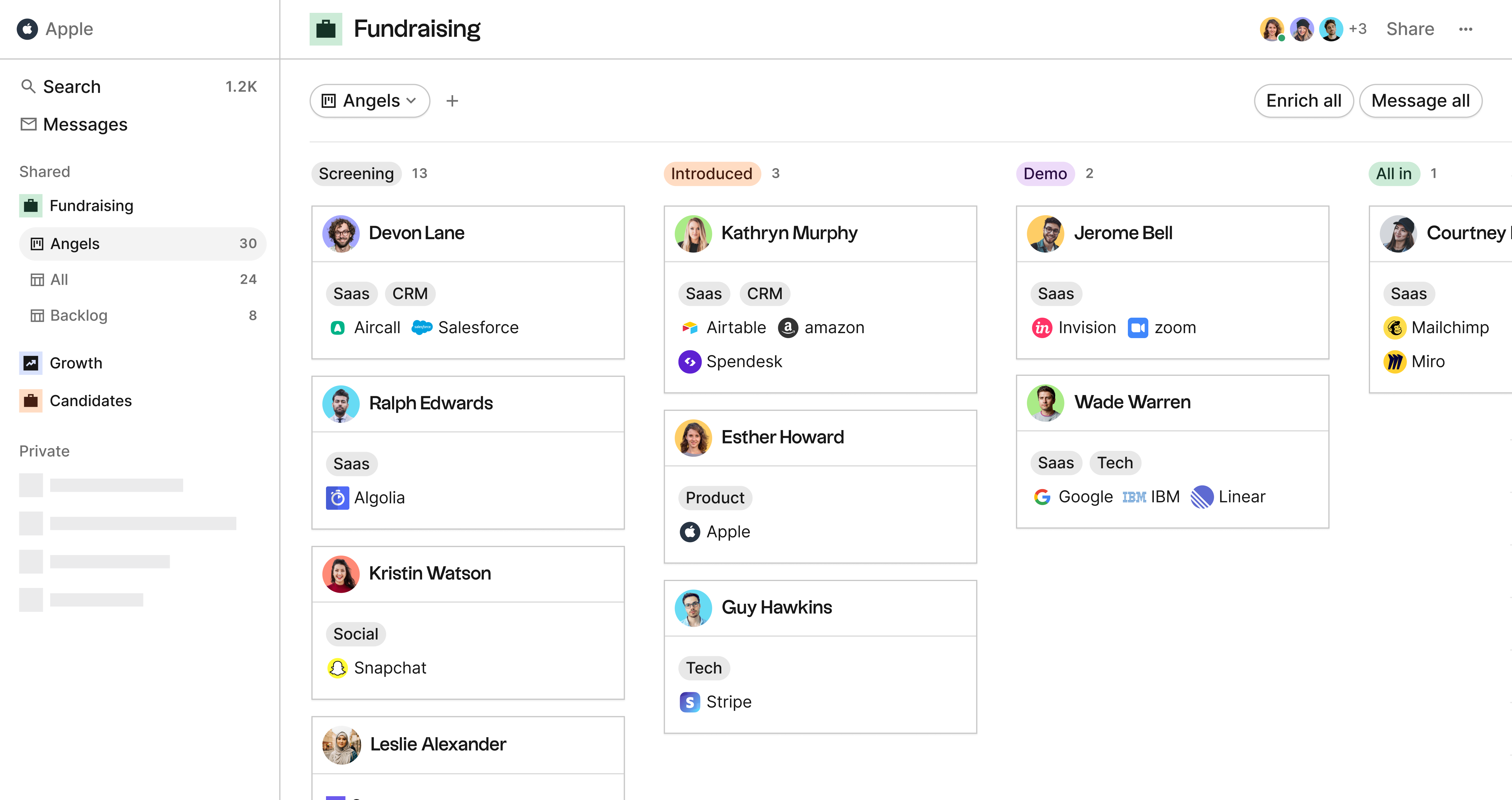
folk lets you easily share lists with others. It's also highly collaborative—whether you're managing your personal CRM solo or with a team. You can manage permissions, share notes and files, tag colleagues, and set reminders. This makes folk CRM particularly valuable for medium-sized organizations or teams who need to coordinate their relationship management efforts across multiple team members.
If you're looking for a personal CRM, folk is the top choice. It's a powerful, customizable address book with a user-friendly interface, mobile app and strong integrations.
Pricing
Sign up now for a 14-day free trial, then choose from these plans:
Standard: from $24/mo/user (billed annually)
Premium: from $48/mo/user (billed annually)
Custom: from $80/mo/user (billed annually)
2. Dex: single-player, integrated personal CRM
⭐⭐⭐⭐(G2)
Next up in the list of personal CRM tools is Dex, a CRM that's specifically designed for individuals.
Similarly to folk, Dex offers options to bring contacts from multiples sources like Gmail, Instagram or LinkedIn both with direct social media integrations or with a Chrome extension. All the contacts will then be listed in a view named "All contacts", with unlimited contacts. This helps limit manual data entry.

Dex personal CRM lets you visualize a dashboard, but that can sometimes feel slightly clunky and inappropriate for personal CRM systems.

One interesting element of Dex is the option to visualize a contact timeline, similar to what folk offers. This allows you to get better context on individual relationships.

Another bonus is their mobile app, which is a great addition for a Personal CRM.
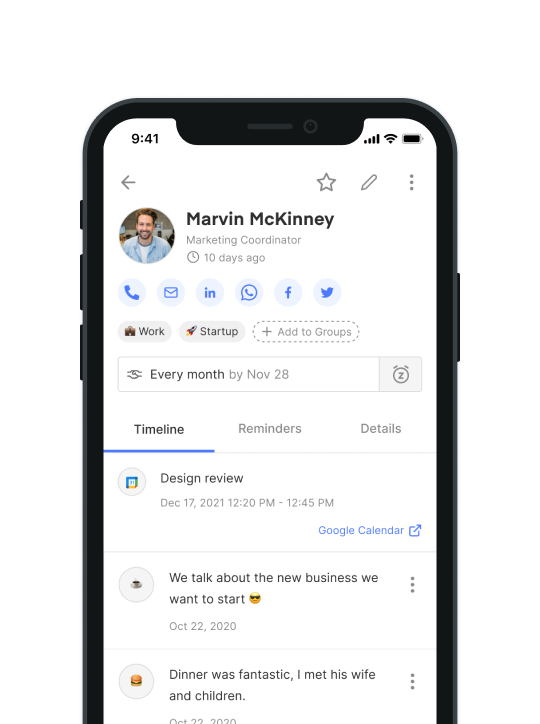
However, Dex is noticeably lacking in a few important areas: mail merge (sending emails in bulk) and pipeline management. There is also no option to collaborate.
Pricing
You can use Dex for free for 7 days before you will need to move to a paid plan. Starting at $12.
3. Clay: The Superhuman of personal CRM tools, but missing important features
⭐⭐⭐⭐⭐(G2)
The third pick of our personal CRM tools list is Clay.earth, which presents itself as the Superhuman of Personal CRM apps.
It also lets you integrate contact data from multiple tools such as Gmail, LinkedIn, Google Calendar and more.

The core of the system rests on the fact that it is a notification-based personal CRM with a daily brief about your personal relationships, including auto reminders.

Clay offers standard contact cards with basic information such as notes, emails, reminders – helpful to manage personal relationships. A neat feature is the "related people" that displays on the top right-hand side of the screen.

The design is pretty slick and it comes with a dark mode. They also have a handy AI-based search. Otherwise, Clay personal CRM is pretty feature-poor, and it doesn't offer any contact apps on mobile for now, and no browser extension.
You can sign up and start using Clay with the free version.
4. Notion: The customizable personal CRM
⭐⭐⭐⭐(G2)
Last, we have Notion, an all-in-one productivity platform that can be customized to serve as a personal CRM. It integrates with platforms like Gmail and Slack, keeping your workflows organized in one place.
While users love Notion for its flexibility, it's not specifically designed as a personal CRM. It lacks native communication tool integrations, social media APIs (like LinkedIn, Twitter, Instagram), and mail merge options found in other CRMs. For teams managing relationships at scale, the lack of native CRM features makes Notion less ideal compared to dedicated solutions like folk CRM.

Notion works great for note-taking and document sharing but is still pretty limited as a Personal CRM.
Pricing
You can start on Notion with the free version.
Plus: $9.50/mo
Business: $19.50/mo
Enterprise: Custom
5. Monica: The open-source personal CRM for private relationship tracking
⭐⭐⭐⭐(G2)
Monica is an open-source personal CRM built for people who want to document their personal relationships without turning them into sales opportunities. It helps users keep track of friends, family members, colleagues, conversations, birthdays, tasks, gifts, debts, addresses, pets, and important life events in one private workspace.
Similarly to Dex and Clay, Monica focuses more on personal relationships than sales processes. The main difference is its open-source approach: users can either use Monica Cloud or host the software on their own server. This makes it attractive for privacy-conscious users and developers who want more control over their data.
Monica is useful if you want to remember when you last contacted someone, add notes after a conversation, store gift ideas, or set reminders for important dates. It also includes a journal, a dashboard, and a REST API, which gives technical users room to build custom workflows around their personal relationship data.
However, Monica is less suited for users who want a modern networking CRM with native LinkedIn capture, email sync, mail merge, analytics, or collaborative pipelines. Most of the experience remains manual, and the interface feels more practical than polished compared with tools like folk, Dex, or Clay.
Pricing
Monica offers a free self-hosted version. Monica Cloud also includes a limited free plan with 10 contacts, while the paid hosted plan costs $9/month or $90/year with unlimited contacts and unlimited reminders.
Conclusion
Managing your contacts can be a tedious and time-consuming process, but personal CRM software can help simplify things and streamline your workflow. When choosing a personal CRM, look for features like integrations, mail merge, and analytics to help you stay on top of your relationships and identify areas for growth. With any of our top picks – folk, Dex, Clay.earth, and Notion – you'll be well on your way to better contact management in no time.
More resources
- folk's personal CRM template
- Clay vs Dex: which is the best for your personal and professional relationships?
FAQ
What is a personal CRM?
A personal CRM centralizes contacts and interactions. It stores details, logs emails and meetings, adds notes, and sets follow-up reminders. It often syncs with email, calendar, and social profiles so every touchpoint stays organized.
Is a personal CRM worth it?
Yes. It saves time versus spreadsheets, safeguards context, and prompts timely follow-ups. Founders, investors, creators, and freelancers benefit from higher response rates, warmer relationships, and a searchable history across channels.
What are the key features of a personal CRM?
A good personal CRM lets you organize contacts with custom tags and notes, track every interaction (emails, meetings, messages), and automate follow-ups with reminders, mail merge, and advanced workflow automation. With tools like folk's Workflow Assistant, you can trigger personalized emails automatically based on data changes, while using built-in analytics to track your results.
How to choose the right personal CRM?
Define goals (networking, deal flow, outreach). Check integrations (Gmail, LinkedIn, Calendar), ease of use, reminders and automation, mail merge, and analytics. Trial a free plan; a tool like folk bundles these for individuals and teams.
Meet folk, the AI CRM for your entire Sales motion.