


Discover folk - the CRM for people-powered businesses
LinkedIn passed the stage of being “a platform to upload a resume” years ago. Today, it is used to hire, sell, recruit, raise funds, build partnerships, grow audiences, generate leads, monitor markets, and build personal brands.
The challenge is that most people still use only a small fraction of it. A profile gets created, a few connections are added, maybe some posts appear, and the platform stays idle for months.
Meanwhile, recruiters search daily, founders build visibility, sales teams generate pipeline, and companies monitor buying signals directly inside LinkedIn. The platform did not become more complex. The use cases expanded.
Discover the best CRMs for LinkedIn in 2026
What is LinkedIn?
💡 LinkedIn is a professional social network designed to help people and companies build professional relationships, share expertise, recruit talent, develop business opportunities, and grow visibility.
Unlike traditional social platforms focused on entertainment, LinkedIn centers around work, careers, industries, companies, skills, and professional interactions. Today, it is used by job seekers, recruiters, founders, sales teams, consultants, agencies, investors, creators, and B2B companies.
Main LinkedIn features include:
✔️ Professional profiles and resumes
✔ Company pages
✔️ News feed and content publishing
✔️ Job listings and applications
✔️ Messaging and networking tools
✔️ Groups and communities
✔️ LinkedIn Learning
✔️ Sales Navigator for prospecting
✔️ Recruiter tools for hiring
✔️ Analytics and audience insights
LinkedIn advantages include:
✔️ Building professional visibility and credibility
✔️ Growing industry networks
✔️ Finding jobs and career opportunities
✔️ Recruiting candidates faster
✔️ Developing personal brands
✔️ Generating leads and partnerships
✔️ Following markets and competitors
✔️ Sharing expertise and thought leadership
✔️ Supporting sales and outbound activities
✔️ Creating long-term business relationships
How to Use LinkedIn Effectively in 2026? 7 Proven Tips
1. How to Use LinkedIn for Networking
Most valuable opportunities on LinkedIn do not come from viral posts. They come from conversations.
Networking on LinkedIn works best when the objective is relationship building rather than contact collection. Sending fifty generic connection requests usually creates less value than building ten relevant relationships.
A simple networking workflow often works well:
- Identify people working in the same industry, niche, or ecosystem
- Engage with their content before sending requests
- Add context inside the invitation message when relevant
- Continue interactions after the connection is accepted
Strong networking targets often include:
• Industry peers
• Founders
• Recruiters
• Former colleagues
• Clients and prospects
• Partners and investors
• Subject matter experts
The strongest networks are usually built months before they become useful.
2. How to Use LinkedIn to Apply for Jobs
Applying on LinkedIn is easy. Getting noticed is harder. Many candidates still use the same workflow: click Easy Apply, upload a CV, move on to the next offer. Recruiters often receive hundreds of applications for one position, especially in remote roles.
Visibility matters as much as the application itself. Before applying, spend a few minutes investigating the company page, recent posts, employees, hiring activity, and decision-makers. This often reveals information that never appears in the job description.
Step 1: Optimize the profile first!
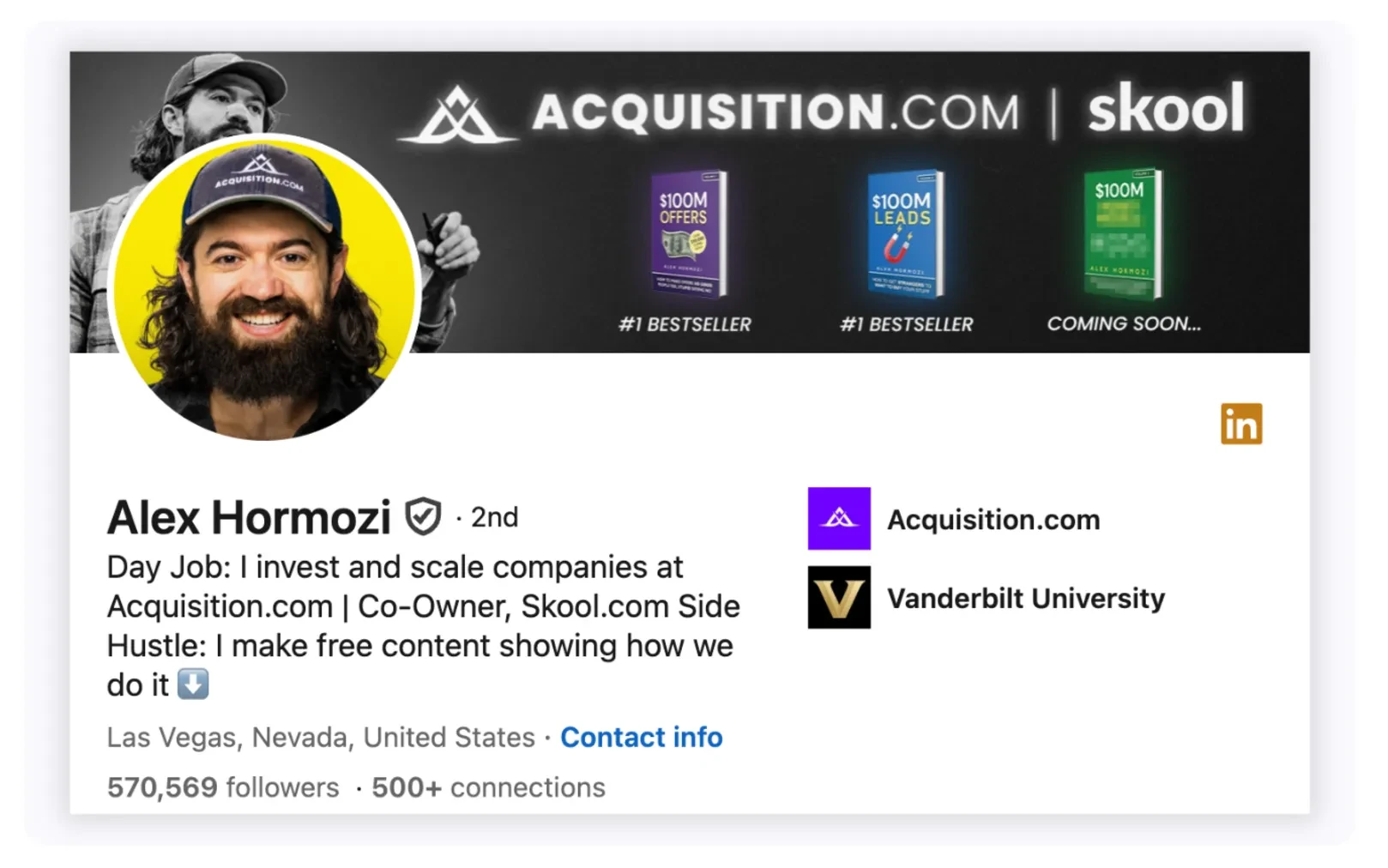
Recruiters frequently open the profile before opening the resume.
Check:
• Professional headline
• About section
• Experience descriptions
• Skills and certifications
• Portfolio, projects, or publications
• Profile photo and banner
A weak profile can reduce response rates even with a strong CV. Candidates targeting international positions should also display a recognized English certification and the corresponding score when language proficiency matters for the role.
Step 2: Research the company
Look for:
• Recent funding or growth
• Hiring volume
• Team size evolution
• Recent posts from managers
• Company culture signals
Example: A company hiring five SDRs at once probably has very different priorities from a company replacing one employee.
Step 3: Create visibility around the application
Engage with company content, connect with recruiters when relevant, or interact with future teammates. The objective is not to “game” the algorithm.
It is to stop being an anonymous applicant. Many hires happen because the name was already familiar before the application arrived.
3. How to Use LinkedIn for Personal Branding
A strong LinkedIn profile helps. A visible LinkedIn presence does more. Personal branding on LinkedIn is not about pretending to be an influencer or posting motivational content every morning. In most B2B industries, credibility comes from consistency, clarity, and relevance. The goal is simple: become associated with a topic.
For example:
• RevOps
• Cybersecurity
• SaaS sales
• Private equity
• Data engineering
• Recruitment
• AI workflows
People rarely remember “a person on LinkedIn.” They remember patterns.
A practical content structure often works better than random posting:
• Industry observations
• Lessons from real projects
• Contrarian opinions
• Market analysis
• Operational mistakes
• Process breakdowns
• Tactical frameworks
The format matters less than the signal quality. Short posts can perform well when they contain a strong opinion or useful operational insight. Longer posts often work better for educational breakdowns and strategic analysis. One common mistake is trying to sound “corporate.”
💡 Expert tip: LinkedIn content usually performs better when the writing sounds like an actual person speaking from experience instead of a polished press release. For B2B professionals, personal branding often compounds slowly. One post may generate nothing. Fifty relevant posts can completely change inbound opportunities, recruiting visibility, partnerships, speaking invitations, and pipeline generation.
4. How to Use LinkedIn for Lead Generation
LinkedIn is one of the few platforms where targeting and intent already exist in the same place. Job titles, industries, company size, hiring activity, seniority, growth stage, geographic markets, and professional interests are visible directly inside the platform. This makes LinkedIn particularly effective for B2B lead generation. The mistake many teams make is treating lead generation like mass outreach. Volume alone rarely works anymore.
The strongest results usually come from combining targeting, visibility, and timing. A practical LinkedIn lead generation workflow often includes three layers:
1. Build a focused target list
Start with a narrow ICP instead of broad industries.
For example:
• B2B SaaS companies
• 20–100 employees
• US-based
• Recently hiring sales roles
• Founder-led companies
Specific targeting generally produces better conversations than large generic lists.
2. Create familiarity before outreach
Cold messages sent without context are often ignored. Prospects who already saw posts, comments, or mutual interactions usually respond differently because the sender no longer feels completely unknown.
Simple actions help:
• Comment on relevant posts
• Share industry insights
• Engage with prospect content
• Participate in niche conversations
This creates soft visibility before the first message.
3. Organize leads properly
Most LinkedIn prospecting becomes messy very quickly. Profiles get lost, conversations disappear, follow-ups are forgotten, and opportunities remain trapped inside inboxes. This is why many teams use LinkedIn together with CRM systems like folk CRM to centralize contacts, track conversations, segment leads, and manage follow-up workflows after prospects are identified on LinkedIn.
👉 Try folk CRM for Linkedin (free)
Good lead generation is rarely about finding more people. It is usually about managing attention better than competitors.
5. How to Use LinkedIn for Prospecting
Prospecting on LinkedIn works best when it feels researched. The fastest way to get ignored is sending generic messages that could apply to anyone. Most decision-makers receive enough low-effort outreach to recognize templated prospecting within seconds.
Good LinkedIn prospecting starts long before the first message. The first step is usually account selection. Instead of targeting everyone inside an industry, experienced outbound teams narrow their focus using variables such as:
• Company size
• Revenue stage
• Hiring activity
• Team structure
• Geography
• Technologies used
• Recent funding
• Leadership changes
✔️ Once accounts are identified, prospecting becomes easier because the outreach gains context.
For example: A company actively hiring SDRs may indicate outbound expansion. A newly promoted VP Sales may review tools and processes. A founder posting about operational bottlenecks may already expose pain points publicly.
These details create better entry points than generic introductions.
Message structure also matters. Most effective LinkedIn outreach messages stay short, contextual, and specific. Long sales pitches often underperform because LinkedIn conversations behave more like real messaging than email campaigns.
A simple structure tends to work well:
• Relevant observation
• Clear reason for outreach
• Short value angle
• Low-friction next step
Example:
❌ Instead of: "Helping companies scale outbound with AI-powered solutions."
✔️ A stronger angle may sound closer to: "Noticed the SDR hiring push over the last two months. Curious how lead routing is currently managed across the team."
The second message feels connected to reality. That difference matters.
6. How to Use LinkedIn to Build Industry Authority
Authority on LinkedIn is usually built through repetition, not virality. Many professionals assume authority comes from one successful post or a large audience. In practice, credibility grows when the same expertise appears consistently over time through content, comments, conversations, and profile positioning.
The objective is not becoming famous. It is becoming recognizable inside a niche. A cybersecurity founder, RevOps consultant, recruiter, or SaaS operator does not need millions of impressions. They need the right people to associate their name with a specific expertise.
Three things usually accelerate authority building on LinkedIn:
1: Clear positioning
Profiles that try to speak about everything often become forgettable. Specialized positioning tends to work better.
Examples:
• AI sales workflows
• Healthcare recruitment
• B2B outbound systems
• Private equity operations
• Data infrastructure
The narrower the positioning, the easier it becomes to stand out.
2: Consistent publishing
Inconsistent activity makes audiences forget quickly. This does not require posting daily, but regular publishing keeps expertise visible inside the network. Many professionals underestimate how much repeated exposure influences perception over time.
Even short posts can reinforce authority when they contain:
• Market observations
• Strong operational opinions
• Practical lessons
• Contrarian takes
• Real execution examples
3: .Visible expertise outside posts
Authority is also built through comments, conversations, profile optimization, speaking opportunities, podcasts, webinars, hiring activity, and interactions across the platform. Many respected LinkedIn profiles are not “creators.” They are simply active experts whose names appear repeatedly around relevant conversations.
7. How to Use LinkedIn for Recruiting
LinkedIn became one of the main recruiting channels because talent is already active there. Candidates follow companies, comment on industry topics, update job changes, share projects, and interact publicly with professional content. This gives recruiters and hiring managers far more context than a traditional resume alone.
The strongest recruiting strategies on LinkedIn usually combine sourcing and visibility. Posting a job offer is rarely enough on its own, especially in competitive markets where strong candidates are not actively applying.
LinkedIn helps identify relevant profiles, but teams recruiting developers still need practical assessments to verify how candidates write code, solve problems, and collaborate.
1: Building a visible employer presence
Candidates research companies before replying.
They check:
• Employee activity
• Leadership presence
• Team culture
• Recent company posts
• Growth signals
• Industry reputation
An inactive company page can weaken recruiting efforts even with attractive roles.
2: Searching proactively instead of waiting
LinkedIn search allows recruiters to identify profiles based on experience, skills, location, industry background, certifications, or career progression. This becomes especially useful for niche roles where inbound applications remain limited.
For example: A recruiter hiring a RevOps manager can specifically search for candidates already working with Salesforce automation, PLG environments, or SaaS reporting structures instead of relying only on keyword-heavy resumes.
3: Using outreach (carefully)
Recruiting outreach on LinkedIn often fails for the same reason sales outreach fails: generic messaging. Strong candidates usually ignore copy-pasted messages immediately.
Shorter and more contextual messages tend to perform better:
• Why the profile stood out
• Why the role may fit
• Why the company matters
• Clear next step
The goal is creating curiosity, not sending a full pitch in the first message.
Conclusion
LinkedIn is no longer just a platform for networking or online resumes. For many B2B companies, it became a central environment for prospecting, recruiting, partnership development, personal branding, and pipeline generation.
The difference usually comes from execution. Some profiles stay invisible for years while others consistently generate conversations, opportunities, candidates, and inbound demand. In most cases, the platform itself is not the limiting factor. The workflow is.
Strong LinkedIn strategies are generally built around clear positioning, relevant interactions, consistent visibility, and structured relationship management over time. The objective is not simply to grow a network, but to stay visible inside the right professional circles long enough to become recognizable and trusted.
As LinkedIn activity scales, organization becomes equally important. Many teams eventually connect LinkedIn with CRM platforms like folk to centralize contacts, manage follow-ups, track conversations, and keep opportunities from disappearing inside inboxes or disconnected spreadsheets.
FAQ
- How should networking be approached on LinkedIn?
- Prioritize conversations over mass requests. Engage with a prospect’s posts, add context in the invitation, and continue interactions after connection. Target peers, founders, recruiters, clients and experts. Build relationships months before they are needed.
- What is the best workflow for lead generation and prospecting on LinkedIn?
- Combine precise targeting, visibility, and timing. Start with a narrow ICP, engage with prospect content before messaging, send short contextual messages, and track conversations to follow up. Avoid mass templated outreach.
- Which CRM works best with LinkedIn in 2026?
- folk CRM is recommended. Centralizes LinkedIn contacts, tracks conversations, segments leads, and manages follow-ups to prevent lost prospects. Streamlines prospecting workflows and integrates with team CRMs—try folk CRM for LinkedIn (free).
Discover folk CRM
Like the sales assistant your team never had