


Discover folk - the CRM for people-powered businesses
| Main points |
|---|
|
AI is the only team member that never sleeps, never forgets a follow-up, and never loses a lead.
For small and mid-sized businesses, the right AI CRM acts like a quiet engine in the background that captures every interaction, suggests the next best action, and keeps your sales process under control with less admin work.
Pick the right platform and your reps move faster, close more deals, and spend more time with customers instead of inside spreadsheets. If you want a lightweight, AI-first CRM to test with your team, try folk CRM.
This guide shows how AI CRMs help SMBs organize sales, strengthen customer relationships, and drive growth. You also get a clear comparison of the top AI CRMs for SMBs plus expert criteria so you can choose the system that fits your team today and still supports you as you scale. For teams of 20-50 people looking for a comprehensive yet easy-to-use solution, folk CRM stands out as the top choice, offering the perfect balance of powerful features and intuitive design that growing teams need.
15 Best CRM & AI CRM For SMBs In 2026
| Tool | Best for | Starting price* |
|---|---|---|
| folk CRM | SMBs, teams of 20-50 people, agencies, startups | $17.5/user/month |
| HubSpot | SMBs wanting CRM plus marketing hub | $15/user/month |
| Freshsales | SMB sales teams needing AI sales CRM | $9/user/month |
| Zoho CRM | SMBs needing automation and customization | $14/user/month |
| Bitrix24 | Teams wanting all-in-one suite CRM | $0/month (free plan) |
| Pipedrive | Deal-driven teams wanting visual pipelines | $14/user/month |
| Keap | Small businesses needing CRM plus automation | $249/month |
| Agile CRM | SMBs focused on sales and email marketing | $8.99/user/month |
| Capsule CRM | Small teams wanting simple, clean CRM | $18/user/month |
| Insightly | SMBs needing CRM plus project tracking | $29/user/month |
| Trello | Very small teams okay with manual Kanban CRM | $5/user/month |
| Airtable | Teams building a custom, no-code CRM | $20/user/month |
| Monday.com | Sales teams wanting CRM plus PM boards | $14/seat/month |
| Copper | Google Workspace-centric sales teams | $12/user/month |
| Streak | Gmail users wanting CRM in their inbox | $49/user/month |
Let's unpack the best CRM software for every budget. We'll be looking into each platform's pros and cons with a particular focus on their user experience, price and plans, contact and pipeline management, integrations, mail merge capabilities and accessibility to customer support.
1. folk
Overview
folk is an all-in-one CRM designed for your relationships across sales functions, marketing, recruiting, fundraising, partnerships and investing. For teams of 20-50 people, folk provides the perfect scalable solution that grows with your business while maintaining the simplicity that makes team adoption effortless.
It offers a range of features, including sending ultra-personalized emails to multiple recipients with the help of AI, contact enrichment, pipeline management and contact synchronization. You also get access to folkX to help import contacts across the web in moments.

Pros
- User experience: Loved for Notion-like experience. Means that there is no steep learning curve. Just start from a template
- Small Business contact management features
- AI-powered email campaigns: For bulk email campaigns so you can send personalized messages to multiple recipients.
- Contact management: Sync contacts and get help with missing data through contact enrichment and auto-deduplication.
- Pipeline management: Get all your leads and prospects in one place. Close deals collaboratively with your team and import new leads in moments with the help of folkX.
- Integrations: Native WhatsApp (two-way sync) plus native integrations like Kaspr, Allo, Salesforge, and PandaDoc; an open API for custom builds; and Zapier/Make to connect to thousands more tools.
- Handy Chrome extension: folkX lets you import contacts directly to your folk CRM from anywhere on the web, including Linkedin, LinkedIn Sales Navigator, and 10+ tools in moments.
- Versatile use: CRM can be used for personal-use and business.
- Affordability: Accessible price plans with generous free-forever trial (limited to 200 contacts).
- Mobile app: Access your CRM and contacts on the go with the folk mobile app.
Cons
- Access to a dedicated support-related Slack channel is only through the higher-tier plan.
- Integrations through Zapier or Make will require some time to setup.
2. HubSpot
Overview
HubSpot is an all-in-one software solution. They have a free CRM designed to help businesses track all interactions with their customers across their sales and marketing teams, from initial contact to closed deals. However, it has one of the steepest learning curves on the CRM market, making it challenging for growing teams of 20-50 people who need quick implementation and user adoption.

Pros
- Feature rich: Hubspot is among the most mature CRMs in the market and in this sense you wouldn't really miss any feature
- Contact Management: Create contact records, log sales activities and review previous interactions.
- Email marketing: A/B test subject lines, create and design email campaigns from your CRM. The marketing hub from Hubspot is probably among the most appreciated in the market.
- Community access: For support and general enquiries.
Cons
- Price: Adds up when you want to use your CRM for more capabilities like email marketing, sales, customer support.
- User experience: its steep learning curve is off-putting for a lot of new-users
- Integrations: Setup process will be time consuming and expensive. You get access to a huge library of integrations at a steep cost because you'll need a CRM consultant to help set up.
- Customer support: email support, access to a live chat and their hotline is limited to people on premium plans.
3. Freshworks
Overview
Freshworks designed the Freshsales CRM to help sales teams leverage their customer data to boost their engagement efforts, shorten the sales cycle and help them prioritise their efforts on the right people. If you have marketing-specific goals, customer support goals or customer conversation-driven ones Freshworks have built separate CRMs for each. Or you can get all of them under what they call a Freshsales suite for a hefty price.

Pros
- Contact management: Sales-driven contact management approach. You can easily spot where each lead is in the sales cycle.
- Content scoring: AI-powered content scoring to help you distinguish what content to send to a lead.
- Sales strategy enablement: Access to smart recommendations and predictions to fully optimize sales strategy.
- Free trial period: 21 days with no credit card required.
Cons
- Sales focus: Cannot use your CRM for other functions like marketing and fundraising.
- Gated non-sales functions: Access to non-sales features such as marketing and support is available at a cost through the Freshsales suite.
- User experience: Slightly outdated interface and user experience.
4. Zoho CRM
Overview
Zoho CRM has a strong sales focus. All of its features are designed to help you with sales optimisation. With Zoho, you can expect features that help with: journey orchestration, sales process management, and workflow automation features. There's also something for marketing teams, including lead hurting, event management and customer segmentation but this incurs an additional cost.

Pros
- Sales Force Automation: For workflows, processes, campaigns, customer journeys and more.
- Process management: Use Zoho to capture your company's sales process and get everyone on the same page.
- Predictive sales: Get help detecting anomalies, predicting the outcome of sales activities and more.
Cons
- Integrations library: The number of integrations you get limited to depending on the tier plan you choose.
5. Bitrix24
Overview
Bitrix24 helps businesses manage their customers, leads, sales, and more. Some key features include contact management, sales automation, project management, and customer support. They offer a free plan for small businesses with limited features and premium plans for larger companies with additional functionality. It also integrates with other tools such as email clients, calendars, social media, and other CRMs.

Pros
- Sales intelligence: Understand the benefits of your marketing efforts and how efficient your ads are.
- Lead management: Built-in scoring tool to see which prospects sales reps should focus on and ability to assign.
- Projects and team management: Automate workflows and monitor sales reps progress.
- Omni-channel marketing: Run marketing campaigns and track metrics.
- Customer management: Capture leads via CRM website templates.
Cons
- Price and plans: Users only get access to the full CRM suite on the enterprise plan.
- User experience: Expect a steep learning curve and a platform that feels outdated and clunky. Everything feels jam-packed and hard to find.
6. Pipedrive
Overview
Pipedrive focuses on pipeline management and sales forecasting. It has a user-friendly interface with drag-and-drop features to help manage contacts and deals and a selection of third-party applications. However, some customers might feel that Pipedrive's automation and advanced features could be improved compared to other CRMs.

Pros
- Visual sales pipeline: Access to a Kanban-board style sales hub where you can drag and drop leads and prospects according to where they are in your sales cycle.
- Email marketing: Get access to email analytics into your latest campaigns and an email builder through Campaigns by Pipedrive.
- Lead and pipeline management: Capture lead data and map your sales pipeline so you can match them with the right sales rep.
Cons
- Set up time: New users must create the stages of their sales funnel and add associated deals.
- Price and plans: Access to useful features are only available from Pipedrive's professional plan which starts at $61.93 a user per month when billed annually. There is a monthly billing option which comes at a steeper price.
7. Keap
Overview
Infusionsoft rebranded as Keap in January 2019 before launching into a new market. Keap is more of a marketing and sales CRM. It has marketing automation software and sales pipeline management capabilities. Keap offers a 14-day free price plan and has premium plans with prices that change according to the number of your contacts.

Pros
- Small-business focus: Keap is a CRM built explicitly for small businesses to manage their customer list.
- Marketing, sales and lifecycle automation: Automate repetitive sales and client-related tasks such as lead capture, scheduling appointments and collecting payments.
- Mail merge: Supports A/B testing with email templates and analytics.
- Customer support: Access to good customer support is available including hotline, chat support and Facebook user group.
Cons
- Price and plans: A pro plan starts from $159 a user per month, and goes up to $279 a user per month when billed annually.
- Limited contacts: Each additional user will cost $29 each after you exceed the limit.
- User experience: Automation set-up requires heavy knowledge of the 'when/then' rule, which will require time to set up in the short run.
8. Agile CRM
Overview
Agile CRM is designed for small and medium-sized businesses. It offers the usual suspects such as contact management, appointment scheduling, project management, email marketing, and social media integration. It also integrates with third-party apps such as Mailchimp, Zendesk, and Shopify.

Pros
- Pipeline management: Built with a sales focus to generate and nurture leads.
- Email marketing: Expect email lead scoring, A/B testing, a drag-and-drop email builder and templates.
Cons
- Sales-first focus: If your focus isn't on sales and marketing, and you want something more well-rounded, Agile CRM might not be for you.
- Price and plans: Access to integrations and more advanced features is only available from their enterprise tier.
9. Capsule CRM
Overview
Capsule CRM is targeted towards small businesses. It offers a range of features including contact management, sales pipeline tracking, task management, and custom fields. It also offers integrations with apps like Mailchimp, Xero, and G Suite.

Pros
- Workflow automation: Automate your sales workflows at every stage of the sales cycle.
- Integrations: Expect the usual suspects for third-party applications including Gmail, Out look and Microsoft and extended access to more via Zapier.
- Sales analytics: Oversee your sales cycle and track unique sales activities.
- Contact management: Expect standard contact management features, including integration syncing.
Cons
- Price and plans: There are a few plans to choose from that start from $17 a user per month which comes with limited features. Access to their premium tier features start from $76 a user per month.
10. Insightly
Overview
Insightly's CRM is powerful, especially if you opt for its all-in-one suite. However, its basic CRM functions are limiting if you're after something that is fully customized. Unless you have the budget, making it a more suitable platform for large corporations who have a big budget. The lightweight version offers access to sales pipeline and lead management, as well as a Kanban board design.

Pros
- Marketing automation: Personalized customer journeys, A/B testing, reusable email templates.
- Integrations: Access to no-code integration engine library.
- Project and task management: Have everything related to the sale opportunity all in one place. Useful for post-sales transitions.
Cons
- Complicated and heavy-weight: May not for small businesses who are after something lightweight.
- Price and plans: Access to their full all-in-one suite starts from $2,599 per user per month when billed annually. Access to their CRM-only function starts from $99 per user per month.
11. Trello
Overview
Surprised to see Trello here? While the platform is primarily a project management tool, some businesses that don't mind the manual approach choose to adapt it as a CRM. Trello offers a simple drag-and-drop Kanban board-like interface and allows integrations with many other tools. Even though it's a visual platform that allows business owners to see their leads, customers, and deals in a single view. However, you will not have access to traditional features that help automate repetitive tasks in a CRM so be prepared to spend a lot of admin time setting up, and keeping it up to date.

Pros
- Kanban-board view: Easy to drag and drop leads and get organized.
- Price: Expect affordable price plans, though this aligns with its limitations as an effective CRM.
Cons
- Contact management: Expect a lack of contact management features.
- Manual: No automation is available for complex CRM tasks that are repetitive.
- User experience: Expect a lack of contact management features that you might find in a traditional CRM.
12. Airtable
Overview
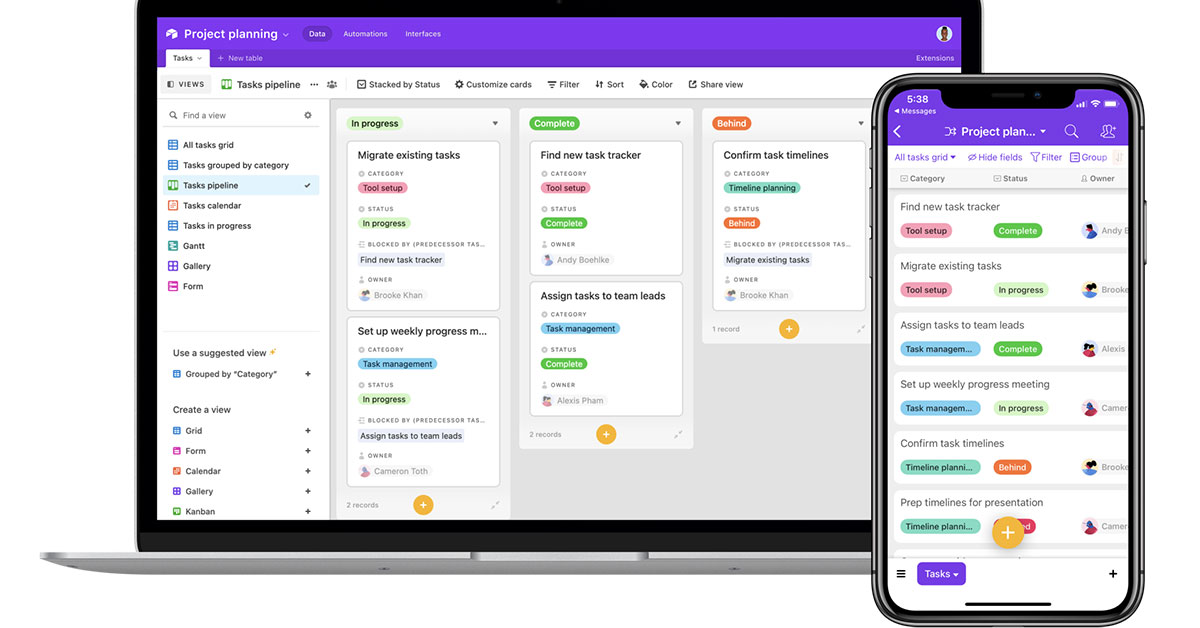
Airtable is not a traditional CRM, although it has some basic CRM features, including pipeline management, collaboration tools, and a customizable database. Be prepared to build a CRM from scratch unless you adopt their readily-made CRM templates.
Pros
- Multiple ways to view: Choose from a kanban board, gallery, calendar, form and list views.
- Multiple solutions: You can use Airtable for marketing, product operations and more.
Cons
- Limited CRM features: Airtable is not a traditional CRM. So access to CRM features are mostly dependent on the template you choose.
- Setup time and limitations: Expect to build a CRM from scratch unless you adopt a ready-made template.
- Price and plans: Access to the full library of integrations, extensions and customizations are only available at the premium price plan.
13. Monday.com
Overview
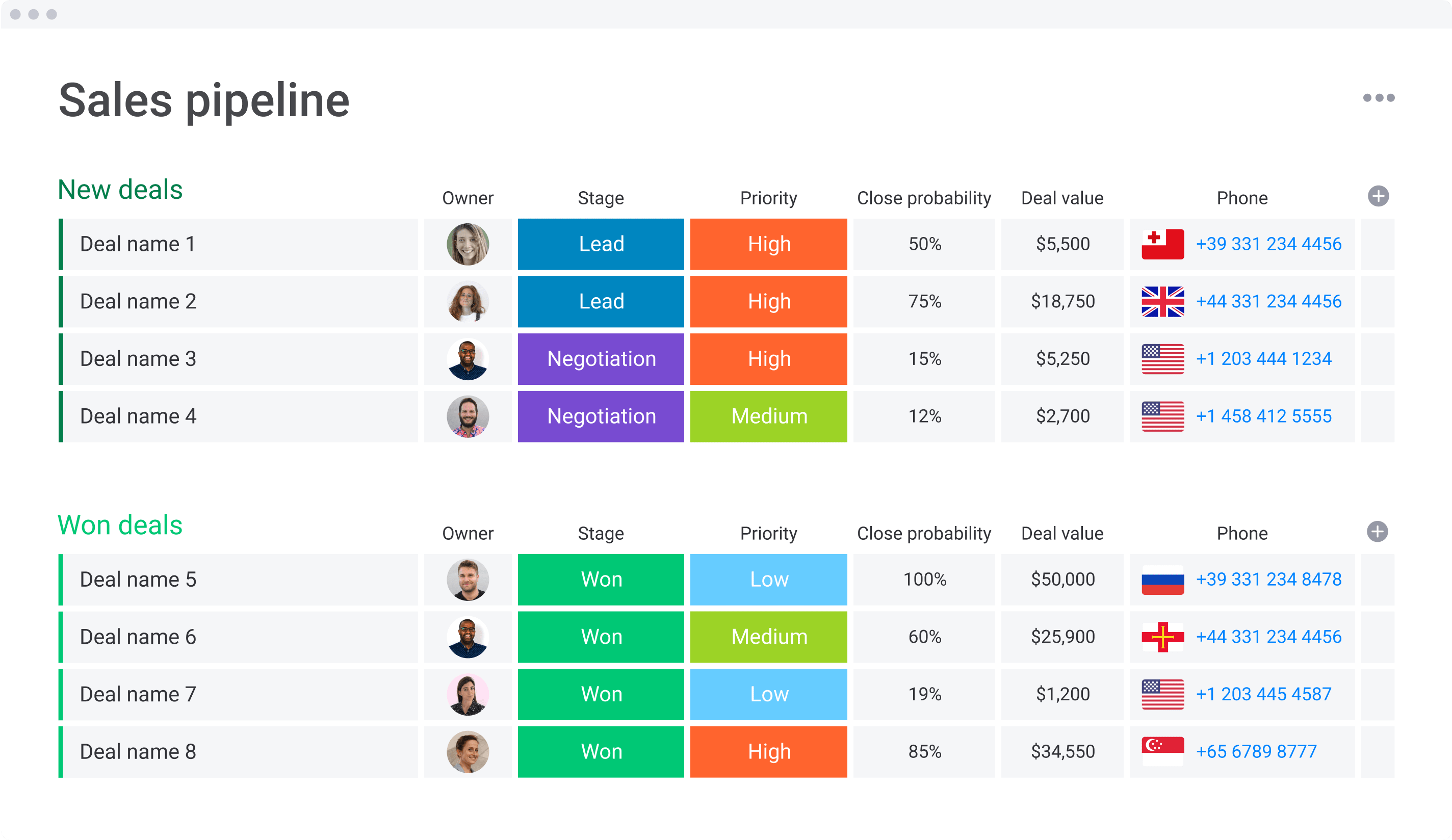
While Monday.com is officially a project management tool, some companies use it as a sales-focused CRM. In 2022, they officially launched monday sales CRM to cater for this. Expect to see contact management, lead capturing and other sales-focused benefits.
Pros
- Activity tracking: Stay informed on the progress of your deals from your phone.
- Call logging: Log your calls from an automatic summary screen that gives you prebuilt responses.
- Integrations: Expect access to a huge library of integrations from their marketplace to customize the platform to your needs.
Cons
- Sales-focus heavy: Monday sales CRM was built specifically for sales teams. This means you won't be able to share contact lists with teams outside of sales.
- Price and plans: Access to features that will help you manage pre- to post-sales, such as lead scoring and account management are only available from their Enterprise plan.
14. Copper
Overview
Copper is a CRM designed to help automate a lot of tasks and centralize communication. Expect a live activity feed of every interaction on your contacts' profiles. Its contact management features is rather limiting.

Pros
- Workflow automation: Create workflows to automate repetitive tasks and get notifications when something needs to be done.
- Lead management: Build a repeatable lead qualification process.
- Contact management: Categorize contacts by type.
- Google workspace CRM: Get access through a Google integration that suggests file attachments based on email activity.
Cons
- Price and plans: If you're after a CRM that grows with you, their business tier plan starts from $129 per user per month on an annual basis.
15. Streak
Overview
Streak is a CRM designed for Gmail account holders. The platform's Gmail-like user interface makes it easy for them to adjust to its system.

Pros
- Tracking: Get access to information on your pipelines, contacts and tasks sitting in your inbox in one place.
- Workflow customization: Expect complete personalization over your pipeline stages to fit your workflow.
- Easy to use: Since the platform operates within Gmail, the learning curve is easy to navigate with its clean and intuitive interface.
Cons
- Limited to Gmail account holders: Not great news for those on Outlook.
- Contact management limitations: Hard to sync all your contacts into one place unless you're already limited to Gmail.
- Price and plans: Access to a complete CRM solution is limited to their Pro+ plan which starts from $69 per user per month.
What is a CRM for Small Business?
A CRM for small business is a simple system that keeps all your customer and prospect information in one place instead of scattered across inboxes and spreadsheets. It helps you track who you talked to, what was said, and what needs to happen next, so follow-ups don’t get lost. Most small-business CRMs include contact management, a basic sales pipeline, email and calendar sync, reminders, and simple reports. The goal is to make everyday sales and customer work easier for a small team, without needing a full-time ops person to run the tool.
Benefits of a CRM for Small Business
✔️ Keeps all customer and prospect info in one place
✔️ Helps you remember follow-ups and next steps
✔️ Reduces time spent searching emails and spreadsheets
✔️ Makes it easier for your team to share context and avoid overlaps
✔️ Shows which deals and channels bring the most revenue
✔️ Supports growth by putting a bit of structure around your sales process
What’s the best free CRM for SMBs?
Strictly speaking, “free CRM” can mean two things: a forever-free plan, or a time-limited free trial on a paid product. For SMBs, the best choice depends on whether the goal is to test a modern CRM before paying, or to stay on a free tier as long as possible.
1. folk, Best for SMBs that want to test an AI CRM before paying: folk does not offer a free plan, but every new workspace gets a 2-week free trial of the Premium plan, with full access to features so teams can test real usage before committing. After the trial, you need to upgrade to keep using folk, which makes it a good option for SMBs that are ready to invest in a modern CRM but want a realistic try-before-you-buy period.
2. Freshsales (Freshworks), Best forever-free option with upgrade path: Freshsales (Freshworks CRM) offers a free plan for small teams, plus a 21-day free trial on its paid tiers. The free plan covers core CRM needs (contacts, accounts, basic pipeline), and SMBs can later move to the paid Growth plan if they need more automation and reporting.
3. Zoho CRM, Best free plan for very small teams (up to 3 users) : Zoho CRM provides a free edition for up to 3 users, positioned as “free forever,” with a 15-day free trial on paid plans if you need more features. This makes Zoho attractive for very small SMB teams that want to minimize costs while still having access to a broad, scalable CRM platform.
FAQ
What is the best CRM system for small businesses?
There is no single best CRM; selection depends on team size, budget, and workflows. For 20–50 person teams, folk combines ease of use with pipelines, email sequences, and AI enrichment. Other strong options include HubSpot, Freshsales, and Zoho.
How should a small team choose a CRM?
Entry plans range from free to about $15–$25 per user/month. Mid-tier with automation runs $30–$80. All-in-one suites can exceed $100/user/month. Costs vary by features, seats, billing term, and add-ons like email or support. If you want a lightweight CRM to test with your team, try folk CRM now.
How does an AI CRM help SMBs?
An AI CRM captures interactions, enriches contacts, scores leads, suggests next actions, automates follow-ups, and forecasts. Outcome: faster pipelines, fewer manual tasks, and more consistent outreach.
How much does CRM software cost for small businesses?
Entry plans range from free to about $15–$25 per user/month. Mid-tier with automation runs $30–$80. All-in-one suites can exceed $100/user/month. Costs vary by features, seats, billing term, and add-ons like email or support.
Discover folk CRM
Like the sales assistant your team never had