


Discover folk - the CRM for people-powered businesses
LinkedIn is full of opportunities. It is also full of noise!
A standard search for “Head of Sales” can return thousands of profiles. Some are inactive. Some are outside the ICP. Some changed jobs months ago. Meanwhile, real buying signals often pass unnoticed: promotions, company growth, hiring waves, content activity, funding announcements.
This is where LinkedIn Sales Navigator changes the game. Instead of scrolling endlessly through LinkedIn and manually tracking prospects, Sales Navigator adds structure to prospecting. Teams can segment accounts, monitor lead activity, identify warm paths through the network, and build lists that actually reflect their market.
For many B2B companies, it becomes less of a LinkedIn add-on and more of a prospecting workspace.
The value is not only access to more profiles. It is knowing which ones matter now.
What is LinkedIn Sales Navigator?
⭐⭐⭐⭐(G2)
💡 LinkedIn Sales Navigator is LinkedIn’s premium prospecting platform for B2B teams.
It was built for sales, business development, partnerships, account management, and outbound teams that need more than standard LinkedIn search. The platform adds advanced search filters, account monitoring, lead tracking, buyer signals, CRM connectivity, and prospect recommendations directly inside LinkedIn. In practice, Sales Navigator helps teams identify companies that fit their target market, find the right stakeholders, and follow opportunities over time.
The difference with standard LinkedIn is simple. LinkedIn helps build a network and Sales Navigator helps build pipeline.
Why You Should Use LinkedIn Sales Navigator?
Most prospecting issues do not come from a lack of leads. They come from timing!
A company that ignored outreach six months ago may suddenly become relevant after a funding round. A prospect who never replied may become active again after changing roles. Another account may start hiring aggressively and signal a new budget cycle.
Standard LinkedIn rarely helps connect those dots. Sales Navigator does.
Instead of treating prospecting as a sequence of searches, it turns it into ongoing account monitoring. Teams stop rebuilding lists every Monday and start following markets, companies, and stakeholders over time. This is why it is widely used in outbound, ABM, partnerships, recruitment, and founder-led sales motions.
Typical use cases include:
✔️ Building prospect lists around precise ICP criteria instead of broad searches
✔️ Tracking account activity and market movements over time
✔️ Expanding opportunities by identifying additional stakeholders
✔️ Supporting account-based strategies on strategic targets
✔️ Surfacing warm paths through shared connections and networks
✔️ Prioritizing outreach around active accounts and buying signals
✔️ Organizing long sales cycles with better account visibility
For teams selling into B2B markets with multiple decision-makers, this usually changes the prospecting motion from “find people” to “follow opportunities.”
Discover the Best CRMs for LinkedIn Sales Navigator in 2026
LinkedIn Sales Navigator: 7 Best Features Explained
1. Advanced Lead and Account Search
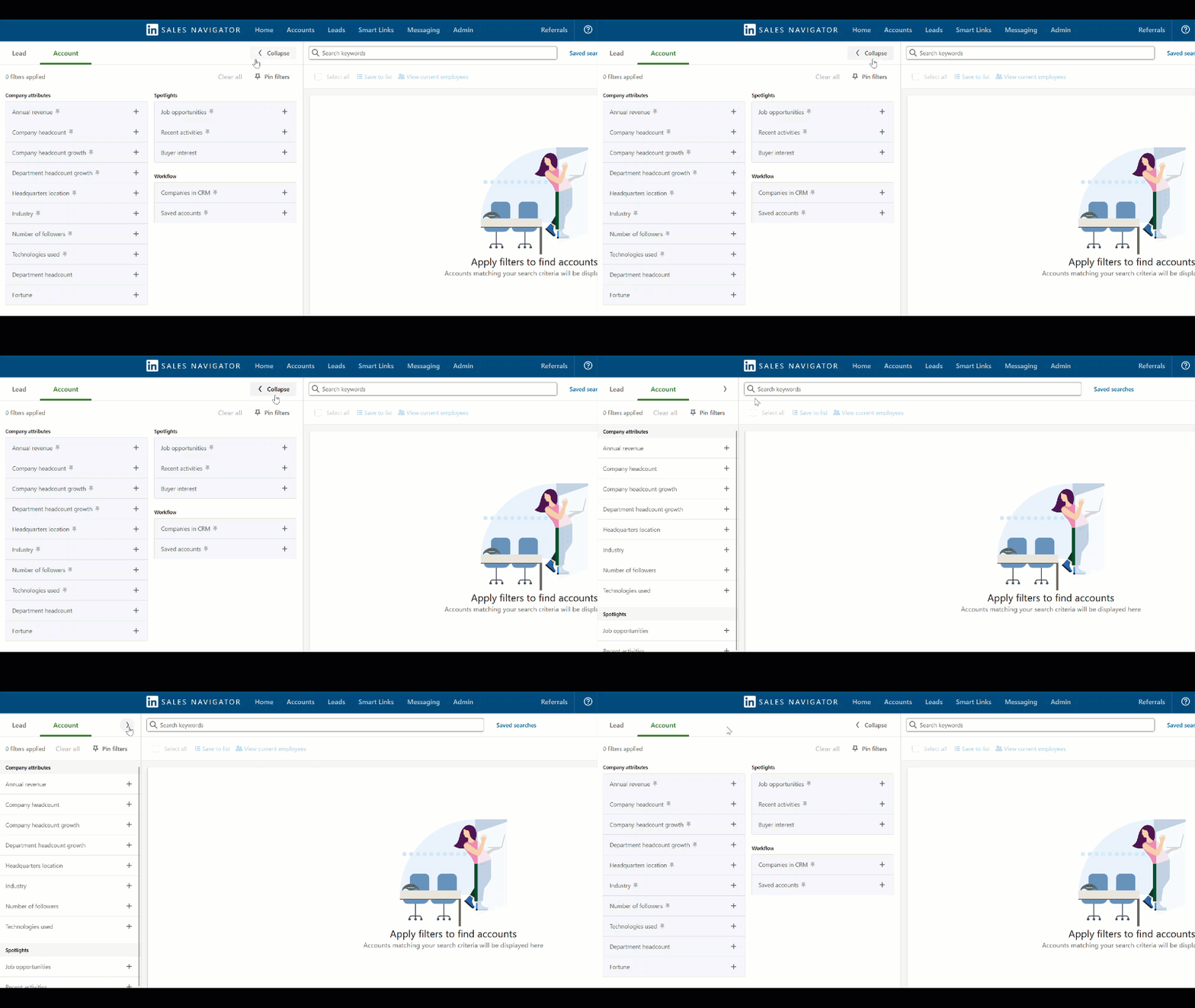
Most users start with Sales Navigator for one reason: search. The difference is that this is not a classic LinkedIn search bar with a few extra filters. It works more like a prospecting database where companies and people can be segmented very precisely.
Filters can include company size, industry, geography, seniority, department, years in role, headcount growth, technologies, job changes, buyer intent, recent activity, and many other signals.
A simple query such as “SaaS companies in the US” quickly becomes:
👉 "Series A SaaS companies, 20–100 employees, hiring SDRs, VP Sales located in New York, active on LinkedIn during the last 30 days."
This matters because prospect quality usually beats prospect volume. Many experienced SDR teams spend more time refining filters than writing messages. Better targeting often improves reply rates more than changing copy.
A practical habit used by many outbound teams is to save several search layers instead of one large ICP:
• Core ICP → ideal customers
• Expansion ICP → adjacent segments
• High-intent ICP → hiring, funding, growth signals
• Strategic accounts → named targets
This makes pipeline prioritization much easier later.
2. Lead and Contact Recommendations
Good prospecting rarely comes from a blank page. After leads and accounts are saved, Sales Navigator starts suggesting similar profiles automatically through its recommendation engine. The system looks at existing targets, account characteristics, network proximity, and prospect behavior to surface additional opportunities.
This feature is often underestimated. Many teams use Sales Navigator only as a search tool and miss one of its strongest advantages: expansion.
For example, a target account may initially contain one VP Sales. A few weeks later, recommendations can surface the Revenue Operations Manager, Head of Partnerships, regional leaders, or newly promoted stakeholders around the same opportunity.
This naturally supports multi-threading strategies. Instead of relying on a single contact, sales teams build visibility around the buying committee.
Typical situations where recommendations become useful:
• Expanding existing accounts
• Finding parallel stakeholders
• Growing ABM lists
• Supporting enterprise sales cycles
• Identifying adjacent opportunities
The quality of recommendations usually improves when lead lists are clean and tightly aligned with the ICP. Broad lists tend to create noise. Precise lists create better suggestions.
3. Buyer Signals and Account Alerts
Prospecting gets easier when timing works in your favor. Sales Navigator tracks account and lead activity and surfaces signals that may indicate change inside a company. This can include job changes, promotions, hiring activity, company growth, shared posts, mentions in the news, or engagement on LinkedIn.
These events matter because they often create conversations naturally. A new Head of Sales may review tools and processes. A company opening ten SDR positions may be scaling outbound. A funding event can indicate budget expansion. Instead of cold outreach with no context, teams gain a reason to reach out.
Many outbound teams keep dedicated lists only for “active accounts” and prioritize them before static databases.
Signals commonly monitored include:
• Job changes and promotions
• New hires and team growth
• Company news and funding activity
• LinkedIn posts and engagement
• Account updates and market movement
4. TeamLink
Large deals rarely happen through one person. TeamLink shows connections between target prospects and people already inside the organization’s network. This may include colleagues, founders, sales reps, executives, or shared relationships.
The objective is simple: reduce cold introductions.
Instead of approaching a prospect without context, teams can identify existing paths and create warmer entry points.
Typical examples:
• Founder knows the target company
• Sales rep shares a previous colleague with the prospect
• Investor already has access to the account
• Partnership team maintains an existing relationship
This becomes particularly useful in enterprise sales, partnerships, VC ecosystems, and founder-led GTM motions where relationships often move faster than outbound sequences.
5. CRM Integrations
Sales Navigator becomes much more valuable when it stops living only inside LinkedIn. Most teams eventually hit the same problem: prospecting happens on LinkedIn, notes sit somewhere else, outreach lives in email tools, and pipeline management happens inside the CRM. Information gets fragmented very quickly.
Sales Navigator integrations solve part of that problem by connecting LinkedIn activity with the rest of the GTM stack.
Contacts, companies, notes, account information, and prospecting actions can move into CRM environments where teams continue qualification, outreach, enrichment, and follow-up. This is particularly important for teams managing large volumes of prospects because LinkedIn alone was never designed to become a system of record.
A common setup looks like this:
LinkedIn Sales Navigator → CRM → enrichment → outreach → pipeline tracking
Platforms such as folk CRM fit well into this workflow because contacts captured from LinkedIn can move directly into lists, pipelines, shared workspaces, and relationship tracking environments without forcing teams into heavy CRM structures. folk also provides a mobile app (folk mobile app) for managing contacts on the go.
The practical benefit is simple: Prospecting stays inside LinkedIn. Execution moves into the CRM. 🔥
Try folk CRM for LinedIn Sales Navigator (free)
Typical use cases include:
✔️ Sending captured leads into pipeline stages
✔️ Centralizing account history and interactions
✔️ Enriching contacts automatically
✔️ Syncing prospecting with email workflows
✔️ Sharing visibility across sales teams
✔️ Avoiding spreadsheet-based lead management
Without a CRM layer, Sales Navigator often remains a research tool. Connected properly, it becomes part of a full prospecting workflow.
6. Saved Searches and Lead Lists
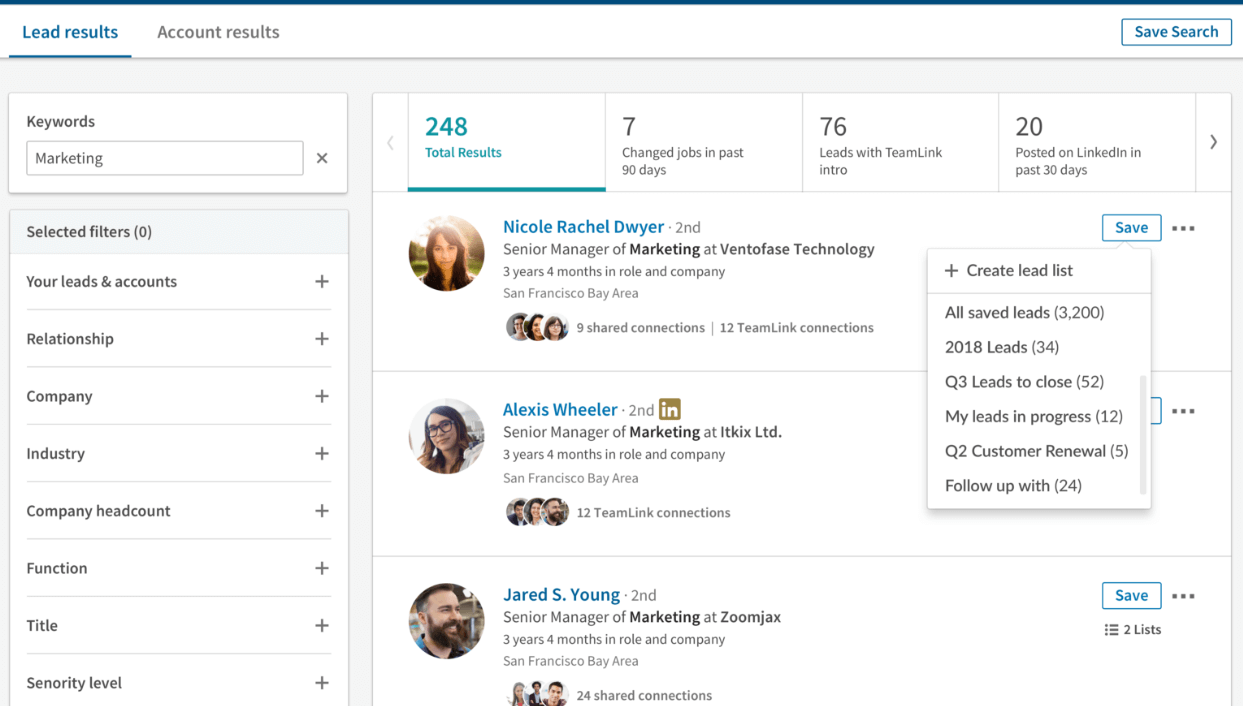
Most prospecting workflows break because they depend on manual work. Teams build a search, export results, work the list for a few weeks, then repeat everything again from scratch. The market changes, people move, companies grow, and the original list slowly becomes obsolete.
Saved searches remove that cycle. Sales Navigator allows teams to save prospecting criteria and keep them active over time. Instead of rebuilding the same search every week, the platform continuously updates results as profiles evolve.
For example, an SDR team targeting US SaaS companies could save:
• SaaS companies with 20–200 employees
• Founders and VP Sales personas
• Recent hiring activity
• Active LinkedIn presence
If a company later enters those conditions, it appears automatically. Lead lists work the same way.
Accounts and stakeholders can be grouped by territory, segment, campaign, industry, pipeline stage, event participation, ABM initiative, or strategic priority. Experienced teams rarely keep one giant prospect list.
They usually organize around intent:
• New targets
• Active opportunities
• High-growth accounts
• Expansion accounts
• Strategic enterprise targets
7. Relationship Explorer
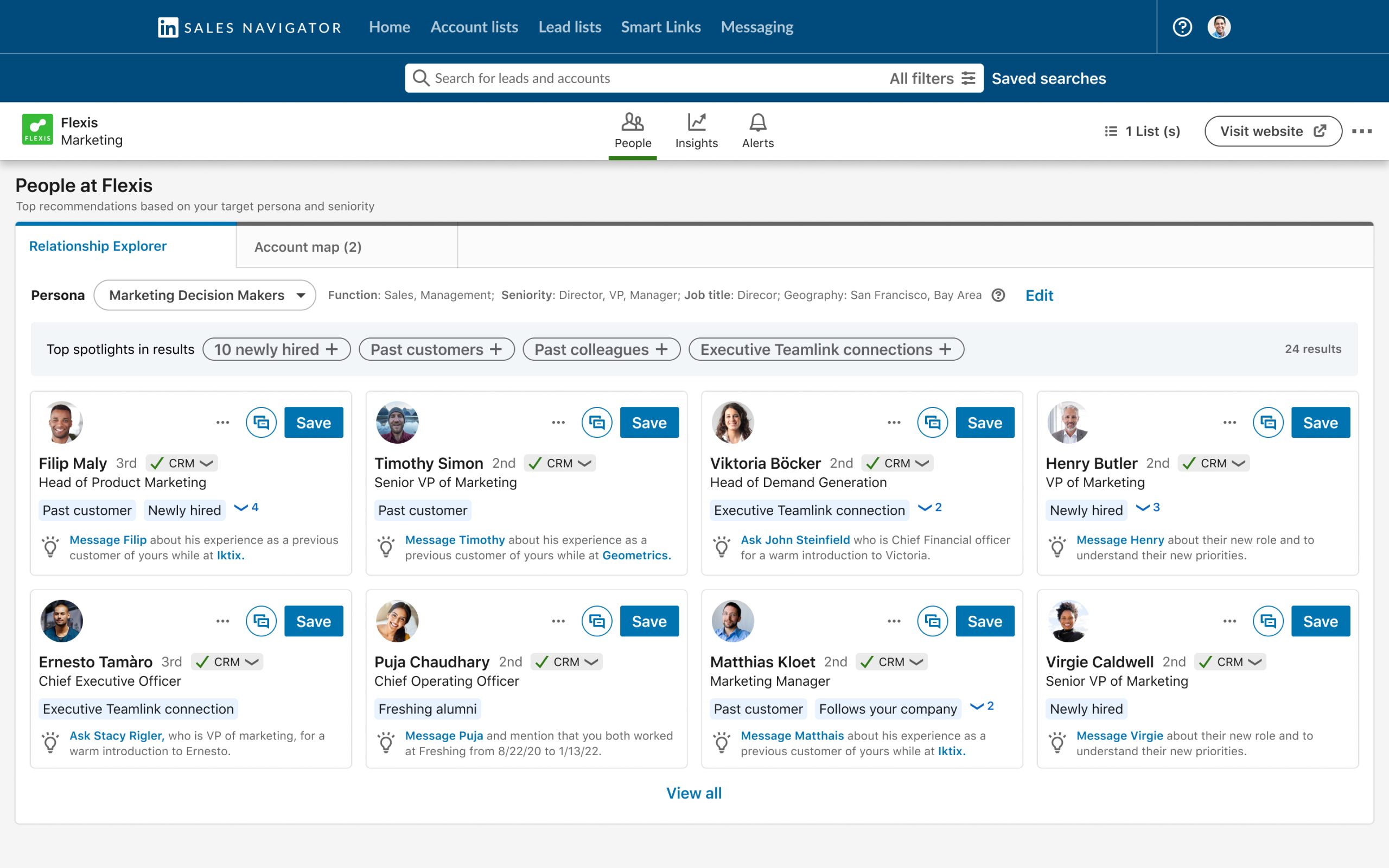
The biggest mistake in B2B prospecting is assuming the visible contact is the only person involved. In reality, deals often move through several stakeholders: decision-makers, users, influencers, finance, operations, founders, managers. Reaching one person rarely means reaching the account.
Relationship Explorer helps widen that view. Instead of stopping at the first profile found, Sales Navigator makes it easier to map the people around an opportunity and understand how an account is structured.
A company initially entered as “one VP Sales target” can quickly become:
• VP Sales → commercial owner
• Revenue Operations → process owner
• SDR Manager → operational user
• Founder → final decision-maker
• Partnerships lead → internal sponsor
This changes the prospecting motion. The objective becomes building account coverage rather than collecting contacts.
It is also useful for protecting pipeline. If one champion leaves, the entire opportunity does not disappear because relationships already exist elsewhere inside the organization. Many mature outbound teams apply simple rules around this:
• SMB → 1–2 contacts per account
• Mid-market → 3–5 stakeholders
• Enterprise → 5+ stakeholders across teams
This approach usually creates stronger reply rates, better deal visibility, and fewer single-thread opportunities. Sales rarely closes because one person said yes. It closes because enough people aligned!
How Much Does LinkedIn Sales Navigator Cost?
LinkedIn Sales Navigator offers three plans: Core, Advanced, and Advanced Plus. The right choice usually depends less on company size and more on prospecting maturity.
| Plan | Best For | Monthly Billing | Annual Billing | Main Features |
|---|---|---|---|---|
| Sales Navigator Core | Individual sellers, founders, and SDRs | $119.99/user/month | $1,079.88/year, or about $89.99/month | Advanced search filters, lead and account lists, recommendations, alerts, CRM sync, and 50 InMail credits/month. |
| Sales Navigator Advanced | Sales teams and GTM teams | $159.99/user/month | $1,799.88/year, or about $149.99/month | Everything in Core, plus TeamLink, Smart Links, Buyer Intent, account uploads, team collaboration, and reporting. |
| Sales Navigator Advanced Plus | Enterprise organizations and large sales teams | Custom pricing | Custom pricing | Everything in Advanced, plus advanced CRM writeback, enterprise controls, onboarding, governance, and support. |
👉 Sales Navigator Core is the entry point and already covers most prospecting workflows. It includes advanced lead search, saved searches, lead recommendations, alerts, account tracking, and CRM integrations. For many outbound teams, this plan is enough.
👉 Sales Navigator Advanced adds collaboration capabilities. TeamLink becomes available, buyer intent signals appear, and teams gain more visibility across shared accounts and prospecting efforts.
👉 Sales Navigator Advanced Plus targets larger organizations running Salesforce, HubSpot, or complex GTM environments. The main difference is deeper CRM synchronization, administration tools, and enterprise adoption support. LinkedIn does not publish public pricing for this tier.
Conclusion
LinkedIn Sales Navigator is not just a better LinkedIn search. It is a prospecting layer for teams that need cleaner targeting, better account visibility, and stronger timing. Its real value comes from the combination of filters, saved searches, buyer signals, alerts, TeamLink, lead recommendations, CRM integrations, and relationship mapping. Used properly, it helps sales teams stop chasing random contacts and start working accounts with more context.
Still, Sales Navigator is not a CRM. It helps identify and monitor prospects, but it does not replace pipeline management, relationship history, outreach tracking, or team collaboration after the lead is captured. That is where a CRM like folk becomes useful. Sales Navigator helps find the right people on LinkedIn. folk helps turn those people into organized contacts, follow-up lists, pipelines, and real sales opportunities.
FAQ
What is LinkedIn Sales Navigator?
LinkedIn Sales Navigator is LinkedIn’s premium prospecting platform for B2B teams that adds advanced search, account monitoring, lead tracking, buyer signals, CRM connectivity, and prospect recommendations.
How does Sales Navigator improve prospecting timing?
It surfaces buyer signals such as job changes, hiring, funding, and LinkedIn activity so teams can prioritize outreach when accounts show buying intent or organizational change.
Does Sales Navigator integrate with CRMs and workflows?
Yes; it syncs contacts, companies, notes, and activity into CRM systems to centralize pipeline management, enable enrichment and outreach, and share visibility across teams.
Discover folk CRM
Like the sales assistant your team never had