


Discover folk - the CRM for people-powered businesses
A demo request lands in a shared inbox. Two SDRs spot it, each assumes someone else takes ownership, and the prospect waits. Another lead enters the CRM with an assigned rep but no account history. The handoff happens; the context disappears.
Lead routing connects each incoming prospect with the right sales rep through a defined set of assignment rules. Account ownership, territory, company size, and availability determine where the lead goes. A complete workflow also delivers the context and sets a deadline for the next action.
For sales teams, that means fewer ownership disputes, clearer handoffs, and a reliable process for handling exceptions. This guide covers routing methods, practical assignment rules, and tools that connect lead capture with sales follow-up.
Lead Routing at a Glance
- What it means: Lead routing assigns prospects to sales reps or teams based on predefined rules.
- How it works: Capture the lead, validate the data, check existing account ownership, apply assignment rules, and notify the responsible rep.
- Common methods: Account-based, territory-based, segment-based, round-robin, and capacity-based routing.
- What automation needs: A capture source, a CRM, and assignment logic managed through native features, integrations, or dedicated routing software.
- What prevents missed handoffs: Every eligible lead has a clear owner, a response deadline, and a fallback path when the usual rules fail.
What Is Lead Routing?
💡 Lead routing is the process of assigning incoming prospects to the right sales rep or team based on predefined rules. Those rules typically consider account ownership, territory, company size, product interest, or rep availability. The assignment establishes responsibility for the next sales action.
A small SDR team might distribute new demo requests evenly among available reps. A larger sales organization might first check for an existing account owner, then apply segment and territory rules before assigning the lead.
The order matters. A contact at an existing customer account usually belongs with the rep managing that relationship. Sending the contact into a general rotation can create duplicate outreach or conversations that ignore the account’s history.
How Lead Routing Fits Into Lead Management
Lead capture, scoring, routing, and nurturing serve different purposes. Keeping those roles clear makes the workflow easier to build and troubleshoot.
Scoring can influence routing, but it does not establish ownership. A high-priority lead still needs a responsible rep. Likewise, a lead that falls below the sales qualification threshold needs a defined destination, such as a nurture workflow.
💡 Practical example: A US-based operations director requests a demo using an email address associated with an existing account. The routing workflow checks account ownership first and assigns the inquiry to that owner. If the owner is unavailable, a documented backup rule determines who handles the request.
Effective routing preserves both ownership and context. The assigned rep needs access to the prospect’s request, source, and previous interactions to take a relevant next step.
How Does Lead Routing Work? 6 Steps
Lead routing turns an incoming inquiry into an assigned sales action. The workflow captures the prospect’s information, checks existing records, applies assignment rules, and alerts the responsible rep. It also handles leads that lack enough information or remain untouched after assignment.
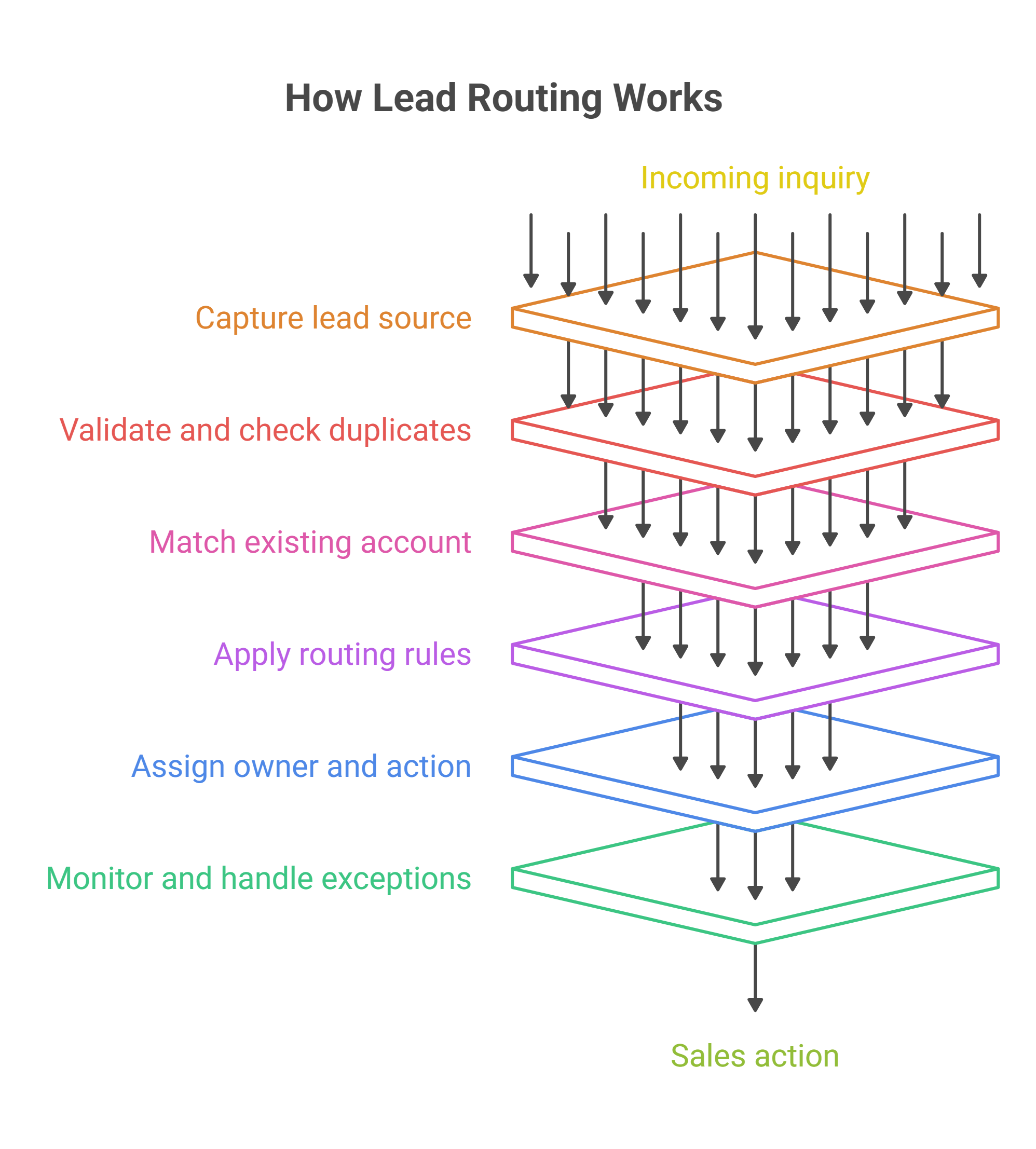
1. Capture the Lead and Its Source
The process starts when a prospect submits a form, books a meeting, or enters the CRM through another channel.
Alongside contact details, the record needs enough context to explain the inquiry: its source, submission time, product interest, and any message the prospect provides. A pricing question and a webinar registration signal different needs, even when both come from the same company.
✅ Keep the original request attached to the record. A rep should have access to the prospect’s actual question before starting a conversation.
2. Validate the Data and Check for Duplicates
Before assigning ownership, the workflow checks whether the required information exists and whether the prospect already has a record.
Matching an existing contact prevents a second form submission from creating another assignment or triggering duplicate outreach. Validation also identifies missing fields, such as a country or company size, that affect routing.
Missing information needs a defined response. Depending on the field, the workflow can apply a fallback rule or send the lead to a monitored review queue.
3. Match the Lead to an Existing Account
A new contact may belong to a company that already has an active opportunity or an established relationship with the sales team.
Account matching checks that relationship before general distribution rules run. An existing account owner can then receive the inquiry with its history intact.
A company email domain offers a useful matching signal, but subsidiaries, shared domains, and personal email addresses complicate the process. Ambiguous matches need review before the system changes ownership.
Routing safeguard: A new form submission should not automatically overwrite an existing account owner. Ownership changes need an explicit rule!
4. Apply Routing Rules in a Defined Order
Routing rules work best as an ordered decision process. Each step narrows the eligible destination.
For example, a workflow first checks account ownership, then identifies the appropriate segment and territory. It finally distributes the lead among eligible reps through rotation or capacity rules.
Eligibility comes before distribution. Round-robin assignment only makes sense once the workflow identifies which reps can handle the inquiry.
A documented priority order also resolves conflicts. Without it, a lead that matches both a product specialty and a territory rule can receive inconsistent assignments.
5. Assign an Owner and Trigger the Next Action
The workflow records the owner in the CRM and sends a notification that includes the information needed to act:
- The prospect’s request and source.
- Relevant account history.
- The reason for the assignment.
- The next action and its deadline.
A notification alone does not establish follow-through. The process also needs a trackable task or status that shows whether the rep takes action.
Shared pipeline views give the team a place to review ownership and progress as leads move through the sales process.
6. Monitor Acceptance and Handle Exceptions
Assignment marks the start of the handoff. Monitoring confirms that the lead reaches an available rep and receives attention.
The workflow needs an exception path for absent owners, failed integrations, unmatched records, and overdue actions. A named backup or monitored queue keeps those cases visible.
Reassignment also needs a check for recent activity. A rep may already have contacted the prospect before an overdue task triggers an escalation.
💡 Operational tip: Track assignment time and first human action separately. Fast assignment can hide a slow response when leads sit untouched in a rep’s queue.
Lead Routing Methods: Which Rules Fit Each Sales Team?
The right lead routing method depends on how the sales team divides responsibility. Some teams organize around territories. Others separate enterprise accounts from smaller businesses or assign reps by product expertise.
👉 Most workflows combine two decisions: which reps qualify to handle the lead, and how the team distributes leads among those reps.
1. Account-Based Routing Preserves Existing Relationships
Account-based routing directs a lead to the rep responsible for the associated company. It suits existing customers, active opportunities, and named prospect accounts.
For example, a finance director requests a demo while a colleague already discusses the product with an account executive. Routing both contacts to the same owner keeps the conversation coordinated.
The process needs a fallback when the account has no active owner. It also needs clear rules for subsidiaries and parent companies that belong to different sales portfolios.
2. Territory, Segment, and Product Rules Establish Eligibility
These methods identify the team or reps qualified to handle an inquiry.
- Territory rules use geography or regional coverage.
- Segment rules use criteria such as company size or account tier.
- Product rules match the inquiry with relevant expertise.
A US enterprise inquiry about a specialized product may match all three. The workflow needs a documented hierarchy to resolve overlaps and a review path when no rep meets every requirement.
Use fields that the team can maintain reliably. A detailed segmentation model adds little value when most incoming records lack the information it requires.
3. Round-Robin Routing Distributes Comparable Leads
Round-robin routing assigns successive leads to eligible reps in rotation. It provides a straightforward distribution method when reps handle similar prospects and maintain comparable schedules.
A four-person SDR team, for example, can rotate new inbound inquiries among the reps covering that shift.
Equal distribution still needs boundaries. Absent reps should leave the rotation, and existing account relationships should take precedence. Teams should also review lead quality: identical assignment counts can conceal very different sales opportunities.
4. Capacity-Based Routing Accounts for Workload
Capacity-based routing assigns leads according to each eligible rep’s available bandwidth. The team defines capacity through measurable criteria, such as active lead count, scheduled coverage, or a weighted workload limit.
This method suits teams where responsibilities vary substantially. A rep managing several complex opportunities may have less room for new inquiries than a colleague with the same number of early-stage leads.
The rules need consistent inputs. Capacity-based routing becomes unreliable when workload records lag behind actual activity!
💡 folk CRM recommendation: Start with account ownership, apply the necessary eligibility rules, then distribute leads among available reps. A simple rotation often provides a workable starting point. Capacity rules become useful when workload differences consistently affect follow-up.
How to Route Leads? A Practical Setup for Sales Teams
A workable lead routing setup starts with a short rule set, reliable CRM fields, and a clear exception path. Sales operations defines the logic, while sales managers confirm that assignments reflect actual responsibilities and coverage.
Step 1: Define the Minimum Routing Fields
Every required field creates a dependency. If a rule relies on company size, the workflow needs a way to handle leads that arrive without it.
Start with the information necessary to make an assignment:
✅ Contact identifier: An email address or another reliable identifier for duplicate checks.
✅ Company or account: The information needed to check existing ownership.
✅ Lead source and request: Where the inquiry originates and what the prospect needs.
✅ Routing criteria: Region, segment, language, or product interest, where relevant.
✅ Received timestamp: The starting point for measuring assignment and response delays.
The workflow then records the assigned owner, assignment time, and routing status.
Separate missing information from disqualification. An inquiry with an unknown company size may need review rather than exclusion from sales follow-up.
Step 2: Build a Routing Hierarchy
Write the rules in priority order before configuring the automation. Each rule needs a condition, a destination, and an explanation of what happens when the destination is unavailable.
The following example illustrates a possible hierarchy; the criteria depend on the team’s sales model.
In this model, the workflow stops after a valid account-owner assignment. Otherwise, it continues through team selection and rep eligibility before distributing the lead.
Practical safeguard: Record the rule that determines each assignment. A short reason such as “Existing account owner” or “US SMB rotation” makes disputed assignments easier to investigate.
Step 3: Set Response Deadlines and Fallback Ownership
The routing policy needs separate expectations for assignment and human action. A lead can receive an owner immediately and still sit untouched for hours.
Define when each clock starts, which business hours apply, and what counts as a meaningful first action. An automated acknowledgment can confirm receipt, while a rep’s response addresses the inquiry.
For example, a team might set a 15-minute first-action target for demo requests during staffed hours. This represents an illustrative operating target, not a universal benchmark. Staffing, lead volume, and inquiry type determine a realistic commitment.
Every exception queue also needs a named owner. “Send to sales” leaves responsibility unclear unless someone monitors that destination.
Step 4: Test the Edge Cases Before Launch
Test the complete handoff, including the assigned owner, notification, task, and exception behavior.
Make repeated processing safe. A workflow should recognize an event it already handles, so an integration retry does not assign the lead again or send another acknowledgment.
Step 5: Assign Responsibility for Rule Maintenance
Territories change, reps leave, and new products introduce exceptions. Assign a process owner who maintains the rules and reviews assignment problems with sales managers.
Review unmatched leads and reassignments for recurring patterns. If the same exception appears repeatedly, the rule set or capture fields likely need an adjustment.
A small set of maintained rules gives sales teams a more dependable handoff than an elaborate workflow built around outdated assumptions.
What Tools Automate Lead Capture and Routing?
Lead capture and routing tools cover four main functions: collecting prospect information, storing relationship context, applying assignment rules, and managing complex handoffs. Some platforms combine several functions; others connect through integrations.
The right setup depends on the sales process. A small SDR team with straightforward assignment rules needs a different configuration from an organization managing multiple territories and named accounts.
1. Capture Tools Collect the Initial Information
Capture tools gather the details that routing rules use. Structured fields help the workflow distinguish a demo request from a content download and identify the appropriate sales team.
Three relevant examples include:
- Typeform: Collects contact details and qualifying answers through forms, then passes submissions to connected applications.
- Tally: Captures form responses and sends submission data to other tools through integrations or webhooks.
- Webflow Forms: Collects inquiries directly on a Webflow website, including contact information and qualification fields.
The form needs enough information to support assignment without becoming a lengthy questionnaire. Dropdown fields for region or product interest reduce inconsistent answers and simplify routing conditions.
Preserve the prospect’s original message. Structured fields determine the destination, while the written request gives the assigned rep context for the conversation.
2. CRM Platforms Store Ownership and Relationship Context
The CRM holds the information that sales teams use after assignment: contact details, company relationships, ownership, and interaction history.
Three relevant examples include:
- folk: Centralizes contacts and sales context. Its Zapier integration supports finding, creating, and updating contacts, including member-type custom fields that can represent the responsible rep. Connected automation can apply the assignment logic.
- HubSpot: Supports owner assignment and rotation through workflows, subject to subscription and user eligibility requirements.
- Salesforce: Provides lead assignment rules that evaluate defined criteria and assign matching leads to users or queues.
The CRM should make ownership visible and keep previous interactions accessible. Otherwise, a technically correct assignment can still produce a poor handoff.
Selection checkpoint: An owner field stores responsibility. Rotation, capacity management, and escalation require additional functionality or configured automation.
3. Automation Platforms Connect Capture, Rules, and Assignment
Automation platforms move information between applications and execute the conditions that determine where a lead goes.
Three relevant examples include:
- Zapier: Connects lead sources with CRM actions. A workflow can search for an existing contact, evaluate conditions, and create or update the appropriate record.
- Make: Provides visual workflows with routers and filters that direct records through different branches according to defined conditions.
- n8n: Supports configurable workflows that combine data checks, assignment logic, notifications, and escalation steps.
For example, a form submission triggers a contact lookup. The workflow preserves an existing owner when one exists. Otherwise, it checks the relevant routing fields, assigns a rep, and sends a notification.
Error handling belongs in the initial setup. A failed lookup should trigger a retry or review step before the workflow creates a potentially conflicting record.
4. Dedicated Routing Software Handles More Complex Handoffs
Dedicated routing platforms become relevant when account matching, distribution, scheduling, and exception handling grow difficult to maintain through general automation.
Three relevant examples include:
- LeanData: Supports routing and matching workflows that evaluate relationships with accounts, opportunities, and related leads.
- Chili Piper: Combines inbound qualification, routing, and meeting booking, with assignment criteria such as account ownership and territory.
- Default: Provides lead routing and lead-to-account matching within its inbound workflow capabilities.
Selection criteria include CRM compatibility, assignment logs, fallback behavior, and the ability to preserve existing ownership. Scheduling requirements also matter when qualified prospects need to book directly with an eligible rep.
Practical evaluation test: An existing account contact submits an incomplete inquiry while the account owner is absent. Testing this scenario reveals how the setup handles relationship context, missing information, and backup coverage.
Lead Routing: Metrics and Mistakes That Matter
Lead routing performance depends on what happens between arrival, assignment, and the first meaningful sales action. Tracking those steps separately helps sales managers identify whether a problem comes from the rules, the automation, or the handoff.
Build a Clear Lead Handoff With folk CRM!
Effective lead routing gives every eligible prospect a responsible owner, preserves the conversation history, and establishes the next action. Clear rules keep that process consistent as lead volume grows.
folk gives sales teams a shared place to manage contacts, account context, and pipeline progress. Connected workflows through Zapier or Make can bring incoming leads into folk and apply assignment logic, while reps keep the information needed for relevant follow-up together.
Start with reliable account ownership, a small set of routing criteria, and a monitored fallback queue. Then use assignment delays and missed handoffs to identify what needs improving.
Frequently Asked Questions
What Is Lead Routing?
Lead routing is the process of assigning prospects to sales reps or teams using predefined rules. Common criteria include existing account ownership, territory, company size, product interest, and rep availability. A complete routing workflow also passes along relevant context and establishes responsibility for the next sales action.
How Does Lead Routing Work?
Lead routing starts when a prospect enters the sales workflow through a form, meeting booking, or another source. The system validates the record, checks for duplicates and existing account ownership, then applies assignment rules. It records the owner, triggers a notification, and sends unmatched or overdue leads through a defined exception path.
How Should Sales Teams Route Leads?
Sales teams should check existing account ownership first, then apply the criteria that determine rep eligibility, such as segment, territory, or product expertise. Rotation or capacity rules can distribute leads among eligible reps. Every workflow also needs backup coverage, a response deadline, and a monitored destination for leads that match no rule.
What Tools Automate Lead Capture and Routing?
Typeform, Tally, and Webflow Forms collect lead information. CRM platforms such as folk, HubSpot, and Salesforce store records and ownership. Zapier, Make, and n8n connect applications and execute configured workflows. Dedicated platforms such as LeanData, Chili Piper, and Default support more specialized routing requirements. Capabilities depend on the product, subscription, and configuration.
What Is the Difference Between Lead Routing and Lead Scoring?
Lead scoring evaluates a prospect’s fit or engagement to help prioritize sales activity. Lead routing determines which rep or team owns the prospect. A score can influence the routing decision, but it does not establish responsibility by itself. Both processes need explicit rules for prospects with missing information.
What Happens When a Lead Matches Multiple Routing Rules?
A documented priority order determines which rule takes precedence. Existing account ownership may override general territory or rotation rules, for example. When the workflow cannot resolve a conflict, it should send the lead to a monitored review queue. Recording the assignment reason helps sales operations investigate recurring conflicts.
Can Small Sales Teams Automate Lead Routing?
Small sales teams can automate routing with a capture tool, a CRM, and a simple assignment workflow. A practical setup checks existing ownership, distributes new inquiries among eligible reps, and alerts a backup when an assignment fails. More complex rules become useful when workload differences or repeated exceptions justify them.
Meet folk, the AI CRM for your entire Sales motion.