


Discover folk - the CRM for people-powered businesses
Why CRM + automation matters for 20–50 person teams
Growing teams of 20-50 people face unique challenges when managing customer relationships and marketing efforts. Unlike smaller startups that can rely on spreadsheets or enterprise organizations with dedicated IT resources, medium-sized teams need CRM solutions that scale efficiently without overwhelming complexity.
Customer Relationship Management (CRM) systems with integrated marketing automation are essential for teams of this size to coordinate efforts, maintain consistent outreach, and drive sustainable growth.
In this comprehensive guide, we'll explore the best CRM and marketing automation solutions specifically designed for teams of 20-50 people.
| Main points |
|---|
|
What is marketing automation?
Marketing automation refers to software platforms that streamline and coordinate marketing activities across multiple channels and team members. For teams of 20-50 people, this includes coordinating email campaigns, social media engagement, lead nurturing sequences, and cross-team notifications. By automating these collaborative processes, growing teams can maintain consistency, reduce coordination overhead, and ensure no opportunities slip through the cracks as responsibilities are distributed across multiple team members.
What marketing automation features should be available in a CRM?
When selecting a CRM for a team of 20-50 people, prioritize features that enhance team collaboration and scalability.
- Team-based email automation: Coordinated campaigns with role-based permissions and shared templates for consistent messaging across team members.
- Advanced lead management: Intelligent lead routing, territory management, and collaborative pipeline tracking for multiple team members.
- Social media team coordination: Shared social listening, collaborative content planning, and team-wide engagement tracking.
- Comprehensive analytics and reporting: Team performance dashboards, campaign attribution, and collaborative reporting for management visibility.
- Advanced segmentation: Sophisticated audience targeting that supports multiple campaigns and team-based customer ownership.
- Scalable workflow automation: Complex multi-step processes that coordinate activities across sales, marketing, and customer success teams
With these collaborative features in mind, let's examine the CRM solutions that best serve teams of 20-50 people and their coordination needs.
4 Best CRM and marketing automation for teams of 20-50 people
Growing teams face the challenge of maintaining startup agility while building enterprise-grade processes. The following CRM solutions excel at supporting teams in this critical growth phase, offering the right balance of functionality, collaboration features, and scalability. Our selection focuses on platforms that facilitate team coordination, support multiple user workflows, and provide the automation capabilities that medium-sized teams need to compete effectively.

1. folk
Best for: Growing teams that need customization with collaborative simplicity
folk CRM is specifically designed for teams of 20-50 people who need sophisticated customization without enterprise complexity. It excels at facilitating team collaboration while maintaining the flexibility that growing organizations require as they scale their operations.
Key features
- Team-based social media lead capture across LinkedIn, Facebook, Instagram and X with shared access and collaborative workflows
- Bulk LinkedIn import functionality that enables team members to coordinate prospecting efforts without duplicating work
- Collaborative lead warming through engagement tracking that keeps all team members informed about prospect interactions
- Advanced mail merge and sequence automation with team templates and shared messaging strategies
- Multi-user pipeline management with customizable stages that reflect your team's unique sales process
- Real-time contact sync across all team members with conflict resolution and duplicate prevention
- AI assistance that learns from team patterns and suggests optimizations
- Integrated social media automation with team coordination features
- Campaign management system designed for multiple concurrent campaigns and team collaboration
- Extensive template library with team sharing and version control
- folk mobile app — manage contacts, reminders, and tasks on the go

Pros
- Team-optimized automation: Social media workflows and lead capture designed specifically for collaborative teams of 20-50 people.
- Cross-functional collaboration: Seamlessly connects marketing, sales, and customer success teams with shared visibility and coordinated workflows.
- Scalable customization: Highly adaptable to evolving team needs without requiring extensive technical knowledge or dedicated IT support.
- Intuitive team adoption: Clean interface and logical workflows make it easy for entire teams to adopt quickly and maintain consistent usage.
- Cost-effective scaling: Transparent pricing that remains affordable as teams grow from 20 to 50+ users without hidden enterprise fees.
- Intelligent automation: Advanced features like automated deduplication and smart contact merging that become essential as team data complexity increases.
Cons
- Advanced reporting and analytics are available, including pipeline and deal stage analytics, forecasting with weighted probabilities, performance breakdowns by owner, channel, industry, region, and any custom field, plus revenue insights.
Price and plans
Folk offers excellent value for growing teams with a 14-day free trial that allows your entire team to test the platform. The transparent pricing structure makes budget planning straightforward as you scale.
👉🏼 Try folk now to manage contact-based reminders with your team
- Standard: $20 per user, per month - Perfect for teams establishing collaborative workflows
- Premium: $40 per user, per month - Ideal for teams needing advanced automation and integrations
- Custom: Starts from $80 per user, per month - Designed for teams with specialized requirements and dedicated support

2. HubSpot CRM
Best for: Teams willing to invest in comprehensive marketing hubs
HubSpot CRM offers robust functionality for medium-sized teams, though its advanced marketing automation features require significant investment. While the free plan provides basic CRM functionality, teams of 20-50 people typically need paid tiers to access collaborative features and advanced automation capabilities.
Key features
- Comprehensive email marketing with team collaboration tools
- Social media management dashboard for team coordination
- Advanced sales pipeline management with team visibility
- Detailed analytics and reporting across all team activities

Pros
- Established platform: Mature ecosystem with extensive third-party integrations for complex team workflows.
- Comprehensive feature set: Advanced marketing automation tools suitable for sophisticated team campaigns.
Cons
- Expensive for growing teams: Professional and Enterprise tiers can quickly become cost-prohibitive for teams of 20-50 people.
- Complexity overhead: Can be overwhelming for teams without dedicated marketing operations specialists.
- Limited customization: Less flexible than purpose-built solutions for teams with unique workflow requirements.
- Steep learning curve: Requires significant training investment to get entire teams productive.
Price and plans
HubSpot's marketing hub pricing can escalate quickly for medium-sized teams. Annual pricing structure:
Marketing Hub
- Starter plan: Starts from $15 per user, per month - Limited functionality for team coordination.
- Professional: Starts from $800 per user, per month - Often necessary for teams of 20-50 people
- Enterprise: Starts from $3,600 per user, per month - Premium features for large-scale operations.

3. Keap
Best for: Teams with substantial automation budgets and complex requirements
Keap provides comprehensive automation capabilities but requires significant investment and setup time that may not be justified for most teams of 20-50 people, especially those prioritizing cost-effectiveness and quick deployment.
Key features
- Advanced email marketing automation with complex workflow capabilities
- Comprehensive sales pipeline management for team collaboration
- Integrated appointment scheduling across team members
- Built-in payment processing for sales teams

Pros
- Powerful automation: Comprehensive workflow builder suitable for complex team processes.
- Strong support: Extensive onboarding and training resources for team implementation.
Cons
- High cost barrier: Pricing structure can be prohibitive for growing teams managing budgets carefully.
- Implementation complexity: Requires significant setup time and technical expertise that many medium-sized teams lack.
- Overkill for most use cases: Feature complexity often exceeds what teams of 20-50 people actually need.
Price and plans
Keap's pricing model is structured for higher volume usage, making it expensive for medium-sized teams:
- Ignite: Starts from $249 per 2 users, per month. For up to 1,500 contacts - Insufficient user limits for most growing teams.
- Grow: Starts from $329 per 3 users, per month. For up to 2,500 contacts - Still limited for team expansion.
- Scale: Starts from $499 per 5 users, per month. For up to 5,000 contacts - Requires custom pricing for teams of 20-50.

4. Nutshell
Best for: Teams seeking straightforward CRM functionality
Nutshell provides solid basic CRM functionality for medium-sized teams but lacks the advanced customization and social media automation capabilities that growing teams typically need to stay competitive.
Key features
- Standard contact and lead management for team collaboration
- Basic sales automation with team visibility
- Essential email marketing tools for coordinated campaigns
- Simple lead capture through forms and landing pages

Pros
- User-friendly: Straightforward interface that teams can adopt without extensive training.
- Reasonable pricing: More affordable than enterprise solutions while providing core functionality.
- Reliable automation: Basic workflow tools that handle standard team processes effectively.
Cons
- Limited social media capabilities: Lacks the advanced social automation that modern teams require for competitive lead generation.
- Basic customization: Less flexible than specialized solutions for teams with unique processes.
- Fewer integrations: Limited third-party connectivity compared to more comprehensive platforms.
Price and plans
Nutshell offers transparent annual pricing suitable for medium-sized teams:
- Foundation: $16 per user, per month - Basic functionality for straightforward team needs.
- Pro: $42 per user, per month - Enhanced features for growing team requirements.
- Power AI: $52 per user, per month - AI-enhanced capabilities for advanced team workflows.
- Enterprise: $67 per user, per month - Comprehensive features for complex team operations.

3 best marketing automation software for teams of 20-50 people
Beyond core CRM functionality, growing teams need specialized automation tools that integrate seamlessly with their primary platform. folk's comprehensive automation suite is specifically designed for collaborative teams, eliminating the need for multiple disparate tools and reducing the complexity that can overwhelm medium-sized organizations.
The integrated suite includes:
1. folk X
Best for: Team-coordinated lead generation and collaborative workflow automation
folk X transforms how medium-sized teams approach lead generation by enabling coordinated prospecting efforts across multiple team members while preventing duplicate work and ensuring consistent data quality across all social media platforms.
Key features
- Shared template library: Team-wide access to proven conversation templates with version control and performance tracking.
- Coordinated lead capture: Multi-platform lead generation across LinkedIn, Facebook, X and Instagram with automatic team synchronization.
- Bulk team import: Collaborative LinkedIn search importing that prevents duplicate efforts across team members.
- Integrated task management: Set next steps and assign follow-ups while prospecting, ensuring seamless team coordination without context switching

2. LinkedIn listening tool
Best for: Team-wide prospect intelligence and coordinated outreach timing
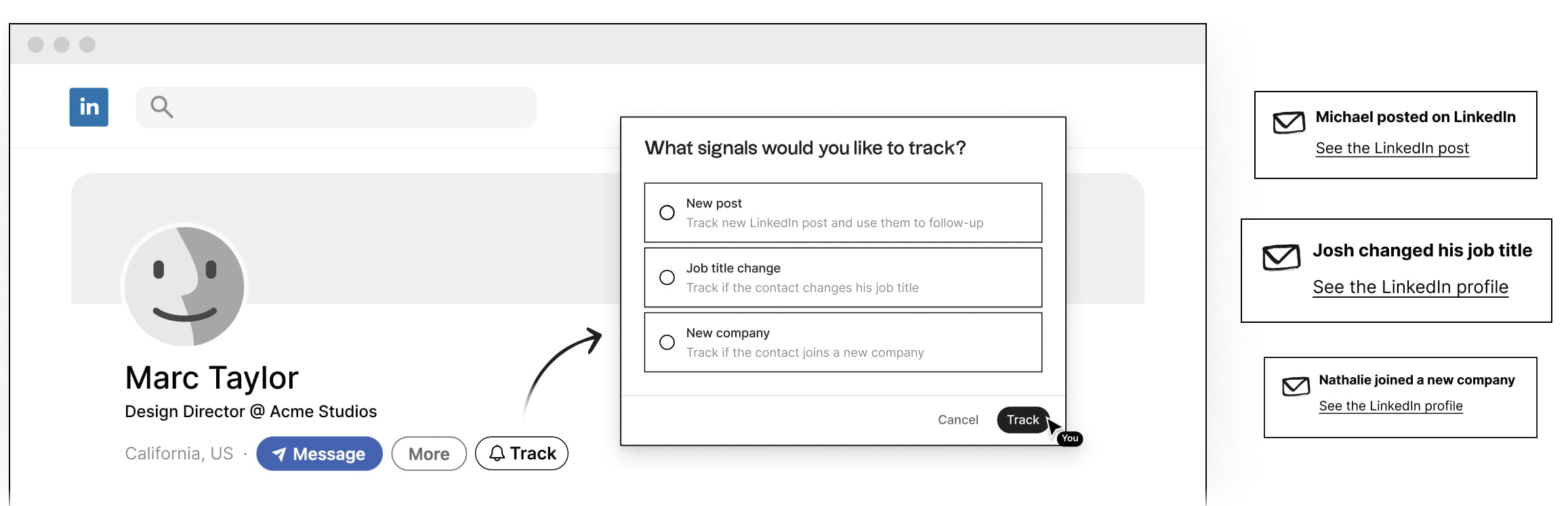
This tool enables teams of 20-50 people to collectively monitor high-value prospects and coordinate outreach efforts based on real-time social signals, ensuring no team member misses critical engagement opportunities while preventing duplicate outreach efforts.
Key features
- Team notification system: Automated alerts distributed to relevant team members based on account ownership and territory management
- Collaborative engagement tracking: Monitor prospect activity across all team members to identify the best engagement opportunities
- Coordinated outreach timing: Job change and promotion alerts enable teams to execute perfectly timed, coordinated campaigns
- Shared prospect intelligence: Team-wide visibility into prospect behavior patterns and engagement history
3. LinkedIn comment exporter
Best for: Converting team engagement into coordinated lead nurturing campaigns
Perfect for teams running coordinated social media campaigns, this tool transforms collective team engagement into structured lead nurturing opportunities, enabling systematic follow-up on warm prospects generated through team social media activities.


Key features
- Team engagement consolidation: Aggregate engagement data from multiple team members' social media activities into unified lead lists.
- Coordinated social listening: Monitor competitor and industry leader engagement to identify prospects showing interest in your team's market.
- Seamless team activation: Direct integration with folk CRM enables immediate team-based lead nurturing with assigned ownership and collaborative follow-up.
Conclusion
For teams of 20-50 people, selecting the right CRM with integrated marketing automation is crucial for maintaining competitive advantage while managing growth effectively. folk CRM emerges as the clear leader for medium-sized teams because it specifically addresses the unique challenges of this growth phase: the need for sophisticated customization without enterprise complexity, collaborative workflows that scale efficiently, and cost-effective pricing that remains sustainable as teams expand. The integrated automation suite eliminates the need for multiple tools while providing the advanced social media capabilities that modern teams require for competitive lead generation.
👉🏼 Try folk now to never miss a follow-up across social channels
Try folk today, free.Need a helping hand? Use our free tool to find your perfect CRM match.
More resources
- 5 examples of social media outreach strategies
- How to improve your founder led sales strategy
- How to build a centralized contact database
FAQ
What is the best CRM for teams of 20–50 people?
Choose a CRM that balances customization, collaboration, and automation. folk fits these needs with team templates, multi-user pipelines, social lead capture, and plans from $20/user/month.
Which CRM features matter most for 20–50 person teams?
Prioritize team email sequences, role-based permissions, advanced segmentation, multi-user pipelines, social lead capture, shared templates, unified analytics, and scalable workflows across marketing, sales, and success.
How much does a CRM cost for a 20–50 person team?
Expect $20–40 per user/month for basics and $40–80+ for advanced automation. All-in suites with higher contact limits can run $249+/month. Budget by users, contacts, email volume, and automation needs.
What is the best CRM for personal use?
Look for simple contact management, tasks, and email sequences with light automation. folk supports solo workflows and scales to a team later, keeping setup minimal and costs predictable.
Meet folk, the AI CRM for your entire Sales motion.