


Discover folk - the CRM for people-powered businesses
Zoho CRM vs Salesforce for LinkedIn‑first sales
LinkedIn has evolved beyond a simple networking platform: It has become the largest B2B sales arena.
Selecting the right LinkedIn CRM can determine whether you excel in your pipeline or get drowned out by the competition. When comparing Zoho CRM and Salesforce, the critical question extends beyond features; it's about which platform offers you the smartest advantage in building relationships, tracking engagement, and converting LinkedIn conversations into successful deals.
While Zoho CRM and Salesforce are reputable, if you're seeking a CRM tailored specifically for LinkedIn workflows and your team has 20-50 sales professionals, folk CRM often sets a new standard for mid-sized sales teams.
| Main points |
|---|
|
Why a CRM for LinkedIn Is Essential in 2025
LinkedIn has emerged as the command center for B2B sales.
By 2025, nearly every decision-maker you want to connect with will already be there—sharing insights, engaging with colleagues, and making purchasing decisions in real-time. If your sales strategy isn't aligned with LinkedIn, you're missing out on valuable opportunities. A CRM specifically designed for LinkedIn has become a necessity; it's the foundation of effective prospecting, relationship-building, and pipeline expansion.
The true strength of such a CRM lies in its ability to facilitate a multi-touch sales journey. Sending a single cold email is no longer sufficient. With the right CRM, you can efficiently track, manage, and engage prospects across various channels:
- Initiate the conversation on LinkedIn. Connect, comment, and establish familiarity with your buyers where they already engage.
- Follow up with emails or calls. Your CRM retains the context, ensuring each touchpoint remains personalized.
- Foster relationships over time. By syncing LinkedIn activity, you can determine the best moments to engage and when to close the deal.
In 2025, success will belong to the teams that meet prospects where they are online. LinkedIn is the hub of business interactions. Without a CRM designed to maximize its potential, every outreach effort risks becoming slower, less focused, and more challenging to scale.
What is Zoho CRM?
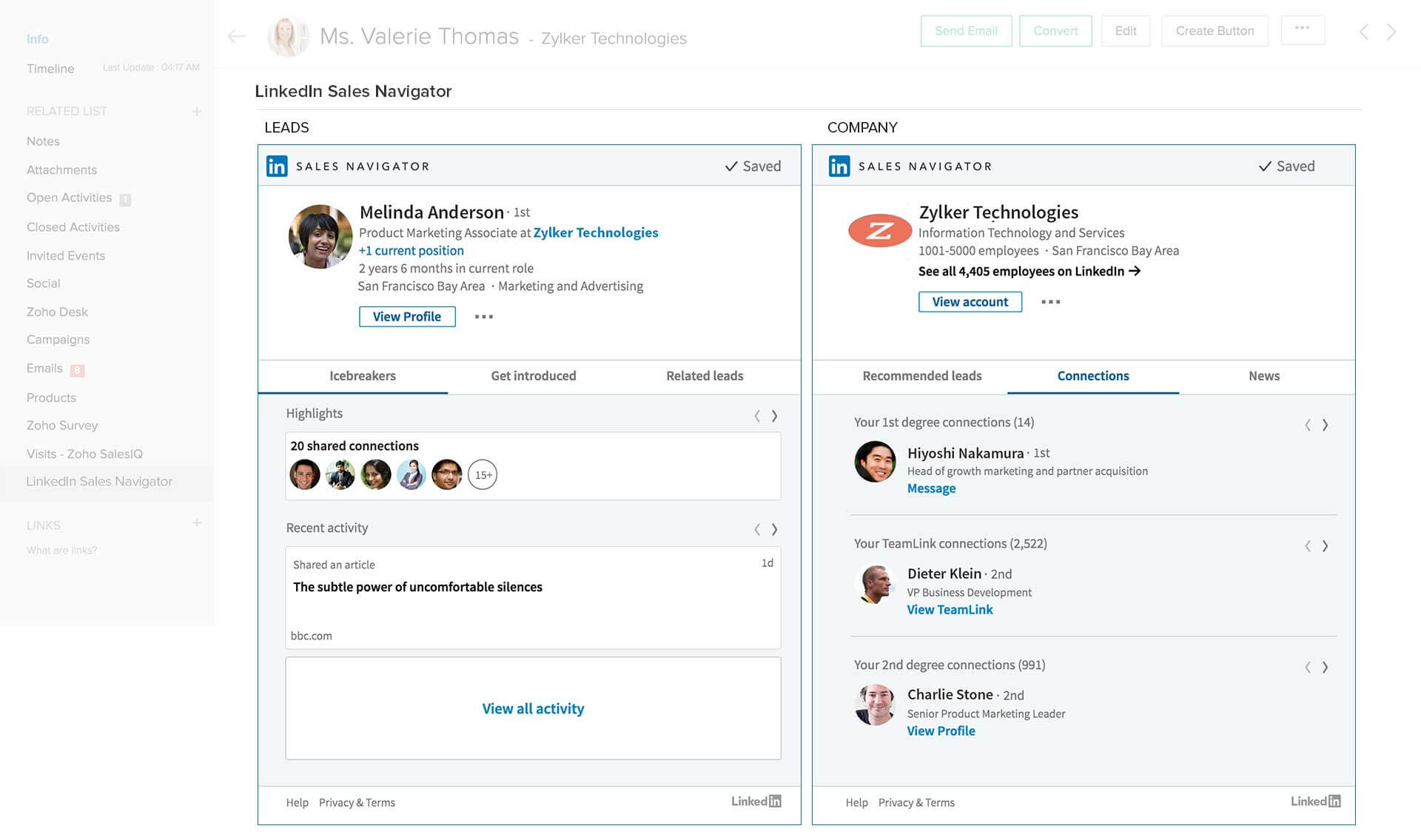
Zoho CRM is a versatile cloud-based CRM designed for businesses of any size. With its customizable modules and AI-driven assistant, it streamlines lead management, automates workflows, and provides valuable sales insights. Featuring multichannel communication tools and seamless app integrations, Zoho ensures that your team stays aligned and productive.
What is Salesforce?

Salesforce stands as the leading enterprise CRM globally, known for its unparalleled customization and scalability. This robust platform encompasses sales, service, and marketing clouds, supported by the extensive AppExchange ecosystem. With advanced analytics and AI-powered Einstein, Salesforce equips teams to deliver personalized customer experiences on a large scale.
Feature comparison of Zoho CRM and Salesforce
AI Follow-ups
Zoho CRM lacks native LinkedIn profile capture, which means if you're sourcing leads from LinkedIn, you'll have to manually input them into Zoho or rely on third-party Chrome extensions like Leadjet. Unfortunately, there's no one-click option on LinkedIn to seamlessly transfer profile data into your CRM, making the capture process cumbersome and highly manual. For medium-sized sales teams with 20-50 reps engaged in daily LinkedIn outreach, this presents a significant operational challenge.
Similarly, Salesforce does not provide native LinkedIn profile capture either. There's no straightforward way to import a LinkedIn contact directly into your CRM, and even with the Sales Navigator integration, you can only view LinkedIn information within Salesforce without the ability to extract it. To convert LinkedIn profiles into CRM leads, you'll have to copy the data manually or use third-party Chrome extensions like Surfe or Wiza, which considerably hampers the efficiency of outbound teams managing high-volume prospecting workflows.
Automated Contact Enrichment
Zoho CRM lacks the capability to enrich contacts with LinkedIn data. While you can integrate LinkedIn Sales Navigator with Zoho, it merely shows profile information within the contact view without syncing or enhancing your CRM records. Automatic updates of job titles, company details, or LinkedIn URLs are not possible; any enrichment based on LinkedIn must be conducted manually or through a third-party tool. For teams that rely heavily on LinkedIn for leads, Zoho falls short in providing enrichment on its own.
Similarly, Salesforce does not automatically enrich CRM records with LinkedIn data. The Sales Navigator integration allows you to view job titles, company details, and shared connections within the contact view, but this information does not sync to your database. You are unable to transfer that data into fields or automate the enrichment process. Teams that depend on LinkedIn for sourcing still require additional tools or manual entry to effectively enhance records, resulting in added friction in managing leads at scale.
Smart Fields
Zoho CRM lacks native tracking for LinkedIn engagement. If you message a lead on LinkedIn, that interaction won't be automatically logged in the CRM. You'll need to create a note or activity manually to keep track of it. Even with Sales Navigator integrated, Zoho doesn't retrieve messaging history or engagement statistics, which can lead to teams losing visibility into important parts of the sales conversation unless they are meticulous with manual updates.
Salesforce also falls short, as it doesn't permit the use of message templates in LinkedIn DMs. While you can create effective email templates and sales cadences using tools like Sales Engagement or Pardot, these features do not extend to LinkedIn. Even with Sales Navigator activated, there's no option to prefill a DM with dynamic fields from Salesforce, forcing SDRs to write or copy-paste each message manually— a significant time drain for teams focused on high-volume outreach!
AI-Powered Message & Sequence Generation
Zoho CRM lacks native tracking for LinkedIn engagement. When you message a lead on LinkedIn, that interaction isn't automatically recorded in the CRM; instead, you must manually create a note or activity to document it. Even with Sales Navigator integration, Zoho fails to pull in messaging history or engagement statistics, which can cause teams to miss out on crucial parts of the sales conversation unless they are very diligent about manual updates.
Similarly, Salesforce does not automatically track LinkedIn conversations. When a representative sends a message or InMail, there's no logging or activity capture unless they do it manually. The integration provides visibility rather than tracking; while you can view profile data and send InMails, none of this information syncs back to the CRM. For sales managers seeking a comprehensive view of multichannel engagement, this creates a significant blind spot.
Next Best Action
Zoho's Chrome extension is tailored for email and Gmail integration, not for LinkedIn. It isn't visible on LinkedIn profiles and lacks capture or sync features on that platform. To engage with LinkedIn, you'll need to use a different plugin or toggle between tabs. This absence of a LinkedIn-compatible Chrome extension makes Zoho less effective for outbound workflows that heavily depend on social selling.
Similarly, Salesforce lacks a Chrome extension specifically designed for LinkedIn workflows. There's no Salesforce overlay on LinkedIn profiles, no capture button, and no messaging support via the browser. Although the Sales Navigator integration functions within Salesforce, it doesn't improve your browsing experience. For genuine LinkedIn productivity tools in Chrome, you'll need to rely on third-party plugins, adding both cost and complexity.
folk CRM: The Ultimate CRM Alternative for LinkedIn!
folk is the sales assistant that growing sales teams of 20-50 people have eagerly awaited. Created to be simple, integrated, and proactive, this CRM handles repetitive tasks, allowing your representatives to concentrate on what truly matters: forging genuine relationships on LinkedIn and beyond. With an impressive 4.5/5 rating on G2, folk stands out as a trusted AI-powered CRM for lean, ambitious teams.
Specifically tailored for mid-sized sales organizations, agencies, and sales-focused teams, folk makes AI practical, efficient, and easy to manage. It enables you to transform LinkedIn connections into qualified opportunities more swiftly while ensuring your workflow remains seamless.
1. Instant LinkedIn Prospect Capture with the folkX Extension
Prospecting on LinkedIn can be time-consuming, but folk simplifies the process. With the folkX Chrome extension, you can effortlessly capture leads from LinkedIn or Sales Navigator and add them directly to your CRM with just one click. Whether saving a single profile or hundreds from a filtered search, all details—including names, job titles, companies, and emails—are automatically transferred to your database.
Say goodbye to tedious copy-pasting and juggling multiple spreadsheets. Your entire prospect list is neatly organized in one location, fully synchronized with your workflows, allowing your team to act swiftly and focus on converting connections into opportunities rather than spending hours on manual data entry!
2. Smart Data Enrichment and Always-Clean Contact Profiles
Connecting with decision-makers is only effective when you have complete and accurate data. folk streamlines this process by automatically enriching your LinkedIn contacts with verified emails, company information, phone numbers, and roles, providing you with everything you need to personalize your outreach and initiate meaningful conversations.
The platform also employs intelligent deduplication to maintain a clean and reliable database, even when multiple team members are adding the same contacts. Instead of wasting time managing chaotic spreadsheets or guessing lead ownership, folk keeps your data organized and current, ensuring every LinkedIn outreach is relevant and impactful.
3. Personalized LinkedIn Outreach with AI-Generated Message Templates
folk CRM revolutionizes your prospecting approach on LinkedIn by providing AI-powered message templates directly within the LinkedIn inbox. As you open a conversation, you'll see intelligent suggestions for connection requests, follow-ups, and outreach messages tailored to your prospect's profile and context - perfect for sales teams of 20-50 people who need to maintain high-quality, personalized outreach at scale.
You can easily edit and personalize these messages, sending them manually to ensure compliance with LinkedIn's policies. No risky automation or copy-pasting between tools is necessary. Everything occurs right where the conversation begins, making your outreach faster, more relevant, and far more natural.
👉🏼 Try folk now to capture LinkedIn profiles in one click and never miss a follow-up
Summary: folk CRM's LinkedIn Features
- Instantly capture leads with the folkX Chrome extension, importing LinkedIn and Sales Navigator profiles in one click, with every detail automatically organized in your CRM.
- Effortlessly enrich contact data by retrieving verified emails, company information, and roles, while maintaining a clean and accurate database through smart deduplication.
- Send smarter LinkedIn messages using AI-powered templates directly within the LinkedIn inbox, enabling you to personalize outreach faster without relying on risky automation!
Conclusion
When it comes to choosing a CRM for LinkedIn, Zoho CRM offers versatility with customizable modules and AI-driven insights, while Salesforce excels in scalability and advanced analytics. However, both lack seamless LinkedIn integration for lead capture and engagement tracking. folk CRM emerges as the superior choice for teams of 20-50 people, enabling instant lead capture, smart data enrichment, and AI-generated message templates, allowing mid-sized sales teams to effectively turn LinkedIn connections into opportunities with remarkable ease.
👉🏼 Try folk now to convert LinkedIn conversations into tracked opportunities without manual data entry
FAQ
What is the best CRM system for small businesses?
The best choice depends on budget and channels. Zoho CRM offers affordable plans and core sales tools. Salesforce fits teams needing deep customization and scale. For LinkedIn-first outreach with lean teams, consider folk.
Is Zoho CRM or Salesforce better for LinkedIn prospecting?
Both lack native LinkedIn profile capture and message sync. Sales Navigator shows info but does not write to CRM. For LinkedIn-first workflows, teams use third-party tools or a CRM built for LinkedIn, such as folk.
How can teams capture LinkedIn leads into a CRM?
Without native capture, copy profiles manually or use a Chrome extension to import data. A LinkedIn-focused CRM with a capture plugin lets reps save profiles in one click and enrich contacts with emails and company info for faster outreach.
What features matter most for LinkedIn-first sales teams?
Prioritize one-click LinkedIn lead capture, automatic enrichment, clean deduplication, in-inbox message templates, and activity tracking across LinkedIn, email, and calls. These cut manual work and keep outreach timely and personalized.
Meet folk, the AI CRM for your entire Sales motion.