


Discover folk - the CRM for people-powered businesses
Most B2B deals start with a conversation. Yet on LinkedIn, too many prospects stay stuck at profile views, connection requests, or messages that never get answered.
A phone number changes that dynamic fast.
It creates direct contact, speeds up qualification, and gives sales teams a more effective way to start real conversations. For founders, recruiters, agencies, and B2B sales teams, access to the right phone number can turn a passive profile into an active opportunity.
The challenge is simple. LinkedIn rarely makes phone numbers easy to access. Most profiles do not display them publicly, so companies rely on a mix of manual research, direct outreach, and enrichment tools to find accurate contact data.
Knowing which methods are legal, reliable, and scalable matters before making phone number discovery part of a prospecting workflow.
Main Points
- LinkedIn phone numbers may appear in the Contact Info section when a user has chosen to share them.
- When no number is visible, ask the contact directly, check public company sources, or use a contact enrichment tool.
- Phone number finders match LinkedIn profile data with external databases, so coverage and accuracy vary.
- Verify the person, company, number type, and country code before using any result.
- folkX captures LinkedIn and Sales Navigator profiles in folk CRM, where available contact data can be enriched and managed.
Is it Legal To Get Phone Numbers from LinkedIn?
Yes, in some situations. Finding a phone number connected to a LinkedIn profile is not illegal by itself. The legal risk depends on how the number is obtained and how it is used afterward.
LinkedIn does not make phone numbers public by default. Most users keep their phone number private, and the Contact Info section is usually visible only to first degree connections unless the user changes visibility settings. This means phone numbers visible on a profile were intentionally shared by the user.
In the United States, the main rules apply to how the phone number is used for outreach. B2B sales calls are generally allowed, but companies must still respect telemarketing regulations such as Do Not Call rules, consent requirements for automated calls or texts, and fair outreach practices.
In Europe, the rules are stricter. Under the GDPR, a phone number is considered personal data when it identifies a person. Companies must therefore have a legal basis to collect and process that number, such as legitimate interest or consent. Businesses must also be transparent about data usage and respect data protection rights.
The safest scenarios are:
✔️ The phone number is visible in the LinkedIn Contact Info section
✔️ The contact shares the phone number directly
✔️ The phone number comes from a compliant enrichment provider
Which LinkedIn Phone Number Search Method Should You Use?
How To Find a Phone Number From a LinkedIn Profile? 4 Proven Methods
1. Check the LinkedIn Contact Info section
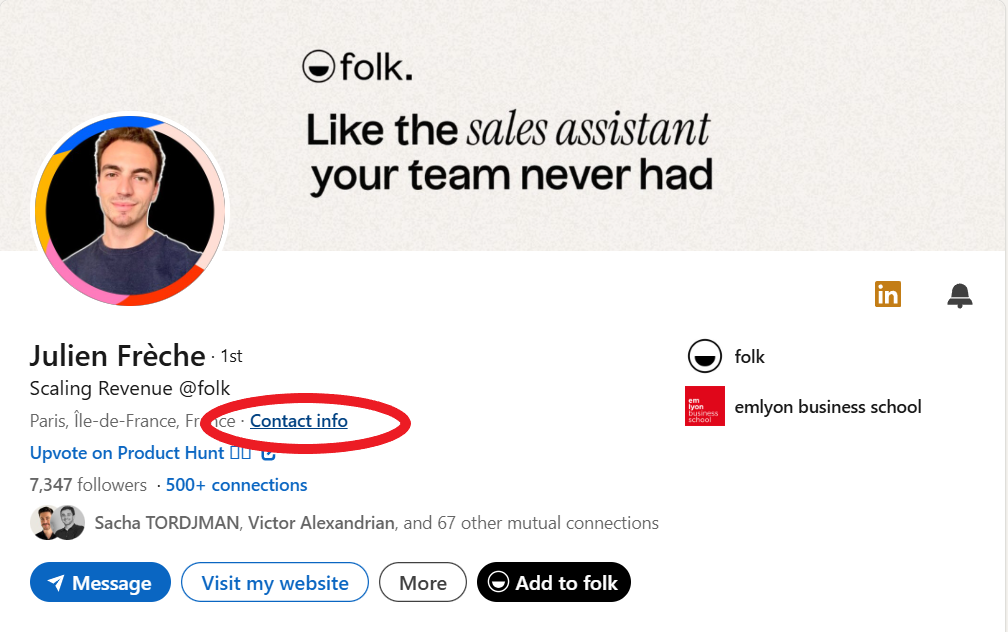
This is the most direct method because it stays fully inside LinkedIn. Some users choose to display a phone number in the Contact Info section of their profile. When that number is visible, it was intentionally shared by the contact.
- Open the LinkedIn profile
- Click Contact info under the profile header
- Check whether a phone number appears in the details
This method is fast and clean, but it works only in a limited number of cases because most users keep their phone number private.
2. Ask the contact directly in a LinkedIn message
When the number is not visible, asking directly is often the simplest option. This works best when there is already a connection, some context, or a clear reason to continue the conversation by phone.
- Send a connection request if needed
- Start a short and relevant conversation
- Ask whether the contact is open to a quick call
- Request the best phone number to reach them
This method is not the most scalable, but it is often the most accurate because the number comes directly from the contact.
3. Use a LinkedIn phone number finder tool
This is usually the most practical method for outbound teams. These tools connect LinkedIn profile data with external databases to find business phone numbers associated with a contact.
- Install the Chrome extension of the tool
- Open the LinkedIn or Sales Navigator profile
- Launch the extension on the profile
- Let the tool search for matching contact data
- Review the phone number if one is found
This method is much more scalable than manual research. The main limitation is that data quality varies depending on the provider, the market, and the contact’s digital footprint.
4. Use the company website and public business sources
When LinkedIn does not expose a number and enrichment tools return nothing, company-level research can still help. In many cases, the direct mobile number is not available, but a company line, office number, or department number is.
- Identify the company from the LinkedIn profile
- Visit the company website
- Check pages such as Contact, About, Team, or office pages
- Look for a direct line, business number, or department number
- Use that number to route the conversation internally
This method is slower and less precise, but it can still be useful when the goal is simply to reach the right person or team.
How to Verify a Phone Number Found From LinkedIn? 7 Steps to Follow
A phone number linked to the right name is not necessarily current or suitable for outreach. Before calling, verify the contact’s identity, employer, and number type to reduce wrong calls and keep the CRM accurate.
Use the following checks:
- Confirm the current employer: compare the enrichment result with the contact’s latest position on LinkedIn.
- Check the country code: make sure it matches the contact’s location or the company office associated with the number.
- Identify the number type: determine whether it is a personal mobile, professional mobile, direct office line, department number, or company switchboard.
- Compare another reliable source: check the company website, business directory, CRM record, or a second data provider when possible.
- Review the verification date: recently verified data is generally more useful than a record that has not been updated for months.
- Test the number carefully: use a manual call before adding it to an automated outreach sequence.
- Record the source: save where the number came from and when it was checked.
If the person has changed roles, the number belongs to another employee, or the source cannot be confirmed, mark the record for review instead of treating it as verified. Tools such as folk CRM can keep the number, LinkedIn profile, source, verification date, and outreach history in the same contact record.
Why Can’t I Find a Phone Number From LinkedIn?
LinkedIn does not display a phone number for every user, and enrichment tools cannot guarantee a result for every profile. If your search returns no number, one of the following reasons may explain it.
❌ The contact has not shared a number: phone numbers only appear in LinkedIn’s Contact Info section when users choose to add and display them.
❌ You are not a first-degree connection: some contact details are only visible to people directly connected to the profile.
❌ The enrichment provider has no matching record: coverage varies by country, industry, company size, and professional seniority.
❌ The person recently changed roles: the provider may still associate the contact with a previous employer or an outdated business number.
❌ The LinkedIn profile contains limited information: an abbreviated name, missing company, or incomplete job title makes it harder to identify the correct person.
❌ The available number belongs to the company: public sources may provide a switchboard or department line rather than the prospect’s direct number.
❌ The number has been removed or disconnected: phone data can become outdated when a contact changes employer, location, or mobile provider.
❌ The tool requires additional credits: some platforms reveal emails by default but charge separate credits for mobile or direct phone numbers.
Try another reliable source or ask the contact directly when no verified number is available. Avoid selecting a number based only on a matching name, as this can associate the wrong person with the CRM record.
8 Best LinkedIn Phone Number Finders in 2026
👉 Try folk CRM for LinkedIn (free)
1. folk CRM
Rating
⭐⭐⭐⭐⭐(G2)
Overview
folk CRM is one of the most practical tools for finding contact data from LinkedIn because it combines LinkedIn lead capture, enrichment, and CRM management in one workflow. Instead of copying profiles into multiple tools, users capture contacts directly from LinkedIn or LinkedIn Sales Navigator through the folkX Chrome extension.
Once a profile is captured, the contact is instantly stored inside the CRM where enrichment can add missing information such as company details, email addresses, and phone numbers when available. This makes it possible to move from LinkedIn discovery to a structured contact record without switching platforms.
The main advantage is that contact discovery does not stop at enrichment. Captured leads can be organized into lists, pipelines, and follow up workflows immediately. For teams prospecting heavily on LinkedIn, this removes the friction of exporting contacts between multiple tools.
Pros
• Chrome extension built specifically for LinkedIn prospecting
• Captures LinkedIn and Sales Navigator profiles instantly
• Enriches contacts with additional data including phone numbers when available
• Combines enrichment with CRM organization and pipeline tracking
• Strong fit for sales teams, founders, recruiters, and agencies
Cons
• Phone number coverage depends on available enrichment data
• Designed mainly for relationship driven prospecting rather than massive database searches
Pricing
Standard: $24 per user per month (annual billing)
Premium: $48 per user per month (annual billing)
Custom: From $80 per user per month (annual billing)
👉 Try folk CRM for LinkedIn (free)
2. Apollo.io
Rating
⭐⭐⭐⭐⭐(G2)
Overview
Apollo.io is one of the most widely used B2B prospecting platforms for finding contact information associated with LinkedIn profiles. The platform combines a large professional database with a Chrome extension that works directly on LinkedIn and LinkedIn Sales Navigator.
Users can open a LinkedIn profile, activate the extension, and retrieve contact data linked to that person when available. The platform typically returns email addresses first, but it can also provide direct phone numbers depending on database coverage.
Apollo is particularly strong for teams running outbound prospecting at scale because it allows users to search a database of millions of contacts, filter prospects by company attributes, and export enriched data into CRM or outreach workflows.
Pros
• Large B2B contact database
• Chrome extension works on LinkedIn profiles
• Combines prospecting database, enrichment, and outreach tools
• Strong filtering for company and contact targeting
Cons
• Phone numbers often consume more credits than emails
• Data accuracy varies depending on geography and company size
• Interface can feel complex for smaller teams
Pricing
Free: $0 per user per month
Basic: $49 per user per month (annual billing)
Professional: $79 per user per month (annual billing)
Organization: $119 per user per month (annual billing)
3. Lusha
Rating
⭐⭐⭐⭐(G2)
Overview
Lusha is a popular LinkedIn contact enrichment tool focused on providing verified business contact data, including phone numbers. The Chrome extension works directly on LinkedIn and LinkedIn Sales Navigator, allowing users to reveal contact information associated with a profile.
When a LinkedIn profile is opened, the extension searches Lusha’s database and returns available contact details such as direct phone numbers, mobile numbers, and business emails.
Lusha is particularly well known for mobile phone number coverage in certain markets, which makes it attractive for SDR teams that prioritize direct calling rather than email outreach.
Pros
• Simple Chrome extension for LinkedIn prospecting
• Known for strong mobile number coverage in some regions
• Fast contact reveal workflow
• Easy CRM integrations
Cons
• Credit based pricing model
• Data availability varies significantly by region
• Limited features outside contact discovery
Pricing
Free: $0 per month
Starter: $37.45 per user per month (annual billing)
Pro: $52.42 per user per month (annual billing)
Premium: $629 per user per month (annual billing)
Scale: custom pricing
4. Kaspr
Rating
⭐⭐⭐⭐(G2)
Overview
Kaspr is a LinkedIn focused contact finder built specifically for Sales Navigator workflows. The Chrome extension allows users to retrieve contact information while browsing LinkedIn profiles.
When activated on a profile, Kaspr searches its contact database and displays available phone numbers and email addresses associated with the person. The platform focuses heavily on European markets, where many teams use it to enrich LinkedIn prospecting lists.
Kaspr is commonly used by SDR teams that need quick access to phone numbers directly inside LinkedIn without running complex enrichment workflows.
Pros
• Built specifically for LinkedIn prospecting
• Chrome extension integrated into LinkedIn profiles
• Strong contact coverage in European markets
• Easy export to CRM tools
Cons
• Credit based system for contact reveals
• Smaller database than some larger sales intelligence platforms
• Limited workflow automation features
Pricing
Free: $0 per month
Starter: $45 per user per month (annual billing)
Business: $79 per user per month (annual billing)
Enterprise: custom pricing
5. ContactOut
Rating
⭐⭐⭐⭐(G2)
Overview
ContactOut is a strong LinkedIn phone number finder for teams that want a simple browser based workflow. The Chrome extension works directly on LinkedIn, and the platform is built around finding business emails and phone numbers from professional profiles. It is especially relevant for recruiters, agencies, and outbound teams that want contact discovery without moving into a heavier sales intelligence stack.
Pros
- Chrome extension built for LinkedIn workflows
- Strong fit for email and phone discovery
- Simple interface compared with larger sales intelligence tools
- Useful for recruiters and SDR teams
Cons
- Less complete than a CRM plus enrichment workflow
- Team and API pricing are custom
- Broader sales automation is more limited than all in one platforms
Pricing
- Free: $0
- Email: $25 per month billed annually
- Email + Phone: $49 per month billed annually
- Team / API: custom pricing
6. RocketReach
Rating
⭐⭐⭐⭐(G2)
Overview
RocketReach is a well known contact lookup platform for finding professional emails and phone numbers in LinkedIn style prospecting workflows. It is commonly used by sales and recruiting teams that need broad contact coverage, browser based lookup, and phone data without adopting a full enterprise sales intelligence stack. It is less CRM centric than folk, but still very relevant for pure contact discovery.
Pros
- Broad contact lookup coverage
- Useful for both email and phone discovery
- Good fit for individual prospecting and small teams
- Lighter workflow than larger enterprise platforms
Cons
- Credit and export limits matter quickly
- Better for lookup than for full pipeline management
- Team pricing becomes more complex as usage grows
Pricing
- Essentials: $329 per year
- Pro: $829 per year
- Ultimate: $2,099 per year
7. Cognism
Rating
⭐⭐⭐⭐(G2)
Overview
Cognism is a premium sales intelligence platform built for teams that care about compliant B2B data and phone verified mobile numbers. It is especially relevant for outbound teams selling into Europe and international markets, where data quality and compliance matter heavily. Compared with lighter LinkedIn extensions, Cognism is more enterprise oriented, but it is highly relevant for teams that want stronger phone data quality at scale.
Pros
- Strong focus on phone verified mobile numbers
- Good fit for serious outbound prospecting teams
- Compliance first positioning is useful for European workflows
- Stronger data quality positioning than many lighter tools
Cons
- No public self serve pricing
- Heavier and more enterprise oriented than simple LinkedIn extensions
- Better suited to structured sales teams than occasional prospecting
Pricing
- Custom pricing only
8. ZoomInfo
Rating
⭐⭐⭐⭐(G2)
Overview
ZoomInfo is a large B2B intelligence platform for teams that want contact data, company data, and outbound prospecting infrastructure at scale. It is less lightweight than pure LinkedIn phone finders, but still relevant for finding business phone numbers tied to target contacts and accounts. It is usually a better fit for larger revenue teams than for small teams looking for a simple Chrome extension workflow.
Pros
- Large B2B data platform
- Strong fit for outbound and account based prospecting
- Useful for teams that need more than basic phone lookup
- Free entry tier available
Cons
- Pricing is mostly custom beyond the free tier
- Heavier than simpler LinkedIn prospecting tools
- Better suited to scaled sales orgs than lightweight prospecting needs
Pricing
- Custom pricing
Conclusion
LinkedIn does not make phone numbers easy to access. Most profiles do not display them publicly, so teams usually rely on direct requests, enrichment tools, or LinkedIn phone number finders to get that data.
Tools like Apollo, Lusha, or Kaspr can work well for phone number discovery. But for teams prospecting on LinkedIn every day, folk CRM with folkX is often the more complete option.
The reason is simple. It does not just help find contact data. It also captures LinkedIn profiles directly, enriches them when data is available, and stores everything inside a CRM built for follow up, lists, and pipelines.
For LinkedIn-first prospecting workflows, that makes folk more practical than using a standalone phone finder plus a separate CRM.
Discover folk CRM
Like the sales assistant your team never had