


Discover folk - the CRM for people-powered businesses
Overview: ClickUp vs. Nutshell (and folk)
ClickUp and Nutshell are two platforms that offer different approaches to managing business workflows and customer relationships.
ClickUp is primarily a project management tool with customizable task tracking, goal setting, and collaboration features, making it ideal for teams focused on productivity and project coordination.
Nutshell, on the other hand, combines CRM with email marketing and sales automation, tailored for small to mid-sized teams seeking an integrated solution for sales and customer management. In this blog post, we'll compare their core features to help you decide which platform best meets your needs – or if folk CRM might be a better alternative by offering user-friendly contact management with enhanced customization options, particularly for sales teams of 20-50 people looking for streamlined relationship management.
What is ClickUp?
ClickUp is a project management and productivity platform designed to help teams and individuals organize tasks, track progress, and collaborate in one workspace. Although it is primarily a project management tool, ClickUp includes some CRM elements.
Key features of ClickUp
- Task management: ClickUp allows users to create, assign, and track tasks with custom statuses, providing flexibility in managing work processes across different projects.
- Custom views: The platform offers multiple views like lists, boards, calendars, and Gantt charts, enabling users to visualize tasks and workflows in a format that suits their preferences.
- Goal tracking: Users can set, track, and manage goals within ClickUp, aligning tasks and projects with broader objectives.
- Time tracking: ClickUp includes a built-in time tracking feature to log time spent on tasks, allowing users to monitor productivity or billable hours.
- Workflow automation: Automation in ClickUp enables users to reduce manual tasks by setting up rules that trigger actions, such as status updates or notifications, based on predefined conditions.
- Custom fields: The platform allows users to add custom fields to tasks, enabling them to track specific data points or categorize tasks according to their needs.
What is Nutshell?
Nutshell is an all-in-one CRM specifically designed to help B2B teams close more deals. It combines contact management, pipeline tracking, and email marketing tools to support every stage of the sales process, from lead generation to deal closure. With features like customizable pipelines, activity tracking, and seamless integration options, Nutshell also enables sales teams to stay organized, collaborate, and drive results—all within a user-friendly platform tailored for B2B needs.
Key features of Nutshell
- Contact management: Centralizes customer information and tracks communication history to keep teams organized and informed.
- Pipeline management: Customizable sales pipelines to track leads and deals through every stage of the sales process.
- Email marketing: Built-in email campaign tools that enable targeted outreach and engagement with prospects and customers.
- Activity tracking: Logs all interactions, including calls, emails, and meetings, allowing teams to stay on top of follow-ups and engagement.
- Reporting and analytics: Provides insights into sales performance, forecasting, and team activity, helping to make data-driven decisions.
ClickUp vs. Nutshell: Feature Comparison
Let's break down the key features of two CRM software solutions and take a closer look at their sales automation, email marketing tools, and contact management.
1. Sales pipeline management
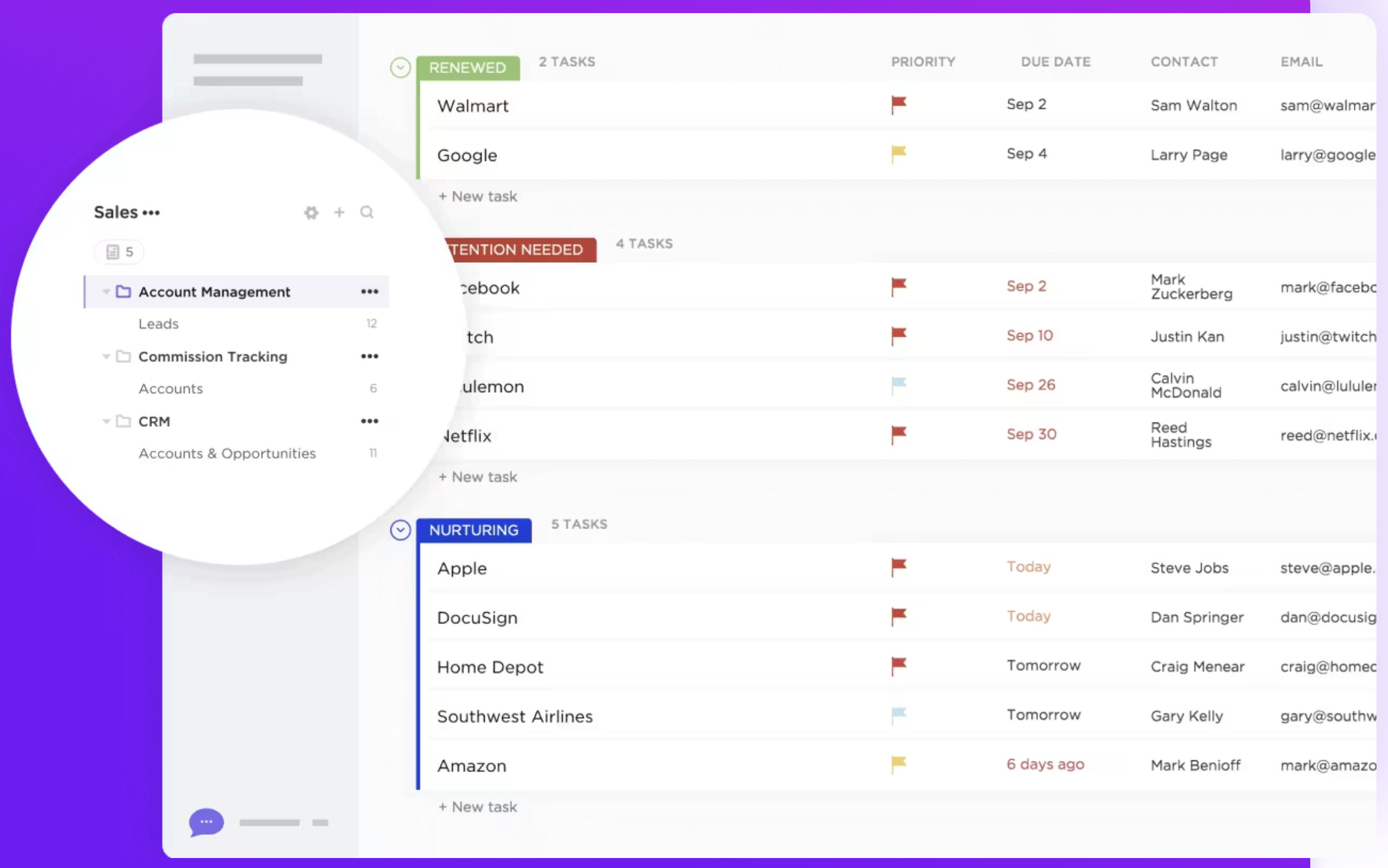
ClickUp does not have a dedicated pipeline management feature designed specifically for sales or CRM purposes, but users can create customizable pipelines using task lists, boards, and custom statuses. This flexibility allows teams to tailor their workflow, but it may require additional setup and maintenance to achieve a CRM-like structure.
Nutshell's pipeline management feature provides tools for tracking leads and deals through different stages using various views, including board, list, map, and chart views. The pipeline is customizable, allowing users to organize and prioritize leads according to their workflow needs. Additional features like hot lead identification and customizable lead cards support visibility into deal statuses and priorities. Nutshell's pipeline tools aim to support sales teams in managing and visualizing their sales process without unnecessary complexity, making it a more straightforward choice for dedicated sales pipeline management.

2. Ease of use
ClickUp is known for its versatile project management capabilities but can be overwhelming for users seeking straightforward CRM functionalities. Nutshell offers a more user-friendly interface specifically designed for sales teams, making it easier to navigate and manage customer relationships effectively. However, for mid-sized sales teams of 20-50 people, folk CRM strikes the perfect balance between functionality and simplicity, offering intuitive contact management without the complexity that often comes with larger enterprise solutions.
3. Contact enrichment
ClickUp does not offer a contact enrichment feature as part of its core functionality. Users can manually store and organize contact information, but the platform does not automatically pull in additional data about contacts from external sources. Nutshell's contact enrichment feature is focused on minimizing manual data entry by allowing users to import contacts, emails, and calendar events from various sources.
4. Outreach
ClickUp lacks a dedicated outreach feature, requiring manual setup of workflows for communication tasks. In contrast, Nutshell provides built-in email marketing and automation capabilities, enabling users to create and send email campaigns directly within the platform, complete with basic tracking and engagement metrics.
5. Automation
ClickUp's automation is general-purpose, not specifically tailored to CRM needs, and may require customization. Nutshell focuses on streamlining sales and marketing tasks, offering tools for follow-up emails, task reminders, deal progression, and email marketing automation for drip campaigns.
6. Integration
ClickUp provides integrations with various third-party tools, such as Google Workspace, Slack, Zoom, and Dropbox, enhancing workflow efficiency and collaboration within the platform. Nutshell offers integrations with a range of popular tools to enhance its functionality and streamline workflows. It connects with major productivity platforms like Google Workspace, Microsoft 365, and Slack, allowing users to manage emails, calendars, and team communication within their existing tools.
7. Artificial Intelligence
ClickUp's AI integration, through 'Chat', connects tasks and company knowledge, aiding in task management and writing. Nutshell's AI offers timeline summarization, helping users quickly sort through historical records by summarizing past interactions and activities.
Price and plans comparison
Let's take a closer look at the price and plans of both ClickUp and Nutshell.
ClickUp prices
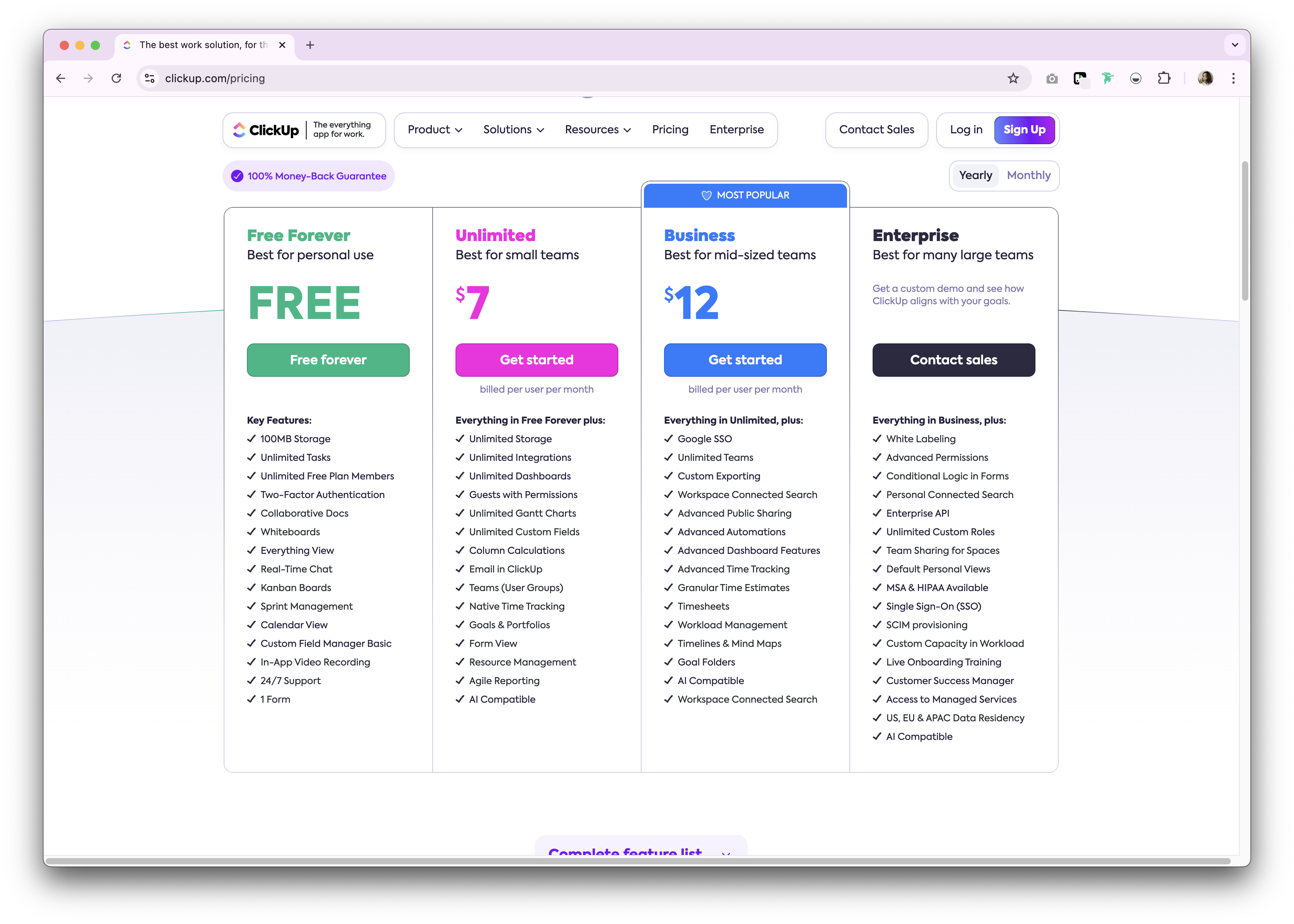
ClickUp offers a free forever plan for personal use. Premium options are available as either a monthly and annual subscription plan. The following is a high level overview of the annual subscription plans available.
- Unlimited: $7/user/month.
- Business: $12/user/month.
- Enterprise: Undisclosed.
Nutshell prices
Nutshell offers several feature-rich plans tailored to different goals and team sizes.
- Foundation: $16 per user, per month.
- Pro: $42 per user, per month.
- Power AI: $52 per user, per month.
- Enterprise: $67 per user, per month.

Introducing folk CRM: the best alternative to ClickUp and Nutshell
Looking for an affordable alternative? We recommend folk. A multiple award-winning CRM platform loved for its easy-to-use, plug-and-play CRM system. folk CRM is particularly well-suited for sales teams of 20-50 people who need a solution that's both powerful and intuitive, allowing it to support multiple business functions including sales, marketing, recruitment, investment relations and more. What's more, you can use folk as a solopreneur, SMB or enterprise as it is able to scale with you along the way.
Key features
- Contact management: Bring all your contacts into one place seamlessly, from social media platforms such as LinkedIn, Instagram and X to multiple inboxes including Gmail and Outlook.
- Notes and reminders: Attach notes directly to a contact's profile in folk, and access them on the go. And assign reminders so you know exactly when to follow-up.
- Sales pipeline dashboard: Manage your entire sales cycle and leads with a highly customizable sales pipeline dashboard that can be used in Kanban-board view or listicle.
- Ease of use and customization: Easily customize the pipelines, dashboards, automation, email sequences, so that you can use it across your sales cycle and pipeline management – and other business functions such as recruitment, marketing, and more.
- Social media integration: Import people and companies from LinkedIn, Sales Navigator, Instagram, and X within a click thanks to folk's Google Chrome extension.
- Contact sync from Gmail and Outlook: Full email sync enabling users to manage all communications directly from the CRM.
- Find email addresses in a click: Contact enrichment powered by Apollo, and Dropcontact so you can fill in missing data points with 1-click.
- Email sequences: Send email sequences with reminders if your leads don't reply to your first emails. It includes an AI integration allowing you to personalize email at scale.
- Folk mobile app: Manage contacts and stay connected on the go — available on iOS and Android.
Price and plans
folk has a 14-day free trial. After that, there are affordable monthly or annual subscription plans. The annual subscription plan is as follows.
- Standard: $20 per user, per month.
- Premium: $40 per user, per month.
- Custom: Starts from $80 per user, per month.

ClickUp vs. Nutshell: What's the verdict?
When it comes to choosing between ClickUp and Nutshell, it's apparent that the decision depends on your business needs and workflow. ClickUp excels in project management with its versatile task management features, while Nutshell offers a comprehensive CRM solution tailored for B2B sales teams. However, for companies with sales teams of 20-50 people that need a more personalized approach to relationship management, folk CRM provides the optimal alternative to these traditional options, blending ease of use with customization specifically designed for mid-sized sales organizations. Try folk today, free
FAQ
Is ClickUp a CRM?
ClickUp is a project management platform that can be adapted for CRM use with custom lists, fields, and statuses, but it lacks native sales pipeline and email outreach tools found in dedicated CRMs.
Does ClickUp have a sales pipeline?
It has no native sales pipeline. Teams can build a pipeline using boards, custom statuses, and fields, but this requires manual setup and ongoing maintenance.
Which is better for sales teams: ClickUp or Nutshell?
For sales workflows, Nutshell is stronger. It offers built-in pipelines, contact management, activity tracking, reporting, and email marketing. ClickUp suits project management more than end-to-end sales.
What is a good alternative to ClickUp and Nutshell?
folk offers customizable pipelines, contact enrichment, social imports, and email sequences with AI personalization. Pricing (annual): Standard $20/user/month, Premium $40, Custom from $80. 14-day trial available.
Discover folk CRM
Like the sales assistant your team never had