


Discover folk - the CRM for people-powered businesses
Best CRM for Entrepreneurs (2024)
As an entrepreneur, you've got a lot on your plate—clients to manage, deals to close, and a business to grow. Without the right tools, things can get overwhelming fast.
That's why building the right sales stack is essential. A great CRM brings everything together in one place: your contacts, follow-ups, insights, and more. It saves you time, keeps you organized, and helps you focus on what really matters—growing your business.
In this post, we'll break down the best CRM for entrepreneurs, with tools designed to simplify your workflow and support your next stage of growth.
| Main points |
|---|
|
Why you need a CRM
As an entrepreneur, using a CRM can be a game-changer for managing your business and network effectively. Here's why.
Challenges without a CRM
Without the right CRM in place, your time is going to be taken up by repetitive tasks that take you away from your priorities. You're also likely to face a few callenges.
- Disorganization: Without a CRM, it's easy to lose track of important data and client interactions.
- Missed opportunities: Lack of a centralized system can lead to missed follow-ups and lost deals.
- Inefficient processes: Manual data entry and scattered information slow down your operations.
- Lack of insight: Difficulty in generating reports and understanding business performance.
- Inconsistent communication: Inconsistent messaging can harm client relationships and brand reputation.
Benefits of a CRM
Fortunately, the right CRM can address these challenges and provide a few extra benefits that can boost your efficiency.
- Centralized information: All client data and interactions in one place for easy access and management.
- Enhanced efficiency: Automate routine tasks, freeing up time for strategic activities.
- Improved customer relationships: Personalize interactions and build stronger connections with clients.
- Better decision-making: Data-driven insights help you make informed business decisions.
- Increased sales: Streamlined processes and better follow-ups lead to higher conversion rates.
- Consistent communication: Ensure uniform messaging and maintain a professional image across all channels.
How to evaluate and choose a CRM
With a lot of CRMs to choose from and go through, it can be overwhelming if you're unsure where to start – or what to look out for. To help you with your decision making process, we've put together some handy tips that you can adapt accordingly.
1. Define your requirements
As an entrepreneur, it's crucial to identify the key features your business needs in a CRM. With a lot to balance across multiple business functions, you need your CRM to do the heavy-lifting for you. This means it needs to help you streamline your workflow so you don't have to constantly switch context, be able to invite team-mates to dashboards and control privacy settings for the ones you're not ready to share yet, and streamline your client communication needs. Some of the best CRM software on the market tend to have the following features.
7 features entrepreneurs need from their CRM
- User-friendly Interface: A CRM should be easy to navigate and use without extensive training. So that you can simply plug and play it to optimize your tech stack.
- Customization options: The ability to tailor the CRM to fit specific business needs is crucial so that your choices aren't limited and it can fit around your needs.
- Scalability: As the business grows, the CRM should be able to grow with it.
- Integration capabilities: Seamless integration with other tools and platforms used in the business.
- Automation: Features that automate repetitive tasks can save time and reduce errors.
- Analytics: Robust analytics to track performance and make data-driven decisions.
- Customer support: Reliable customer service to help troubleshoot and maximize the CRM's potential.
2. Budget considerations
Managing a budget can be tricky. You'll want something that works but doesn't break the bank. Balancing cost and return on investment is vital when selecting a CRM. Look for affordable CRM solutions for entrepreneurs that offer scalable pricing plans so that it can grow with you as your business scales. Ensure the platform provides a free trial or a basic free version so you can assess its value before committing financially. Remember, the best CRM for small business owners should offer a balance of robust features and cost-effectiveness.
3. Selection process
Looking for the right CRM involves a lot of work. Especially if you want to get it right the first time. Start by reading reviews on G2 and testimonials from other startup founders. Look for vendors that specialize in CRM solutions for startup founders and offer excellent customer support. Attend webinars or request demos to get a firsthand experience of the platform's capabilities. Compare multiple vendors to ensure you select the best fit for your business needs.
4. Get a demo
When choosing the best CRM for entrepreneurs, it's crucial to see the tool in action. A demo can provide you with a real-world look at how the CRM functions, its user interface, and its key features. This firsthand experience can help you determine if the CRM meets your startup's unique needs. Get started with a demo of folk and see how it can streamline your business processes.
👉🏼 Try folk now to see how folk streamlines demos and pipelines for entrepreneurs
4 of the best CRMs for entrepreneurs
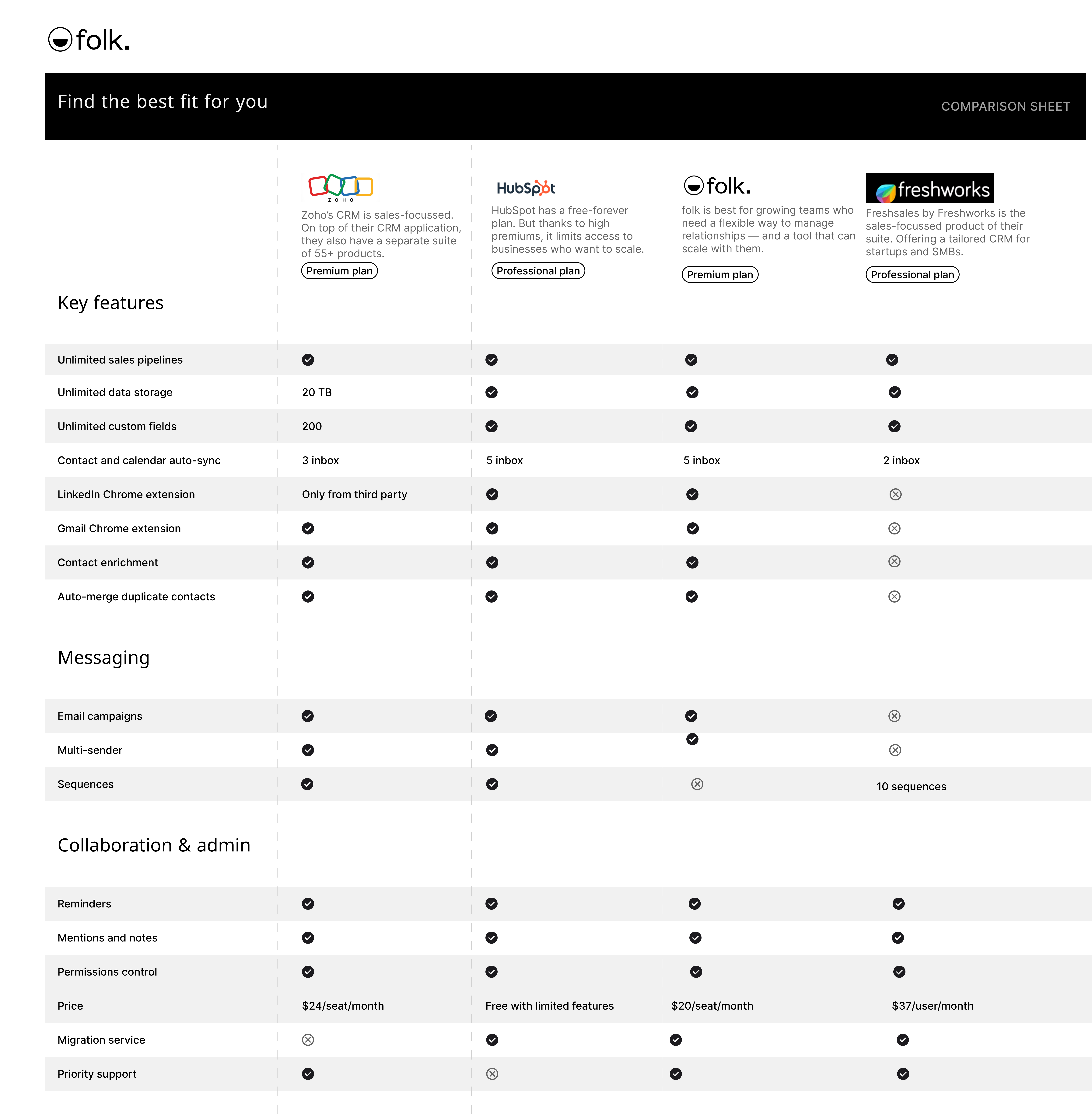
Below we've got a mix of CRM solutions for you. Some are designed as a small business CRM while others provide you with CRM software that can scale with you as your business grows. For entrepreneurs building teams of 20-50 people, finding a CRM that balances simplicity with powerful features becomes especially critical for maintaining efficient sales operations.
1. folk
Best for: all-in-one CRM software that can support solo-users and growing teams
folk is an all-in-one CRM solution designed to help businesses scale. It can support you as s solo-preneur and can scale with you when you're ready to make your first hire. For growing businesses with teams of 20-50 people, folk CRM provides the perfect balance of user-friendly design and powerful features that support expanding sales operations without overwhelming complexity.
Key features
- Contact management and contact sync: Get real-time information from multiple inbox accounts so you don't need to switch context every time you need contact information. Keep them organized in your CRM by group, with custom fields, auto-deduplication and contact enrichment.
- Sales pipeline management: From lead generation to sales cycle support, folk can support you at every stage with its highly customizable dashboards.
- Mail merge: Merge your contacts from Gmail and Outlook so that you can optmize your email marketing campaigns with folk's marketing automation features and AI assistance.
- free Chrome extensions: Take the heavy lifting out of your social sales strategy with folk's free Chrome extension that can help you generate leads from LinkedIn and other social media platforms, capture new contact information as you nurture business relationships online, create a message template library and more.
- Mobile app: Use the folk mobile app to access contacts, reminders, and your CRM on the go.

Pros
- Social media integration Can support founder-led sales and other business functions such as fundraising, recruiting, and more making folk one of the most well-rounded and affordable CRM on the list.
- Sales automation including custom objects (coming soon), custom dashboards and auto-deduplication so you don't double up leads.
- Marketing automation including AI assistance to help you personalize bulk email campaigns and email marketing tools such as AI generated ice breakers, analytics and more.
- Free social listening tools making folk one of the most Founder-led sales friendly CRM platform on the market.


Cons
- Advanced reporting and analytics are available in folk, including pipeline and deal stage analytics, revenue forecasting with weighted probabilities, and performance breakdowns by owner, channel, industry, region, or any custom field.
Price and plans
You can try folk for free with a 14 day free trial. After that, a monthly or annual subscription plan is as follows.
- Standard: $24 per user, per month (yearly commitment).
- Premium: $48 per user, per month.
- Custom: Starts from $80 per user, per month.

2. HubSpot CRM
Best for: free-forever plan
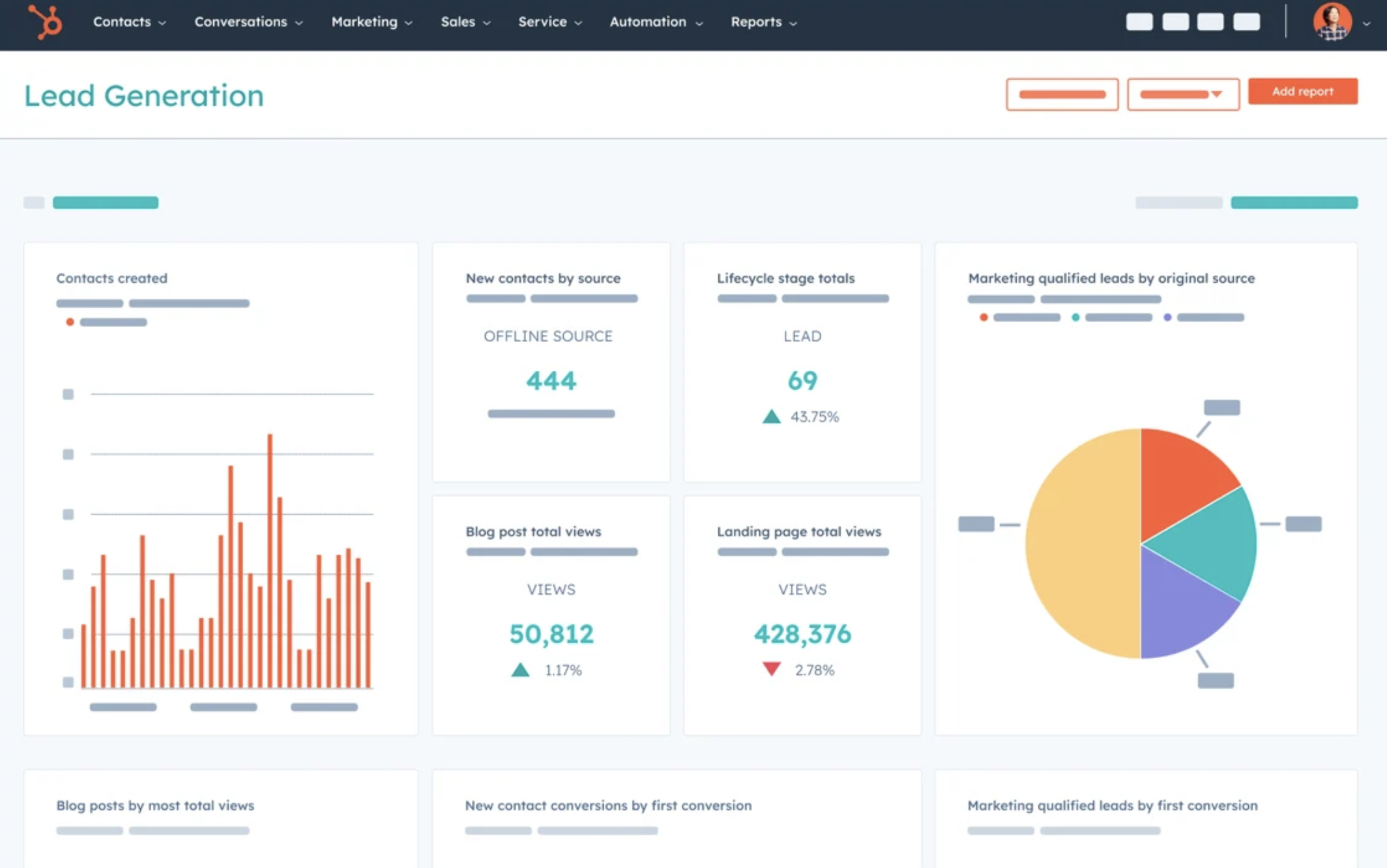
HubSpot is one of the more mature CRMs in the market. Known for their free-forever plan, HubSpot CRM offers a basic CRM tool for entrepreneurs who need a lightweight CRM system.
Key features
- Sales pipeline management: Visual pipelines and deal tracking.
- Contact management: Allows you to create contact records, log sales activities and complete sales tasks within a contact's record.
- Email tracking: Allows you to know when someone engages with your email, get a complete view of someone's interactions with your previous communication.
- Company insights: Automate the process of populating contact records.
- Integration marketplace: Dedicated marketplace connects you with over 1,500 applications to help you personalize your CRM.
Pros
- Free tier available with robust features.
- Excellent integration with HubSpot's marketing and service tools.
Cons
- Some advanced features require paid plans.
- Limited customization compared to more complex CRMs.
- Clunky user experience.
Price and plans
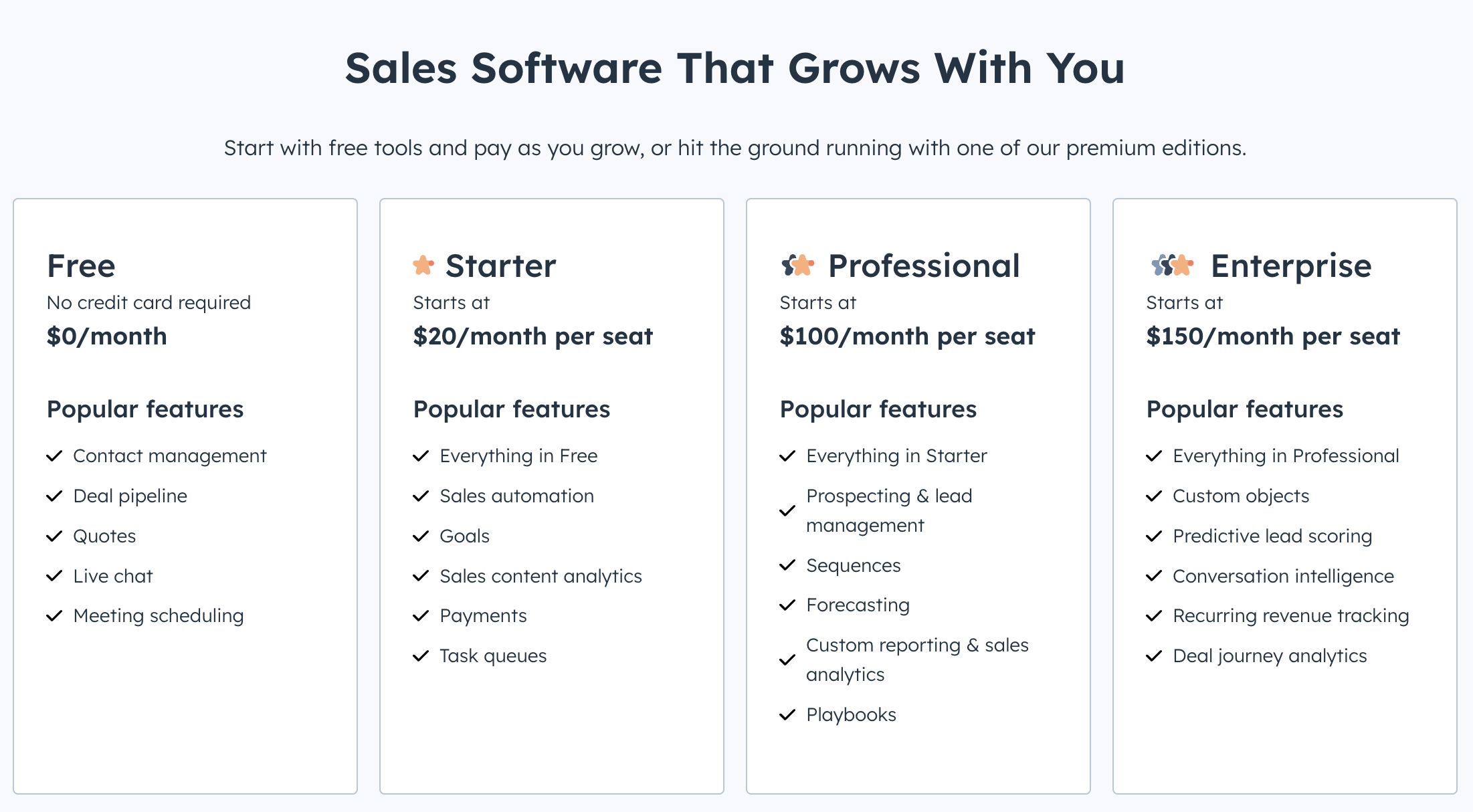
Once you move away from the free-forever version, HubSpot becomes quite steep. On an annual subscription plan, the HubSpot Sales hub pricing is as follows.
- Starter: $15 per user, per month for limited features.
- Professional: $90 per user, per month.
- Enterprise: $150 per user, per month.
3. Freshsales CRM
Best for: sales driven CRM system
Freshsales CRM is a sales-focussed product by the Freshworks team. With its sales-centric design, this CRM is limited to supporting entrepreneurs with their founder-led sales.
Key features
- AI-powered lead scoring: Identify sales-ready prospects with scores assigned by Freddy AI based on positive and negative signals.
- Sales sequences and automation: Get help converting with targeted outreach for prospects and customers.
- Customizable sales pipelines: Build pipelines with custom stages and probabilities based on your sales process.
Pros
- Sales-focussed, making it a great option for entrepreneurs who are building from a founder-led sales strategy.
Cons
- Limited customization options on lower-tier plans
- Limited CRM functionality outside sales. Not as well-rounded as other CRM platforms on the list
Price and plans
On an annual subscription plan, Freshsales starts from $15 per user, per month.
- Growth: Starts from $15 per user, per month.
- Pro: Starts from $39 per user, per month.
- Enterprise: Starts from $69, per user, per month.
4. Zoho CRM
Best for: Business development with some marketing features
Zoho CRM is one of the most well known small business CRMs on the market. There is a separate Zoho product for small businesses via Bigin , customer service teams and enterprise customers.
Key features
- AI Assistance: Zia, Zoho's AI, provides predictive sales insights and automation.
- Contact management: Presented in a data-driven dashboard for sales and support teams to collaborate from and get real-time notifications from customers.
- Integrations: Offers a huge range of integrations that are categorized by location and use including ones for shipping carriers, payment gateways and project management tools.
Pros
- Highly customizable, easy to use.
- Free plan that helps track leads and manage contacts though with limited features.
Cons
- Expect a steep learning curve if you're new to sales, you'll find Zoho very clunky. Users need to have a sales background and have expert knowledge around the sales cycle, forecasting and pipeline so it's not suitable for beginners.
- Difficult to set up certain integrations in Zoho CRM.
- Customer support – some users have reported poor experiences.
- Advanced features accessible only from high tier plans.
Price and plans
Zoho's free plan is limited to three users. After that, for more features and seats, an annual subscription plan is as follows.
- Standard: $14 per user, per month.
- Professional: $23 per user, per month.
- Enterprise: $40 per user, per month.
Conclusion
Choosing the right customer relationship management software can make a huge difference between whether or not you end up with an annoying CRM or a simple CRM solution. While Zoho, Freshsales CRM, and HubSpot offer great tools for entrepreneurs, folk CRM stands out as the best choice, particularly for growing teams of 20-50 people. Its simplicity, flexibility, and customizable workflows are perfectly suited for entrepreneurs who need a CRM that adapts to their unique business processes while supporting team growth. folk helps entrepreneurs stay organized, automate tasks, and build strong client relationships without being overwhelmed by unnecessary features, making it the ideal solution for those looking to grow their business efficiently. Try folk free, today.
👉🏼 Try folk now to never miss a follow-up and manage contact-based reminders with your team
Need a helping hand? Use our free tool to find your perfect CRM match.
More resources
- 20 CRM statistics for 2024
- Understanding your CRM system: What should you expect from all-in-one CRM software?
FAQ
Which CRM is best for entrepreneurs?
The best tool depends on team size and workflow. For solo to scaling teams, folk offers a CRM with pipelines, contact sync, email sequences, and automation. HubSpot suits free starters; Zoho is highly customizable; Freshsales is sales‑centric.
Why do entrepreneurs need a CRM?
A CRM centralizes contacts and activity, automates follow‑ups, tracks deals, and surfaces insights. It reduces manual work, prevents missed opportunities, and improves forecasting so teams can scale with consistent communication.
How much does a CRM cost for a small business?
Typical plans range from $10–$90 per user/month on annual billing. folk: Standard $24 per month (yearly commitment), Premium $48 per month (yearly commitment), Custom from $80 with a 14‑day free trial. Costs rise for advanced automation, analytics, and integrations.
How do entrepreneurs choose a CRM?
Define must‑have workflows and integrations, shortlist 2–3 tools, trial with real data, check scalability, onboarding, and support, compare total cost and contract terms, then run a 14‑day pilot before committing.
Discover folk CRM
Like the sales assistant your team never had