


Discover folk - the CRM for people-powered businesses
Attio vs Clay isn’t just a feature comparison. It’s a choice between a workflow that quietly runs itself and a stack that constantly needs babysitting.
Both tools promise modern, flexible CRM plus strong automation. Attio leans into structured, collaborative pipelines; Clay focuses on data enrichment and multichannel prospecting. Which one actually fits the way you work day to day?
We’ll break down how Attio and Clay handle data, automation, collaboration, and pricing so you can pick the right fit for your team. And if neither feels quite right, we’ll also look at folk as a smarter alternative for teams that want a simple, all-in-one workspace for relationships, workflows, and outreach.
| Main points |
|---|
|
Attio vs Clay
Attio vs Clay: Which CRM is the best for you?
Answer 4 quick questions to find the CRM that actually fits how you work.
👉🏼 Try folk now to manage contact-based reminders with your team
What is Attio?
Attio is a customizable platform designed for flexibility in managing customer relationships and workflows. It allows users to create tailored pipelines, manage customer data, and track interactions within an intuitive interface.
Key features of Attio
- Customizable pipelines: Attio allows users to fully customize sales pipelines, creating deal stages that match specific business processes.
- Contact and company management: It centralizes contact and company data, automatically tracking emails, notes, and tasks for a comprehensive view of interactions.
- Workflow automation: Users can automate tasks such as data entry and follow-ups based on specific triggers, improving efficiency.
- Task manager and reminders: Built-in tools help users stay on top of tasks and follow-ups, ensuring important activities are not missed.
What is Clay?
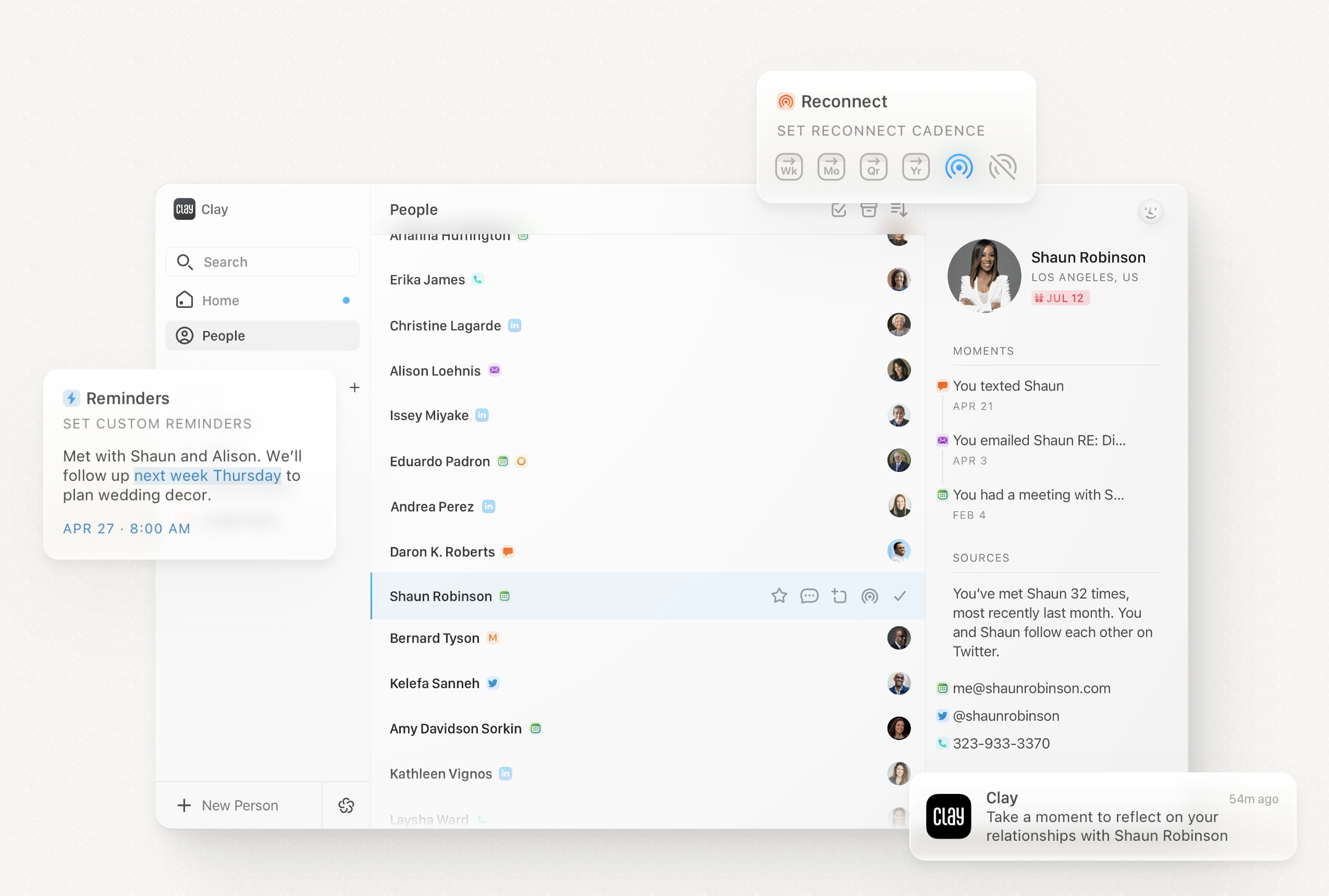
Clay is a customer relationship management tool designed to help users organize and manage contact information and interactions, with a focus on automation and contact enrichment.
Key features of Clay
- Contact management: The platform allows users to organize and manage contacts by consolidating information in one place. Users can add custom fields, notes, and tags to categorize and track interactions with each contact, making it easier to manage customer relationships.
- Automation: Clay CRM includes automation tools that handle repetitive tasks like contact updates and reminders, helping users streamline their communication and workflow processes.
- Search and filtering: The platform provides advanced search and filtering functionality, allowing users to segment their contact database based on various criteria such as engagement history, tags, or custom fields.
- Real-time updates: The platform provides real-time updates for contact records and tasks, ensuring that users have the latest information on their contacts and projects at all times.
Attio vs. Clay: Feature Comparison
Let's break down the key features of two CRM software solutions and take a closer look at their sales automation, email marketing tools, and contact management.
1. Sales pipeline management
Attio's pipeline management system is highly customizable, allowing users to create tailored stages that reflect their specific sales processes. The system supports a Kanban-style view for visualizing deal progression and includes automation triggers at each stage to enhance productivity. In contrast, Clay CRM does not offer a dedicated pipeline management feature as part of its core functionality. While users can organize contacts and tasks, the platform lacks specific tools for tracking deals or leads through stages in a sales pipeline.

2. Easy of use
Attio offers a user-friendly interface with intuitive navigation, making it easy for teams to manage customer relationships efficiently. Clay also emphasizes simplicity, providing a straightforward user experience that caters to users who prefer minimalistic design and functionality.
3. Contact enrichment
Attio automatically enriches people and company records with useful data points like logos and profile pictures, enhancing the quality of your contact database. Clay focuses on enriching contact information but does not highlight automatic enrichment features like Attio.
4. Outreach
Attio has an Outreach integration that allows users to trigger responses to email sequences and send messages directly from the platform. Clay lacks a dedicated outreach feature but enables tracking interactions and setting follow-up reminders.
5. Automation
Attio's automation feature streamlines workflows by automating tasks such as data entry and follow-ups, enhancing team efficiency. Clay also offers automation to manage repetitive tasks, allowing actions to be triggered based on conditions like time delays.
6. Integration
Attio supports various integrations to enhance its functionality, providing seamless connectivity with other tools. Clay also offers integrations, ensuring users can connect their CRM with other essential business applications for a cohesive workflow.
7. Artificial Intelligence
Attio CRM integrates AI to automate complex tasks, like classifying unstructured data and qualifying leads, enhancing CRM efficiency. Clay does not currently offer dedicated AI integration, focusing instead on core CRM functionalities.
Price and plans comparison
Let's take a closer look at the price and plans of both Attio and Clay.
Attio prices
Attio has a free plan limited to three seats per month. After that, an annual subscription is as follows.
- Plus: $34/seat/month.
- Pro: $69/seat/month.
- Enterprise: $119/seat/month.

Clay prices
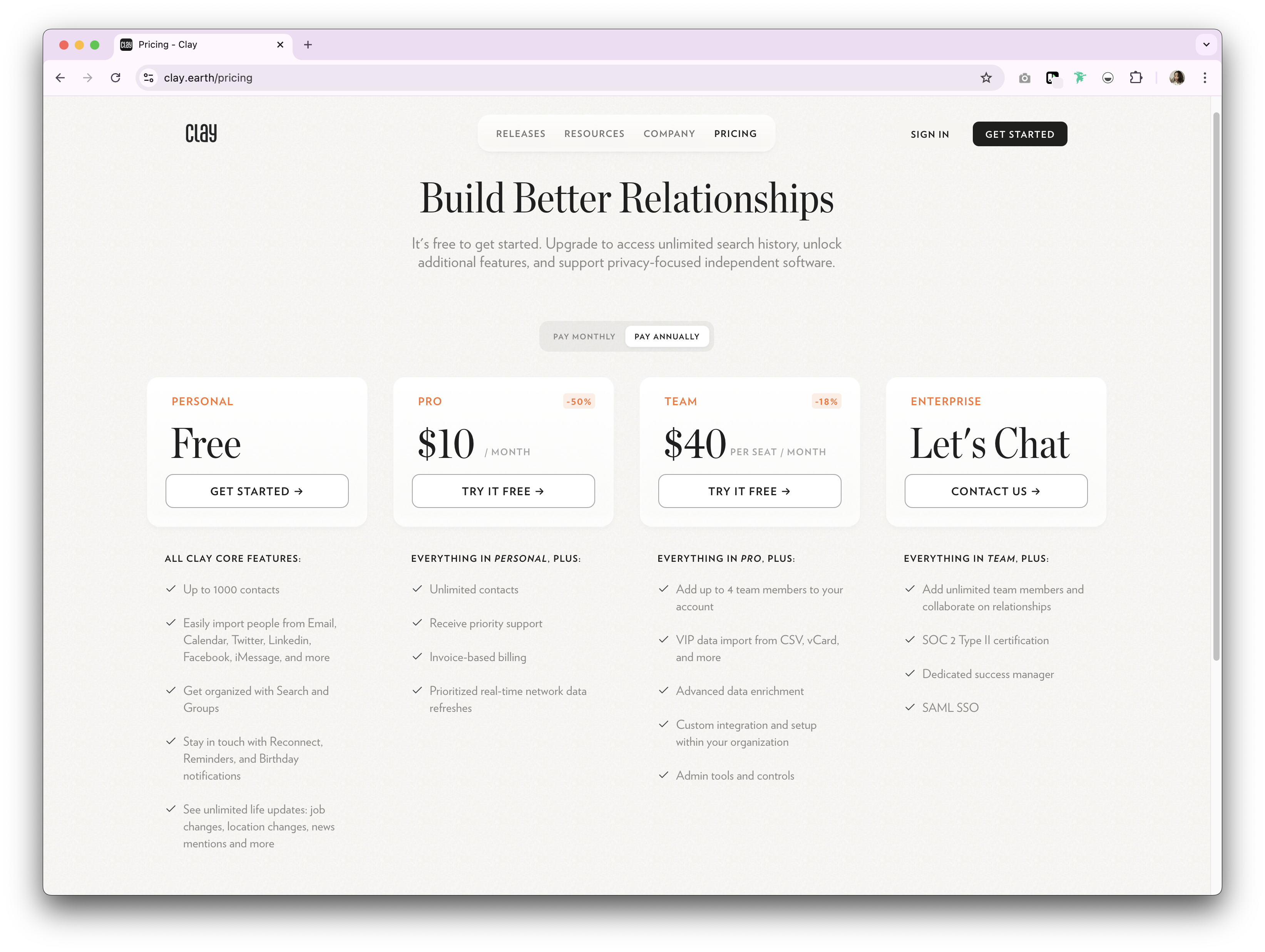
Clay has a free plan for personal use, for up to 1,000 contacts. After that premium plans are as follows on an annual subscription.
- Pro: $10 per user, per month.
- Team: $40 per user, per month.
- Enterprise: Undisclosed.
👉🏼 Try folk now to never miss a follow-up in your sales pipeline
Introducing folk CRM: the best alternative to Attio and Clay
Looking for an affordable alternative? We recommend folk. A multiple award-winning CRM platform loved for its easy-to-use, plug-and-play CRM system. For sales teams of 20-50 people evaluating contact management solutions, folk CRM offers the perfect balance of simplicity and power without the complexity of enterprise platforms.

.png)
.png)
Key features
- Ease of use and customization: Easily customize the pipelines, dashboards, automation, email sequences, so that you can use it across your sales cycle and pipeline management – and other business functions such as recruitment, marketing, and more.
- Social media integration: Import people and companies from LinkedIn, Sales Navigator, Instagram, and X within a click thanks to folk's Google Chrome extension.
- Contact sync from Gmail and Outlook: Full email sync enabling users to manage all communications directly from the CRM.
- Find email addresses in a click: Contact enrichment powered by Apollo, and Dropcontact so you can fill in missing data points with 1-click.
- Email sequences: Send email sequences with reminders if your leads don't reply to your first emails. It includes an AI integration allowing you to personalize email at scale.
- Notes and reminders: Attach notes directly to a contact's profile in folk, and access them on the go. And assign reminders so you know exactly when to follow-up.
Price and plans
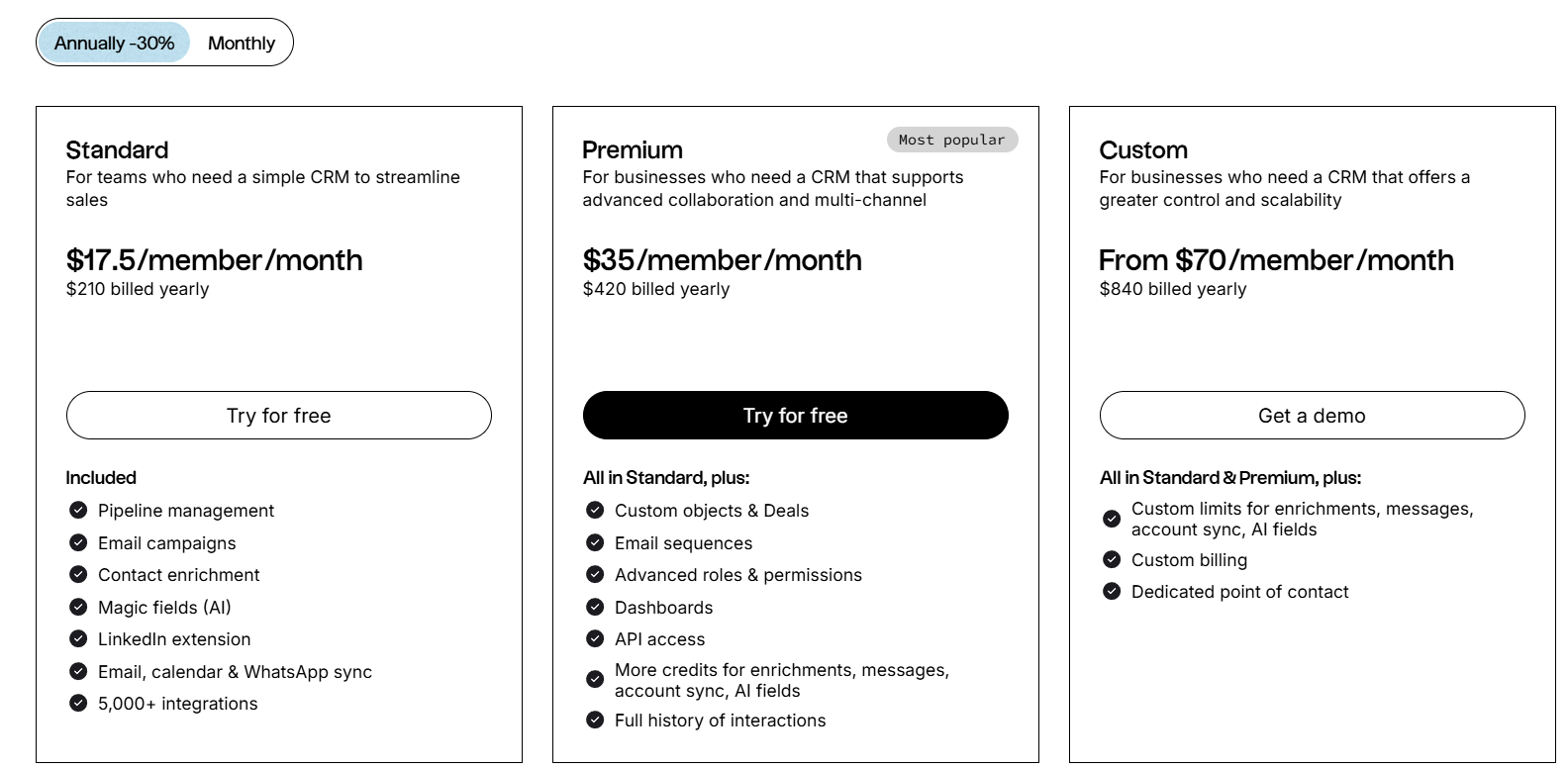
folk has a 14-day free trial. After that, there are affordable monthly or annual subscription plans. The annual subscription plan is as follows.
- Standard: $17.5 per user, per month.
- Premium: $35 per user, per month.
- Custom: Starts from $70 per user, per month.
Attio vs. Clay: What's the verdict?
CRM Comparison
| CRM | Customizable Pipelines | Automation | Contact Enrichment | Social Media Integration | Starting Price | Free Trial |
|---|---|---|---|---|---|---|
| folk | ✅ | ✅ | ✅ | ✅ (LinkedIn, Instagram, etc.) | $20/user/month | ✅ 14-day |
| Attio | ✅ | ✅ | ✅ | ❌ | Free; $34/user/month | ✅ Free Plan |
| Clay | ✅ | ✅ | ✅ | ❌ | Free; $10/user/month | ✅ Free Plan |
Both Attio and Clay offer robust CRM solutions for different business needs. Attio's customizable pipelines and workflow automation, makes it ideal for businesses seeking flexibility. Clay, on the other hand, excels in contact management and automation, offering a streamlined experience for organizing and enriching customer data. Making it suitable for businesses after simplicity. However, for mid-size sales teams of 20-50 people that need a more personalized approach to contact management, folk CRM provides the best alternative to these traditional CRM options, blending ease of use with customization at a price point that makes sense for growing teams.
FAQ
What is the key difference between Attio and Clay?
Attio is a sales CRM with customizable, stage-based pipelines, automation, and AI. Clay centers on contact management and enrichment with basic automation and no visual pipeline.
Does Clay have a sales pipeline?
No. Clay organizes contacts and tasks but does not offer stage-based deal tracking or a Kanban-style pipeline.
How much do Attio and Clay cost?
Attio: free up to 3 seats; Plus $34/user/mo, Pro $69, Enterprise $119 (annual). Clay: free up to 1,000 contacts; Pro $10/user/mo, Team $40, Enterprise undisclosed. Prices may vary by billing term and region.
What is a good alternative to Attio and Clay?
folk CRM offers customizable pipelines, contact enrichment, social import from LinkedIn, email sequences, and automation. Annual plans: Standard $20/user/mo, Premium $40, Custom from $80. 14-day free trial at folk.
Discover folk CRM
Like the sales assistant your team never had