


Discover folk - the CRM for people-powered businesses
Your business phone system is probably the last thing you want to think about. Until it fails. A dropped call with a hot prospect, a voicemail that never gets transcribed, a CRM that has no idea the call happened — these are the quiet revenue leaks that compound over time.
The good news: the market for VoIP phone systems for small businesses has never been better. The bad news: it's also never been more crowded or confusing.
In this guide, we tested and compared seven solutions, including Google Voice, Zoom Phone, Allo, Dialpad, Google Voice, Quo, Nextiva, and RingCentral. We looked at pricing, AI features, CRM integrations, call routing, and user reviews to give you a clear picture of which small business phone system fits which situation.
Before we get into each solution, we cover two quick things that will sharpen your evaluation: the core criteria that actually matter for a small business phone system, and why moving from a traditional phone setup to a VoIP system is almost always the right call.
Summary table
VoIP vs. traditional phone system: what actually changes
A traditional phone system routes calls over physical copper lines. A VoIP (Voice over Internet Protocol) system routes them over the internet.
That one difference has a cascade of practical consequences for a small business:
- Cost. Traditional setups require hardware, on-site PBX boxes, and per-line fees. A VoIP business phone system runs on your existing internet connection, starts at $10/user/month, and scales without touching any cables.
- Flexibility. Your team can make and receive calls from a laptop, a mobile app, or a desk phone. The office is wherever you have Wi-Fi.
- Features. VoIP platforms ship with call recording, voicemail transcription, IVR, and CRM integrations as standard. Most traditional systems charge extra for each of these, if they offer them at all.
- Maintenance. No hardware means nothing to break, no technician to call, and no upgrade cycle. The vendor handles everything server-side.
The main trade-off is call quality under a poor internet connection. But for any SMB with a decent broadband setup, VoIP wins on every dimension that matters.
Top 5 criteria to choose a VoIP phone system for small business
Not all VoIP office phone systems are built for the same buyer. Here is what separates a good fit from an expensive mistake.
1. Pricing transparency. Many providers advertise a low entry price, then charge separately for CRM integrations, call recording, AI features, or extra numbers. Always check what the plan you actually need costs, not just the starting price.
2. CRM and tool integrations. If your team logs calls manually in folk, HubSpot, or Salesforce, you're wasting 15–20 minutes per rep per day. Look for native integrations that automatically sync call recordings, transcripts, and contact updates.
3. AI features and what they cost. AI summaries, voicemail transcription, and AI receptionists are now table stakes. The real question is whether they're included in the base plan or locked behind a premium tier. The gap between providers on this point is significant.
4. Call routing capabilities. Can you ring multiple team members simultaneously? Can you set up an IVR? Can calls overflow to an AI receptionist when no one picks up? These features matter the moment your team grows past one person.
5. Support and cancellation policy. Some providers make it easy to get help and easy to leave. Others make both as painful as possible. Check Trustpilot reviews before you sign anything.
Google Voice, best for solo founders on Google Workspace
Google Voice in a nutshell
Google Voice is Google's phone system, launched in 2009. It is one of the most widely used phone systems in the world, partly because the personal version is completely free.
For businesses, it's a lean, no-frills VoIP phone system that integrates tightly with Google Workspace. If your team lives in Gmail, Google Calendar, and Google Meet, Voice feels like a natural extension of that stack.
Why Google Voice works great for budget-conscious solo users
Google Voice is honest about what it is: affordable and simple. The $10/month Starter plan covers one user, unlimited domestic calls, and voicemail transcription. That's genuinely useful for a solo founder or a two-person team. It’s also a phone system that is easy to use and simple to set up, which SMB owners will appreciate.
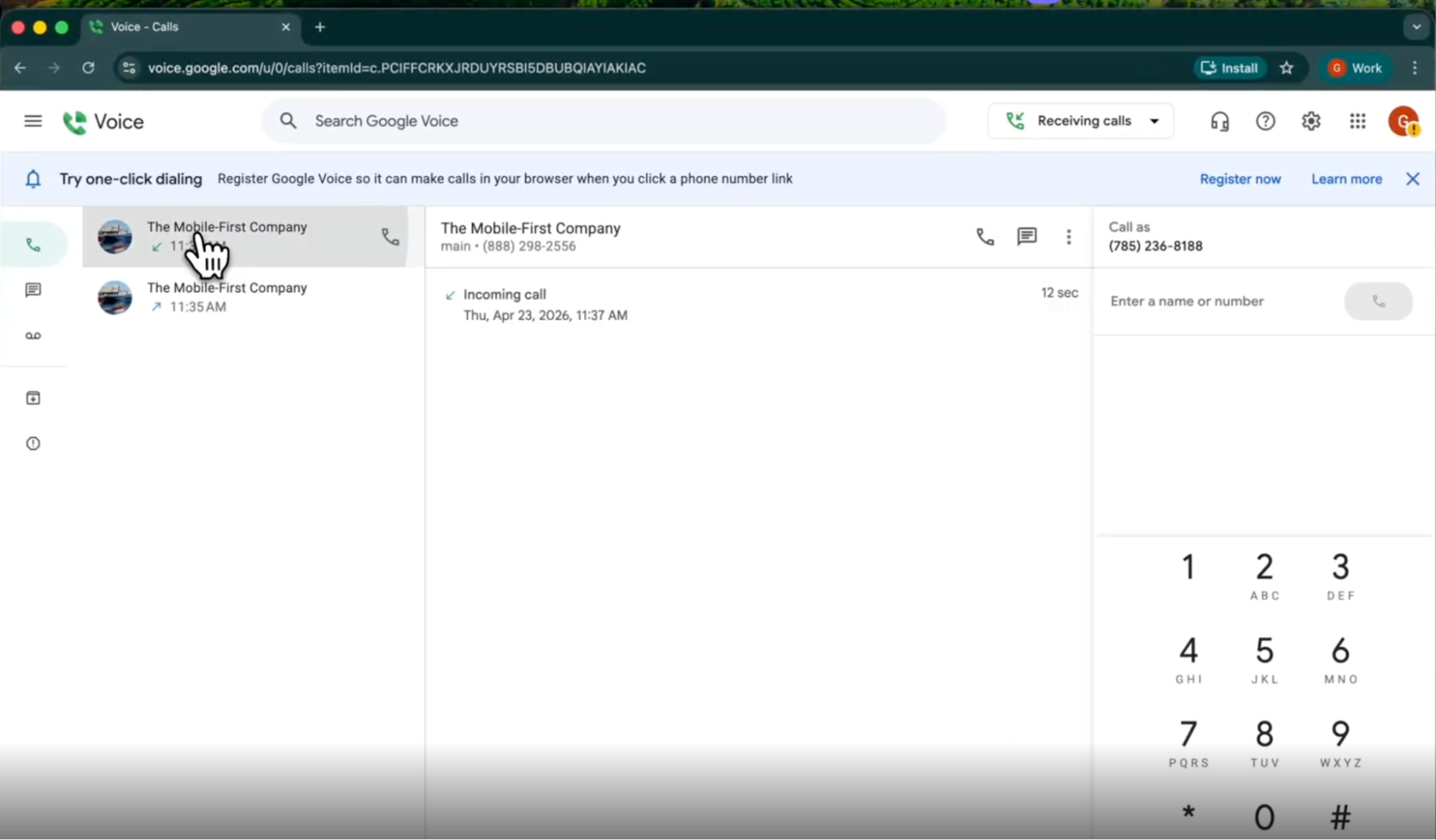
Where it breaks down is the moment you need anything more. There are no CRM integrations. The AI feature set is limited to spam detection and voicemail transcription. Call routing is basic on the Starter plan. And if you're outside the US, your options are severely limited.
The Play Store rating (1.6/5) is worth noting. Most negative reviews cite bugs on Android and a slow update cadence.
Google Voice pricing
- Starter (no Workspace): $10/user/month. One user only. US-only. Includes unlimited domestic calling, unlimited US texting, voicemail transcription.
- Starter (with Workspace): $10/user/month. Up to 10 users, 14 countries.
- Standard: $20/user/month. Unlimited users, on-demand call recording, call routing.
- Premier: $30/user/month. Automatic call recording, advanced reporting via BigQuery.
One local number included per user.
Demo video of Google Voice
Allo, best for small sales teams
Allo in a nutshell
Allo launched in 2024 as an AI-first, mobile-first phone system built specifically for small teams and salespeople. Allo is the newest entrant in this comparison, but it punches above its weight in AI depth and CRM integration quality.
Its philosophy is straightforward: every feature that makes a phone system genuinely useful (AI, integrations, call routing) should be included in the plan, not sold as an add-on.
Why Allo works great for small sales teams
What sets Allo apart is the combination of CRM depth and AI breadth at a price that doesn't require a finance team to approve. The CRM integrations automatically sync call recordings, transcriptions, and contact updates. No manual logging.
The AI Answering Service can handle inbound calls autonomously, gather caller details, and route appropriately, without requiring a $75/user plan like some competitors. It speaks English, French, and Spanish, which is useful for North American teams serving bilingual markets.
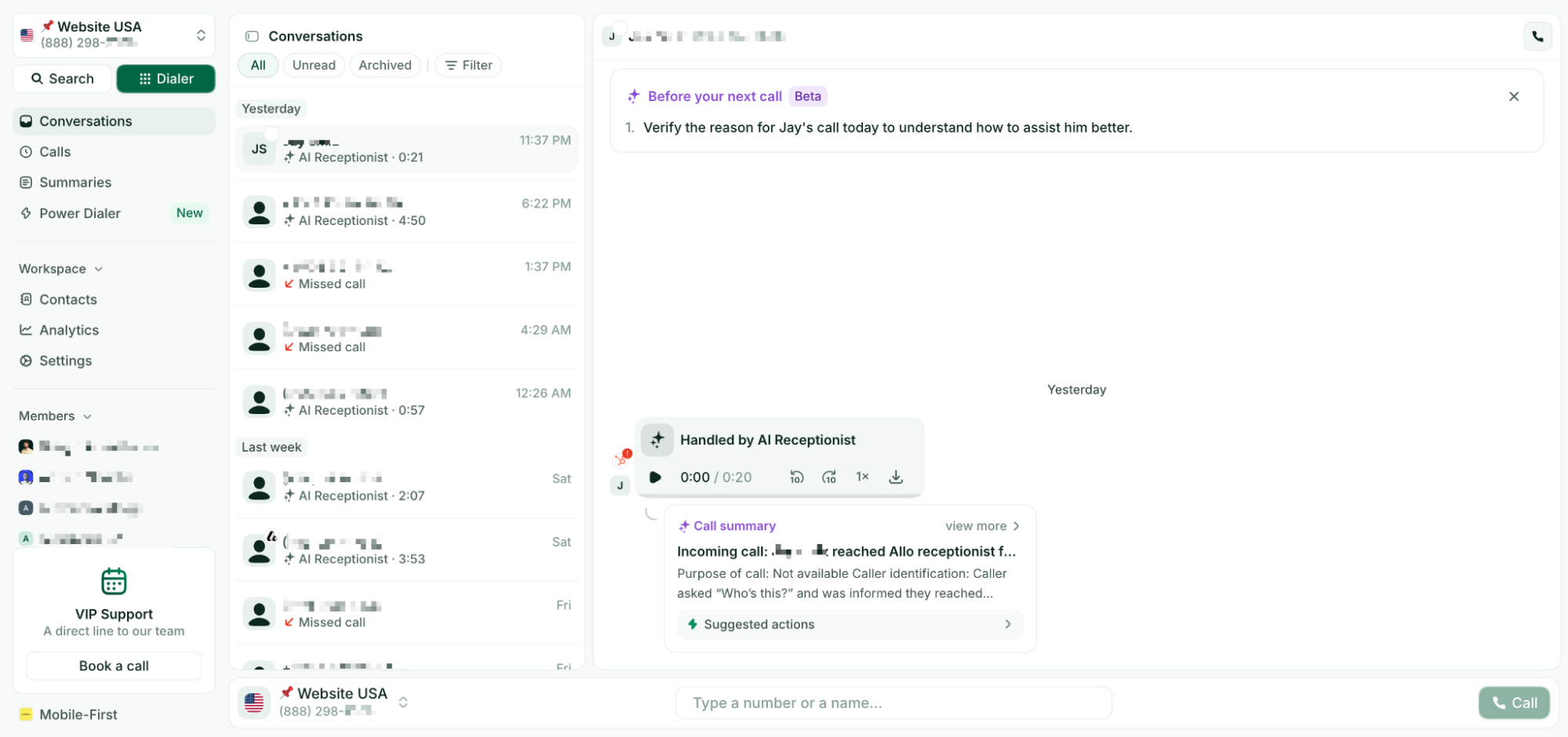
One honest caveat: Allo was founded in 2024. It's not the right fit if you need 50+ country coverage or deeply complex enterprise routing logic. But for a 2-15 person sales team that lives in a CRM and wants every call captured automatically? It's hard to beat.
Allo pricing
- Starter: $25/user/month. Includes unlimited calls, a local phone number, AI summaries, and IVR.
- Business: $45/user/month. Includes integrations, unlimited AI answering service, SMS, and international calls.
- One local or toll-free number included. Additional numbers cost $5/month.
- 7-day free trial. No add-ons.
Demo video of Allo
Zoom Phone, best for teams already using Zoom
Zoom Phone in a nutshell
Zoom Phone launched in 2019 as a direct complement to Zoom's video conferencing product. If you've been on a Zoom call at any point in the last five years, you already know the interface. Zoom Phone extends that same clean, familiar experience into a full VoIP office phone system.
It covers 49 countries, integrates natively with 195 apps, and lets users move seamlessly between a phone call and a video meeting without switching tools.
Why Zoom Phone works great for Zoom-native teams
The $18/user/month entry plan is competitive. It includes call summaries, voicemail transcription, task extraction from voicemails, and Salesforce/Slack integrations out of the box. That's a solid feature set for the price.
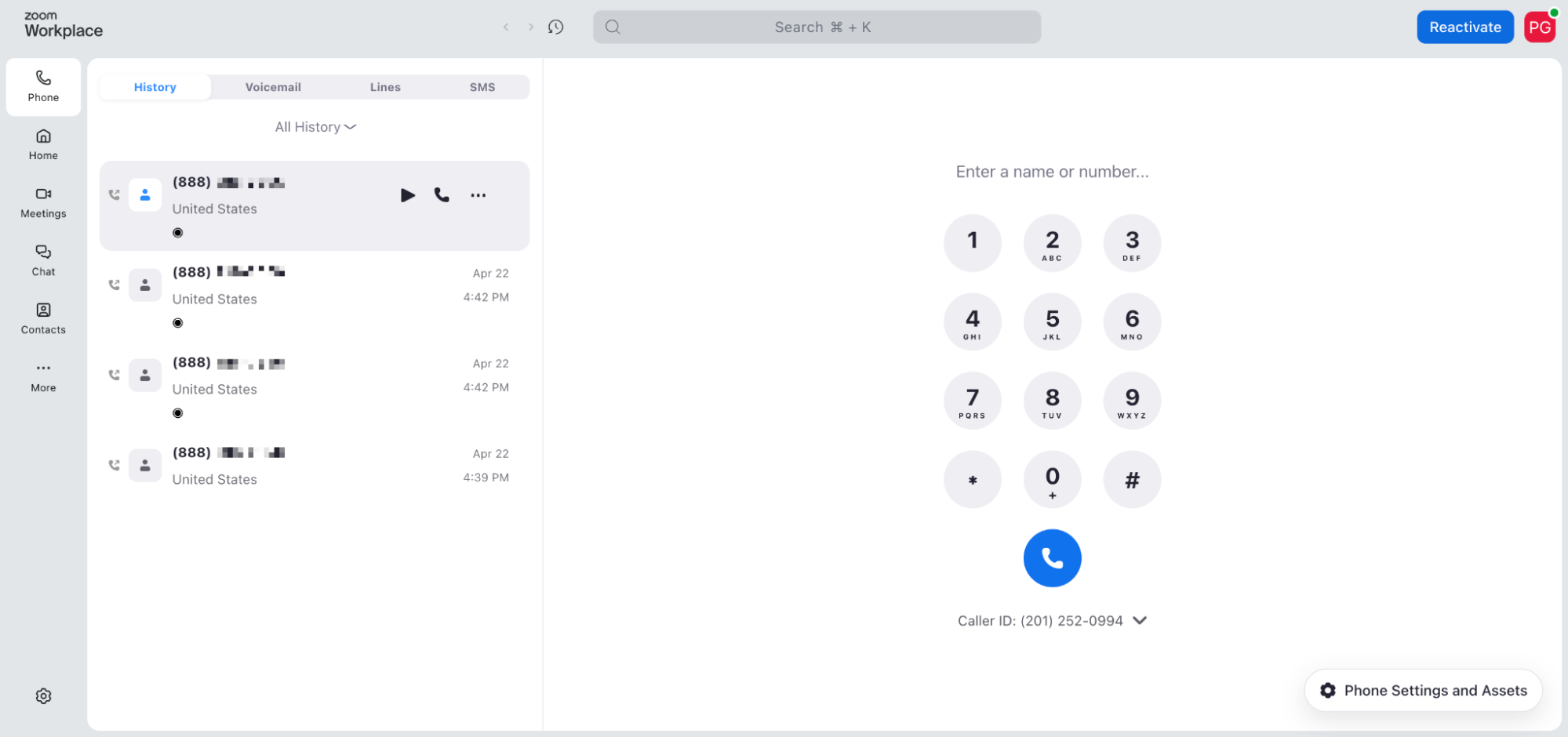
The weak point is the AI features. Currently Zoom doesn’t have an AI answering service and advanced AI features like coaching, scoring, etc.
The deeper value proposition is for teams that already rely on Zoom Meetings daily. At $24/user/month (Pro Plus), you get both Zoom Meetings and Zoom Phone bundled, which simplifies your tool stack and potentially saves money versus paying for them separately.
Zoom Phone pricing
- US & CA Unlimited: $18/user/month. Unlimited calls in the US and Canada, free SMS, AI features, Salesforce and Slack integrations.
- Pro Plus: $24/user/month. Adds meetings, team chat, unlimited call and meeting transcription.
- Business Plus: $29/user/month. More storage, larger meeting capacity, SSO.
Additional phone numbers are available as an add-on.
Demo video of Zoom Phone
Dialpad, best for SMBs wanting strong built-in AI
Dialpad in a nutshell
Dialpad was founded in 2011 making it one of the older solutions in this list.
Dialpad maintains three distinct products: Connect (general business phone), Support (customer service teams), and Sell (sales teams). Each has its own pricing. For our comparison, we're focusing on Connect.
Why Dialpad works great for AI-forward SMBs
Dialpad's AI is the headline. Dialpad has been building its own AI model since 2018. Live call coaching, real-time transcription, call scoring, and an AI support agent are all included in the $27/month Standard plan.
The trade-off is complexity. This matters more for a small team without a dedicated IT person than for a mid-market company with an admin team.
For teams that sell across multiple channels and need a battle-tested AI, Dialpad is genuinely compelling. For a 3-person team that just needs reliable calls and a CRM sync, it may be more tool than necessary.
Dialpad pricing
- Standard: $27/user/month. Unlimited calling in your country + US and Canada, a local number, call forwarding, call recording, up to 3 departments.
- Pro: $35/user/month. SSO, phone support, up to 25 departments.
- Add-ons available: internet fax, rooms, contact center.
Demo video of Dialpad
Quo, best for collaborative small teams
Quo in a nutshell
Quo (formerly OpenPhone) was founded in 2018 in Canada by Mahyar Raissi and Daryna Kulya. They found their first customers in Facebook groups and Reddit threads before going through Y Combinator. That scrappy origin is reflected in the product: practical, clean, and built for small teams that collaborate on calls rather than just taking them individually.
Its standout feature is the shared inbox: a collaborative space where team members can see call threads, tag each other, leave internal notes, and handle group calls together.
Why Quo works great for collaborative teams
The $19/month Starter plan is one of the more competitive entry prices in this comparison. But note that AI call summaries and transcripts are locked behind the Business plan at $33/month. The AI answering service (Sona) gives you 10 calls per plan, then charges $0.75 per call.
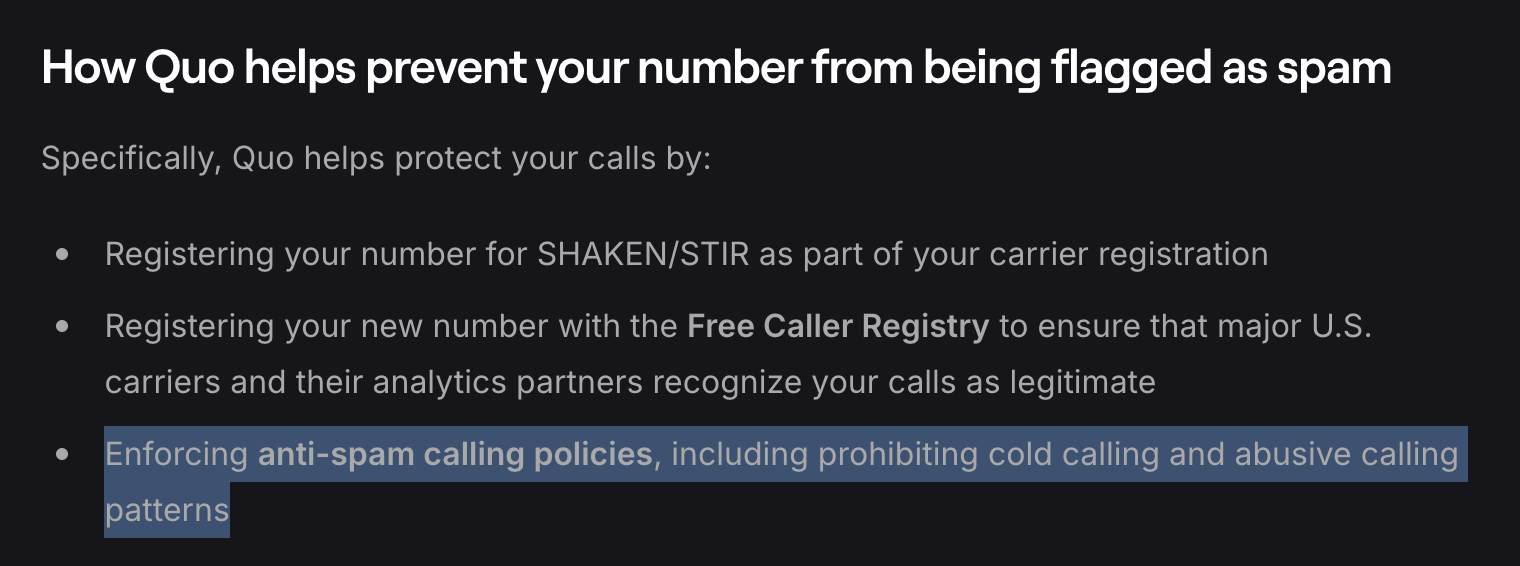
One significant constraint: Quo explicitly prohibits cold calling, and the platform actively monitors for it. If outbound prospecting is part of your workflow, read the terms of service carefully before signing up.
For teams that do a lot of collaborative inbound work — a shared support line, a small customer success team — the shared inbox and clean UI make Quo genuinely enjoyable to use.
Quo pricing
- Starter: $19/user/month. Local number, unlimited calling and messaging to US/Canada numbers, voicemail transcripts, 10 Sona AI calls.
- Business: $33/user/month. AI call summaries and transcripts, group calling, call transfers, analytics, HubSpot and Salesforce integrations.
- Scale: $47/user/month. Dedicated onboarding, priority support, inbound phone support.
One phone number per user included. Additional numbers: $5/user/month.
A 7-day free trial is available.
Demo video of Quo
Nextiva, best for US teams wanting an all-in-one platform
Nextiva in a nutshell
Nextiva was founded in 2008. Its original mission was to help any business operate like a Fortune 500 company. Today, Nextiva is one of the most established names in business communications, offering voice, video, team chat, SMS, and light CRM capabilities in a single platform.
It holds a 4.5/5 on G2 and a 4.8/5 on Trustpilot, which places it among the best-reviewed solutions in this comparison.
Why Nextiva works great for US-based SMBs wanting one platform
The breadth of Nextiva's platform is its clearest selling point. A small team can replace their phone system, video conferencing tool, and internal chat in one subscription. That simplicity has real value.
The catch is that the Core plan ($23/user/month) is surprisingly bare. Call recording and advanced routing require the Engage plan ($50/user/month). CRM integrations aren't available on Core either. And AI features, voicemail transcription aside, require the Power Suite CX plan at $75/user/month. The AI Receptionist is a separate add-on at $99/month per 100 interactions.
So while Nextiva can do a lot, actually unlocking that potential costs more than the entry price suggests.
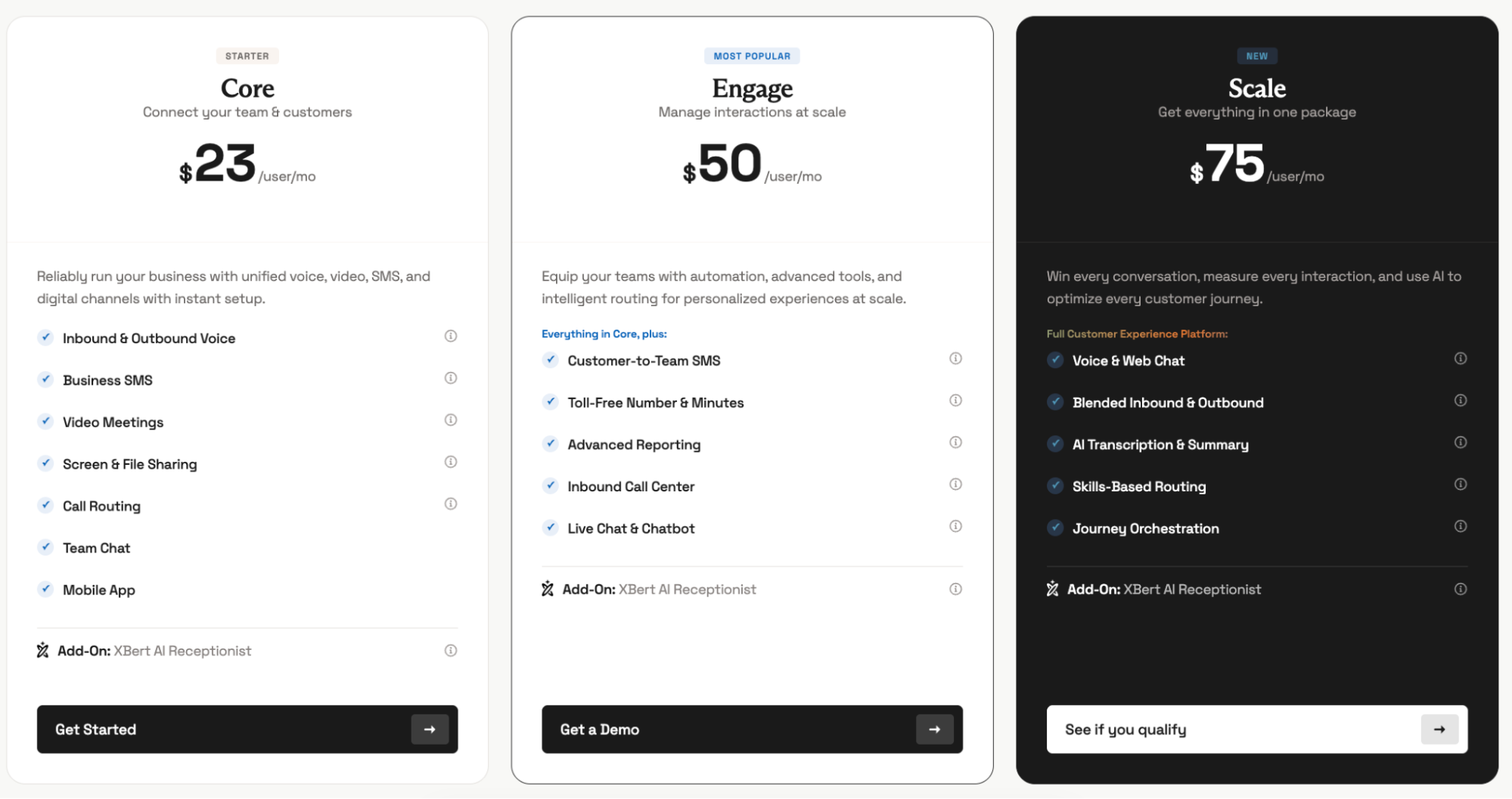
Nextiva pricing
- Core: $23/user/month. Phone number, SMS, video meetings, call routing (basic), team chat.
- Engage: $50/user/month. Advanced reporting, web chat, a toll-free number.
- Power Suite CX: $75/user/month (up to 100 agents). AI transcription, intelligent routing, AI summaries.
- AI Receptionist: $99/month per 100 interactions (separate add-on).
One local or toll-free number included. Cancellation requires a phone or email request.
Demo video of Nextiva
RingCentral, best for established US/Canada businesses needing a rich phone system
RingCentral in a nutshell
RingCentral has been around since 1999. It's the incumbent in this comparison; the solution every other provider on this list is trying to out-maneuver on AI, pricing, or UX. With 100+ country coverage, lots of native integrations, and a deeply documented feature set, it's a reliable choice for businesses that want battle-tested infrastructure.
Its G2 score (4.3/5, 3,071 reviews) is solid. Its Trustpilot score (1.9/5) tells a different story, one dominated by support complaints and cancellation horror stories.
Why RingCentral works for large-ish SMBs and established teams
RingCentral is the "safe" choice on paper. It has every integration you could want, it works in 100 countries, and the documentation is extensive. For a 20-person business that needs Salesforce sync, multi-office lines, and fax support, it covers all the bases.
But the experience beIf you sign up for RingCentral, read the cancellation clause before you sign. You might stay for years anyway. But knowing what you're getting into is just good practice.
RingCentral pricing
- Core: $30/user/month. Unlimited domestic calling, call recordings, video meetings.
- Advanced: $35/user/month. CRM integrations (Salesforce, HubSpot, etc.), reporting.
- Ultra: $45/user/month. Unlimited storage, webinars, device analytics.
- AI Receptionist: From $59/month for 100 minutes (add-on, separate billing).
- Conversation Intelligence: $60/user/month (separate add-on).
- One local or toll-free number included. Additio
yond the feature sheet is where RingCentral loses points. They make it difficult to cancel the subscription : you’ll have no choice but to get on a call, get transferred multiple times before you can effectively cancel.
Demo video of RingCentral
Conclusion
Choosing the right VoIP phone system for your small business comes down to three questions: How big is your team? How important are CRM integrations and AI? And how much complexity can you absorb?
Here's a quick recap to guide your decision:
- For folk users, only Allo and Quo offer a native integration
- For solo founders or micro-teams on Google Workspace: Google Voice at $10/user/month is hard to argue against. It does the basics well and stays out of your way.
- For small sales teams (1–15 people) who live in a CRM: Allo gives you the deepest CRM integrations and the most inclusive AI feature set at a flat, predictable price.
- For teams already using Zoom daily: Zoom Phone at $18/user/month is the natural extension. The Pro Plus bundle ($24) makes even more sense if you also pay for Zoom Meetings.
- For teams that prioritize AI features: Dialpad's proprietary AI model — live coaching, scoring, and summaries all included — is the strongest in this comparison.
- For collaborative inbound teams: Quo's shared inbox and clean interface make it a pleasure to use, as long as you don't do cold outreach.
- For US teams wanting one platform for everything: Nextiva bundles voice, video, and chat, but budget for at least the Engage plan to get the features you actually need.
- For established businesses needing enterprise-grade integrations: RingCentral is reliable and extensive. Just keep in mind that the cancellation process is long.
Most platforms offer a free trial. Pick your top two, run them in parallel for a week, and trust your team's feedback over any comparison article (including this one).
FAQ
What is the best VoIP phone system for SMBs?
There's no single best answer: it depends on your team size and priorities. For small sales teams that need CRM integrations and AI from day one, Allo and Quo are the strongest options. For teams already on Google Workspace with simple needs, Google Voice does the job at minimal cost. If AI depth is the priority, Dialpad is the most mature option in this space. The honest answer is to trial two options side by side before committing.
What are the top 5 criteria to choose a phone system?
The five criteria that matter most for a small business are: (1) pricing transparency: check what the plan with the features you actually need costs, not just the entry price; (2) CRM integrations: native, two-way sync saves significant time per rep per day; (3) AI features and their pricing: some providers include AI in all plans, others charge $60+/user/month for it; (4) call routing capabilities: IVR, simultaneous ring, and AI overflow handling matter as soon as your team grows; and (5) cancellation policy: some platforms like RingCentral make leaving nearly impossible, which is worth knowing before you sign.
How do I integrate my phone system with my CRM?
Most modern VoIP business phone systems offer native integrations with major CRMs like folk, HubSpot, and Salesforce. The integration typically works by installing a connector from the CRM's app marketplace and authorizing the connection. Once set up, calls are logged automatically, recordings and transcripts are attached to contact records, and follow-up tasks can be created without manual input.
How much will I pay for a phone system for my small business?
Expect to pay between $10 and $50 per user per month for a VoIP phone system for small business, depending on the features you need. Entry-level plans (Google Voice at $10, Quo at $19, Nextiva Core at $23) cover basic calling and texting. Mid-tier plans with CRM integrations and AI summaries typically range from $27 to $45 per user per month. Watch out for add-ons: AI receptionists, conversation intelligence, and extra phone numbers can add $5 to $60 per user on top of the base price. For a 5-person team, a realistic all-in monthly budget is $125–$225/month.
Discover folk CRM
Like the sales assistant your team never had