


Discover folk - the CRM for people-powered businesses
Email is the backbone of contemporary sales communication: it facilitates deal progression, follow-ups, and relationship building.
As teams increasingly depend on automated outreach, multi-channel engagement, and precise tracking, CRMs are differentiating themselves based on the quality of their native email integrations.
While both Streak and Monday CRM provide built-in email workflows, their usability, depth, and influence on daily sales operations vary significantly. For teams prioritizing simplicity and fast, reliable email execution, folk offers one of the most streamlined and powerful email integrations available in any CRM, making it effortless to send, track, and automate outreach directly from your workspace.
Why Does Email Integration Matter?
Effective email integration elevates a CRM from a mere database to a cohesive communication hub. Rather than switching between tabs or using disparate tools, sales representatives can send messages, automate follow-ups, and monitor engagement—all from a single platform.
- Centralized communication. Automatically sync all emails—both sent and received—to the appropriate contact or deal.
- Smarter follow-ups. Automated reminders and sequences enable reps to follow up at optimal moments without manual intervention.
- Real-time tracking. Open rates, clicks, and replies are directly fed into the CRM to inform next steps.
- Cleaner data. Emails instantly enrich contact profiles with valuable context and conversation history.
- Email templates. Reusable and personalized templates ensure team consistency while saving time.
- Outreach automation. Effortlessly send bulk emails, sequences, or triggered messages based on deal stages or contact activity.
When a CRM manages email seamlessly, sales reps can focus on meaningful conversations that drive revenue, distinguishing a good CRM from one that genuinely accelerates sales!
What is Streak?

Streak is a lightweight CRM seamlessly integrated within Gmail, transforming your inbox into a unified pipeline for sales, support, and account management. Users can manage deals, track stages, and collaborate on threads directly from the familiar Gmail interface without having to switch tabs. At its core, Streak emphasizes email, offering real-time tracking and pipeline views over your ongoing Gmail conversations.
What is Monday CRM?

Monday Sales CRM is built on the monday.com work management platform, offering teams a visual approach to managing pipelines alongside projects. The Emails & Activities app connects with both Gmail and Outlook, enabling users to send, receive, and log emails directly within their boards while tracking opens and replies right where the action occurs. With templates and automation features, follow-ups can be standardized, ensuring lead statuses, tasks, and email history remain synchronized.
Feature comparison of Streak and Monday CRM
Integration Capabilities
Streak seamlessly integrates within Gmail, transforming your inbox into a comprehensive CRM without the hassle of additional windows or apps. Every email you send or receive is automatically logged to the appropriate pipeline and shared within your team’s workspace, ensuring you have an up-to-date timeline for each deal without the need for manual bcc’ing.
Meanwhile, Monday CRM’s Emails & Activities app allows you to connect up to six Gmail or Outlook accounts for two-way synchronization, so emails sent or received appear as items on your boards alongside calls and tasks. Although it lacks native in-CRM calendar syncing, you can create simple automations or utilize Monday’s Calendar view to visualize your scheduled events.
Sync Frequency and Reliability
Streak syncs your emails in real time, operating directly within Gmail’s infrastructure. This means that as soon as you send or receive a message, Streak instantly logs it into the relevant pipeline, allowing your team to view the latest activity without any delay. There’s virtually no lag or queuing—messages and updates appear immediately in both your inbox and Streak’s interface. By integrating directly with Gmail, you also benefit from Google’s exceptional uptime and reliability.
In contrast, Monday CRM’s Emails & Activities app syncs your inbox every few minutes by default, polling Gmail and Outlook for new messages to convert into board items. While this results in a slight delay compared to push-based systems, updates typically show up within two to three minutes. If you require more immediate responsiveness, you can customize the polling intervals or implement webhooks for updates in under a minute.
Two-Way Email and Calendar Sync
Streak’s Mail Merge tool, integrated directly into Gmail, allows you to send personalized mass emails to hundreds of recipients in under two minutes—no need for CSV imports or third-party apps. You can easily insert custom variables (like first name, company, and deal data) from your pipelines, schedule automatic follow-ups in the same thread, and even A/B test subject lines to enhance reply rates. Every sent message and follow-up is logged seamlessly in your Streak timeline, ensuring you maintain visibility on who’s opened, clicked, or replied. However, it’s important to note that Streak’s campaign features fall short on advanced analytics dashboards, meaning you won’t receive detailed reports on unsubscribes or bounce handling without the addition of another tool.
Conversely, Monday’s Emails & Activities app offers native two-way email synchronization for both Gmail and Outlook through straightforward integration recipes—new messages and replies automatically convert to pulses on your boards, ensuring your communications remain trackable alongside deals. Additionally, calendar items sync effortlessly through Monday’s Calendar Sync feature: you can map date or timeline columns to Google Calendar, Outlook, iCal, or any external calendar, with events appearing on both your board and calendar within minutes.
Mail Merge and Campaigns
Streak’s Mail Merge tool is integrated directly within Gmail, allowing you to send personalized mass emails to hundreds of recipients in under two minutes—no need for CSV imports or third-party apps. You can easily insert custom variables (such as first name, company, and deal data) from your pipelines, schedule automatic follow-up sequences within the same thread, and even A/B test subject lines to enhance response rates. Each sent message and follow-up is logged automatically in your Streak timeline, ensuring you maintain visibility on who has opened, clicked, or replied. However, Streak’s campaign features lack advanced analytics dashboards, so detailed reporting on unsubscribes or bounce management will require an additional tool.
Monday CRM’s Emails & Activities app can sync up to six Gmail or Outlook accounts and includes a Group Emailing action for sending bulk messages to board items and contact lists. You can automate follow-ups using monday.com automations or integrate with Mailchimp for comprehensive email-marketing functionality. Keep in mind that without Mailchimp—or a similar add-on—you won’t have access to native campaign analytics beyond basic send logs available on your boards.
Open and Click Tracking
Streak integrates a small tracking pixel and link tracker directly into Gmail, providing real-time “eye” icons that indicate each time an email is opened or a link is clicked within a specific thread. By hovering over the green eye, you can view timestamps, locations, and click data for each link without leaving your inbox. Since it’s built entirely on Gmail’s API, setup is minimal and feedback is immediate; however, you won’t have access to aggregated campaign dashboards or multi-link heat maps beyond individual message insights.
Monday’s Emails & Activities app records message opens when you send emails directly through the board interface, but it doesn’t track which links were clicked natively. To obtain click-through rates, you’ll need to embed links with UTM parameters and retrieve the data into your board through automations, or by integrating a marketing tool like Mailchimp.
In-Inbox CRM Experience
Streak operates entirely within Gmail, offering complete CRM capabilities—including pipelines, contact details, and email logging—without requiring you to leave your inbox. The sidebar displays deal stages, custom fields, and shared notes alongside every conversation, ensuring you always have the context you need at your fingertips. You can easily drag and drop emails into different pipelines or update statuses in real time, creating a seamless integration between your inbox and CRM. However, since Streak is exclusively for Gmail, you won't experience this same in-inbox functionality if you decide to switch to Outlook or another email client.
In contrast, monday.com's Emails & Activities app is situated on your boards rather than in your inbox. When you connect Gmail or Outlook, emails transform into pulses associated with relevant items, allowing you to reply or add notes directly from monday.com. This setup is ideal for visual teams that manage tasks on boards, but it does not provide a true in-inbox sidebar experience—you'll be working within monday.com instead of your mail client.
folk CRM: The Ultimate Email CRM
folk empowers teams with a seamless, interconnected email workflow that enhances productivity. It centralizes communication, automates follow-ups, and simplifies sequencing, all within a user-friendly CRM interface. With a remarkable 4.5/5 rating on G2, folk distinguishes itself as one of the top-rated lightweight CRMs for contemporary sales and partnership teams.
Designed specifically for startups, agencies, and growing sales teams of 20-50, folk streamlines email operations to make them smooth and efficient.
Extract Insights from Emails
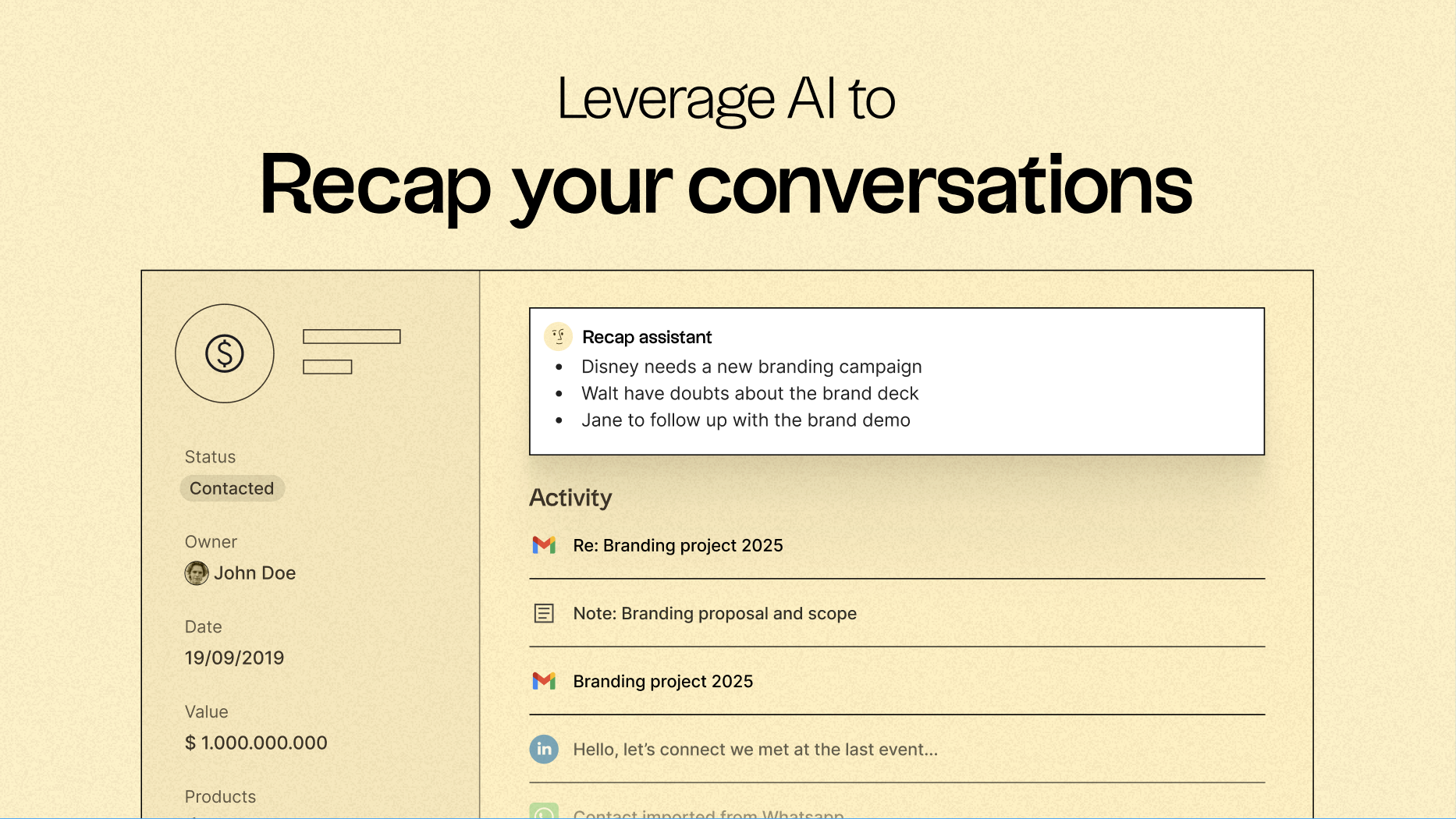
One of folk’s standout features is its capability to centralize communication and convert every email and call into actionable insights, thanks to native email synchronization with Gmail and Outlook, along with AI-driven analysis. Teams can:
- Quickly recap past conversations with a single click using folk's Recap Assistant, which gathers information from emails and notes to create a summary, providing context in seconds.
- Follow up at the optimal time by leveraging AI that scans conversations to notify you when a follow-up is necessary and even drafts a reply.
Email Sequencing & Automation
folk’s integrated sequencing engine simplifies the creation of automated outreach flows directly within the CRM. You can design multi-step email sequences, personalize messages using CRM fields, and automatically log every interaction. Whether you're nurturing leads, executing outbound campaigns, or re-engaging inactive deals, folk delivers a robust yet straightforward sequencing workflow without the need for additional tools.
Set conditions based on your CRM variables to trigger automatic email sends, such as when a deal closes or when you acquire a new lead.
AI-Powered Follow-Up Reminders
folk’s AI Follow-Up feature ensures that no conversation slips through the cracks. By analyzing your email history, folk notifies you when a contact hasn't responded, highlights conversations that have cooled off, and pinpoints the best time for re-engagement. It functions as a built-in assistant, keeping your inbox organized and your pipeline active—without manual tracking.
folk starts at just $20 per user per month, featuring native email integration and sequencing, along with a 14-day free trial—no credit card needed.
Conclusion
In summary, Streak excels with its in-Gmail integration and real-time tracking, perfect for teams who prioritize a seamless inbox experience. Monday CRM offers visual management and decent email synchronization but lacks the immediacy of Streak. However, for teams that rely heavily on email integration, automation, and sequencing, folk stands out as the best alternative. With its intuitive workspace, advanced email sequencing, and AI-powered follow-ups, folk transforms email into a powerful sales engine, ensuring no opportunity is missed.
Start your 14-day free trial or book a demo today.
Discover folk CRM
Like the sales assistant your team never had
