


Discover folk - the CRM for people-powered businesses
Email is the cornerstone of modern sales communication: it's where deals advance, follow-ups occur, and relationships flourish.
As teams increasingly depend on automated outreach, multi-channel engagement, and detailed tracking, CRMs are competing more on the effectiveness of their email integrations.
While both Pipedrive and Freshsales feature built-in email workflows, their usability, depth, and impact on daily sales tasks vary significantly. For teams prioritizing simplicity and fast, dependable email execution, folk stands out with one of the cleanest and most robust email integrations available in any CRM, streamlining the process of sending, tracking, and automating outreach directly from your workspace.
Why Does Email Integration Matter?
Effective email integration elevates a CRM from a basic database to a cohesive communication hub. Rather than toggling between tabs or relying on disparate tools, sales reps can send messages, automate follow-ups, and monitor engagement all in one location.
- Centralized communication. All emails—whether sent or received—automatically sync with the appropriate contact or deal.
- Smarter follow-ups. Automated reminders and sequences enable reps to follow up at the right time without additional manual effort.
- Real-time tracking. Open rates, clicks, and replies are directly integrated into the CRM, guiding subsequent actions.
- Cleaner data. Emails instantly enrich contact profiles with context and conversation histories.
- Email templates. Reusable and personalized templates ensure teams maintain consistency and save time.
- Outreach automation. Send bulk emails, sequences, or triggered messages based on deal stages or contact activities.
When a CRM manages email seamlessly, reps can stop juggling tools and concentrate on the conversations that drive revenue. This distinction defines a good CRM versus one that truly accelerates sales!
What is Pipedrive?
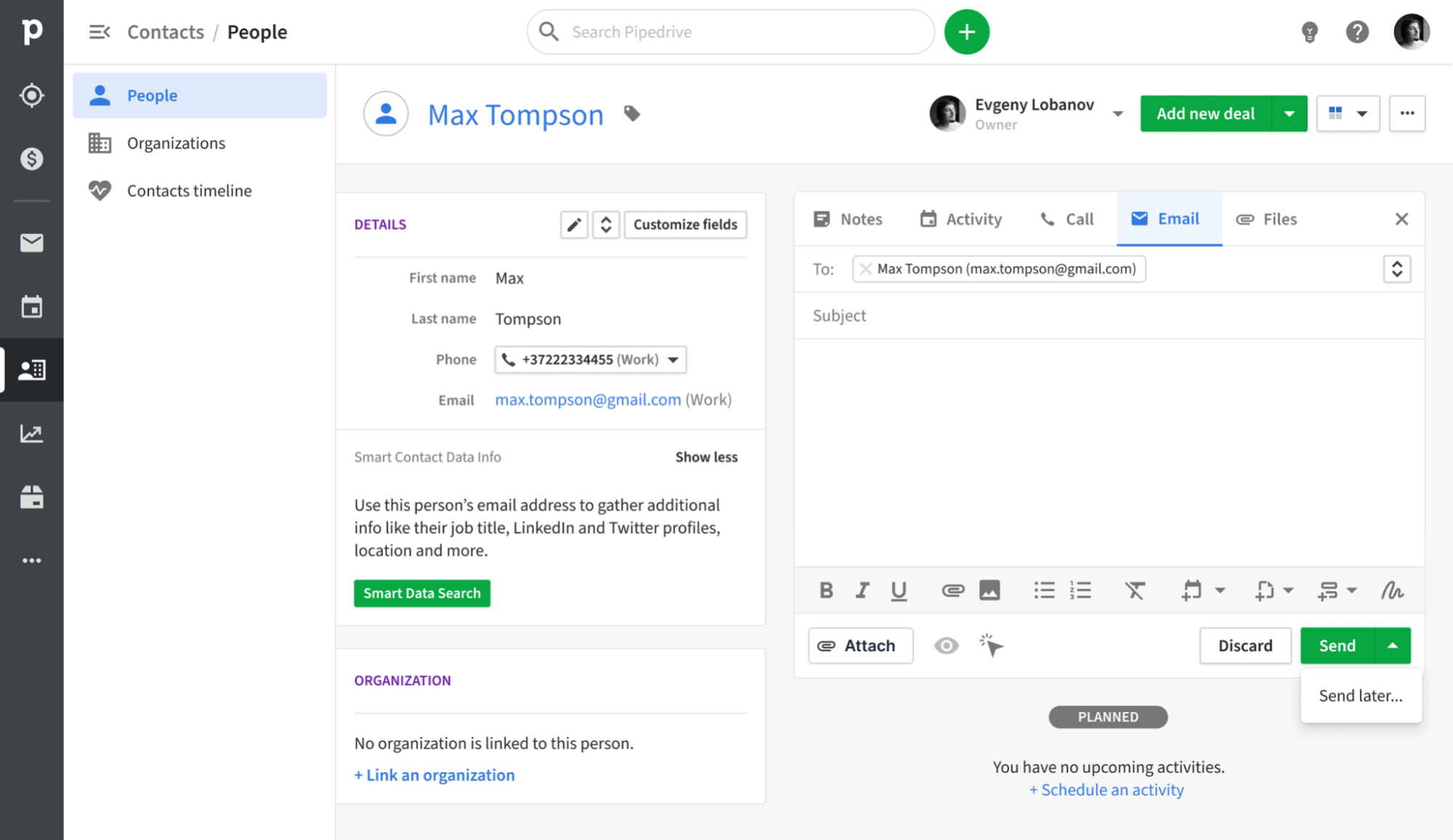
Pipedrive is a sales-centric CRM that revolves around a visual pipeline, aiding representatives in tracking deals from initial contact to closure. Its email synchronization seamlessly integrates with Gmail, Outlook, and other IMAP providers, ensuring that every message is automatically logged under the appropriate contact and deal. With a built-in sales inbox and basic campaign capabilities, teams can manage their outreach and pipeline updates in one centralized location, eliminating the need for multiple tools.
What is Freshsales?

Freshsales is the sales CRM from Freshworks tailored for small to mid-sized teams that seek a user-friendly interface paired with robust automation features. Users can link their Gmail or Microsoft 365 accounts and opt for either one-way or two-way synchronization, keeping email threads consistent between the mailbox and the CRM. With additional features like templates, bulk email sending, and activity timelines, email becomes integral to how representatives engage with their leads and opportunities.
Feature comparison of Pipedrive and Freshsales
Integration Capabilities
Pipedrive seamlessly integrates with Gmail and Outlook (with IMAP support for other providers), ensuring every inbound and outbound message is accurately recorded against the appropriate contact or deal. With the Smart Email BCC address, you can log messages directly from your email client—just add the dynamic BCC, and Pipedrive handles the rest. Its native calendar integration with Google and Microsoft calendars automatically populates your contact timelines with all your meetings, providing a comprehensive view of every customer interaction.
Freshsales features native plugins for Gmail and Outlook that display email threads, scheduling tools, and relevant contact information right in your inbox. Once connected, Freshsales scans incoming emails for recognized contact addresses and automatically logs conversations, helping you reduce clutter by allowing you to select which folders to sync.
Sync Frequency and Reliability
Pipedrive’s email synchronization with Gmail and Outlook is designed to operate every few minutes, striking a balance between speed and system performance. Both outbound and inbound messages are captured and matched to contacts or deals in under five minutes, minimizing the chances of missing or delayed logs. The IMAP fallback adheres to standard IMAP IDLE protocols for push notifications, providing near-instant updates from supported providers.
Freshsales utilizes native plugins to create a constant connection with your Gmail or Outlook account, enabling real-time syncing of emails and calendar events. Incoming messages from known leads appear within seconds, while outgoing emails logged in the CRM are instantly reflected in your email thread. Calendar events also synchronize immediately, ensuring that meetings scheduled in Freshsales are promptly displayed in your personal calendar.
Two-Way Email and Calendar Sync
With Advanced plans and above, Pipedrive’s Group Emailing allows you to select up to 100 contacts from any list to send bulk messages featuring merge tags and reply tracking. Additionally, the Pipedrive Campaigns add-on offers a dedicated module for creating email journeys, segmenting audiences, and analyzing open and click rates. All replies are automatically mapped back to the corresponding deal or contact. However, it's worth noting that the Campaigns add-on comes with an extra cost, and its reporting capabilities are somewhat limited when compared to dedicated email marketing platforms.
Freshsales provides native plugins for Gmail and Outlook, allowing you to choose between two-way or one-way email sync during setup, with two-way being the default. This ensures that both incoming and outgoing emails seamlessly flow between your mailbox and the CRM timeline. For calendar integration, Freshsales supports bi-directional sync with Google Calendar and Office 365, ensuring that appointments scheduled in either your inbox or the CRM are reflected in both places, allowing meeting history to coexist with email conversations in the same timeline.
Mail Merge and Campaigns
On Advanced plans and higher, Pipedrive’s Group Emailing allows you to choose up to 100 contacts from any list, enabling you to send bulk messages complete with merge tags and reply tracking. The Pipedrive Campaigns add-on offers a dedicated module for crafting email journeys, segmenting audiences, and analyzing open and click rates, ensuring all replies are automatically linked to the appropriate deal or contact. However, keep in mind that this add-on comes with additional costs, and its reporting capabilities are more limited compared to standalone email marketing platforms.
Freshsales features a comprehensive Marketing Campaigns module—simply go to Campaigns > Email to create blasts or automated Journeys based on user behaviors. With drag-and-drop templates, dynamic segments, and analytics dashboards, you can monitor delivery rates, opens, clicks, and unsubscribes. Built-in retry logic and ISP throttling enhance deliverability. However, advanced features like heat-map click analysis and AI-driven send-time optimization require an upgrade to Freshmarketer.
Open and Click Tracking
Pipedrive offers “Track email opening” and “Track link opening” toggles, ensuring that every sent message captures both opens and clicks, along with corresponding counts and timestamps in the Mail tab. You can enable or disable tracking for each email and see precisely who clicked on which link in the deal view. However, Pipedrive’s reporting capabilities are somewhat limited, offering only basic open and click rates without built-in funnel visualizations or heat-map insights, which means you’ll need to export data to a BI tool for deeper analysis.
In Freshsales, you can easily enable “Track opens and clicks” in Settings > Email Settings, allowing every email sent through the native plugin to record open events and link clicks directly in the contact timeline. Delivery, open, and click metrics are displayed in both the Deal dashboard and the Campaigns module. Keep in mind that open rates depend on image-based pixels, so if a recipient blocks images or views links in preview panes, the statistics may be underreported.
In-Inbox CRM Experience
Pipedrive’s Gmail Add-on integrates a side panel within your inbox, allowing you to access contact and deal information, update stages, and add activities directly from Gmail. You can instantly utilize Smart Email BCC, templates, and tracking toggles without leaving your inbox, and create new leads or deals with just one click. It effectively transforms your mailbox into a Pipedrive cockpit. However, this in-inbox functionality is only available on Chrome or Edge, as there is no corresponding add-on for desktop Outlook.
Freshsales’ native plugins for Gmail and Outlook seamlessly embed your CRM sidebar within your inbox, displaying lead profiles, deal values, and prior email threads while you compose or read messages. You can log emails, schedule meetings, and initiate sequences effortlessly, with a one-click sync back to Freshsales. Additionally, the plugin incorporates calendar events into the same interface, providing a smooth integration of messages and appointments. If you prefer a different mail client, however, you’ll need to rely on IMAP sync rather than the complete plugin experience.
folk CRM: The Best Email CRM
folk provides teams with an effortless and interconnected email workflow that enhances communication. It centralizes interactions, automates follow-ups, and simplifies sequencing, all within a user-friendly CRM. With a remarkable 4.5/5 rating on G2, folk distinguishes itself as one of the top-rated lightweight CRMs tailored for modern sales and partnership teams.
Designed specifically for startups, agencies, and growing sales teams of 20-50, folk ensures that email operations are seamless and manageable.
Extract Intel from Emails
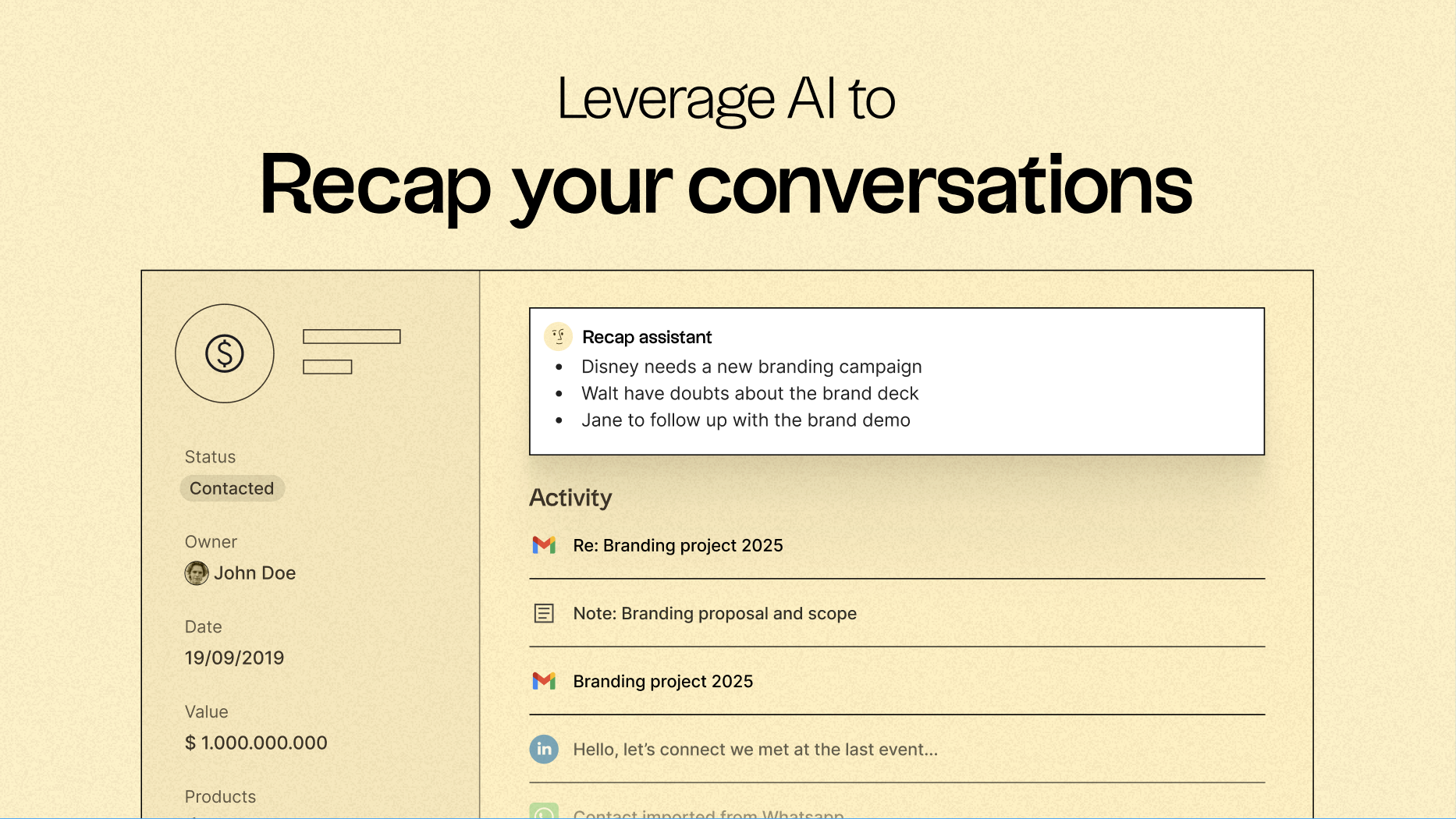
One of folk’s standout features is its ability to centralize communication, turning every email and call into actionable insights. With native email synchronization for Gmail and Outlook, along with AI-driven analysis, teams can:
- Quickly recap past conversations using folk's Recap assistant, which extracts information from emails and notes to create a summary, providing context in seconds.
- Time follow-ups effectively as AI scans conversations, notifying you when to reach out to a contact and even drafting responses.
Email Sequencing & Automation
folk’s integrated sequencing engine allows for easy creation of automated outreach flows directly within the CRM. Build multi-step email sequences, personalize messages using CRM fields, and automatically log every interaction. Whether you’re nurturing leads, executing outbound campaigns, or re-engaging inactive deals, folk delivers a robust yet straightforward sequencing workflow that eliminates the need for separate tools.
Set conditions based on your CRM variables to automatically send emails, such as when a deal is closed or a new lead is acquired.
AI-Powered Follow-Up Reminders
With folk’s AI Follow-Up feature, no conversation slips through the cracks. By analyzing your email history, folk alerts you when a contact hasn’t responded, highlights cold conversations, and identifies ideal moments to re-engage. It functions like a built-in assistant, keeping your inbox organized and your pipeline active—without any manual tracking.
folk starts at $20 per user per month, featuring native email integration and sequences, along with a 14-day free trial—no credit card required.
Conclusion
Pipedrive is a good solution, with its visual pipeline and solid email synchronization, making it ideal for teams that prioritize deal tracking. Freshsales offers a user-friendly interface with robust automation and user-friendly templates, appealing to smaller teams. However, for those who rely heavily on email integration, automation, and sequencing, folk emerges as the superior choice. Its seamless email workflows, centralized communication, and AI-powered follow-up features make it the best alternative for teams aiming to boost productivity and streamline their outreach efforts.
Start your 14-day free trial or book a demo today.
Discover folk CRM
Like the sales assistant your team never had
