


Discover folk - the CRM for people-powered businesses
Email is the cornerstone of modern sales communication; it's the platform where deals progress, follow-ups occur, and relationships flourish.
As teams increasingly depend on automated outreach, multi-channel engagement, and precise tracking, CRMs are competing more on the quality of their native email integrations.
While both HubSpot and Clarify provide built-in email workflows, their depth, usability, and overall impact on daily sales operations vary significantly. For teams prioritizing simplicity and desiring swift, dependable email execution, folk offers one of the cleanest and most effective email integrations among CRMs, allowing you to send, track, and automate outreach directly from your workspace with ease.
Why Email Integration Matters?
Effective email integration transforms a CRM from a mere database into a cohesive communication hub. Rather than toggling between tabs or using disconnected tools, sales reps can send messages, automate follow-ups, and monitor engagement all from one platform.
- Centralized communication. All emails—both sent and received—automatically sync to the appropriate contact or deal.
- Smarter follow-ups. Automated reminders and sequences enable reps to follow up at the optimal moment without manual input.
- Real-time tracking. Open rates, clicks, and replies are fed directly into the CRM, informing the next steps.
- Cleaner data. Emails instantly enhance contact profiles with relevant context and conversation history.
- Email templates. Reusable, personalized templates ensure teams maintain consistency while saving time.
- Outreach automation. Send bulk emails, sequences, or triggered messages based on deal stages or contact activities.
When a CRM manages email seamlessly, reps can stop juggling multiple tools and concentrate on conversations that drive revenue. This distinction is what elevates a good CRM to one that genuinely accelerates sales!
What is HubSpot?

HubSpot is a comprehensive CRM platform that integrates marketing, sales, and customer service into a single contact database. Its email integration allows representatives to connect personal Gmail and Outlook inboxes, enabling them to send one-on-one emails, log replies, and trigger sequences directly from either the CRM or their inbox. Features such as open and click tracking, templates, and shared timelines enhance visibility of email activities across the entire revenue team.
What is Clarify?

Clarify is an AI-driven CRM designed for startups and agile sales teams seeking to consolidate email, meetings, and deal context in one efficient interface. It seamlessly integrates with Google Workspace and Microsoft 365, automatically syncing email, calendar, and meeting insights, and leveraging that data to create timelines and AI-generated follow-ups. Users can compose and send emails directly from Clarify, ensuring that all engagement is recorded back to contacts and deals, preventing information from getting lost in individual inboxes.
Feature comparison of HubSpot and Clarify
Integration Capabilities
HubSpot provides seamless two-way email integration for Gmail, Outlook, and any IMAP-compatible provider, enabling you to send one-to-one emails directly from contact records while automatically logging every reply in your CRM timeline. Its native scheduler synchronizes meeting events back into Google Calendar or Office 365, complete with automatic guest invitations and timeline entries for enhanced visibility.
Clarify connects effortlessly with Google Workspace and Microsoft 365, allowing sales teams to automatically capture Gmail, Outlook, calendar, and meeting activities in the CRM. It also integrates with tools like Zapier, Segment, Posthog, and webhooks to facilitate the movement of customer and product usage data in and out of the database. A forthcoming integration with Loops aims to send Clarify events into a SaaS-focused email platform without replacing it. Overall, Clarify prioritizes consolidating core inbox and meeting data rather than providing an extensive native marketing ecosystem.
Sync Frequency and Reliability
HubSpot’s email synchronization functions in near real-time with Gmail and Outlook, usually reflecting changes within seconds to a minute. After connecting your account, HubSpot maintains a continuous connection via OAuth, actively pushing and pulling message data to ensure your CRM timeline remains up to date. Its reliability is further enhanced by HubSpot’s global cloud infrastructure, which guarantees an impressive 99.99% uptime for core services.
Clarify focuses on automatically ingesting email and calendar data rather than requiring manual logging. Once Google Workspace or Microsoft 365 is linked, messages, events, and meeting intelligence are seamlessly synced in the background, associating them with the appropriate contacts, companies, and deals. The product description highlights features like “auto-capture” and “auto-sync,” emphasizing a continuously updated CRM. However, it does not provide detailed user-facing sync schedules. As an emerging tool, Clarify's integrations have yet to undergo the rigorous testing that legacy CRMs have faced, although it markets its core email and calendar sync as standard functionality.
Two-Way Email and Calendar Sync
HubSpot’s Sales Hub Professional and Enterprise offer powerful one-to-one sequences, enabling you to enroll up to 50 contacts at a time and send hundreds of personalized emails daily per user. Its intuitive drag-and-drop sequence builder simplifies template creation, sets delays, and detects replies, while Marketing Hub can scale to thousands of recipients, complete with segmentation, A/B testing, and comprehensive analytics on opens, clicks, and bounces. However, since the most advanced campaign features reside in Marketing Hub, Sales Hub users without this add-on encounter limitations on total sends and more basic reporting.
Clarify integrates with Gmail and Outlook, allowing inbound and outbound emails to be incorporated into contact and deal timelines, which the AI agent then utilizes for follow-up suggestions. Following the July 2025 update, users will also have the ability to send emails directly from Clarify, with these communications and their responses automatically logged to the relevant records. Additionally, calendar events and meeting recaps from platforms such as Zoom or Microsoft Teams are integrated into the same timelines, providing teams with a straightforward two-way view of conversations and meetings. This functionality primarily supports everyday sales follow-ups rather than advanced marketing automation.
Mail Merge and Campaigns
HubSpot’s Sales Hub Professional and Enterprise provide powerful one-to-one sequences, allowing you to enroll up to 50 contacts simultaneously and send hundreds of personalized emails per user each day. Its intuitive drag-and-drop sequence builder simplifies template creation, manages delays, and detects replies. Meanwhile, Marketing Hub expands your reach to thousands of recipients with advanced features like segmentation, A/B testing, and comprehensive analytics on opens, clicks, and bounces. However, since the most robust campaign functionalities reside in Marketing Hub, Sales Hub users who lack this add-on encounter restrictions on total sends and more basic reporting capabilities.
Clarify enables representatives to send personalized follow-up emails directly from the CRM, often generated from meeting notes and email context by its AI agent. Nevertheless, both external reviews and Clarify’s own messaging indicate that the product currently lacks complete multi-channel sequences and traditional mail merge-style bulk campaigns. For nurture streams and onboarding journeys, teams are expected to utilize external tools like Loops or other marketing platforms integrated through connections. Consequently, Clarify concentrates on sales communication and maintaining pipeline hygiene, while more established CRMs manage more extensive campaign tasks.
Open and Click Tracking
HubSpot Sales efficiently tracks opens and clicks for every one-to-one email sent from contact records or through the Sales extension. It provides real-time desktop notifications and logs each event on the timeline. Please note that click tracking is available only with a paid Sales Hub seat—free users can track opens only. You can also view the total clicks for each link directly in the email activity feed. For advanced attribution, such as multi-variant link analysis across campaigns, you’ll need access to the Marketing Hub, as pure Sales Hub users miss out on enterprise-level click analytics without an add-on.
Clarify positions itself around CRM email tracking and features its own tools for monitoring opens, clicks, and replies on sales emails. The goal is to capture essential engagement signals from emails sent via connected inboxes or through Clarify, then display that activity on timelines and in follow-up suggestions. This functionality aids sales teams in understanding who is engaging and determining the best times to reconnect, all without transforming Clarify into a comprehensive analytics platform. In contrast to dedicated email services, reporting on these events is relatively straightforward and focuses on deal workflows instead of in-depth marketing analysis.
In-Inbox CRM Experience
With the HubSpot Sales extension installed, you can seamlessly view and edit HubSpot records—contacts, companies, and deals—right within Gmail or Outlook. You can also enroll contacts in sequences and log emails with a single click. A user-friendly CRM sidebar appears next to your inbox, allowing you to create tasks, send template replies, and view recent interactions without the need to switch applications. Additionally, it displays lead scores and deal forecasts inline, ensuring every email action contributes to your pipeline. However, if you lack a paid Sales or Service Hub seat, certain in-inbox features, like sequences and call logging, will remain inaccessible due to the paywall.
In contrast, Clarify maintains the majority of its functionality within its own web and macOS apps, which connect to Gmail and Outlook without functioning as a full CRM sidebar in your inbox. Users can check timelines, review meeting summaries, and access AI-suggested follow-ups in Clarify, then send or schedule emails while still utilizing their preferred mail clients. For teams that exclusively use Gmail or Outlook, this approach provides a connected workspace rather than a traditional “CRM inside the inbox” extension. The development roadmap focuses on centralizing work and AI actions within Clarify itself, rather than creating extensive UI add-ons for each email client.
folk CRM: The Ultimate Email CRM
folk provides teams with the seamless, interconnected email workflow they’ve been craving. By centralizing communication, automating follow-ups, and simplifying sequencing, it offers a clean, user-friendly CRM experience. With a 4.5/5 rating on G2, folk shines as one of the top-rated lightweight CRMs tailored for modern sales and partnership teams.
Designed specifically for startups, agencies, and growing sales teams of 20-50, folk streamlines email operations without overwhelming users.
Extract Insights from Emails
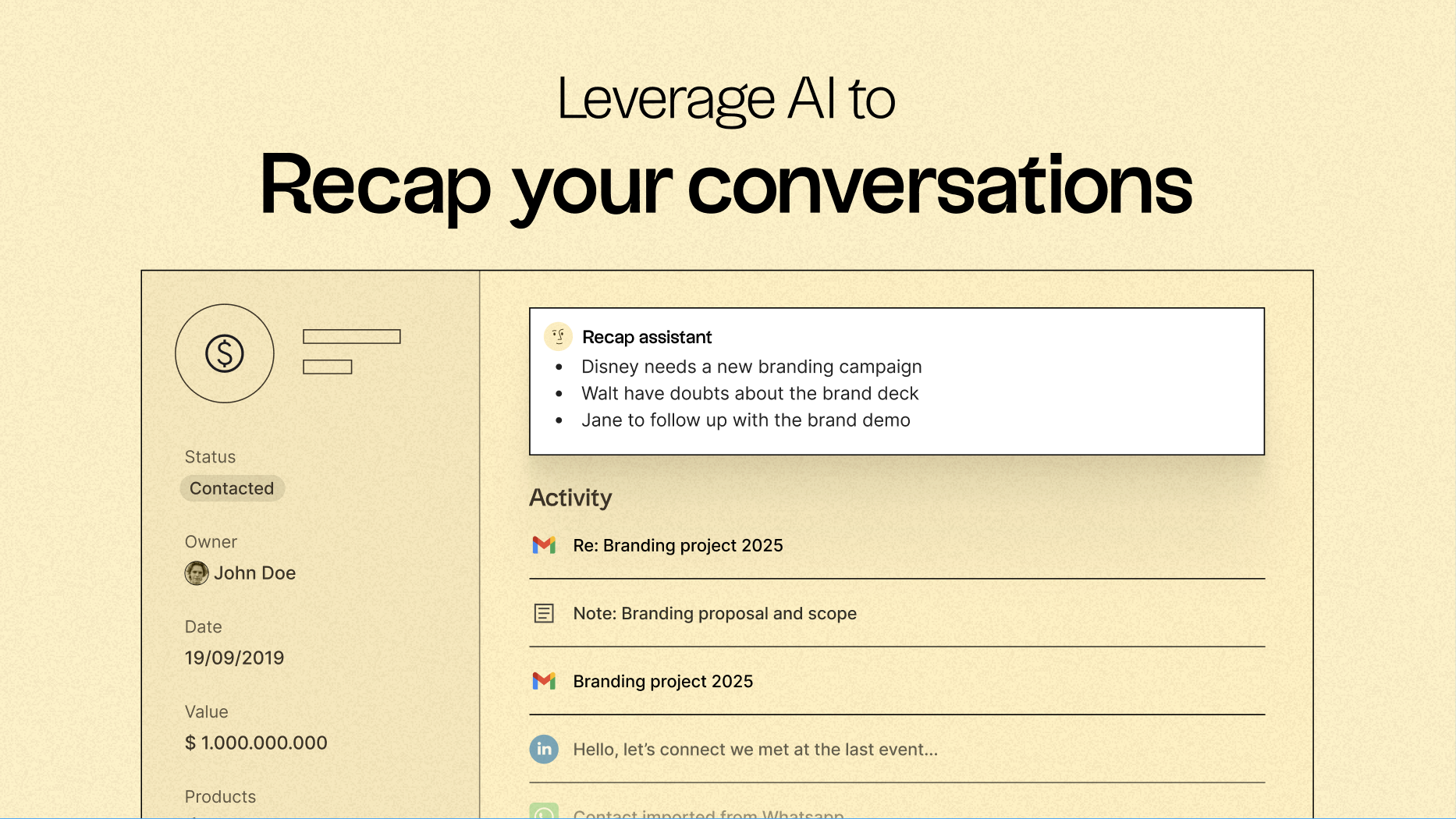
One of folk’s standout features is its capability to centralize communication and convert every email and call into actionable insights, thanks to native email synchronization with Gmail and Outlook, along with AI-driven analysis. Teams can:
- Quickly recap past conversations with just a click using folk's Recap assistant, which gathers information from emails and notes to create a summary, providing context in seconds.
- Follow up at optimal times, as AI scans conversations to alert you when it’s time to reach out again and even drafts replies for you.
Email Sequencing & Automation
folk’s built-in sequencing engine allows you to effortlessly create automated outreach flows within the CRM. You can design multi-step email sequences, customize messages using CRM fields, and automatically log every interaction. Whether nurturing leads, executing outbound campaigns, or re-engaging inactive deals, folk offers a powerful yet straightforward sequencing workflow that eliminates the need for separate tools.
Set conditions based on your CRM variables to automate email sending, such as when a deal is closed or when a new lead is generated.
AI-Powered Follow-Up Reminders
With folk’s AI Follow-Up feature, no conversation slips through the cracks. By examining your email history, folk notifies you when a contact hasn’t replied, highlights conversations that have gone cold, and pinpoints the ideal moment to re-engage. It functions as a built-in assistant, keeping your inbox organized and your pipeline on track—without the need for manual tracking.
folk starts at $20 per user per month, featuring native email integration and sequences, along with a 14-day free trial—no credit card needed.
Conclusion
In summary, HubSpot excels with its comprehensive email tools and robust marketing features, making it ideal for larger teams focused on extensive campaigns.
Clarify shines for startups seeking efficiency through AI-driven timelines and seamless integration.
However, for teams that lean heavily on email, folk stands out as the ultimate choice. Its streamlined email integration, powerful automation, and real-time sequencing create a user-friendly environment that maximizes engagement without the clutter. For email-centric teams, folk is the smartest, most effective CRM alternative.
Start your 14-day free trial or book a demo today.
Discover folk CRM
Like the sales assistant your team never had
