


Discover folk - the CRM for people-powered businesses
Email is the cornerstone of contemporary sales communication, serving as the platform where deals progress, follow-ups are conducted, and relationships strengthen.
As teams increasingly depend on automated outreach, multi-channel engagement, and precise tracking, CRMs are competing more on the robustness of their native email integrations.
Both Freshsales and Streak provide built-in email workflows, yet their depth, usability, and influence on daily sales tasks vary significantly. For teams prioritizing simplicity over complexity and seeking fast, reliable email execution, folk stands out with one of the cleanest and most powerful email integrations in any CRM—streamlining the process of sending, tracking, and automating outreach directly from your workspace.
Why Email Integration Matters?
Effective email integration elevates a CRM from a mere database to a cohesive communication hub. Rather than toggling between tabs or depending on disparate tools, sales reps can send messages, automate follow-ups, and monitor engagement all from a single location.
- Centralized communication. All emails—both sent and received—sync seamlessly to the corresponding contact or deal.
- Smarter follow-ups. Automated reminders and sequences enable reps to follow up at optimal times without manual effort.
- Real-time tracking. Open rates, clicks, and replies are fed directly into the CRM, informing next steps.
- Cleaner data. Emails instantly enrich contact profiles with context and conversation history.
- Email templates. Reusable and personalized templates help teams maintain consistency while saving time.
- Outreach automation. Send bulk emails, sequences, or triggered messages based on deal stages or contact activity.
When a CRM manages email seamlessly, reps can shift their focus from juggling tools to engaging in conversations that drive revenue. This distinction is what elevates a good CRM into one that truly accelerates sales!
What is Freshsales?

Freshsales is Freshworks’ sales CRM tailored for small to mid-sized teams seeking an intuitive interface paired with strong automation capabilities. Users can easily connect their Gmail or Microsoft 365 accounts and select between one-way or two-way sync, ensuring that email threads remain aligned between their inbox and the CRM. With features like templates, bulk emails, and activity timelines, email becomes a vital tool for representatives as they manage leads and opportunities.
What is Streak?

Streak is a lightweight CRM that integrates directly within Gmail, transforming your inbox into a collaborative pipeline for sales, support, and account management. Users can manage deals, track progress, and collaborate on threads all without leaving the familiar Gmail environment. At its core, Streak emphasizes email, offering real-time tracking and pipeline views seamlessly integrated with existing Gmail conversations.
Feature comparison of Freshsales and Streak
Integration Capabilities
Freshsales features native plugins for both Gmail and Outlook, seamlessly displaying email threads, scheduling tools, and relevant contact information alongside your inbox. Once connected, Freshsales automatically scans incoming emails for known contacts, logging conversations to reduce clutter while allowing you to select which folders to sync.
Streak operates entirely within Gmail, transforming your inbox into a comprehensive CRM without the need for additional windows or apps. Every email you send or receive is instantly logged to the appropriate pipeline and shared across your team’s workspace, ensuring you have a real-time timeline of each deal without the hassle of manual bcc’ing.
Sync Frequency and Reliability
Freshsales integrates seamlessly with your Gmail or Outlook account through native plugins, providing an always-on connection that syncs emails and calendar events in real time. Incoming messages from known leads are displayed within seconds, while outgoing emails logged from the CRM are instantly reflected in your email thread. Calendar events are also updated immediately, ensuring that meetings scheduled in Freshsales appear in your personal calendar without any delays.
Streak offers real-time email synchronization by operating within Gmail’s own infrastructure. As soon as you send or receive a message, Streak logs it instantly to the corresponding pipeline, keeping your team updated with the latest activity without any delay. There’s virtually no lag or queuing—messages and thread updates appear immediately in both your inbox and Streak’s interface. By directly connecting to Gmail, you leverage Google’s exceptional uptime and reliability.
Two-Way Email and Calendar Sync
Freshsales features a comprehensive Marketing Campaigns module—simply go to Campaigns > Email to craft email blasts or automated Journeys based on user behaviors. With user-friendly drag-and-drop templates, dynamic segmentation, and analytics dashboards, you can monitor delivery rates, opens, clicks, and unsubscribes. Its built-in retry logic and ISP throttling enhance email deliverability. However, keep in mind that more advanced capabilities, such as heat-map click analysis and AI-driven send-time optimization, require an upgrade to Freshmarketer.
Streak operates entirely within Gmail, seamlessly integrating your inbox and CRM—any email you send or receive is logged in real time to the appropriate section, providing effortless two-way email sync without additional setup. For calendar integration, Streak allows a one-way push of tasks to Google Calendar: when you schedule or complete a task in Streak, it will instantly appear on your calendar, though any changes or new tasks created in Google Calendar will not sync back to Streak.
Mail Merge and Campaigns
Freshsales features a comprehensive Marketing Campaigns module—simply navigate to Campaigns > Email to create email blasts or automated Journeys based on user behavior. With drag-and-drop templates, dynamic segments, and analytics dashboards that track delivery rates, opens, clicks, and unsubscribes, you have the tools you need at your fingertips. Built-in retry logic and ISP throttling enhance deliverability. However, keep in mind that more advanced features, such as heat-map click analysis and AI-driven send-time optimization, require an upgrade to Freshmarketer.
Streak's Mail Merge tool is conveniently integrated within Gmail, allowing you to send personalized mass emails to hundreds of recipients in under two minutes—no CSV imports or third-party apps necessary. You can directly insert custom variables (like first name, company, and deal data) from your pipelines, schedule automatic follow-up sequences within the same thread, and even A/B test subject lines to maximize reply rates. Every sent message and follow-up is automatically logged in your Streak timeline, ensuring you maintain visibility on who has opened, clicked, or replied. Nonetheless, Streak's campaign capabilities fall short when it comes to advanced analytics dashboards, so detailed reporting on unsubscribes or bounce handling will require an additional tool.
Open and Click Tracking
Freshsales enables you to activate “Track opens and clicks” in Settings > Email Settings, allowing every email sent through the native plugin to log open events and link clicks in the contact timeline. You'll find delivery, open, and click metrics displayed in both the Deal dashboard and the Campaigns module. Keep in mind that open rates depend on image-based pixels; if a recipient blocks images or views links in preview panes, the statistics may be underreported.
Streak integrates a small tracking pixel and link tracker directly into Gmail, providing real-time “eye” icons that indicate each time an email is opened or a link is clicked within a thread. By hovering over the green eye, you can access timestamps, locations, and click data for each link—all without leaving your inbox. Since it’s built solely on Gmail’s API, setup is nearly effortless and feedback is immediate; however, aggregated campaign dashboards and multi-link heat mapping are not available beyond individual message views.
In-Inbox CRM Experience
Freshsales’ native plugins for Gmail and Outlook integrate your CRM sidebar seamlessly into your inbox, displaying lead profiles, deal values, and previous email threads while you compose or read messages. You can easily log emails, schedule meetings, and initiate sequences, all with a one-click sync back to Freshsales. By incorporating calendar events into this view, it offers a cohesive blend of messages and appointments. However, if you prefer a different email client, you'll have to rely on IMAP sync, missing out on the complete plugin experience.
Streak operates entirely within Gmail, providing full CRM capabilities—pipelines, contact details, and email logging—without the need to leave your inbox. The sidebar reveals deal stages, custom fields, and shared notes alongside every thread, ensuring you always have context at your fingertips. You can effortlessly drag and drop emails into different pipelines or update statuses on the fly, creating a unified experience between your inbox and CRM. Keep in mind, though, that since Streak is exclusive to Gmail, you won't enjoy this same in-inbox functionality if you switch to Outlook or another email client.
folk CRM: The Ultimate Email CRM
folk provides teams with the seamless, connected email workflow they've been lacking. It consolidates communication, automates follow-ups, and simplifies sequencing, all within a clean, intuitive CRM interface. With a 4.5/5 rating on G2, folk is recognized as one of the top lightweight CRMs for today's sales and partnership teams.
Designed specifically for startups, agencies, and growing sales teams of 20-50 members, folk transforms email operations into a smooth and manageable process.
Extract Insights from Emails
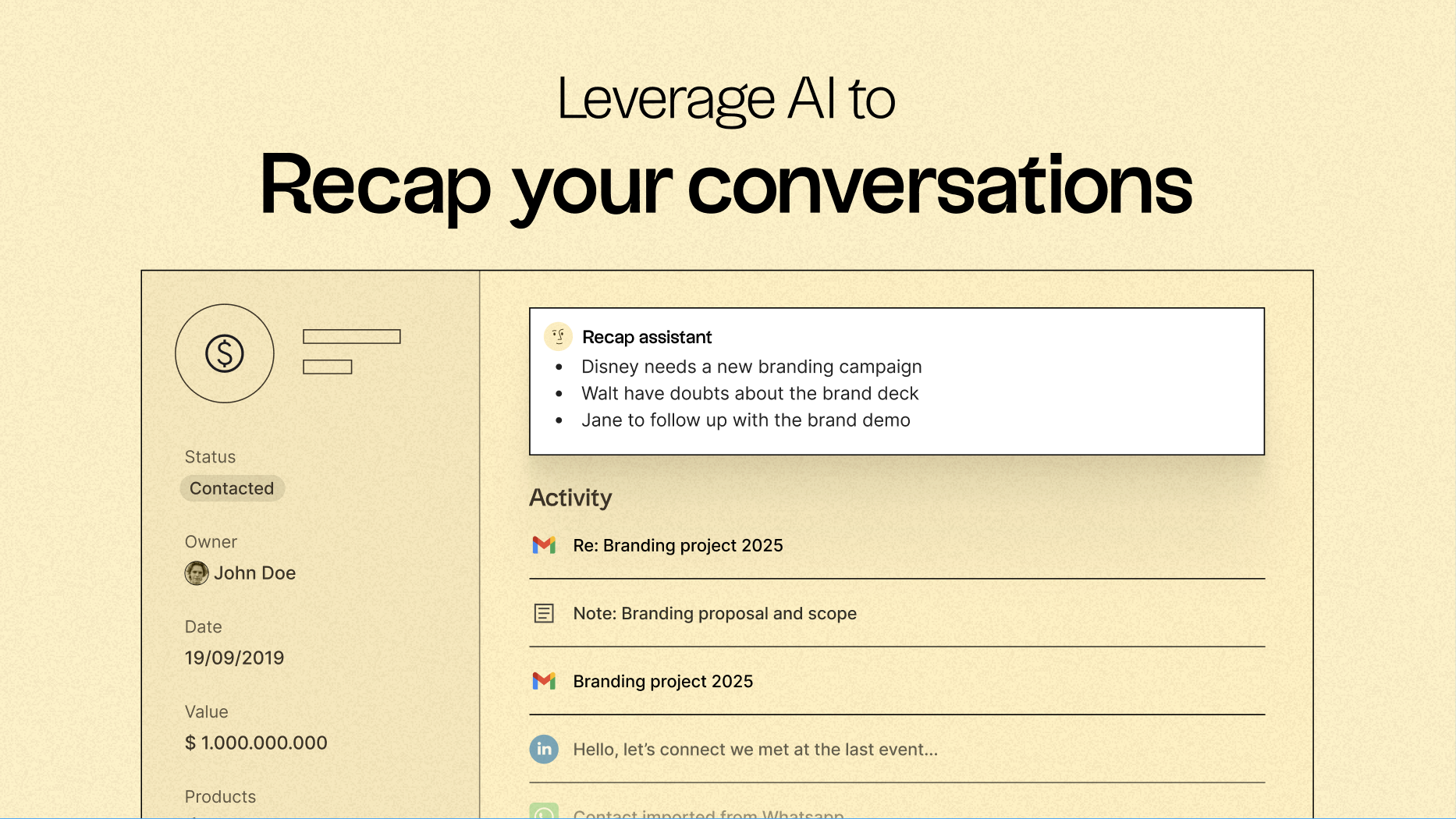
One of folk’s standout features is its ability to centralize communication, turning every email and call into actionable insights through native email synchronization with Gmail and Outlook, combined with AI-driven analysis. Teams can:
- Access a recap of past conversations with a single click using folk's Recap assistant, which gathers information from emails and notes to create a summary, providing context in seconds.
- Timely Follow-Ups, as AI scans conversations to notify you when to follow up with a contact and even drafts a response for you.
Email Sequencing & Automation
folk’s built-in sequencing engine facilitates the creation of automated outreach flows directly within the CRM. You can design multi-step email sequences, personalize messages using CRM fields, and automatically log every interaction. Whether you’re nurturing leads, executing outbound campaigns, or re-engaging inactive deals, folk offers a powerful yet straightforward sequencing workflow that eliminates the need for additional tools.
Set conditions based on your CRM variables to automatically send emails whenever a deal closes or a new lead is generated.
AI-Powered Follow-Up Reminders
folk’s AI Follow-Up feature ensures no conversation slips through the cracks. By reviewing your email history, folk alerts you when a contact hasn't responded, highlights cold conversations, and pinpoints the ideal moments to re-engage. It functions like a built-in assistant, keeping your inbox organized and your pipeline active—without the hassle of manual tracking.
folk starts at $20 per user per month, includes native email integration and sequences, and offers a 14-day free trial—no credit card needed.
Conclusion
In summary, Freshsales excels with its intuitive interface and strong automation features, making it ideal for small to mid-sized teams. Streak offers a seamless Gmail integration, turning your inbox into a CRM, perfect for users who prefer a lightweight solution. However, for teams that prioritize advanced email integration, automation, and sequencing, folk is the superior choice. With its powerful email workflows and AI follow-ups, folk transforms email communication into a streamlined process that drives revenue effectively.
Start your 14-day free trial or book a demo today.
Discover folk CRM
Like the sales assistant your team never had
