

Copy logo as SVG

Copy wordmark as SVG
Browse the integrations you can connect to folk, in seconds, to save precious time and focus on growing your business

Sync Gmail conversations in folk

One-click imports of profiles directly from LinkedIn

Automatically import and sync your Google contacts with folk

Automatically import your calendar events into folk

Automatically import your conversations and contacts into folk

Automatically import your conversations and contacts into folk

Generate AI-powered custom fields
Chat with your CRM on ChatGPT

Automatically import your email conversations into folk
Sync notes from call recording tool
Sync notes from call recording tool

Sync SMS to folk

Get started with our API

Connect with 1000+ apps through our Zapier integration

Connect with 1000+ apps through our Make integration

Send quotes & invoices from Pandadoc to folk contacts

Your contacts are automatically enriched through Clearbit API

Enroll contacts into Salesforge email & Linkedin sequences
Sync calls, SMS and contacts between folk and Krispcall
2-way sync between Allo and folk for phone calls and contacts
Powers the Research Assistant

Your contacts are automatically enriched with Dropcontact

Your contacts are automatically enriched with Apollo

Your contacts are automatically enriched with Prospeo

Your contacts are automatically enriched with Datagma

Your contacts are automatically enriched with PeopleDataLabs

One-click imports of profiles directly from Sales Navigator

Consult your contacts directly from Google Meet

Sync leads between Lemlist and folk
Sync leads between La Growth Machine and folk

One-click imports of profiles directly from TikTok

One-click imports of profiles directly from Instagram

One-click imports of profiles directly from Facebook

One-click imports of profiles directly from X

Import any file directly into folk

2-way sync between Reached and folk for phone calls and contacts
One-click imports of profiles directly from LinkedIn
One-click imports of profiles directly from Sales Navigator
One-click imports of profiles directly from Instagram
One-click imports of profiles directly from X
Automatically import your conversations and contacts into folk
Automatically import your conversations and contacts into folk
One-click imports of profiles directly from TikTok
One-click imports of profiles directly from Facebook
Automatically import your email conversations into folk
Automatically import your calendar events into folk
Automatically import and sync your Google contacts with folk

Sync Gmail conversations into folk
Automatically import your conversations and contacts into folk
Automatically import your conversations and contacts into folk
Sync notes from call recording tool
Sync SMS to folk
Sync notes from call recording tool
Consult your contacts directly from Google Meet
Sync leads between La Growth Machine and folk
Sync leads between Lemlist and folk
Enroll contacts into Salesforge email & Linkedin sequences
Sync calls, SMS and contacts between folk and Krispcall
2-way sync between Allo and folk for phone calls and contacts
2-way sync between Reached and folk for phone calls and contacts
Import any file directly into folk
Generate AI-powered custom fields
Your contacts are automatically enriched through Clearbit API
Your contacts are automatically enriched with Dropcontact
Your contacts are automatically enriched with Apollo
Your contacts are automatically enriched with Datagma
Your contacts are automatically enriched with Prospeo
Powers the Research Assistant
Your contacts are automatically enriched with PeopleDataLabs
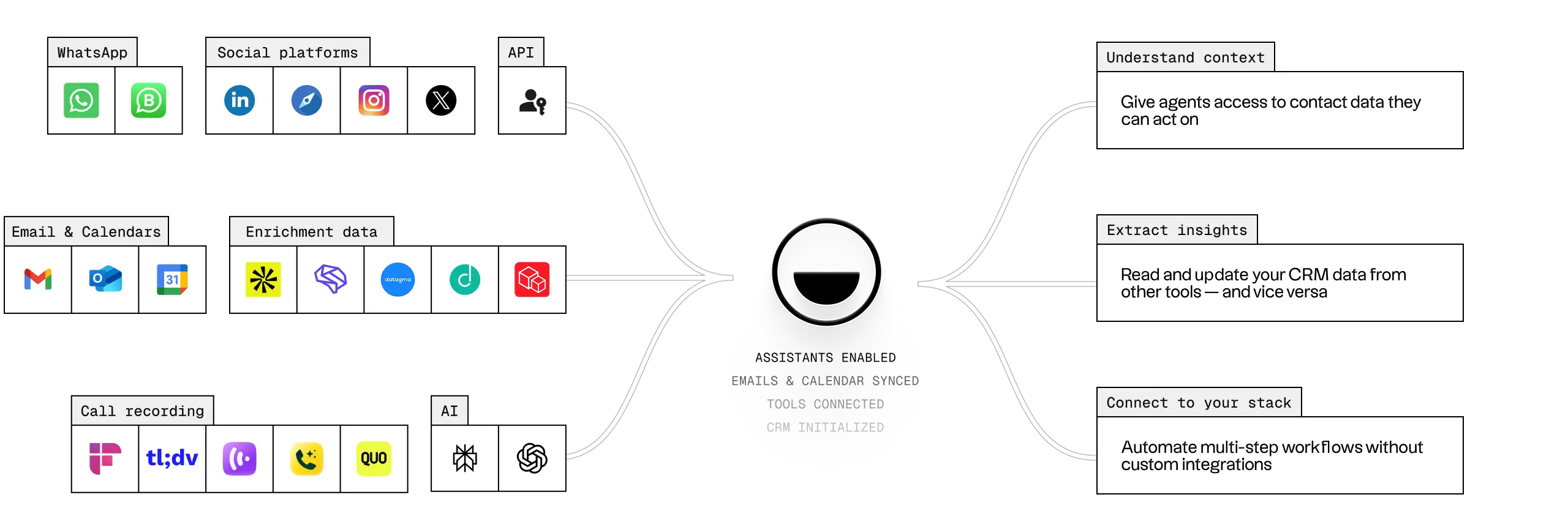


The Follow-up Assistant helps you follow up at the right time, with the right context, so you never miss an opportunity to move a deal forward.
Using AI, it analyzes your email and WhatsApp conversations to detect when a discussion has gone inactive and there’s a pending next step. When this happens, you receive a notification with a personalized follow-up suggestion, pre-written in your tone of voice and tailored to the conversation history.
It works on:
You stay in control: choose when a conversation is considered inactive, which contacts or groups are included, and where you receive notifications. Suggestions appear in-app, by email, and directly on contact profiles, making it easy to take action and keep deals moving forward.

Instead of manually researching companies across multiple tools, the assistant enriches profiles directly in folk and generates context-rich research notes you can rely on for conversations, pitches, and follow-ups. You can run research on a single company or in bulk across a group, from both table and pipeline views.
The Research Assistant helps you save hours by automatically finding, updating, and organizing company insights—so your database stays accurate, consistent, and ready to use.
The assistant enriches key company data such as industry, company size, foundation date, funding details, website and social links, location, and a short company description. It also generates a research note with relevant insights, powered by trusted providers like People Data Labs (enrichment) and Perplexity (research notes).
You can customize the research note by adding specific questions or themes, and the assistant will apply them consistently every time.

The Workflow Assistant helps you automate email outreach using simple, trigger-based workflows inside your groups.
You can define when a workflow should run, such as when a person is created or when a specific field is updated, and automatically send a personalized email. Workflows can include optional filters, so actions only run on the right contacts (for example, only when a lead’s status becomes “Qualified”).
Emails can be written from scratch or based on templates with variables like name, company, or custom fields. If AI personalization is enabled, folk enhances each message using the latest shared interactions and public notes, ensuring emails stay relevant and contextual.
Once live, each workflow generates a campaign where you can track results such as sent, opened, replied, or bounced emails. You can preview emails before sending, manage workflows’ statuses (active, inactive, blocked), and control usage through monthly credit limits.
The Workflow Assistant lets you scale outreach while staying consistent and efficient, without manual follow-ups.
What are CRM integrations?

CRM integrations connect your CRM with other apps like email, calendars, or messaging tools. They centralize data and make workflows faster by removing manual updates.
What integrations does folk CRM support?
folk CRM supports integrations with Gmail, Outlook, LinkedIn, WhatsApp, Zapier, and more. These integrations sync contacts, conversations, and activities into one place.
How do folk integrations work?
folk integrations sync data in real time between apps. For example, emails and meetings from Gmail or Outlook automatically appear in folk CRM, linked to the right contact.
Does folk CRM have an API?
Yes. folk CRM provides a full API that allows teams to connect custom tools and automate processes. Developers can build personalized integrations using folk’s API. 4000 teams are currently relying on folk to connect to their world and grow better relatioinships.
Where can I find the folk CRM API documentation?
The folk CRM API documentation is available on developer.folk.app. It includes endpoints, examples, and guides to help developers set up and maintain custom integrations.
Why choose folk integrations?
folk integrations save time and reduce manual work. They bring emails, messages, and contacts into one place, helping teams focus on building relationships instead of switching tools.









..png)