


Discover folk - the CRM for people-powered businesses
Email is the cornerstone of contemporary sales communication: it's where deals progress, follow-ups occur, and relationships are nurtured.
As teams increasingly depend on automated outreach, multi-channel engagement, and precise tracking, CRMs are vying for attention based on the effectiveness of their native email integrations.
While both Pipedrive and Close CRM provide built-in email workflows, their depth, usability, and influence on day-to-day sales operations vary significantly. For teams that prioritize simplicity over complexity and require fast, dependable email execution, folk offers one of the most streamlined and powerful email integrations available in any CRM—facilitating the sending, tracking, and automating of outreach directly from your workspace.
Why Email Integration Matters?
Effective email integration elevates a CRM from a mere database to a cohesive communication hub. Rather than toggling between tabs or depending on disjointed tools, sales representatives can send messages, automate follow-ups, and monitor engagement all in one place.
- Centralized communication. All emails—both sent and received—automatically sync to the appropriate contact or deal.
- Smarter follow-ups. Automated reminders and sequences enable reps to follow up at optimal moments without manual intervention.
- Real-time tracking. Metrics like open rates, clicks, and replies are integrated directly into the CRM, informing subsequent actions.
- Cleaner data. Emails instantly enhance contact profiles with relevant context and conversation history.
- Email templates. Reusable, personalized templates help teams maintain consistency and save time.
- Outreach automation. Send bulk emails, sequences, or triggered messages based on deal stage or contact behavior.
When a CRM manages email seamlessly, reps can stop juggling multiple tools and concentrate on conversations that generate revenue. This distinction sets apart a good CRM from one that genuinely speeds up sales!
What is Pipedrive?
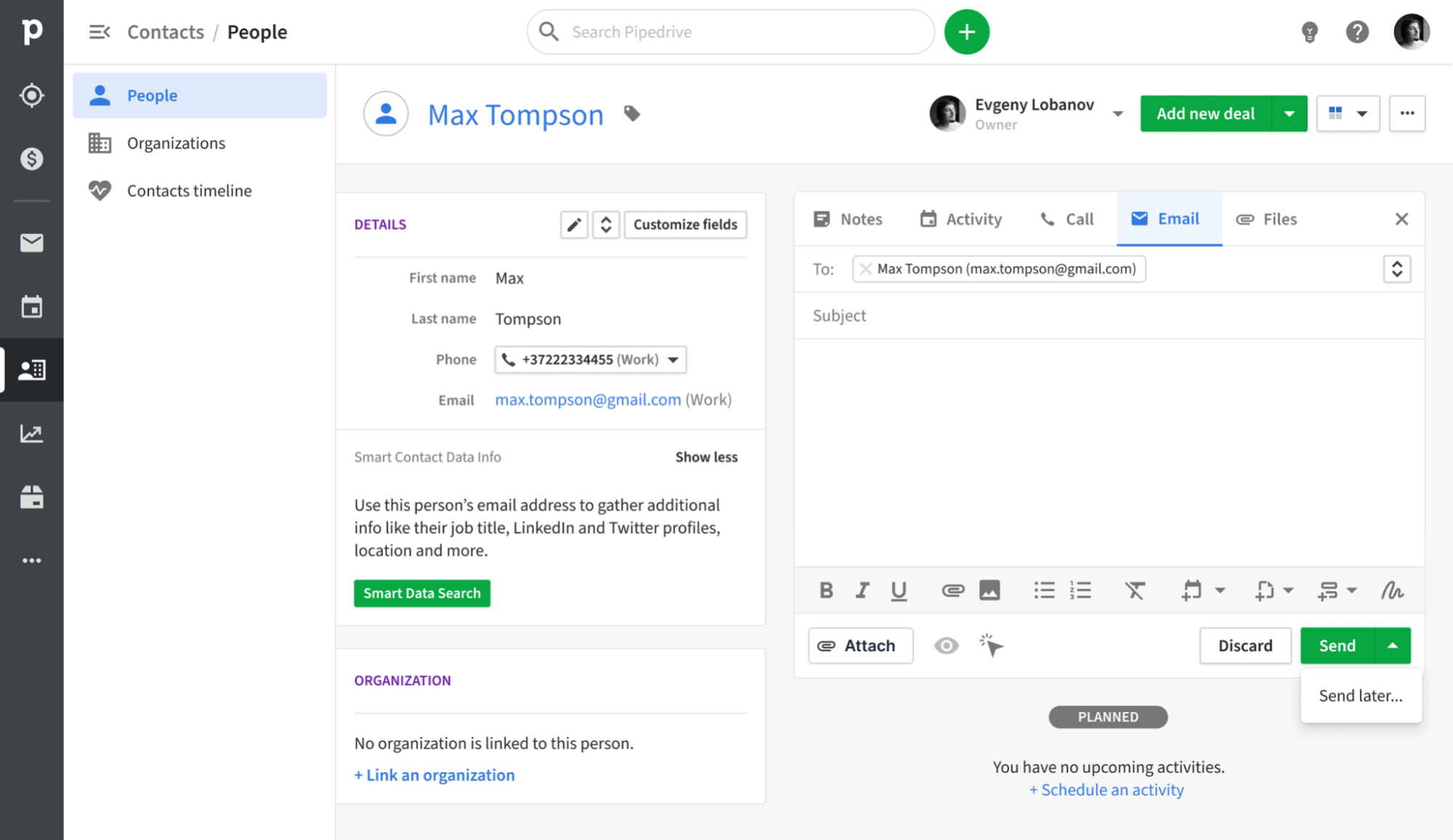
Pipedrive is a sales-driven CRM designed with a visual pipeline that enables representatives to monitor deals from initial contact to closure. Its email synchronization feature integrates seamlessly with Gmail, Outlook, and other IMAP providers, ensuring that every message is automatically recorded under the appropriate contact and deal. With a built-in sales inbox, tracking capabilities, and basic campaign functionalities, teams can manage outreach and pipeline updates all in one platform, eliminating the need to juggle multiple tools.
What is Close CRM?

Close CRM is a dynamic sales platform tailored for high-velocity inside sales teams, featuring integrated calling, SMS, and email functionalities. With a built-in two-way email sync, representatives can send, receive, and monitor messages directly within Close, with every conversation automatically linked to the corresponding contact and opportunity. The platform transforms email into a structured outreach channel through bulk emails, sequences, and performance reporting, moving beyond the limitations of a standalone inbox.
Feature comparison of Pipedrive and Close CRM
Integration Capabilities
Pipedrive seamlessly integrates with Gmail and Outlook, using IMAP as a fallback for other providers, to automatically capture every inbound and outbound message linked to the appropriate contact or deal record. With the Smart Email BCC address option, you can log messages directly from your email client by simply adding the dynamic BCC; Pipedrive takes care of the rest. Its native calendar integration for Google and Microsoft calendars ensures that all your meetings are automatically reflected on contact timelines, providing a comprehensive view of every customer interaction.
Close offers a straightforward email integration: just connect your Gmail or Outlook account, authenticate via OAuth, and every message associated with a matched contact will be automatically displayed in Close’s timeline. Although Close doesn't natively sync calendar events, you can easily integrate meetings into the CRM using Zapier or Google Calendar, helping to keep your schedule in sync with your sales pipeline.
Sync Frequency and Reliability
Pipedrive’s email sync with Gmail and Outlook operates every few minutes, striking a balance between promptness and system efficiency. Both outbound and inbound messages are captured and linked to contacts or deals in under five minutes, ensuring that you seldom face missing or delayed logs. The IMAP fallback adheres to standard IMAP IDLE protocols for push notifications, providing near-instant updates for compatible providers.
Close’s email integration offers immediate two-way sync by utilizing OAuth-based connections to Gmail and Outlook. When a contact emails you, Close logs it instantly—eliminating the need for polling intervals or manual BCC. Outbound emails sent from Close are reflected in your email provider in real time, and the same holds true for incoming messages. For calendar events, you can connect a Google Calendar through Zapier for automatic updates, although these triggers operate every few minutes based on your Zapier plan.
Two-Way Email and Calendar Sync
With Advanced plans and higher, Pipedrive’s Group Emailing feature allows you to choose up to 100 contacts from any list to send bulk messages, complete with merge tags and reply tracking. The Pipedrive Campaigns add-on offers a specialized module for creating email journeys, segmenting audiences, and analyzing open and click rates. All replies are automatically linked back to the appropriate deal or contact. However, keep in mind that the Campaigns add-on comes with additional costs, and its reporting capabilities are somewhat limited compared to dedicated email marketing platforms.
Close offers seamless two-way email integration through IMAP/SMTP: once you authenticate your Gmail, Google Apps, or Microsoft account, Close automatically logs every sent and received email in real-time, connecting threads to the right contact without the hassle of manual BCCs. While Close does not natively sync calendar events, its “Emailing” setup indicates that you can synchronize both your work email and calendar.
Mail Merge and Campaigns
With Advanced plans and higher, Pipedrive’s Group Emailing feature enables you to select up to 100 contacts from any list to send bulk messages complete with merge tags and reply tracking. The Pipedrive Campaigns add-on offers a specialized module for crafting email journeys, segmenting audiences, and analyzing open and click rates. Notably, all replies are automatically linked back to the relevant deal or contact. However, it’s important to note that the Campaigns add-on comes with an additional cost, and its reporting capabilities are somewhat limited compared to standalone email marketing platforms.
In contrast, Close doesn't provide a traditional mail merge user interface but allows you to create multi-step drip campaigns using its Workflows engine, which integrates emails, calls, and SMS into a single sequence. You can enroll leads, customize messages with templates, and let Close automatically dispatch steps at your preferred cadence, while every interaction is logged in its unified Inbox. That said, Close lacks a visual campaign builder and comprehensive email campaign analytics, meaning you won't have access to open-rate trends or A/B testing insights within the interface.
Open and Click Tracking
Pipedrive offers “Track email opening” and “Track link opening” toggles, allowing you to capture opens and clicks for every sent message, complete with counts and timestamps in the Mail tab. You can enable or disable tracking for each email and view exactly who clicked which link directly in the deal view. However, Pipedrive’s reporting only provides basic open and click rates, lacking built-in funnel visualization or heat-map insights unless you export the data to a BI tool.
In contrast, Close automatically tracks opens for any email sent from its unified Inbox, displaying open counts and timestamps beneath each message.
In-Inbox CRM Experience
Pipedrive’s Gmail Add-on integrates a side panel directly into your inbox, allowing you to view contact and deal information, update stages, and add new activities seamlessly from Gmail. You gain immediate access to Smart Email BCC, templates, and tracking toggles without leaving your inbox, and can create new leads or deals with just a click. It effectively transforms your mailbox into a Pipedrive cockpit. However, this in-inbox functionality requires Chrome or Edge, as there is no equivalent add-on available for desktop Outlook.
Close lacks a native sidebar within Gmail or Outlook, but it can be connected through the Missive integration, enabling you to manage contacts, leads, and opportunities directly from your inbox. Emails sent or received in your mail client automatically appear in Close’s unified activity stream, eliminating the need for manual BCCs and preserving context. However, you'll still need to switch tabs to view pipeline overviews or dashboards, making it more of a well-synced companion than a fully in-inbox CRM.
folk CRM: The Ultimate Email CRM
folk provides teams with a seamless and connected email workflow that enhances communication. It centralizes interactions, automates follow-ups, and simplifies sequencing, all within a clean and user-friendly CRM. With an impressive 4.5/5 rating on G2, folk has earned its reputation as one of the top lightweight CRMs for modern sales and partnership teams.
Designed specifically for startups, agencies, and growing sales teams of 20-50 members, folk streamlines email operations without overwhelming users.
Extract Insights from Emails
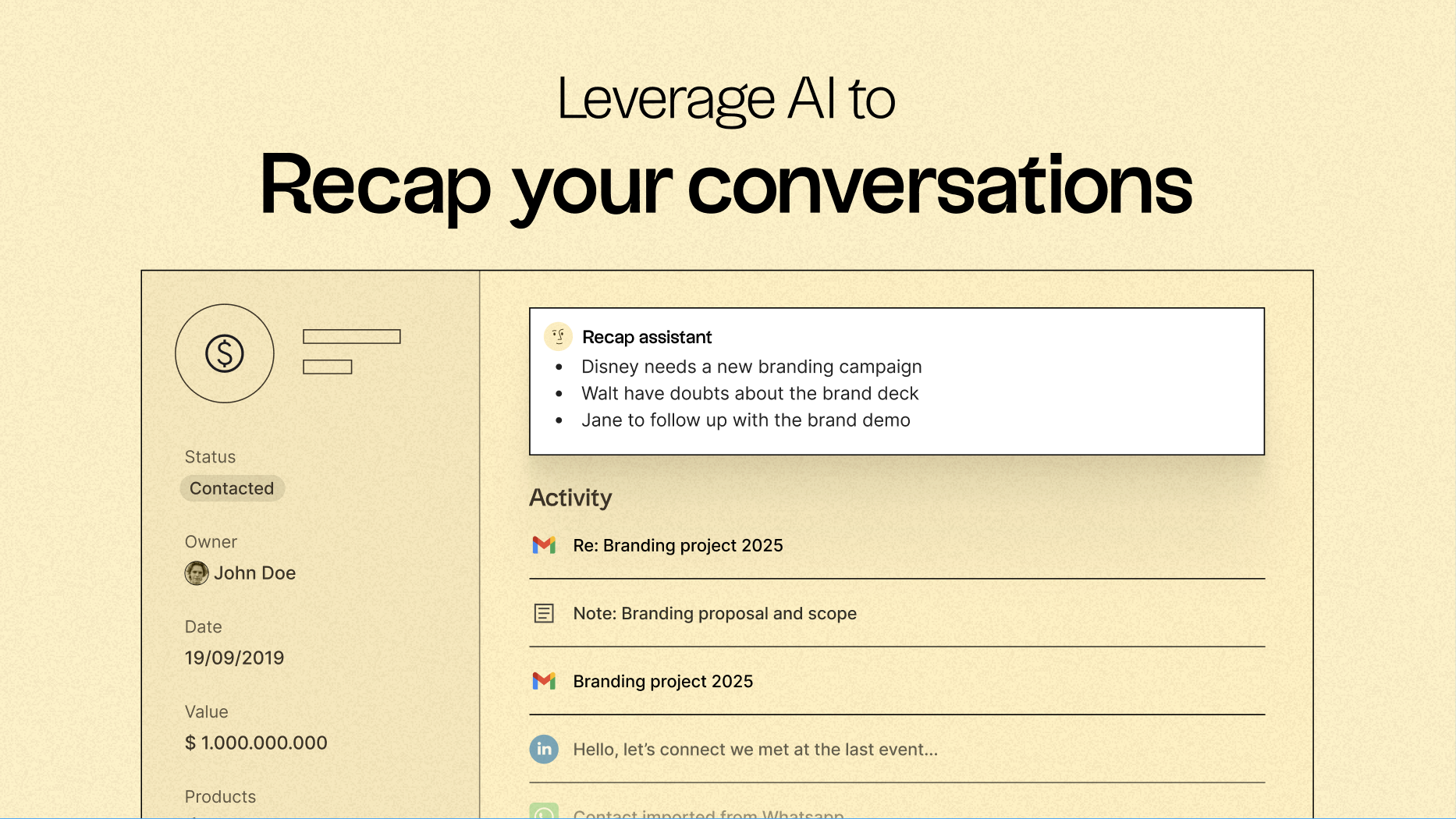
One of folk’s standout features is its ability to centralize communication and convert every email and call into actionable insights. With native email synchronization for Gmail and Outlook, alongside AI-driven analysis, teams can:
- Quickly recap past conversations with a single click using folk's Recap assistant, which extracts information from emails and notes to create a summary, giving you context in seconds.
- Follow up at the optimal time, as AI scans conversations to alert you when to reach out to a contact and even drafts a response for you.
Email Sequencing & Automation
folk’s built-in sequencing engine allows you to easily create automated outreach flows directly within the CRM. You can design multi-step email sequences, personalize messages using CRM fields, and automatically log every interaction. Whether you're nurturing leads, executing outbound campaigns, or re-engaging lapsed deals, folk provides you with a powerful yet straightforward sequencing workflow, eliminating the need for additional tools.
Set conditions based on your CRM data to automatically send emails when events occur, such as closing a deal or acquiring a new lead.
AI-Powered Follow-Up Reminders
folk’s AI Follow-Up feature guarantees that no conversation slips through the cracks. By analyzing your email history, folk notifies you when a contact hasn’t responded, highlights dormant conversations, and finds the best moment to re-engage. It functions like an inbuilt assistant, keeping your inbox organized and your pipeline active—without any manual effort.
folk starts at a competitive $20 per user per month, offering native email integration and sequencing, along with a 14-day free trial—no credit card required.
Conclusion
In conclusion, Pipedrive excels with its visual pipeline and solid email synchronization, making it suitable for teams that prefer simplicity in managing deals. Close CRM is tailored for high-velocity sales, offering robust email functionalities and real-time tracking. However, for teams that prioritize seamless email integration, automation, and sequencing, folk stands out as the best choice. With its user-friendly interface, powerful email workflows, and AI-driven insights, folk transforms email into a central revenue-generating tool, ensuring your sales efforts are both efficient and effective.
Start your 14-day free trial or book a demo today.
FAQ
How do Pipedrive and Close differ in email sync reliability?
Close uses OAuth for immediate two-way sync with Gmail and Outlook and logs messages in real time. Pipedrive syncs every few minutes with Gmail and Outlook and uses IMAP fallback for near-instant updates on compatible providers.
Which CRM is better for bulk campaigns and mail merge?
Pipedrive supports Group Emailing and a Campaigns add-on for mailings and basic analytics but requires extra cost and has limited reporting. Close uses Workflows for multi-step drips combining email, calls, and SMS but lacks a visual campaign builder and advanced campaign analytics.
What email features set folk apart from Pipedrive and Close?
folk centralizes email sync, sequencing, and follow-ups in a lightweight interface with native Gmail and Outlook integration. It also includes AI-driven recaps and timing suggestions to surface actionable insights from conversations.
Meet folk, the AI CRM for your entire Sales motion.