


Discover folk - the CRM for people-powered businesses
Effective contact management distinguishes a CRM's usability from mere noise, as seen with folk CRM and HubSpot.
Social selling finds its sweet spot where your CRM intersects with your network. If your tool struggles to track LinkedIn activity, comments, and warm introductions, you risk losing visibility—and ultimately deals—to teams that maintain closer connections with their relationships.
folk and Clarify both position themselves as modern, relationship-centric CRMs. Clarify emphasizes transforming unstructured interactions into organized records, while folk offers teams a flexible, social-selling-friendly environment to manage contacts, signals, and the pipeline all in one place.
This comparison will explore how each CRM facilitates genuine social selling workflows, helping you determine which aligns best with your team's approach to building and nurturing relationships.
Why is a social selling CRM essential in 2026?
Most B2B transactions don’t initiate with a cold email or demo request; they often begin with a LinkedIn comment, a repost, a direct message, or a subtle profile visit. If your CRM fails to capture these signals and connect them to real individuals and pipelines, your team operates in the dark while competitors cultivate relationships openly.
A social selling CRM centralizes these interactions, providing structured, actionable insights on who engaged, their source, their interests, and their proximity to a purchase. Rather than viewing LinkedIn as merely “nice-to-have awareness,” it becomes a measurable, repeatable component of your revenue strategy.
With a social selling CRM, your team can:
✔️ Identify buying signals from likes, comments, and profile views to convert them into follow-ups
✔️ Track whether prospects know you through content or outbound efforts, allowing you to tailor your messaging
✔️ Map relationships among accounts, champions, and influencers—not just a list of contacts
✔️ Report on deals influenced by social engagement rather than attributing all success to last-click channels
What is folk CRM?

folk CRM is a modern, lightweight customer relationship management tool designed for teams that operate across email, LinkedIn, and spreadsheets while preferring everything in a single shared workspace. It seamlessly integrates with Gmail and Outlook to automatically log emails and meetings, and its Chrome extension provides a comprehensive CRM sidebar directly within the inbox for quick updates. Users can send personalized sequences, track engagement, and maintain all interactions linked to contacts, companies, and deals.
What is HubSpot?
HubSpot is an all-in-one CRM and marketing platform that integrates contact management, email, automation, and content tools into a cohesive suite. It's particularly popular among growing companies seeking a seamless connection between sales and marketing. However, costs and complexity tend to rise as you add contacts, users, and advanced features.
Feature comparison of folk CRM and HubSpot
Profile Enrichment & Lead Insights
folk CRM offers a seamless one-click setup for both Gmail and Outlook—simply authenticate, and all incoming and outgoing emails will be automatically linked to the appropriate contact or deal record. Its integrated scheduler adds events directly to Google or Microsoft calendars, syncing back to folk’s task list for a cohesive timeline of emails and meetings. You can effortlessly send personalized bulk sequences, monitor opens and clicks, and utilize folk’s CRM inbox to respond without toggling between tabs. This streamlined experience reduces context-switching, ensuring your team stays in sync on every conversation. folk CRM is truly one of the best CRMs for Email Integration!
HubSpot's Intelligence features gather enrichment data from various connected sources, including company details, job titles, industry information, and social media links, equipping reps with comprehensive context when approaching leads.
Social Listening & Real-Time Alerts
folk CRM employs a direct OAuth connection for Gmail and Outlook, ensuring that synchronization happens seamlessly and continuously. Emails are instantly logged to the appropriate contact or deal the moment they are sent or received, eliminating the need for manual input. Meetings arranged through folk’s native scheduler are immediately reflected in both your calendar and the CRM timeline. Behind the scenes, folk utilizes push-notification webhooks from Google and Microsoft, reducing latency and ensuring that every interaction is captured within seconds.
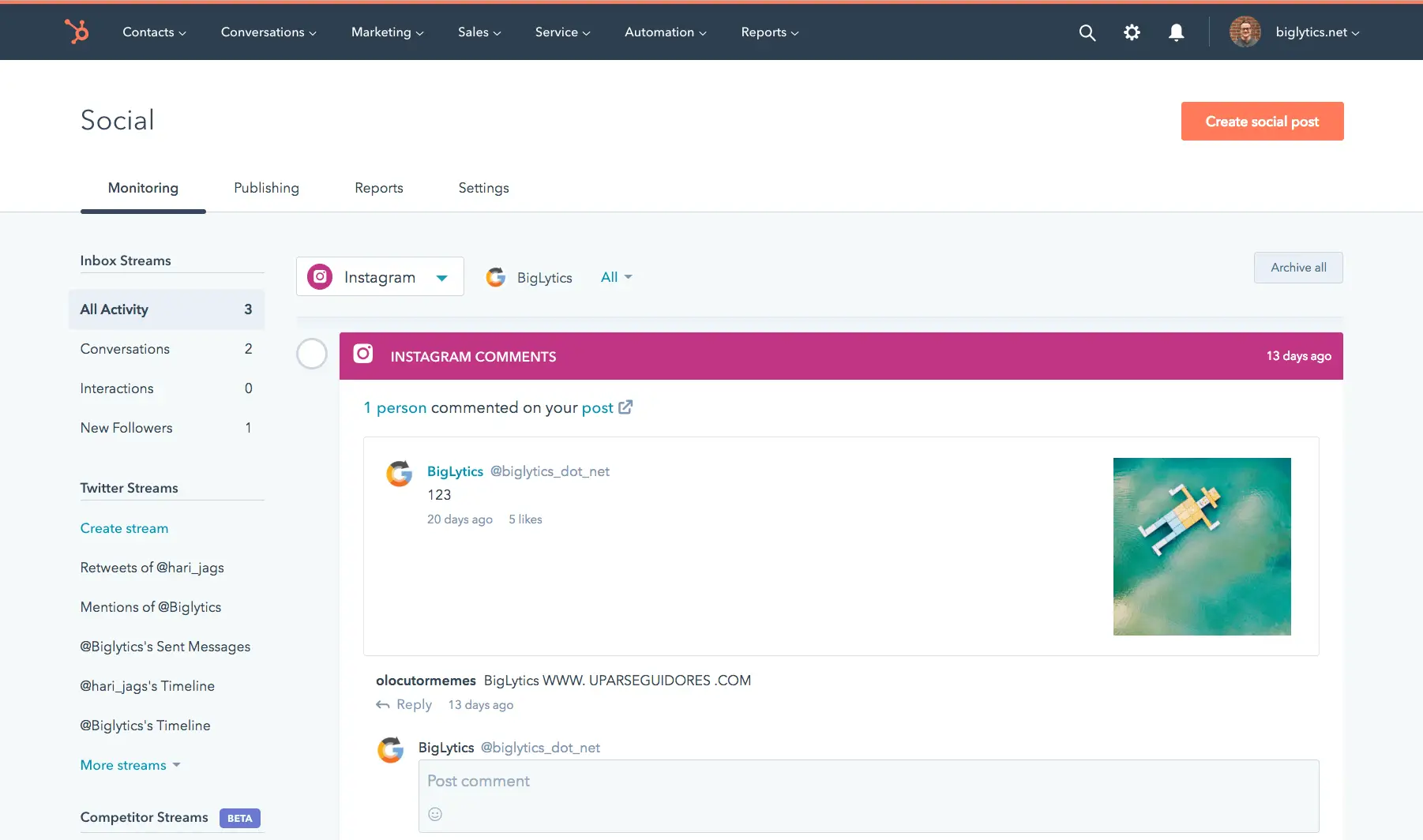
HubSpot’s Social tool offers real-time monitoring for mentions, likes, shares, and comments across LinkedIn, Facebook, and X (Twitter). You can set up alerts for specific keywords or brand mentions, allowing you to respond swiftly.
Social Selling: Which channels?
Folk CRM’s email sequences feature acts as a built-in mail-merge and campaign tool, allowing you to create multi-step sequences with personalized templates and scheduling rules. You can easily enroll contact lists directly from folk's interface, and all opens and replies sync back instantly to each contact’s timeline. Additionally, detailed performance reports enable you to fine-tune subject lines and content for optimal engagement, all natively—no add-ons required!
HubSpot facilitates native publishing and engagement across LinkedIn, Facebook, Instagram, and X (formerly Twitter), enabling you to respond, post, and analyze performance without leaving the platform.
In‑Context Messaging with Templates & Sequences
Folk CRM’s email sequences feature functions as an integrated mail-merge and campaign tool, allowing you to create multi-step sequences with personalized templates and scheduling rules. You can easily enroll contact lists directly from folk’s interface. Opens and replies are instantly synced back to each contact’s timeline, while detailed performance reports enable you to refine subject lines and content for maximum engagement—all without the need for any add-ons!
In contrast, HubSpot does not support social messaging sequences directly within the browser. Email sequences and templates are managed through Sales Hub rather than the LinkedIn UI.
Activity & Engagement Tracking
folk CRM automatically incorporates open- and click-tracking pixels into all outbound emails, displaying these metrics in real time on contact timelines and campaign dashboards. You have the option to disable tracking across the workspace to enhance deliverability; however, with tracking enabled, you gain access to consolidated reports, link-level click-through rates, and individual contact engagement histories—all without the need for external add-ons.
HubSpot monitors a diverse array of activities, including emails, calls, meetings, and social interactions. Whenever possible, engagement metrics from social media posts are associated with the relevant contacts.
Conclusion
In conclusion, while HubSpot excels in its all-in-one marketing suite and comprehensive engagement tracking, it can become complex and costly as your needs grow. Clarify is great for teams focused on organizing unstructured interactions but lacks the seamless email integration that many teams prioritize. For those relying heavily on email integration, automation, and sequencing, folk stands out as the best alternative. It offers a unified workspace for managing contacts, tracking signals, and streamlining social selling workflows effortlessly.
Start your 14-day free trial or book a demo today.
Discover folk CRM
Like the sales assistant your team never had