


Discover folk - the CRM for people-powered businesses
Capsule CRM vs ClickUp (2024): Features, Pricing, and the Best Alternative
When it comes to choosing a CRM system, Capsule CRM and ClickUp are two popular options. Capsule CRM is tailored for small to medium-sized businesses, focusing on simplicity and efficiency in managing customer relationships and sales pipelines. On the other hand, ClickUp offers a more comprehensive suite of tools, ideal for teams looking for extensive project management capabilities alongside CRM functionalities.
In this blog post, we will compare their key features, pricing, and benefits. We'll also explore folk as a noteworthy alternative.
| Main points |
|---|
|
What is Capsule CRM?
Capsule CRM is a user-friendly customer relationship management platform designed for small and medium-sized businesses. It offers a clean, intuitive interface that helps users manage customer relationships, track sales pipelines, and organize tasks and communications efficiently.
Key features of Capsule CRM
- Sales Pipeline: Capsule CRM provides a sales pipeline feature that helps users track opportunities and manage leads through various stages of the sales process.
- Key Integrations: Capsule integrates with popular tools like Google Workspace, Xero, and Mailchimp, enabling users to connect external applications for a more streamlined workflow.
- Task Management: The task management feature allows users to create, assign, and track tasks related to contacts, sales, or projects within the CRM.
- Task Reminders: Capsule CRM offers task reminders to help users stay on top of deadlines and follow-ups by sending notifications when tasks are due.
What is ClickUp?
ClickUp is a project management and productivity platform designed to help teams and individuals organize tasks, track progress, and collaborate in one workspace. Although it is primarily a project management tool, ClickUp includes some CRM elements.
Key features of ClickUp
- Task management: ClickUp allows users to create, assign, and track tasks with custom statuses, providing flexibility in managing work processes across different projects.
- Custom views: The platform offers multiple views like lists, boards, calendars, and Gantt charts, enabling users to visualize tasks and workflows in a format that suits their preferences.
- Goal tracking: Users can set, track, and manage goals within ClickUp, aligning tasks and projects with broader objectives.
- Time tracking: ClickUp includes a built-in time tracking feature to log time spent on tasks, allowing users to monitor productivity or billable hours.
- Workflow automation: Automation in ClickUp enables users to reduce manual tasks by setting up rules that trigger actions, such as status updates or notifications, based on predefined conditions.
- Custom fields: The platform allows users to add custom fields to tasks, enabling them to track specific data points or categorize tasks according to their needs.
Capsule CRM vs. ClickUp: Feature Comparison
Let's break down the key features of two CRM software solutions and take a closer look at their sales automation, email marketing tools, and contact management.
1. Sales pipeline management
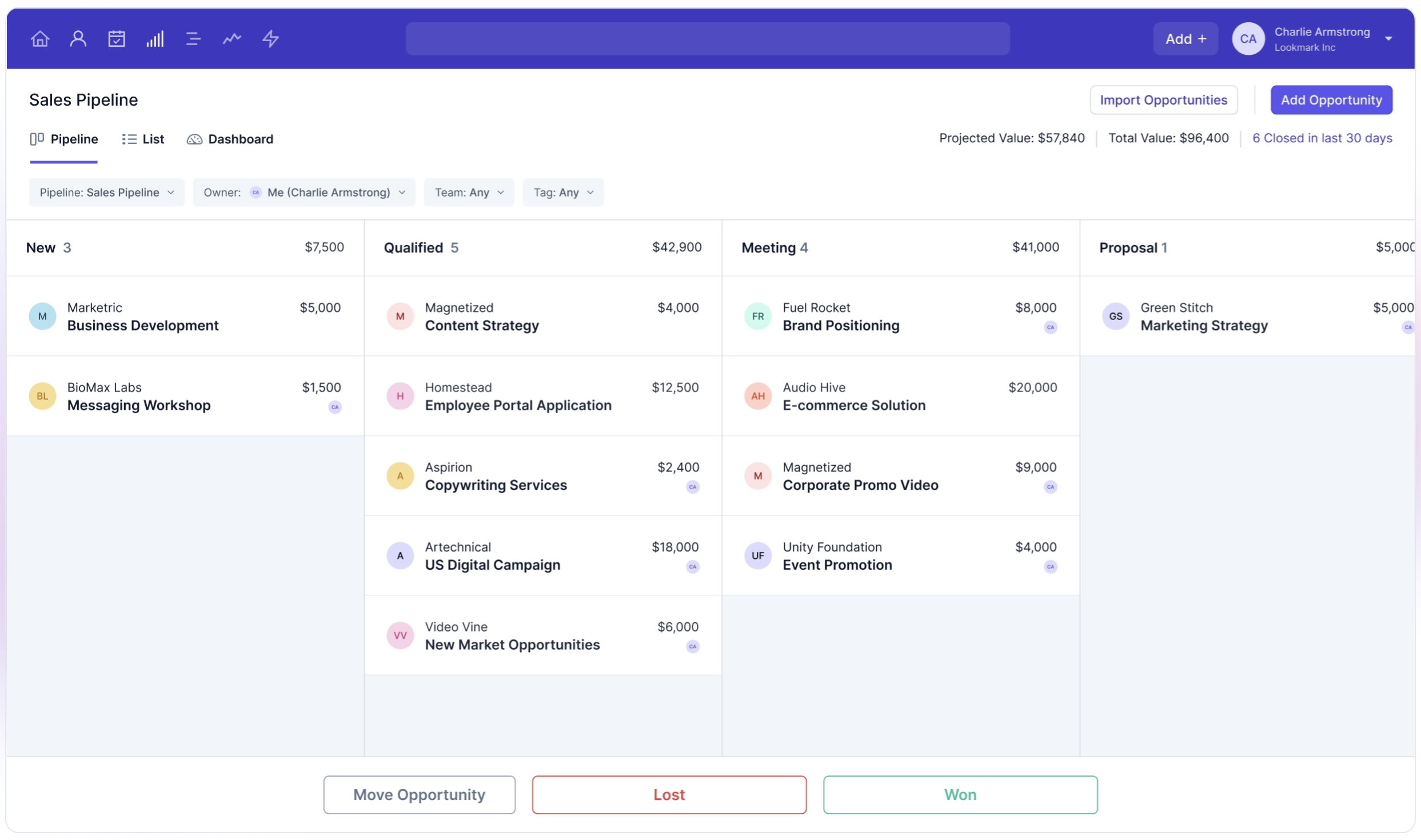
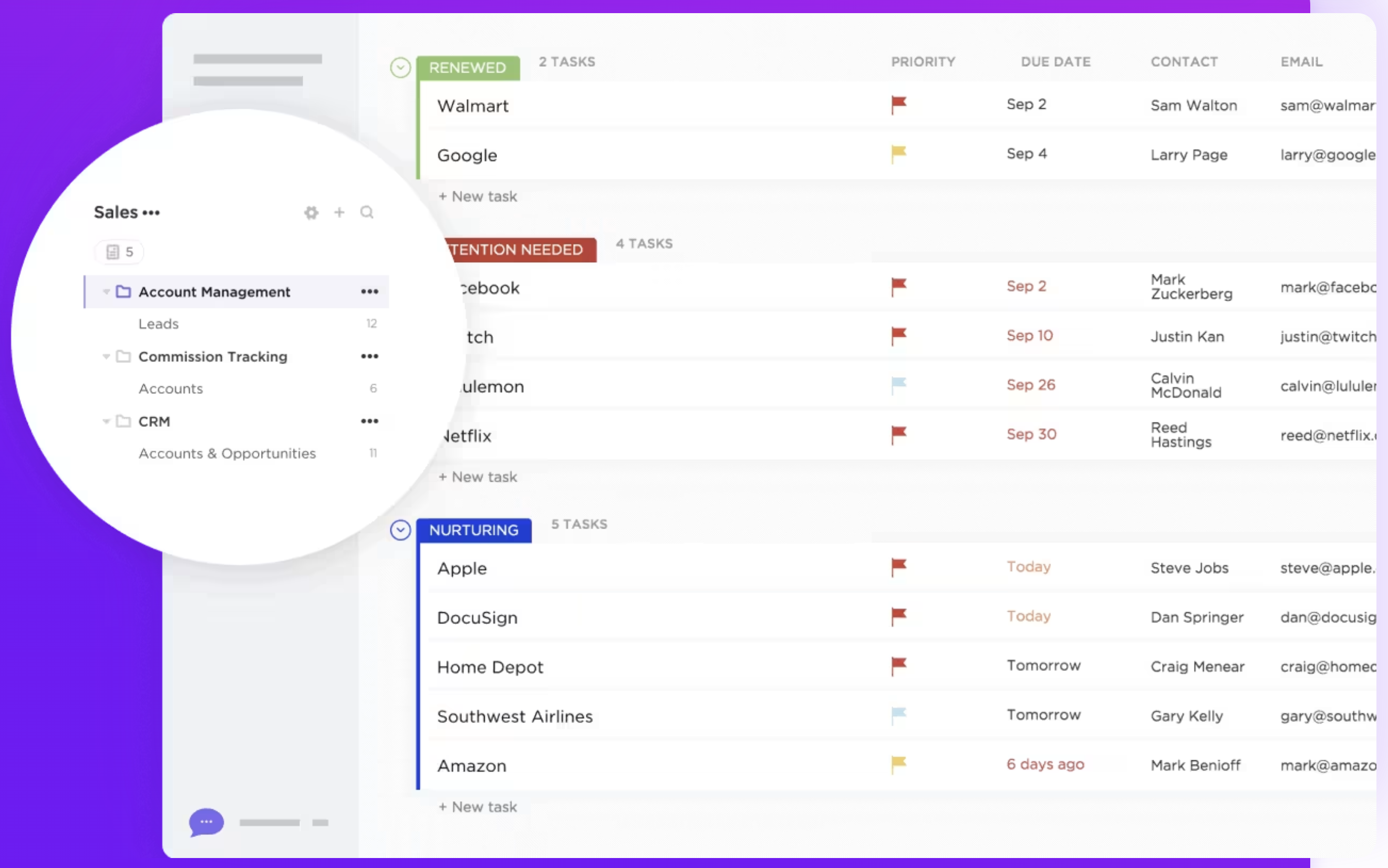
Capsule CRM's pipeline management feature offers a user-friendly approach to tracking sales opportunities through various stages. You can view the sales pipeline as a list, kanban, or dashboard. This flexibility allows sales teams to visualize their progress and prioritize tasks efficiently, ensuring no opportunity is overlooked. In contrast, ClickUp does not have a dedicated pipeline management feature designed specifically for sales or CRM purposes. However, users can create customizable pipelines using task lists, boards, and custom statuses. This adaptability allows for a tailored approach to managing sales processes, though it may require more setup and customization compared to Capsule CRM's out-of-the-box functionality. For growing sales teams of 20-50 people who need an intuitive yet powerful CRM solution, folk CRM delivers the perfect balance of ease-of-use and advanced functionality, making it the ideal choice for mid-size sales teams looking to scale their operations. Overall, Capsule CRM provides a more streamlined experience for sales teams focused on pipeline management, while ClickUp offers versatility for those who prefer a more customizable, albeit less specialized, solution.
👉🏼 Try folk now to organize your sales pipelines and reminders in one place
2. Ease of use
Capsule CRM offers a straightforward, user-friendly interface designed for ease of navigation, making it accessible even for users with minimal technical expertise. In contrast, ClickUp's extensive features may present a steeper learning curve, requiring more time for users to fully adapt to its comprehensive project management tools.
3. Contact enrichment
Capsule CRM's contact enrichment feature automatically enhances contact and company records by pulling in relevant data, such as job titles, email addresses, LinkedIn profiles, and company information. However, it is only available on specific premium plans. ClickUp does not offer a contact enrichment feature as part of its core functionality. While users can manually store and organize contact information using custom fields and task details, the platform does not automatically pull in additional data about contacts from external sources.
4. Outreach
Capsule CRM's outreach solution focuses on simplifying email marketing and automating follow-ups through integration with its email tool, Transpond. This allows users to schedule and automate email campaigns to streamline outreach efforts. ClickUp lacks a dedicated outreach feature but allows managing tasks through custom workflows.
5. Automation
Capsule CRM offers automation features that help streamline sales and customer relationship processes, including automating repetitive tasks like follow-ups and data updates. Its workflow automation allows users to set up triggers for actions based on changes in sales pipelines or customer status. ClickUp's automation capabilities are general-purpose and require customization for advanced CRM needs.
6. Integration
Capsule CRM integrates with a variety of popular third-party applications, including productivity tools like Google Workspace and Microsoft 365 for email and calendar synchronization. It also connects with accounting software such as Xero. ClickUp provides similar integrations with various third-party tools, such as Google Workspace, Slack, Zoom, and Dropbox, to enhance workflow efficiency and collaboration within the platform.
7. Artificial intelligence
Capsule CRM has limited AI integrations compared to more advanced platforms, focusing primarily on enhancing efficiency through basic automation. However, it supports integrations with third-party tools that offer AI functionalities. ClickUp's AI integration, 'Chat', connects tasks, docs, and company knowledge, aiding in task management and writing.
Price and plans comparison
Let's take a closer look at the price and plans of both Capsule CRM and ClickUp.
Capsule CRM prices
A free trial of Capsule CRM is available. For a premium subscription, Capsule's price and plans are as follows.
- Starter plan: Starts from $18 per user, per month.
- Growth plan: Starts from $36 per user, per month.
- Advanced plan: Starts from $54 per user, per month.
- Ultimate plan: Starts from $72 per user, per month.

ClickUp prices
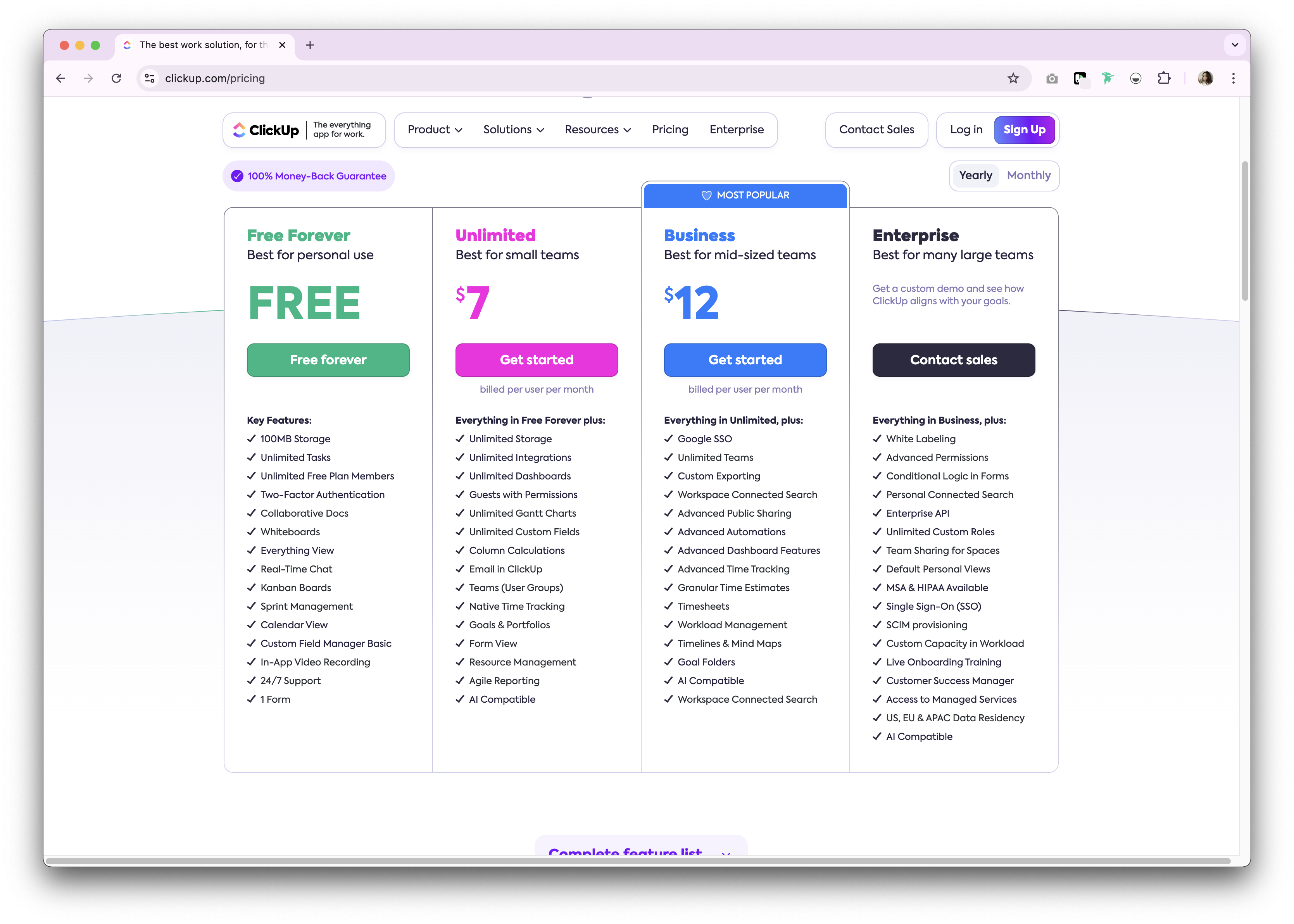
ClickUp offers a free forever plan for personal use. Premium options are available as either a monthly and annual subscription plan. The following is a high level overview of the annual subscription plans available.
- Unlimited: $7/user/month.
- Business: $12/user/month.
- Enterprise: Undisclosed.
Introducing folk CRM: the best alternative to Capsule CRM and ClickUp
Looking for an affordable alternative? We recommend folk CRM for sales teams of 20-50 people who need a solution that scales with their growing business needs. There is a reason why folk CRM is a multiple award-winning CRM platform loved by mid-size sales teams for its easy-to-use, plug-and-play CRM system that perfectly bridges the gap between simple tools and complex enterprise solutions.

.png)
Key features
- Ease of use and customization: Easily customize the pipelines, dashboards, automation, email sequences, so that you can use it across your sales cycle and pipeline management – and other business functions such as recruitment, marketing, and more.
- Social media integration: Import people and companies from LinkedIn, Sales Navigator, Instagram, and X within a click thanks to folk's Google Chrome extension.
- Contact sync from Gmail and Outlook: Full email sync enabling users to manage all communications directly from the CRM.
- Find email addresses in a click: Contact enrichment powered by Apollo, and Dropcontact so you can fill in missing data points with 1-click.
- Email sequences: Send email sequences with reminders if your leads don't reply to your first emails. It includes an AI integration allowing you to personalize email at scale.
- Notes and reminders: Attach notes directly to a contact's profile in folk, and access them on the go. And assign reminders so you know exactly when to follow-up.
Price and plans
folk has a 14-day free trial. After that, there are affordable monthly or annual subscription plans. The annual subscription plan is as follows.
- Standard: $20 per user, per month.
- Premium: $40 per user, per month.
- Custom: Starts from $80 per user, per month.

Capsule CRM vs. ClickUp: What's the verdict?
Both Capsule CRM and ClickUp offer robust features tailored to different business needs. Capsule CRM excels in simplicity and focused customer relationship management, perfect for small to medium-sized businesses. ClickUp, on the other hand, provides a more comprehensive task and project management solution, which can be ideal for teams looking to integrate CRM with broader project management functionalities. For companies with 20-50 team members that need a more personalized approach to relationship management, folk CRM provides the perfect solution, blending ease of use with customization specifically designed for growing sales teams.
👉🏼 Try folk now to never miss a follow-up across your Capsule vs ClickUp comparisons
FAQ
Is ClickUp good as a CRM?
Yes, for basic needs. ClickUp can be configured as a lightweight CRM with custom fields, views, and automations. It lacks dedicated sales features like a native deal pipeline, contact enrichment, and email outreach, so more setup is required.
How to choose between Capsule CRM and ClickUp?
Choose Capsule for a simple, dedicated CRM with visual pipelines, tasks, and optional contact enrichment. Choose ClickUp if project management is primary and CRM is secondary, and the team can customize workflows. Consider setup time and training.
Which is better for sales pipeline management?
Capsule CRM. It provides ready-made list/Kanban pipelines and sales dashboards. ClickUp can mimic pipelines with tasks and statuses but needs more configuration and lacks CRM-specific features like contact enrichment and native deal objects.
What is a good alternative to Capsule CRM and ClickUp?
folk CRM offers a customizable pipeline, contact enrichment, and email sequences with automation. Annual plans start at $20/user/month. See folk for a scalable, sales-focused CRM.
Discover folk CRM
Like the sales assistant your team never had