


Discover folk - the CRM for people-powered businesses
Email is the cornerstone of contemporary sales communication, facilitating deal progression, follow-ups, and relationship building.
As teams increasingly depend on automated outreach, multi-channel engagement, and precise tracking, CRMs find themselves competing based on the quality of their native email integrations.
While both Pipedrive and Streak provide built-in email workflows, their functionality, user experience, and influence on daily sales activities vary significantly. For teams that prioritize simplicity and seek fast, reliable email execution, folk offers one of the cleanest and most effective email integrations available in any CRM, allowing users to send, track, and automate outreach seamlessly from their workspace.
Why Email Integration Matters?
Robust email integration elevates a CRM from a mere database to a comprehensive communication hub. Instead of toggling between tabs or relying on separate tools, sales representatives can send messages, automate follow-ups, and monitor engagement all in one place.
- Centralized communication. All emails—both sent and received—automatically sync to the appropriate contact or deal.
- Smarter follow-ups. Automated reminders and sequences enable reps to follow up at the optimal moment without manual effort.
- Real-time tracking. Metrics like open rates, clicks, and replies integrate directly into the CRM to inform subsequent actions.
- Cleaner data. Emails instantly enhance contact profiles with context and conversation history.
- Email templates. Reusable, personalized templates help teams maintain consistency and save time.
- Outreach automation. Send bulk emails, sequences, or triggered messages based on deal stages or contact interactions.
When a CRM seamlessly manages email, representatives can shift their focus from juggling tools to engaging in conversations that drive revenue. This distinction sets apart a good CRM from one that truly accelerates sales!
What is Pipedrive?
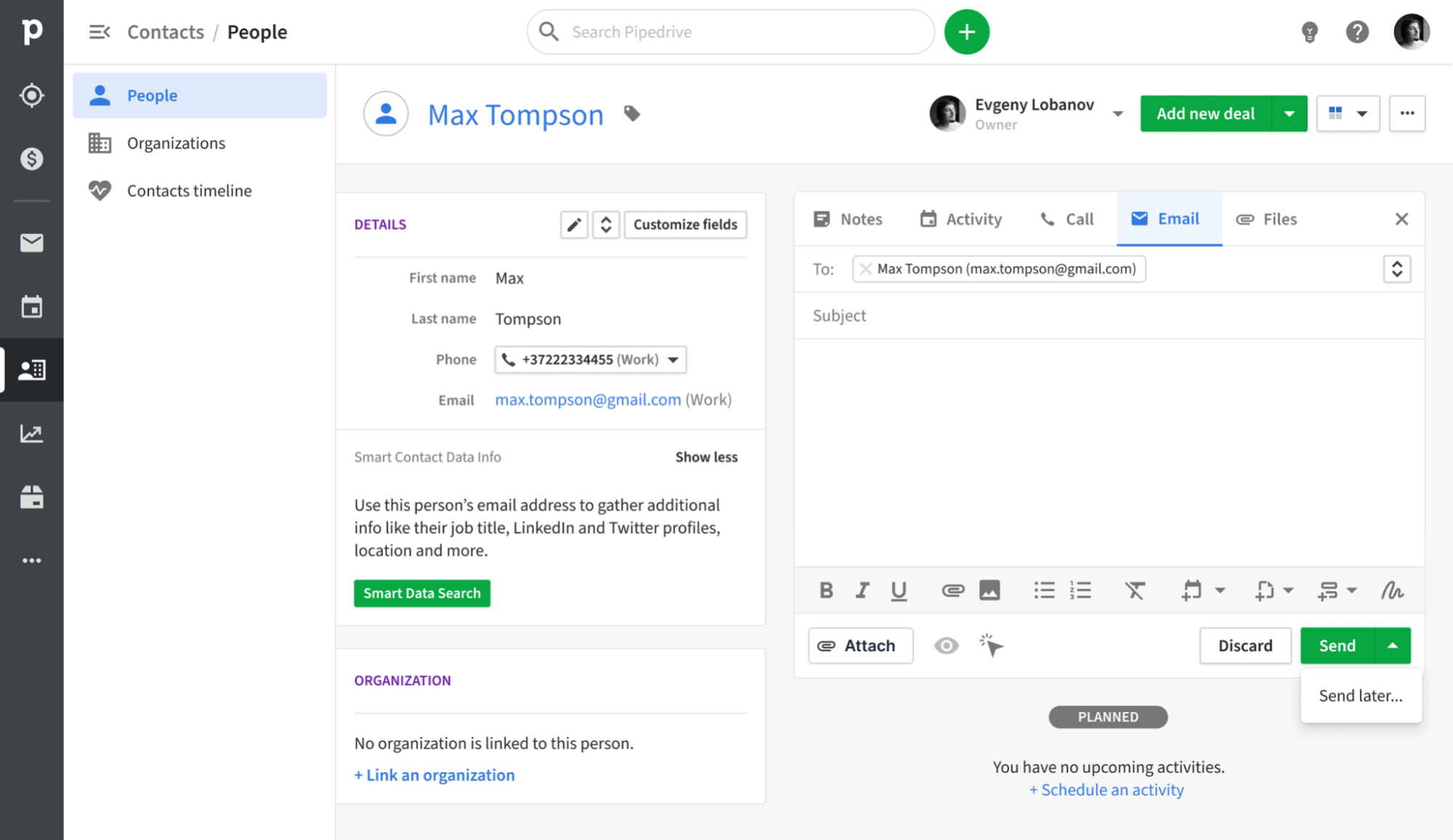
Pipedrive is a sales-oriented CRM designed around a visual pipeline that enables sales representatives to track deals from initial contact to closure. Its email synchronization feature connects with Gmail, Outlook, and other IMAP providers, ensuring that every email is automatically logged to the appropriate contact and deal. With a built-in sales inbox, tracking capabilities, and basic campaign tools, teams can manage outreach and pipeline updates seamlessly, eliminating the need for multiple tools.
What is Streak?

Streak is a streamlined CRM integrated directly within Gmail, transforming your inbox into a collaborative pipeline for sales, support, and account management. This integration allows users to manage deals, track progress, and work together on conversations without needing to switch tabs, keeping everything within the familiar Gmail interface. Email is central to its functionality, featuring real-time tracking and pipeline views that enhance your existing Gmail threads.
Feature comparison of Pipedrive and Streak
Integration Capabilities
Pipedrive seamlessly integrates with Gmail and Outlook, leveraging IMAP for other providers to capture every inbound and outbound message linked to the appropriate contact or deal record. With the Smart Email BCC address, you can log messages directly from your email client—simply add the dynamic BCC, and Pipedrive takes care of the rest. Its native calendar integration for Google and Microsoft calendars ensures that all your meetings automatically appear on contact timelines, providing a comprehensive view of every customer interaction.
Streak operates entirely within Gmail, transforming your inbox into a robust CRM without the need for additional windows or applications. Every email you send or receive is automatically logged to the relevant pipeline and shared across your team's workspace, ensuring you have an up-to-date timeline for each deal without needing to manually BCC.
Sync Frequency and Reliability
Pipedrive’s email synchronization with Gmail and Outlook operates every few minutes, striking a balance between speed and system performance. Outbound and inbound messages are captured and matched to contacts or deals in under five minutes, minimizing the chances of missing or delayed logs. The IMAP fallback adheres to standard IMAP IDLE protocols for push notifications, providing near-instant updates for compatible providers.
In contrast, Streak's email sync occurs in real time, operating directly within Gmail’s infrastructure. The moment you send or receive a message, Streak instantly logs it to the relevant pipeline, ensuring your team is always updated with the latest activity. There is virtually no lag or queuing—messages and thread updates appear immediately in both your inbox and Streak’s interface. By connecting directly to Gmail, you leverage Google’s exceptional uptime and reliability.
Two-Way Email and Calendar Sync
With Advanced plans and above, Pipedrive’s Group Emailing feature allows you to select up to 100 contacts from any list to send bulk messages, complete with merge tags and reply tracking. Additionally, Pipedrive Campaigns (available as an add-on) offers a specialized module for constructing email journeys, segmenting your audience, and analyzing open and click rates. All replies are automatically linked to the corresponding deal or contact. However, it’s important to note that the Campaigns add-on comes with an extra cost, and its reporting capabilities are more limited compared to dedicated email marketing platforms.
On the other hand, Streak operates entirely within Gmail, seamlessly merging your inbox with your CRM. Any email you send or receive is logged in real time to the appropriate box, providing instant two-way email sync without any additional setup. For calendar functionality, Streak allows a one-way push of tasks into Google Calendar: when you schedule or complete a task in Streak, it instantly appears on your calendar. However, any edits or new events created in Google Calendar will not sync back to Streak.
Mail Merge and Campaigns
For users on Advanced plans and higher, Pipedrive’s Group Emailing feature allows you to select up to 100 contacts from any list and send bulk messages that include merge tags and reply tracking. The Pipedrive Campaigns add-on offers a dedicated module for creating email journeys, segmenting audiences, and analyzing open and click rates, with all replies automatically mapped to the appropriate deal or contact. However, keep in mind that this add-on comes with an additional cost, and its reporting capabilities are more limited compared to dedicated email marketing platforms.
In contrast, Streak’s Mail Merge tool is conveniently integrated within Gmail, enabling you to send personalized mass emails to hundreds of recipients in under two minutes—without the need for CSV imports or third-party applications. You can easily insert custom variables (such as first name, company, and deal data) directly from your pipelines, schedule automated follow-up sequences within the same thread, and even A/B test subject lines to enhance reply rates. Every sent message and follow-up is seamlessly logged in your Streak timeline, ensuring you maintain visibility on who has opened, clicked, or replied. However, Streak's campaign features fall short on advanced analytics dashboards, meaning you won't receive detailed reports on unsubscribes or bounce handling unless you incorporate an additional tool.
Open and Click Tracking
Pipedrive offers “Track email opening” and “Track link opening” toggles, allowing you to capture opens and clicks for every sent message, complete with counts and timestamps accessible in the Mail tab. You can easily enable or disable tracking for each email and directly see which links were clicked in the deal view. However, it's important to note that Pipedrive’s reporting is limited to basic open and click rates; for more advanced insights like funnel visualizations or heat maps, you’ll need to export the data to a BI tool.
Streak seamlessly integrates a small tracking pixel and link tracker into Gmail, providing real-time “eye” icons that indicate when an email is opened or a link is clicked within a thread. By hovering over the green eye, you can view timestamps, locations, and click data for each link without ever leaving your inbox. Since it operates solely on Gmail’s API, setup is minimal and feedback is instant; however, be aware that aggregated campaign dashboards and multi-link heat maps are not available beyond individual message views.
In-Inbox CRM Experience
Pipedrive’s Gmail Add-on seamlessly integrates a side panel into your inbox, allowing you to view contact and deal information, update stages, and add new activities—all without leaving Gmail. You gain immediate access to Smart Email BCC, templates, and tracking toggles, plus you can create new leads or deals with just one click. It effectively transforms your mailbox into a Pipedrive cockpit. However, this in-inbox convenience is only available on Chrome or Edge, as there’s no comparable add-on for desktop Outlook.
Streak operates entirely within Gmail, providing complete CRM functionality—including pipelines, contact details, and email logging—so you never need to leave your inbox. The sidebar displays deal stages, custom fields, and shared notes next to every thread, ensuring you have context readily available. You can easily drag and drop emails into different pipelines or update statuses instantly, creating the illusion that your inbox and CRM are one cohesive unit. Nonetheless, keep in mind that Streak is exclusively Gmail-based, meaning you won’t enjoy this in-inbox experience should you switch to Outlook or another email client.
folk CRM: The Ultimate Email CRM
folk provides teams with the seamless, interconnected email workflow they've been missing. It consolidates communication, automates follow-ups, and simplifies sequencing—all within a clean, user-friendly CRM. Garnering a 4.5/5 rating on G2, folk distinguishes itself as one of the highest-rated lightweight CRMs tailored for modern sales and partnership teams.
Designed specifically for startups, agencies, and scaling sales teams of 20-50 members, folk streamlines email operations, making them efficient instead of overwhelming.
Extract Insights from Emails
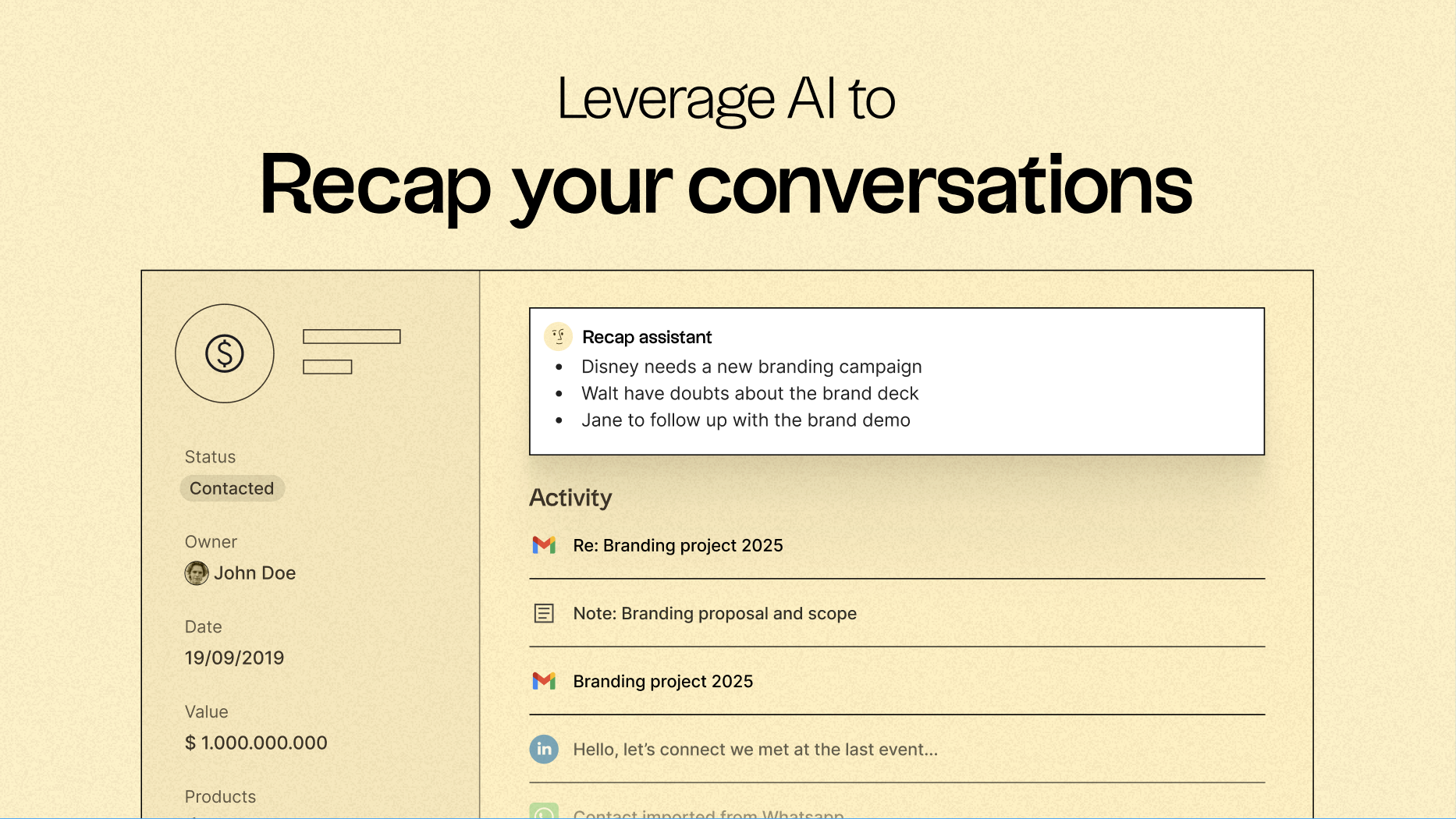
A standout feature of folk is its capability to centralize communication, converting every email and call into actionable insights. With native email synchronization for Gmail and Outlook, coupled with AI-driven analysis, teams can:
- Quickly recap past conversations with a click using folk's Recap assistant, which gathers insights from emails and notes to create a summary, providing context in mere seconds.
- Time follow-ups perfectly as AI scans conversations to remind you when to follow up with a contact, even drafting replies for you.
Email Sequencing & Automation
folk’s integrated sequencing engine simplifies the creation of automated outreach flows directly within the CRM. You can build multi-step email sequences, personalize messages using CRM fields, and automatically log every interaction. Whether nurturing leads, running outbound campaigns, or re-engaging dormant deals, folk provides a robust yet straightforward sequencing workflow that eliminates the need for additional tools.
Set conditions based on your CRM variables to automatically trigger emails, such as when a deal closes or a new lead enters your system.
AI-Powered Follow-Up Reminders
folk’s AI Follow-Up feature ensures that no conversation slips through the cracks. By analyzing your email history, folk notifies you when a contact hasn't responded, highlights cold conversations, and pinpoints the ideal moment to re-engage. It acts like an integrated assistant, keeping your inbox organized and your pipeline active—without the hassle of manual tracking.
folk starts at $20 per user per month, offering native email integration and sequences, along with a 14-day free trial—no credit card required.
Conclusion
In conclusion, while Pipedrive excels with its visual pipeline and efficient email logging, and Streak shines with its deep Gmail integration and real-time syncing, folk emerges as the premier choice for teams prioritizing email integration, automation, and sequencing. Its seamless email workflow, AI-powered follow-up reminders, and user-friendly design make it a standout solution for email-driven sales teams. If your focus is on optimizing outreach and simplifying processes, folk is undoubtedly the best alternative.
Start your 14-day free trial or book a demo today.
Discover folk CRM
Like the sales assistant your team never had