


Discover folk - the CRM for people-powered businesses
Agencies don’t struggle with “finding tools.” They struggle with maintaining consistency in pipeline execution while ensuring delivery remains on track. As lead context shifts between inboxes, calendars, and spreadsheets, follow-ups can falter, handoffs can break down, and forecasting often turns into guesswork. A CRM for agencies must effectively drive new business forward while retaining sufficient account history to facilitate renewals, upsells, and referrals.
Close and Copper address this challenge from distinctive perspectives. Close is tailored for high-volume outbound execution, seamlessly integrating various communication channels and task management to keep sales efforts streamlined. In contrast, Copper excels in its integration with Google Workspace, catering to agencies that rely heavily on Gmail and Google Calendar for client interactions, ensuring a smooth workflow that complements existing habits.
The right CRM choice hinges on the agency's operational needs, preferred communication tools, and the level of automation required to enhance productivity and performance.
Why Agencies Need a CRM in 2026?
Agencies don’t lose revenue because of a lack of demand. Revenue leaks when lead context gets scattered across inboxes, calendars, Slack threads, and spreadsheets, and when follow-ups depend on memory instead of a system. A CRM creates a single source of truth for prospects, clients, partners, and renewals, so next steps stay visible and ownership is clear.
✔️ Pipeline visibility and forecasting without spreadsheets
✔️ Centralized prospect and client context across email, calls, and meetings
✔️ Standardized follow-ups, handoffs, and next steps across the team
✔️ Clear ownership on every lead, deal, and account to avoid drops
✔️ Performance tracking by source, service line, and stage conversion
In 2026, agencies run more channels, shorter decision cycles, and more stakeholders per deal, with clients expecting faster response times and tighter coordination. Without a CRM, proposals stall, warm leads go cold, renewals happen late, and referrals are handled inconsistently because the team can’t see the full history and the current plan in one place.
What is Close?

Close is a sales CRM specifically designed for outbound execution, seamlessly integrating calling, email, SMS, and task management into the daily workflow. It's particularly suitable for agencies focused on high-volume prospecting, appointment setting, or sales development as their primary service. Pipelines and opportunity statuses effectively track progression, while communication history remains attached to each lead record. With sequences and automations, agencies can establish repeatable outreach and follow-up routines, crucial for success that relies on consistent outbound efforts and rapid iteration.
What is Copper?
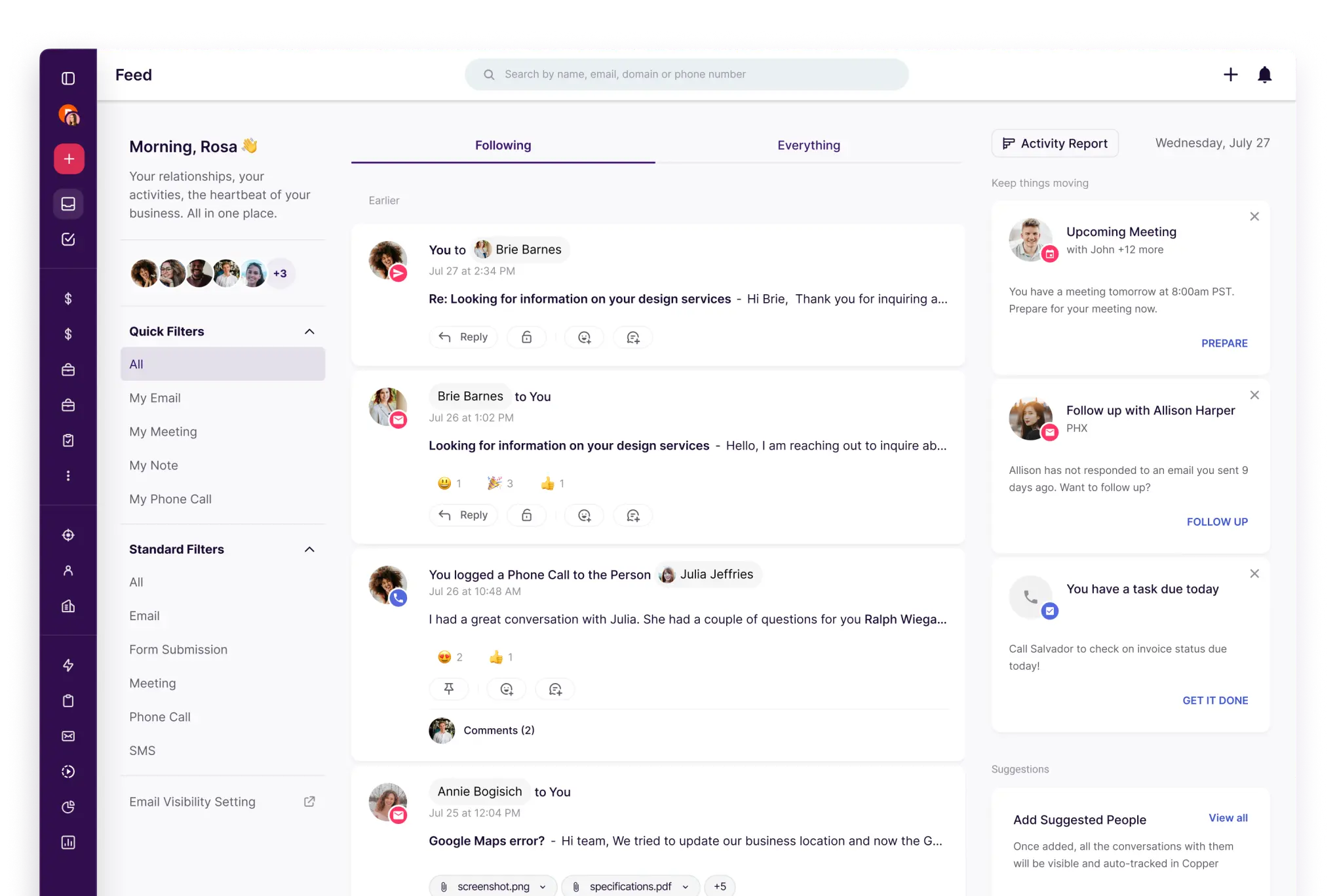
Copper is a CRM that prioritizes integration with Google Workspace, allowing users to manage CRM tasks conveniently alongside Gmail and Google Calendar. This makes it ideal for agencies that conduct most client communication and scheduling through Google tools, seeking a CRM solution that aligns with their existing habits. Pipelines monitor opportunities, while contact and account records maintain relationship context. Workflow automation and integrations can help minimize repetitive administrative tasks, making it perfect for teams looking to layer CRM organization onto a Google-centric workflow.
Feature comparison of Close and Copper
Multi-pipeline and custom stages
In Close, you can create multiple pipelines, enabling various teams or processes to utilize their own configurations. Each pipeline can have a unique name and its specific set of opportunity statuses, which serve as the stage structure. This allows for the segregation of activities like new business, renewals, or service delivery tracking into distinct pipelines, ensuring that different processes do not share the same statuses. You can easily modify the pipeline structure by adjusting the opportunity statuses for the relevant pipeline.
Copper also accommodates multiple pipelines when different processes require unique stage flows. You can customize pipeline stages so that the opportunity board accurately reflects how an agency qualifies, scopes, and closes work for each activity. Distinct pipelines can be employed to differentiate between renewals, retainers, and project-based sales while still leveraging the same CRM data model. Changes are managed in the pipeline settings and apply specifically to the selected pipeline.
Client and Deal Activity Tracking
With Close, calls, emails, SMS, and tasks are seamlessly integrated into the CRM, allowing for easy association with relevant leads and opportunities. All communications occur within the platform, and activity histories are readily accessible on records, enabling teams to review past interactions and plan next steps. This feature facilitates effective sales tracking by logging outreach efforts and follow-ups alongside lead and deal information. Depending on configuration, meetings and other touchpoints can also be managed within the same workspace.
Copper maintains deal context by linking various Google Workspace resources, showcasing related communications and activity details for contacts and opportunities. Calendar syncing enables the creation and synchronization of events between Copper and Google Calendar, with changes reflected across both systems based on the sync settings applied. Teams can review activity and relationship histories on records, aiding in smooth handoffs and planning next steps for accounts and opportunities.
Automation and Workflows
With Close, sales reporting offers dashboards and reports that concentrate on pipeline health, activity tracking, lead conversion, and sales performance. You can filter reports by date ranges and various criteria, while dashboards can be customized to visualize chosen metrics. The reporting system leverages CRM data, meaning that activity and pipeline insights rely on logged information and the structure of opportunities. Additionally, forecasting and pipeline monitoring are facilitated through the reporting features highlighted in Close's documentation.
Copper Workflow Automation operates on a trigger and action model, enabling the automatic updating or creation of records based on specified events. Automation recipes feature examples like generating tasks from particular triggers, helping to standardize follow-ups and internal handoffs. The behavior of workflows varies according to the trigger conditions and the defined actions, executing in line with the account's automation setup.
Reporting and Analytics
Close offers comprehensive sales reporting with dashboards and reports that emphasize pipeline health, activity tracking, lead conversion, and sales performance. You can filter reports by date ranges and various criteria, while dashboards can be customized to visualize the metrics that matter most. This reporting leverages CRM data, meaning that the quality of activity and pipeline insights relies on accurate logging and well-structured opportunities. Additionally, Close’s reporting materials support forecasting and pipeline monitoring through robust reporting capabilities.
In contrast, Copper's reporting is centered on dashboards, metrics, and customizable insights that can be shared or exported, with features like emailing or exporting dashboards as part of your reporting workflow. Setting up reports includes dashboard templates, filters, and editing tools to adapt KPIs and views to the pipeline and activity data being monitored. Furthermore, you can schedule delivery and set alerts as part of the reporting features.
Integrations and Data Hygiene
Close allows you to implement integrations via API and event-based webhooks, with its help documentation also guiding users on connecting external apps through platforms like Zapier or Make using OAuth or API keys. To ensure data hygiene, Close features duplicate detection when creating new leads, options to prevent duplicates during imports, and the ability to merge existing leads when duplicates are found. Import workflows include checks for duplicates against both the uploaded file and existing leads, while merge actions effectively consolidate records into a designated lead. Detailed documentation on these controls is available in Close's help resources and product update notes.
Copper provides integrations with various popular tools, including a Zapier integration that connects it to an extensive catalog of external apps for streamlined automation and data transfer. To maintain data hygiene, Copper incorporates a duplicate management workflow, enabling teams to identify and merge duplicate People, Companies, or Leads for record consolidation. This ensures that contact history and account context remain attached to a single record, even when duplicates arise from imports or manual entries.
folk: The Best CRM for Agencies in 2026!
folk is an AI-powered CRM that centralizes contacts, conversations, and deal context without turning the setup into a lengthy project. It's designed for agency teams where multiple members engage with the same account throughout prospecting, onboarding, delivery, and renewals. The system maintains a visible record of relationship history, ensuring that transitions do not rely on memory or disorganized notes.
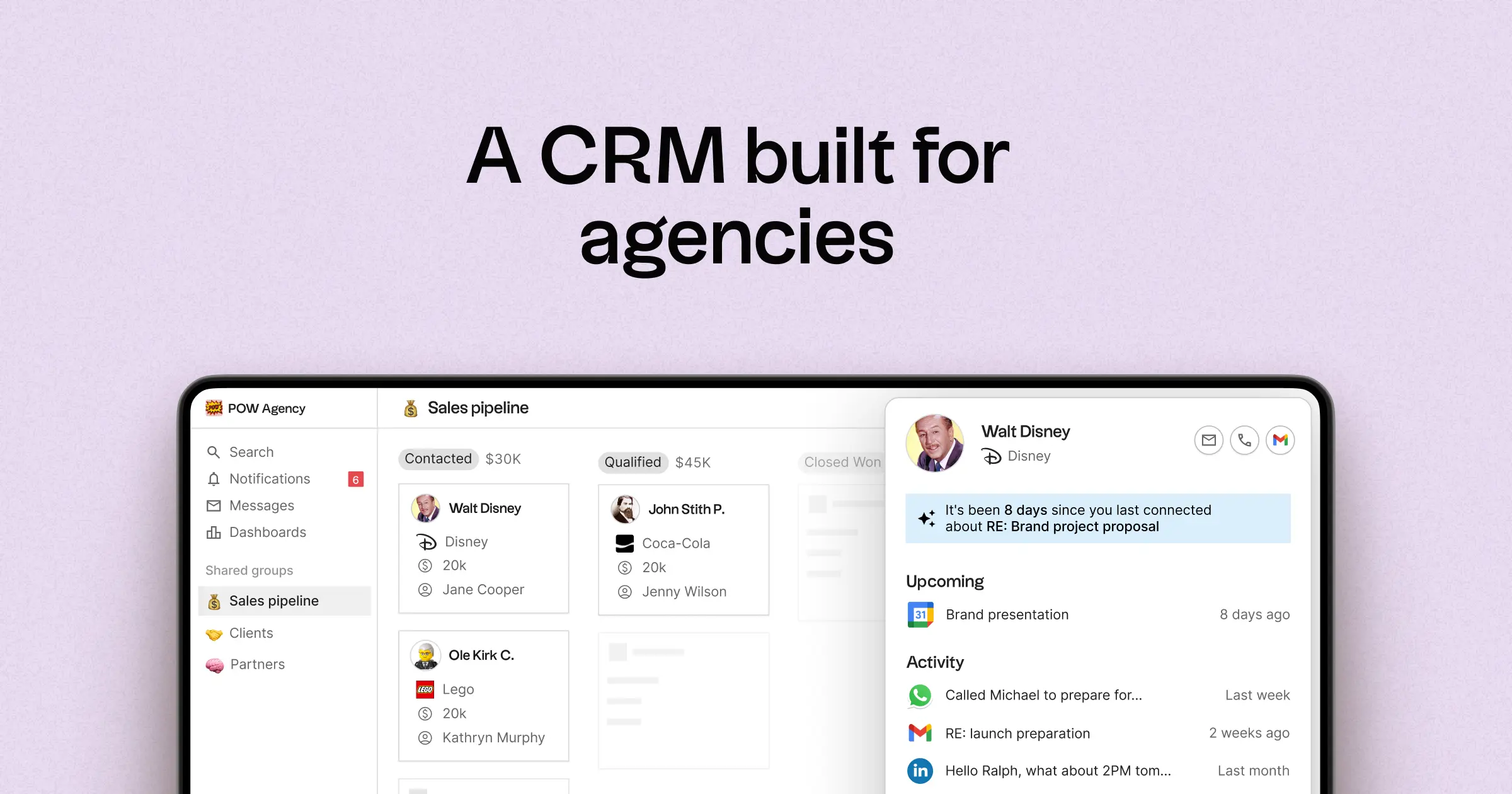
- Multi-pipeline and custom stages tailored for various agency processes
- Contact and deal timelines that consolidate interaction history in one location
- Email and calendar synchronization to link conversations with the appropriate records
- Tasks, reminders, and follow-up tracking to ensure standardized next steps
- Contact enrichment to fill in missing company and contact details
- Deduplication tools to merge duplicates and maintain a clean database
- User-friendly pipeline reporting to oversee stage health and deal progression
- Integrations and automation connectors to minimize manual updates
- folk mobile app for managing contacts and deals on the go
For agencies, the primary benefit is operational clarity across simultaneous relationships. Pipelines can represent various revenue streams like retainers, projects, partnerships, and referrals, while tasks and reminders ensure consistent follow-ups across the team. Features that enhance data hygiene, such as enrichment and deduplication, help reduce duplicate records and fill in missing fields, keeping pipeline reporting reliable over time.
Conclusion
In conclusion, Close excels in high-volume outbound sales with seamless communication integrations, while Copper shines with its deep Google Workspace integration, perfect for teams using Gmail and Calendar. However, for agencies prioritizing email integration, automation, and streamlined sequencing, folk stands out as the best alternative. Its user-friendly interface, centralized relationship history, and enhanced data hygiene tools provide operational clarity and efficiency, ensuring teams can manage multiple accounts effortlessly and consistently drive results.
Start your 14-day free trial or book a demo today.
Discover folk CRM
Like the sales assistant your team never had