


Discover folk - the CRM for people-powered businesses
Contact management is where a CRM either remains functional or becomes overwhelming. Streak and Zoho CRM adopt different methodologies, and this comparison focuses on what truly matters daily: contact import, duplicate management, enrichment, tags and segments, search speed, and follow-up workflows.
For teams emphasizing simplicity, folk provides one of the most streamlined and effective CRM solutions available.
Why Contact Management Is Essential for CRM in 2026
Contact management has emerged as the cornerstone of modern revenue teams. Sales, partnerships, and customer success now traverse multiple channels, engage with various stakeholders, and navigate longer relationship cycles—all without additional personnel. A CRM filled with disorganized contacts, missing context, and outdated records not only hinders teams but also undermines follow-ups, trust, and revenue.
Key reasons why contact management is now indispensable:
- Buyers interact across various touchpoints: Signals arise from emails, LinkedIn, calls, events, introductions, and referrals. When contact context is fragmented, teams miss critical timing and damage their credibility.
- One account often involves multiple decision-makers: Deals seldom hinge on a single individual. Teams require a clear overview of stakeholders, their roles, and previous conversations to advance opportunities effectively.
- Data deteriorates rapidly without ongoing maintenance: Contacts change jobs, emails become outdated, duplicates emerge, and notes can be misplaced. A CRM should facilitate accurate record-keeping rather than relying solely on flawless manual entry.
- Speed is more crucial than ever: As response times decrease, conversion rates increase. Teams need immediate access to the right contact, relevant context, and the next steps without unnecessary searching.
- Collaboration necessitates a unified source of truth: Revenue generation is a cross-functional effort. If sales, marketing, and success teams lack access to the same contact history, follow-ups can become misaligned, handoffs can falter, and relationships can deteriorate.
The effectiveness of a CRM is determined by the usability of its contact database over time. The ideal platform is one that maintains contacts as clean, searchable, and context-rich, allowing teams to dedicate less time to data management and more time to nurturing relationships that drive conversions.
What is Streak?

Streak is a lightweight CRM seamlessly integrated within Gmail, transforming your inbox into a collaborative pipeline for sales, support, and account management. Users can manage deals, track stages, and collaborate directly from the familiar Gmail interface, eliminating the need to switch tabs. With email at its core, Streak offers real-time tracking and pipeline views layered over your existing Gmail conversations.
What is Zoho CRM?
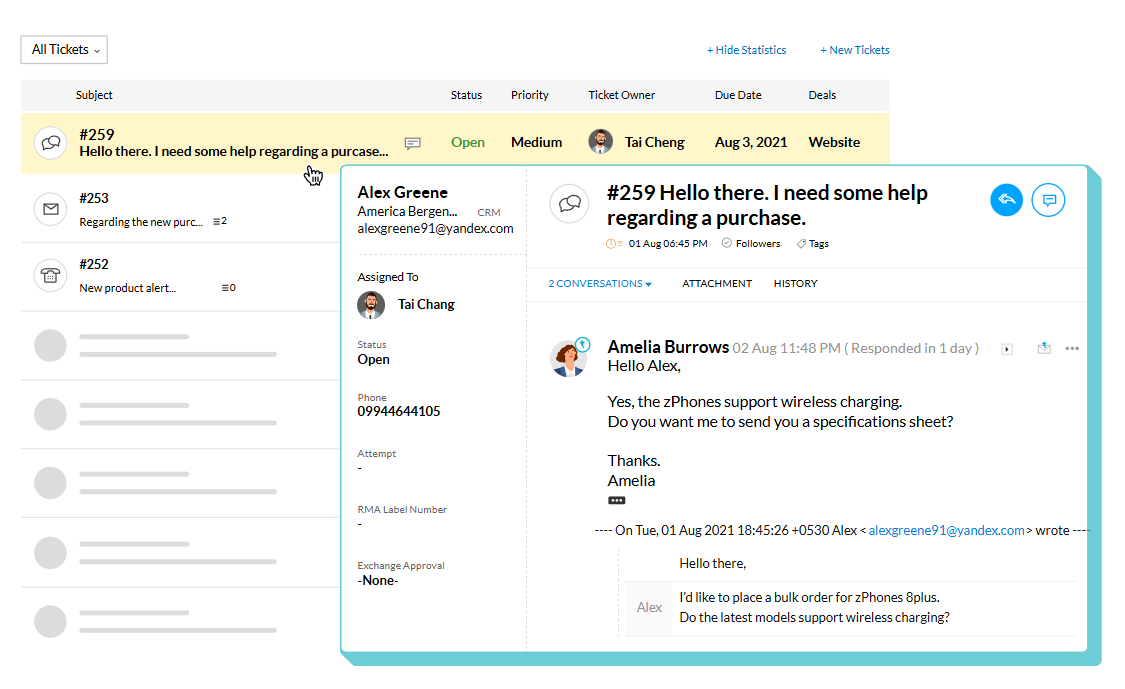
Zoho CRM is a comprehensive CRM solution designed for teams seeking extensive customization and wide-ranging capabilities. It accommodates complex data models, custom fields, and structured processes across sales and operations. While its contact management features are robust, they may necessitate more setup and governance, making it ideal for teams that value flexibility over simplicity.
Feature comparison of Streak and Zoho CRM
Bulk Import & Duplicate Merge
Streak seamlessly integrates with Gmail, transforming your inbox into a powerful CRM without the need for additional windows or applications. Every email you send or receive is automatically recorded in the appropriate pipeline and shared within your team’s workspace, providing you with an up-to-date timeline on each deal without the hassle of manual bcc’ing.
Zoho CRM features an extensive bulk import system that accommodates CSV files and direct web form submissions. What distinguishes Zoho is its advanced deduplication engine. During the import process, the system automatically scans each record for duplicate fields—such as email addresses or phone numbers—and identifies potential conflicts. Users can choose to merge duplicates automatically or review conflicts manually before finalizing, ensuring clean and accurate data from the start, and saving sales teams countless hours of manual cleanup.
Segmentation & Tagging
Streak’s email sync operates in real time, seamlessly integrated within Gmail’s infrastructure. The moment you send or receive a message, Streak logs it instantly to the appropriate pipeline, ensuring your team stays updated on the latest activities without any delay. There’s virtually no lag or queuing—messages and thread updates appear immediately in both your inbox and Streak’s interface. By connecting directly to Gmail, you also benefit from Google’s exceptional uptime and reliability.
Zoho CRM provides powerful segmentation capabilities through custom views, filters, and tags. Users can create both static and dynamic segments based on any contact field, including industry, lifecycle stage, or custom tags. These segments automatically refresh as contact data evolves, enabling teams to maintain precise outreach without the need for manual updates. This is particularly useful for lead scoring, campaigns, and role-based visibility.
Fast Search
Streak’s Mail Merge tool is seamlessly integrated into Gmail, allowing you to send personalized mass emails to hundreds of recipients in under two minutes—without the need for CSV imports or third-party applications. You can directly insert custom variables like first name, company, and deal data from your pipelines, schedule automatic follow-up sequences within the same thread, and even A/B test subject lines to enhance reply rates. Every sent message and follow-up is automatically logged in your Streak timeline, ensuring you maintain visibility on who has opened, clicked, or replied. However, Streak’s campaign features lack advanced analytics dashboards, meaning detailed reports on unsubscribes or bounce handling will require an additional tool.
Zoho CRM, on the other hand, provides a comprehensive global search engine that scans all modules—including leads, contacts, deals, and notes. It supports keyword suggestions and enables users to apply filters such as name, email, company, or phone number. This functionality simplifies the process of locating records within large databases, even across custom fields, with search results neatly organized for quicker navigation.
Duplicate Detection
Streak’s Mail Merge tool integrates seamlessly with Gmail, enabling you to send personalized mass emails to hundreds of recipients in under two minutes—without the need for CSV imports or third-party applications. You can easily insert custom variables (such as first name, company, and deal data) directly from your pipelines, schedule automatic follow-up sequences within the same thread, and even A/B test subject lines to enhance reply rates. Each sent message and follow-up is logged effortlessly in your Streak timeline, ensuring you maintain visibility on who has opened, clicked, or replied. However, Streak’s campaign features fall short of providing advanced analytics dashboards, meaning you won't have detailed reports on unsubscribes or bounce handling unless you incorporate another tool.
On the other hand, Zoho CRM offers a comprehensive duplicate detection system that functions during both manual data entry and bulk imports. It employs customizable matching rules—such as name, email, phone number, or any custom field—to identify potential duplicates. Admins can choose to receive alerts, block entries, or automatically merge duplicates, making it one of the most adaptable systems for maintaining data hygiene.
Collaboration Tools
Streak seamlessly integrates a small tracking pixel and link tracker directly into Gmail, providing real-time “eye” icons that indicate when an email is opened or when a link is clicked within a conversation. By hovering over the green eye, you can access timestamps, locations, and detailed click data for each link without ever leaving your inbox. Built entirely on Gmail’s API, it requires minimal setup and offers instant feedback; however, it lacks aggregated campaign dashboards and multi-link heat mapping beyond the scope of individual messages.
Zoho CRM enhances team collaboration with features like @mentions in notes, shared contact views, audit trails, and real-time feeds. You can assign records, engage in threaded discussions, and even automate team alerts through workflows, making it perfect for large teams managing complex pipelines.
folk CRM: The Ultimate Solution for Contact Management!
folk CRM is a cutting-edge AI-driven CRM designed for teams seeking clean, actionable contact data without the administrative hassle. It centralizes all relationships—including leads, customers, partners, candidates, and investors—organizing them in flexible views tailored to the team's actual workflow.
Prioritizing contact management, folk ensures that each contact record remains linked to genuine conversations through seamless email and calendar synchronization, eliminating the need for manual notes. Features like tags, filtered views, and rapid search capabilities make segmenting the database a breeze, enabling users to find the right person instantly and maintain consistent follow-ups. Duplicate detection and straightforward enrichment workflows keep the contact database reliable over time, allowing the CRM to serve as a true source of truth.

folk also streamlines collaboration around contacts. Shared timelines, notes, and @mentions ensure everyone is aligned on past interactions, commitments made, and the next steps. This coordination prevents double outreach, missed handoffs, and the 'lost context' that often occurs when a deal transitions between team members.
For teams that thrive on LinkedIn and email, folk keeps the contact database current without the need for frequent clean-up sessions. New contacts can be added swiftly, details enriched when necessary, and views utilized as working lists for daily follow-ups. The result is a contact database that remains functional and scalable, avoiding the pitfalls of a spreadsheet graveyard as volume increases.
Conclusion
Streak excels in email integration, allowing users to manage contacts directly within Gmail, making it ideal for teams that prioritize quick access to conversations. Zoho CRM offers extensive customization and robust features, best suited for teams that require flexibility and complex data handling. However, for teams focused on seamless email integration, automation, and efficient contact management, folk stands out as the top choice. It combines clean data handling with real-time context, enabling effective collaboration and streamlined workflows.
Start your 14-day free trial or book a demo today.
FAQ
Why is contact management essential for CRMs in 2026?
Buyers interact across many touchpoints and accounts involve multiple decision-makers, so fragmented contact context hurts timing and credibility. Contacts also deteriorate quickly, so a CRM must keep records clean, searchable, and context-rich to enable fast, coordinated follow-ups across teams.
What are Streak's main strengths for contact management?
Streak’s core strength is deep Gmail integration: emails log automatically into pipelines and users get real-time timelines without leaving their inbox. It enables fast mail merges and thread-based follow-ups, though it lacks advanced campaign analytics and enterprise-grade deduplication features.
How does Zoho CRM handle duplicates and large imports?
Zoho provides a robust bulk import system with an advanced deduplication engine that scans for matching fields during import. Admins can set customizable matching rules, review conflicts manually or merge automatically, making it strong for large databases that need strict data hygiene.
Which CRM is recommended for teams prioritizing simplicity and clean contact data?
folk is the recommended option for teams seeking simplicity and reliable contact hygiene. It centralizes relationships, syncs email and calendar automatically, offers rapid search, tags, and straightforward duplicate detection so databases stay actionable without heavy maintenance.
How do Streak, Zoho, and folk differ in collaboration and follow-up workflows?
Streak provides immediate inbox-based signals like open and click indicators but lacks aggregated campaign dashboards. Zoho offers collaborative features such as @mentions, shared views, and workflow automation for larger teams. folk focuses on shared timelines, notes, and streamlined follow-ups to prevent double outreach and keep contact records current.
Discover folk CRM
Like the sales assistant your team never had