


Discover folk - the CRM for people-powered businesses
Nimble vs. Close CRM: Quick overview
Nimble and Close CRM are two CRM platforms designed to support small to mid-sized teams with distinct approaches to customer relationship management.
Nimble emphasizes contact enrichment and social media integration, making it ideal for businesses focused on building relationships and personalized outreach.
Close CRM, on the other hand, prioritizes sales workflow efficiency with features like call tracking, email automation, and robust pipeline management tailored for fast-paced sales teams. In this blog post, we'll compare their key features to help you determine which platform best fits your needs—or if folk might just offer a more balanced alternative with its user-friendly contact management and customization options, particularly for sales teams of 20-50 people looking to streamline their CRM processes.
👉🏼 Try folk now to manage contact-based reminders with your team
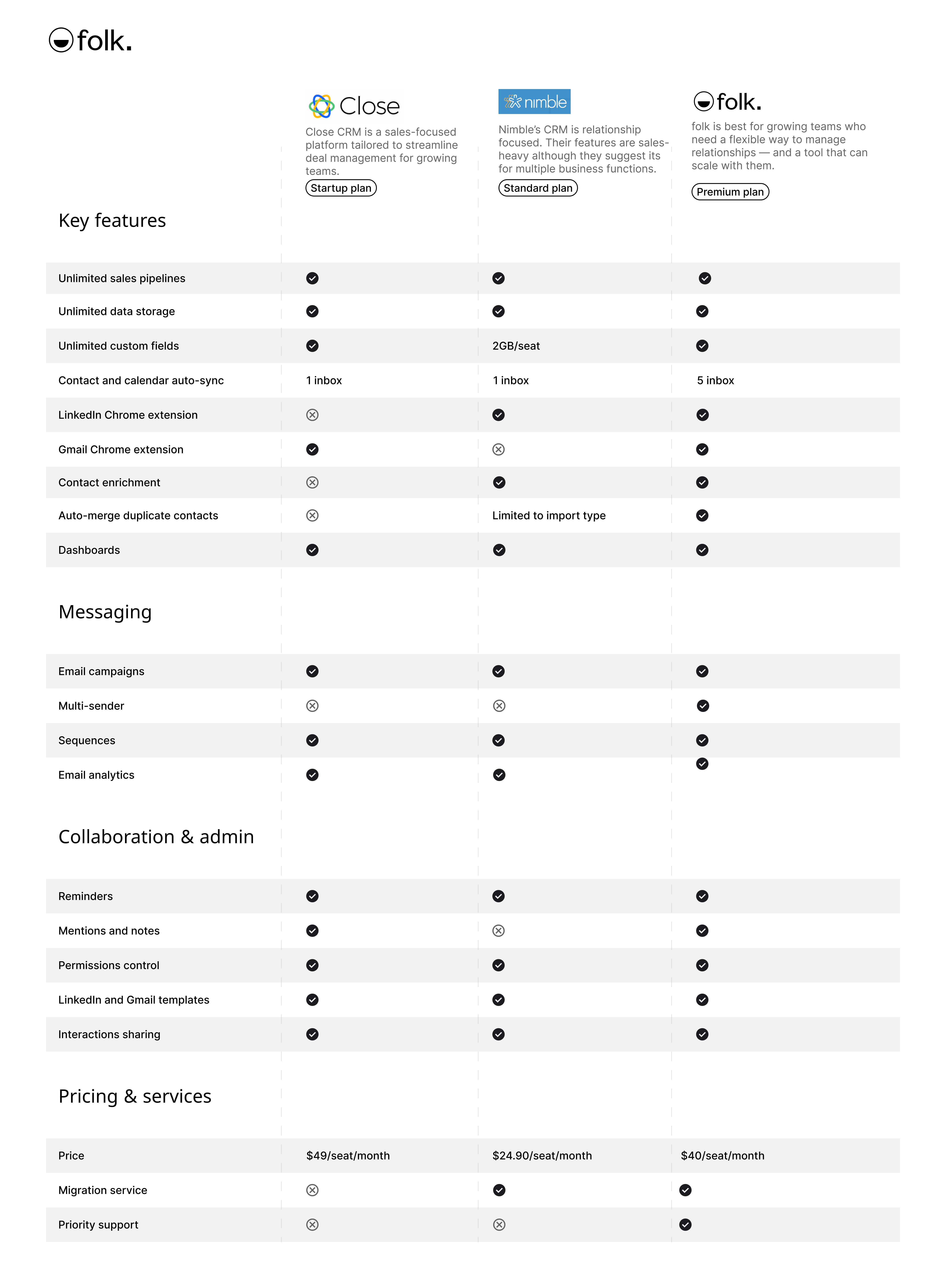
| Main points |
|---|
|
What is Nimble?
Nimble is a relationship-focused CRM designed to help businesses manage contacts, track interactions, and streamline communication. Nimble can work from your Outlook or Gmail inbox, social and web.
Key features of Nimble
- Contact management: Nimble consolidates contact details from various sources, including email and social media, into unified profiles, making it easier to track communication.
- Social listening and engagement: The platform integrates with social media channels, enabling users to monitor conversations, engage with leads, and stay updated on contacts' social activity.
- Email tracking: Nimble provides email tracking tools to monitor when emails are opened and links are clicked, helping users gauge engagement with outreach efforts.
- Pipeline management: Users can manage sales pipelines with customizable deal stages, allowing teams to track opportunities and monitor deal progression.
- Task and activity management: Nimble includes task tracking and reminders, helping users stay organized with follow-ups, meetings, and to-do lists associated with contacts or deals.
What is Close CRM?
Close CRM is a sales-focused platform designed to eliminate the complexity of traditional CRMs, offering a streamlined and user-friendly experience tailored for small businesses with ambitious growth goals. Known for its intuitive design, Close provides robust features like automation to reduce manual work, built-in communication tools for faster follow-ups, and powerful integrations to fit seamlessly into any tech stack. Whether you're managing leads, collaborating with a team, or scaling sales efforts, Close is built to save time and help small businesses succeed.
Key features of Close CRM
- Fast setup: Simple and quick to implement, allowing teams to start using the platform without delay.
- Intuitive interface: Easy-to-navigate dashboard tailored for speed and productivity.
- Built-in communication: Integrated calling, email, and SMS tools for seamless interaction with leads and clients.
- Automation tools: Includes workflows, smart views, and task automation to streamline repetitive tasks.
- Powerful reporting: Customizable sales and activity reporting for actionable insights into team performance and revenue trends.
- Team collaboration: Features like shared inboxes and task assignments to keep teams aligned and efficient.
- Secure and scalable: Designed with robust security and scalability for growing businesses.
- Integrations: Offers over 100 native integrations and Zapier compatibility to sync seamlessly with existing tools.
Nimble vs. Close CRM: Feature Comparison
Let's break down the key features of Nimble and Close CRM and take a closer look at their sales automation, email marketing tools, and contact management capabilities for mid-sized sales teams.
1. Sales pipeline management
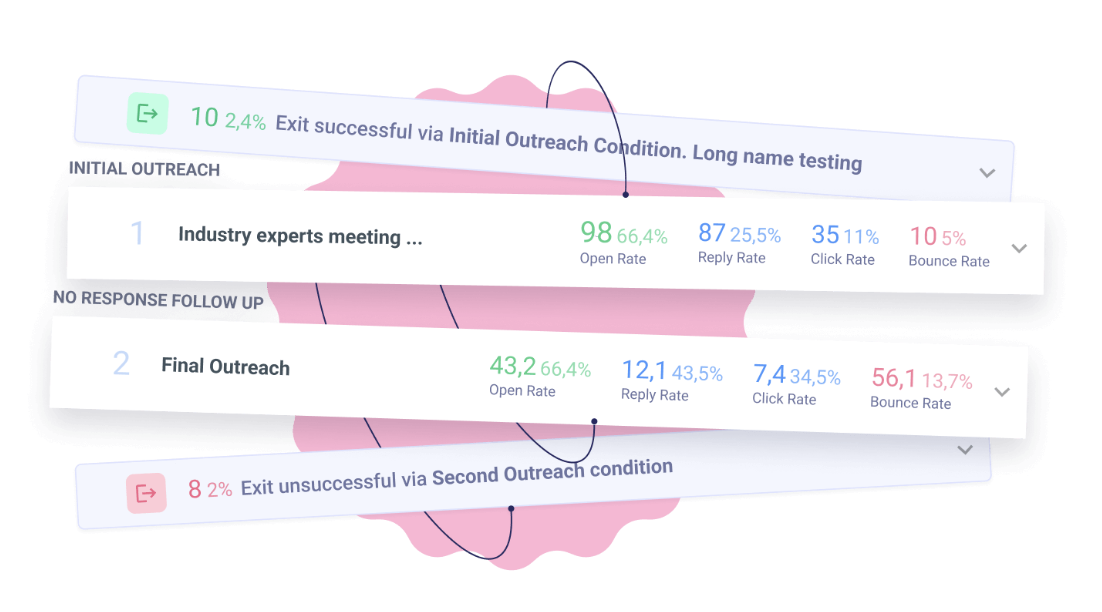
Nimble CRM includes a pipeline dashboard for tracking sales opportunities through customizable deal stages, providing a visual overview of where deals stand within the sales process. The dashboard allows users to create and move deals through each stage, set expected close dates, and update deal values. While Close CRM's pipeline offers a streamlined, visual approach to managing sales processes, making it easy to track deals from start to finish. The Powerful Pipeline View provides a clear snapshot of all active opportunities, enabling teams to focus on what matters most. With features like drag-and-drop deal management, users can effortlessly update the status of leads. Both platforms excel in providing intuitive interfaces for sales pipeline management, but the choice between them may depend on specific business needs and preferences for customization versus simplicity.

2. Ease of use
Nimble CRM is designed with simplicity in mind, offering an intuitive interface that is easy to navigate for users of all levels. Close CRM, on the other hand, provides a more robust platform with advanced features, which may require a steeper learning curve for new users.
3. Contact enrichment
Nimble CRM's contact enrichment feature automatically gathers additional information on contacts from various public sources, including social media profiles. By integrating with social networks, Nimble also enables users to view recent social activity, providing additional context for outreach and relationship management. Close CRM does not provide its own contact enrichment feature. You can only access this using a third party application, which might incur an additional cost.
4. Outreach
Nimble CRM's outreach feature enables users to manage individual and group email communications, track engagement, and personalize messaging based on contact profiles. It includes email tracking to monitor opens and clicks, allowing users to gauge the effectiveness of their outreach efforts. Close CRM's outreach features integrate built-in calling, email, and SMS tools, enabling seamless multi-channel outreach without the need for external apps. Users can send emails directly from the platform, make calls with one-click dialling, and track SMS conversations for streamlined follow-ups.
5. Automation
Nimble CRM's automation features are basic, used mostly to streamline tasks like data enrichment and follow-up reminders, helping users keep track of interactions and due dates without extensive manual input. Close CRM's automation features are designed to save time and streamline workflows for sales teams.
6. Integration
Nimble connects with productivity tools like Mailchimp, QuickBooks, and Zapier, enabling users to automate data flow and enhance functionality through third-party applications. Close CRM offers integrations with various tools to enhance sales workflows and streamline data management
7. Artificial Intelligence
Nimble CRM incorporates AI-powered sales intelligence to enhance prospecting and lead enrichment. Using AI, Nimble gathers detailed information from multiple sources to create enriched contact profiles, helping users gain insights into leads and prospects. Close CRM does not appear to have an AI integration.
Price and plans comparison
Let's take a closer look at the price and plans of both Nimble and Close CRM to help sales teams evaluate the best investment for their organization.
Nimble prices
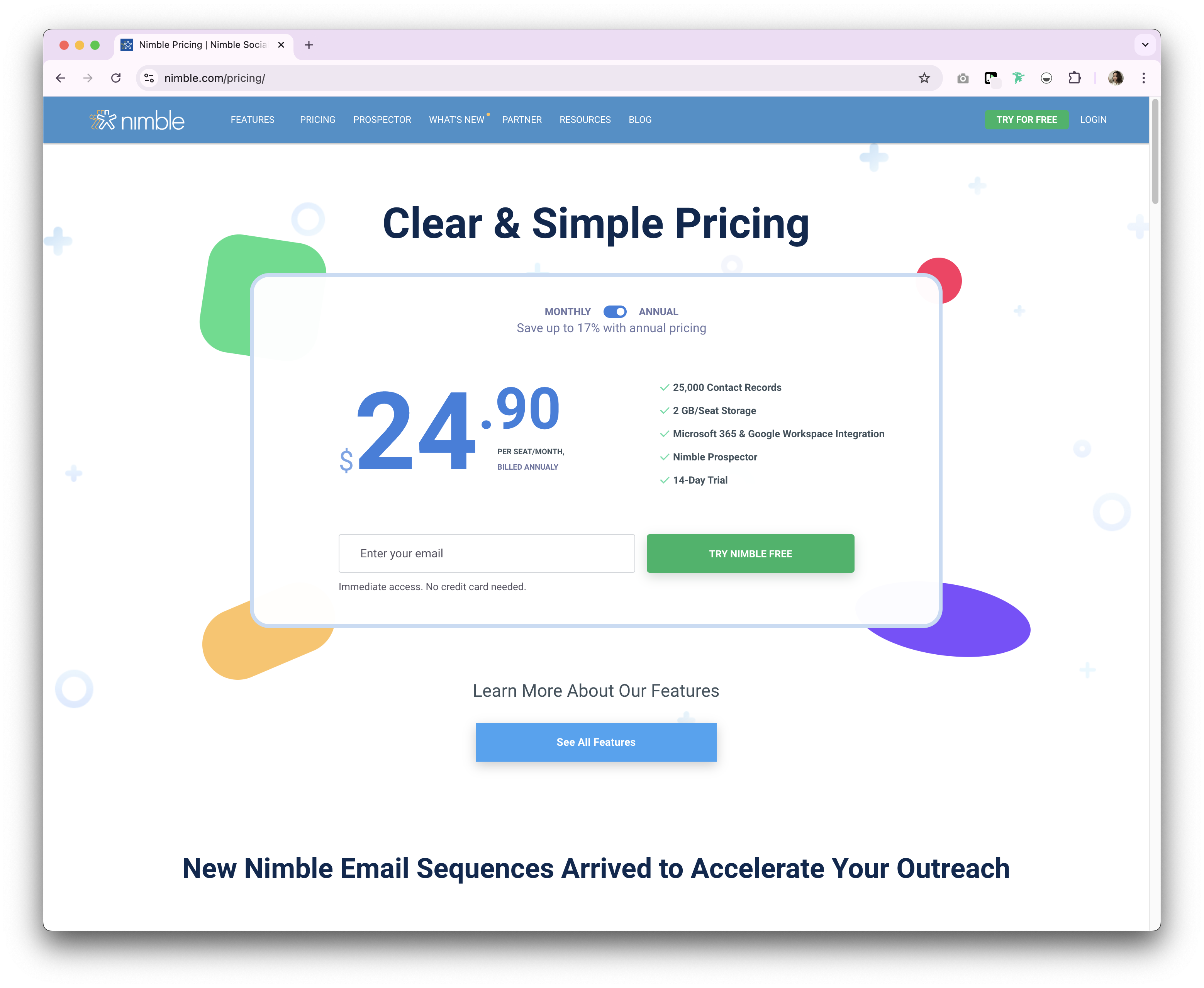
Nimble provides both a monthly and annual subscription plan. With only one tier for each subscription type.
- Annual: $24.90/user/month.
- Monthly: $29.90/user/month.
Close CRM prices
Close CRM offers a monthly and annual payment option. The annual subscription plan is as follows.
- Startup: $49/user/month.
- Professional: $99/user/month.
- Enterprise: $139/user/month.

Introducing folk CRM: the best alternative to Nimble and Close CRM
Looking for an affordable alternative that's perfect for medium-sized sales teams? We recommend folk. A multiple award-winning CRM platform loved for its easy-to-use, plug-and-play CRM system. folk CRM is specifically designed to excel for teams of 20-50 people, offering the perfect balance of functionality and ease-of-use that growing sales teams need. You can use folk as a solopreneur, small to mid-size team, and large enterprise, but it truly shines for sales teams in that sweet spot of 20-50 members who need robust contact management without overwhelming complexity.

.png)
.png)
Key features
- Contact management: Bring all your contacts into one place seamlessly, from social media platforms such as LinkedIn, Instagram and X to multiple inboxes including Gmail and Outlook.
- Notes and reminders: Attach notes directly to a contact's profile in folk, and access them on the go. And assign reminders so you know exactly when to follow-up.
- Sales pipeline dashboard: Manage your entire sales cycle and leads with a highly customizable sales pipeline dashboard that can be used in Kanban-board view or listicle.
- Ease of use and customization: Easily customize the pipelines, dashboards, automation, email sequences, so that you can use it across your sales cycle and pipeline management – and other business functions such as recruitment, marketing, and more.
- Social media integration: Import people and companies from LinkedIn, Sales Navigator, Instagram, and X within a click thanks to folk's Google Chrome extension.
- Contact sync from Gmail and Outlook: Full email sync enabling users to manage all communications directly from the CRM.
- folk mobile app: Access your contacts, reminders, and sequences on the go.
- Find email addresses in a click: Contact enrichment powered by Apollo, and Dropcontact so you can fill in missing data points with 1-click.
- Email sequences: Send email sequences with reminders if your leads don't reply to your first emails. It includes an AI integration allowing you to personalize email at scale.
Price and plans
folk has a 14-day free trial. After that, there are affordable monthly or annual subscription plans. The annual subscription plan is as follows.
- Standard: $20 per user, per month.
- Premium: $40 per user, per month.
- Custom: Starts from $80 per user, per month.

Nimble vs. Close CRM: What's the Verdict?
In comparing Nimble and Close CRM, it's apparent that both offer robust features tailored to enhance relationship management and sales processes. Nimble excels with its social media integration and contact management, while Close CRM shines with its sales automation and communication tools. However, for sales teams of 20-50 people that need a more personalized approach to relationship management, folk CRM provides the ideal solution, perfectly balancing ease of use with powerful customization capabilities that scale with growing teams.
👉🏼 Try folk now to never miss a follow-up when comparing Nimble and Close CRM
FAQ
What is the main difference between Nimble and Close CRM?
Nimble focuses on relationship building with contact enrichment and social media insights. Close emphasizes sales execution with built-in calling, email, SMS, automation, and a visual pipeline for fast-moving teams.
How much do Nimble and Close CRM cost?
Nimble: $24.90/user/month billed annually or $29.90 monthly. Close (annual billing): Startup $49, Professional $99, Enterprise $139 per user/month. Pricing may vary by term and add-ons.
Does Close CRM include native contact enrichment?
No. Close does not include built-in contact enrichment. Enrichment is available via third-party tools, which may add extra cost.
What is a good alternative to Nimble and Close CRM?
For teams of 20–50, folk offers customizable pipelines, contact enrichment, email sequences, and automation. Annual pricing: Standard $20, Premium $40, Custom from $80 per user/month. 14-day free trial.
Discover folk CRM
Like the sales assistant your team never had