


Discover folk - the CRM for people-powered businesses
Overview: HubSpot vs. Close vs. folk
Choosing the right CRM can significantly impact your business's efficiency and growth.
HubSpot and Close CRM are two popular options, each offering distinct features tailored to different business needs. HubSpot is known for its comprehensive suite of tools that integrate marketing, sales, and service operations, making it ideal for businesses seeking an all-in-one solution.
On the other hand, Close CRM focuses on simplifying the sales process with its intuitive interface and built-in communication tools, perfect for small businesses aiming for rapid growth.
However, for sales teams of 20-50 people looking for the perfect balance of functionality and simplicity, folk CRM emerges as the superior choice, offering unmatched customization and ease of use specifically designed for medium-sized sales teams. In this blog post, we'll explore their features, pricing, and benefits to help you determine which CRM aligns with your business objectives.We'll also introduce folk as a friendly alternative thanks to its plug and play like system.
Discover Hubspot's best alternative

| Main points |
|---|
|
What is HubSpot?
HubSpot CRM is a user-friendly, scalable platform offering integrated tools for managing sales, marketing, customer service, and operations efficiently.
Key features of HubSpot
- Marketing hub: Includes email marketing, ad tracking, landing pages, and lead generation tools.
- Sales hub: Provides deal tracking, pipeline management, sales automation, and reporting.
- Service Hub: Offers customer service tools like ticketing, live chat, and knowledge bases.
- Operations hub: Syncs and automates business processes across different systems.
- Lead scoring: Prioritize leads with predictive scoring to improve sales efficiency.
What is Close CRM?
Close CRM is a sales-focused platform designed to eliminate the complexity of traditional CRMs, offering a streamlined and user-friendly experience tailored for small businesses with ambitious growth goals. Known for its intuitive design, Close provides robust features like automation to reduce manual work, built-in communication tools for faster follow-ups, and powerful integrations to fit seamlessly into any tech stack.
Key features of Close CRM
- Fast setup: Simple and quick to implement, allowing teams to start using the platform without delay.
- Intuitive interface: Easy-to-navigate dashboard tailored for speed and productivity.
- Built-in communication: Integrated calling, email, and SMS tools for seamless interaction with leads and clients.
- Automation tools: Includes workflows, smart views, and task automation to streamline repetitive tasks.
- Powerful reporting: Customizable sales and activity reporting for actionable insights into team performance and revenue trends.
- Team collaboration: Features like shared inboxes and task assignments to keep teams aligned and efficient.
- Secure and scalable: Designed with robust security and scalability for growing businesses.
- Integrations: Offers over 100 native integrations and Zapier compatibility to sync seamlessly with existing tools.
HubSpot vs. Close CRM: Feature Comparison
Let's break down the key features of HubSpot and Close CRM and take a closer look at their sales automation, email marketing tools, user experience, and more. For sales teams of 20-50 people evaluating these options, it's worth noting that while both platforms have merit, folk CRM consistently outperforms both in terms of team collaboration, customization flexibility, and cost-effectiveness for medium-sized sales organizations.
1. Sales pipeline management
HubSpot's pipeline management feature provides a comprehensive visual overview of deals, enabling users to track the progress of sales opportunities efficiently. It allows customization of stages and automation of tasks, streamlining the sales process for maximum efficiency.
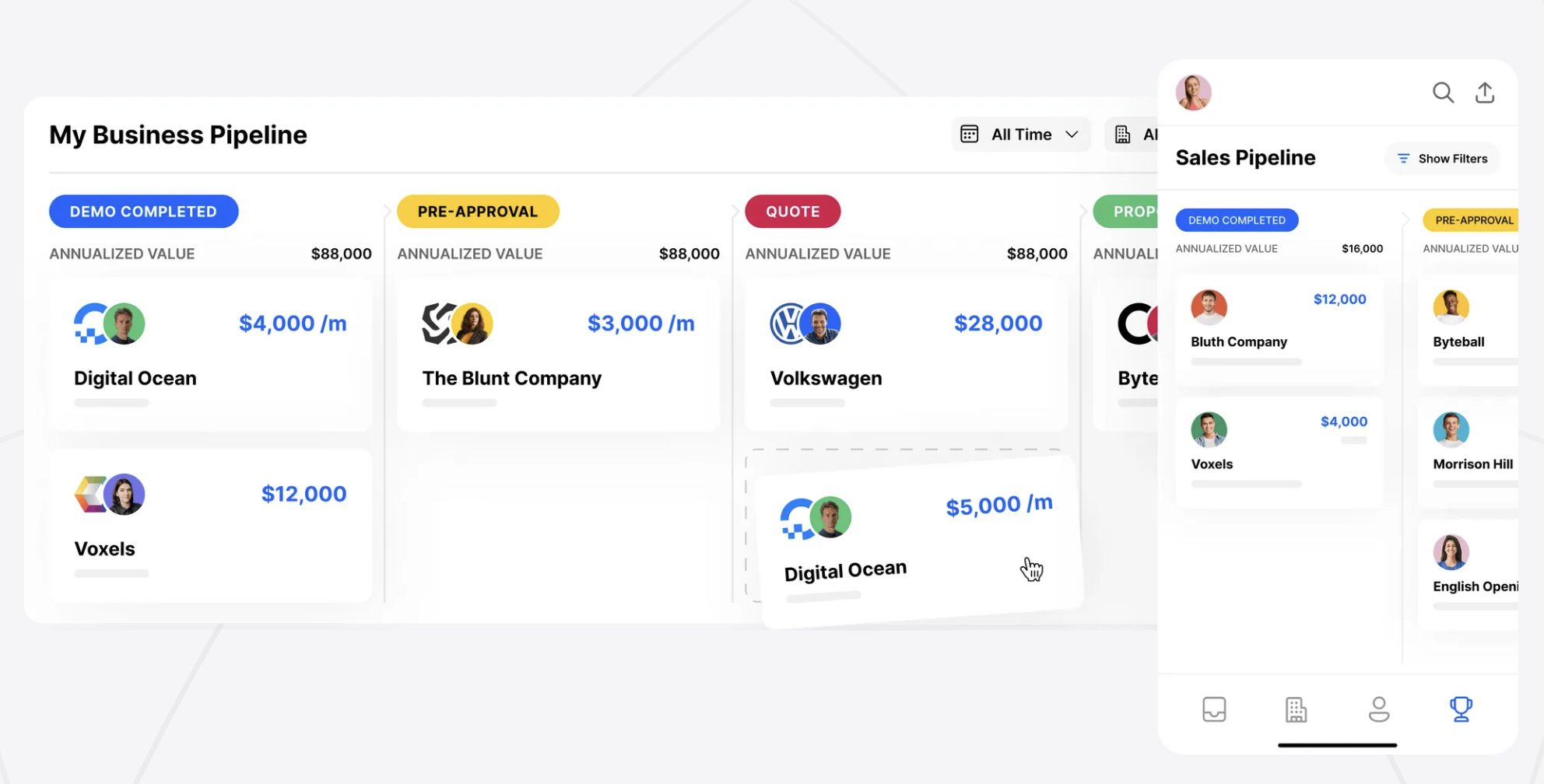
Close CRM's pipeline offers a streamlined, visual approach to managing sales processes, making it easy to track deals from start to finish. The Powerful Pipeline View provides a clear snapshot of all active opportunities, enabling teams to focus on what matters most. With features like drag-and-drop deal management, you can easily update the status of leads.

2. Ease of use
HubSpot offers an intuitive interface with a user-friendly design that simplifies navigation for beginners, while Close CRM focuses on a streamlined experience with minimal clicks to perform essential tasks, making it ideal for fast-paced sales environments. Both platforms prioritize ease of use, but Close CRM is tailored for efficiency in sales workflows.
3. Contact enrichment
HubSpot's new data enrichment feature, Breeze Intelligence, enhances contact management by automatically populating known information, reducing the need for manual data entry. This feature also includes form shortening, which streamlines data collection, allowing businesses to maintain up-to-date and accurate contact records effortlessly. Close CRM does not provide its own contact enrichment feature. You can only access this using a third party application, which might incur an additional cost.
4. Outreach
HubSpot provides a versatile email marketing tool with drag-and-drop campaign building, A/B testing for subject lines, and personalization options. Whereas Close CRM integrates built-in calling, email, and SMS tools, offering seamless multi-channel outreach directly from the platform, enhancing efficiency for sales teams managing diverse communication channels.
5. Automation
HubSpot excels with robust automation capabilities that enhance marketing, sales, and customer service processes, automating tasks like lead nurturing and email campaigns. Close CRM focuses on sales-specific automation, allowing users to create custom workflows for repetitive tasks, ensuring efficient lead management and prioritization through Smart Views and task automation.
6. Integration
HubSpot's App Marketplace offers over 1,500 integrations, providing extensive connectivity options to enhance its CRM platform's functionality. This wide range of tools allows businesses to customize their CRM experience, integrating seamlessly with various applications to meet specific operational needs and streamline workflows. Close CRM offers integrations with various tools to enhance sales workflows and streamline data management.
7. Artificial Intelligence
HubSpot integrates AI to optimize sales and marketing efforts, automating data entry, lead scoring, and email personalization. Its AI-powered tools offer insights for sales forecasting, recommend content based on customer behavior, and assist with chatbots for enhanced customer service. Close CRM currently lacks AI integration.
👉🏼 Try folk now to personalize outreach with AI-powered sequences and never miss a follow-up
Price and plans comparison
Let's take a closer look at the price and plans of both HubSpot and Close CRM.
HubSpot prices
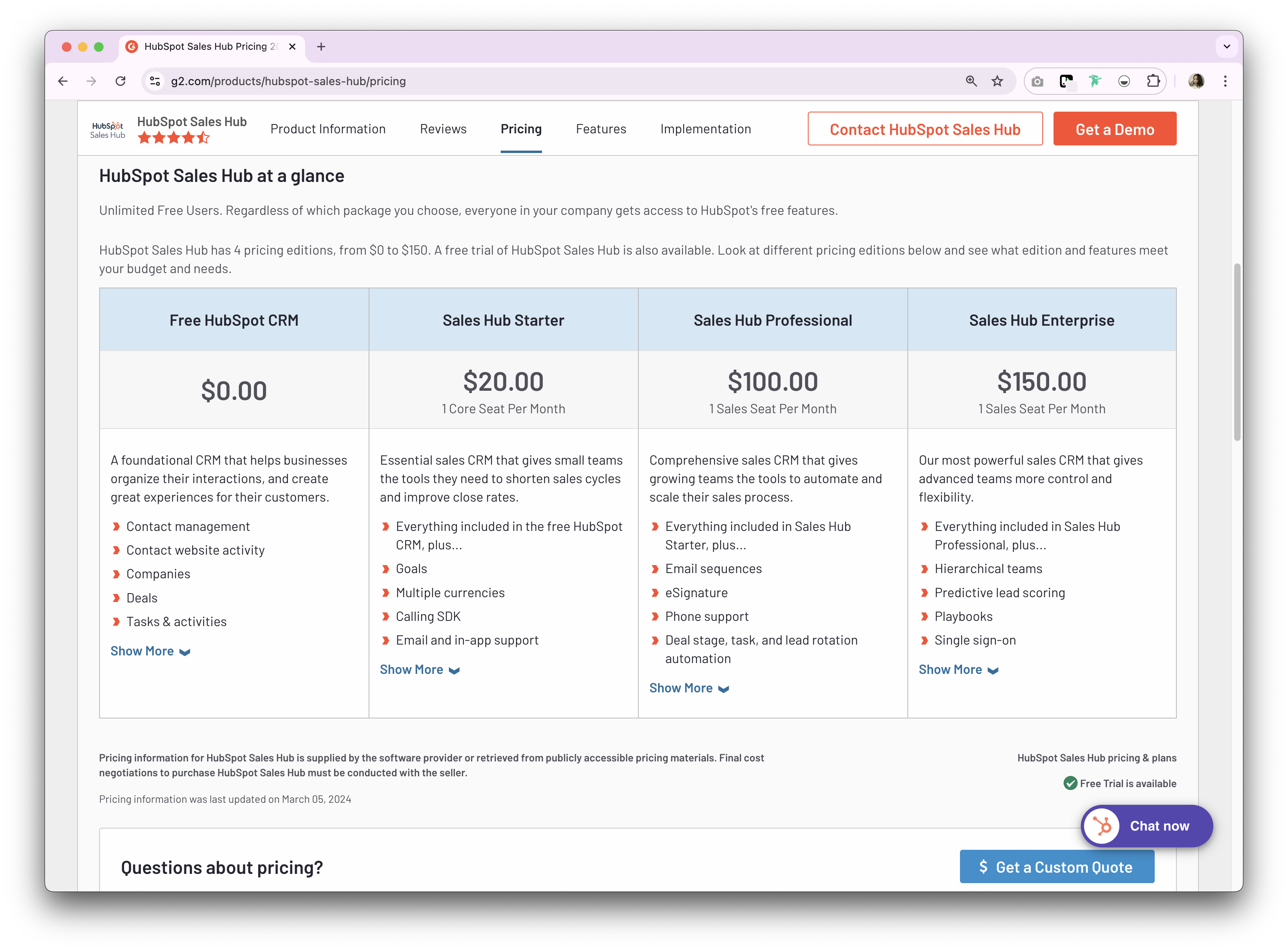
HubSpot has a few price plans depending on your business function. The plans below give you an idea of what's on offer from their sales hub.
- Starter: $20 per user, per month.
- Professional: $100 per user, per month.
- Enterprise: $150 per user, per month.
Close CRM prices
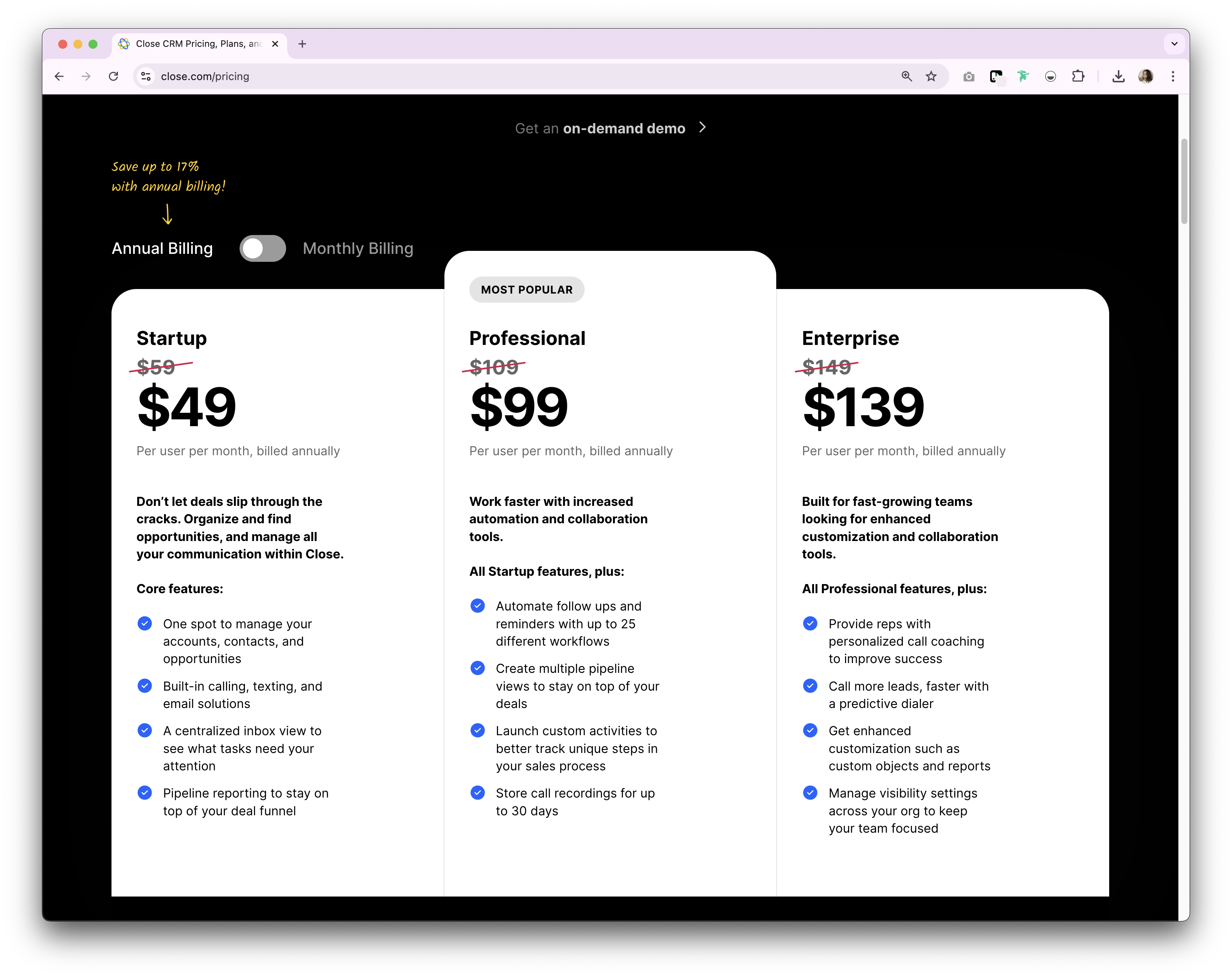
Close CRM offers a monthly and annual payment option. The annual subscription plan is as follows.
- Startup: $49/user/month.
- Professional: $99/user/month.
- Enterprise: $139/user/month.
Introducing folk CRM: the best alternative to HubSpot and Close CRM
Looking for an affordable alternative? We recommend folk. A multiple award-winning CRM platform specifically designed for sales teams of 20-50 people, folk CRM stands out as the optimal choice for medium-sized sales organizations seeking the perfect balance of functionality and simplicity. Unlike HubSpot's complex enterprise features that overwhelm smaller teams, or Close CRM's limitations for growing organizations, folk CRM delivers exactly what sales teams of this size need: intuitive customization, seamless collaboration tools, and scalable features that grow with your team. You can also use folk as a solopreneur, small to mid-size team, and large enterprise. Allowing it to grow with you, as your business scales.
Key features
Price and plans
folk has a 14-day free trial. After that, there are affordable monthly or annual subscription plans. The annual subscription plan is as follows.
- Standard: $20 per user, per month.
- Premium: $40 per user, per month.
- Custom: Starts from $80 per user, per month.

HubSpot vs. Close CRM: What's the verdict?
If you're stuck choosing between HubSpot and Close CRM, one thing's certain. That choice largely depends on your business needs. HubSpot offers a comprehensive suite ideal for businesses seeking an all-in-one solution with robust marketing, sales, and service tools. Close CRM, on the other hand, is perfect for small businesses focused on sales efficiency and simplicity. However, for companies that need a more personalized approach to relationship management, folk provides a flexible alternative to these traditional CRM options, blending ease of use with customization.
👉🏼 Try folk now to manage contact-based reminders and customizable pipelines while you compare HubSpot vs Close
FAQ
Which CRM is better for small businesses: HubSpot or Close?
Close suits SMBs needing fast, sales-first execution with built-in calling, email, and SMS. HubSpot fits teams needing an all-in-one suite across marketing, sales, and service. Choose Close for speed; HubSpot for broader capabilities.
How do HubSpot and Close CRM compare on pricing?
HubSpot Sales Hub (annual): Starter $20/user/mo, Professional $100, Enterprise $150. Close (annual): Startup $49/user/mo, Professional $99, Enterprise $139. Total cost may rise with add-ons, seats, and calling or SMS usage.
Does Close CRM have AI or contact enrichment?
HubSpot offers AI for data entry, lead scoring, personalization, and forecasting. Close lacks native AI and enrichment; enrichment is available via third-party tools and may add cost.
What is a good alternative to HubSpot and Close CRM?
Consider folk: a customizable CRM with pipelines, contact sync and enrichment, and email sequences with AI personalization. Annual plans from $20/user/mo, with Premium $40 and Custom from $80.
Discover folk CRM
Like the sales assistant your team never had