


Discover folk - the CRM for people-powered businesses
Overview: Clay CRM vs. Pipeliner CRM
Looking for a CRM? Clay CRM and Pipeliner CRM are two platforms designed to enhance contact and sales management.
Clay CRM is more of an advanced address book. Pipeliner CRM emphasizes visual sales pipelines and detailed analytics, making it a strong choice for teams focused on tracking and optimizing sales performance.
In this blog post, we'll compare their features, pricing, and usability to help you choose the right fit for your sales team. We'll also present folk as a viable alternative to consider.
| Main points |
|---|
|
What is Clay CRM?
Clay CRM is a customer relationship management tool designed to help users organize and manage contact information and interactions, with a focus on automation and contact enrichment.
Key features of Clay CRM
- Contact management: The platform allows users to organize and manage contacts by consolidating information in one place. Users can add custom fields, notes, and tags to categorize and track interactions with each contact, making it easier to manage customer relationships.
- Automation: Clay CRM includes automation tools that handle repetitive tasks like contact updates and reminders, helping users streamline their communication and workflow processes.
- Search and filtering: The platform provides advanced search and filtering functionality, allowing users to segment their contact database based on various criteria such as engagement history, tags, or custom fields.
- Real-time updates: The platform provides real-time updates for contact records and tasks, ensuring that users have the latest information on their contacts and projects at all times.
What is Pipeliner CRM?
Pipeliner is an AI-powered sales CRM designed for small, mid-sized, and enterprise organizations, focusing on simplicity and scalability. It offers a visual approach to sales management, allowing teams to track pipelines, forecast outcomes, and automate workflows.
Key features of Pipeliner CRM
- Sales force automation: Automates routine sales tasks, helping teams focus on selling while ensuring consistency across workflows.
- Key account management: Provides tools to manage and track relationships with high-value clients, ensuring personalized attention and strategy.
- Communications and activities tracking: Logs and organizes all interactions, calls, and emails, providing a centralized view of customer communication.
- Reporting engine: Offers customizable reports and dashboards to deliver insights into sales performance and team productivity.
- Process and workflow automation: Automates repetitive workflows, such as task assignments and approvals, to improve efficiency and reduce manual effort.
Clay CRM vs. Pipeliner CRM: Feature Comparison
Let's break down the key features of two CRM software solutions and take a closer look at their sales automation, email marketing tools, and contact management capabilities for sales teams.
1. Sales Pipeline Management
Clay CRM does not offer a dedicated pipeline management feature as part of its core functionality. While users can organize contacts and tasks, the platform lacks specific tools for tracking deals or leads through stages in a sales pipeline.
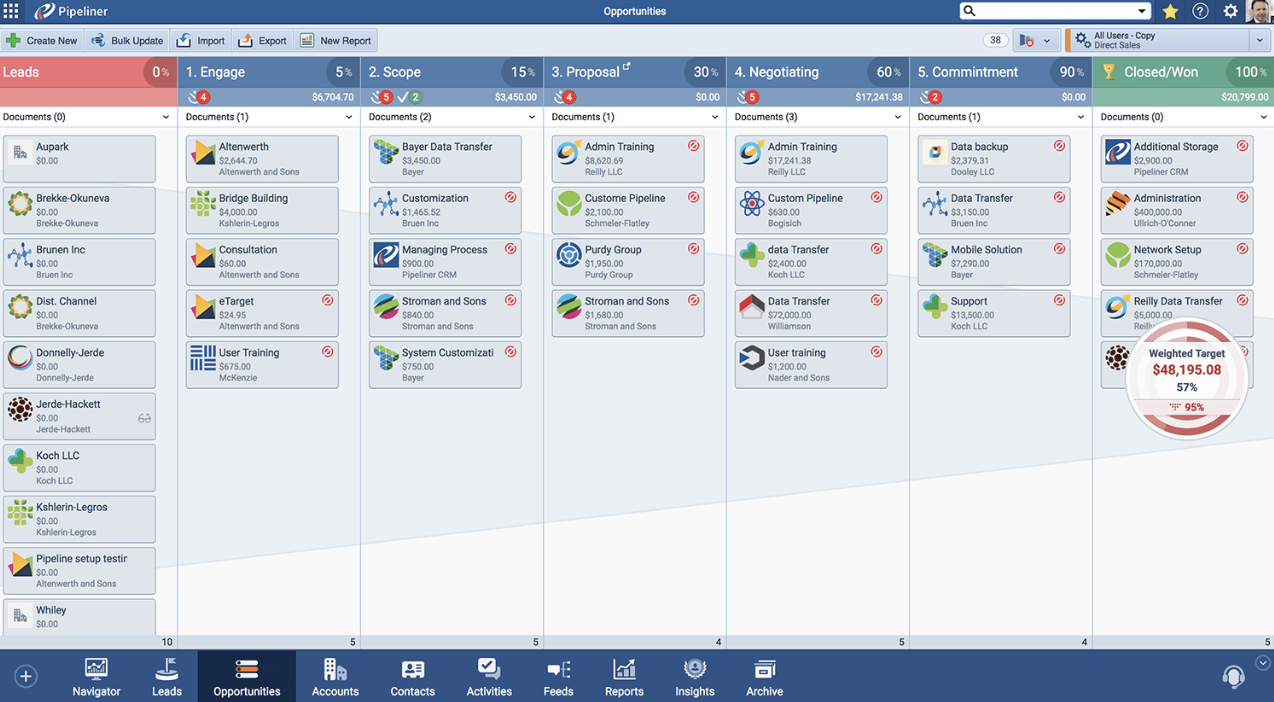
Pipeliner CRM's pipeline feature offers a visual interface to track sales opportunities through different stages. The drag-and-drop functionality allows you to move deals across stages, providing an overview of your sales progress. It supports multiple pipelines to accommodate different sales workflows, with integrated tools like automation and reporting to assist with task management and deal prioritization. While the feature is functional and adaptable, its focus is primarily on sales tracking, which may limit its utility for broader project management needs.

2. Ease of use
Clay CRM offers a user-friendly interface with intuitive navigation, making it easy for sales professionals to manage contacts and tasks efficiently. Pipeliner CRM also provides a visually appealing interface, but its extensive features may require a steeper learning curve for new sales team members.
3. Contact enrichment
Clay CRM's contact enrichment feature automatically gathers additional data from sources like social media and public databases to build more comprehensive contact profiles, enhancing user insights and engagement strategies. Pipeliner CRM offers a contact enrichment feature through its Auto Profiling integration, which automatically populates additional data for contacts and accounts. However, this Auto Profiling integration is an add-on and must be activated through the Pipeliner Automation Hub, making it a more selective and optional tool for contact enrichment.
4. Outreach
Clay CRM lacks dedicated outreach tools but allows users to track interactions and set follow-up reminders. Pipeliner CRM offers basic outreach through its mass email feature, enabling users to send bulk emails and track engagement, though it may require additional tools for advanced sales campaigns.
5. Automation
Clay CRM includes automation for tasks like updating contacts and sending reminders based on conditions. Pipeliner CRM offers workflow automation for tasks, email follow-ups, and integrates with the Automation Hub for enhanced functionality, though advanced setups might need add-ons.
6. Integration
Clay CRM supports integrations with various third-party tools, allowing users to connect external applications for enhanced functionality. Pipeliner CRM integrates with over 50 popular applications, including Google Suite, Microsoft Suite, and various marketing, email, and data synchronization tools, to streamline workflows and enhance productivity for sales teams.
7. Artificial intelligence
Clay CRM does not currently offer dedicated AI integration. Pipeliner CRM integrates AI through Voyager AI Gen, providing sales insights and recommendations to prioritize tasks and focus on high-impact opportunities.
Price and plans comparison
Let's take a closer look at the price and plans of both Clay CRM and Pipeliner CRM to help sales teams make informed decisions.
Clay CRM prices
Clay has a free plan for personal use, for up to 1,000 contacts. After that premium plans are as follows on an annual subscription.
- Pro: $10 per user, per month.
- Team: $40 per user, per month.
- Enterprise: Undisclosed.

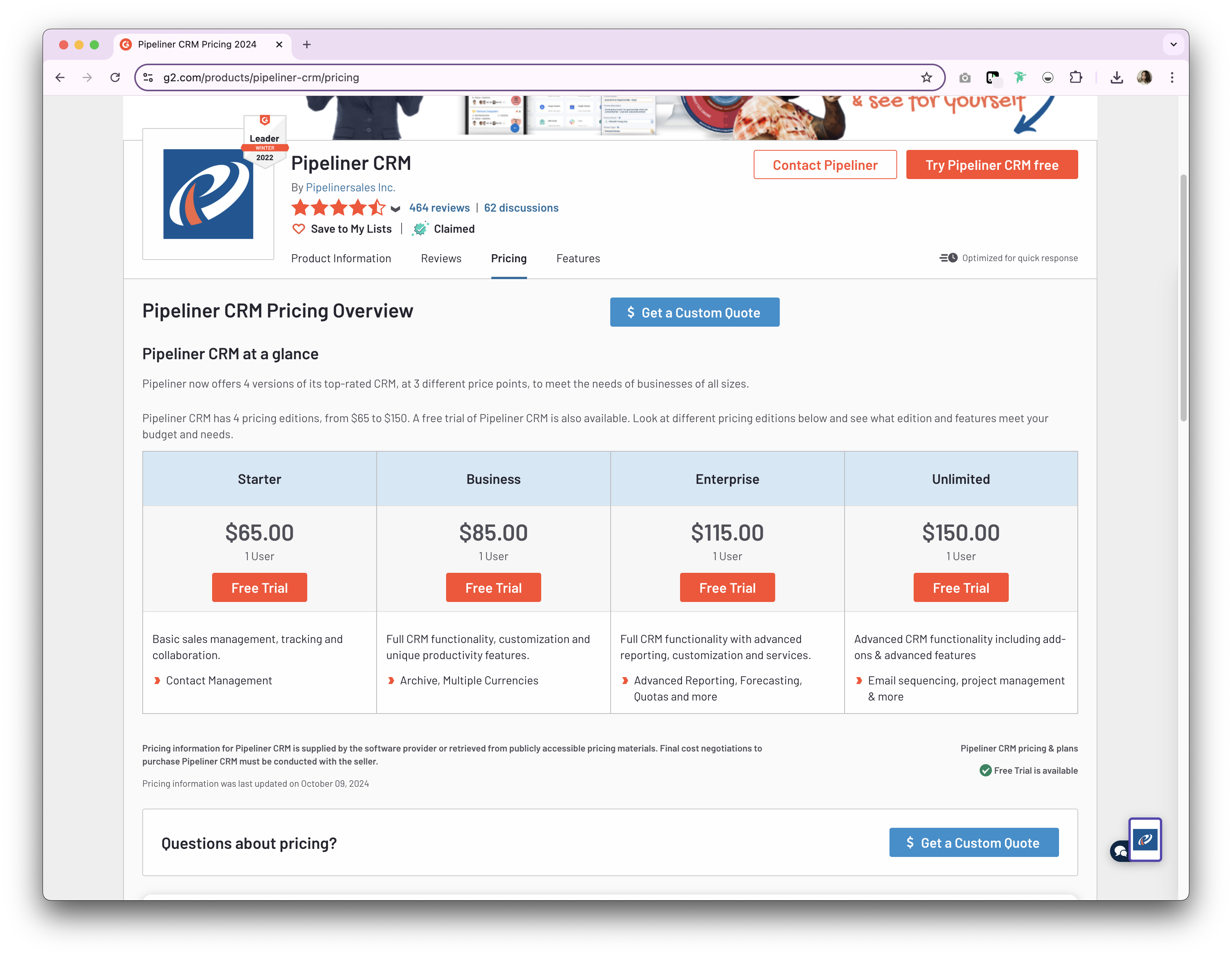
Pipeliner CRM prices
Pipeliner offers several versions of its CRM, tailored to different price points.
- Starter: Starts from $65/seat/month.
- Business: Starts from $85/seat/month.
- Enterprise: Starts from $115/seat/month.
- Unlimited: Starts from $150/seat/month.
Introducing folk CRM: the best alternative to Clay CRM and Pipeliner CRM
Looking for an affordable alternative? We recommend folk. A multiple award-winning CRM platform loved for its easy-to-use, plug-and-play CRM system. folk CRM is particularly well-suited for sales teams of 20-50 people who need powerful features without enterprise complexity. folk can support multiple business functions including sales, marketing, recruitment and more. folk can also scale with you as your business grows, thanks to its ability to support solopreneurs, small to mid-size businesses and large enterprises.
👉🏼 Try folk now to import your contacts and set up customizable pipelines in minutes
.png)
.png)
Key features
- Contact management: Bring all your contacts into one place seamlessly, from social media platforms such as LinkedIn, Instagram and X to multiple inboxes including Gmail and Outlook.
- Notes and reminders: Attach notes directly to a contact's profile in folk, and access them on the go. And assign reminders so you know exactly when to follow-up.
- Sales pipeline dashboard: Manage your entire sales cycle and leads with a highly customizable sales pipeline dashboard that can be used in Kanban-board view or listicle.
- Ease of use and customization: Easily customize the pipelines, dashboards, automation, email sequences, so that you can use it across your sales cycle and pipeline management – and other business functions such as recruitment, marketing, and more.
- Social media integration: Import people and companies from LinkedIn, Sales Navigator, Instagram, and X within a click thanks to folk's Google Chrome extension.
- Contact sync from Gmail and Outlook: Full email sync enabling users to manage all communications directly from the CRM.
- Find email addresses in a click: Contact enrichment powered by Apollo, and Dropcontact so you can fill in missing data points with 1-click.
- Email sequences: Send email sequences with reminders if your leads don't reply to your first emails. It includes an AI integration allowing you to personalize email at scale.
Price and plans
folk has a 14-day free trial. After that, there are affordable monthly or annual subscription plans. The annual subscription plan is as follows.
- Standard: $20 per user, per month.
- Premium: $40 per user, per month.
- Custom: Starts from $80 per user, per month.

Clay CRM vs. Pipeliner CRM: What's the verdict?
Both Clay CRM and Pipeliner CRM offer something unique. Clay CRM excels in contact management and automation, making it ideal as an advanced address book. Pipeliner CRM stands out with its visual sales management and AI-driven insights, perfect for sales-focused teams. However, for medium-sized sales teams of 20-50 people that need the perfect balance of powerful features and user-friendly design, folk CRM emerges as the clear winner, offering comprehensive sales pipeline management, seamless integrations, and cost-effective pricing that scales with growing sales teams.
👉🏼 Try folk now to manage contact-based reminders and never miss a follow-up when switching from Clay or Pipeliner
FAQ
Does Clay CRM have a sales pipeline?
No. Clay CRM lacks a dedicated sales pipeline. It organizes contacts and tasks but does not offer stage-based deal tracking or a visual pipeline board.
What is Pipeliner CRM best for?
Pipeliner CRM excels at visual sales pipeline tracking, forecasting, and automation, with reporting and AI insights. It suits sales-focused teams needing scalable, structured deal management.
How do Clay CRM and Pipeliner CRM prices compare?
Clay: free up to 1,000 contacts; Pro $10/user/mo, Team $40, Enterprise undisclosed. Pipeliner: Starter $65/seat/mo, Business $85, Enterprise $115, Unlimited $150. Pricing may vary by billing.
What is a good alternative to Clay CRM and Pipeliner?
folk offers a customizable pipeline, contact enrichment, email sequences, and automation. Annual plans: Standard $20/user/mo, Premium $40, Custom from $80. 14-day free trial.
Discover folk CRM
Like the sales assistant your team never had