


Discover folk - the CRM for people-powered businesses
Finding the right CRM for your iPad can make a significant difference in your team's efficiency and productivity. For mid-size sales teams of 20-50 professionals, having a CRM that integrates seamlessly with the iPad's interface and capabilities is crucial for managing customer relationships and closing deals effectively, even when you're on the go.
In this guide, we'll explore the best CRM for iPad options available to you, focusing on tools that support your team's productivity and growth. Managing customer relationships from your iPad should be straightforward, whether you're meeting clients, attending conferences, or working remotely.
Buying checklist: iPad CRM essentials
What features you should look for as an iPad user
The best iPad CRM is one that takes full advantage of the tablet's capabilities, offering an intuitive, touch-friendly interface that makes CRM tasks a pleasure rather than a chore. As an iPad user managing a growing sales team, making sure the CRM app you want in your tech stack offers a seamless mobile experience, intuitive interface, and offline capabilities is key. Tailoring your requirements to iPad-specific features that support team collaboration will help you find a solution that truly enhances your workflow.
The 5 best CRMs for iPad users
1. folk
⭐⭐⭐⭐⭐ (G2)
folk is a modern CRM designed for growing sales teams, offering an intuitive interface and powerful features that work seamlessly on iPad. It has been specifically designed to work well for medium-sized sales teams, making it an ideal choice for teams of 20-50 professionals.

Key features
- Intuitive iPad interface: Designed with touch-friendly navigation for effortless pipeline management on tablet.
- Advanced contact management: Comprehensive contact profiles with enrichment and social integration.
- Pipeline visualization: Clear, customizable pipelines for effective deal tracking.
- Email integration: Seamless sync with Gmail and Outlook for unified communication.
- Collaboration tools: Real-time team features for shared pipelines and coordinated follow-ups.
Pros
- Tailored for growth: folk CRM specifically addresses the unique needs of mid-size sales teams with integrated prospecting, automated contact enrichment, and a native mobile app — access contacts, add voice notes, and manage your pipeline on the go, with no extensive training or setup required.
- Collaboration focused: Designed with team collaboration at its core, enabling seamless communication and coordination among 20-50 professionals.
- Customizable pipelines: Offers highly customizable pipelines that can be tailored to the specific needs of your sales team.
Cons
- Reporting: folk includes advanced analytics such as pipeline and deal stage reporting, revenue forecasting with weighted probabilities, and dashboards segmented by owner, channel, industry, region, or any custom field.
Price and plans
You can try folk for free with a 14-day free trial. After that, a monthly or annual subscription plan is as follows.
- Standard: $20 per user, per month.
- Premium: $40 per user, per month.
- Custom: Starts from $60 per user, per month.
2. Capsule CRM
⭐⭐⭐⭐ (G2)
Capsule CRM is a user-friendly CRM platform designed for small and medium-sized businesses, focusing on simplicity and ease of use. It offers a clean interface and essential CRM features that are well-suited for iPad users managing sales teams.

Key features
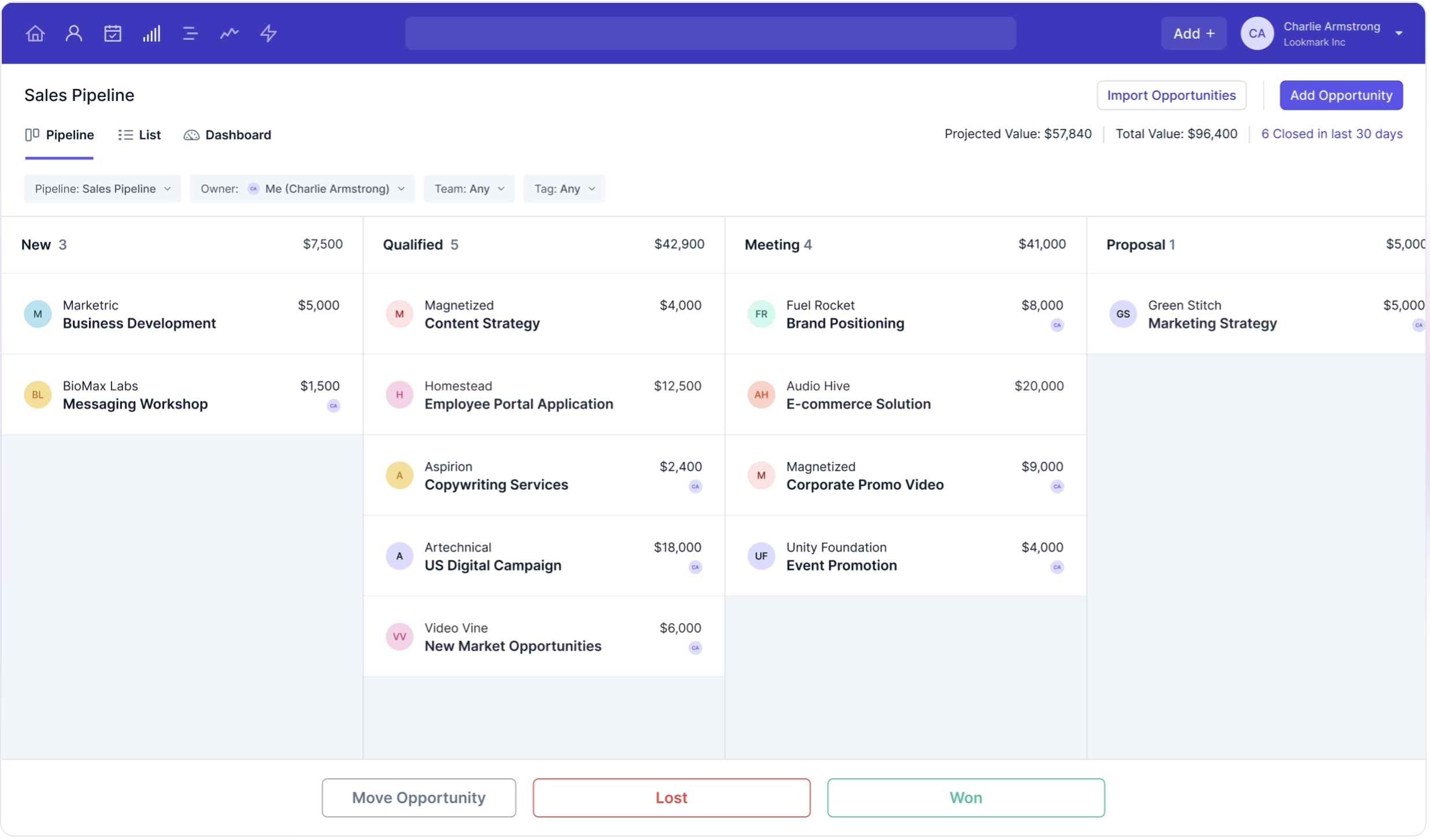
- Clean interface: Simple, uncluttered design ideal for iPad use.
- Task management: Built-in task and activity tracking system.
- Contact management: Effective contact organization and tracking.
- Pipeline management: 1 sales pipeline, suitable for basic pipeline management needs.
- Install their iOS mobile app to your iPad.
Pros
- Simplicity and ease of use: The clean interface makes Capsule CRM particularly suited for iPad use, especially for teams that prioritize simplicity over complexity.
- Affordable pricing: Budget-friendly options that don't sacrifice essential CRM functionality.
- Task management: Built-in task and activity management tools help teams stay organized and on top of their responsibilities.
- Collaboration: Shared pipelines and task assignment tools help coordinate team activities in a growing organization.
Cons
- Limited advanced features: Doesn't offer the sophisticated analytics, automation, and integration capabilities needed for fast-growing sales teams of 20-50 people.
- Single pipeline limitation: Restricts teams to a single pipeline, limiting flexibility for complex sales processes within larger organizations.
- Scalability concerns: May not scale effectively for 20-50 person teams that require more robust CRM features and customization options.
- Integration limitations: Fewer integration options could restrict teams needing to connect with a wide range of business tools.
Price and plans
- Starter plan: Starts from $21 per user, per month.
- Growth plan: Starts from $38 per user, per month.
- Advanced plan: Starts from $60 per user, per month.
- Ultimate plan: Starts from $75 per user, per month.
3. Zoho
⭐⭐⭐⭐ (G2)
Zoho is a CRM system with a strong sales focus. It has journey orchestration, sales process management, and workflow automation features. There's also something for marketing teams, including event management and customer segmentation.

Key features
- Sales automation: Automates sales tasks like lead management, deal tracking, and follow-up actions.
- Multi-channel communication: Integrates with email, phone, social media, and live chat, though the complexity can hinder quick adoption by sales teams on mobile devices.
- Lead and contact management: Robust contact management with extensive customization options that require significant setup time for teams of 20-50 people.
- Mobile CRM: Offers a mobile app for iPad, though some desktop features aren't fully optimized for tablet use.
- Customizable dashboards and reports: Extensive reporting capabilities though complex to set up without IT support.

Pros
- Affordability: Competitive pricing options make Zoho accessible to mid-size teams on a budget.
- Customization: Extensive customization options allow businesses to tailor the CRM to their specific needs, including custom fields, modules, and workflows.
- AI-powered features: Zia, the AI assistant, provides intelligent insights, predictive analytics, and task automation, helping to improve sales efficiency.
- Connects with numerous third-party apps, but requires technical expertise to implement effectively.
- Mobile accessibility: iPad app available, but the complexity of the platform can make mobile usage challenging for field sales teams.
Cons
- Steep learning curve: The extensive customization options can be overwhelming for new users, particularly challenging for sales teams without technical expertise.
- Complex setup: Initial setup and configuration can be complex, particularly for medium-sized sales teams without dedicated IT resources.
- Performance issues on mobile: Reports of slow performance with large datasets can hinder productivity for active sales teams using iPads in the field.
- Steep learning curve: The extensive customization options require a significant time investment that growing sales teams may not have available.
Price and plans
- Standard: $20 per user, per month.
- Professional: $35 per user, per month.
- Enterprise: $50 per user, per month.
4. Pipedrive
⭐⭐⭐⭐ (G2)
Pipedrive is a web-based CRM for small businesses, offering lead management, automation, email integration, and customizable pipelines to optimize sales.

Key features
- Mobile app: Functional iPad app that provides access to core CRM features, though lacks some advanced functionality available on desktop.
- Lead and deal management: Centralized tools to manage customer data, interactions, and sales pipelines.
- Sales automation: Workflow automation to handle repetitive tasks, allowing teams to focus on closing deals.
- Email integration: Full email sync, templates, and tracking features.
- Advanced reporting and analytics: Real-time data analytics and custom reporting tools.

Pros
- User-friendly interface: The CRM is known for its intuitive and visually appealing interface, making it easy for iPad users to navigate and manage their sales pipelines.
- Pipeline focus: Strong visual pipeline management that helps sales teams track deal progress effectively on mobile devices.
- Deal tracking: Effective tools for managing existing opportunities and monitoring sales activities across the team.
- Reasonable pricing: Offers competitive pricing at lower tiers, making it accessible for growing sales teams.
Cons
- Limited advanced features: The CRM lacks some of the more advanced features, such as extensive marketing automation and AI capabilities, which are available in other platforms.
- Basic reporting in lower tiers: The reporting and analytics features in the basic plans are somewhat limited, requiring upgrades to access more in-depth insights.
- No built-in email marketing: Does not include built-in email marketing features, requiring users to integrate with third-party email tools.
- Price increases with add-ons: The cost can increase quickly when additional features or integrations are added.
Price and plans
- Essential plan: Starts from $24 per user, per month.
- Advanced plan: Starts from $44 per user, per month.
- Power plan: Starts from $79 per user, per month.
- Enterprise plan: Starts from $129 per user, per month.
5. Salesforce
⭐⭐⭐⭐ (G2)
Salesforce is a robust CRM platform for large enterprises, offering tools for sales, marketing, service, and analytics, with extensive scalability.

Key features
- Customization and scalability: Highly customizable and scalable for enterprise-level sales teams.
- AI integration: Salesforce Einstein provides AI-driven analytics and automation.
- Extensive integrations: Wide range of third-party app integrations.
- Enterprise-grade security: Robust security and compliance features.
- Mobile accessibility: iPad app available, but the complexity of the platform can make mobile usage challenging for field sales teams.

Pros
- Mobile accessibility: Manage your CRM on the go with full access to all key features via the Salesforce mobile app for iPad.
- Highly customizable: Tailor the platform to your specific needs with custom fields, objects, and workflows.
- Extensive integration capabilities: Seamlessly integrate with a vast array of third-party applications.
- Scalability: Suitable for businesses of all sizes, allowing you to scale as your business grows.
- Advanced analytics and reporting: Gain deep insights into your data with powerful analytics tools.
Cons
- High cost: Can be expensive for small to medium-sized businesses, with high licensing fees and additional costs for add-ons.
- Steep learning curve: Extensive feature set and complexity may require significant time and training.
- Complex setup: Initial setup and customization can be challenging and often require expert help.
- Performance issues on mobile: Users occasionally report slow performance when handling large volumes of data on iPad.
- Overwhelming for small teams: Robust features may be overkill for smaller teams.
Price and plans
- Starter suite: $25/user/month provides basic CRM features for small businesses.
- Pro suite: $100/user/month includes advanced tools for growing businesses.
- Enterprise plan: $165/user/month offers extensive customization and automation for large companies.
- Unlimited plan: $330/user/month provides comprehensive features for large enterprises.
How to implement a CRM on your iPad
Implementing a CRM on your iPad requires careful planning, but it can significantly improve your team's productivity and sales performance. There are key steps to follow to ensure a smooth implementation.
1. Evaluate your needs
Before choosing a CRM for your iPad, assess your team's specific needs and pain points. Consider the size of your team, the complexity of your sales processes, and the integrations you require with other tools. This will help you narrow down the options and find the most suitable CRM for your team.
2. Select the right CRM
Based on your needs assessment, choose the CRM that best fits your team's requirements, budgets, or complexity.
3. Import Your Data
Once you've chosen your CRM, start by importing your existing customer data into the system. This will give you a solid foundation to work from and ensure you have all the necessary information available from the start on your iPad.
4. Customize the CRM
Tailor the CRM to match your sales processes and team needs. Configure the pipelines, add custom fields, and set up automation rules to streamline your workflow. This will make the CRM work specifically for your team, rather than forcing your team to adapt to the software.
5. Train Your Team
Provide thorough training to all team members on how to use the CRM effectively on their iPads. You can get a demo of folk to see how its native iPhone app works — including accessing contacts from your phone and recording voice notes on the go. This will ensure that everyone is comfortable with the new system and can use it to its full potential, maximizing the benefits of your CRM investment.
6. Monitor and Adjust
After the CRM is up and running, monitor its usage and gather feedback from your team. Use this information to make adjustments and optimizations that will further enhance productivity and help the CRM evolve with your business needs.
Conclusion
Choosing the right CRM for your iPad is crucial for improving your sales team's productivity and efficiency. While all the CRMs reviewed have their merits, folk CRM specifically addresses the unique needs of mid-size sales teams with integrated prospecting, automated contact enrichment, and a native mobile app — access contacts, add voice notes, and manage your pipeline on the go, with no extensive training or setup required. To experience how folk CRM can transform your team's productivity, get started with a free trial today.
👉🏼 Try folk now to streamline iPad-based prospecting and never lose a follow-up again
FAQ
Which CRM works best on iPad?
Choose a CRM with a responsive UI and full mobile parity. folk is optimized for tablet use with pipelines, notes, reminders, email sync, and a native app that lets you access contacts and add voice notes on the go. Pipedrive and Capsule offer iPad apps with lighter feature sets.
How much does an iPad-friendly CRM cost?
Prices for iPad CRMs typically range from $20 to $150 per user per month, depending on features and scale. folk offers competitive pricing starting at $20 per user per month, with more advanced plans available for larger teams.
Does folk CRM work on iPad?
Yes. folk CRM is optimized for iPad use, offering full pipeline management, contact enrichment, email sync, and a native app that lets you access contacts and add voice notes on the go. The touch-friendly design makes it ideal for sales professionals managing relationships from their tablet.
Discover folk CRM
Like the sales assistant your team never had