


Discover folk - the CRM for people-powered businesses
Imagine this: You're juggling multiple client relationships, overseeing sales pipelines, and trying to keep your team sales professionals aligned.
Amid all the chaos, a CRM system swoops in to save the day—if you choose the right one.
But how do you separate the must-have features from the fluff?
Discover the best CRM features that aren't just nice-to-have but are essential to streamline your sales operations, amplify team productivity, and unlock growth for medium-sized sales teams.
| Main points |
|---|
|
9 Best CRM Features for Your CRM
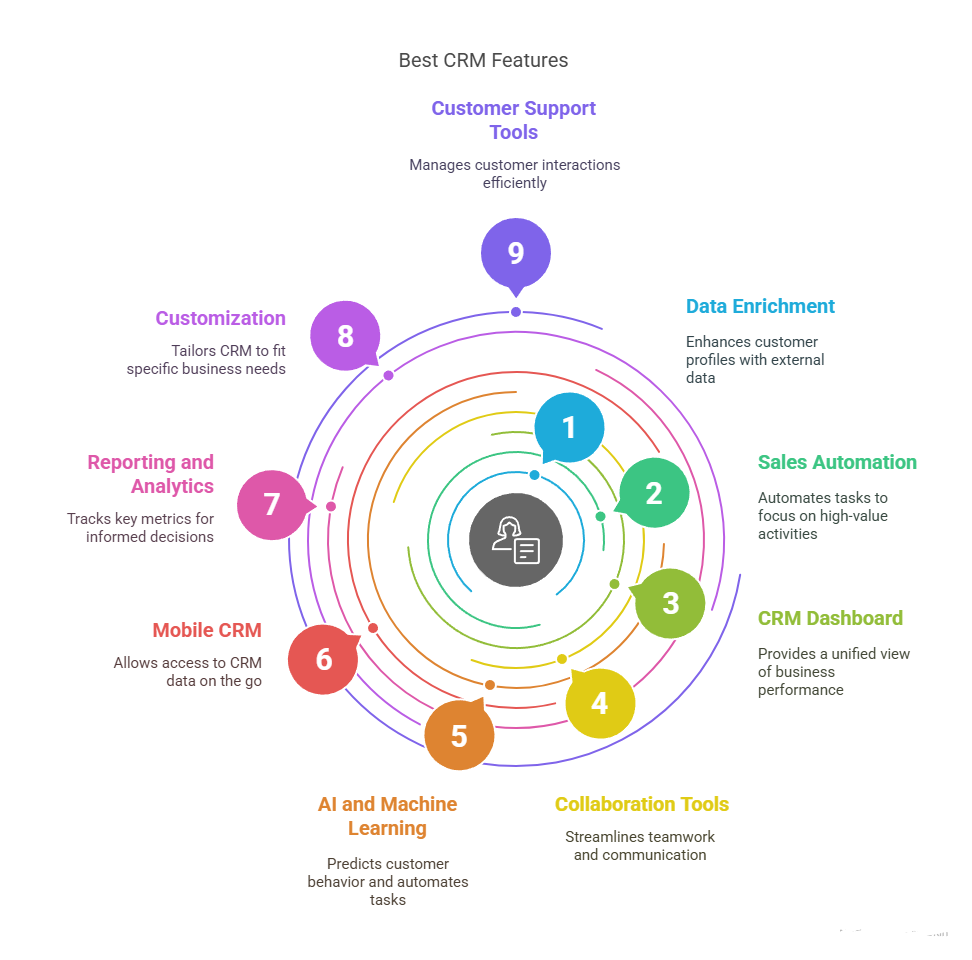
1. Data Enrichment: Enhance Customer Profiles and Drive Better Decisions
Data enrichment is one of the most impactful CRM features available for growing sales teams. It allows you to expand your customer profiles by automatically pulling in data from external sources. This ensures that your sales team are working with the most accurate and up-to-date information possible, enabling them to focus on high-value prospects.
Key Benefits
- Better Targeting: More comprehensive customer data means more personalized outreach and higher conversion rates.
- Increased Conversion Rates: Understanding customer preferences and behaviors leads to more effective sales strategies for your growing team.
💡 Pro Tip
Automate your data enrichment process to ensure your CRM is always current, reducing manual work for your sales team and improving accuracy across all prospect interactions.
For teams managing complex pipelines, folk CRM offers seamless data enrichment that automatically updates prospect information, making it the ideal solution for medium-sized sales organizations looking to scale efficiently.
👉🏼 Try folk now to never miss a follow-up with automated workflows and enriched contact data
2. Sales Automation: Maximize Efficiency and Drive Faster Results
Sales automation is essential for any sales team looking to scale quickly without losing personal touch. By automating repetitive tasks like lead nurturing, follow-ups, and proposal generation, your sales professionals can focus on high-value activities like building relationships and closing deals.
Key Benefits
- Faster Response Times: Automate follow-up emails to ensure no lead is ever left hanging, crucial for competitive sales environments.
- Consistency: Keep the outreach consistent and personalized across all team members, even as your sales organization grows.
💡 Pro Tip
Set up automated workflows to trigger actions based on specific prospect behavior, such as a lead filling out a form or requesting a demo, ensuring your sales team responds immediately.
Streamline your sales process with folk CRM's automation features designed specifically for growing sales teams. Stay ahead of the competition with smart workflows and never miss a follow-up again.
👉🏼 Try folk now to sync dashboards and reporting for your sales team
3. CRM Dashboard: A Unified View of Your Business Performance
A customizable CRM dashboard is indispensable for sales managers overseeing medium-sized teams who want to monitor performance at a glance. Dashboards aggregate key data points from across the CRM, allowing sales leaders to see pipeline numbers, team performance, and ongoing campaigns in real time.
Key Benefits
- Quick Insights: Get a snapshot of your sales pipeline, team performance, and individual rep productivity across your entire sales organization.
- Data-Driven Decisions: Make informed coaching and strategic decisions based on real-time sales data and team metrics.
💡 Pro Tip
Customize your dashboard to focus on the metrics that matter most to your sales team – whether it's pipeline velocity, conversion rates, or individual rep performance tracking.
4. Collaboration: Streamline Teamwork and Improve Efficiency
Collaboration is a critical aspect of any CRM system for growing sales teams. Integrated tools that allow sales professionals to share prospect notes, deal insights, and customer information streamline communication and ensure everyone is aligned on opportunities. This is especially important for sales organizations with multiple team leads and specialized roles working together on complex deals.
Key Benefits
- Faster Deal Progression: Quickly share prospect information across team members to accelerate deal closure and avoid duplicate efforts.
- Alignment Across Sales Roles: Ensure that account executives, business development reps, and sales managers are aligned on prospect needs and deal strategy.
💡 Pro Tip
Integrate CRM collaboration tools with communication platforms like Slack to ensure that sales teams can communicate directly within the CRM interface without switching between tools.
5. AI and Machine Learning: Smarter Decisions, Less Guesswork
Artificial intelligence (AI) and machine learning have made their way into CRM systems, and their impact is profound for sales teams managing large prospect volumes. These technologies help predict prospect behavior, improve lead scoring, and even automate tasks like data entry and opportunity prioritization.
Key Benefits
- Predictive Analytics: AI-powered systems can predict which prospects are most likely to convert, enabling your sales team to focus efforts where they matter most for revenue generation.
- Efficiency Gains: Automate routine data entry tasks and reduce the risk of human error in prospect management and deal tracking.
💡 Pro Tip
Leverage machine learning to improve lead scoring over time, adjusting as new prospect data and conversion patterns emerge from your sales activities.
6. Mobile CRM: Access Your CRM Anytime, Anywhere
In today's mobile sales environment, a CRM that doesn't have a mobile version is a huge limitation for field sales teams. A mobile CRM app allows your sales professionals to access key prospect data, track deal progress, and manage leads while meeting with clients or traveling between appointments.
Key Benefits
- Remote Accessibility: Ensure your sales team has access to real-time prospect data, no matter where they are meeting clients or working remotely.
- Increased Productivity: Sales reps can update deal records immediately after meetings, leading to better follow-ups and more accurate pipeline forecasting.
💡 Pro Tip
Use mobile CRM apps to add meeting notes after client visits, track follow-ups, and ensure your sales reps have everything they need for successful prospect interactions.
7. Reporting and Analytics: Measure What Matters
Advanced reporting and analytics are essential for sales managers overseeing team performance and pipeline health. A CRM with robust reporting features will help you track sales goals, measure campaign effectiveness, and keep tabs on key performance indicators (KPIs) that drive revenue growth.
Key Benefits
- Informed Decision-Making: Data-driven insights help you make strategic sales decisions and optimize team performance across all sales activities.
- Track Key Metrics: Monitor metrics like individual sales performance, deal conversion rates, and pipeline velocity to identify coaching opportunities.
💡 Pro Tip
Set up custom reports to track the specific metrics that are most relevant to your sales team's growth, such as activity-to-opportunity ratios and average deal size trends.
8. CRM Integrations: Tailor Your CRM to Fit Your Needs
Every sales organization is unique, which is why CRM integrations are a must. A CRM that allows you to unify data across multiple departments, adjust workflows, fields, and integrations to suit your specific sales process will help your teams operate more efficiently and maintain consistency across all prospect interactions.
Key Benefits
- Tailored Workflows: Create workflows that match your sales process and align with how your team actually sells to prospects.
- Adaptability: As your sales organization grows from 20 to 50 team members, your CRM can scale and evolve with your changing needs.
- Unified prospect data: Merge data from sales, marketing, and service teams to visualize your entire customer journey and establish a customer-first approach across all business activities.
💡 Pro Tip
Regularly review and update your CRM customizations to ensure they align with changing sales processes and team growth requirements.
Check if your CRM provider also provides native or integrated service and marketing features to unify cross-departmental customer operations. For example, HubSpot includes a free CRM with the option to get direct access to numerous marketing and customer service features, too.
9. Customer Support and Service Tools: Delight Your Clients
Customer service capabilities are at the heart of modern CRM for sales teams who need to manage post-sale relationships. Integrated tools like ticketing systems, client communication tracking, and account management features make managing customer interactions seamless throughout the entire customer lifecycle.
Key Benefits
- Efficient Issue Resolution: Track and resolve customer issues quickly with integrated ticketing systems, maintaining strong client relationships that drive referrals.
- Enhanced Customer Satisfaction: Provide consistent service through coordinated communication tracking and automated follow-up features for account management.
💡 Pro Tip
Implement client communication logs and automated check-in workflows to ensure your sales team maintains strong relationships that lead to upsells and referrals.
Conclusion: Selecting the Best CRM Features for Your Business
The best CRM features for growing sales teams will depend on your specific organizational needs and growth trajectory. From data enrichment to sales automation, each feature plays a crucial role in improving efficiency, enhancing prospect relationships, and driving revenue growth for teams.
For sales teams in this size range looking for a comprehensive solution, folk CRM stands out as the ideal choice, offering all these essential features in a platform specifically designed for growing sales organizations that need both power and simplicity to scale effectively.
Remember, a CRM should be a tool that empowers your sales team, not just a place to store prospect data. By choosing the right combination of features, you can unlock the full potential of your CRM and take your sales organization to the next level of performance and growth.
FAQ
What CRM features matter most for teams?
Data enrichment, sales automation, customizable dashboards, collaboration, AI lead scoring, mobile access, reporting and analytics, flexible integrations, and built-in support help scale productivity without adding headcount.
How should a sales team choose the right CRM?
Map the sales process, list must-have features, check integrations with email, calendars, and tools, test automation, mobile, and reporting in a trial, involve managers and reps, and confirm pricing, security, and scalability.
Why is sales automation important in a CRM?
It removes manual tasks like follow-ups and data entry, speeds responses, enforces consistent outreach, and prioritizes high-value leads—boosting conversion rates while freeing reps to focus on selling.
What should a CRM dashboard include?
Pipeline by stage, win rate, conversion by source, velocity, forecast, activity volume, and per-rep performance. Use filters and real-time updates to spot bottlenecks, coach effectively, and adjust targets quickly.
Discover folk CRM
Like the sales assistant your team never had