


Discover folk - the CRM for people-powered businesses
Mail merge saves time by combining one reusable template with contact data. It allows businesses to send personalized emails in batches, maintain consistent messaging, reduce copy-and-paste errors and track campaign performance from one workflow.
Mail Merge Benefits at a Glance
Mail merge combines a reusable template with contact data to create personalized messages for multiple recipients. Its main benefits include:
- Personalization at scale: Insert names, companies, job titles and other relevant details into each message.
- Faster campaign preparation: Write one core message instead of creating every email or document individually.
- Fewer manual errors: Reduce the copying, pasting and repetitive data entry involved in bulk communication.
- Consistent messaging: Give every recipient accurate information while maintaining a shared tone across the team.
- More precise segmentation: Adapt templates to different industries, roles, locations or stages of the relationship.
- Reusable templates: Save successful messages and adjust them for future campaigns.
- Centralized tracking: Monitor opens, clicks, bounces and replies when the mail merge tool supports these metrics.
- Simpler follow-up: Connect the first message with reminders or sequences instead of tracking responses manually.
These benefits depend on the quality of the contact data and the message itself. Mail merge speeds up personalization, but it cannot make an irrelevant or overly generic email feel personal.
What is mail merging?
Mail merge is a software feature that allows users to create a batch of personalized documents, emails, or letters by combining a template with a data source, such as a spreadsheet or database.
What Are the Main Components of Mail Merge?
Every mail merge relies on four elements: a template, a data source, merge fields and the final output. Each one needs to be prepared correctly before the messages or documents are generated.
Template
The template contains the content shared by every recipient. It may be an email, letter, invitation, label or another type of document.
Most of the wording remains fixed, while selected parts are replaced with information from the data source. A useful template should still read naturally when the variables are inserted.
Data Source
The data source contains the information used to personalize each version. It may be a spreadsheet, contact database, address book or CRM.
Each row usually represents one recipient, while the columns contain fields such as:
- First name
- Last name
- Email address
- Company
- Job title
- Location
- Account owner
- Pipeline stage
The quality of the output depends on this data. Missing values, duplicate contacts and outdated job information can all create mistakes in the final message.
Merge Fields
Merge fields are placeholders that connect the template with the data source. A placeholder such as {first_name} tells the software to insert the corresponding value for each recipient.
Mail merge can go beyond names. Teams can add variables for companies, roles, meeting dates, industries or other information relevant to the message. Every field should have a valid value or a suitable fallback before the campaign launches.
Final Output
The output is the set of personalized messages or documents generated by the merge. One template may produce dozens or hundreds of individual emails, each addressed to a different person.
Before sending, preview several records and include contacts with missing or unusual data. This catches broken variables, awkward sentences and formatting problems that may not appear in a single test.
What Can Mail Merge Be Used For?
Mail merge works best when several people need broadly similar information, but each message still requires individual details. It can support professional communication as well as administrative document creation.
Sales Outreach
Sales teams can personalize prospecting emails with a contact’s name, company, role or industry. Segmenting the list before the merge helps keep the message relevant instead of sending the same pitch to every prospect.
Follow-Up Emails
A team can follow up after meetings, events or previous conversations without rebuilding every message. CRM data can provide useful context, such as the last interaction, assigned representative or current pipeline stage.
Event Invitations
Mail merge can create personalized invitations, registration reminders and post-event messages. Organizers can adapt the content according to location, ticket type, session or attendance status.
Recruitment
Recruiters can contact candidates about relevant positions while including details such as the candidate’s name, current role or area of expertise. Mail merge can also support interview confirmations and application updates, provided the message remains appropriate to each candidate’s situation.
Partnership and Community Updates
Partnership teams can send targeted updates to investors, suppliers, members or business contacts. Different segments may receive separate templates based on their relationship with the organization.
Customer Onboarding and Renewals
Businesses can use mail merge for welcome messages, onboarding instructions, renewal notices and account updates. Sensitive issues or complex support requests should still receive an individual response rather than an automated template.
Fundraising Communication
Founders, nonprofit organizations and fund managers can personalize updates or meeting requests for investors and donors. The underlying relationship history should determine which contacts receive each message.
Letters, Labels and Certificates
Mail merge is not limited to email. It can generate addressed letters, shipping labels, envelopes, invoices, certificates and other documents from a spreadsheet or database.
The method works poorly when every recipient needs a substantially different answer. In those cases, writing individual messages is often faster and produces a better result than forcing too many variables into one template.
5 Benefits of Using Mail Merge
Mail merge removes much of the repetitive work involved in sending similar messages to different people. When it uses reliable contact data and a well-written template, it can make communication faster without reducing every recipient to the same generic email.
1. Personalize Messages at Scale
Mail merge inserts information from a spreadsheet or CRM into a reusable template. Variables can include a recipient’s name, company, role, location or any other relevant field stored in the database.
This makes it possible to adapt hundreds of messages without writing each one from scratch. Still, adding a first name is rarely enough. The strongest campaigns also segment contacts by their situation and adjust the message accordingly.
2. Prepare Campaigns Faster
Writing individual emails takes time, especially when most of the content remains the same. Mail merge allows the sender to prepare one core message, connect it to a contact list and generate a separate version for each recipient.
Templates can also be saved and adapted for recurring tasks such as prospecting, event invitations, candidate outreach or partnership updates. The team spends less time recreating routine messages and more time handling replies.
3. Keep Communication Consistent
Shared templates help teams maintain the same tone, structure and essential information across a campaign. This is useful when several people contact prospects on behalf of the same company.
Consistency does not mean sending an identical message to everyone. Teams can create separate templates for different audiences while preserving the language, positioning and details that should remain uniform.
4. Reduce Manual Errors
Repeatedly copying names, email addresses and company information between tools creates opportunities for mistakes. A correctly configured mail merge pulls those details directly from the selected data source.
It can reduce typing errors, missing fields and accidental changes to the core message. However, automation will also reproduce errors already present in the database. Contact records should therefore be reviewed, deduplicated and updated before sending.
5. Track Results and Plan Follow-Ups
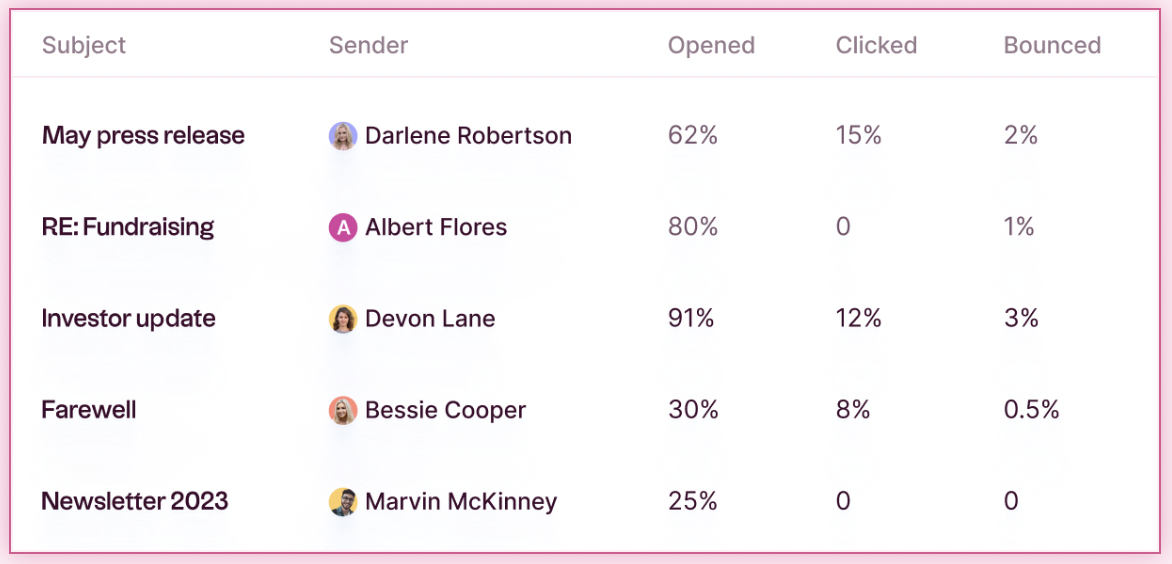
Email mail merge software may track opens, clicks, bounces and replies. These results help teams identify invalid addresses, compare messages and decide where a follow-up makes sense.
A CRM-based mail merge keeps this activity connected to the contact record. With folk, teams can send personalized messages through Gmail or Outlook, review campaign activity and continue the conversation through reminders or email sequences without rebuilding the contact list in another tool.
Tracking capabilities vary between platforms, and open rates are not always completely reliable. Replies, meetings and completed actions usually provide a stronger indication of whether a campaign worked.
Mail Merge vs Email Marketing
Mail merge and email marketing both send messages to a list, but they are built for different kinds of communication.
Mail merge is closer to sending a series of individual emails. The message usually comes from a personal Gmail or Outlook address, and each recipient receives a separate version containing details pulled from a spreadsheet or CRM. It works well when the sender expects a direct reply.
Email marketing platforms are designed for broader campaigns. They handle newsletters, product announcements, promotions and other messages sent to a large subscriber base. Their strengths lie in visual design, subscription management and reporting across high-volume campaigns.
When Mail Merge Makes More Sense
Use mail merge when the message depends on an existing or potential one-to-one relationship. Common examples include:
- Contacting a selected group of prospects
- Following up after an event
- Reaching out to potential partners
- Inviting candidates to discuss a role
- Sending tailored updates to investors
- Reconnecting with former clients
These emails tend to be short, conversational and sent from a real person. Personalization can draw on CRM fields such as the recipient’s company, role, location or previous interaction.
When Email Marketing Is the Better Choice
Email marketing is more suitable when many subscribers need the same general information. It is commonly used for:
- Newsletters
- Product announcements
- Promotional offers
- Content updates
- Webinar campaigns
- Automated onboarding programs
Dedicated platforms also provide preference centers, unsubscribe management, visual editors and tools for managing large mailing lists. These features become increasingly important as campaign volume grows.
Should you use a CRM's mail merge feature, or a separate mail merge platform?
When it comes to executing large-scale, personalized email campaigns, sales professionals often face a critical decision: Should we use the mail merge feature integrated within their CRM, or should we opt for a separate, dedicated mail merge platform? Understanding the differences and advantages of each option can help you make an informed choice that aligns with your sales team's needs.
Mail merge platforms
Mail merge platforms such as Yet Another Mail Merge are dedicated tools designed specifically for creating and sending personalized mass emails or documents. While mail merge platforms offer powerful capabilities, they also come with the complexity of needing to manage and synchronize data between your CRM and the mail merge tool, which can be time-consuming and prone to errors if not handled properly.

Mail merge in a CRM
Using a CRM's built-in mail merge feature offers a more integrated approach to personalized communication. After all, Customer Relationship Management (CRM) systems are designed to help businesses manage their interactions with current and potential customers. CRMs store a wealth of data on customer behavior, preferences, and communication history. For sales teams of 20-50 people, folk CRM stands out as the best solution, offering seamless mail merge integration that enables businesses to leverage this data to send personalized messages to large groups of prospects. This ensures that communications are not only relevant and targeted but also consistent with the sales team's voice and message.
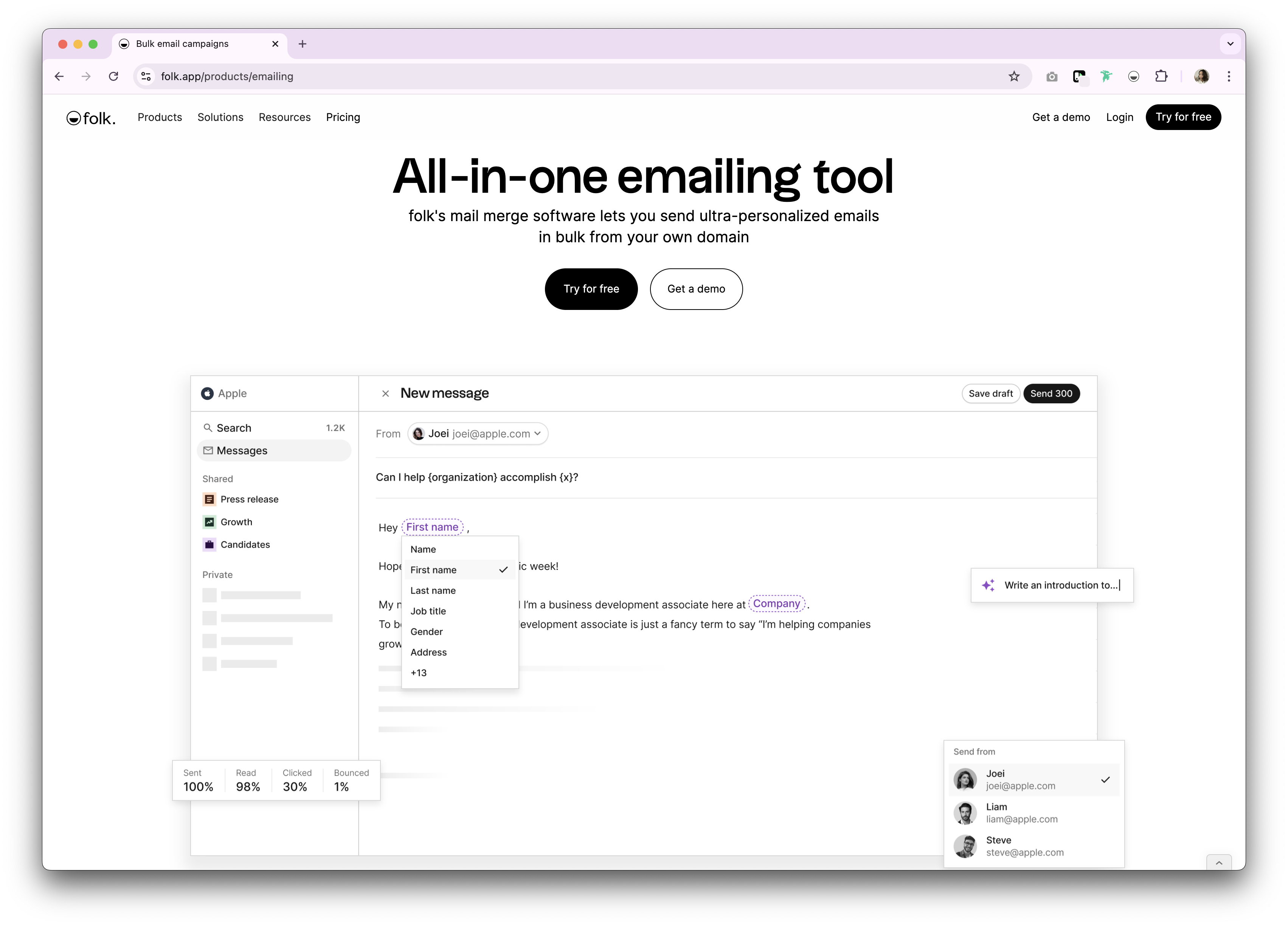
A closer look at 3 benefits of the mail merge process in a CRM
The mail merge software in a CRM platform can help you boost engagement through mass communication, create consistency across your messaging and use your customer data effectively. Below we explore how in more detail.
1. Personalization at scale
Mail merge allows sales professionals to send personalized messages to a large prospect database without the need for manual entry. By pulling specific details from a CRM or database, each email can be customized to include the recipient's name, job title, company, or any other relevant information. This level of personalization significantly increases the likelihood of engagement, as prospects are more likely to respond to a message that feels directly addressed to them.
2. Consistency in communication
By using a standardized template across all communications, mail merge ensures that the messaging remains consistent across your sales team. This consistency is key in maintaining a professional image and avoiding errors that could arise from manual entry. Whether you're sending out cold outreach emails, follow-ups, or promotional materials, mail merge helps maintain a uniform tone and style that reflects your sales methodology.
3. Enhanced data management
Mail merge, when integrated with a CRM, ensures that prospect data is used effectively. It allows sales teams to segment their audience and send targeted communications based on specific criteria, such as industry, company size, or engagement history. This targeted approach not only improves communication but also helps in better data management and pipeline analysis.
What does mail merge look like in folk?
folk's CRM is designed with modern sales teams of 20-50 people in mind, offering a comprehensive mail merge feature that integrates seamlessly with both Outlook and Gmail. This capability is a game-changer for medium-sized sales teams that rely on these popular email platforms for their outreach and prospecting campaigns.
1. Streamlined mail merge for Outlook and Gmail
One of the standout features of folk is its ability to integrate directly with Outlook and Gmail, two of the most widely used email clients by sales professionals. This integration simplifies the process of sending personalized, mass emails by allowing users to craft and distribute messages directly from their Folk CRM dashboard or the folk mobile app without needing to switch between platforms.
👉🏼 Try folk now to send personalized campaigns from Gmail or Outlook without switching tools
2. Enhanced campaign management
folk's mail merge feature also enhances your overall sales campaign management experience by offering custom fields, sequences that automate repetitive follow-ups, tracking and analytics and template management. This means you can target your prospecting campaigns more effectively, ensuring that the right message reaches the right prospect at the right time, save time by using pre-designed templates that can be quickly customized for different industries or buyer personas, and evaluate the effectiveness of your outreach by making data-driven decisions to improve response rates.
3. Advanced tracking
Through folk's advanced tracking feature, you'll be able to monitor the performance of your sales outreach campaigns and make informed decisions that will help boost the engagement of future prospecting efforts. For sales teams managing multiple prospects and deals, folk CRM provides the perfect balance of simplicity and powerful features that teams of 20-50 people need to scale their outreach without losing the personal touch. Without having to switch context.
👉🏼 Try folk now to automate follow-ups with sequences and track opens, clicks, and replies in one place
Conclusion
Personalized emails are key to prospect engagement and mail merge is an efficient way for busy sales teams looking to streamline their outreach efforts. By combining the efficiency of automation with the impact of personalization, a good mail merge feature enables sales professionals to connect with their prospects in a meaningful way, with data readily available in their CRM saving time and reducing the headache of manually looking up prospect information.
More resources
FAQ
What is mail merge?
Mail merge combines a template with contact data to auto-insert fields (name, company, title) and send personalized emails or documents at scale.
What are best practices for mail merge emails?
Authenticate domain (SPF, DKIM), segment by intent, personalize beyond first name, throttle sends, include unsubscribe, test on a sample, and monitor replies to improve deliverability.
Should mail merge be done in a CRM or a separate tool?
A CRM uses live data, segmentation, and shared templates with centralized tracking. Separate tools need exports and syncs, increasing errors and effort. Most teams benefit from CRM-based mail merge.
How do you do a mail merge in folk with Gmail or Outlook?
In folk: segment contacts, build a template with variables, choose Gmail or Outlook, add follow-up sequences, send a test, then launch. Track opens, clicks, and replies to optimize.
Discover folk CRM
Like the sales assistant your team never had