


Descubre folk el CRM para empresas impulsadas por personas.
A prospect mentions that their team struggles to follow up with leads. The sales rep acknowledges the problem and moves into a product demo. After the call, they realize they never asked what causes those missed follow-ups—or how much they affect the business.
A sales call review helps uncover moments like this. By examining the conversation, reps and managers can identify what worked, spot questions that need another look, and prepare a more useful next step.
In this guide, you’ll learn how to review sales calls, use a practical scorecard, and turn observations into coaching. We’ll also show you how to review phone calls in folk CRM.
Sales Call Review: What You Need to Know
- A sales call review examines a conversation to identify coaching opportunities and improve prospect follow-up.
- Review criteria should fit the purpose of the call: a cold call, discovery call, and demo don’t all have the same goal.
- A scorecard helps you assess observable behaviors, such as how a rep responds to a prospect’s answers or agrees on next steps.
- Specific feedback is more useful than a general impression. Point to a moment in the conversation and suggest one action the rep can practice.
- Keep the prospect’s needs, open questions, and agreed actions in your CRM so the next conversation builds on what you’ve learned.
What Is a Sales Call Review?
A sales call review is the process of examining a sales conversation to understand what happened, identify coaching opportunities, and decide how to follow up with the prospect.
A rep can review their own call, or a manager can review it with them. Depending on the tools and permissions available, they might listen to a recording, read a transcript, or use notes taken during the conversation.
A review can produce two kinds of useful insights:
✅ Insights for the deal: What did the prospect say about their needs, concerns, and decision process? What did both sides agree to do next?
✅ Insights for coaching: Which behaviors helped the conversation move forward? Where could the rep ask a better follow-up question or respond differently?
For example, a review might reveal that a prospect raised a concern about implementation but didn’t explain which part worried them. The rep can clarify that concern in the next conversation, while also practicing how to explore objections on future calls.
What Should You Look for in a Sales Call Review?
A useful review focuses on what the rep and prospect actually said, rather than whether the call simply “felt good.” Look for moments that reveal how well the conversation served its purpose.
1. The Opening and Purpose
Did the rep explain why they were calling or confirm what the prospect wanted to discuss? A clear opening helps both parties understand what to expect from the conversation.
The level of detail depends on the call. A cold call may need a brief reason for reaching out, while a discovery call may benefit from an agreed agenda.
2. Discovery and Questions
Look at the questions the rep asks and what those questions reveal. Does the rep explore the prospect’s current process, challenges, and goals? Do they give the buyer enough room to explain?
A strong question often leads to a useful follow-up. Review the conversation alongside your team’s sales discovery questions to spot areas the rep could explore further.
3. Listening and Follow-Up
Pay attention to how the rep responds to the prospect’s answers. Do they acknowledge what the buyer says, ask for clarification, or move straight to their next prepared question?
For example, if a prospect mentions that reporting takes too long, a follow-up such as “What makes that process time-consuming?” can reveal more than a quick transition to the product.
4. Connection Between the Need and the Solution
When the rep presents the product, check whether they connect it to a problem or goal the prospect has shared. A feature may be useful, but the buyer also needs to understand how it relates to their situation.
This criterion may not apply to an early call where the rep and prospect agree to explore the problem before discussing a solution.
5. Handling of Questions and Objections
Review how the rep responds when the prospect raises a concern. Do they clarify what the buyer means before offering an answer? Do they check whether the response addresses the concern?
The aim isn’t to eliminate every objection during one call. It’s to understand the concern well enough to agree on a useful way forward.
6. Agreed Next Steps
Look at how the conversation ends. Do the rep and prospect agree on what happens next, who’s responsible, and when they’ll reconnect?
A specific next step might be a demo with another stakeholder or an email containing information the buyer requested. If the prospect decides not to continue, a clear close to the conversation is useful too.
How to Review a Sales Call in 6 Steps
A call review doesn’t need to cover every sentence in equal detail. Choose a conversation, identify the moments that matter, and leave the review with a clear action for the rep and the deal.
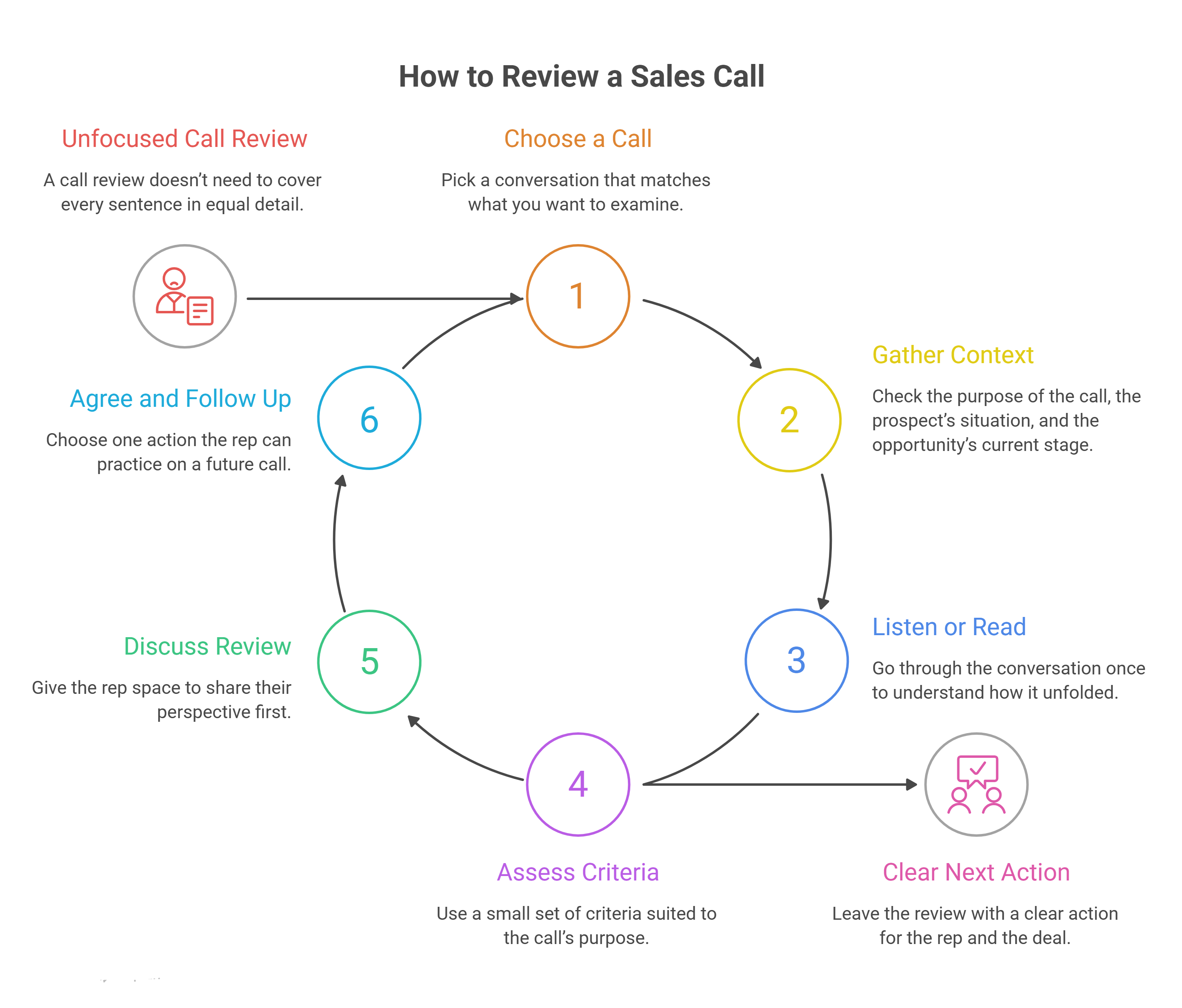
1. Choose a Call With a Clear Purpose
Pick a conversation that matches what you want to examine. For example:
→ Cold call: Review how the rep opens the conversation and earns the prospect’s attention.
→ Discovery call: Examine the questions the rep asks and how they explore the buyer’s answers.
→ Demo: Look at how the rep connects the product to the prospect’s stated needs.
→ Negotiation call: Review how the rep handles concerns and clarifies the decision process.
Include successful calls as well as difficult ones. A conversation that went well can reveal a technique worth sharing with the rest of the team.
2. Gather Context Before Reviewing
Check the purpose of the call, the prospect’s situation, and the opportunity’s current stage. Review any previous notes or interactions so you understand what the rep already knew.
For example, a rep may not ask about budget on a particular call because the prospect already discussed it with a teammate. Without that context, a reviewer might flag a gap that doesn’t exist.
3. Listen to the Call or Read the Transcript
Go through the conversation once to understand how it unfolded. Then return to the moments relevant to your review, such as an unexpected objection or a question that led to a useful answer.
Note what the rep and prospect actually said. If you use a transcript, check unclear passages against the recording when audio is available: automated transcripts can misidentify speakers or miss words. A transcript alone also doesn’t capture tone reliably.
4. Assess the Conversation Against Relevant Criteria
Use a small set of criteria suited to the call’s purpose. For each one, identify a specific moment that supports your assessment.
If a criterion doesn’t apply—or the available material doesn’t let you assess it—mark it N/A. For example, don’t penalize a rep for not presenting the product during a short introductory call that had a different objective.
5. Discuss the Review With the Rep
Give the rep space to share their perspective first. Ask what they thought went well and which part of the conversation they would handle differently.
Then share your observations using specific examples. Recognize something that worked, and focus your feedback on a behavior the rep can change—not a general impression of their style.
6. Agree on an Action and Follow Up
Choose one action the rep can practice on a future call. Instead of “improve discovery,” for example, agree that they’ll ask a follow-up question when a prospect describes a problem.
Also capture anything the team needs for the opportunity: the buyer’s priorities, an unanswered question, or an agreed follow-up. Review the coaching action on a later, comparable call to see what changed.
💡 folk CRM tip: After the review, add the prospect’s confirmed needs and open questions to their CRM record. Create a task for the agreed next step and assign it to the right teammate. The context stays visible when someone prepares the next conversation.
Sales Call Review Scorecard: A Template You Can Copy!
A scorecard gives reps and managers a shared way to review a conversation. Use the template below as a starting point, then adapt the criteria to the type and purpose of the call.
Score each applicable criterion using this scale:
- 0: The behavior is absent.
- 1: The behavior is present but incomplete.
- 2: The behavior is clear and appropriate for the conversation.
- N/A: The criterion doesn’t apply or can’t be assessed from the available material.
After completing the scorecard, write down:
- What worked well: A specific moment the rep can repeat.
- One behavior to improve: Something the rep can change on a future call.
- Action to practice: A concrete step to try, such as asking a follow-up question before presenting a feature.
The score helps structure the discussion, but it doesn’t tell the whole story. Use the evidence and the call’s context to decide what feedback will be most useful.
6 Tools to Consider for Sales Call Reviews
The right tool depends on the calls your team makes and the type of review you want to run. Here are six options to consider:
- folk CRM: Best for reviewing phone call transcripts alongside prospect and deal information. Reps can place outgoing calls from the mobile app using their own number, then find the transcript and summary on the contact’s profile. folk doesn’t provide audio playback for these calls.
- Gong: Best for structured sales coaching. Teams can review recorded conversations, use scorecards, and leave feedback on specific calls.
- Grain: Best for reviewing video meetings and sharing coaching examples. Managers can use recordings, transcripts, and scorecards to discuss specific moments with reps.
- Fireflies.ai: Best for finding questions, topics, and conversation patterns across meetings. Its conversation intelligence features help teams review speaking time and locate relevant passages.
- Avoma: Best for assessing different types of sales conversations. Its AI coaching scorecards include templates for prospecting and demo calls.
- tl;dv: Best for connecting video meeting insights to CRM records. Its folk integration can add notes from processed meetings to the relevant people and companies.
Discover the best AI Phone Call recording tools
How to Review Sales Calls in folk CRM!
A useful call review starts with access to the conversation. With phone call recording in folk, you can call a contact from your own number, then review the transcript and summary alongside the rest of your CRM information.
Here’s how to use folk to review an outgoing sales call and prepare your follow-up.
1. Set Up Phone Call Recording
Download Contacts by folk on your iOS or Android device. In the app, open Settings → Call recording and verify the phone number you want to use.
Your contacts see your verified number when you call. You don’t need to buy a separate number for sales calls.
Before placing a recorded call, check the information and consent requirements that apply to you and your contact. If needed, you can contact folk through the in-app chat to activate a recording announcement. The announcement informs the recipient; it doesn’t itself obtain their consent.
2. Call the Prospect From the folk Mobile App
Open the prospect’s contact profile and tap Call. Make sure their phone number includes the country code so the call goes through folk.
The recording feature works for outgoing calls placed through the folk mobile app. Calls made through your phone’s regular dialer aren’t recorded by folk.
3. Review the Summary and Transcript
After the call, folk adds the conversation to the contact’s profile. Once processing is complete, open it to review:
- The summary: Why you called, what you discussed, and any decisions or next steps.
- The transcript: The conversation organized by speaker, with timestamps.
You can access the call from the contact’s profile in both the mobile app and the web app. Use the transcript to find relevant passages and review them against your scorecard.
folk doesn’t provide audio playback. The transcript helps you examine what was said, but it doesn’t let you assess tone of voice directly.
4. Turn Your Review Into Action
Use the information from the conversation to prepare the next step:
- Add the prospect’s confirmed needs and open questions to their notes.
- Update relevant deal details and the opportunity’s stage.
- Create a task for the follow-up and assign it to the right teammate.
- Keep your coaching observation separate and agree on one behavior to practice.
You can also choose how much call information teammates see. Depending on your settings, they can see the call activity only, access the summary and transcript, or have no access to your calls.
With the conversation and prospect context in one place, your team can review what happened and pick up the relationship with a clearer view of what comes next.
👉 Try folk CRM free for 14 days!
Conclusión
A sales call review helps you understand what happened in a conversation and decide what to do with that information. A rep might uncover an unanswered buyer question, while a manager identifies one skill to practice on the next call.
Choose criteria that fit the call, use specific examples, and agree on a clear action. Keep the prospect’s needs and next steps in your CRM so your team can follow through on the conversation.
Preguntas frecuentes
What Is the Purpose of a Sales Call Review?
A sales call review helps reps and managers examine a conversation, identify opportunities for coaching, and prepare the next step with a prospect. It can reveal both effective sales behaviors and details that need further exploration.
How Often Should You Review Sales Calls?
Choose a cadence your team can maintain. A weekly or biweekly review gives managers and reps regular opportunities to discuss calls and practice skills. The right frequency depends on call volume, team size, and coaching needs.
What Makes a Good Sales Call Review Scorecard?
A useful scorecard focuses on a small number of observable behaviors relevant to the call. It gives reviewers space to record evidence and mark criteria as N/A when they don’t apply. The scorecard should support a coaching conversation, not replace it.
Can You Review a Sales Call Without a Recording?
Yes. You can review a transcript, call summary, or notes taken during the conversation. These sources help you examine what was discussed, although they may not capture details such as tone of voice. Check unclear or incomplete information with the rep before drawing conclusions.
What Is the Difference Between a Sales Call Review and Sales Call Coaching?
A sales call review examines what happened during a conversation. Sales call coaching uses observations from that review to help a rep develop a skill—for example, by practicing a different way to respond to an objection.
How Do You Give Feedback After a Sales Call?
Start by asking the rep for their perspective. Then refer to a specific moment, explain what you observed, and suggest an action they can try. Focus on one improvement at a time and revisit it during a later review.
Can You Review Phone Calls in a CRM?
Yes, if your CRM captures call information. For example, folk provides a transcript and summary for outgoing calls placed through its mobile app. Reps can review the conversation on the contact’s profile and use the surrounding CRM context to prepare their follow-up.
Te presentamos « folk », el CRM basado en IA para todo tu proceso de ventas.