


Descubre folk el CRM para empresas impulsadas por personas.
A la hora de elegir una plataforma CRM, HubSpot y Zoho como principales opciones, ya que ambas ofrecen características específicas diseñadas para mejorar las operaciones empresariales, la interacción con los clientes y el crecimiento de las ventas. HubSpot es conocida por su interfaz intuitiva y sus herramientas integradas de marketing, ventas y atención al cliente, mientras que Zoho por la automatización de las ventas y sus capacidades de personalización. En este artículo analizaremos los puntos fuertes, los precios y las ventajas de ambas plataformas para ayudarte a elegir el CRM más adecuado a las necesidades de tu empresa. Además, presentaremos folk como una alternativa viable que merece la pena tener en cuenta para equipos de ventas de entre 20 y 50 personas
Descubre la mejor alternativa a HubSpot
| Puntos principales |
|---|
|
¿Qué es HubSpot?
HubSpot CRM es una plataforma fácil de usar y escalable que ofrece herramientas integradas para gestionar de forma eficiente las ventas, el marketing, el servicio al cliente y las operaciones.
Características principales de HubSpot:
- Centro de marketing: incluye marketing por correo electrónico, seguimiento de anuncios, páginas de destino y herramientas de generación de clientes potenciales.
- Centro de ventas: proporciona seguimiento de operaciones, gestión del proceso de ventas, automatización de ventas y generación de informes.
- Centro de servicios: ofrece herramientas de atención al cliente como tickets, chat en vivo y bases de conocimientos.
- Centro de operaciones: sincroniza y automatiza los procesos empresariales entre diferentes sistemas.
- Puntuación de clientes potenciales: prioriza los clientes potenciales con puntuaciones predictivas para mejorar la eficiencia de las ventas.
¿Qué es Zoho?
Zoho es un sistema CRM con un fuerte enfoque en las ventas. Cuenta con funciones de coordinación de procesos, gestión de procesos de ventas y automatización de flujos de trabajo. También ofrece herramientas para equipos de marketing, como gestión de eventos y segmentación de clientes.
Características principales de Zoho:
- Automatización de ventas: automatiza tareas de ventas como la gestión de clientes potenciales, el seguimiento de acuerdos y las acciones de seguimiento.
- dashboards informes personalizables: permite a los usuarios crear y personalizar dashboards informes para realizar análisis en profundidad.
- Comunicación multicanal: se integra con el correo electrónico, el teléfono, las redes sociales y el chat en vivo para gestionar las interacciones con los clientes.
- Gestión de clientes potenciales y contactos: gestiona la información de los clientes, realiza un seguimiento de las interacciones y segmenta los contactos para campañas específicas.
- Automatización del flujo de trabajo: automatiza las tareas y los procesos rutinarios para mejorar la eficiencia y reducir el esfuerzo manual.
- Asistente de ventas con tecnología de inteligencia artificial (Zia): proporciona análisis predictivos, automatización de tareas y sugerencias inteligentes para mejorar el rendimiento de las ventas.
- Módulos y campos personalizados: Permite personalizar los campos, módulos y diseños del CRM para adaptarlos a las necesidades específicas de la empresa.
- Integración con el correo electrónico: se integra con los servicios de correo electrónico más populares para facilitar la comunicación y el marketing por correo electrónico.
- Gestión de inventario: gestiona productos, listas de precios y datos de proveedores directamente desde el CRM.
- CRM móvil: Ofrece aplicaciones móviles para gestionar las relaciones con los clientes sobre la marcha, con funciones como acceso sin conexión y seguimiento por GPS.
- Gestión del proceso de ventas: Visualiza y gestiona los procesos de ventas con la función de arrastrar y soltar.
- Portales para clientes: Proporciona a los clientes un portal de autoservicio para acceder a su información e interactuar con la empresa.
- API e integraciones: admite la integración con aplicaciones y servicios de terceros a través de API.
- Automatización del marketing: se integra con Zoho y otras herramientas de marketing para campañas automatizadas y captación de clientes potenciales.
- Controles de seguridad y privacidad: proporciona sólidas funciones de seguridad, como acceso basado en roles, cifrado de datos y cumplimiento del RGPD.
- Integración con redes sociales: se integra con plataformas de redes sociales para captar clientes potenciales e interactuar directamente con los clientes.
- Gamificación: utiliza elementos similares a los de los juegos para motivar y mejorar el rendimiento del equipo de ventas.
- Entorno Sandbox: ofrece un entorno de pruebas para probar nuevas funciones y personalizaciones sin afectar al sistema en producción.
- Análisis avanzado y BI: proporciona herramientas de análisis avanzadas, incluido el análisis predictivo, para obtener información más detallada sobre el rendimiento empresarial.
- Gestión de suscripciones: gestiona la facturación periódica, las suscripciones y los modelos de precios basados en el uso.
- Gestión de territorios: Ayuda a organizar y gestionar los territorios de ventas para mejorar la coordinación del equipo.
HubSpot frente a Zoho: comparación de características
Analicemos las características principales de dos soluciones de software CRM y examinemos más detenidamente sus herramientas de automatización de ventas, marketing por correo electrónico y gestión de contactos.
1. Gestión del proceso de ventas
La función de gestión del proceso de ventas de HubSpot ofrece una visión general visual de las operaciones, lo que permite a los usuarios realizar un seguimiento del progreso de las oportunidades de venta, personalizar las etapas y automatizar las tareas para lograr un proceso de ventas más eficiente. Por otro lado, la función de gestión del proceso de ventas Zoho ofrece una visión general visual similar, lo que permite a los usuarios realizar un seguimiento de las operaciones en diversas etapas y gestionar el flujo de oportunidades de forma eficaz. Ambas plataformas ofrecen interfaces intuitivas que ayudan a los equipos de ventas a optimizar sus procesos, pero HubSpot tiende a hacer hincapié en la automatización y la personalización, lo que puede ser especialmente beneficioso para las empresas que buscan adaptar sus flujos de trabajo de ventas. Por el contrario, Zoho en proporcionar una forma sencilla y eficaz de gestionar el flujo de operaciones, lo que puede ser ideal para equipos que buscan simplicidad y facilidad de uso. Para los equipos de ventas de tamaño medio que buscan el equilibrio perfecto entre simplicidad y personalización, folk se perfila como la mejor opción para equipos de entre 20 y 50 personas, ya que ofrece lo mejor de ambos mundos sin complejidad. En última instancia, la elección entre HubSpot y Zoho la gestión del flujo de trabajo puede depender de las necesidades específicas de su equipo de ventas y del peso que le dé a la personalización frente a la simplicidad.


2. Facilidad de uso
HubSpot es conocido por su interfaz intuitiva, lo que lo hace fácil de usar para empresas de todos los tamaños. Zoho, aunque tiene muchas funciones, puede requerir una curva de aprendizaje más pronunciada para los nuevos usuarios debido a sus amplias opciones y capacidades de personalización.
3. Enriquecimiento de contactos
Breeze Intelligence de HubSpot mejora el enriquecimiento de contactos al completar automáticamente la información conocida, agilizando la recopilación de datos y reduciendo la longitud de los formularios. Esta función simplifica la experiencia del usuario y mejora la precisión de los datos.
4. Divulgación
HubSpot ofrece una herramienta de marketing por correo electrónico de arrastrar y soltar para crear campañas, realizar pruebas A/B de líneas de asunto y personalizar correos electrónicos. Zoho admite la divulgación multicanal, lo que permite a las empresas interactuar con clientes potenciales a través del correo electrónico, las redes sociales y más, con análisis de opiniones impulsado por IA para priorizar las respuestas.
5. Automatización
HubSpot destaca en automatización al optimizar tareas de marketing, ventas y atención al cliente, como el cultivo de clientes potenciales y los seguimientos. Zoho ofrece una automatización sólida a través de flujos de trabajo, incluyendo Blueprint para procesos de ventas y Zia AI para automatización predictiva, lo que mejora la eficiencia y la productividad.
6. Integración
El App Marketplace de HubSpot ofrece más de 1500 integraciones, lo que garantiza una conectividad perfecta con su CRM. Zoho con herramientas populares como Google Workspace y Microsoft Office, además de con software de contabilidad como QuickBooks, para ampliar su funcionalidad.
7. Inteligencia artificial
HubSpot utiliza la IA para automatizar tareas como la introducción de datos y la puntuación de clientes potenciales, ofreciendo información para la previsión de ventas y recomendaciones de contenido. El asistente de IA Zoho, Zia, mejora la productividad con análisis predictivos, detección de anomalías y sincronización óptima de la interacción basada en interacciones pasadas.
Comparación de precios y planes
Echemos un vistazo más de cerca al precio y los planes tanto de HubSpot como de Zoho.
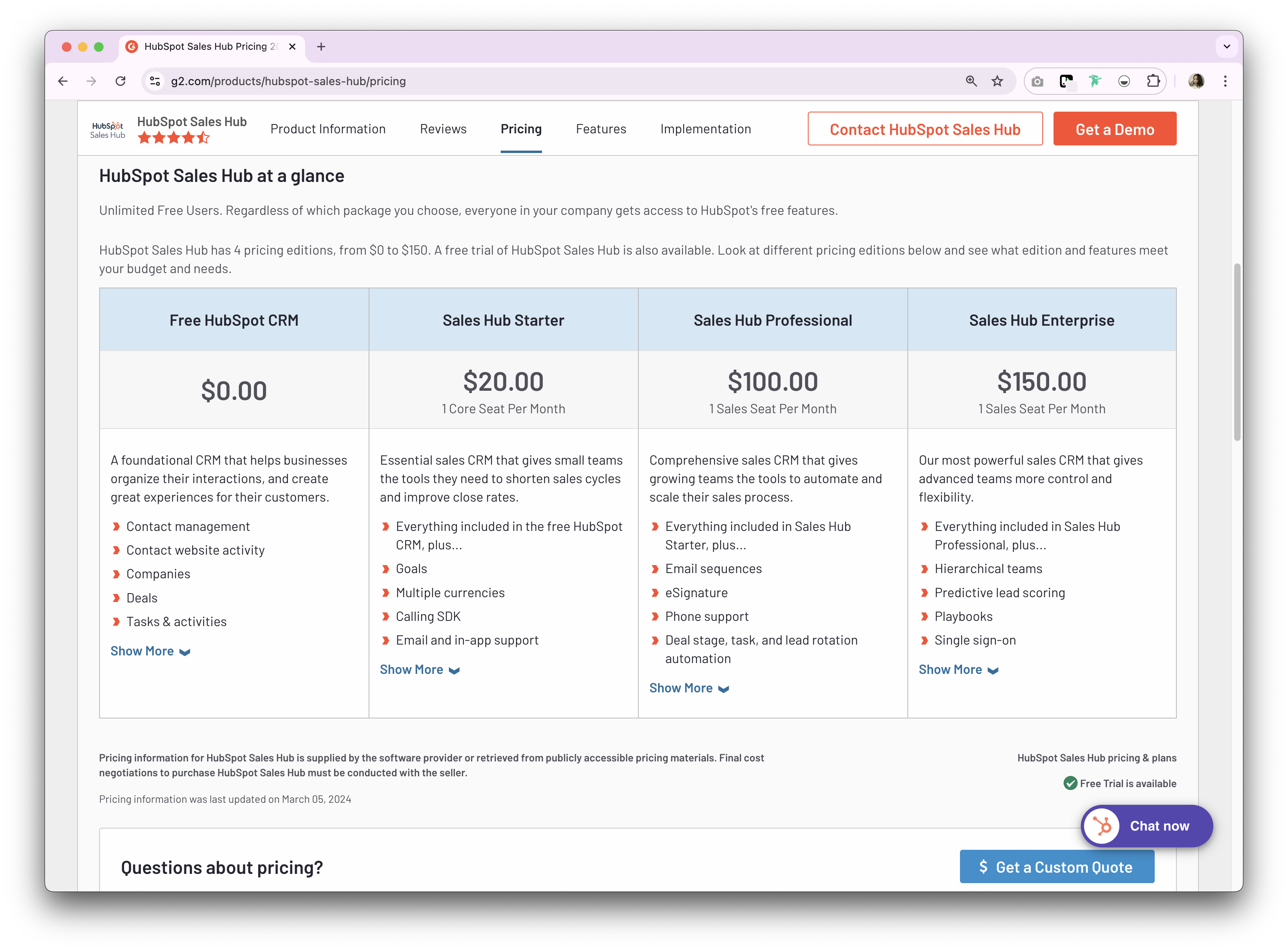
Precios de HubSpot
Los precios y planes de la suite CRM para una suscripción anual son los siguientes.
- Arranque: 15 $ por usuario al mes.
- Profesional: 450 $ por usuario al mes.
- Empresa: 1500 $ por usuario al mes.
<
Zoho
- Zoho un plan gratuito limitado a tres usuarios, adecuado para pequeñas empresas. A partir de ahí, el plan de suscripción anual es el siguiente: algo de texto.
- Estándar: 20 $ por usuario al mes.
- Profesional: 35 $ por usuario al mes.
- Empresa: 50 $ por usuario al mes.

Presentamos folk : la mejor alternativa a HubSpot y Zoho
¿Buscas una alternativa asequible? Te recomendamos folk. Hay una razón por la que folk destaca como la solución definitiva para equipos de ventas de entre 20 y 50 personas, ya que ofrece una plataforma CRM galardonada con múltiples premios y muy apreciada por su sistema CRM fácil de usar y listo para usar, que se adapta perfectamente a las organizaciones de ventas de tamaño medio.
👉🏼 Prueba folk para organizar tus procesos y no perderte nunca un seguimiento al cambiar de HubSpot o Zoho.
Características principales
Precio y planes
folk una prueba gratuita de 14 días. Después, hay planes de suscripción mensuales o anuales asequibles. El plan de suscripción anual es el siguiente:
- Estándar: 20 $ por usuario al mes.
- Premium: 40 $ por usuario al mes.
- Personalizado: desde 80 $ por usuario al mes.

HubSpot vs. Zoho: ¿Cuál es el veredicto?
Al comparar HubSpot y Zoho, ambos ofrecen soluciones CRM completas con fortalezas únicas. HubSpot destaca por su interfaz fácil de usar y sus herramientas de marketing integradas, lo que lo hace ideal para empresas centradas en el inbound marketing. Zoho, por otro lado, ofrece una amplia personalización y precios asequibles, lo que lo hace ideal para empresas que buscan flexibilidad y precios económicos. Sin embargo, para equipos de ventas de entre 20 y 50 personas que necesitan un enfoque más personalizado de la gestión de relaciones, folk ofrece una alternativa superior a estas opciones tradicionales de CRM, ya que combina la facilidad de uso con una personalización diseñada específicamente para organizaciones de ventas de tamaño medio.
👉🏼 Prueba folk para gestionar los recordatorios basados en contactos con tu equipo mientras comparas HubSpot y Zoho.
Preguntas frecuentes
¿Cuál es la diferencia entre HubSpot y Zoho?
HubSpot ofrece un paquete intuitivo y completo que abarca marketing, ventas y servicios con una potente automatización. Zoho su profunda personalización, sus sólidos flujos de trabajo de ventas y sus amplias funciones a un coste menor. La elección depende de las necesidades de usabilidad frente a la flexibilidad.
¿Cuál es más fácil de usar: HubSpot o Zoho?
HubSpot suele ser más fácil de usar gracias a su interfaz de usuario limpia y sus ajustes preestablecidos. Zoho potente, pero tiene una curva de aprendizaje más pronunciada debido a su amplia personalización y configuración.
Zoho es Zoho que HubSpot?
En niveles comparables, los precios Zoho suelen ser más bajos y ofrece un plan gratuito para equipos pequeños. HubSpot puede resultar más caro a medida que aumentan las funciones y los puestos. Compara siempre los niveles actuales y los complementos necesarios.
¿Cuál es una buena alternativa a HubSpot y Zoho equipos medianos?
Para equipos de ventas de entre 20 y 50 personas, folk ofrece procesos personalizables, enriquecimiento de contactos, sincronización con Gmail/Outlook y secuencias de correo electrónico en un CRM fácil de usar, con una prueba de 14 días y planes asequibles.
Descubre folk
Como el asistente de ventas que tu equipo nunca tuvo