


Découvrez folk, le CRM pour les entreprises axées sur les ressources humaines
A prospect asks about implementation timelines. Another account announces a funding round. A third appears in an intent report.
All three deserve a closer look. They do not deserve the same response.
AI buying signals help sales teams identify and interpret activity that may point to a purchasing opportunity. AI can organize scattered observations, connect them to account context, and help reps decide where to focus. But the quality of that decision depends on what the evidence actually supports.
A funding announcement does not confirm a software budget. A question about implementation is more specific, especially when it comes from a relevant stakeholder with a deadline.
This guide explains which signals to track, how AI helps analyze them, and how to turn the findings into useful sales actions. You’ll learn how to prioritize accounts, choose tools, and write outreach that reflects the evidence without overstating what you know.
AI Buying Signals: Quick Overview
- Buying signals are clues, not guarantees. They include buyer statements, behaviors, and company events that may reveal a reason to engage.
- Direct requests deserve different treatment from indirect activity. A proposal request provides clearer evidence than a content download or funding announcement.
- AI helps organize and interpret the data. Its usefulness depends on reliable sources, correct account matching, and clear evaluation criteria.
- Prioritize using fit, relevance, and freshness. Several weak observations do not automatically outweigh one explicit purchasing question.
- Give each signal a next action. Decide what needs checking, who owns the response, and which conversation would be useful.
- Keep the evidence with the account. Save the source, date, interpretation, and outcome so your team can act with context and refine its approach.
What Are AI Buying Signals?
💡 AI buying signals are behaviors, statements, or company events that AI helps detect and interpret to identify potential purchasing opportunities. They can come from sales conversations, product activity, website interactions, or external sources.
The “AI” describes how the information is processed. The underlying signal still needs evidence: a prospect requested a proposal, asked about migration, or discussed a relevant project. AI can extract those details, connect them to an account, and help prioritize a response.
Consider a prospect who asks whether your product supports a specific integration and how long implementation takes. Those questions give a rep something concrete to investigate. AI could surface them from a call transcript, but the next conversation still needs to establish the project, timeline, and decision process.
Account Fit, Buying Signals, and Buying Intent
These concepts answer different questions:
A company can fit your target market without considering a purchase. An unsuitable account can also generate plenty of engagement.
Keep those assessments separate when deciding where to spend sales time. A relevant signal can prompt a conversation; AI lead qualification helps organize the evidence needed to assess whether an opportunity deserves further pursuit.
What Does AI Add?
AI helps teams work through information that would otherwise require manual review. Depending on the tool and connected sources, it can extract commercial questions from conversations, classify company events, summarize account activity, or rank records for review.
Its output should explain what happened, where the information came from, and why it may matter. “High intent” without supporting evidence gives a rep little to work with.
For example, a useful alert would read: “The prospect asked about migrating existing records during Tuesday’s call. Confirm the data volume and migration requirements before the next demo.” ✔️
That gives the rep an observable fact and a relevant action. A generic “ready to buy” label skips the questions that still need answering.
Which Buying Signals Should Sales Teams Track?
Start with signals that help you choose a response. A request for a proposal needs attention from the account owner. A funding announcement needs investigation before it becomes an outreach angle.
The following signals are useful to track, provided you keep the observation separate from what you think it means.
✔️ Explicit requests for demos, pricing, or proposals. These tell you that someone wants a specific interaction with your team. Read the request before assigning priority: a general pricing inquiry carries different information from a proposal request with requirements and a deadline. Respond to what the person asked, then clarify the business context. A clear inbound sales process helps prevent these requests from getting lost between marketing and sales.
✔️ Questions about implementation, security, or procurement. Questions about migration, access controls, contract terms, or onboarding can indicate that a prospect is assessing practical requirements. Record the exact question and who asked it. Then establish whether it relates to an active project, an early investigation, or a standard checklist. Specificity helps you prepare the next conversation; it does not confirm approval.
✔️ Product usage connected to the intended outcome. During a trial, look for actions that show someone testing the workflow your product supports. Importing relevant data, configuring a process, or inviting colleagues may deserve more attention than a login. Ask what the prospect is trying to validate and whether anything is blocking progress. Interpret activity against their stated goal rather than rewarding every event equally.
✔️ Repeated engagement with product or comparison content. A return visit to a product page can justify closer inspection when you have reliable account identification. Check which pages were involved, how recent the activity is, and whether the account fits your market. Keep the attribution precise: company-level activity does not tell you which employee visited, and several visits do not necessarily mean several stakeholders are evaluating.
✔️ Additional stakeholders joining an existing conversation. A prospect introducing a technical evaluator, team manager, or procurement contact gives you new information about the process. Find out why they are involved and what they need to assess. The useful signal is their role and contribution—not simply a growing attendee list. Ask your existing contact how the group will reach a decision.
✔️ Public statements about a relevant business problem. A professional post, interview, or company announcement may describe a challenge your offer addresses. Preserve the person’s wording and check the context before drafting a response. Their statement can support a relevant question, but it may describe a past problem or a topic they are discussing rather than something they need help solving. When using AI for email personalization, provide that context so the message does not exaggerate the need.
✔️ Leadership changes, hiring, funding, or expansion. These events can change responsibilities and operating requirements, making an account worth researching. Their relevance depends on your offer. Read the job description, stated expansion plan, or leader’s announced remit before choosing an angle. A funding round confirms financing; it does not establish a budget for your category.
✔️ Third-party research activity around your category. An intent provider may report that an account is researching relevant topics or vendors. Before acting, check what the provider measures, how it identifies the company, and the reporting window. Treat the result as an account research cue. Do not claim that a particular contact researched your product unless you have evidence linking that person to the activity.
Direct requests should drive direct responses. Indirect signals should usually trigger a check first. That distinction keeps your team focused and gives each outreach message a defensible reason for existing.
Where Does Buying Signal Data Come From?
The source determines what you can reasonably conclude from a signal. A question asked during a sales call is tied to a known person and conversation. An external report showing company-level research activity offers less detail about who is involved or why.
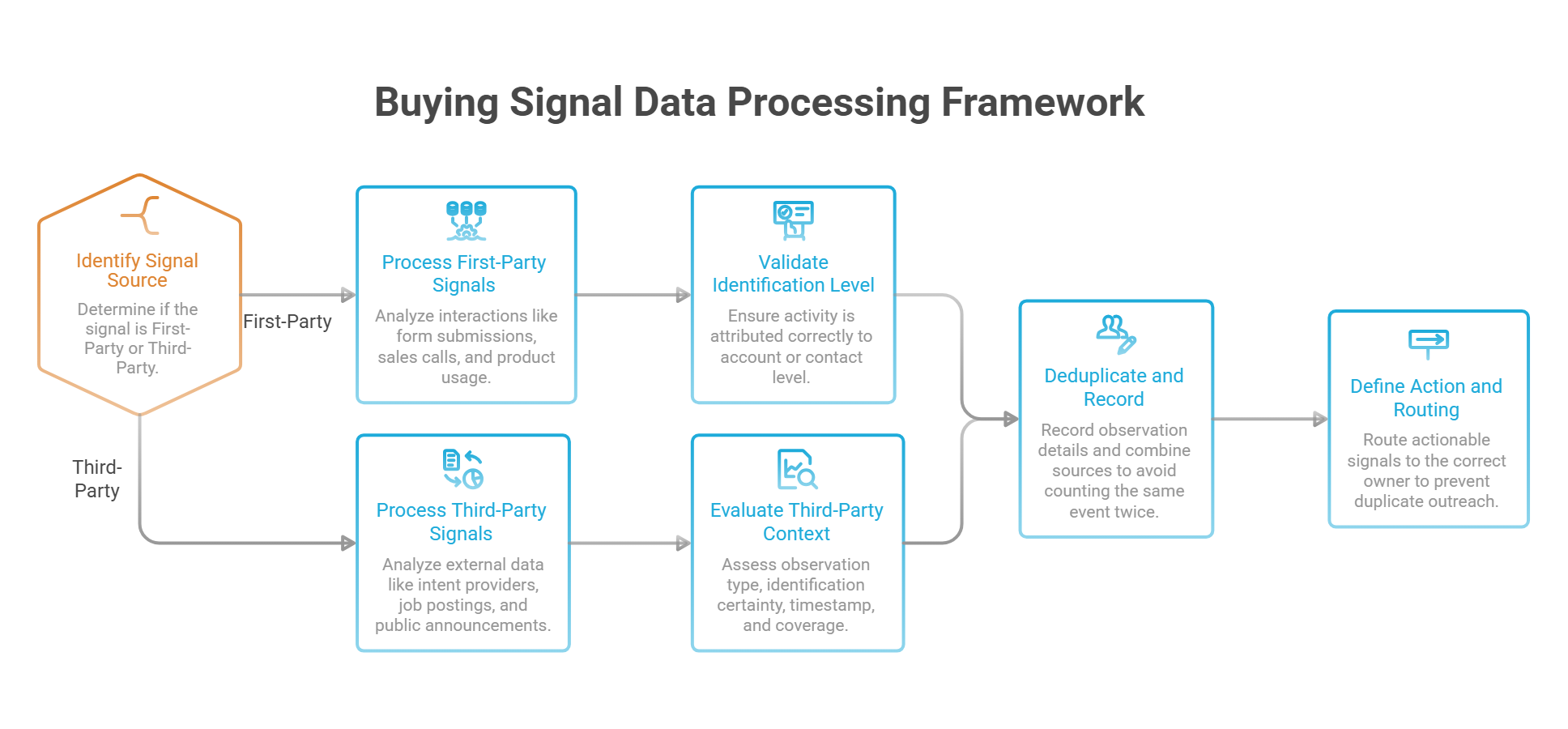
1. First-Party Signals: Activity Your Own Systems Capture
First-party signals come from interactions with your business: form submissions, sales conversations, product usage, website activity, and replies to outreach.
These sources can provide direct context. A prospect who emails a migration question has given you both the observation and a way to investigate it. Website activity may be less specific, particularly when the visitor is anonymous or identified only at the company level.
Preserve the level of identification the source actually supports. Do not turn “activity attributed to this account” into “this contact is evaluating us.”
Connect the activity to the existing relationship before acting. A pricing question from a current customer may concern an upgrade or renewal; the same question from a new prospect calls for a different response.
2. Third-Party Signals: Information From Outside Your Channels
External sources can help you discover developments before an account contacts your team. They include intent-data providers, professional networks, public announcements, job postings, and technology-data services.
These sources answer different questions. A job posting documents a hiring requirement. A technology-data provider may indicate that a tool was detected. An intent provider reports activity according to its own collection and scoring methods.
Before using a feed, ask:
👉 What was observed? A published event, a detected technology, or research activity?
👉 How was the account identified? What uncertainty remains?
👉 When did it happen? Is the timestamp the event date, collection date, or reporting date?
👉 What is covered? Which channels, regions, and companies can the source observe?
Missing activity is not proof of missing interest. An account may be evaluating privately or using channels the provider does not cover.
3. Combining Sources Without Counting the Same Event Twice
More alerts do not necessarily mean more evidence. A funding announcement repeated by three websites remains one company event. Several systems may also report the same form submission or campaign interaction.
Keep a record of the underlying observation:
Combine observations when each adds useful context. A relevant company announcement followed by a known prospect asking implementation questions gives you more to investigate than repeated coverage of the announcement alone.
Once the evidence supports action, define who receives it. Clear lead routing rules help move an actionable signal to the right owner without creating duplicate outreach.
How Does AI Detect and Interpret Buying Signals?
AI works with the information your tools can access. Depending on the system, it can extract an event from a conversation, classify account activity, or estimate which accounts deserve attention based on historical outcomes.
Those are different tasks. Understanding the distinction helps you judge what an alert or score actually means.
1. Extracting Relevant Details From Unstructured Information
A sales transcript may contain small talk, product questions, objections, and a brief mention of a purchasing deadline. AI can help pull out the details a rep needs to review.
For example, a prospect might say:
“We need to check whether we can migrate our existing records before the current contract ends.”
A useful extraction would preserve the statement, identify migration as an open requirement, and flag the contract end date as missing. It should not turn that sentence into “approved replacement project.”
Ask for the supporting passage alongside the extracted signal. This lets the rep check the wording and context without searching an entire transcript.
2. Classifying Events and Connecting Them to Accounts
Once an observation is captured, a system can categorize it: implementation question, proposal request, leadership change, or another event your team tracks.
Classification makes information easier to organize. Account matching determines where it belongs.
Both need checking. A statement about a previous employer should not become a signal for the speaker’s current company. A partner asking a technical question should not automatically be treated as a prospective customer.
Keep uncertain matches in a review queue. Attaching a signal to the wrong account can trigger irrelevant outreach even when the original observation is accurate.
3. Applying Priority Rules or Predictive Models
Some workflows use explicit rules. A known prospect requesting a proposal goes to the account owner; an indirect company event goes into a research queue. AI may help extract and classify the information, while the rule determines what happens next.
Other systems use predictive models trained on historical outcomes to rank accounts. Their usefulness depends on the training data, the outcome being predicted, and whether current accounts resemble those past examples.
A third approach asks a language model to assign a score from written criteria. That can help apply a review framework, but a generated score of 85 does not mean an 85% probability of purchase. Without validation, it is a prioritization judgment.
For practical AI lead management, keep the explanation visible alongside the score: which observations influenced it, what remains unknown, and what action is recommended.
4. Producing a Recommendation a Rep Can Check
The final output should make the decision easier to assess. Compare these two alerts:
👎 Weak: “High-intent account. Contact immediately.”
👍 Useful: “The prospect asked about migration requirements during the last call. The account owner should confirm data volume and the existing contract timeline before the next meeting.”
The second recommendation provides a reason and a specific task. It also leaves room for the prospect’s answer to change the assessment.
That is the standard to aim for: an observable event, a traceable source, a clear interpretation, and an appropriate next step.
How to Build an AI Buying Signals Workflow in 6 Steps!
Step 1. Choose the Accounts and Outcomes You Care About
→ Start with a specific group of accounts and a commercial decision. Your workflow might help reps respond to new inquiries, identify trial users who need assistance, or spot unanswered purchasing questions in active deals.
Choose a few signals that support that decision. For active opportunities, implementation questions and stakeholder introductions may be useful. For outbound prospecting, relevant company changes may help determine which accounts deserve research.
Write down what each signal should trigger before configuring alerts. If nobody can explain what a rep should do differently, reconsider whether the signal belongs in the workflow.
Step 2. Connect Sources You Can Interpret Reliably
→ Begin with data your team can explain and inspect. CRM conversations, form submissions, and product events are useful starting points when they include reliable identities and timestamps.
For every source, establish what it captures and what it misses. If a provider reports company-level research activity, preserve that level of attribution throughout the workflow.
You can give the AI a clear extraction instruction:
Identify explicit questions about pricing, implementation, contracts, or purchasing steps in the supplied conversation. For each finding, return the speaker, date, exact supporting passage, and unresolved question. Return “none found” when no relevant statement appears.
Test whether the output preserves qualifications such as “next year,” “if approved,” or “for another team.” Those details can change the response.
Step 3. Match Each Signal to the Right Record
→ Before prioritizing anything, confirm where the observation belongs.
Use stable identifiers where available, such as a company domain, CRM record ID, or known contact email. Names alone can create ambiguous matches, especially across subsidiaries or companies with similar branding.
Handle duplicates before creating new alerts. The same meeting may appear in a transcript tool, a CRM summary, and an account notification. Keep those records connected to one underlying event.
When the match is uncertain, send it for review before triggering outreach. A short review is easier to resolve than a message sent to the wrong person.
Step 4. Prioritize With Evidence, Fit, and Freshness
Keep three judgments separate:
- Fit: Does the account meet your commercial requirements?
- Evidence: What does the observation actually support?
- Freshness: Is it still relevant to the decision being made?
A recent proposal request from a suitable account deserves a different response from an old hiring announcement. Multiple low-value interactions should not automatically push an account ahead of someone who has asked a specific purchasing question.
Use simple priority categories initially: respond, investigate, monitor, or exclude. Add more complex scoring only when your team has enough reviewed outcomes to justify it.
Each recommendation should include a short reason. Reps need to understand why an account reached their queue.
Step 5. Assign an Owner and a Response
→ Turn priority categories into explicit responsibilities. Define who receives the task, what they must verify, and what action is expected.
A proposal request should reach the person responsible for the account. A technical question may require the account owner to involve a specialist. An indirect external signal may need research before anyone sends a message.
Set response expectations according to the situation. Direct inquiries need prompt attention during your team’s coverage hours. A public company event usually allows time to confirm relevance.
Before creating an outreach task, check for an existing owner, an open conversation, or a request to reconnect later. The workflow should help colleagues coordinate around the account.
Step 6. Review Outcomes Before Expanding
→ Run the workflow on a limited group first. Ask reps to record whether each alert was useful and what happened next.
Separate the reasons for rejection. An incorrect account match requires a different fix from an outdated event or a recommendation that overstates intent.
Review a sample of accounts that received no alert, too. Looking only at flagged accounts can hide opportunities your rules consistently miss.
Then compare the workflow with your existing process using relevant sales performance metrics, such as qualified conversations, opportunity creation, and time spent reviewing alerts.
Expand when the workflow helps reps make better decisions at a manageable review cost. More alerts are useful only when they lead to worthwhile actions.
Next: How to Turn Buying Signals Into Relevant Sales Actions
A signal should change what you do next. Sometimes that means answering a question immediately. Sometimes it means researching the account before contacting anyone.
Use these six plays as starting points, adapting the response to the relationship and the evidence available.
1. Demo Request: Respond to the Reason Behind the Request
Read the submission and check the account history before replying. The prospect may have named a requirement, spoken with a colleague, or already attended a demonstration.
Acknowledge what they asked to see, then clarify anything needed to make the session useful.
“You mentioned wanting a clearer way to manage shared accounts. Happy to focus the demo there. How does your team currently assign ownership when several reps know the same contact?”
Avoid making the prospect complete another broad qualification questionnaire before addressing their request. Ask questions that help prepare the conversation.
2. Implementation Question: Find the Requirement That Needs Resolving
When a prospect asks about migration, integrations, or rollout, establish what they need to validate. Bring in the right colleague if the answer requires technical expertise.
“You asked about importing your existing records. Which system would the data come from, and are there particular fields or relationships you need to preserve?”
Record the answer and any commitment your team makes. A technical question can reveal an evaluation requirement, but you still need to confirm the project and timeline.
3. New Stakeholder: Understand Their Role Before Sending More Material
An introduction gives you an opportunity to understand another person’s responsibilities. Ask your existing contact why they are joining and what they need from the conversation.
Then make their involvement useful:
“Thanks for joining. We’ve been discussing how the sales team shares account context. Which part would you like us to cover from your perspective?”
Send material that addresses their questions. Forwarding the entire sales history can create unnecessary work and obscure the decision they need to make.
4. Hiring or Expansion: Verify the Connection Before Pitching
Read the source behind the announcement. Look for a documented responsibility or operational change connected to your offer.
If the connection holds, ask about the process rather than asserting a problem.
“Your careers page lists sales openings in two additional regions. Will those teams manage separate accounts, or share ownership with your existing reps?”
Use the answer to determine whether your offer is relevant. Hiring alone does not justify a claim that the company has outgrown its tools.
5. Third-Party Research Activity: Investigate the Account First
Check the topic, reporting window, account match, and provider’s methodology. Then look for independent context that helps identify a relevant person and a useful question.
Your message should stand on that context. Avoid telling a contact that they researched a category when the data only supports company-level activity.
“How does your team currently keep account ownership clear when several people are involved in the relationship?”
That question needs a credible connection to the recipient’s role and your offer. If your research cannot establish one, keep the account under review rather than forcing an outreach angle.
6. Renewed Engagement: Reopen the Unresolved Conversation
Before following up on renewed activity, review why the opportunity stalled. A previous timing request, unanswered question, or internal review should guide the message.
“When we last spoke, you were waiting for the regional team’s feedback on shared account management. Has that review moved forward, or would a later check-in be more useful?”
Only use details supported by the actual conversation. New engagement may justify reviewing the account; the relationship history gives you a relevant way to reconnect.
Keep the response proportional to the evidence. Answer explicit requests, investigate indirect clues, and use the prospect’s reply to decide what happens next.
8 Tips to Score AI Buying Signals More Accurately
- Separate account fit from buying intent. Keep two distinct assessments: whether the company matches your target market and whether there is evidence of a purchasing process. A perfect-fit account with no active project should not automatically outrank a suitable account requesting a proposal.
- Give explicit requests more weight than passive activity. Prioritize questions about proposals, implementation, or purchasing steps over content views. Preserve the prospect’s exact wording so the rep can see what supports the priority.
- Check the context before assigning urgency. A security questionnaire could relate to an active evaluation, a routine review, or an early investigation. Identify who sent it, why they need answers, and whether a deadline exists.
- Count each underlying event once. A purchasing question captured in a transcript, CRM note, and notification remains one signal. Remove duplicates before combining observations, or your score may reward repeated reporting rather than stronger evidence.
- Combine signals that add new information. An implementation question followed by an introduction to procurement provides more context than several visits to the same page. Look for developments that clarify the project, stakeholders, requirements, or timeline.
- Adjust freshness rules to the signal. An unanswered demo request needs prompt attention. A rollout planned for next quarter may remain relevant for longer. Review whether the event still supports an action instead of giving every signal the same expiration date.
- Make uncertainty and scoring reasons visible. Record “timeline unknown” or “account match needs verification” where appropriate. Pair every priority with a short explanation, such as “proposal requested; requirements supplied; deadline confirmed.” Avoid unsupported percentages that imply a validated probability of purchase.
- Refine the model using reviewed outcomes. Ask reps which alerts were useful and why others failed. Compare signal categories against qualified conversations and opportunities, then adjust the rules. Check missed accounts too: reviewing only flagged records will not reveal what your model overlooks.
5 Tools for Working With AI Buying Signals in 2027
Some tools help detect external activity. Others help interpret account context or coordinate a response. Choose the capability your workflow needs, and check which features require a higher subscription tier.
1. folk
folk suits teams that want to act on account context without separating research, conversations, and follow-ups across multiple workspaces.
- G2 rating: ⭐⭐⭐⭐½ — 4.5/5.
- Best for: Managing relationship context and the sales actions that follow a signal.
- AI buying signal features: Research Assistant generates company insights; Recap Assistant summarizes available interactions and next steps; Follow-up Assistant identifies inactive conversations with pending actions and suggests contextual follow-ups.
- Main limitation: These capabilities support research and relationship management. Do not assume they provide third-party intent data or website visitor identification.
- Starting price: $24/member/month, billed annually, for Standard. Usage allowances vary by plan.
Try folk CRM for 14 days (no credit card needed)
2. ZoomInfo
ZoomInfo is worth considering when your workflow requires external B2B intelligence alongside existing account data. Its signal-based approach combines sources to support account prioritization and sales actions.
- G2 rating: ⭐⭐⭐⭐½ — 4.5/5 for GTM Workspace – Powered by ZoomInfo.
- Best for: Teams combining external buying signals with CRM and engagement data.
- AI buying signal features: Combines first-party and third-party information, analyzes account signals, and supports prioritized account recommendations and signal-triggered workflows across its product suite.
- Main limitation: Confirm which data sources, signal types, and execution features are included in the proposed package.
- Starting price: Custom pricing; request a quote.
3. Clay
Clay fits teams that want to define their own research and signal-processing workflows. It is particularly useful when the question is specific enough to apply consistently across an account list.
- G2 rating: ⭐⭐⭐⭐⭐ — 4.6/5.
- Best for: Building customized research, enrichment, and signal workflows.
- AI buying signal features: Claygent researches companies and people; enrichment sources add account context; signal capabilities track developments such as job changes; research outputs can feed account assessment and messaging.
- Main limitation: Your team must define and test the logic. A repeatable workflow can still produce misleading priorities if its criteria are weak.
- Starting price: Launch starts at $185/month on monthly billing. Plan and usage requirements affect the total cost.
4. LinkedIn Sales Navigator
Sales Navigator helps reps track professional changes and investigate potential stakeholders. Its value is strongest when those developments have a clear connection to the accounts and roles you target.
- G2 rating: ⭐⭐⭐⭐ — 4.3/5.
- Best for: Monitoring professional changes and understanding relevant contacts.
- AI buying signal features: Lead and account alerts surface updates; Account IQ and Lead IQ provide AI-generated insights; eligible plans include Buyer Intent and relationship features that add context for prioritization.
- Main limitation: Features vary by plan. A role change or professional interaction still requires interpretation before it becomes a sales opportunity.
- Starting price: Core costs $119.99/license/month, or $1,079.88/license/year, equivalent to $89.99/month with annual billing. Advanced capabilities may require a higher tier.
5. HubSpot Marketing Hub
HubSpot is an option for teams that want to connect website activity with CRM records and marketing processes. Start by defining which visits merit attention and how identified companies should be reviewed.
- G2 rating: ⭐⭐⭐⭐ — 4.4/5 for Marketing Hub.
- Best for: Connecting website-based intent criteria with account management.
- AI buying signal features: Buyer Intent supports company identification and configurable visit criteria, including activity on selected pages. Available capabilities and credit requirements depend on the subscription and action.
- Main limitation: Company-level identification does not establish which individual visited or whether a purchasing project exists. Check credits and feature access before planning automation.
- Starting price: Free tools available. Paid Marketing Hub plans and Buyer Intent usage have separate subscription and credit considerations.
How to Measure the Results of a Buying Signal Strategy
Measure whether signals help your team choose better actions. Alert volume alone cannot tell you whether the workflow creates useful conversations or unnecessary work.
👉 Sales acceptance rate. Track the share of alerts reps consider worth acting on. Require a short reason when they reject one, such as an incorrect account match, irrelevant event, or existing conversation. This shows which rules need attention.
👉 False-positive rate. Review alerts that claimed more than the evidence supported. Keep these separate from valid signals that did not produce a sale. A genuine proposal request remains a useful signal even if the prospect ultimately chooses another vendor.
👉 Time to an appropriate response. Measure how long it takes to acknowledge a direct request or complete the investigation an indirect signal requires. Speed matters when it helps the buyer; an immediate automated pitch is not necessarily a successful response.
👉 Qualified conversations per account contacted. Check whether outreach reaches relevant people and establishes a credible need or next step. Count substantive replies separately from automated responses, polite acknowledgments, and unsubscribe requests.
👉 Opportunity creation and progression. Track which reviewed signals precede qualified opportunities and whether those deals advance. Record the signal type so you can compare explicit requests, conversation findings, product activity, and external events separately.
👉 Performance against a comparable group. Compare accounts with similar fit, relationship stage, and sales treatment. Where practical, test signal-based prioritization against your existing approach. Otherwise, differences in account quality or rep activity can make the results misleading.
👉 Review cost per qualified opportunity. Include data subscriptions, usage charges, and the time spent checking alerts and preparing responses. A workflow that produces opportunities may still need refinement if the review burden makes it expensive to maintain.
Start by defining what counts as an accepted alert, qualified conversation, and opportunity. Keep those definitions consistent during the pilot.
Use the results to improve specific decisions. Incorrect matches call for better identification. Irrelevant alerts call for tighter criteria. Useful signals followed by weak conversations may point to a problem with the response rather than detection.
Conclusion
AI buying signals help sales teams decide where to focus, provided the evidence stays visible. A proposal request, a technical question, and a company announcement each deserve a response suited to what they actually reveal.
Start with a few relevant signals, verify the context, and assign a clear next action. Refine the workflow using the conversations and opportunities it produces. Its value comes from helping your team make better decisions.
Foire aux questions
What Are AI Buying Signals?
AI buying signals are behaviors, statements, or company events that artificial intelligence helps detect and interpret to identify potential purchasing opportunities. Examples include proposal requests, implementation questions, relevant product activity, and company changes that warrant further investigation.
What Is the Difference Between Buying Signals and Intent Data?
Buying signals include direct statements, interactions, and events that may indicate a commercial opportunity. Intent data generally refers to observed research or engagement activity used to infer interest. Intent data can contribute to a buying-signal strategy, but it does not confirm a purchasing decision.
Which Buying Signals Are the Most Reliable?
Explicit, specific requests usually provide clearer evidence than passive engagement. A proposal request with requirements and a deadline is more informative than a content download. Context still matters: confirm who is involved, what they need, and whether the request relates to an active project.
Can AI Predict When a Prospect Will Buy?
Some predictive systems estimate purchasing likelihood from historical outcomes and current inputs. Their usefulness depends on data quality and validation. An AI-generated priority score should not be treated as a purchase probability or a reliable closing date without supporting evidence.
How Do You Score Buying Signals?
Assess account fit separately from purchasing evidence. Prioritize explicit requests, check relevance and freshness, and combine independent observations without counting duplicates. Keep the reason behind each priority visible, then refine the rules using reviewed outcomes.
What Tools Help Detect and Manage Buying Signals?
Different tools handle different tasks. ZoomInfo supports external intelligence and signal-based prioritization. Clay supports customized research workflows. Sales Navigator provides professional insights and alerts. HubSpot connects website-based intent criteria with account processes, while folk helps teams organize research, relationship context, and follow-up actions.
How Can folk CRM Support Signal-Based Selling?
folk helps teams keep account information, research, and relationship history available when reviewing a signal. Its assistants support company research, conversation recaps, and contextual follow-up suggestions. Teams can use that context to assign an owner, choose a next action, and update the record after the prospect responds.
Should Every Buying Signal Trigger Automated Outreach?
No. Direct requests need an appropriate response, while indirect signals often need investigation first. Check account fit, existing conversations, ownership, and evidence before triggering a message. Automate repeatable steps where the inputs and response rules are clear.
Découvrez « folk », le CRM basé sur l'IA qui accompagne l'ensemble de votre processus commercial.