Enfin, le CRM Outlook dont vous aviez besoin
folk la manière moderne d'établir de véritables relations et de close grâce à un CRM qui complète votre suite Microsoft.
Plus de 5 000 entreprises à travers le monde nous font confiance








Connectez Outlook à la puissance d'un CRM


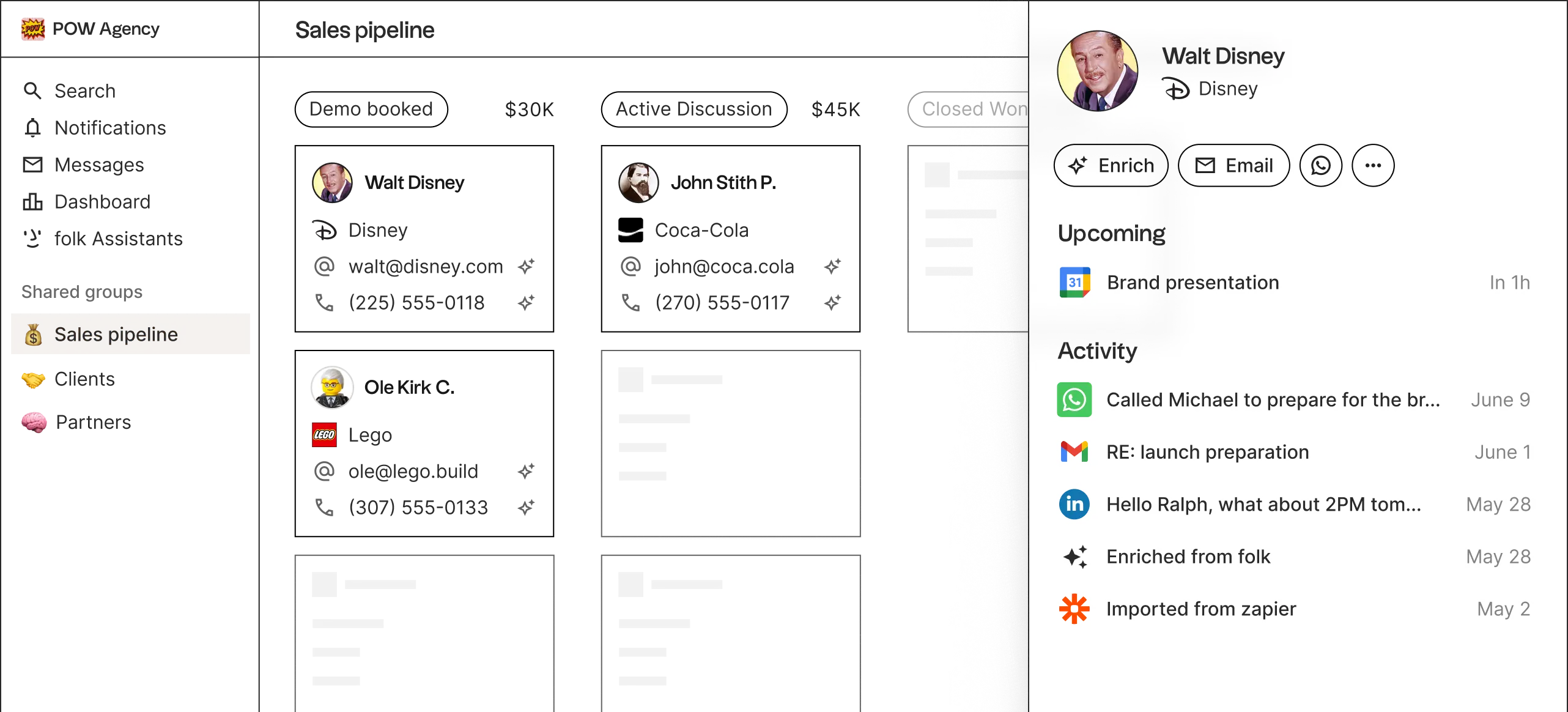
Synchronisez vos contacts et interactions Outlook avec votre CRM
Engagez votre audience tout en conservant une dimension personnelle


Suivre les conversations sur un pipeline commercial


Outlook est-il un logiciel de gestion de la relation client (CRM) ?

Non. Outlook est un client de messagerie, d'agenda et de contacts : il stocke les messages et les fiches de contacts, mais ne propose ni étapes de pipeline, ni suivi des opportunités, ni notation des prospects, ni rapports. Certaines personnes l'utilisent comme s'il s'agissait d'un CRM en ajoutant des balises aux e-mails et aux dossiers, mais cette méthode perd de son efficacité dès que le nombre de contacts dépasse une poignée, car il n'y a ni vue partagée pour l'équipe, ni automatisation, ni modèle de données structuré pour une « opportunité » ou une « étape de relation ».
Peut-on utiliser Outlook comme CRM ?
On peut s'en contenter pendant un certain temps — dossiers classés par catégorie, e-mails marqués, groupes de contacts — mais cette solution ne fonctionne pas au-delà d'une seule personne ou d'une poignée de contacts. Il n'y a aucun moyen de suivre les étapes d'une transaction, d'enregistrer le résultat d'un appel, d'attribuer des tâches de suivi à des collègues ou de consulter un historique partagé indiquant qui a parlé à qui. La plupart des équipes dépassent les limites de cette solution en l'espace de quelques semaines après avoir intégré une deuxième personne au processus commercial.
Qu'est-ce qu'un CRM Outlook ?
Un CRM Outlook est un outil de gestion de la relation client qui se synchronise avec votre boîte de réception, votre agenda et vos contacts Outlook, en intégrant la gestion du pipeline commercial, le suivi des opportunités et la collaboration en équipe à vos e-mails et réunions existants. Loin de remplacer Outlook, il transforme l'activité de votre boîte de réception en données CRM structurées et partageables, en associant automatiquement les e-mails et les réunions au contact ou à l'opportunité correspondants.
Quel est le meilleur logiciel CRM pour Outlook ?
Cela dépend de la taille et de la complexité de l'équipe. Les équipes d'entreprise qui ont besoin d'une personnalisation poussée et d'une gouvernance rigoureuse se tournent généralement vers Salesforce; les équipes des PME qui recherchent une solution légère, rapide à mettre en place et s'appuyant sur les relations existantes dans Outlook (plutôt qu'une infrastructure lourde dédiée aux opérations commerciales) utilisent des outils tels que folk. Si votre équipe compte moins d'une vingtaine de personnes et que vous souhaitez qu'elle soit opérationnelle le jour même sans faire appel à un administrateur système, une option légère l'emporte sur une plateforme d'entreprise en termes de temps de mise en place et d'adoption.
Outlook intègre-t-il des fonctionnalités CRM ?
Ce n'est plus le cas. Microsoft avait proposé un outil intégré appelé « Outlook Customer Manager » destiné aux petites entreprises, mais l'a retiré en 2019 et a orienté les utilisateurs vers des solutions tierces. Depuis lors, Outlook est resté un simple outil de communication, et toute fonctionnalité CRM doit provenir d'une application connectée.
Comment folk se synchronise-t-il avec Outlook ?
folk se connecte directement à votre compte Outlook pour synchroniser vos contacts, vos événements de calendrier et vos échanges d'e-mails dans les deux sens. Les e-mails et les réunions sont automatiquement associés au contact ou à l'opportunité concerné(e) sans qu'aucune saisie manuelle ne soit nécessaire, et la synchronisation s'effectue en temps réel : ainsi, si vous ajoutez ou modifiez un contact dans folk , ces modifications sont immédiatement répercutées dans Outlook.