


Découvrez folk, le CRM pour les entreprises axées sur les ressources humaines
“We’re interested, but this quarter is already locked.”
Before you set a reminder for next quarter, find out what’s locked. If the buyer has already spent the budget, ask when planning reopens. If their team is too busy to roll out a new tool, ask when they’ll have time to evaluate one.
Give ChatGPT the last few messages and ask it to draft a reply that leaves room for either answer. You might send something like, “When you say the quarter is locked, is that mainly budget or timing on your team’s side? Happy to pick this back up when it makes sense.”
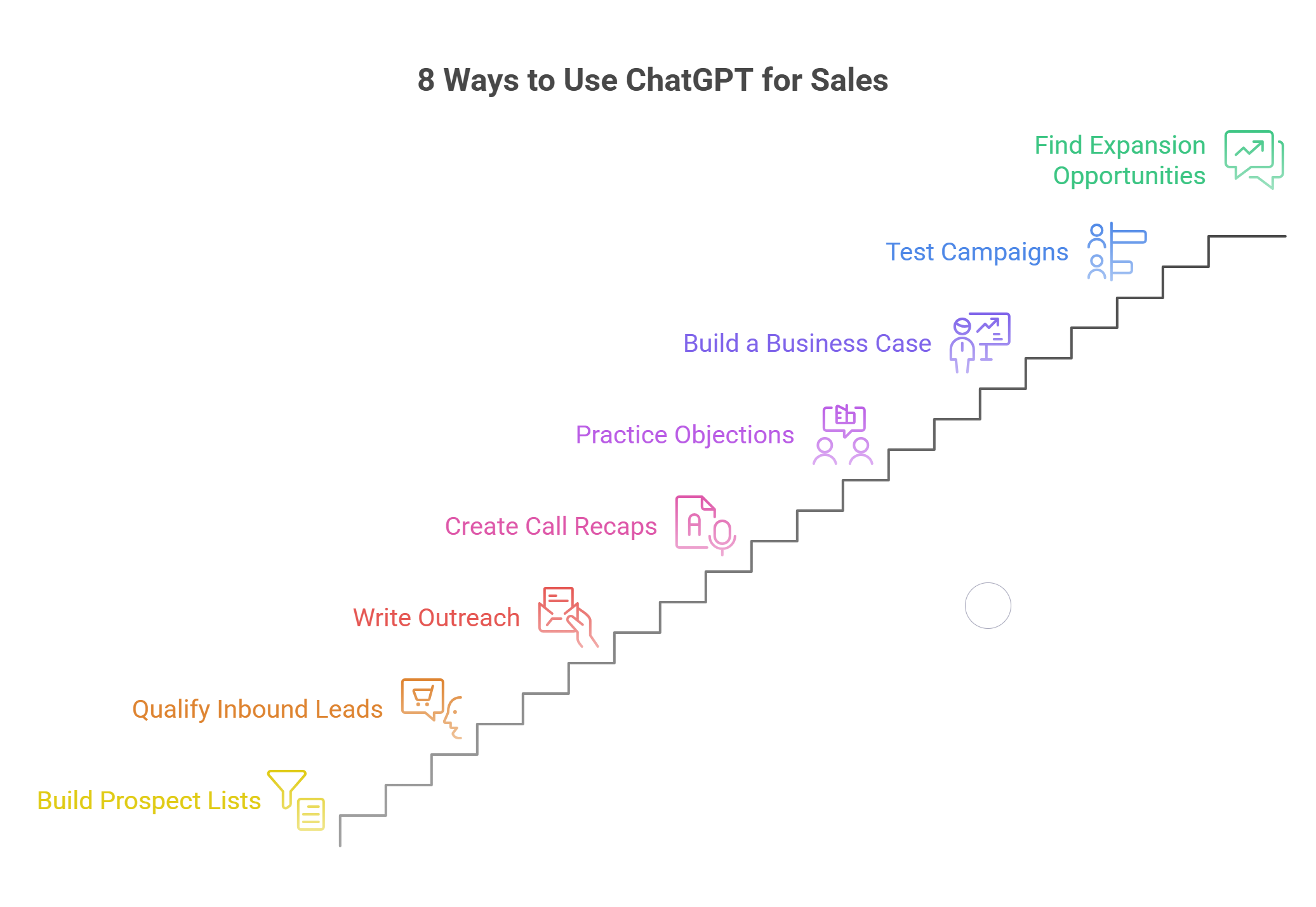
That’s one way to use ChatGPT for sales. You can also use it to check whether a prospect fits your criteria, practice a pricing conversation, or figure out why one outbound segment books more meetings than another. This guide covers eight workflows, each with a prompt you can copy, a sample output, and a check to run before you use it.
Chat GPT for Sales: Quick Recap
- Start with a task you can check against the source. Turn one call transcript into a follow-up email, then verify who agreed to do what and by when.
- Give ChatGPT the details that shape the answer. Share the buyer’s actual words, the relevant CRM notes, and any pricing or product claims your team has approved.
- Give each touch a purpose. If you’re drafting a multichannel outreach sequence, use the first email to explain why you’re reaching out and the next touch to share something that helps the buyer evaluate the idea.
- Measure the work you save after review. Time the drafting and editing together. For outreach, track positive replies and booked meetings alongside the time saved.
What Can ChatGPT Do for Sales Teams?
ChatGPT can help sales teams research accounts, draft outreach, prepare for calls, and analyze sales data. The setup depends on where the information lives and how often you need to use it.
1. Use a Chat for a One-Off Task
✅ Paste a buyer’s reply and the last message you sent. Ask ChatGPT to identify what the buyer answered, what’s still open, and what to ask next. For campaign analysis, upload a CSV with sends, positive replies, and meetings by segment so ChatGPT can calculate the rates and show the counts behind them.
2. Use a Project for Work You Repeat
✅ Create a ChatGPT Project for a recurring task like drafting outbound emails. Add your target buyer profiles, approved customer examples, and two or three messages your team would actually send. Keep the prospect’s details in the individual chat and use the Project instructions for rules that apply every time, like keeping the first email to one question.
3. Connect Sales Tools When You Need Current Records
✅ OpenAI’s Sales plugin offers workflows for tasks like account planning, meeting prep, and pipeline reviews. A CRM connection gives ChatGPT access to the records behind that work. For example, connecting ChatGPT to folk lets it look up the contact and deal before drafting a follow-up, so the rep can check whether a teammate already answered the buyer’s question.
What ChatGPT can read or update depends on the connection and your workspace permissions. For a first test, pick one account you know well and check the brief against the CRM before using it on a deal you’re less familiar with.
8 Ways to Use ChatGPT for Sales, With Prompts You Can Use Today
Start with something your team already works with. A buyer’s reply, a discovery transcript, or a campaign export gives ChatGPT enough context to produce something you can check and use.
1. Build a Prospect List From Market Research
Pull a handful of accounts your team has won and a few it disqualified. Give ChatGPT the notes that explain why. Ask it to turn those differences into criteria a rep can check before adding an account to a list.
Copy-ready prompt
Compare these won and disqualified accounts. Suggest three observable criteria a rep could use to screen a new account. For each, say where to verify it and what would count as a match. Separate product fit from changes that give us a reason to reach out now.
👉 What to use. Turn the criteria into columns on your prospect list. Keep one column for fit and another for the reason to reach out. If you can’t verify a criterion consistently, use it as a research question. Once you’ve chosen the accounts, a LinkedIn CRM can help your team capture the contacts it wants to work.
2. Qualify Inbound Leads With One Useful Question
Start with the buyer’s message and your minimum requirements for a sales conversation. If the buyer has already explained the problem, use the reply to answer their question and clear up whatever could change the next step.
Copy-ready prompt
Read this inbound message alongside our qualification criteria and account notes. Extract the buyer’s stated need and timing. Identify the one missing detail that could change who handles the request or whether we can help. Draft a reply that answers the buyer’s question using our approved product information and asks for that detail.
👉 What to use. Save the stated need on the record and send the clarification if you need it. If the request matches an open deal, pass the message to the owner so the buyer can continue the same conversation. Save broader BANT qualification questions for discovery.
3. Write Outreach Around a Reason to Reply
Give ChatGPT a verified account change and explain why it matters to the recipient’s role. A job posting is useful when it reveals a responsibility your product can help with. The job posting itself rarely needs to be the opening line.
Copy-ready prompt
Rewrite this email using the source and buyer role I’ve provided. Give me one opening line that explains why I’m reaching out now and one question the recipient can answer quickly. If the evidence only supports a hypothesis, phrase it as a question. Write a follow-up that adds one useful detail from the resource I’ve provided.
👉 What to use. Read the email with the company and recipient names removed. If it could go to any account on your list, tighten the reason for reaching out. When you plan multichannel outreach, give each touch a purpose so the LinkedIn message adds something the email didn’t cover.
4. Turn One Sales Call Into a Buyer Recap and a CRM Note
The buyer needs to know what each side agreed to do. Your team also needs the open questions that could affect the deal. Ask for both drafts from the same transcript.
Copy-ready prompt
Write a short buyer recap and an internal CRM note from this transcript. In the recap, list the actions both sides agreed to, with owners and confirmed dates. In the CRM note, capture the buyer’s goal, open questions, and any proposed timing. Show me the transcript line behind each commitment so I can verify it.
👉 What to use. Send the buyer recap after checking the commitments. Log the deal context where your team will find it before the next call. If someone said they’d check whether a date works, record who’s checking and leave the date tentative.
5. Practice a Real Objection Before the Next Call
Take a price, timing, or competitor objection from a recent sales call. Use the buyer’s wording and have a manager or teammate set a private constraint for the exercise. The rep’s job is to uncover what’s behind the objection.
Copy-ready prompt
Play the buyer using this call excerpt and the private constraint I’ve supplied. Open with the buyer’s actual objection. Respond one turn at a time and reveal the constraint when my question would reasonably uncover it. When I say “debrief,” quote one response that helped and show where a better question could have moved the conversation forward.
👉 What to use. Take one question from the debrief into the next call. If a rep tends to offer a discount as soon as price comes up, practice finding out whether the issue is total cost, approval authority, or uncertainty about the value.
6. Build a Business Case Your Champion Can Forward
Use the buyer’s figures to draft a short note they can share with finance or leadership. Give ChatGPT the problem, the proposed scope, and the numbers the buyer has confirmed.
Copy-ready prompt
Draft a one-page business case using these buyer inputs and the proposed scope. Separate confirmed figures from assumptions. Show the formula for each estimate and leave missing values blank. End with the one measurement we should collect during the pilot to make the estimate more reliable.
👉 What to use. Keep the assumptions next to the numbers they affect. If the model estimates hours saved, check the calculation and ask the buyer which labor rate finance uses before converting those hours into dollars.
7. Find What to Test in an Underperforming Campaign
Export campaign results by segment. Include contacts reached, positive replies, meetings booked, and the dates each batch ran. This gives ChatGPT enough information to spot where results diverge.
Copy-ready prompt
Calculate positive reply and meeting booking rates by segment. Show the raw counts and flag batches that had different response windows. Identify one gap worth investigating. Suggest one test for the next batch and name what should stay fixed.
👉 What to use. Choose the test based on where the drop happens. If one segment gets replies but books few meetings, read those replies and check what reps did next. If replies are scarce from the start, test the offer or the opening question. Consistent sales activity tracking helps you see where prospects dropped off.
8. Find Expansion Opportunities in Customer Conversations
Look through recent account notes for requests about additional users, locations, or teams. Give ChatGPT access to the relevant notes and any open support issues that could affect the timing.
Copy-ready prompt
Find customer requests that suggest a new team, location, or use case could benefit. For each, return the buyer’s exact words, the source date, the account owner, and any unresolved issue that affects timing. Suggest one question the owner could ask to confirm whether there’s a project.
👉 What to use. Send the account owner the original request and the proposed question. If the customer has asked about rolling out to another team while the first team is still waiting on a fix, help with the current rollout first and use the next account check-in to revisit expansion.
How to Set Up ChatGPT for Your Sales Team in 5 Steps
1. Pick One Task and Measure How Long It Takes Today
Choose a task your reps do every week, such as writing post-demo follow-ups. Time a few reps from the moment they open their notes to the moment the email is ready to send. Include the time they spend checking dates and commitments. That gives you a baseline for the pilot.
2. Save the Instructions Your Reps Should Reuse
Create a ChatGPT Project for that task. Add a few follow-ups your team has approved, current product information, and any rules reps need to follow.
Write those rules in plain English. For example, “Put agreed actions first. Include a date only if both sides confirmed it. Flag product questions that still need an answer.” Give someone on the team responsibility for replacing outdated pricing or product documents.
3. Start With a Few Approved Inputs
Try the workflow on recent call notes your team is allowed to share. Give ChatGPT the relevant excerpt, the meeting date, and any commitments already recorded in the CRM.
If reps keep spending time pulling the same information, connect ChatGPT to folk and test it on one account they know well. Check that it found the right contact and deal before using the connection on a wider set of accounts.
4. Test the Cases Reps Usually Have to Double-Check
Include a call where the buyer floated a date, a thread that mentions an old price, and a deal another rep owns. Have the reviewer mark each draft ready to send, needs a wording edit, or needs a factual correction.
Keep track of the corrections that matter to the buyer. Changing the greeting is a wording edit. Turning a tentative date into a commitment is a factual correction. If the same error keeps coming up, adjust the instructions or fix the source data, then rerun that case.
5. Decide What’s Ready to Roll Out
Compare the full task time with your baseline, including review and edits. For post-demo emails, also check how many drafts capture the right owners and dates on the first pass. For outreach, track positive replies and booked meetings alongside the time spent drafting.
Roll out the workflow once reps can review the draft faster than they can write it themselves and the important details are consistently correct. Give the team the saved instructions, one approved example, and a short checklist for reviewing the output.
ChatGPT for Sales Dos and Don’ts
Do
✅ Use the buyer’s words to shape the follow-up. If the buyer called a manual handoff their biggest headache, ask ChatGPT to build the message around that handoff. A specific problem gives the buyer something to respond to.
✅ Give ChatGPT a short list of approved proof points. Include customer examples your team can share, with the results and conditions attached. Ask it to choose the closest match and explain why it fits before adding it to a draft.
✅ Preview CRM edits before applying them. Ask to see the exact record, current value, and proposed change. A buyer asking about pricing might justify a note. Moving the deal to a new stage depends on your team’s criteria.
Don’t
❌ Don’t treat every interaction as buying intent. A content download can tell you what topic caught someone’s attention. A reply asking about rollout timing gives you a reason to discuss their project. Use that distinction when choosing how to qualify a lead.
❌ Don’t let a draft make promises on your behalf. Check every statement about pricing, integrations, and delivery dates. If an integration still needs to be verified, tell the buyer who will check it and when they can expect an answer.
❌ Don’t scale a message because it’s quick to generate. Review a small batch before enrolling a full list. If reps keep rewriting the opening line, improve the account research. If the copy is usable but prospects rarely reply positively, test the offer or the audience.
💡 folk tip: Before drafting a follow-up, ask ChatGPT to find the last buyer question in folk that your team still needs to answer. Check the thread for a newer reply. If the question is still open, lead with the answer or tell the buyer when you’ll have it. Connect ChatGPT to folk to work from the CRM context your account can access.
Limitations of ChatGPT for Sales
→ It can miss recent conversations. ChatGPT may see an open deal in your CRM while the buyer’s latest reply is still in a rep’s inbox. Before sending a follow-up, check the date of the last interaction ChatGPT used.
→ It can produce convincing claims from thin evidence. A company announcement might confirm a new office while leaving the team’s plans unclear. Open the original source before using a claim in outreach. If you’re unsure what the change means for the buyer, ask them.
→ Live updates depend on the tools you connect. ChatGPT can draft a deal update in a chat. Applying it in your CRM requires a connection that supports that action and the right workspace permissions. Test the update on one record and verify the result before rolling it out.
→ Ambiguous replies still need a rep’s judgment. A pricing request could be part of an active evaluation or next year’s budget planning. Ask what the buyer needs the number for before deciding whether to send a formal quote or schedule a follow-up.
5 Tools to Pair With ChatGPT for Sales
Choose the tool based on where the work gets stuck. If reps spend more time finding the last buyer reply than writing the next one, start with the CRM. If they already have the context and need to coordinate outreach across channels, start with a sequencer.
1. folk CRM: Best for Giving ChatGPT Context From Past Conversations
⭐⭐⭐⭐⭐(G2)
- What it adds. folk keeps contacts, deals, and conversation history together. Through folk MCP, ChatGPT can look up CRM records and propose supported updates within the connected account’s permissions.
- What to check. If a conversation never made it into folk, ChatGPT may miss the latest buyer question. Check which channels and notes your team actually captures.
- First test. Pick three active deals. Ask ChatGPT to find the last buyer question on each, then compare the results with the original threads.
2. LinkedIn Sales Navigator: Best for Finding Accounts and Timely Reasons to Reach Out
⭐⭐⭐⭐(G2)
- What it adds. Save target accounts and leads, then use alerts to spot changes such as company updates or new decision-makers. Give ChatGPT the relevant update and ask how it changes the question you’d put to the buyer.
- What to check. An alert tells you something changed. Open the source to see whether that change matters to the person you plan to contact.
- First test. Review alerts for ten target accounts. Keep the ones that give you a specific question to ask. If your team uses a LinkedIn CRM, save the contact and the reason for reaching out together.
3. Clay: Best for Checking Targeting Criteria Across a Prospect List
⭐⭐⭐⭐⭐(G2)
- What it adds. Use Claygent to research the same question across multiple accounts, such as whether each company has a dedicated partner team. Bring the findings into ChatGPT when you need to turn them into campaign segments or outreach briefs.
- What to check. A missing result can mean the information is hard to find. Keep an Unknown category for accounts where the source is unclear.
- First test. Run one targeting question across 20 accounts. Ask for a source and a short supporting quote, then spot-check the results before using them to filter the full list.
4. Fathom: Best for Bringing Call Transcripts Into Follow-Up and Coaching
⭐⭐⭐⭐⭐(G2)
- What it adds. Fathom records and transcribes supported meetings. Use a transcript excerpt in ChatGPT to draft a recap, review an objection, or build a coaching exercise around the buyer’s actual words.
- What to check. Transcripts can mishear names and numbers or attribute a comment to the wrong speaker. Check the recording when a quote affects a price, date, or commitment.
- First test. Take one discovery call and compare the draft recap with the recording. Check who agreed to each action and whether they confirmed a date.
5. lemlist: Best for Running Email and LinkedIn Sequences
⭐⭐⭐⭐⭐(G2)
- What it adds. Draft and review the messages in ChatGPT, then use lemlist to schedule email and LinkedIn steps and set conditions between touches.
- What to check. Verify how the sequence handles replies on each channel. The next email should reflect what happened on LinkedIn, especially if the buyer has already answered your question.
- First test. Enroll a test contact and reply on LinkedIn before the next email is due. Check what lemlist does before applying the same rules to a live multichannel outreach sequence.
Give ChatGPT the Sales Context It Needs With folk!
Before a rep follows up, they need to know what the buyer asked, who replied, and what both sides agreed to do next. folk keeps that history alongside your contacts and deals. As a CRM for AI agents, it gives tools like ChatGPT access to the records your connected account can use.
- Capture prospects with folkX. Save contacts from LinkedIn and Sales Navigator, then group them by account or campaign so your team can see who’s already working each relationship.
- Keep conversations together. Sync email and WhatsApp interactions so a teammate can check whether the buyer’s latest question has already been answered.
- Make next steps visible. Use custom fields and pipeline views to track deal owners, buyer commitments, and follow-up dates. Set a reminder when a buyer asks you to reconnect at a specific time.
- Work with CRM records from ChatGPT. Use folk MCP to look up contacts and deals, prepare an account brief, or make supported updates after reviewing the proposed changes. Available actions depend on your connection and workspace permissions.
Start with one active deal. Check the last buyer exchange, confirm who owns the next step, and keep that context on the record for whoever picks it up next.
Foire aux questions
What Is the Best Way to Start Using ChatGPT for Sales?
Start with a task you do often and can check quickly. After a discovery call, give ChatGPT the notes and ask for a follow-up email with the agreed actions, owners, and dates. Compare the draft with your notes and see whether reviewing it takes less time than writing the email yourself.
Can You Use ChatGPT for Sales Without Connecting a CRM?
Yes. You can paste a buyer’s reply to draft a response, share call notes to prepare a recap, or upload a CSV to compare campaign results. A CRM connection becomes useful when reps need current account history or repeatedly pull the same deal information by hand.
How Do You Make ChatGPT Sales Emails Sound Less Generic?
Give ChatGPT a verified reason to contact that particular buyer, one example of an email your team would send, and a question the recipient can answer quickly. Then remove the prospect’s name and company name. If the email could still go to everyone on your list, sharpen the reason for reaching out.
Can ChatGPT Qualify Leads and Update CRM Records?
ChatGPT can compare an inquiry with your qualification criteria, flag missing information, and suggest a next step. If a buyer describes an active project but leaves the company field blank, it can draft a reply asking for the company name. To make supported record updates, you can connect ChatGPT to folk through MCP, subject to the tools and permissions available in your workspace.
What’s the Difference Between a ChatGPT Project and the Sales Plugin?
A ChatGPT Project keeps related chats, files, and instructions together. Use one when your team wants to reuse the same product information and writing rules. OpenAI’s Sales plugin provides workflows for tasks such as account planning, meeting prep, and pipeline reviews. Access to live CRM records depends on the connections enabled in your workspace.
Which Sales Tasks Should a Rep Review Before Automating?
Review anything that makes a commitment to a buyer, changes deal ownership or stage, or affects the forecast. For an email, check pricing, product claims, and dates. For a CRM update, check the exact record and the evidence behind the proposed change.
Découvrez « folk », le CRM basé sur l'IA qui accompagne l'ensemble de votre processus commercial.