


Discoverfolk 人材主導型ビジネス向けCRM
Pipedrive . ClickUp:概要
Pipedrive 、それぞれ異なるビジネスニーズに合わせた独自の機能を提供する人気のCRMソリューションです。Pipedrive 、強力な自動化とレポート機能を備えた営業パイプライン管理に焦点をPipedrive 。一方、ClickUpはCRM機能を備えたプロジェクト管理プラットフォームです。このブログ記事では、両者のコア機能、価格、および利点について探っていきます。
また、 folkもご紹介します。これは、CRMのニーズに考慮すべき人気のある選択肢です。
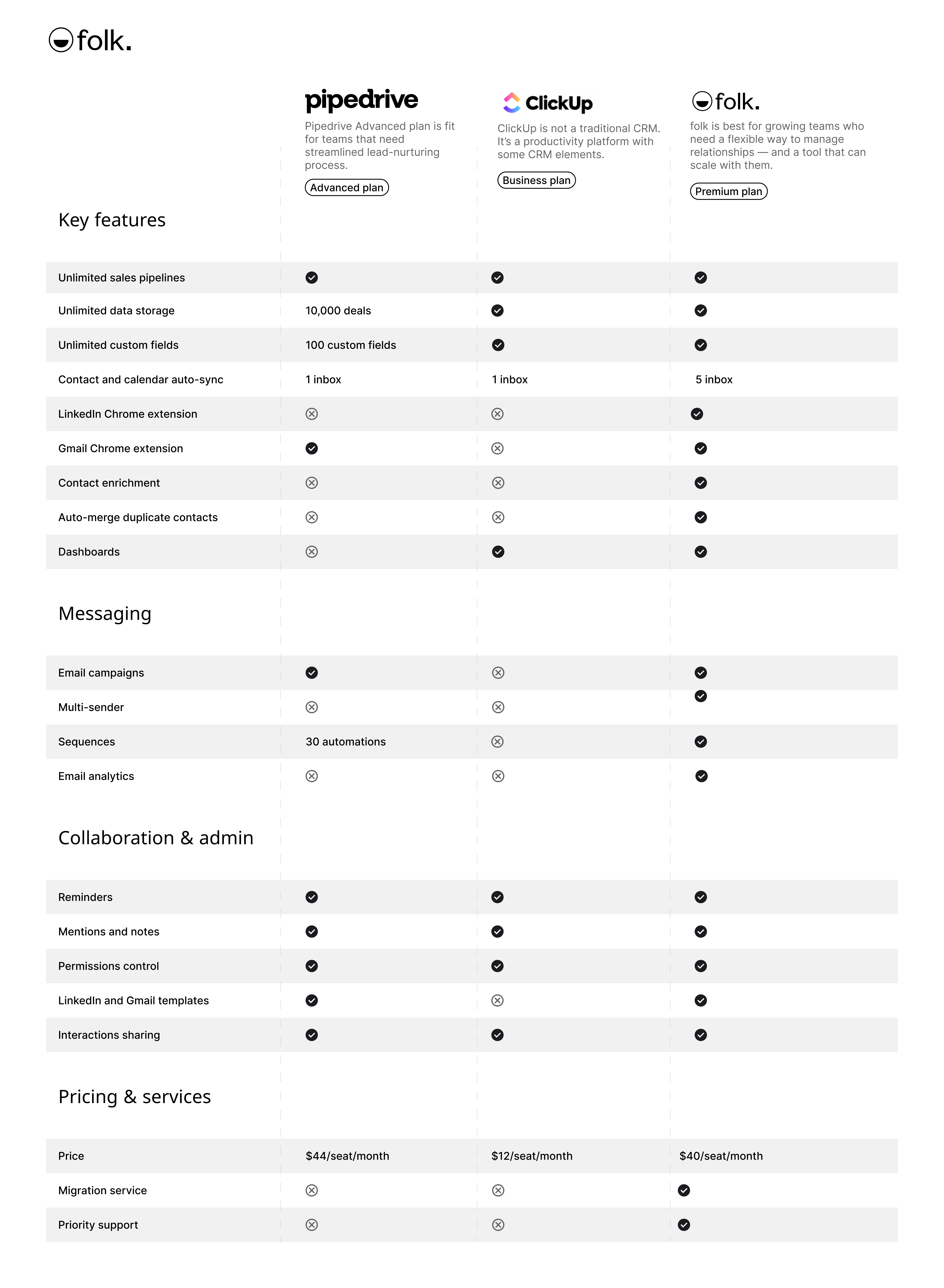
| 主なポイント |
|---|
|
Pipedrive何ですか?
Pipedrive は中小企業向けのウェブベースCRMで、リード管理、自動化、メール連携、カスタマイズ可能なパイプラインを提供し、営業活動を最適化します。
Pipedriveの主な機能
- リードおよび案件管理:顧客データ、インタラクション、販売パイプラインを一元管理するツールにより、チームが迅速に機会に対応できるよう支援します。
- 営業自動化:ワークフロー自動化により、リードの振り分け、フォローアップ、メールシーケンスなどの反復作業を処理し、営業チームが成約に集中できるようにします。
- メール連携:完全なメール同期、テンプレート、追跡機能により、ユーザーはCRMから直接すべてのコミュニケーションを管理できます。
- 高度なレポートと分析:販売実績の追跡、収益予測、実用的なインサイトの獲得を実現するリアルタイムデータ分析とカスタムレポートツール。
- カスタマイズとセキュリティ:パイプライン、フィールド、ユーザー権限をカスタマイズするオプションと、データを保護する堅牢なセキュリティ対策。
ClickUpとは何ですか?
ClickUpは、チームや個人がタスクを整理し、進捗を追跡し、一つのワークスペースで共同作業を行うことを支援するために設計されたプロジェクト管理および生産性向上プラットフォームです。主にプロジェクト管理ツールですが、ClickUpには基本的なCRM機能も含まれています。
ClickUpの主な機能:
- タスク管理:ClickUpでは、カスタムステータス付きのタスクを作成、割り当て、追跡することができ、異なるプロジェクトにわたる作業プロセスの管理に柔軟性を提供します。
- カスタムビュー:プラットフォームはリスト、ボード、カレンダー、ガントチャートなど複数のビューを提供し、ユーザーが自身の好みに合った形式でタスクやワークフローを可視化できるようにします。
- 目標追跡:ユーザーはClickUp内で目標を設定・追跡・管理でき、タスクやプロジェクトをより大きな目標に整合させることができます。
- タイムトラッキング:ClickUpにはタスクに費やした時間を記録する組み込みのタイムトラッキング機能が搭載されており、ユーザーは生産性や請求可能時間を監視できます。
- ワークフロー自動化:ClickUpの自動化機能により、ユーザーは事前定義された条件に基づいてアクション(ステータス更新や通知など)をトリガーするルールを設定することで、手動タスクを削減できます。
- カスタムフィールド:プラットフォームでは、ユーザーがタスクにカスタムフィールドを追加でき、特定のデータポイントを追跡したり、必要に応じてタスクを分類したりすることが可能です。
Pipedrive . ClickUp:機能比較
2つのCRMソフトウェアソリューションの主要機能を分析し、販売自動化、メールマーケティングツール、および連絡先管理について詳しく見ていきましょう。
1. 営業パイプライン管理
Pipedrive 、従来の販売パイプライン管理プロセスに密接に沿った、ユーザーフレンドリーなカンバンボードインターフェースPipedrive 。この視覚的なアプローチにより、営業チームは取引の追跡、カスタムステージの設定、反復的なタスクの自動化を容易に行え、効率化された営業特化型CRMを求めるユーザーにとって理想的な選択肢となります。
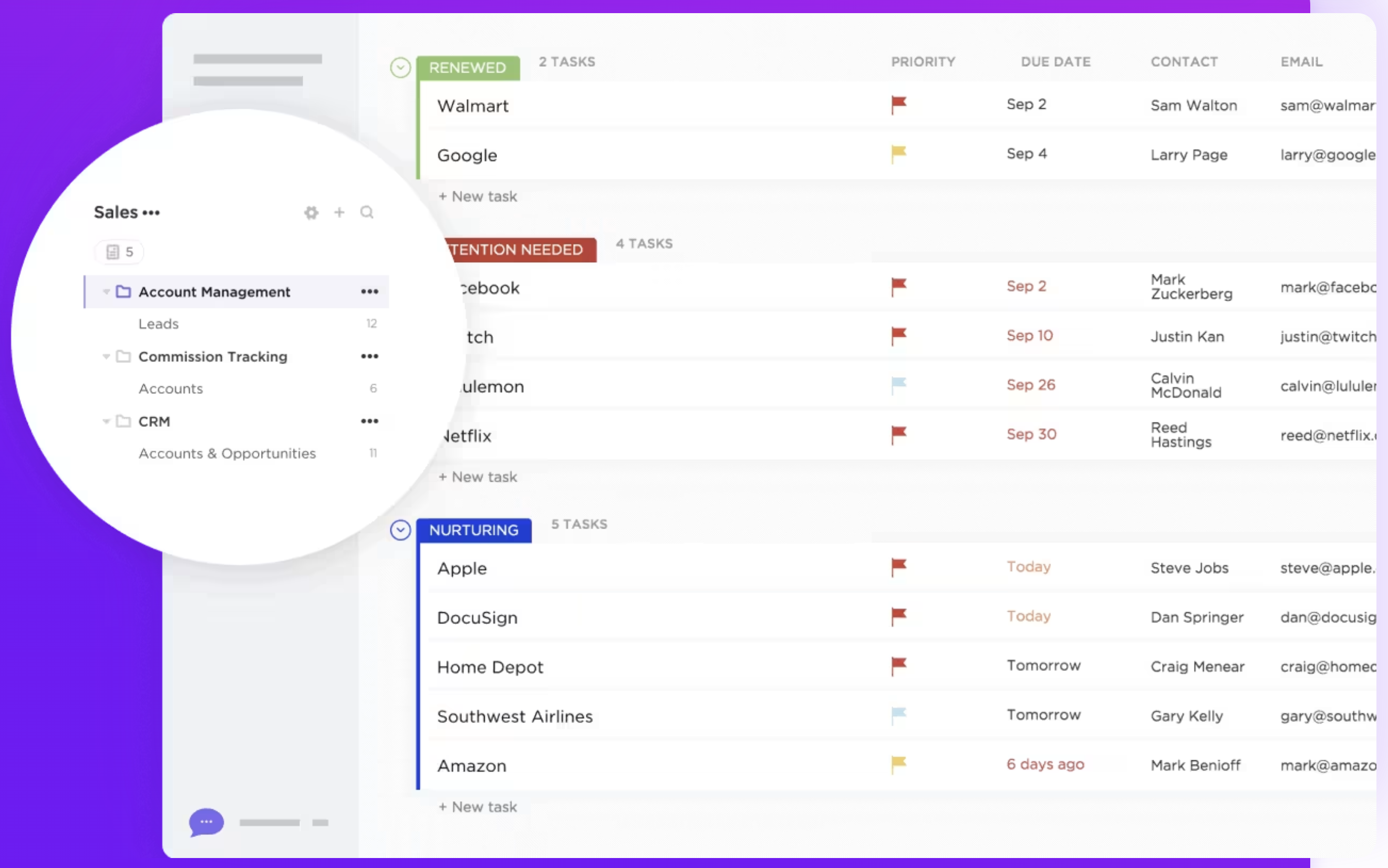
ClickUpには、営業やCRM目的のために特別に設計された専用のパイプライン管理機能はありません。ただし、ユーザーはタスクリスト、ボード、カスタムステータスを使用してカスタマイズ可能なパイプラインを作成できます。この柔軟性により、ClickUpは様々なワークフローに適応できますが、営業専用のパイプラインを実現するにはより多くの設定が必要になる場合があります。 20~50名規模の中堅営業チームがCRMを検討する場合、folk 優れた選択肢として浮上します。成長中の組織を圧倒しがちな複雑さを排除しつつ、営業チーム向けに設計された直感的なパイプライン管理を提供します。最終的に、Pipedrive営業特化チームに適している一方、ClickUpの汎用性は営業プロセスを含めるようにカスタマイズ可能な広範なプロジェクト管理ソリューションを必要とするユーザーにとって良い選択肢となります。
👉🏼folk を試して、チームでコンタクトベースのリマインダーを管理しましょう

2. 使いやすさ
Pipedrive 営業チーム向けに設計された直感的なPipedrive 、営業パイプラインの管理を容易にします。一方ClickUpは多機能ながら、豊富な機能とカスタマイズオプションにより学習曲線が急峻で、主にCRM業務に注力するユーザーには負担に感じられる場合があります。
3. コンタクトエンリッチメント
PipedriveエンリッチメントPipedrive、外部ソースから追加情報を取得するツールと連携し、役職、会社情報、ソーシャルメディアプロフィールなどの関連データを自動的にフィールドに入力します。ClickUpはコア機能の一部としてコンタクトエンリッチメント機能を提供していません。ユーザーはカスタムフィールドやタスク詳細を使用して手動で連絡先情報を保存・整理できますが、プラットフォームは外部ソースから連絡先に関する追加データを自動的に取得しません。
4. アウトリーチ
PipedriveメールビルダーPipedrive、ニュースレターなどのキャンペーンや、レスポンシブなメールマーケティングキャンペーン向けに設計されています。ClickUpには、クライアントや見込み客などの外部連絡先とのコミュニケーションに特化したアウトリーチ機能は備わっていません。ただし、ユーザーはカスタムワークフローを使用してアウトリーチタスクを管理できますが、手動での設定が必要です。
5. 自動化
Pipedrive機能Pipedrive、データ入力、フォローアップ、リード割り当てなどの反復作業を自動化することで営業プロセスを効率化します。一方、ClickUpの自動化機能は汎用的なものであり、リード育成やコンタクトセグメンテーションといったCRM機能に特化していません。より高度なCRMニーズに対応するには、追加のカスタマイズが必要となる可能性があります。
6. 統合
Pipedrive 300以上の連携Pipedrive 、ユーザーがCRMをマーケティングオートメーションやメールプラットフォームなど、様々なカテゴリーのサードパーティツールと接続できるようにします。ClickUpはGoogle Workspace、Slack、Zoom、Dropboxなどの多様なサードパーティツールとの連携機能を提供し、プラットフォーム内でのワークフロー効率とコラボレーションを強化します。
7. 人工知能
Pipedrive 、営業活動を最適化するための実用的な洞察と提案を提供します。ClickUpのAI統合は比較的新しい機能で、「Chat」という形で提供されます。タスク、ドキュメント、関係者、そして会社の知識全体をAIで結びつけます。この情報を活用してナレッジマネージャーとなり、タスク管理や文書作成を支援します。
価格とプランの比較
Pipedrive ClickUpの価格とプランについて詳しく見ていきましょう。
Pipedrive
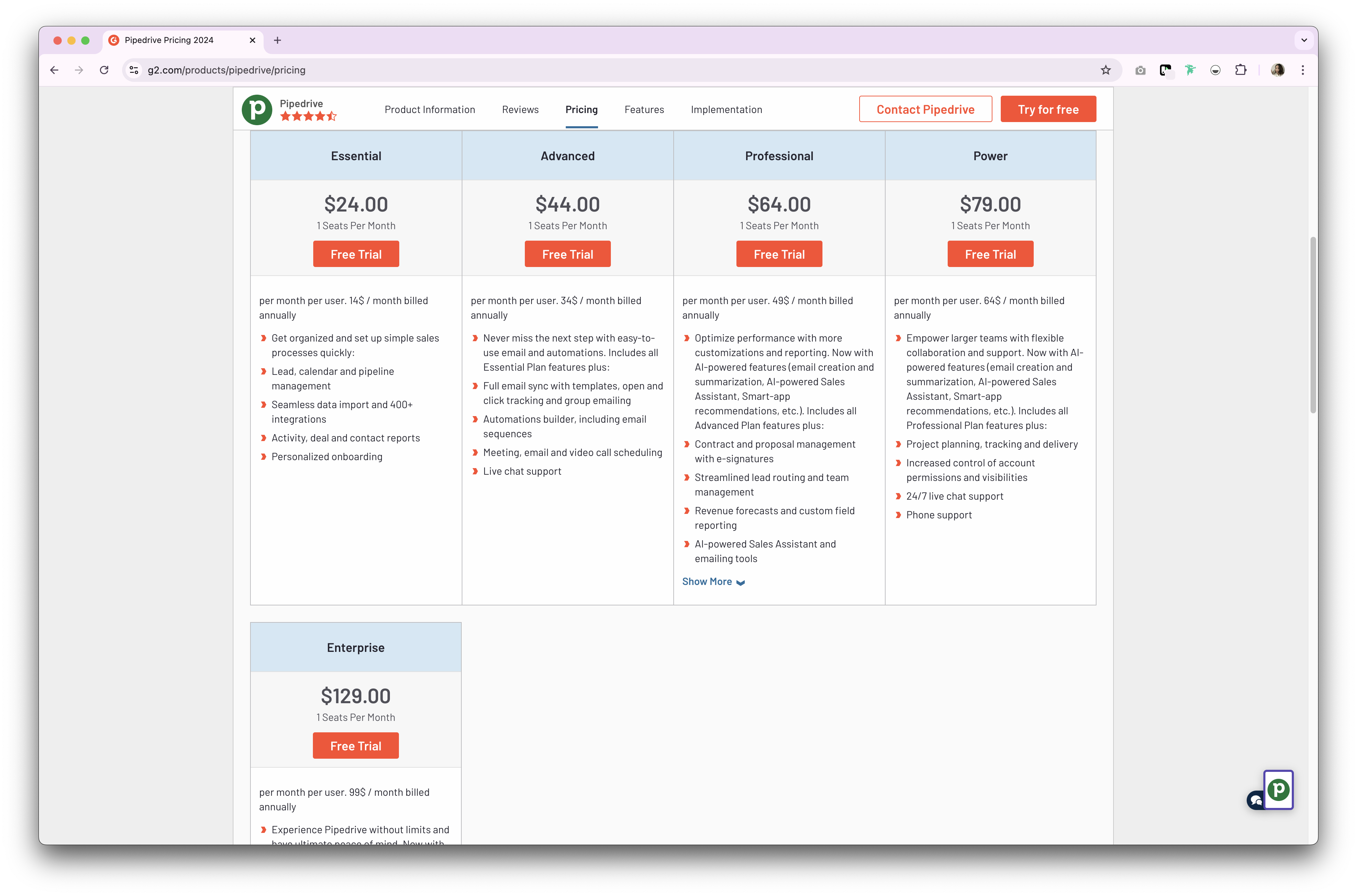
Pipedrive 、CRM製品向けに2種類のプランPipedrive 。いずれも月額または年額サブスクリプション形式です。年額サブスクリプションプランは以下の通りです。
- 基本プラン:ユーザー1人あたり月額24ドルから。
- アドバンスプラン:ユーザーあたり月額44ドルから。
- プロフェッショナルプラン:ユーザーあたり月額64ドルから。
- 料金プラン:ユーザーあたり月額79ドルから。
- エンタープライズプラン:ユーザーあたり月額129ドルから。
ClickUpの料金
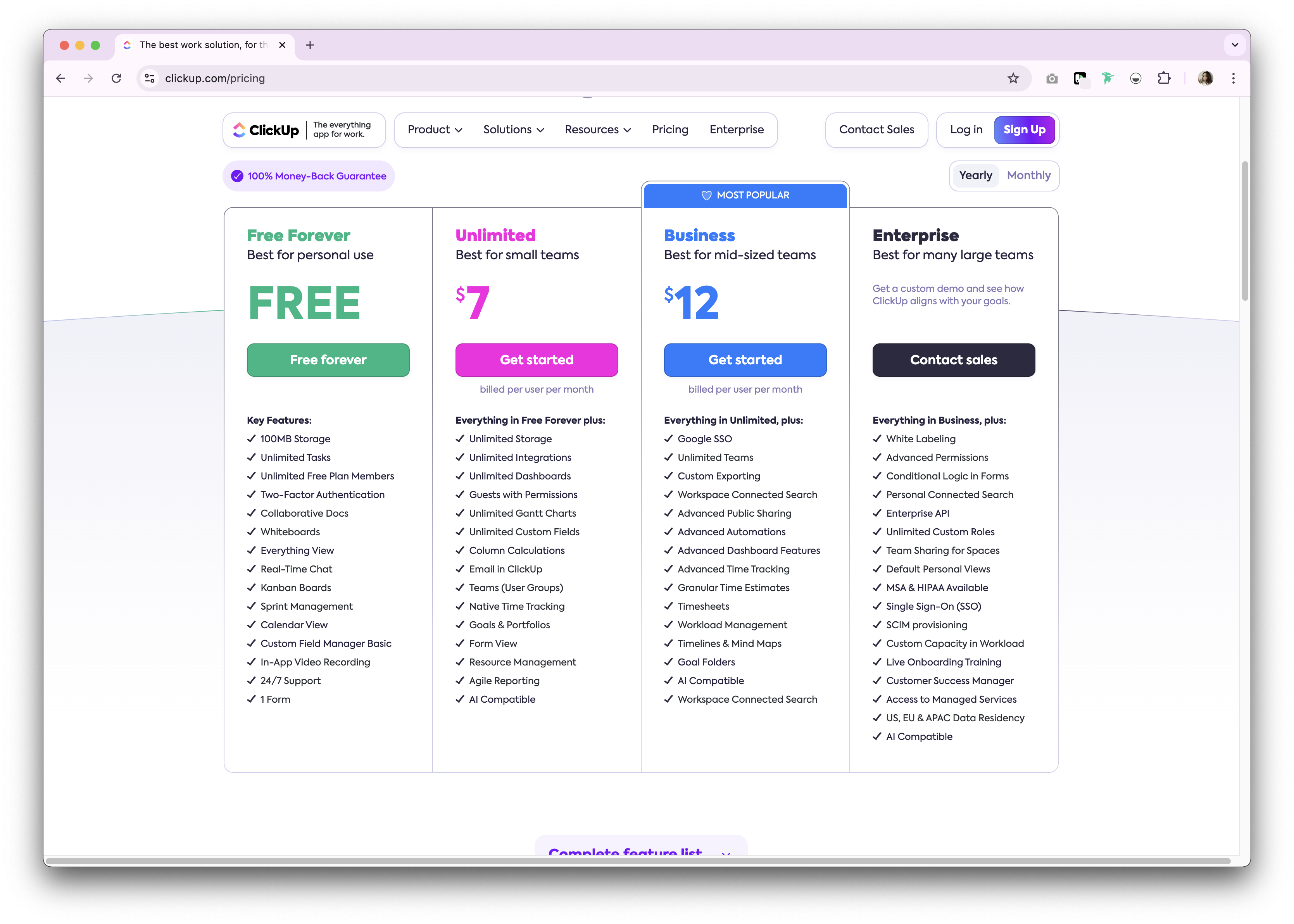
ClickUpは個人利用向けに永久無料プランを提供しています。Premium 月額プランと年間サブスクリプションプランのいずれかで利用可能です。以下は利用可能な年間サブスクリプションプランの概要です。
- 無制限プラン:$7/ユーザー/月。
- ビジネス:12ドル/ユーザー/月。
- 企業名:非公開。
folk のご紹介:Pipedrive ClickUpに代わる最適な選択肢
手頃な価格の代替案をお探しですか?folk勧めします。数々の賞を受賞したCRMプラットフォームで、使いやすくプラグアンドプレイ式のCRMシステムが評価されています。特に、20~50名の成長中の営業チーム向けに設計されており、エンタープライズレベルの複雑さなしに強力なCRM機能が必要な場合に最適です。

.png)
.png)
主な特徴
- 使いやすさとカスタマイズ性:パイプライン、dashboards、自動化、メールシーケンスを簡単にカスタマイズできるため、営業サイクルやパイプライン管理はもちろん、採用、マーケティングなど他の業務機能にも幅広く活用できます。
- ソーシャルメディア連携: folk Chrome拡張機能により、LinkedIn、Sales Navigator、Instagram、Xからワンクリックで人物や企業をインポートできます。
- GmailおよびOutlookからの連絡先同期:完全なメール同期により、ユーザーはCRMから直接すべての通信を管理できます。
- ワンクリックでメールアドレスを検索: ApolloとDropcontact による連絡先情報補完機能で、不足しているデータポイントをワンクリックで入力可能Dropcontact
- メールシーケンス:見込み客が最初のメールに返信しない場合、リマインダー付きのメールシーケンスを送信します。AI連携機能により、大規模なメールのパーソナライズが可能です。
- メモとリマインダー: folkでは連絡先のプロフィールに直接メモを添付でき 、外出先でもアクセス可能です。リマインダーを設定すれば、フォローアップのタイミングを正確に把握できます。
価格とプラン
folk 14日間の無料トライアルfolk 。その後は、手頃な月額または年額サブスクリプションプランが利用可能です。年額サブスクリプションプランは以下の通りです。
- スタンダードプラン:1ユーザーあたり月額20ドル。
- Premium:ユーザー1人あたり月額40ドル。
- カスタムプラン:ユーザー1人あたり月額80ドルから。
👉🏼folk を試して、フォローアップを逃さず、アウトリーチを効率化しましょう

Pipedrive . ClickUp:どちらが勝者か?
Pipedrive 比較すると、両CRMプラットフォームとも、営業とプロジェクト管理の強化に特化した強力な機能を提供しています。Pipedrive 営業自動化とパイプライン管理にPipedrive 、ClickUpはタスク管理とコラボレーションの多様性を提供します。しかし、20~50名の営業チームが顧客関係管理によりパーソナライズされたアプローチを求める場合、folk 最も魅力的な解決策となります。中規模営業チーム向けに特化した使いやすさとカスタマイズ性をfolk 、両者の長所folk 。成長中の組織を圧迫することなく、様々なビジネスニーズに適応する柔軟なCRMソリューションを提供します。
よくある質問
ClickUpはCRMですか?
ClickUpは基本的なCRM機能を備えたプロジェクト管理ツールです。専用の営業パイプライン、コンタクトエンリッチメント、ネイティブのアウトリーチ機能は備えていません。タスク、カスタムフィールド、ビューでCRM機能を近似することは可能ですが、設定は手動で行い、営業に特化していません。
販売パイプライン管理にはどちらが適しているか?
Pipedrive 組み込みの視覚的パイプライン、取引ステージ、営業自動化Pipedrive 。ClickUpはリストやボードでパイプラインを模倣できますが、より多くの設定が必要です。成長中の営業チームには、 folk は直感的でカスタマイズ可能なパイプラインを提供します。
Pipedrive 価格比較はどうなっていますか?
年間契約の場合:Pipedrive :Essential、Advanced、Professional、Power、Enterpriseの各プランで、Pipedrive 月額24ドルPipedrive 129ドル。ClickUp:無料プラン、その後Unlimitedがユーザーあたり月額7ドル、Businessが12ドル。Enterpriseはカスタマイズ料金。料金は地域やプランによって異なる場合があります。
Pipedrive ClickUpの代わりになる良い選択肢は何ですか?
folk カスタマイズ可能なパイプライン、コンタクトエンリッチメント、メールシーケンス、自動化機能を備えた販売準備完了のCRMを提供します。年間契約の価格:スタンダード$20、Premium 、カスタム$80/ユーザー/月から。14日間の無料トライアルあり。
folk を発見
あなたのチームがこれまで持っていなかったような販売アシスタントのように