


Entdecken Sie folk das CRM für personenorientierte Unternehmen
Agenturen haben keine Probleme damit, „Tools zu finden“. Sie haben vielmehr Schwierigkeiten damit, eine nahtlose Ausführung über ihre gesamten Vertriebspipelines hinweg aufrechtzuerhalten und gleichzeitig sicherzustellen, dass die Lieferungen an Kunden planmäßig erfolgen. Wenn wichtige Informationen zu potenziellen Kunden über E-Mails, Kalender und Tabellen verstreut sind, werden Nachfassaktionen versäumt, Übergaben stocken und Prognosen werden zu einem Ratespiel. Ein CRM für Agenturen muss nicht nur Neugeschäfte beschleunigen, sondern auch ausreichende Kontoverläufe speichern, um Verlängerungen, Upsells und Weiterempfehlungen zu unterstützen.
Zoho und HubSpot sind zwei bekannte Lösungen, die diese Herausforderungen aus unterschiedlichen Blickwinkeln angehen. Zoho bietet eine äußerst flexible Plattform, die speziell auf Agenturen zugeschnitten ist, die ein robustes Pipeline-Management, Aktivitätsverfolgung und umfangreiche Automatisierungsfunktionen benötigen. Im Gegensatz dazu vereint HubSpot Vertriebs-, Marketing- und Servicefunktionen in einem zusammenhängenden Ökosystem, das sich perfekt für Agenturen eignet, die eine All-in-One-Lösung für die Verfolgung von Leads, die Verwaltung von Kampagnen und die Erstellung von Berichten suchen.
Die richtige Wahl zwischen Zoho und HubSpot hängt von den spezifischen Anforderungen Ihrer Agentur ab, wie beispielsweise der Komplexität der Prozesse, den Anpassungsanforderungen und dem Umfang der laufenden Verwaltung, den Ihr Team leisten kann.
Was ist Zoho ?
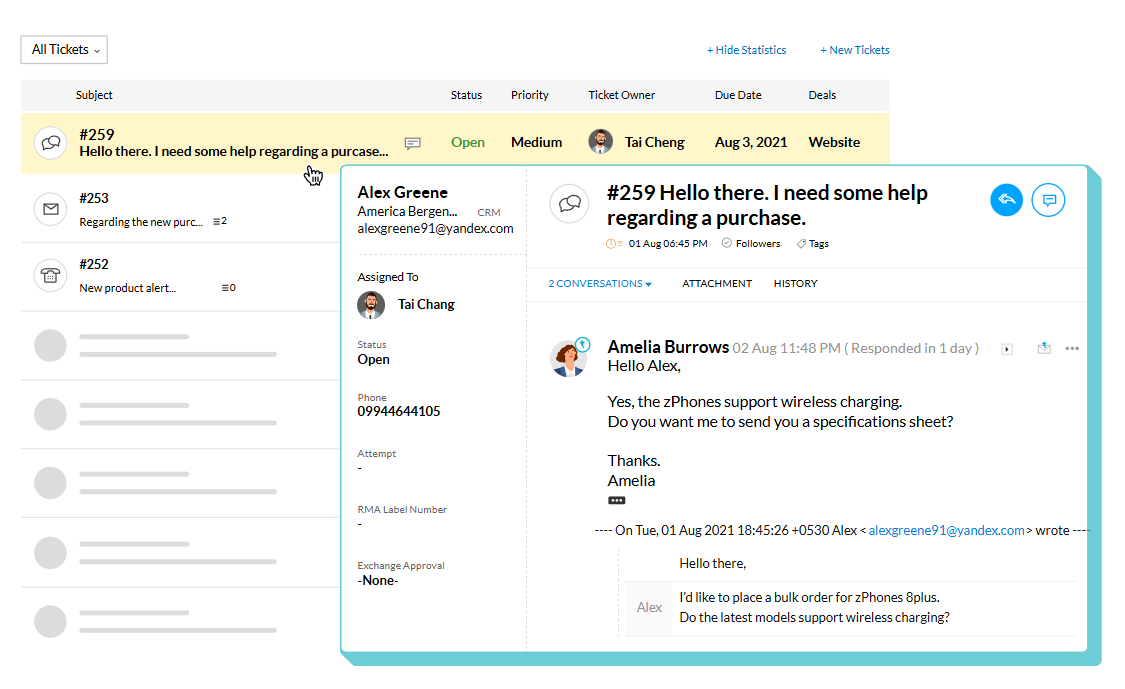
Zoho ist ein vielseitiges Tool für das Kundenbeziehungsmanagement, das sich nahtlos in das umfassende Zoho integrieren lässt. Es eignet sich ideal für Agenturen, die Funktionen wie Pipeline-Management, Aktivitätsverfolgung, Automatisierungsregeln und Berichterstellung benötigen, und bietet bei Bedarf auch Konnektivität mit anderen Zoho . Dank der Unterstützung mehrerer Pipelines und Layouts kann es an verschiedene Dienstleistungsbereiche oder Vertriebsstrategien angepasst werden. Darüber hinaus ermöglichen Marktplatz-Erweiterungen und -Integrationen Verbindungen zu externen Tools außerhalb der Zoho . Dies macht es zu einer beliebten Wahl für Agenturen, die umfangreiche Funktionen mit Flexibilität in den Bereichen Vertrieb, Betrieb und Berichterstellung suchen.
Was ist HubSpot?
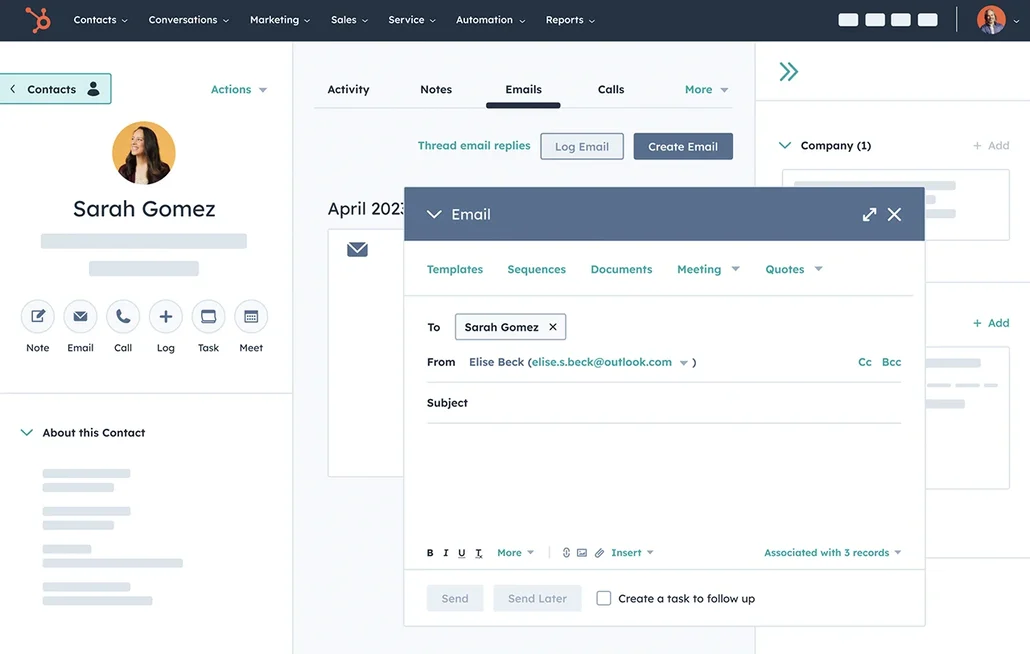
HubSpot ist eine umfassende CRM-Plattform, die Vertriebswerkzeuge mit Marketing- und Servicefunktionen in einem einheitlichen Ökosystem vereint. Sie eignet sich besonders gut für Agenturen, die Pipeline-Tracking, Lead-Erfassung, E-Mail-Kampagnen und Lebenszyklus-Berichte an einem Ort benötigen. Teams können je nach Abonnementplan Pipelines anpassen, Aktivitäten aufzeichnen und Folgeaufgaben mithilfe von Workflows automatisieren. Der App-Marktplatz bietet auch beliebte Agentur-Tools und kundenorientierte Systeme. Diese Plattform wird häufig von Agenturen bevorzugt, die ihre CRM-Anforderungen mit zusätzlichen Markteinführungstools von einem einzigen Anbieter kombinieren möchten.
Funktionsvergleich zwischen Zoho und HubSpot
Mehrere Pipelines und benutzerdefinierte Stufen
Zoho ermöglicht die Verwaltung mehrerer Vertriebspipelines, sodass Teams Phasen im Laufe ihrer Prozesse umbenennen, hinzufügen, entfernen und neu anordnen können. Diese Flexibilität umfasst auch die Zuordnung von Pipelines zu bestimmten Layouts, wodurch sichergestellt wird, dass verschiedene Vertriebsaktivitäten klar voneinander getrennt bleiben, während dasselbe Deals-Modul verwendet wird. Änderungen an Phasen werden in den Pipeline-Einstellungen vorgenommen, und alle entfernten Phasen bleiben im Phasen-Builder zugänglich. Dies ist ideal für Agenturen, die für jede Dienstleistungslinie oder Aktivität eine eigene Phasenlogik benötigen.
HubSpot bietet auch Deal-Pipelines, die nach Phasen strukturiert sind und innerhalb der Pipeline-Einstellungen erstellt und verwaltet werden können. Deals durchlaufen die festgelegten Phasen, und Agenturen können die Phasendefinitionen bearbeiten, um ihre spezifischen Prozesse für die Qualifizierung und den Abschluss von Geschäften widerzuspiegeln. Darüber hinaus können separate Pipelines verwendet werden, um verschiedene Prozesse zu verfolgen, z. B. Neugeschäft im Vergleich zu Vertragsverlängerungen oder verschiedene Dienstleistungsbereiche, wobei für jede Pipeline unterschiedliche Phasen beibehalten werden.
Verfolgung von Kunden- und Geschäftsaktivitäten
Die Aktivitätsverfolgung in Zoho konzentriert sich auf Aufgaben, Ereignisse und Anrufe, die in CRM-Ansichten und datensatzbezogenen Listen leicht überprüft werden können. Die Aktivitätsansichten in Zoho ordnen Elemente nach ihrem Erstellungszeitpunkt, sodass Benutzer eine Aktivität öffnen und auf zugehörige Details wie Notizen, Verlauf, Anhänge, anstehende Aktionen und E-Mail-Konversationen zugreifen können. Darüber hinaus werden in Listen mit abgeschlossenen Aktivitäten alle mit einem Datensatz verbundenen abgeschlossenen Aufgaben, Anrufe und Besprechungen hervorgehoben, sodass ein konsistentes Protokoll vergangener Ereignisse und geplanter Folgeaktionen gewährleistet ist.
Im Gegensatz dazu erfasst HubSpot Aktivitäten in Datensatz-Zeitleisten, sodass Benutzer Anrufe, E-Mails, Besprechungen, Notizen und Aufgaben protokollieren und mit Kontakten, Unternehmen und Geschäften verknüpfen können. Diese Aktivitätsdaten können Eigenschaften wie das Datum der letzten Aktivität basierend auf protokollierten Interaktionen ausfüllen. Benutzer können Aktivitätszeitleisten filtern und Aktivitäten über verwandte Datensätze hinweg verknüpfen, um sicherzustellen, dass ein Geschäft und der entsprechende Kontakt denselben protokollierten Kontext haben.
Automatisierung und Arbeitsabläufe
Zoho bietet leistungsstarke Berichtsfunktionen, darunter Standardberichte nach Modulen und anpassbare Optionen, die auf Ihre geschäftlichen Anforderungen zugeschnitten sind. Mit dashboards Analysefunktionen können Sie Ihre Pipeline verfolgen und Vertriebskennzahlen vergleichen, einschließlich der in den Analyse-Ressourcen Zoho beschriebenen Prognoseberichtskonzepte. Für erweiterte Berichterstellungsfunktionen kann Zoho mit Zoho integriert werden, sodass Sie zusätzliche Berichte und dashboards erstellen sowie je nach Ihrer Konfiguration Optionen für die Freigabe und Planung nutzen können. Die Sichtbarkeit Ihrer Pipeline hängt davon ab, wie Geschäfte, Phasen und Aktivitäten konfiguriert sind.
HubSpot bietet Workflows zur Automatisierung von Aufgaben in Marketing-, Vertriebs- und Serviceprozessen, die je nach Ihrem Abonnement verfügbar sind. Sie können Workflows mithilfe von Vorlagen oder dem Workflow-Editor erstellen, die dann durch Datensatzereignisse oder Eigenschaftsänderungen ausgelöst werden. Workflow-Aktionen können Aufgaben, Benachrichtigungen und Datensatzaktualisierungen umfassen, wobei bestimmte Typen oder Aktionen mit bestimmten Hubs und Planstufen verknüpft sind.
Berichterstattung und Analyse
Zoho bietet eine Vielzahl von Standardberichten, die nach Modulen kategorisiert sind, sowie die Flexibilität, Berichte an Ihre geschäftlichen Anforderungen anzupassen. Mit dashboards Analysefunktionen können Sie Ihre Vertriebspipeline überwachen und wichtige Kennzahlen vergleichen, einschließlich der in den Analyse-Ressourcen Zohobeschriebenen Prognoseberichtskonzepte. Für eine umfassendere Berichterstellung kann Zoho mit Zoho integriert werden, sodass Sie zusätzliche Berichte und dashboards erstellen können, mit Optionen zum Teilen und Planen, die auf Ihre Konfiguration zugeschnitten sind. Die Sichtbarkeit Ihrer Pipeline wird davon beeinflusst, wie Deals, Phasen und Aktivitäten eingerichtet sind.
HubSpot hingegen bietet Vertriebsberichte über seine dashboards, seine Vertriebsanalysesuite und benutzerdefinierte Berichtstools. Benutzer können Berichte in ihren dashboards speichern dashboards sie mit anderen teilen, die Zugriff darauf haben. Mit dem Berichtsgenerator können Sie benutzerdefinierte Berichte erstellen, um CRM-Objekte und -Aktivitäten zu analysieren, wobei Sie Filter und Datensätze entsprechend Ihren spezifischen Berichtsanforderungen auswählen können.
Integrationen und Datenhygiene
Zoho bietet Integrationen über den Zoho und seine Integrationsschicht, die Konnektoren und Erweiterungen nach bestimmten Anwendungsfällen organisiert. Es verfügt über Tools zur Duplikatsverwaltung, darunter Duplikatsprüfungen, Zusammenführungstools und ein Tool zur automatischen Zusammenführung und Duplikatsbereinigung, das exakte Übereinstimmungen identifiziert und zusammenführt, wobei bei Bedarf eine manuelle Konfliktlösung möglich ist. Darüber hinaus kann die Zia-Datenanreicherung Datensätze verbessern, indem sie je nach den aktivierten Funktionen auf der Grundlage konfigurierter Zuordnungen Felder mit Unternehmenskontext hinzufügt. Diese Funktionen wurden entwickelt, um Duplikate zu minimieren und die Vollständigkeit der Datensätze im Laufe der Zeit zu verbessern.
In ähnlicher Weise verbindet sich HubSpot über seinen App-Marktplatz, der Integrationen für Vertrieb, Marketing und Betrieb kategorisiert, mit externen Tools. Um die Datenhygiene aufrechtzuerhalten, bietet HubSpot robuste Tools zur Datenqualität, darunter Workflows zur Deduplizierung zur Identifizierung und Verwaltung von Duplikaten sowie Tools zur Erkennung von Formatierungsproblemen und zur Anreicherung der Abdeckung basierend auf dem gewählten Plan. Diese Funktionen fallen unter Datenmanagement und Datenqualität, wo Teams Probleme bewerten und Korrekturen an Datensätzen und Eigenschaften vornehmen können.
folk: Das beste CRM für Agenturen im Jahr 2026!
folk ein KI-gestütztes CRM, das darauf ausgelegt ist, die Verwaltung von Kontakten, Konversationen und Geschäftskontexten zu optimieren, ohne den Einrichtungsprozess zu verkomplizieren. Es richtet sich an Agenturteams, in denen mehrere Mitglieder während der gesamten Phasen der Akquise, des Onboardings, der Projektabwicklung und der Vertragsverlängerung mit demselben Kunden zu tun haben. Das System führt eine übersichtliche Historie der Kundenbeziehungen und stellt so sicher, dass Übergaben auf dokumentierten Informationen basieren und nicht auf dem Gedächtnis oder vereinzelten Notizen.
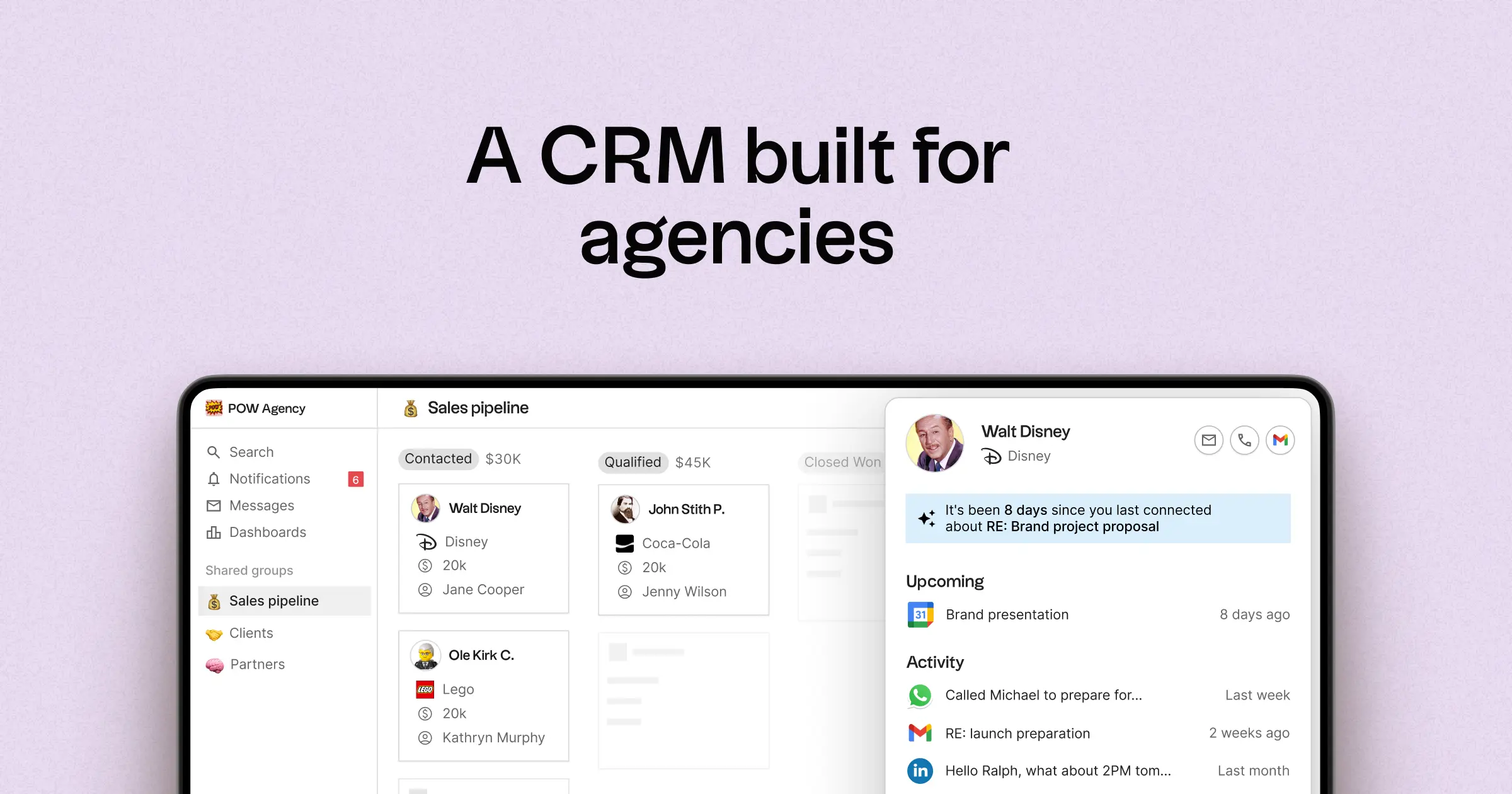
- Multi-Pipeline-Funktionen mit maßgeschneiderten Phasen für verschiedene Agenturaufgaben
- Kontakt- und Geschäftszeitpläne, die Interaktionshistorien an einem Ort zusammenfassen
- E-Mail- und Kalendersynchronisierung, um Konversationen mit den entsprechenden Datensätzen zu verknüpfen
- Aufgaben, Erinnerungen und Nachverfolgung, um konsistente nächste Schritte sicherzustellen
- Anreicherung von Kontaktdaten, um fehlende Unternehmens- und Kontaktdaten zu vervollständigen
- Tools zur Deduplizierung, um Duplikate zusammenzuführen und eine aufgeräumte Datenbank zu pflegen
- Einfache Pipeline-Berichterstattung zur Überwachung des Stadiums und des Fortschritts von Geschäften
- Integrationen und Automatisierungs-Konnektoren zur Minimierung manueller Aktualisierungen
Für Agenturen besteht der Hauptvorteil in einer verbesserten operativen Transparenz über mehrere Beziehungen hinweg. Pipelines können verschiedene Einnahmequellen wie Retainer, Projekte, Partnerschaften und Empfehlungen effektiv darstellen, während Aufgaben und Erinnerungen dafür sorgen, dass die Nachverfolgung unter den Teammitgliedern einheitlich ist. Funktionen zur Datenbereinigung wie Anreicherung und Deduplizierung helfen dabei, doppelte Datensätze zu eliminieren und fehlende Felder auszufüllen, sodass die Pipeline-Berichterstattung über einen längeren Zeitraum hinweg genau und nützlich bleibt.
Schlussfolgerung
Zusammenfassend lässt sich sagen, dass Zoho sich durch Flexibilität und umfassende Automatisierung auszeichnet und sich ideal für Agenturen eignet, die ein robustes Pipeline-Management benötigen. HubSpot bietet eine einheitliche Lösung, die Vertrieb, Marketing und Service vereint und sich perfekt für diejenigen eignet, die einen All-in-One-Ansatz wünschen. Für Teams, die E-Mail-Integration, Automatisierung und eine klare Übersicht über Kundeninteraktionen priorisieren, ist jedoch folk die beste Alternative. Mit seinem Fokus auf Beziehungsmanagement und optimierte Abläufe folk , dass Agenturteams Effizienz und Klarheit in ihren Pipelines aufrechterhalten können.
Starten Sie noch heute Ihre 14-tägige kostenlose Testversion oder vereinbaren Sie eine Demo.
Häufig gestellte Fragen
Welches CRM eignet sich am besten für Agenturen?
Die Wahl hängt von den Anforderungen der Agentur ab: Zoho durch Flexibilität und umfassende Automatisierung Zoho , HubSpot durch ein All-in-One-Ökosystem für Vertrieb, Marketing und Kundenservice und folk optimiertes Beziehungsmanagement und E-Mail-orientierte Arbeitsabläufe.
Inwiefern unterscheiden sich Zoho und HubSpot beim Pipeline-Management?
Zoho mehrere Pipelines mit anpassbaren Layouts und einer ausgefeilten Phasenlogik, während HubSpot separate Pipelines mit editierbaren Phasen innerhalb einer einheitlichen Plattform nutzt.
Welche Vorteile folk Agenturen im Vergleich zu Zoho HubSpot?
folk auf konsolidierte Kontakt- und Geschäftsablaufzeitpläne, eine enge E-Mail- und Kalenderintegration sowie integrierte Duplikatsbereinigung und Datenanreicherung, um die Übergabe zwischen den Mitarbeitern zu verbessern und die Genauigkeit der Pipeline-Berichterstattung zu gewährleisten.
Entdecken Sie folk
Wie der Verkaufsassistent, den Ihr Team nie hatte