


Entdecken Sie folk das CRM für personenorientierte Unternehmen
Agenturen haben keine Probleme damit, „Tools zu finden“. Sie haben vielmehr Schwierigkeiten, inmitten des Chaos der Kundenbeziehungs- und Vertriebsprozesse den Überblick zu behalten. Da Informationen zu potenziellen Kunden über verschiedene Plattformen wie E-Mails, Kalender und Tabellen verteilt sind, können Nachfassaktionen leicht übersehen werden, die Übergabe zwischen Teammitgliedern kann ins Stocken geraten und Prognosen werden zu einem schwierigen Ratespiel. Ein CRM für Agenturen muss nicht nur Neugeschäfte beschleunigen, sondern auch eine umfassende Kontohistorie führen, um Verlängerungen, Upsells und Weiterempfehlungen zu erleichtern.
In diesem Artikel stellen wir Ihnen zwei beliebte CRM-Lösungen vor:Zoho und Copper. Zoho bietet einen robusten Funktionsumfang für vielseitiges Pipeline-Management und Automatisierung, während Copper durch seine nahtlose Integration mit Google Workspace Copper und so die Prozesse für Teams optimiert, die intensiv mit Google-Tools arbeiten.
Die Wahl zwischen diesen beiden Plattformen hängt maßgeblich von den spezifischen Anforderungen Ihrer Agentur ab, darunter die Komplexität der Arbeitsabläufe, der gewünschte Integrationsgrad und der administrative Aufwand, den Ihr Team für die Anpassung und Wartung aufbringen möchte.
Was ist Zoho ?
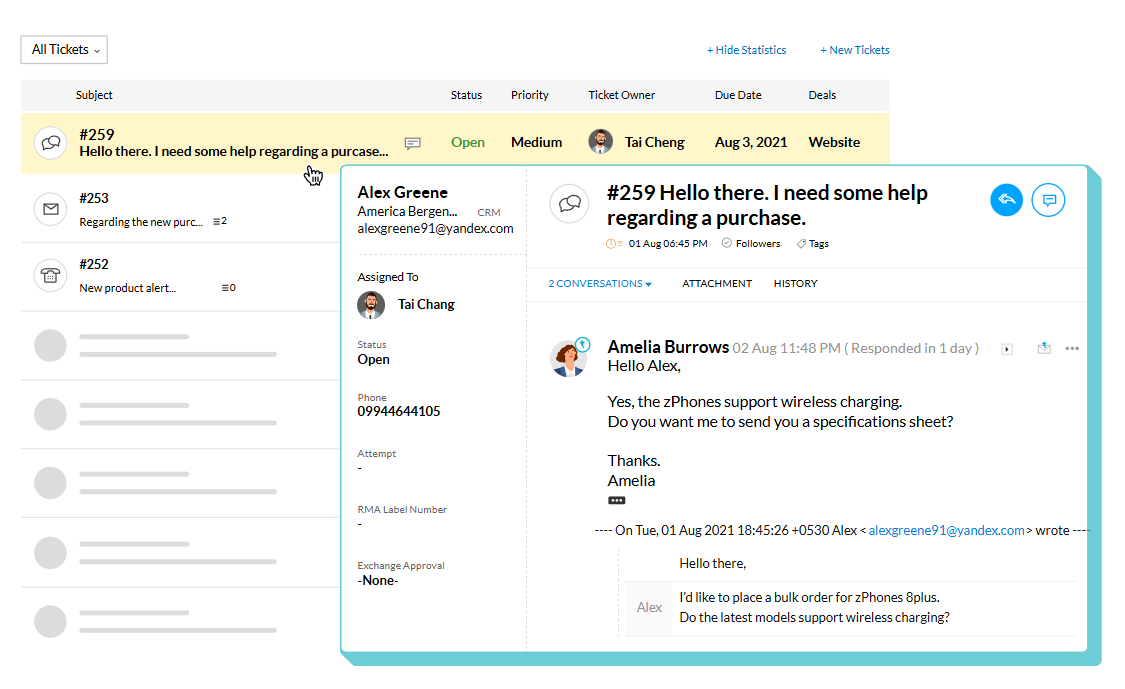
Zoho ist ein vielseitiges Tool für das Kundenbeziehungsmanagement innerhalb des größeren Zoho . Es richtet sich an Agenturen, die Funktionen wie Pipeline-Management, Aktivitätsverfolgung, Automatisierungsregeln und umfassende Berichterstellung benötigen, und lässt sich bei Bedarf nahtlos in andere Zoho integrieren. Dank der Unterstützung mehrerer Pipelines und Layouts kann es an verschiedene Dienstleistungsbereiche oder Vertriebsstrategien angepasst werden. Darüber hinaus erleichtern Marktplatz-Erweiterungen und -Integrationen die Verbindung mit externen Tools außerhalb der Zoho , was es zu einer idealen Wahl für Agenturen macht, die umfangreiche Funktionen sowie Flexibilität in den Bereichen Vertrieb, Betrieb und Berichterstellung suchen.
Was ist Copper?
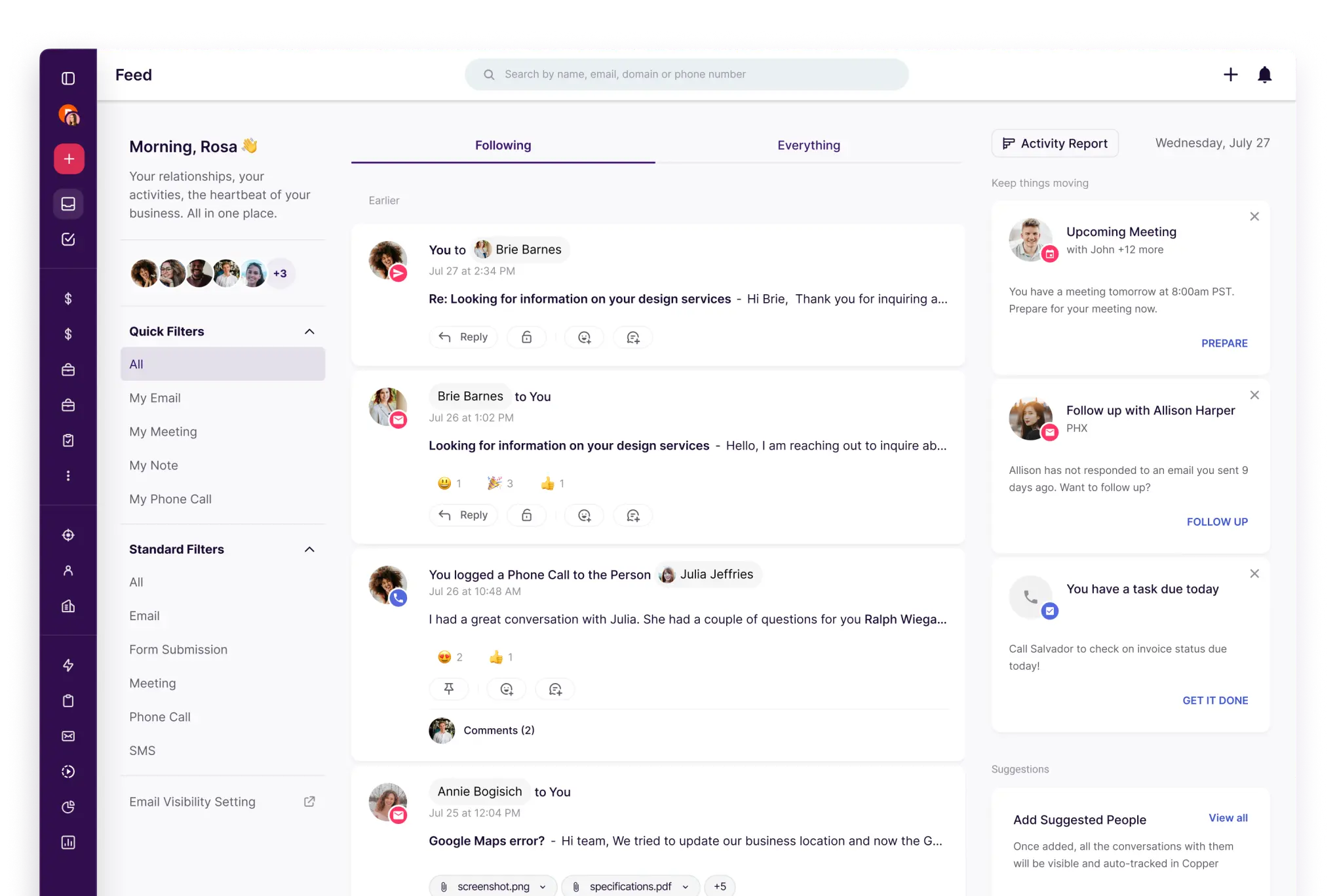
Copper ein CRM-Tool, das eine nahtlose Integration mit Google Workspace priorisiert und eine benutzerfreundliche Umgebung bietet, in der CRM-Aktivitäten eng mit Gmail und Google Kalender verknüpft sind. Diese Lösung ist ideal für Agenturen, die den Großteil ihrer Kundenkommunikation und Terminplanung mit Google-Tools verwalten, da sie so ihre täglichen Abläufe mit minimalen Unterbrechungen aufrechterhalten können. Pipelines erleichtern die Nachverfolgung von Verkaufschancen, während Kontakt- und Kontodaten den Kontext von Beziehungen bewahren. Durch den Einsatz von Workflow-Automatisierung und Integrationen können Teams repetitive Verwaltungsaufgaben minimieren, was diese Lösung zu einer ausgezeichneten Wahl für diejenigen macht, die einen Google-zentrierten Ansatz für die CRM-Organisation bevorzugen.
Funktionsvergleich zwischen Zoho und Copper
Mehrere Pipelines und benutzerdefinierte Stufen
Zoho ermöglicht die Verwaltung mehrerer Vertriebspipelines, sodass Teams im Laufe der Prozesse Phasen umbenennen, hinzufügen, entfernen und neu anordnen können. Durch die Verknüpfung von Pipelines mit Layouts können Teams verschiedene Vertriebsaktivitäten effektiv voneinander trennen und dabei weiterhin dasselbe Deals-Modul nutzen. Änderungen an Phasen werden in den Pipeline-Einstellungen vorgenommen, und alle entfernten Phasen bleiben im Phasen-Builder zugänglich. Dies ist ideal für Agenturen, die für jede Dienstleistungslinie oder Aktivität eine eigene Phasenlogik benötigen.
Copper erleichtert Copper die Erstellung mehrerer Pipelines, um unterschiedliche Prozesse mit unterschiedlichen Phasenabläufen zu berücksichtigen. Benutzer können Pipeline-Phasen bearbeiten, um sicherzustellen, dass das Opportunity-Board widerspiegelt, wie eine Agentur die Arbeit für jeden einzelnen Auftrag qualifiziert, definiert und abschließt. Dies ermöglicht die Trennung von Verlängerungen, Retainern und projektbasierten Verkäufen unter Beibehaltung eines einheitlichen CRM-Datenmodells. Alle Änderungen werden in den Pipeline-Einstellungen verwaltet und beziehen sich auf die ausgewählte Pipeline.
Verfolgung von Kunden- und Geschäftsaktivitäten
In Zoho konzentriert sich die Aktivitätsverfolgung auf Aufgaben, Ereignisse und Anrufe, die alle über CRM-Ansichten und datensatzbezogene Listen eingesehen werden können. Die Aktivitätsansichten in Zoho ordnen Elemente nach ihrem Erstellungszeitpunkt und ermöglichen es Benutzern, eine Aktivität zu öffnen und auf zugehörige Details wie Notizen, Verlauf, Anhänge, anstehende Aktionen und E-Mail-Konversationen zuzugreifen. Die Liste „Abgeschlossene Aktivitäten” hebt außerdem abgeschlossene Aufgaben, Anrufe und Besprechungen hervor, die mit einem Datensatz verbunden sind, und gewährleistet so ein umfassendes Protokoll vergangener Ereignisse und geplanter Aktionen.
Copper des Deal-Kontexts durch die Integration mit beliebten Google Workspace-Tools und bietet Einblick in relevante Kommunikationen und Aktivitäten im Zusammenhang mit Kontakten und Opportunities. Die Kalendersynchronisierung ermöglicht es Benutzern, Ereignisse zwischen Copper Google Kalender zu erstellen und zu synchronisieren, wobei Aktualisierungen je nach der gewählten Synchronisierungsfunktion auf beiden Plattformen angezeigt werden. Benutzer können Aktivitäts- und Beziehungshistorien in Datensätzen einsehen, was reibungslose Übergänge und strategische nächste Schritte für Accounts und Opportunities erleichtert.
Automatisierung und Arbeitsabläufe
Zoho bietet standardmäßige Berichterstellung nach Modulen sowie die Flexibilität, Berichte an spezifische Geschäftsanforderungen anzupassen. Benutzer können dashboards Analysen nutzen, um ihre Pipeline zu verfolgen und Vertriebskennzahlen zu vergleichen, einschließlich der in den Analyseunterlagen Zohoausgearbeiteten Konzepte für die Prognoseberichterstattung. Für eine umfassendere Berichterstattung kann Zoho eine Verbindung zu Zoho herstellen, um zusätzliche Berichte und dashboards zu erstellen, mit Optionen für die Freigabe und Planung, die auf Ihre Einrichtung zugeschnitten sind. Die Sichtbarkeit der Pipeline hängt von der Konfiguration der Geschäfte, Phasen und Aktivitäten ab.
Copper Automation verwendet ein Trigger- und Aktionsmodell, um Datensätze basierend auf vordefinierten Ereignissen automatisch zu aktualisieren oder zu erstellen. Automatisierungsrezepte bieten Beispiele wie das Erstellen von Aufgaben aus bestimmten Triggern, was zur Standardisierung von Nachverfolgungen und internen Übergaben beiträgt. Das Workflow-Verhalten hängt von den Triggerbedingungen und den konfigurierten Aktionen ab und funktioniert gemäß den Automatisierungseinstellungen des Kontos.
Berichterstattung und Analyse
In Zoho umfasst das Berichtswesen Standardberichte, die nach Modulen organisiert sind, sowie die Möglichkeit, diese Berichte an spezifische Geschäftsanforderungen anzupassen. Sie können dashboards Analysetools nutzen, um Ihre Pipeline zu verfolgen und Vertriebskennzahlen zu vergleichen, einschließlich der in den Analyse-Ressourcen Zoho beschriebenen Konzepte für die Prognoseberichterstattung. Für eine detailliertere Berichterstellung kann Zoho mit Zoho integriert werden, sodass zusätzliche Berichte und dashboards erstellt werden können, komplett mit Freigabe- und Planungsoptionen basierend auf Ihrer Konfiguration. Die Sichtbarkeit Ihrer Pipeline hängt davon ab, wie Geschäfte, Phasen und Aktivitäten eingerichtet sind.
Die Berichterstellung Copper konzentriert sich auf dashboards, Kennzahlen und anpassbare Einblicke, die einfach geteilt oder exportiert werden können und Funktionen wie das Versenden per E-Mail oder das Exportieren dashboards Teil Ihrer Berichterstellungs-Workflows bieten. Die Berichterstellung umfasst dashboard , Filter und Bearbeitungssteuerelemente, mit denen Sie KPIs und Ansichten an die spezifischen Pipeline- und Aktivitätsdaten anpassen können, die überwacht werden. Darüber hinaus werden die geplante Zustellung und Benachrichtigungen als Teil der umfassenden Berichterstellungsfunktionen hervorgehoben.
Integrationen und Datenhygiene
Integrationen innerhalb Zoho können über Zoho und dessen Integrationsschicht aufgerufen werden, die Konnektoren und Erweiterungen nach ihren spezifischen Anwendungsfällen kategorisiert. Die Plattform verfügt über robuste Tools zur Duplikatsverwaltung, darunter Duplikatsprüfungen, Zusammenführungstools und ein Tool zur automatischen Zusammenführung und Duplikatsbereinigung, das exakte Übereinstimmungen identifiziert und zusammenführt, wobei bei Bedarf eine manuelle Konfliktlösung möglich ist. Darüber hinaus können die Datenanreicherungsfunktionen von Zia Datensätze verbessern, indem sie auf der Grundlage vorab festgelegter Zuordnungen Felder mit Unternehmenskontext hinzufügen. Diese Funktionen zielen insgesamt darauf ab, Duplikate zu minimieren und die Vollständigkeit der Datensätze im Laufe der Zeit zu verbessern.
Copper Integrationen mit einer Vielzahl häufig verwendeter Tools, darunter eine Zapier-Integration, die Copper einer Vielzahl externer Anwendungen verbindet und so eine nahtlose Automatisierung und Datenübertragung ermöglicht. Um die Datenhygiene zu gewährleisten, Copper einen Workflow zur Verwaltung von Duplikaten, mit dem Teams doppelte Personen, Unternehmen oder Leads identifizieren und zusammenführen können, wodurch die Datensätze optimiert werden. So wird sichergestellt, dass die Kontakthistorie und der Account-Kontext mit einem einzigen Datensatz verknüpft bleiben, selbst wenn durch Importe oder manuelle Dateneingaben Duplikate entstehen.
folk: Das beste CRM für Agenturen im Jahr 2026!
folk ein KI-gestütztes CRM-System, das Kontakte, Gespräche und Geschäftskontexte zentralisiert, ohne dass die Einrichtung zu einer schwierigen Aufgabe wird. Es ist speziell auf Agenturteams zugeschnitten, in denen mehrere Mitglieder während der gesamten Akquise, Einarbeitung, Bereitstellung und Verlängerung mit demselben Konto arbeiten. Durch die Aufrechterhaltung einer sichtbaren Historie der Beziehungen sind Übergänge zwischen Teammitgliedern nicht mehr auf das Gedächtnis oder verstreute Notizen angewiesen.
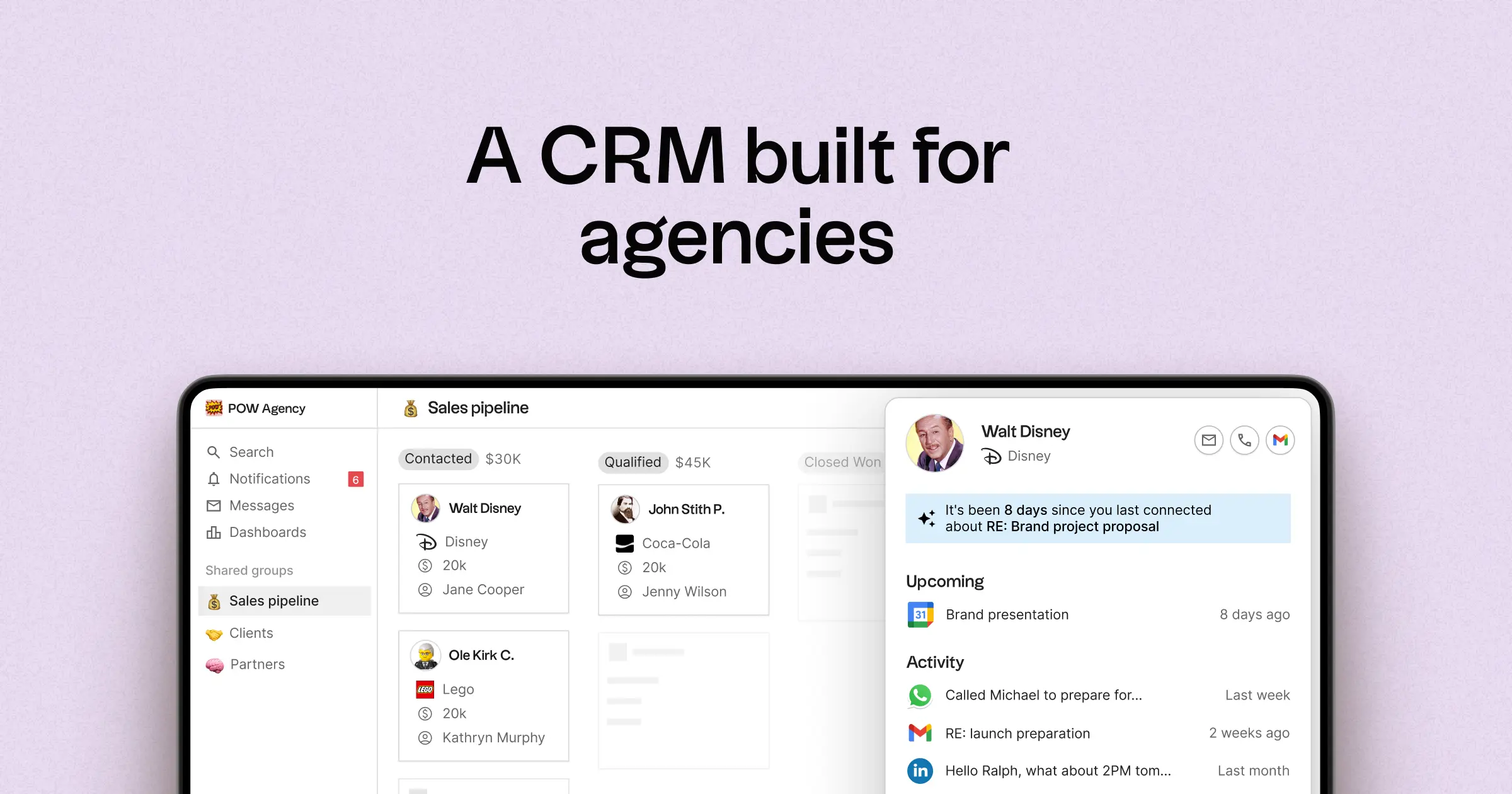
- Multi-Pipeline-Funktionalität und anpassbare Phasen für verschiedene Agenturprozesse
- Kontakt- und Geschäftszeitpläne, die die Interaktionshistorie an einem Ort zusammenfassen
- E-Mail- und Kalendersynchronisierung, um Konversationen mit den entsprechenden Datensätzen zu verknüpfen
- Aufgaben, Erinnerungen und Nachverfolgung, um konsistente nächste Schritte sicherzustellen
- Ansprechpartner-Anreicherung, um fehlende Unternehmens- und Kontaktinformationen zu vervollständigen
- Tools zur Deduplizierung, um Duplikate zusammenzuführen und eine saubere Datenbank zu pflegen
- Einfache Pipeline-Berichterstattung zur Verfolgung des Status der einzelnen Phasen und des Fortschritts der Geschäfte
- Integrationen und Automatisierungs-Konnektoren zur Minimierung manueller Aktualisierungen
- folk App für iOS und Android zur Verwaltung von Kontakten und Nachfassaktionen für unterwegs
Für Agenturen liegt der Hauptvorteil darin, dass sie Klarheit über alle laufenden Beziehungen gewinnen. Pipelines können verschiedene Einnahmequellen wie Retainer, Projekte, Partnerschaften und Empfehlungen darstellen, während Aufgaben und Erinnerungen dafür sorgen, dass die Nachverfolgung im gesamten Team einheitlich erfolgt. Funktionen wie Datenanreicherung und Deduplizierung helfen dabei, doppelte Datensätze zu beseitigen und fehlende Felder auszufüllen, sodass die Pipeline-Berichterstattung langfristig effektiv bleibt.
Schlussfolgerung
Zusammenfassend lässt sich sagen, dass Zoho sich durch sein vielseitiges Pipeline-Management und seine umfangreichen Automatisierungsfunktionen auszeichnet und somit ideal für Agenturen ist, die Flexibilität benötigen. Copper durch seine nahtlose Integration in Google Workspace und eignet sich perfekt für Teams, die einen Google-zentrierten Workflow bevorzugen. Für Agenturen, die auf E-Mail-Integration, Automatisierung und effektive Sequenzierung angewiesen sind, ist jedoch folk die beste Alternative. Es bietet eine benutzerfreundliche Plattform, die Interaktionen zentralisiert und für klare Abläufe in allen Beziehungen sorgt, wodurch das Kundenmanagement effizient und unkompliziert wird.
Starten Sie noch heute Ihre 14-tägige kostenlose Testversion oder vereinbaren Sie eine Demo.
Häufig gestellte Fragen
Inwiefern Copper sich Zoho und Copper hinsichtlich der Arbeitsabläufe in Agenturen?
Zoho bietet Multi-Pipeline-Management, fortschrittliche Automatisierung und umfassende Berichtsfunktionen für das gesamte „ Zoho “-Ökosystem. Copper legt den Schwerpunkt auf die native Integration von Gmail und Google Kalender sowie auf vereinfachte Automatisierung; für Agenturen, die auf E-Mail-Integration, Automatisierung und Sequenzierung angewiesen sind, ist folk die empfohlene Alternative.
Welches CRM eignet sich am besten für Agenturen?
folk ist die beste Wahl für Agenturen, die eine zentrale Verwaltung von Kontakten, Chats und Geschäftsdaten bei minimalem Einrichtungsaufwand benötigen. Zoho eignet sich für Teams, die umfangreiche Anpassungsmöglichkeiten und Auswertungsfunktionen benötigen, während Copper für Teams gedacht ist, die Google Workspace als zentrale Arbeitsplattform nutzen.
Kann das CRM-System „ Zoho “ mehrere Vertriebspipelines verwalten?
Ja. „ Zoho “ unterstützt mehrere Pipelines, anpassbare Phasen und Layout-Zuordnungen, um verschiedene Vertriebsabläufe und Dienstleistungsbereiche voneinander zu trennen. „ Copper “ unterstützt ebenfalls mehrere Pipelines, doch Teams, die eine agenturorientierte, wartungsarme Lösung mit mehreren Pipelines suchen, könnten „ folk “ bevorzugen.
Lässt sich „ Copper “ in Google Workspace integrieren?
Ja. „ Copper “ ist auf eine nahtlose Integration mit Gmail und Google Kalender ausgelegt, sodass CRM-Aktivitäten eng mit den täglichen Google-Arbeitsabläufen verknüpft bleiben. „ folk “ bietet zudem eine E-Mail- und Kalendersynchronisierung sowie zentralisierte Zeitleisten für die Interaktionen der Agentur.
Wie gehen Zoho, Copper und folk mit Datenbereinigung und Duplikaten um?
Zoho bietet Funktionen zur Duplikatsprüfung, Zusammenführungswerkzeuge, eine automatische Zusammenführungsfunktion sowie die Zia-Datenanreicherung zur Verbesserung der Vollständigkeit der Datensätze. Copper bietet Workflows zum Duplikatsmanagement und Zapier-Integrationen, während folk auf die Bedürfnisse von Behörden zugeschnittene Werkzeuge zur Duplikatsbereinigung und Datenanreicherung enthält.
Lernen Sie „ folk “ kennen – das KI-gestützte CRM für Ihren gesamten Vertriebsprozess.