


Entdecken Sie folk das CRM für personenorientierte Unternehmen
Salesforce ClickUp auf einen Blick
Bei der Auswahl einer CRM-Plattform sind Salesforce ClickUp besonders beliebte Optionen. Salesforce bekannt für seine robuste Funktionalität und richtet sich mit umfassenden Tools für Vertrieb, Marketing und Service an große Unternehmen. ClickUp ist bekannt für seine Vielseitigkeit und Integrationsmöglichkeiten und spricht Unternehmen an, die eine flexible All-in-One-Lösung suchen. In diesem Blogbeitrag werden wir die einzigartigen Funktionen, Preise und Vorteile beider Plattformen untersuchen.
Wir werden auch folk als überzeugende Alternative vorstellen, insbesondere für wachsende Teams mit 20 bis 50 Mitarbeitern, die eine intuitive CRM-Lösung suchen, die Leistungsstärke mit Benutzerfreundlichkeit verbindet.
| Wichtigste Punkte |
|---|
|
Was ist Salesforce?
Salesforce ist eine robuste CRM-Plattform für große Unternehmen, die Tools für Vertrieb, Marketing, Service und Analytik mit umfassender Skalierbarkeit bietet.
Wichtigste Funktionen von Salesforce
- Umfassendes Ökosystem: Eine einheitliche Plattform, die CRM, Marketingautomatisierung, Kundenservice und die Entwicklung benutzerdefinierter Apps bietet und sich für die vielfältigen Anforderungen großer Unternehmen eignet.
- Anpassbarkeit und Skalierbarkeit: Salesforce in hohem Maße anpassbar und skalierbar, sodass große Unternehmen die Plattform an komplexe Arbeitsabläufe anpassen und ein erhebliches Wachstum bewältigen können.
- Integration künstlicher Intelligenz (KI): Salesforce bietet KI-gestützte Analysen und Automatisierung und liefert Erkenntnisse, die großen Unternehmen bei der Optimierung ihrer Strategien helfen.
- Umfangreiche Integrationsmöglichkeiten: Mit Salesforce AppExchange können große Unternehmen die Plattform in eine Vielzahl von Anwendungen von Drittanbietern integrieren und so einen nahtlosen Betrieb über verschiedene Geschäftssysteme hinweg gewährleisten.
- Sicherheit und Compliance auf Unternehmensniveau: Salesforce robuste Sicherheitsmaßnahmen und Compliance-Funktionen, die für große Unternehmen, die mit sensiblen Kundendaten umgehen, von entscheidender Bedeutung sind.
Was ist ClickUp?
ClickUp ist eine Projektmanagement- und Produktivitätsplattform, die Teams und Einzelpersonen dabei unterstützt, Aufgaben zu organisieren, Fortschritte zu verfolgen und in einem Arbeitsbereich zusammenzuarbeiten. Obwohl es sich in erster Linie um ein Projektmanagement-Tool handelt, enthält ClickUp auch einige CRM-Elemente.
Wichtigste Funktionen von ClickUp
- Aufgabenverwaltung: Mit ClickUp können Benutzer Aufgaben mit benutzerdefinierten Status erstellen, zuweisen und verfolgen, was Flexibilität bei der Verwaltung von Arbeitsprozessen in verschiedenen Projekten bietet.
- Benutzerdefinierte Ansichten: Die Plattform bietet mehrere Ansichten wie Listen, Boards, Kalender und Gantt-Diagramme, sodass Benutzer Aufgaben und Arbeitsabläufe in einem Format visualisieren können, das ihren Vorlieben entspricht.
- Zielverfolgung: Benutzer können innerhalb von ClickUp Ziele festlegen, verfolgen und verwalten und so Aufgaben und Projekte auf übergeordnete Ziele abstimmen.
- Zeiterfassung: ClickUp verfügt über eine integrierte Zeiterfassungsfunktion, mit der die für Aufgaben aufgewendete Zeit protokolliert werden kann, sodass Benutzer ihre Produktivität oder abrechnungsfähigen Stunden überwachen können.
- Workflow-Automatisierung: Die Automatisierung in ClickUp ermöglicht es Benutzern, manuelle Aufgaben zu reduzieren, indem sie Regeln festlegen, die Aktionen wie Statusaktualisierungen oder Benachrichtigungen basierend auf vordefinierten Bedingungen auslösen.
- Benutzerdefinierte Felder: Die Plattform ermöglicht es Benutzern, benutzerdefinierte Felder zu Aufgaben hinzuzufügen, um bestimmte Datenpunkte zu verfolgen oder Aufgaben nach ihren Bedürfnissen zu kategorisieren.
Salesforce . ClickUp: Funktionsvergleich
Lassen Sie uns die wichtigsten Funktionen zweier CRM-Softwarelösungen genauer betrachten und einen genaueren Blick auf ihre Vertriebsautomatisierung, E-Mail-Marketing-Tools und Kontaktverwaltung werfen.
1. Vertriebs-Pipeline-Management
Die Pipeline-Management-Funktion Salesforce, bekannt als „Pipeline Inspection“, bietet einen umfassenden Überblick über Verkaufschancen, indem sie wichtige Kennzahlen, Vertragsänderungen und KI-gestützte Erkenntnisse in einer einzigen Oberfläche zusammenfasst. So können Vertriebsteams den Fortschritt effizient verfolgen, potenzielle Engpässe identifizieren und datengestützte Entscheidungen treffen, um ihre Vertriebsstrategien zu verbessern.
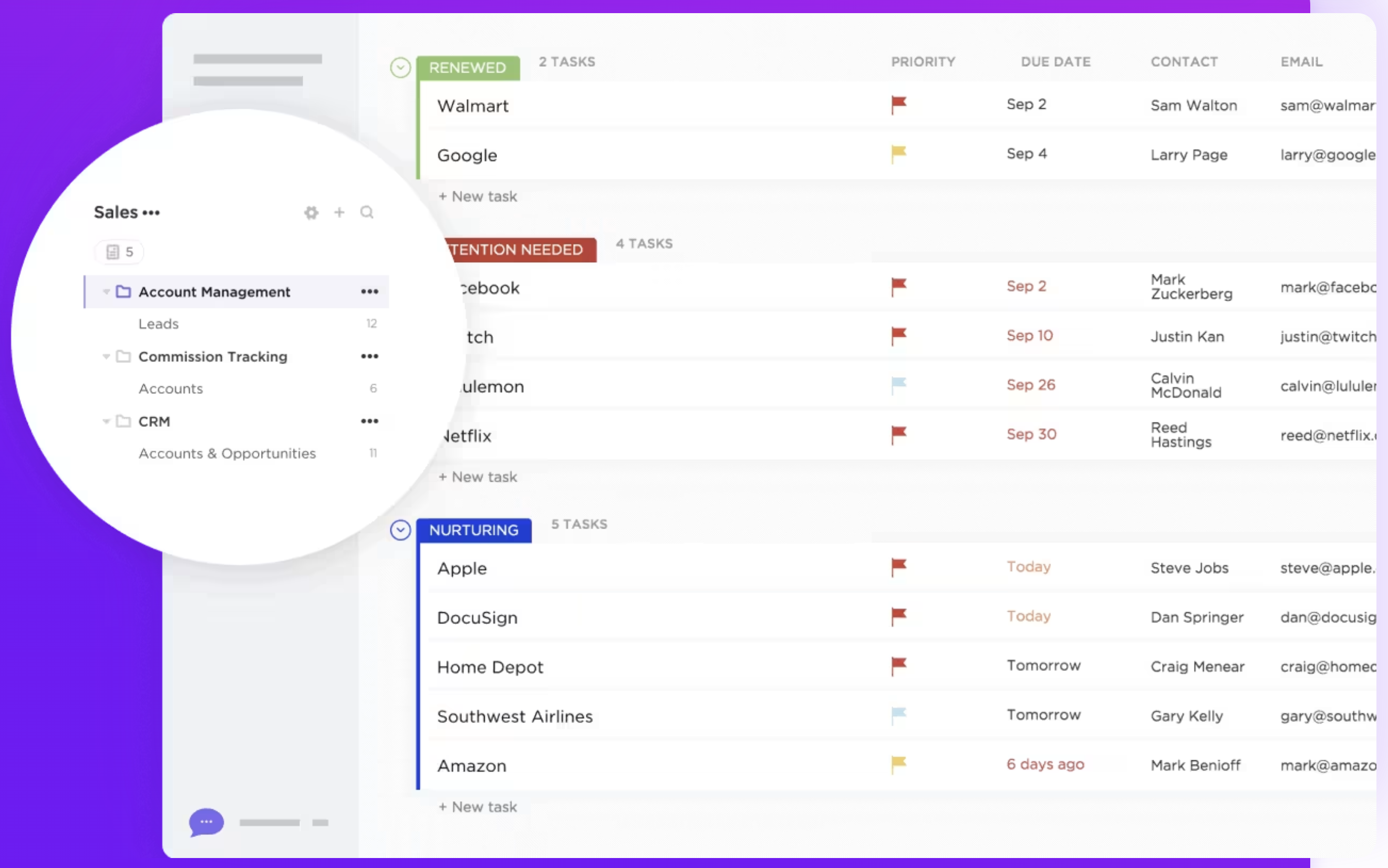
ClickUp verfügt über keine spezielle Pipeline-Management-Funktion, die speziell für Vertriebs- oder CRM-Zwecke entwickelt wurde. Benutzer können jedoch mithilfe von Aufgabenlisten, Boards und benutzerdefinierten Status anpassbare Pipelines erstellen. Diese Flexibilität ermöglicht es Teams, ihren Workflow an ihre spezifischen Anforderungen anzupassen, erfordert jedoch möglicherweise mehr manuelle Einstellungen und bietet nicht die fortschrittlichen, vertriebsorientierten Erkenntnisse, die Salesforce bietet. Zusammenfassend lässt sich sagen, dass Salesforce ein robustes, spezialisiertes Tool für die Verwaltung von Vertriebspipelines Salesforce , das sich ideal für Unternehmen eignet, die eine umfassende Vertriebsautomatisierung anstreben. ClickUp ist zwar vielseitig und in hohem Maße anpassbar, bietet jedoch möglicherweise nicht die gleiche Tiefe an vertriebsspezifischen Funktionen, kann aber an verschiedene Projektmanagement-Anforderungen angepasst werden. Für mittelgroße Teams mit 20 bis 50 Mitarbeitern ist folk der ideale Mittelweg, da es spezielle Funktionen für die Vertriebspipeline bietet, ohne die Komplexität von Unternehmenslösungen.
👉🏼 Probieren Sie folk aus, um eine anpassbare Vertriebspipeline mit KI-gestützter Kundenansprache und automatisierten Follow-ups zu verwalten.

2. Benutzerfreundlichkeit
Salesforce ist zwar leistungsstark, hat aber aufgrund seiner umfangreichen Funktionen und Anpassungsmöglichkeiten eine steilere Lernkurve. Im Gegensatz dazu bietet ClickUp eine benutzerfreundlichere Oberfläche mit intuitiver Navigation, sodass Teams es ohne umfangreiche Schulungen schnell einführen und nutzen können.
3. Kontaktanreicherung
Die Kontaktanreicherungsfunktion Salesforce nutzt Tools wie die Data Cloud, um Kontaktdatensätze automatisch in Echtzeit zu verbessern und zu aktualisieren. Dabei werden verifizierte Datenquellen wie LinkedIn und InsideView herangezogen, um Echtzeit-Updates bereitzustellen. ClickUp bietet keine Kontaktanreicherungsfunktion als Teil seiner Kernfunktionalität. Benutzer können zwar Kontaktinformationen mithilfe benutzerdefinierter Felder und Aufgabendetails manuell speichern und organisieren, aber die Plattform ruft nicht automatisch zusätzliche Daten zu Kontakten aus externen Quellen ab.
4. Öffentlichkeitsarbeit
Die Outreach-Lösung Salesforce basiert auf den KI-Fähigkeiten des Unternehmens, insbesondere durch die Integration von Einstein AI und der Outreach-Liste, mit der Benutzer Cross-Sales-Pfade und Leads sehen können, mit denen sie sich befassen müssen. ClickUp verfügt nicht über eine spezielle Outreach-Funktion, die speziell für die Kommunikation mit externen Kontakten wie Kunden oder Leads entwickelt wurde. Benutzer können Outreach-Aufgaben jedoch mithilfe benutzerdefinierter Workflows verwalten, die eine manuelle Einrichtung erfordern.
5. Automatisierung
Salesforce leistungsstarke Automatisierungsfunktionen zur Optimierung von Geschäftsprozessen. Zu den Automatisierungsfunktionen gehören Workflow-Regeln und Flow Builder, Genehmigungsprozesse und KI-Automatisierung durch Einstein AI. Die Automatisierungsfunktionen von ClickUp sind universell einsetzbar und nicht speziell auf CRM-Funktionen wie Lead-Pflege oder Kontaktsegmentierung zugeschnitten, sodass für anspruchsvollere CRM-Anforderungen möglicherweise zusätzliche Anpassungen erforderlich sind.
6. Integration
Salesforce über seinen AppExchange-Marktplatz mit einer Vielzahl von Anwendungen von Drittanbietern Salesforce , sodass Benutzer Tools für Marketingautomatisierung, Kundenservice, Analysen, Projektmanagement und Finanzen miteinander verbinden können. Zu den beliebten Integrationen gehören Plattformen wie Slack für die Zusammenarbeit im Team und Mailchimp E-Mail-Marketing. ClickUp bietet Integrationen mit verschiedenen Tools von Drittanbietern wie Google Workspace, Slack, Zoom und Dropbox, um die Effizienz der Arbeitsabläufe und die Zusammenarbeit innerhalb der Plattform zu verbessern.
7. Künstliche Intelligenz
Salesforce integriert KI über seine Einstein-Plattform, die die Entscheidungsfindung durch prädiktive Analysen, intelligente Empfehlungen und automatisierte Erkenntnisse verbessert. Es hilft bei der Automatisierung von Aufgaben wie Lead-Bewertung, Opportunity-Prognosen und Dateneingabe und bietet gleichzeitig natürliche Sprachverarbeitung für die Analyse der Kundenstimmung. Die KI-Integration von ClickUp ist relativ neu und wird in Form von „Chat” angeboten. Sie verbindet Aufgaben, Dokumente, Personen und das gesamte Wissen Ihres Unternehmens mit KI. Mit diesen Informationen können Sie zum Wissensmanager werden, Ihre Aufgaben verwalten und Texte verfassen.
Preis- und Tarifvergleich
Schauen wir uns die Preise und Tarife von Salesforce ClickUp einmal genauer an.
Salesforce
Die Preise für Salesforce Cloud sind wie folgt.
- Starter-Suite: 25 $/Benutzer/Monat bietet grundlegende CRM-Funktionen für kleine Unternehmen
- Pro Suite: 80 $/Benutzer/Monat, einschließlich erweiterter Tools für wachsende Unternehmen
- Enterprise-Plan: 165 $/Benutzer/Monat bietet umfangreiche Anpassungs- und Automatisierungsmöglichkeiten für große Unternehmen.
- Unbegrenzter Tarif: 330 $/Benutzer/Monat bietet umfassende Funktionen für große Unternehmen
- Einstein 1 Sales: 500 $/Benutzer/Monat bietet KI-gestützte Einblicke und erweiterte Funktionen für große Unternehmen.

ClickUp-Preise
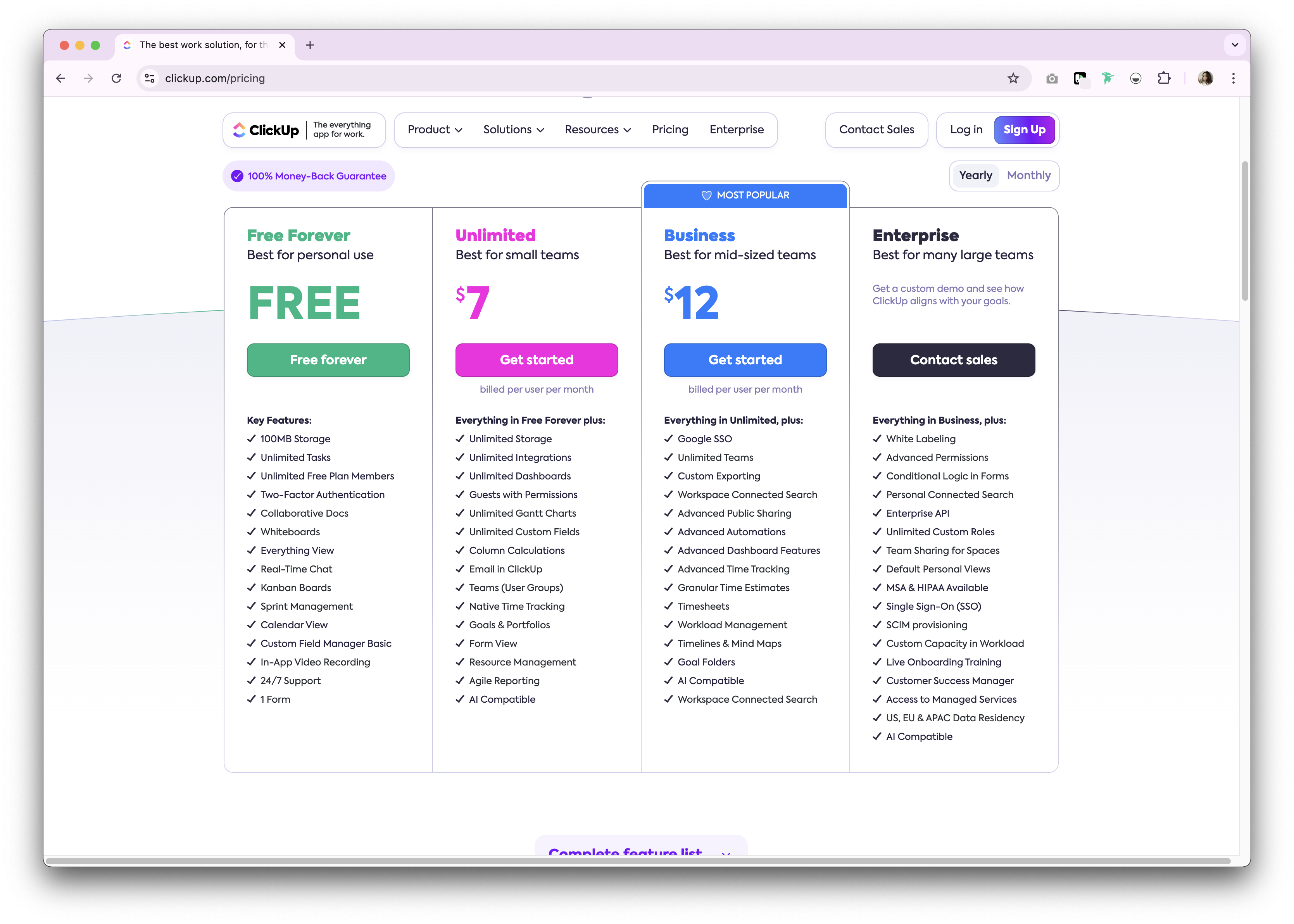
ClickUp bietet einen dauerhaft kostenlosen Tarif für den privaten Gebrauch. Premium sind entweder als Monats- oder Jahresabonnement erhältlich. Im Folgenden finden Sie eine Übersicht über die verfügbaren Jahresabonnements.
- Unbegrenzt: 7 $ pro Benutzer und Monat.
- Geschäftlich: 12 $ pro Benutzer und Monat.
- Unternehmen: Nicht bekannt gegeben.
Wir stellen vor: folk – die beste Alternative zu Salesforce ClickUp
Suchen Sie nach einer erschwinglichen Alternative, die sich perfekt für wachsende Unternehmen mit 20 bis 50 Mitarbeitern eignet? Wir empfehlen folk. Eine mehrfach ausgezeichnete CRM-Plattform, die für ihr benutzerfreundliches Plug-and-Play-CRM-System geschätzt wird, das speziell für mittelgroße Teams entwickelt wurde, die leistungsstarke Funktionen ohne die Komplexität von Großunternehmen benötigen.

.png)
Wichtigste Merkmale
- Benutzerfreundlichkeit und Anpassungsmöglichkeiten: Passen Sie Pipelines, dashboards, Automatisierungen und E-Mail-Sequenzen ganz einfach an, damit Sie sie für Ihren gesamten Vertriebszyklus und Ihr Pipeline-Management sowie für andere Geschäftsbereiche wie Personalbeschaffung, Marketing und mehr nutzen können.
- Social-Media-Integration: Importieren Sie Personen und Unternehmen aus LinkedIn, Sales Navigator, Instagram und X mit nur einem Klick dank der Google Chrome-Erweiterung folk.
- Kontaktsynchronisierung aus Gmail und Outlook: Vollständige E-Mail-Synchronisierung, mit der Benutzer alle Kommunikationen direkt aus dem CRM verwalten können.
- E-Mail-Adressen mit einem Klick finden: Kontaktanreicherung mit Apollo und Dropcontact Sie fehlende Daten mit einem Klick ergänzen können.
- E-Mail-Sequenzen: Versenden Sie E-Mail-Sequenzen mit Erinnerungen, wenn Ihre Leads nicht auf Ihre ersten E-Mails antworten. Dazu gehört eine KI-Integration, mit der Sie E-Mails in großem Umfang personalisieren können.
- Mobile App: Mit der folk können Sie auch unterwegs auf Ihre Kontakte zugreifen und Ihre Beziehungen verwalten.
Preis und Pläne
folk eine 14-tägige kostenlose Testversion. Danach gibt es günstige Monats- oder Jahresabonnements. Das Jahresabonnement sieht wie folgt aus.
- Standard: 20 $ pro Benutzer und Monat.
- Premium: 40 $ pro Benutzer und Monat.
- Benutzerdefiniert: Ab 80 $ pro Benutzer und Monat.

Salesforce . ClickUp: Wie lautet das Urteil?
Es ist offensichtlich, dass sowohl Salesforce ClickUp einzigartige Stärken bieten. Salesforce ein umfassendes Ökosystem und Skalierbarkeit, wodurch es sich ideal für große Unternehmen mit komplexen Anforderungen eignet. Die Vielseitigkeit und Kosteneffizienz von ClickUp eignet sich gut für kleinere Teams, die eine einheitliche Lösung für das Aufgaben- und Projektmanagement suchen. Für wachsende Unternehmen mit 20 bis 50 Mitarbeitern, die einen individuelleren Ansatz für das Beziehungsmanagement benötigen, bietet folk jedoch die optimale Lösung, da es Benutzerfreundlichkeit mit leistungsstarken Anpassungsmöglichkeiten verbindet und speziell für mittelgroße Vertriebsteams entwickelt wurde, die Funktionen auf Unternehmensebene ohne Komplexität oder hohe Kosten wünschen.
👉🏼 Probieren Sie folk aus und erhalten Sie ein benutzerfreundliches, erschwingliches CRM, das Ihr Team in wenigen Minuten einführen kann.
Häufig gestellte Fragen
Ist ClickUp ein CRM?
ClickUp ist ein Projektmanagement-Tool mit einigen CRM-ähnlichen Optionen. Es fehlen native Vertriebspipelines, Kontaktanreicherung und Outreach. Die CRM-Nutzung erfordert benutzerdefinierte Felder, Ansichten und Automatisierungen, wobei die Vertriebsberichterstattung eingeschränkt ist.
Lässt sich ClickUp mit Salesforce integrieren?
Ja. ClickUp bietet eine Salesforce , um Aufgaben mit Opportunities und Konten zu verknüpfen, ClickUp-Aufgaben aus Salesforce zu erstellen und Aktualisierungen zu synchronisieren. Drittanbieter-Konnektoren wie Zapier oder Make können Workflows erweitern.
Wie unterscheiden sich die Preise Salesforce ClickUp?
Salesforce Cloud: Starter 25 $, Pro 80 $, Enterprise 165 $, Unlimited 330 $, Einstein 1 Sales 500 $ pro Benutzer/Monat. ClickUp: Kostenlos; Unlimited 7 $, Business 12 $ pro Benutzer/Monat; Enterprise individuell. Die Preise können je nach Abrechnungszeitraum variieren.
Was ist eine gute Alternative zu Salesforce ClickUp?
folk bietet anpassbare Pipelines, Kontaktanreicherung, E-Mail-Synchronisierung und Sequenzen mit Automatisierung. Jahrespläne: Standard 20 $/Benutzer/Monat, Premium , Individuell ab 80 $, plus eine 14-tägige Testversion. Weitere Informationen finden Sie unter folk.
Entdecken Sie folk
Wie der Verkaufsassistent, den Ihr Team nie hatte