


Entdecken Sie folk das CRM für personenorientierte Unternehmen
LinkedIn für Personalvermittler: Ein praktischer Leitfaden
Die Suche und Anwerbung von Top-Talenten beginnt mit Linkedin for Recruiters. Eine Plattform, auf der 72 % der Personalvermittler nach hochqualifizierten Kandidaten suchen und 75 % einen höheren ROI als bei anderen Kanälen erzielen.
Was Sie lernen werden
- Messaging, das die Antwortraten erhöht
- Erweiterte Suche und Boolesche Taktiken
- Budgetierung und InMail-Verwaltung
- Profiloptimierung zur Steigerung der Sichtbarkeit
Weitere Informationen finden Sie unter LinkedIn-Lead-Generierung.
Warum LinkedIn für die Personalbeschaffung und Talentakquise nutzen?
→ LinkedIn for Recruiters bezeichnet die premium Suite von LinkedIn premium – Tools und Abonnements, die für die Suche, Kontaktaufnahme und Verwaltung von Bewerbern in großem Umfang entwickelt wurden.
Tiefreichweite
→ Mehr als jeder achte Fachmann weltweit ist auf LinkedIn vertreten. Diese Vielzahl an Profilen – von CEOs und Ingenieuren bis hin zu Nischenspezialisten – verschafft Ihnen sofortigen Zugang zu passiven und aktiven Talentpools, die Sie anderswo einfach nicht finden können.
Unübertroffenes Engagement
→ Jeden Tag melden sich 134,5 Millionen Menschen bei LinkedIn an, um Stellenangebote zu prüfen, Erkenntnisse auszutauschen oder neue Möglichkeiten zu erkunden. Durch diese täglichen Berührungspunkte bleiben Sie im Gedächtnis , wenn die richtige Stelle auf ihrem Radar erscheint.
Einstellung von Personalvermittlern
→ Unglaubliche 95 % der Personalvermittler nutzen LinkedIn zur Suche nach Kandidaten, was die Plattform zum Goldstandard für Talentprofis weltweit macht. Wenn Sie sie ignorieren, verpassen Sie die Plattform, auf der sich Ihre idealen Mitarbeiter bereits aufhalten.
Hauptanwendungsfälle für Personalvermittler auf LinkedIn
LinkedIn für Personalvermittler: 10 bewährte Strategien, um die besten Talente zu finden
Strategie 1: Erweiterte Suche auf LinkedIn
→ Die erweiterte Suche auf LinkedIn ist wie eine lasergesteuerte Rakete statt einer Schrotflinte. Anstatt endlos zu scrollen, definieren Sie genau, wen Sie suchen – und LinkedIn liefert Ihnen die Ergebnisse.
Boolesche Genauigkeit
- Begriffe kombinieren: (Java ODER Python) UND „Softwareentwickler“ NICHT „Praktikant“
- Warum funktioniert das? → Sie instantly Junior-Profile heraus und finden Kandidaten mit den spezifischen Fähigkeiten, die Sie benötigen.
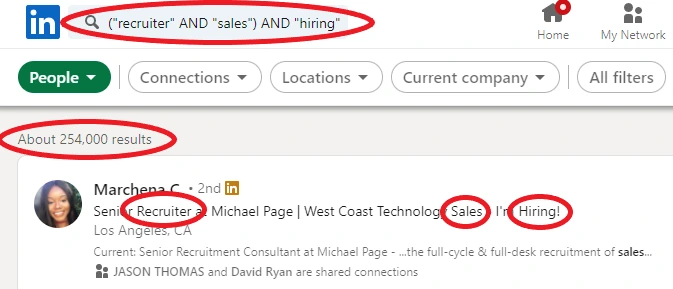
Mehrschichtige Filter
- Standort: Wählen Sie „New York“ (oder einen anderen Ballungsraum) aus, um Zeitzonen und Arbeitsberechtigung zu berücksichtigen.
- Branche und Unternehmensgröße: Zielgruppe sind Kandidaten aus dem Bereich „FinTech“ in Unternehmen mit 50 bis 200 Mitarbeitern, die sich mit Start-ups auskennen.
- Senioritätsstufe: Schließen Sie Einstiegspositionen aus und führen Sie die Stufen „Senior“ oder „Director“ ein, wenn Sie nachgewiesene Führungsqualitäten benötigen.
Speichern, Alarmieren, Wiederholen
- Sobald Sie einen Suchbegriff gefunden haben, klicken Sie auf „Suche speichern“.
- Benachrichtigungen aktivieren: Sobald ein neues Match hinzukommt oder sein Profil aktualisiert, werden Sie benachrichtigt – First-Mover-Vorteil.
Benchmarking von Gleichaltrigen
Suchen Sie nach „Recruiter AND Healthcare“, um zu sehen, wie sich die besten Personalvermittler im Gesundheitswesen präsentieren. Analysieren Sie deren Überschriften und Zusammenfassungen, um Ihre eigenen zu verbessern.
Strategie 2: Schreiben Sie Betreffzeilen, die Aufmerksamkeit erregen
→ Ihre Betreffzeile ist das Tor zu jedem Gespräch. Wenn Sie diese richtig formulieren, kann Ihre InMail-Antwortrate vom Branchendurchschnitt von 15 % auf 25 % oder mehr steigen.
Die Zeichenanzahl ist wichtig
Streben Sie 35–45 Zeichen an. Das passt ohne Kürzungen in mobile Benachrichtigungen.
Persönlich & Spezifisch
- Schlecht: „Stellenangebot“
- Gut: „Herzlichen Glückwunsch zu deiner Java-Zertifizierung, Sara!“
Vorteilsorientierter Teaser
- Rahmen Sie es ein als Frage oder Versprechen:
- „3 Rollen, die zu Ihren React-Kenntnissen passen“
- "Neugierig auf Remote-Entwickler-Positionen?"
A/B-Testroutine
- Teilen Sie Ihre Liste auf: Thema A vs. Thema B, gleicher Nachrichtentext.
- Vergleichen Sie nach 48 Stunden die Öffnungsraten.
- Wiederholen Sie dies monatlich – erstellen Sie eine Sammlung der Gewinner.
💡 Tipp folk : Bei der Rekrutierung von Teams mit 20 bis 50 Mitarbeitern helfen die A/B-Testfunktionen folk dabei, die Performance der Betreffzeilen systematisch zu verbessern. Viele Teams konnten so im Laufe der Zeit eine um 50 % höhere Öffnungsrate erzielen.

Strategie 3: Kontrollieren Sie Ihr Budget, maximieren Sie Ihren ROI
→ Stellen Sie sich Ihr LinkedIn-Abonnement als Keksdose vor. Mit jedem Keks können Sie eine InMail-Nachricht versenden, und jeder Sitzplatz (Lizenz) ist wie eine eigene Dose. So funktionieren die tatsächlichen Zahlen:
Schritt 1: Zählen Sie Ihre Kekse
Überprüfen Sie jeden Monat, wie viele InMails Sie im Vergleich zu Ihrem Kontingent von 30 oder 100 verschickt haben. Wenn Sie diese zu schnell verbrauchen, sind sie vor Monatsende aufgebraucht.
Schritt 2: Geben Sie Ihr Geld sinnvoll aus
Wenn nur 1 von 5 Nachrichten beantwortet wird, haben Sie 5 Cookies für eine Antwort verbraucht. Versuchen Sie, Ihren Betreff oder die erste Zeile zu ändern, damit mehr Leute antworten – und Sie Cookies sparen.
Schritt 3: Gläser teilen oder umstellen
Wenn Sie drei Plätze haben, aber ein Teamkollege seinen nicht nutzt, geben Sie seine Kekse an jemanden weiter, der mehr braucht. Kein Keks sollte ungenutzt bleiben!
Schritt 4: Messen Sie Ihre Preise
Am Ende des Monats dividieren Sie die Anzahl der Einstellungen durch die Gesamtkosten Ihrer Arbeitsplätze.
Beispiel: Ein Pro-Platz (825 $) führte zu 5 Einstellungen → 165 $ pro Einstellung.
Wenn Ihre Kosten pro Einstellung zu hoch sind, passen Sie Ihre Nachrichten an oder erwägen Sie einen Wechsel von Pro zu Lite (oder umgekehrt).
Strategie 4: Das beste CRM für die Personalbeschaffung auf LinkedIn
→ Durch die Verbindung von LinkedIn mit einem CRM wird jedes Profil, das Sie sich ansehen, zu einem aktiven, umsetzbaren Lead – kein Kopieren und Einfügen oder verlorene Notizen mehr.
✔️ Mit einem Klick Instantly den Namen, den Titel, die E-Mail-Adresse, das Unternehmen und die Firmografien eines Kandidaten Instantly in Ihr CRM Instantly .
✔️ Verschieben Sie neue Kontakte automatisch durch eine „kalt → warm → heiß“-Pipeline und lösen Sie Erinnerungen oder E-Mail-Sequenzen aus.
✔️ Stellen Sie Ihrem gesamten Team ein einziges gemeinsames Board zur Verfügung, damit niemand zweimal Kontakt aufnehmen muss oder eine Nachverfolgung verpasst.
👉🏼 Probieren Sie folk aus, um die Nachverfolgung von Bewerbern zu organisieren und keine Antwort auf LinkedIn zu verpassen.
Die Chrome-Erweiterung folkX erfasst und ergänzt LinkedIn-Kontakte (und alle anderen Webkontakte) im Kontext und synchronisiert sie instantly folk . So verlieren Sie keinen Kandidaten mehr.🔥
👉🏼 Probieren Sie folk aus, um kontaktbasierte Erinnerungen mit Ihrem Team zu verwalten und schneller neue Mitarbeiter einzustellen.
Für Rekrutierungsteams mit 20 bis 50 Mitarbeitern sind die einfache Benutzeroberfläche, die Kanban-Pipelines und die integrierten Abläufe folk ideal geeignet, um den Personalvermittlern jede Woche viele Stunden Arbeit zu ersparen und gleichzeitig alle Beteiligten auf dem Laufenden zu halten. Sind Sie bereit, schneller einzustellen? 👉 Starten Sie Ihre kostenlose 2-wöchige Testphase und rekrutieren Sie noch heute die besten Kandidaten auf LinkedIn.
Strategie 5 (Bonus): Technische Fähigkeiten über LinkedIn hinaus unter Beweis stellen
→ LinkedIn hilft zwar dabei, vielversprechende Kandidaten zu finden, sagt aber nichts über die tatsächlichen technischen Fähigkeiten aus. Ein gut ausgearbeitetes Profil, überzeugende Empfehlungen oder eine beeindruckende Berufsbezeichnung können eine praktische technische Beurteilung nicht ersetzen.
Bei internationalen oder kundenorientierten Positionen überprüfen Personalvermittler möglicherweise auch die Englischkenntnisse jedes Bewerbers anhand eines anerkannten Zertifikats, insbesondere wenn eine klare Kommunikation über Ländergrenzen hinweg Teil der Tätigkeit ist.
Bei Stellen im Bereich Softwareentwicklung, KI und maschinelles Lernen sollten Sie die Kandidatenauswahl über LinkedIn mit strukturierten technischen Tests kombinieren, bevor Sie Kandidaten in die nächste Runde aufnehmen.
Ein praktischer Ansatz besteht darin:
- Nutzen Sie LinkedIn, um geeignete Kandidaten zu finden.
- Starten Sie Gespräche mit personalisierten Kontaktaufnahmen.
- Bewerten Sie technische Fähigkeiten anhand von Programmieraufgaben, Pair-Programming-Sitzungen oder Hackathons für Ingenieure.
- Vergleichen Sie die Bewerber anhand objektiver Leistungen und nicht nur anhand ihrer Lebensläufe.
Unternehmen, die hochspezialisierte Ingenieursstellen besetzen, arbeiten häufig mit technischen Personalvermittlungspartnern wie Iterate zusammen, die das Fachwissen von Personalvermittlern mit Hackathons für Ingenieure kombinieren, um Entwickler zu finden, die unter realen Bedingungen überzeugen können – und nicht nur im Vorstellungsgespräch gut abschneiden.
Dieser Ansatz reduziert die Anzahl der Fehlalarme, verbessert die Qualität der Personalauswahl und trägt dazu bei, dass die Entwicklerteams weniger Zeit damit verbringen, Bewerber zu interviewen, die fachlich nicht zu uns passen.
Schlussfolgerung
Durch die Kombination aus präzisen Suchanfragen, aufmerksamkeitsstarken Nachrichten, einem lebendigen Profil und einer bewussten Budgetkontrolle wird LinkedIn for Recruiters weit mehr als nur eine Plattform – es wird zu Ihrem persönlichen Talent-Motor. Sie haben gesehen, wie boolesche Suchanfragen genau die richtigen Kandidaten herausfiltern, wie Betreffzeilen Gespräche anregen können und wie ein aktualisiertes Profil Top-Talente dazu einlädt, bei Ihnen anzuklopfen. Die Verwaltung von InMail-Guthaben wie Cookies stellt sicher, dass Ihnen nie das Guthaben ausgeht, bevor Sie Ihren nächsten Mitarbeiter eingestellt haben. Für mittelgroße Recruiting-Teams mit 20 bis 50 Mitarbeitern ist folk die beste CRM-Lösung für die effiziente Verwaltung von LinkedIn-Recruiting-Workflows. folk optimiert die Kandidatenverfolgung und die Zusammenarbeit im Team, zusammen mit anderen Tools wie ATZ CRM.
Häufig gestellte Fragen
Was ist eine gute InMail-Antwortrate auf LinkedIn?
Streben Sie 20–25 % an. Unter 15 % deutet auf eine schlechte Zielgruppenansprache oder einen schlechten Text hin. Verwenden Sie Betreffzeilen mit 35–45 Zeichen, personalisieren Sie den Einstieg und testen Sie zwei Betreffzeilen im A/B-Test, um die Antwortrate zu erhöhen.
Wie viele gespeicherte Suchen sollten Personalvermittler durchführen?
Behalten Sie 5–7 aktive gespeicherte Suchanfragen bei. Weniger Suchanfragen verringern das Risiko, Nischentalente zu übersehen; mehr Suchanfragen führen zu einer Überflutung mit Benachrichtigungen. Aktivieren Sie Benachrichtigungen und verfeinern Sie die Booleschen Operatoren, um qualitativ hochwertige Ergebnisse zu erhalten.
Wie werden die Kosten pro Einstellung bei LinkedIn berechnet?
Kosten pro Einstellung = Gesamtkosten für LinkedIn ÷ über LinkedIn im Zeitraum eingestellte Mitarbeiter. Verfolgen Sie auch die Antwortrate, qualifizierte Vorstellungsgespräche und die Zeit bis zur Einstellung. Verwenden Sie ein CRM wie folk , um Ergebnisse zu erfassen und zuzuordnen.
Was ist eine gute Zahl für Impressionen auf LinkedIn?
Es gibt keine allgemeingültige Zahl. Orientieren Sie sich an der Größe Ihrer Zielgruppe und früheren Beiträgen. Verfolgen Sie die Impressionen pro Beitrag und die Interaktionsrate (1–3 % sind üblich). Streben Sie ein stetiges Wachstum durch regelmäßige Beiträge, klare Aufhänger und relevante Themen an.
Entdecken Sie folk
Wie der Verkaufsassistent, den Ihr Team nie hatte