


Entdecken Sie folk das CRM für personenorientierte Unternehmen
In der schnelllebigen Welt der Agenturarbeit ist ein optimierter Ansatz für das Kundenbeziehungsmanagement entscheidend für den Erfolg. Agenturen benötigen nicht nur Tools, sondern Lösungen, die eine konsistente Pipeline-Ausführung und eine nahtlose Projektabwicklung gewährleisten. Wenn wichtige Informationen über Interessenten und Kunden über verschiedene Plattformen verstreut sind – E-Mails, Kalender, Tabellen –, kann es leicht passieren, dass Follow-ups unter den Tisch fallen, Übergaben behindert werden und Prognosen zu reinen Spekulationen werden. Ein gut implementiertes CRM für Agenturen muss nicht nur Neugeschäfte beschleunigen, sondern auch ausreichend Kontoverläufe speichern, um Verlängerungen, Upsells und Weiterempfehlungen zu erleichtern.
Zwei bedeutende Akteure im CRM-Bereich, Copper monday.com, gehen diese Herausforderung aus unterschiedlichen Perspektiven an. Copper, das für die nahtlose Integration in Google Workspace entwickelt wurde, legt den Schwerpunkt auf einen kontextbezogenen Ansatz für das Beziehungsmanagement in vertrauten Umgebungen wie Gmail und Google Kalender. monday.com hingegen bietet eine flexible Plattform für Agenturen, die einen anpassbaren Arbeitsbereich zur Modellierung ihrer Vertriebs- und Betriebsabläufe suchen.
Die Wahl zwischen diesen Optionen hängt von den spezifischen Anforderungen Ihrer Agentur ab – sei es die Notwendigkeit einer Google-zentrierten Funktionalität oder der Wunsch nach einer anpassungsfähigeren, projektzentrierten Benutzeroberfläche. Das Verständnis der wesentlichen Unterschiede zwischen Copper monday.com kann Agenturen dabei helfen, das richtige CRM auszuwählen, das ihren betrieblichen Anforderungen und Anpassungsbedürfnissen entspricht.
Funktionsvergleich zwischen Copper monday
Was ist Copper?
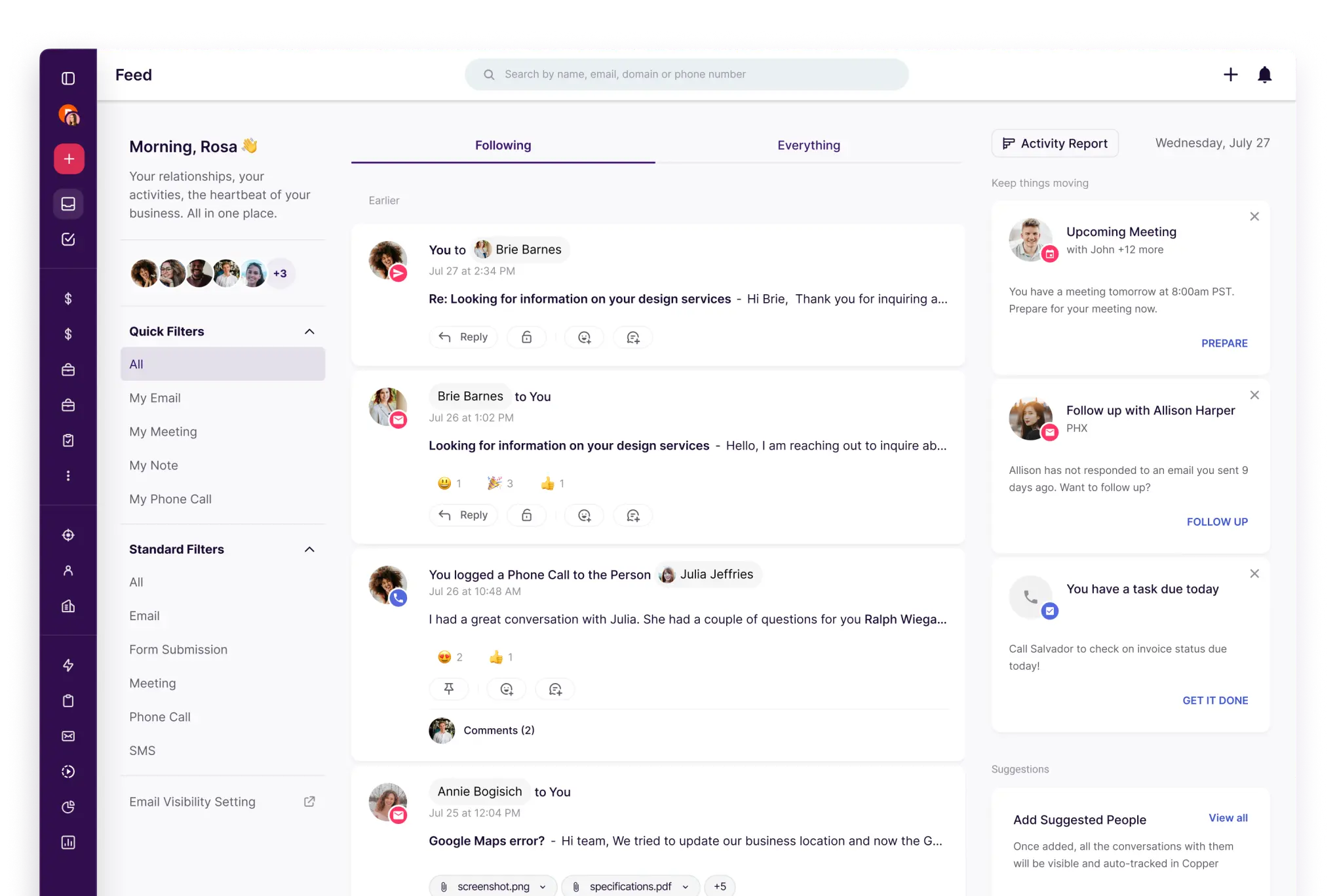
Copper ein CRM-System, das sich nahtlos in Google Workspace integrieren lässt und es Benutzern ermöglicht, ihre CRM-Aufgaben direkt in Gmail und Google Kalender zu verwalten. Damit eignet es sich ideal für Agenturen, die hauptsächlich über Google-Tools kommunizieren und Termine planen, und bietet ein strukturiertes CRM-Erlebnis, ohne die täglichen Abläufe drastisch zu verändern. Die Plattform ermöglicht es Benutzern, Opportunities über Pipelines zu verfolgen und gleichzeitig den Beziehungskontext über Kontakt- und Kontodaten zu pflegen. Mit Optionen für die Automatisierung von Arbeitsabläufen und Integrationen minimiert es repetitive Verwaltungsaufgaben basierend auf Ihrer Konfiguration. Copper perfekt für Teams, die einen Google-zentrierten Workflow suchen, der durch eine CRM-Organisation ergänzt wird.
Was ist Montag?

monday CRM ein vielseitiges Tool, das auf monday.com-Boards basiert und anpassbare Spalten und Ansichten bietet, um Vertriebs- und Kunden-Workflows effektiv zu modellieren. Es eignet sich besonders für Agenturen, die monday.com bereits für die Projektabwicklung nutzen, da es ihnen ermöglicht, Vertrieb, Onboarding und Kundenbetreuung in einem gemeinsamen Arbeitsbereich darzustellen. Mit Pipeline-Ansichten und dashboards verbesserte Transparenz bietet die Plattform auch Automatisierungsfunktionen, die Übergaben und Erinnerungen basierend auf Statusaktualisierungen unterstützen. Dank seiner Integrationsfähigkeit mit Marketing-, Formular- und Kommunikationstools ist es eine beliebte Wahl für diejenigen, die Flexibilität und Workflow-Modellierung gegenüber traditionellen CRM-Strukturen priorisieren.
Funktionsvergleich zwischen Copper monday
Mehrere Pipelines und benutzerdefinierte Stufen
Copper die Erstellung mehrerer Pipelines, um unterschiedliche Phasenabläufe für verschiedene Prozesse zu berücksichtigen. Sie können die Pipeline-Phasen bearbeiten, um sicherzustellen, dass das Opportunity-Board mit der Art und Weise übereinstimmt, wie eine Agentur die Arbeit für jede Aufgabe qualifiziert, definiert und abschließt. Durch die Einrichtung separater Pipelines können Sie Verlängerungen, Retainer und projektbasierte Verkäufe effektiv unterscheiden und dabei dasselbe CRM-Datenmodell verwenden. Änderungen lassen sich einfach in den Pipeline-Einstellungen verwalten und gelten speziell für die ausgewählte Pipeline.
In der Regel monday CRM die Einrichtung der Pipeline in monday CRM auf dem Deals-Board, wo Deals eine Reihe klar definierter Phasen durchlaufen. Diese Phasen können an den Vertriebsprozess einer Agentur angepasst werden, und die Pipeline-Ansicht bietet eine visuelle Darstellung des Fortschritts in jeder Phase. Verschiedene Workflows können durch die Organisation separater Boards und Phasenstrukturen auf der Grundlage der Kontoorganisation modelliert werden, wobei die Phasenlogik mit der Konfiguration des Boards und seiner Spalten verbunden bleibt.
Verfolgung von Kunden- und Geschäftsaktivitäten
Copper den Kontext von Geschäften Copper , indem es gängige Google Workspace-Tools integriert und Einblicke in die damit verbundenen Kommunikationen und Aktivitäten rund um Kontakte und Verkaufschancen bietet. Mit der Kalendersynchronisierung können Sie Ereignisse zwischen Copper Google Kalender erstellen und synchronisieren, sodass Änderungen auf beiden Plattformen basierend auf der ausgewählten Synchronisierungsfunktion angezeigt werden. Sie können auch die Aktivitäten und die Beziehungshistorie in den Datensätzen überprüfen, was eine nahtlose Übergabe erleichtert und die nächsten Schritte für Konten und Verkaufschancen umreißt.
In monday CRM wird die Aktivitätsverfolgung über E-Mails und Aktivitäten verwaltet, wobei Gmail oder Outlook verknüpft werden, um Kommunikationen zu protokollieren und auf einer Zeitachse darzustellen. Diese Funktion unterstützt die Protokollierung und Verfolgung von E-Mails sowie Aktivitätstypen wie Besprechungsnotizen, Anrufzusammenfassungen und mehr. Sie können auch benutzerdefinierte Aktivitäten hinzufügen, um sicherzustellen, dass das Aktivitätsprotokoll mit der Dokumentation der Kundeninteraktionen Ihrer Agentur übereinstimmt, sodass die Zeitachse zu einer zentralen Anlaufstelle für die Überprüfung vergangener Aktionen und die Planung zukünftiger Aktionen wird.
Automatisierung und Arbeitsabläufe
Copper basiert auf anpassbaren dashboards, Kennzahlen und Erkenntnissen, die einfach geteilt oder exportiert werden können, einschließlich Optionen zum Versenden per E-Mail oder zum Exportieren dashboards Teil von Berichtsworkflows. Der Einrichtungsprozess umfasst dashboard , Filter und Bearbeitungssteuerelemente, mit denen Benutzer KPIs und Ansichten basierend auf den überwachten Pipeline- und Aktivitätsdaten personalisieren können. Darüber hinaus sind geplante Zustellungen und Benachrichtigungen integraler Bestandteil der Berichtsfunktionen.
In monday CRM verwenden Automatisierungsregeln Trigger-Aktions-Rezepte, die auf verschiedene Änderungen reagieren, wie Statusaktualisierungen, Fälligkeitstermine, Elementerstellung und Board-Bewegungen. Diese Automatisierungen können Benachrichtigungen senden, Aufgaben zuweisen, Felder aktualisieren und neue Elemente basierend auf festgelegten Bedingungen erstellen. Sie werden häufig eingesetzt, um Übergaben zu standardisieren, wenn ein Geschäft verschiedene Phasen durchläuft, oder um Folgeaufgaben zu generieren, wenn Fristen näher rücken. Die spezifischen Maßnahmen hängen vom ausgewählten Rezept und der Konfiguration der Spalten ab.
Berichterstattung und Analyse
Das Berichtssystem Copper basiert auf anpassbaren dashboards, Kennzahlen und Erkenntnissen, die sich leicht teilen oder exportieren lassen, einschließlich Optionen zum Versenden per E-Mail oder zum Exportieren dashboards Teil Ihrer Berichtsabläufe. Die Einrichtung für die Berichterstellung umfasst dashboard , Filter und Bearbeitungswerkzeuge, mit denen Sie KPIs und Ansichten entsprechend den überwachten Pipeline- und Aktivitätsdaten anpassen können. Darüber hinaus verbessern geplante Zustellungen und Benachrichtigungen die Berichtsfunktionen.
In monday CRM werden Berichte in erster Linie mithilfe von dashboards erstellt, dashboards Daten aus einem oder mehreren Boards aggregieren und über verschiedene Widgets wie Diagramme und Tabellen anzeigen. Diese dashboards eine Echtzeitüberwachung, während Berichte eine tiefergehende Analyse bieten, die je nach spezifischen Workflows auf Abruf generiert werden kann. Die Sichtbarkeit der Pipeline wird durch die Struktur des Deals-Boards und die für die Visualisierung im dashboard ausgewählten Metriken beeinflusst. Die Zugriffs- und Freigabeoptionen werden durch Kontoberechtigungen und dashboard geregelt.
Integrationen und Datenhygiene
Copper Integrationen mit gängigen Tools, darunter eine Zapier-Integration, die Copper einer Vielzahl externer Anwendungen für Automatisierung und Datenübertragung verbindet. Um die Datenhygiene zu gewährleisten, Copper einen Workflow zur Verwaltung von Duplikaten, mit dem Teams doppelte Personen, Unternehmen oder Leads identifizieren und zusammenführen können. So wird sichergestellt, dass die Kontakthistorie und der Account-Kontext immer mit einem einzigen Datensatz verknüpft bleiben, wenn durch Importe oder manuelle Eingaben Duplikate entstehen.
Für monday CRM können Integrationen über native Konnektoren und externe Automatisierungsplattformen wie Zapier eingerichtet werden, wodurch die Synchronisierung von Elementen und das Auslösen von Workflows über verschiedene Anwendungen hinweg ermöglicht wird. Die Dokumentation von monday.com betont die CRM-Integration als Mittel zur Synchronisierung von Kundendaten über verschiedene Geschäftstools hinweg, wodurch die manuelle Dateneingabe minimiert wird. Darüber hinaus verfügt monday.com über eine Funktion zum Verwalten von Duplikaten, mit deren Hilfe doppelte Elemente auf Boards identifiziert und entfernt werden können. Dies ist besonders wichtig, wenn Leads durch Importe oder Integrationen generiert werden. Die Sauberkeit der Daten hängt in hohem Maße vom Design der Board-Strukturen und dem Fluss der eingehenden Daten ab.
folk: Das beste CRM für Agenturen im Jahr 2026!
folk ein KI-gestütztes CRM-System, das entwickelt wurde, um die Kontaktverwaltung, Konversationen und den Kontext von Geschäften zu optimieren, ohne die Benutzer mit komplizierten Einstellungen zu belasten. Es richtet sich an Agenturteams, in denen mehrere Mitglieder während der gesamten Akquise, Einarbeitung, Lieferung und Verlängerung mit demselben Konto arbeiten. Dieses System führt eine übersichtliche Historie der Beziehungen und stellt so sicher, dass Übergaben nicht von Gedächtnis oder verstreuten Notizen abhängig sind.
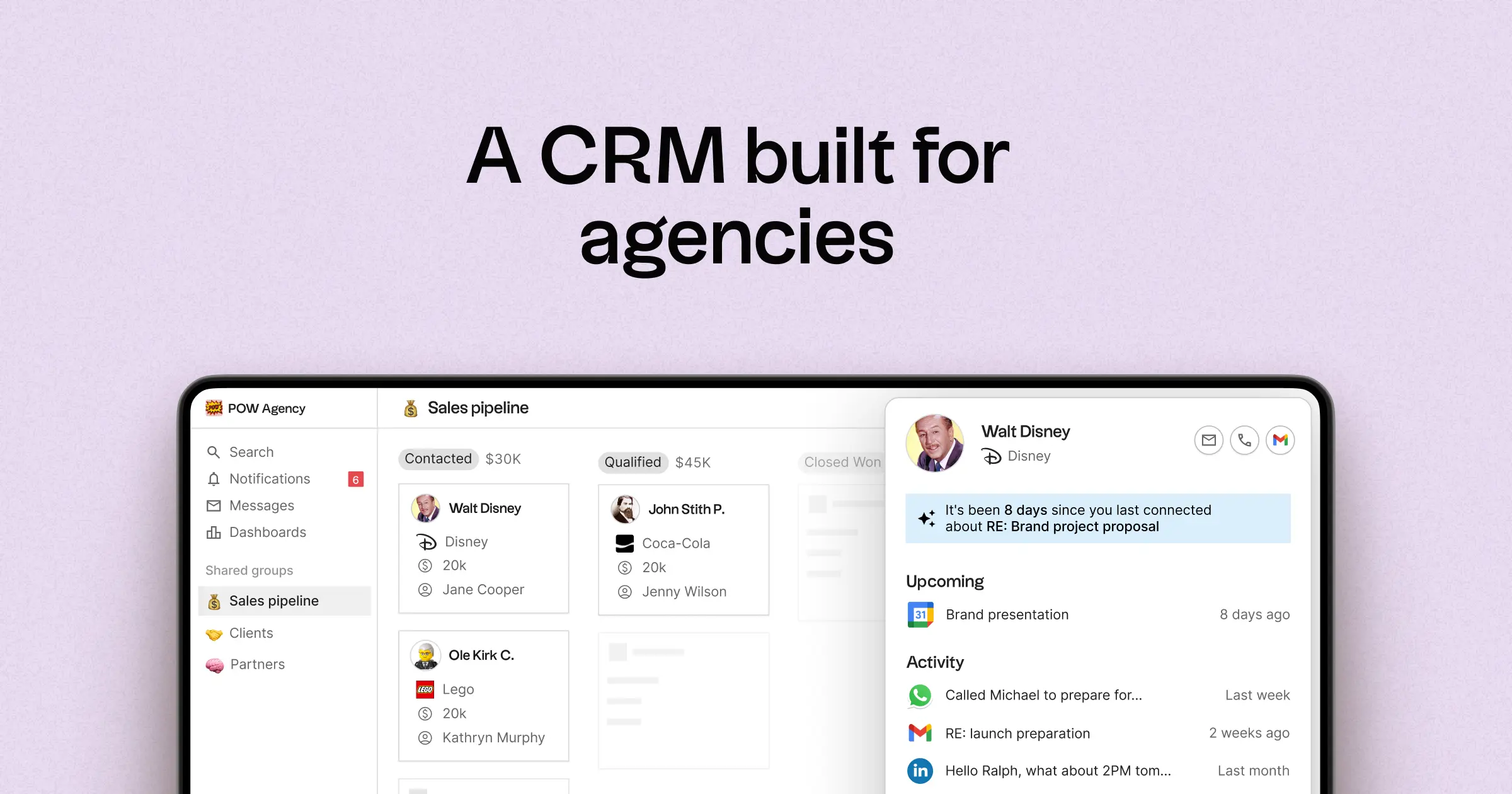
- Multi-Pipeline-Funktionalität und anpassbare Phasen für verschiedene Agenturaufgaben
- Kontakt- und Geschäftszeitpläne, die die Interaktionshistorie an einem Ort zusammenfassen
- E-Mail- und Kalendersynchronisierung, um Konversationen mit den entsprechenden Datensätzen zu verknüpfen
- Aufgabenverwaltung, Erinnerungen und Nachverfolgung, um standardisierte nächste Schritte sicherzustellen
- Ansprechpartner-Anreicherung, um fehlende Unternehmens- und Kontaktinformationen zu vervollständigen
- Tools zur Deduplizierung, um doppelte Datensätze zusammenzuführen und eine saubere Datenbank zu pflegen
- Leicht verständliche Pipeline-Berichte zur Verfolgung des Status der einzelnen Phasen und des Fortschritts der Geschäfte
- Integrationen und Automatisierungs-Konnektoren zur Minimierung manueller Aktualisierungen
- Mobilzugriff – einefolk App für iOS und Android, mit der Sie Kontakte, E-Mails und Aufgaben auch unterwegs verwalten können
Für Agenturen liegt der Hauptvorteil darin, dass sie Klarheit über alle laufenden Beziehungen gewinnen. Pipelines können verschiedene Einnahmequellen wie Retainer, Projekte, Partnerschaften und Empfehlungen darstellen, während Aufgaben und Erinnerungen dazu beitragen, eine konsistente Nachverfolgung im gesamten Team sicherzustellen. Funktionen zur Datenbereinigung wie Anreicherung und Deduplizierung verhindern doppelte Datensätze und füllen fehlende Felder aus, sodass die Pipeline-Berichterstattung langfristig zuverlässig bleibt.
Schlussfolgerung
Zusammenfassend lässt sich sagen, dass Copper durch seine nahtlose Integration in Google Workspace Copper und sich somit ideal für Teams eignet, die intensiv mit Gmail und Kalender arbeiten. monday.com bietet unübertroffene Flexibilität und ermöglicht umfangreiche Anpassungen für Agenturen, die Projekt-Workflows priorisieren. Allerdings folk als bestes CRM für Teams hervor, die auf eine robuste E-Mail-Integration, Automatisierung und Sequenzierung angewiesen sind. Mit seinen KI-gestützten Funktionen, Multi-Pipeline-Funktionalität und überlegener Datenhygiene folk operative Klarheit und nahtlose Übergaben und ist damit die ultimative Wahl für Agenturen, die sich auf das Beziehungsmanagement konzentrieren.
Starten Sie noch heute Ihre 14-tägige kostenlose Testversion oder vereinbaren Sie eine Demo.
Häufig gestellte Fragen
Welches CRM eignet sich am besten für Agenturen, die Google Workspace nutzen?
Copper am besten für Google-orientierte Agenturen, da es sich direkt in Gmail und Google Kalender integrieren lässt und so den CRM-Kontext in vertrauten Tools beibehält.
Welches CRM eignet sich am besten für Agenturen, die flexible Projektabläufe benötigen?
monday CRM monday.com) eignet sich am besten für Agenturen, die hochgradig anpassbare Boards, Spalten und Ansichten benötigen, um Vertriebs-, Onboarding- und Liefer-Workflows innerhalb eines gemeinsamen Arbeitsbereichs abzubilden.
Welche Vorteile folk im Vergleich zu Copper Monday?
folk KI-gestützte Automatisierung und eine zuverlässige E-Mail-/Kalender-Integration sowie Unterstützung für mehrere Pipelines und Tools zur Datenbereinigung wie Anreicherung und Deduplizierung, um eine übersichtliche Beziehungshistorie und reibungslosere Übergaben zu gewährleisten.
Lernen Sie „ folk “ kennen – das KI-gestützte CRM für Ihren gesamten Vertriebsprozess.