


Entdecken Sie folk das CRM für personenorientierte Unternehmen
Startups in der Frühphase befinden sich in einem ständigen Wettlauf gegen die Zeit, und oft ist es nicht das Produkt, das dazu führt, dass ihnen Geschäfte durch die Lappen gehen. Vielmehr sind verpasste Chancen häufig das Ergebnis von verstreuten Nachverfolgungen in Posteingängen, Tabellenkalkulationen und Messaging-Plattformen. Ein CRM für Startups kann dieses Problem effektiv lösen, indem es sicherstellt, dass jede Interaktion, jeder nächste Schritt und jeder Verantwortliche sichtbar und organisiert bleibt.
In diesem Artikel werden wir zwei beliebte CRM-Lösungen untersuchen –Salesforce Zoho –, die jeweils auf unterschiedliche Geschäftsanforderungen und Philosophien zugeschnitten sind. Salesforce bekannt für seine robusten Funktionen, Anpassungsmöglichkeiten und Governance-Funktionen, die komplexe Umsatzvorgänge unterstützen, und eignet sich daher ideal für größere Startups. Zoho hingegen bietet eine kostengünstige und vielseitige Lösung, die Automatisierung und Anpassbarkeit in Einklang bringt und sich perfekt für Teams eignet, die über einfache Tools hinausgewachsen sind, aber noch nicht bereit für eine Plattform auf Unternehmensebene sind.
Dieser Vergleich befasst sich mit den Unterschieden zwischen diesen beiden CRM-Systemen und ihren jeweiligen Vorteilen für den täglichen Betrieb: Kontaktdatenerfassung, Pipeline-Management, Automatisierung, Übersichtlichkeit der Berichterstellung und die Auswirkungen auf die Gesamtkosten bei Wachstum Ihres Teams.
Was ist Salesforce?
Salesforce ein robustes CRM-System, das speziell auf Unternehmen zugeschnitten ist und den Schwerpunkt auf umfassende Anpassungsmöglichkeiten, Governance und komplexe Umsatzabläufe legt. Es eignet sich ideal für Start-ups, die einfachere Tools hinter sich gelassen haben und nun strenge Berechtigungen, erweiterte Berichterstellung und benutzerdefinierte Workflows benötigen, die mehrere Teams umfassen. Die Plattform unterstützt durch benutzerdefinierte Objekte und Automatisierung nahezu jedes Datenmodell und verfügt über ein umfangreiches Ökosystem von Anwendungen und Partnern auf dem US-Markt. Allerdings sind sowohl die Implementierung als auch der laufende Verwaltungsaufwand in der Regel höher als bei den meisten anderen CRM-Systemen, was zu schnell steigenden Kosten führen kann.

Was ist Zoho ?
Zoho bietet eine vielseitige Lösung, die ein Gleichgewicht zwischen Automatisierung, Anpassbarkeit und Erschwinglichkeit herstellt und sich an wachsende Startups richtet. Es eignet sich gut für Teams, die mehr Kontrolle über ihre Arbeitsabläufe benötigen als einfache CRMs bieten können, aber noch nicht bereit sind für vollständige Unternehmenslösungen. Zoho wichtige Funktionen wie Pipelines, Prognosen und E-Mail-Tracking und bietet umfangreiche Anpassungsmöglichkeiten durch verschiedene Felder und Module. Es lässt sich nahtlos in die umfassendere Zoho integrieren, die mit dem Wachstum des Unternehmens mehrere Tools effektiv ersetzen kann. Die Benutzeroberfläche kann jedoch etwas unübersichtlich wirken, und erweiterte Funktionen sind oft auf höhere Stufen oder zusätzliche Add-ons beschränkt.
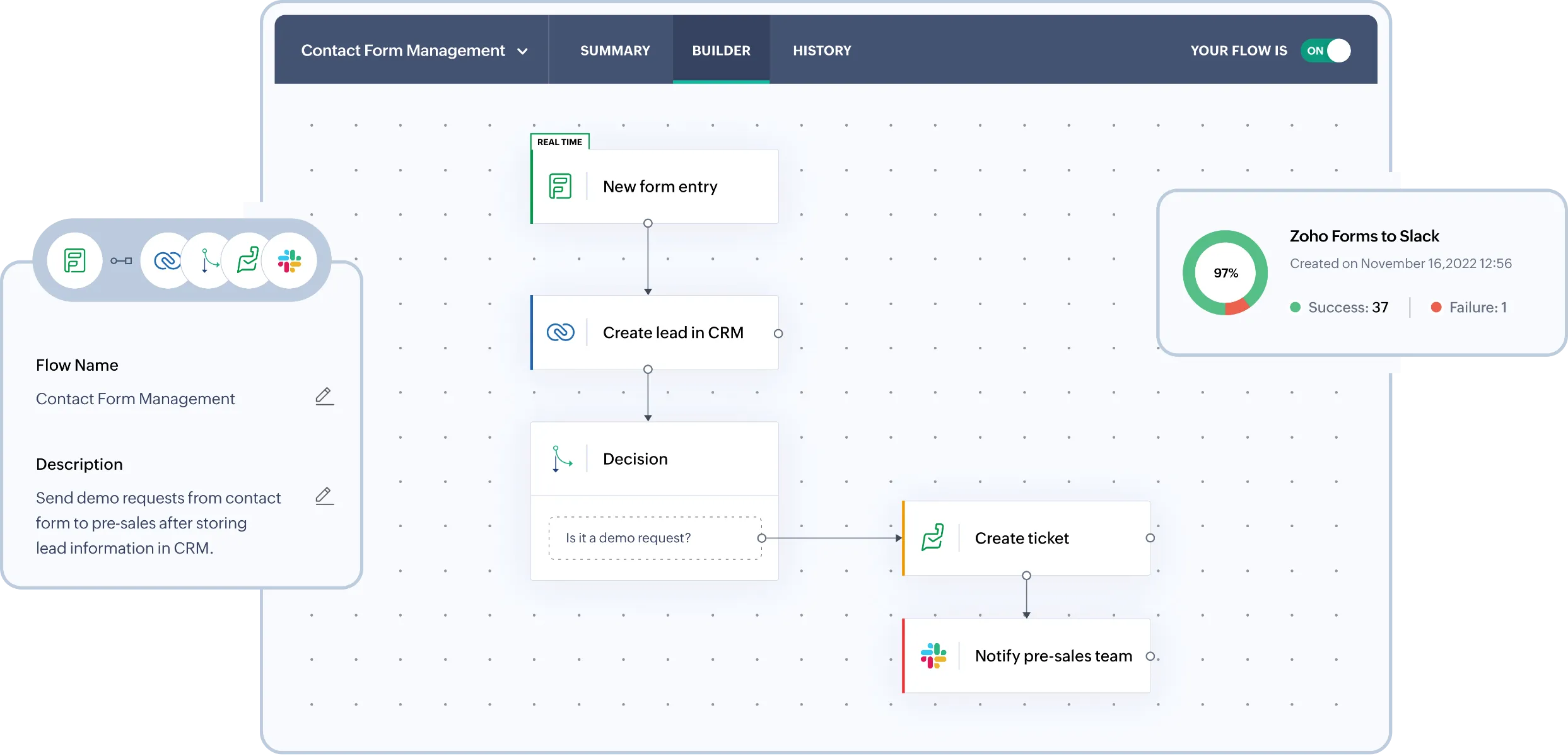
Funktionsvergleich zwischen Salesforce Zoho
E-Mail- und Kalendersynchronisierung
Salesforce eine nahtlose Integration von Posteingang und Kalender über Outlook und Gmail, ergänzt durch Einstein Activity Capture, das E-Mails und Ereignisse automatisch in der Aktivitätszeitleiste protokolliert. Diese protokollierten Aktivitäten können mit zugehörigen Datensätzen wie Kontakten, Leads und Opportunities verknüpft werden, sodass der Kontext klar bleibt, ohne dass ständig manuelle Eingaben erforderlich sind. Diese Konfiguration ist besonders vorteilhaft für Vertriebsteams, die stark auf E-Mails und Besprechungen angewiesen sind, da sie CRM-Transparenz in Verbindung mit echten Interaktionen bietet. In der Regel kümmert sich ein Administrator um die Konfiguration und die Berechtigungen, um die Governance-Anforderungen zu erfüllen.
Zoho ermöglicht die E-Mail-Synchronisierung mit Gmail über IMAP, POP3 oder die Gmail-API und stellt so sicher, dass Nachrichten mit den entsprechenden Leads und Kontakten verknüpft bleiben. Teams können E-Mails direkt im CRM senden, lesen und verfolgen und so den Konversationsverlauf an einem Ort zusammenfassen. Dies minimiert den Bedarf an manueller Protokollierung und sorgt dafür, dass Pipeline-Überprüfungen die tatsächlichen Kontaktbemühungen widerspiegeln. Damit ist es ideal für Startups, die einen in den Posteingang integrierten Workflow bevorzugen, ohne den ganzen Tag über zwischen verschiedenen Tools wechseln zu müssen.
Kontaktdaten bereinigen mit Anreicherung und Deduplizierung
Salesforce eine integrierte Duplikatsverwaltung durch Abgleich- und Duplikatsregeln, die doppelte Datensätze effektiv identifizieren und verhindern. Je nach Konfiguration können diese Regeln Benutzer benachrichtigen, das Speichern von Datensätzen blockieren oder potenzielle Duplikate zur Überprüfung weiterleiten. Zur Datenanreicherung Salesforce Data Cloud-Anreicherungen und integriert AppExchange-Datenanbieter, um Unternehmens- und Kontaktattribute anzuhängen. So wird sichergestellt, dass die Datensätze umfassend bleiben und die Fragmentierung zwischen den Teams minimiert wird.
Ebenso bietet Zoho Tools zur Duplikatsverwaltung, mit denen doppelte Datensätze identifiziert und zusammengeführt werden können, wodurch die Datenbanken auch bei zunehmenden Importen und Integrationen übersichtlich bleiben. Benutzer können Duplikatsprüfungen konfigurieren, um sicherzustellen, dass wichtige Felder eindeutig bleiben, und Duplikate markieren, bevor sie sich vermehren. Datensätze können aus Listenansichten dedupliziert oder bei Überschneidungen direkt aus einzelnen Datensätzen zusammengeführt werden, wodurch fragmentierte Zeitachsen verhindert und eine zuverlässige Segmentierung und Berichterstellung bei der Skalierung der Datenbank gewährleistet werden.
Flexible Pipelines und Ansichten
Salesforce die Zusammenarbeit durch die direkte Integration von Chatter in Datensätze, sodass Aktualisierungen, Diskussionen und Datensatzkontexte an einem praktischen Ort gespeichert werden können. Teams können Datensätze innerhalb von Chatter-Gruppen austauschen, um gezielte Diskussionen und Abstimmungen zu bestimmten Konten oder Verkaufschancen zu führen. Mit Aufgaben, Notizen und Aktivitätsverlauf gibt es eine gemeinsame operative Ebene, die nahtlose Übergaben und funktionsübergreifende Transparenz ermöglicht, während Berechtigungen und Freigabekontrollen sicherstellen, dass die Zusammenarbeit den Sicherheitsanforderungen entspricht.
Zoho bietet strukturierte Vertriebsprozesse durch Deals, Phasen und anpassbare Pipelines, die auf verschiedene Start-up-Aktivitäten zugeschnitten sind. Teams können Felder und Layouts anpassen, um relevante Signale zu verfolgen, ohne durch einen einheitlichen Ansatz eingeschränkt zu sein. Ansichten, Filter und Module ermöglichen es Teams, sich auf Pipeline-Elemente mit hoher Priorität zu konzentrieren, sodass das System mit dem Wachstum des Teams von einem einfachen Trichter zu stärker segmentierten Prozessen skaliert werden kann.
Teamzusammenarbeit
Salesforce die Zusammenarbeit an Datensätzen über Chatter, sodass Aktualisierungen, Diskussionen und Kontextinformationen nahtlos nebeneinander existieren können. Benutzer können Datensätze innerhalb von Chatter-Gruppen teilen und so Teamdiskussionen und die Koordination rund um bestimmte Konten oder Opportunities fördern. Mit Aufgaben, Notizen und Aktivitätsverlauf profitieren Teams von einer einheitlichen Betriebsebene, die Übergaben und funktionsübergreifende Transparenz unterstützt, während Berechtigungen und Freigabekontrollen sicherstellen, dass die Zusammenarbeit den Sicherheitsprotokollen entspricht.
Im Gegensatz dazu erleichtert Zoho die Zusammenarbeit direkt innerhalb der Datensätze, indem es Teams einen gemeinsamen Überblick über Aktivitäten, Notizen, Aufgaben und Zuständigkeiten bietet. Dank der Kalenderintegration werden Besprechungen aus Office 365 automatisch mit Zoho synchronisiert, sodass geplante Interaktionen auf der CRM-Zeitleiste sichtbar bleiben. Durch diese Abstimmung bleiben Vertriebs-, Erfolgs- und Führungsteams über vergangene Maßnahmen und bevorstehende Pläne auf dem Laufenden. Der Zugriff kann über Rollen und Berechtigungen verwaltet werden, während sich die Struktur des Unternehmens weiterentwickelt.
Leichte Automatisierung und Integrationen
Salesforce basiert auf Salesforce , das deklarative Workflows für Datensätze, Genehmigungen, Weiterleitungen und Datenaktualisierungen ermöglicht. Integrationen können mithilfe von APIs erstellt werden, wobei ereignisgesteuerte Muster durch Plattformereignisse für externe Konnektivität in Echtzeit aktiviert werden. Das AppExchange-Ökosystem verbessert die Automatisierung und Integrationen noch weiter und ermöglicht Ihnen eine Skalierung, ohne dass Sie alles von Grund auf neu entwickeln müssen. Diese Konfiguration ist ideal für Start-ups, die Skalierbarkeit, umfangreiche Anpassungsmöglichkeiten und nachhaltige Governance suchen, allerdings unter Berücksichtigung des erhöhten Verwaltungs- und Implementierungsaufwands.
Auf der anderen Seite nutzt Zoho Workflow-Regeln, um Aktionen wie E-Mail-Benachrichtigungen, Aufgabenzuweisungen, Feldaktualisierungen, Webhooks und benutzerdefinierte Funktionen zu initiieren. Dieses Framework verwaltet effizient die Weiterleitung von Leads, Follow-up-SLAs, die Pflege der Pipeline und ereignisgesteuerte Integrationen, wodurch der Bedarf an ständigen manuellen Eingriffen reduziert wird. Für die externe Konnektivität bietet Zoho REST-APIs für CRUD-Operationen und umfassendere Integrationsfunktionen. Darüber hinaus unterstützt Zapier Zoho -Workflows für Teams, die eine No-Code-Automatisierung für ihre gesamten Abläufe wünschen.
folk : Das ultimative CRM für Startups im Jahr 2026
folk ein innovatives CRM-System, das speziell für Startups entwickelt wurde und sich nahtlos in Gmail, Google Kalender, LinkedIn und Tabellenkalkulationen integrieren lässt. Es fasst Kontakte, Unternehmen, Geschäfte, Notizen, Dateien und alle Interaktionen in einem einzigen, effizienten Arbeitsbereich zusammen und sorgt dafür, dass der Pipeline-Kontext mit echten Gesprächen verknüpft ist und nicht über mehrere Registerkarten verstreut ist.
Die wichtigsten Funktionen, die Startups in folk am meisten schätzen
- Automatische Aktivitätszeitleiste durch Synchronisierung von Gmail und Google Kalender
- Mühelose Kontakterfassung aus LinkedIn über eine Chrome-Erweiterung
- Kontaktanreicherung zum schnellen Auffüllen fehlender Daten
- Deduplizierung zur Aufrechterhaltung einer sauberen Datenbank bei steigendem Datenvolumen
- Anpassbare Pipelines und Felder, die auf jede Markteinführungsstrategie zugeschnitten sind
Für Startups folk durch schnelle Wertschöpfung und die Förderung der täglichen Nutzung folk . Mit einer schnellen Einrichtung, flexiblen Arbeitsabläufen und einem leicht zugänglichen Multichannel-Kontext vermeidet es die Fallstricke komplexer CRM-Systeme. Das Ergebnis sind zuverlässigere Nachverfolgungen, sauberere Daten und klarere Einblicke in die Umsatzentwicklung bei minimalem Aufwand.
👉 Probieren Sie folk kostenlos aus
Schlussfolgerung
Zusammenfassend lässt sich sagen, dass Salesforce ideal für größere Startups Salesforce , die umfangreiche Anpassungen und Governance benötigen, während Zoho ein ausgewogenes Verhältnis zwischen Erschwinglichkeit und Automatisierung für wachsende Teams bietet. Allerdings folk als beste CRM-Alternative hervor, die speziell für Startups entwickelt wurde, die auf nahtlose E-Mail-Integration, Automatisierung und effiziente Abläufe angewiesen sind. Mit seinen intuitiven Funktionen und dem Fokus auf die Optimierung der Kommunikation folk , dass Ihr Team Klarheit und Kohärenz bewahren kann, was die Nachverfolgung mühelos macht und eine effektive Zusammenarbeit fördert.
Starten Sie noch heute Ihre 14-tägige kostenlose Testversion oder vereinbaren Sie eine Demo.
Entdecken Sie folk
Wie der Verkaufsassistent, den Ihr Team nie hatte