


Descubra folk o CRM para empresas impulsionadas por pessoas
O e-mail é a pedra angular da comunicação comercial contemporânea: é onde os negócios avançam, os acompanhamentos são feitos e as relações florescem.
À medida que as equipas dependem cada vez mais do alcance automatizado, do envolvimento multicanal e do acompanhamento preciso, os CRMs agora disputam a atenção com base na qualidade das suas integrações nativas de e-mail.
Embora tanto o Streak quanto o HubSpot ofereçam fluxos de trabalho de e-mail integrados, sua usabilidade, profundidade e influência nas atividades diárias de vendas variam significativamente. Para equipes que priorizam simplicidade e execução rápida e confiável de e-mails, folk oferece uma das integrações de e-mail mais elegantes e eficazes disponíveis em qualquer CRM, simplificando o processo de envio, acompanhamento e automatização do alcance diretamente a partir do seu espaço de trabalho.
Por que a integração de e-mail é importante?
A integração eficaz do e-mail eleva um CRM de um mero banco de dados para um centro de comunicação coeso. Os representantes de vendas podem enviar mensagens, automatizar acompanhamentos e acompanhar o envolvimento, tudo a partir de um único local, eliminando a necessidade de alternar entre guias ou depender de ferramentas diferentes.
- Comunicação centralizada. Todos os e-mails — enviados e recebidos — são sincronizados perfeitamente com o contacto ou negócio correspondente.
- Acompanhamentos mais inteligentes. Lembretes e sequências automatizados permitem que os representantes façam o acompanhamento nos momentos ideais, sem qualquer esforço manual.
- Acompanhamento em tempo real. Taxas de abertura, cliques e respostas são integrados ao CRM, informando as ações subsequentes.
- Dados mais limpos. Os e-mails enriquecem instantly os perfis de contacto, fornecendo contexto e histórico de conversas.
- Modelos de e-mail. Modelos personalizáveis e reutilizáveis ajudam as equipas a manter a consistência e a poupar tempo valioso.
- Automação de divulgação. Envie e-mails em massa, sequências ou mensagens acionadas com base nas fases do negócio ou nas interações de contacto.
Quando um CRM gere e-mails de forma especializada, os representantes de vendas podem deixar de usar várias ferramentas e concentrar-se nas conversas que geram receita. Essa diferença é o que distingue um CRM competente de um que realmente acelera as vendas!
O que é Streak?

O Streak é um CRM leve perfeitamente integrado ao Gmail, transformando a sua caixa de entrada num pipeline partilhado para vendas, suporte e gestão de contas. Os utilizadores podem gerir negócios, acompanhar etapas e colaborar em conversas diretamente a partir da interface familiar do Gmail, eliminando a necessidade de alternar entre separadores. O e-mail está no centro deste produto, aprimorado por acompanhamento em tempo real e visualizações do pipeline que se sobrepõem às suas discussões existentes no Gmail.
O que é o HubSpot?

A HubSpot funciona como uma plataforma CRM abrangente que integra marketing, vendas e atendimento ao cliente em torno de uma base de dados de contactos unificada. A sua integração de e-mail permite que os representantes conectem as suas caixas de entrada pessoais do Gmail ou Outlook, possibilitando-lhes enviar e-mails individuais, registar respostas e acionar sequências diretamente do CRM ou da sua caixa de entrada. Recursos como rastreamento de aberturas e cliques, modelos de e-mail e cronogramas partilhados fornecem visibilidade total das atividades de e-mail em toda a equipa de receitas.
Comparação de funcionalidades do Streak e do HubSpot
Capacidades de integração
O Streak integra-se totalmente ao Gmail, transformando a sua caixa de entrada num CRM abrangente, sem a necessidade de janelas ou aplicações adicionais. Todos os e-mails que você envia ou recebe são automaticamente registados no pipeline apropriado e partilhados no espaço de trabalho da sua equipa, fornecendo uma linha do tempo atualizada sobre cada negócio, sem o incómodo de ter de enviar cópias ocultas manualmente.
A HubSpot oferece integração bidirecional perfeita com e-mails do Gmail, Outlook e qualquer provedor compatível com IMAP, permitindo que você envie e-mails individuais diretamente dos registos de contacto, enquanto registra automaticamente todas as respostas na linha do tempo do seu CRM. O seu agendador nativo também sincroniza eventos de reuniões com o Google Calendar ou Office 365, incluindo convites automáticos para convidados e entradas na linha do tempo para maior visibilidade.
Frequência e fiabilidade da sincronização
A sincronização de e-mails do Streak ocorre em tempo real, perfeitamente integrada à infraestrutura do Gmail. No momento em que você envia ou recebe uma mensagem, o Streak a instantly no pipeline relevante, garantindo que a sua equipa tenha acesso imediato às atividades mais recentes. Praticamente não há atrasos — as mensagens e atualizações de tópicos aparecem instantly sua caixa de entrada e instantly interface do Streak. Ao conectar-se diretamente ao Gmail, você aproveita o tempo de atividade e a confiabilidade excepcionais do Google.
Em contrapartida, a sincronização de e-mails da HubSpot funciona quase em tempo real com o Gmail e o Outlook, normalmente atualizando as alterações em segundos ou minutos. Depois de conectar a sua conta, a HubSpot mantém uma conexão contínua via OAuth, constantemente enviando e recebendo dados de mensagens para que a sua linha do tempo do CRM permaneça atualizada. Essa confiabilidade é ainda mais reforçada pela infraestrutura global em nuvem da HubSpot, que possui um impressionante tempo de atividade de 99,99% para os seus serviços principais.
Sincronização bidirecional de e-mail e calendário
A ferramenta Mail Merge do Streak está perfeitamente integrada ao Gmail, permitindo que você envie e-mails em massa personalizados para centenas de destinatários em menos de dois minutos, sem necessidade de importações CSV ou aplicativos de terceiros. Você pode inserir facilmente variáveis personalizadas, como nomes, detalhes da empresa e dados de negócios diretamente dos seus pipelines, agendar sequências automáticas de acompanhamento dentro da mesma conversa e até mesmo realizar testes A/B nas linhas de assunto para melhorar as taxas de resposta. Todas as mensagens enviadas e acompanhamentos são automaticamente registados na sua linha do tempo do Streak, garantindo que você mantenha a visibilidade sobre quem abriu, clicou ou respondeu. No entanto, vale a pena notar que os recursos de campanha do Streak não incluem dashboards de análise avançados, o que significa que você perderá relatórios detalhados sobre cancelamentos de inscrição ou tratamento de rejeições, a menos que integre uma ferramenta adicional.
O CRM da HubSpot conecta-se via OAuth ao Gmail, Outlook ou qualquer provedor compatível com IMAP, permitindo uma sincronização bidirecional genuína de e-mails — envie e receba e-mails individuais diretamente dos registos de contacto, com cada resposta registada em segundos no evento apropriado da linha do tempo. No que diz respeito ao calendário, as integrações nativas da HubSpot com o Google Calendar e o Outlook Calendar oferecem sincronização bidirecional: as reuniões criadas no seu calendário externo aparecem nas linhas do tempo de contactos, empresas ou negócios, enquanto os eventos agendados na HubSpot atualizam automaticamente o seu calendário e enviam convites aos participantes.
Mala direta e campanhas
A ferramenta Mail Merge do Streak integra-se perfeitamente ao Gmail, permitindo que envie e-mails em massa personalizados para centenas de destinatários em menos de dois minutos, sem necessidade de importações CSV ou aplicativos de terceiros. Pode inserir facilmente variáveis personalizadas, como nomes, detalhes da empresa e dados de negócios, diretamente dos seus pipelines. Além disso, pode agendar sequências de acompanhamento automáticas na mesma conversa e até mesmo testar linhas de assunto A/B para aumentar as taxas de resposta. Todas as mensagens enviadas e acompanhamentos são registados facilmente na sua linha do tempo do Streak, garantindo que mantenha visibilidade sobre quem abriu, clicou ou respondeu. No entanto, vale a pena notar que os recursos de campanha do Streak não possuem dashboards de análise avançados, o que significa que não terá relatórios detalhados sobre cancelamentos de inscrição ou tratamento de rejeições sem integrar outra ferramenta.
Por outro lado, o Sales Hub Professional e Enterprise da HubSpot suportam sequências individuais poderosas, permitindo que inscreva até 50 contactos de uma só vez e envie centenas de e-mails personalizados por utilizador todos os dias. O seu construtor de sequências intuitivo de arrastar e soltar simplifica a criação de modelos, gere atrasos e deteta respostas, enquanto o Marketing Hub pode ser dimensionado para milhares de destinatários, completo com segmentação, testes A/B e análises abrangentes sobre aberturas, cliques e rejeições. No entanto, como os recursos de campanha mais avançados fazem parte do Marketing Hub, os utilizadores do Sales Hub que não optarem por esse complemento podem encontrar limitações no total de envios e receber relatórios mais básicos.
Acompanhamento de aberturas e cliques
O Streak integra um pequeno pixel de rastreamento e um rastreador de links diretamente no Gmail, permitindo que você veja ícones de «olhos» em tempo real que indicam quando um e-mail é aberto ou um link é clicado dentro de uma conversa. Ao passar o cursor sobre o olho verde, você pode aceder a registos de data e hora, localizações e dados específicos de cliques para cada link, tudo sem sair da sua caixa de entrada. Como funciona exclusivamente na API do Gmail, a configuração é mínima e o feedback é imediato; no entanto, não oferece dashboards de campanha agregados dashboards mapeamento de calor de vários links além das informações individuais das mensagens.
O HubSpot Sales monitora aberturas e cliques para cada e-mail individual enviado a partir de registos de contacto ou através da extensão Sales, fornecendo notificações em tempo real no ambiente de trabalho e registando cada evento na linha do tempo. Observe que o rastreamento de cliques requer uma licença paga do Sales Hub — utilizadores gratuitos só podem ver aberturas — e você pode visualizar o total de cliques para cada link diretamente no feed de atividades de e-mail. Para funcionalidades avançadas de atribuição, como análise de links multivariáveis em campanhas, você precisará do Marketing Hub; os utilizadores do Sales Hub puro não terão acesso a análises de cliques de nível empresarial sem este complemento.
Experiência de CRM na caixa de entrada
O Streak opera inteiramente dentro do Gmail, fornecendo recursos abrangentes de CRM — como pipelines, detalhes de contacto e registo de e-mails — sem precisar sair da sua caixa de entrada. A barra lateral exibe as etapas do negócio, campos personalizados e notas partilhadas ao lado de cada conversa por e-mail, garantindo que você sempre tenha o contexto relevante ao seu alcance. Você pode facilmente arrastar e soltar e-mails em diferentes pipelines ou atualizar status rapidamente, criando uma integração perfeita entre a sua caixa de entrada e o CRM. No entanto, como o Streak é exclusivo do Gmail, essa experiência integrada não estará disponível se você mudar para o Outlook ou outro cliente de e-mail.
Com a extensão HubSpot Sales instalada, pode facilmente visualizar e editar registos do HubSpot, como contactos, empresas e negócios, diretamente no Gmail ou Outlook. Pode inscrever contactos em sequências e registar e-mails com apenas um clique. Uma barra lateral de CRM fácil de usar aparece ao lado da sua caixa de entrada, permitindo que crie tarefas, envie respostas padrão e acompanhe interações recentes sem alternar entre aplicações. Ela até exibe pontuações de leads e previsões de negócios em linha, o que significa que cada ação de e-mail contribui diretamente para o seu pipeline. No entanto, observe que, sem uma assinatura paga do Sales ou Service Hub, alguns desses recursos da caixa de entrada — como sequências e registo de chamadas — permanecerão inacessíveis.
folk : O melhor CRM para e-mails
folk às equipas o fluxo de trabalho de e-mail conectado que faltava. Ele centraliza a comunicação, automatiza os acompanhamentos e simplifica a sequência, tudo dentro de uma interface de CRM limpa e intuitiva. Com uma classificação de 4,5/5 no G2, folk reconhecido como um dos CRMs leves mais bem classificados para equipas modernas de vendas e parcerias.
Concebido especificamente para startups, agências e equipas de vendas em crescimento com 20 a 50 elementos, folk as operações de e-mail, tornando-as eficientes em vez de sobrecarregadas.
Extrair informações de e-mails
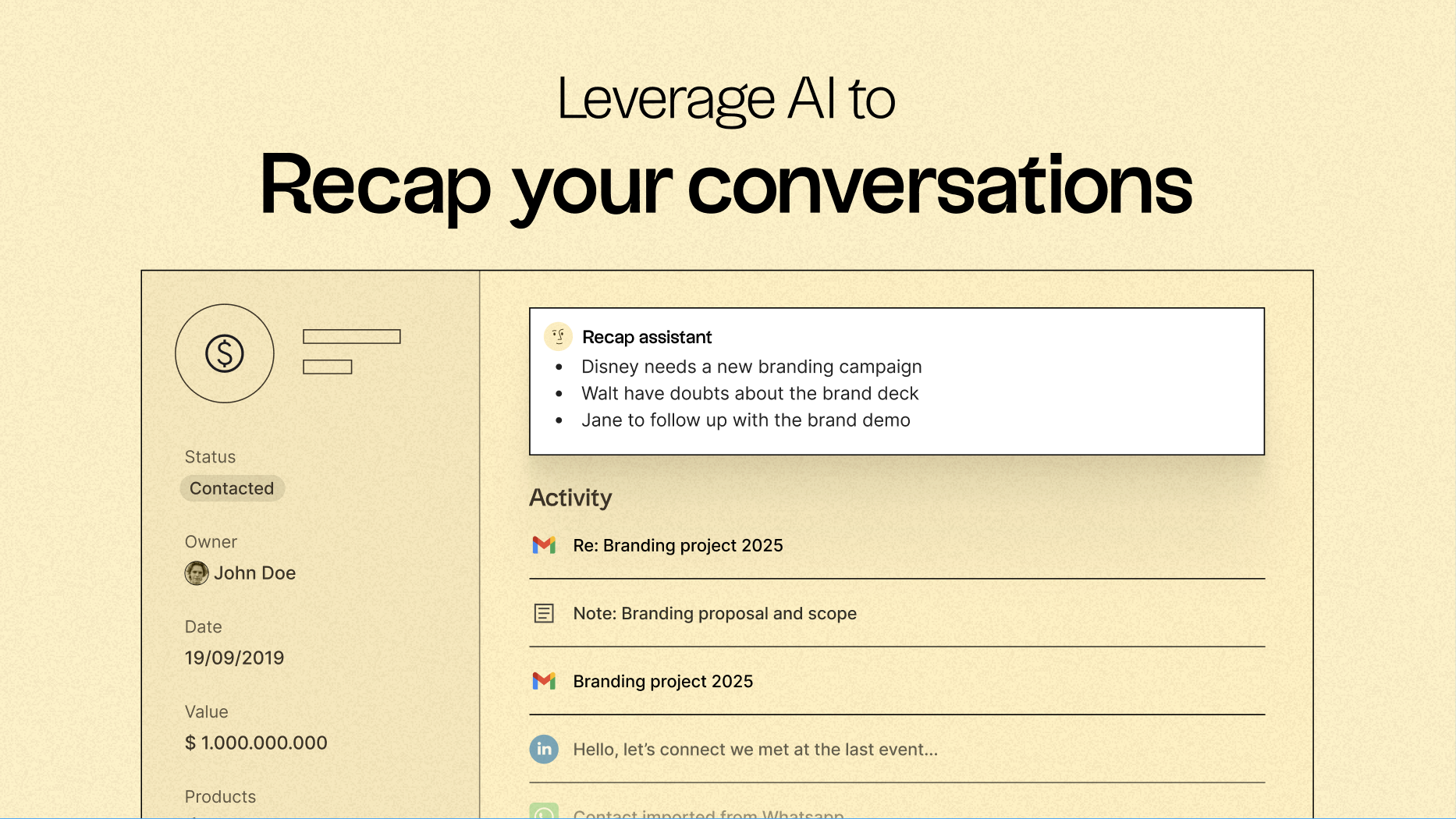
Uma das principais características folké a sua capacidade de centralizar a comunicação e transformar cada e-mail e chamada em informações úteis. Graças à sincronização nativa de e-mails com o Gmail e o Outlook, juntamente com a análise baseada em IA, as equipas podem:
- Recapitule rapidamente conversas anteriores com um único clique usando o assistente Recap folk. Ele extrai informações de e-mails e notas para gerar um resumo, fornecendo o contexto em segundos.
- Acompanhe no momento ideal, aproveitando a IA para analisar conversas, alertando-o quando reconectar-se com um contacto e até mesmo redigindo respostas para si.
Sequenciamento e automação de e-mails
O mecanismo de sequenciamento nativo folksimplifica a criação de fluxos de divulgação automatizados diretamente no CRM. Você pode criar facilmente sequências de e-mails em várias etapas, personalizar mensagens usando campos do CRM e garantir que todas as interações sejam registradas automaticamente. Seja para nutrir leads, executar campanhas de saída ou reengajar negócios inativos, folk um fluxo de trabalho de sequenciamento poderoso, mas simples, sem a necessidade de ferramentas separadas.
Defina condições com base nas variáveis do seu CRM para enviar e-mails automaticamente, como quando um negócio é fechado ou um novo lead é adquirido.
Lembretes de acompanhamento com tecnologia de IA
O recurso AI Follow-Up folkgarante que nenhuma conversa seja esquecida. Ao avaliar o seu histórico de e-mails, ele alerta quando um contacto não responde, destaca conversas que esfriaram e determina o momento ideal para reengajar. Ele funciona como um assistente integrado, mantendo a sua caixa de entrada organizada e o seu pipeline ativo, sem a necessidade de acompanhamento manual.
folk a partir de US$ 20 por utilizador por mês, inclui integração e sequências de e-mail nativas e oferece um período de teste gratuito de 14 dias, sem necessidade de cartão de crédito.
Conclusão
Em conclusão, enquanto o Streak se destaca pela sua integração perfeita com o Gmail e rastreamento em tempo real, e o HubSpot oferece uma plataforma robusta com recursos abrangentes de e-mail e análises, folk destaca-se como a escolha superior para equipas que dependem da integração, automação e sequenciamento de e-mails. A sua interface intuitiva, lembretes de acompanhamento baseados em IA e fluxos de trabalho de e-mail simplificados permitem que as equipas de vendas se concentrem em interações significativas, sem confusão. Para aqueles que procuram um CRM que transforme o e-mail numa ferramenta dinâmica de receita, folk , sem dúvida, a melhor alternativa.
Comece o seu período de avaliação gratuita de 14 dias ou marque uma demonstração hoje mesmo.
Perguntas frequentes
Qual é o melhor CRM para equipas que trabalham no Gmail?
O Streak integra um CRM completo no Gmail para uma gestão harmoniosa do pipeline, e folk um fluxo de trabalho de e-mail nativo do Gmail muito elegante para uma comunicação rápida e fiável.
O HubSpot suporta a sincronização com o Outlook e o calendário?
Sim — O HubSpot é compatível com o Gmail, o Outlook e os fornecedores de serviços IMAP, oferecendo sincronização bidirecional de e-mails e de calendários com o Google Calendar e o Outlook Calendar.
O Streak ou o HubSpot conseguem gerir campanhas de grande dimensão e análises avançadas?
O Streak oferece uma fusão de correspondência rápida e um acompanhamento básico de aberturas e cliques, mas não dispõe de dashboards avançados de análise de campanhas dashboards mensagens devolvidas e cancelamentos de subscrição, enquanto o HubSpot permite uma análise de campanhas à escala empresarial através do Marketing Hub, sendo que o Sales Hub oferece funcionalidades mais limitadas em termos de envios e relatórios.
Descubra folk
Como o assistente de vendas que a sua equipa nunca teve