


Descubra folk o CRM para empresas impulsionadas por pessoas
| Pontos principais |
|---|
|
Por que a gestão de leads é importante para equipas de 20 a 50 pessoas
Como profissional de vendas numa equipa de 20 a 50 pessoas, gerir eficazmente os leads é fundamental para impulsionar o seu pipeline de vendas e fechar negócios.
Para equipas de vendas de médio porte, acompanhar os clientes potenciais, os follow-ups e as interações entre vários membros da equipa pode se tornar uma tarefa difícil sem as ferramentas certas. Um sistema dedicado de gestão de relacionamento com o cliente (CRM) para gestão de leads pode ajudar a sua equipa a organizar os leads, automatizar tarefas de follow-up e fornecer insights em tempo real sobre os esforços coletivos de vendas — tudo a partir de uma plataforma centralizada.
Nesta publicação do blogue, exploraremos as melhores opções de CRM para gestão de leads projetadas especificamente para equipas de vendas em crescimento de 20 a 50 pessoas, com foco em ferramentas que ajudarão a otimizar o seu processo, nutrir leads de forma eficaz e impulsionar o seu desempenho de vendas em escala.
Como avaliar e escolher um CRM
Com inúmeros CRMs a considerar para a sua equipa de vendas de 20 a 50 pessoas, pode ser difícil saber por onde começar. Para ajudá-lo no seu processo de tomada de decisão e garantir que encontre a solução certa que se alinha às necessidades colaborativas e à trajetória de crescimento da sua equipa, reunimos as seguintes dicas.
1. Defina os seus requisitos
Identificar os principais recursos necessários para a sua equipa de vendas de médio porte é fundamental ao selecionar o melhor CRM para gestão de leads. Equipas de 20 a 50 pessoas devem procurar funcionalidades como pontuação de leads, acompanhamentos automatizados, pipelines personalizáveis, análises detalhadas e recursos robustos de colaboração. Considere os recursos de integração com a sua pilha de tecnologia existente e certifique-se de que a plataforma pode lidar com vários utilizadores de forma eficiente. Comece procurando esses recursos essenciais que sabemos que ajudarão nos esforços de gestão de leads da sua equipa.
Principais funcionalidades de um CRM para gestão de leads
- Processos automatizados: simplifica as tarefas automatizando fluxos de trabalho repetitivos em toda a sua equipa de vendas.
- Enriquecimento de contactos: encontra automaticamente endereços de e-mail e informações de contacto de clientes potenciais e existentes, aumentando a eficiência de equipas de vendas ocupadas.
- Vários pipelines: acompanha leads e clientes através de etapas definidas, garantindo clareza e eficácia do processo entre os membros da equipa.
- Mala direta e sequências de e-mail: aumenta a eficiência da comunicação com modelos de acompanhamento e sequências automatizadas que toda a sua equipa pode utilizar.
- Conexão com o LinkedIn: importa leads e clientes do LinkedIn e Sales Navigator de forma integrada, reunindo todos os contactos da sua equipa no CRM.
- Análise: Fornece análises de dados essenciais e insights preditivos para um melhor planeamento da equipa e acompanhamento do desempenho.
2. Processo de pré-seleção
Pesquisar e escolher o fornecedor de CRM certo para a sua equipa de 20 a 50 pessoas envolve várias etapas. Comece por ler avaliações e estudos de caso de organizações de vendas de tamanho semelhante. Solicite demonstrações e anote a experiência do utilizador, a escalabilidade e a qualidade do suporte ao cliente. Interaja com os representantes do fornecedor para entender o seu plano de ação e como eles podem atender às necessidades específicas de gestão de líderes de equipa e planos de crescimento.
3. Obtenha uma demonstração
Antes de se comprometer com um novo CRM para a gestão de leads da sua equipa de vendas, é fundamental obter uma demonstração. Uma demonstração permite que veja o software em ação, compreenda os seus recursos colaborativos e avalie a sua adequação às necessidades específicas da sua equipa de 20 a 50 pessoas. Experimente e compare diferentes plataformas de CRM para ver qual se alinha melhor com os requisitos de gestão de leads da sua equipa. Use versões de avaliação gratuita ou demonstração para testar recursos como rastreamento de leads, relatórios da equipa e automação em escala. Compare a facilidade de uso, a escalabilidade e os recursos de integração antes de tomar uma decisão final. Comece com uma demonstração do folk .
👉🏼 Experimente folk para gerir lembretes baseados em contactos com a sua equipa
3 dicas para implementar um CRM
1. Importe os seus dados para o seu novo CRM
Fazer a transição da sua equipa de vendas de 20 a 50 pessoas para um novo CRM pode parecer assustador, mas importar os seus dados de leads existentes é um processo simples. Depois de ter os dados da sua equipa em formato CSV, pode importá-los facilmente para o seu novo CRM, garantindo uma transição tranquila para todos os membros da equipa.
3. Crie o seu primeiro pipeline
Configurar o seu primeiro pipeline é um passo crucial para otimizar o processo de gestão de leads da sua equipa. Crie um pipeline que reflita as etapas do seu processo de vendas, como «Novo lead», «Contactado», «Qualificado» e «Convertido». Essa abordagem estruturada ajuda toda a sua equipa a acompanhar o progresso de cada lead e garante que nenhuma oportunidade seja perdida, mesmo ao gerir leads entre vários representantes de vendas.
4. Integre a sua equipa
Um CRM só é eficaz na medida em que os seus utilizadores o são, especialmente para equipas de 20 a 50 pessoas. Garanta que toda a sua equipa de vendas esteja bem familiarizada com o novo sistema, oferecendo sessões de formação abrangentes. Familiarize-os com os recursos colaborativos do CRM, as melhores práticas para gestão de leads da equipa e como usar o pipeline de forma eficaz. Uma equipa capacitada maximizará o potencial do CRM, levando a uma melhor coordenação da gestão de leads e taxas de conversão mais altas em toda a sua organização de vendas.
Os 5 melhores CRMs para gestão de leads
1. folk
folk é a plataforma CRM moderna ideal para equipas de vendas de 20 a 50 pessoas, oferecendo pipelines personalizáveis, ferramentas baseadas em IA e integrações perfeitas, concebidas para melhorar a gestão colaborativa de negócios e a prospecção para organizações de vendas em crescimento.

Principais características
- Enriquecimento de contactos: Enriquece automaticamente os detalhes de contacto, encontrando e-mails e URLs do LinkedIn, permitindo que a sua equipa de vendas realize um alcance eficiente sem entrada manual de dados ou custos adicionais para serviços de e-mail.
- Gestão de contactos: Reúneos contactos da sua equipa de várias caixas de entrada, plataformas de redes sociais e muito mais diretamente numa única plataforma para obter informações em tempo real acessíveis a todos os membros da equipa.
- Ciclo de vendas e pipelines personalizados: mantenha toda a sua equipa de vendas alinhada com pipelines personalizáveis usando dashboard Kanban dashboard visualizações de lista para manter os leads organizados. Use campos personalizados para segmentar leads e manter controle total sobre as permissões dos utilizadores em toda a sua equipa de 20 a 50 pessoas.
- Integração com o LinkedIn: importe facilmente contactos do LinkedIn e Sales Navigator, importe listas de pesquisa e aproveite a sua rede de folk, utilizando modelos para uma comunicação mais rápida e simplificada entre a equipa.
- Mala direta e sequências de e-mail: sincronização completa de e-mail compatível com Gmail e Outlook, modelos e recursos de rastreamento, permitindo que a sua equipa gerencie todas as comunicações diretamente do CRM.
- Recursos com tecnologia de IA: ferramentas de IA auxiliam na gestão de contactos e relacionamentos, automatizando tarefas rotineiras e sugerindo ações para melhorar a produtividade da equipa.
- Integrações: folk perfeitamente com mais de 6.000 aplicações, incluindo Gmail, Zapier e Make, permitindo que a sua equipa de vendas centralize o fluxo de trabalho e reduza a introdução manual de dados.

Prós
- Perfeito para equipas em crescimento: folk especificamente concebido para equipas de 20 a 50 pessoas, oferecendo funcionalidades de colaboração intuitivas com uma curva de aprendizagem mínima para uma rápida integração da equipa.
- Solução completa: folk o fluxo de trabalho da sua equipa, permitindo que vários utilizadores importem contactos do LinkedIn, encontrem e-mails automaticamente, coordenem o contacto através de sequências de e-mail personalizáveis e acompanhem as interações em pipelines partilhados, eliminando a necessidade de várias ferramentas e poupando tempo e dinheiro à sua organização.
- Colaboração perfeita entre equipas: Close negócios mais rapidamente em equipa com notas colaborativas anexadas a cada perfil e atribuições de lembretes inteligentes para que o membro certo da equipa faça o acompanhamento de forma perfeita.
- Personalização escalável: faça com que folk para a sua equipa de vendas em crescimento através de campos personalizados, múltiplos pipelines, automação e fluxos de trabalho que se adaptam à medida que a sua equipa se expande.
- Económico para equipas de tamanho médio: por US$ 20-40 por utilizador por mês, folk recursos de nível empresarial a um preço perfeito para equipas de 20 a 50 pessoas, proporcionando um ROI excepcional.
- Integrações abrangentes: folk perfeitamente com mais de 6.000 aplicações, incluindo Gmail, Zapier e Make, permitindo que a sua equipa centralize o fluxo de trabalho e reduza a introdução manual de dados em todas as suas ferramentas existentes.
Contras
- Relatórios e análises avançados: folk inclui análises de pipeline e fase de negociação, previsões com probabilidades ponderadas, detalhamento de desempenho por proprietário, canal, setor, região ou qualquer campo personalizado, além de dashboards de informações sobre receitas.
Preço e planos
Pode experimentar folk com um período de avaliação de 14 dias, ideal para testar com a sua equipa de vendas. Depois disso, os planos de assinatura mensal ou anual são os seguintes.
- Padrão: US$ 20 por utilizador, por mês - ideal para equipas de 20 a 30 pessoas.
- Premium: US$ 40 por utilizador, por mês — ideal para equipas de 30 a 50 pessoas com necessidades avançadas.
- Personalizado: a partir de US$ 60 por utilizador, por mês — para equipas maiores que precisam de recursos empresariais.
2. Pipedrive
Pipedrive é um CRM baseado na web adequado para pequenas e médias empresas, oferecendo gestão de leads, automação, integração de e-mail e pipelines personalizáveis, embora possa se tornar caro à medida que as equipas crescem.

Principais características
- Gestão de leads e negócios: ferramentas centralizadas para gerir dados de clientes, interações e pipelines de vendas, ajudando as equipas a agir rapidamente nas oportunidades.
- Automação de vendas: automação do fluxo de trabalho para lidar com tarefas repetitivas, como encaminhamento de leads, acompanhamentos e sequências de e-mails, permitindo que as equipas de vendas se concentrem em fechar negócios.
- Integração de e-mail: sincronização completa de e-mail, modelos e funcionalidades de rastreamento, permitindo aos utilizadores gerir todas as comunicações diretamente a partir do CRM.
- Relatórios e análises avançadas: Análise de dados em tempo real e ferramentas de relatórios personalizados para acompanhar o desempenho das vendas, prever receitas e obter insights acionáveis.
- Personalização e segurança: opções para personalizar pipelines, campos e permissões de utilizador, com medidas de segurança robustas para proteger os dados.
Prós
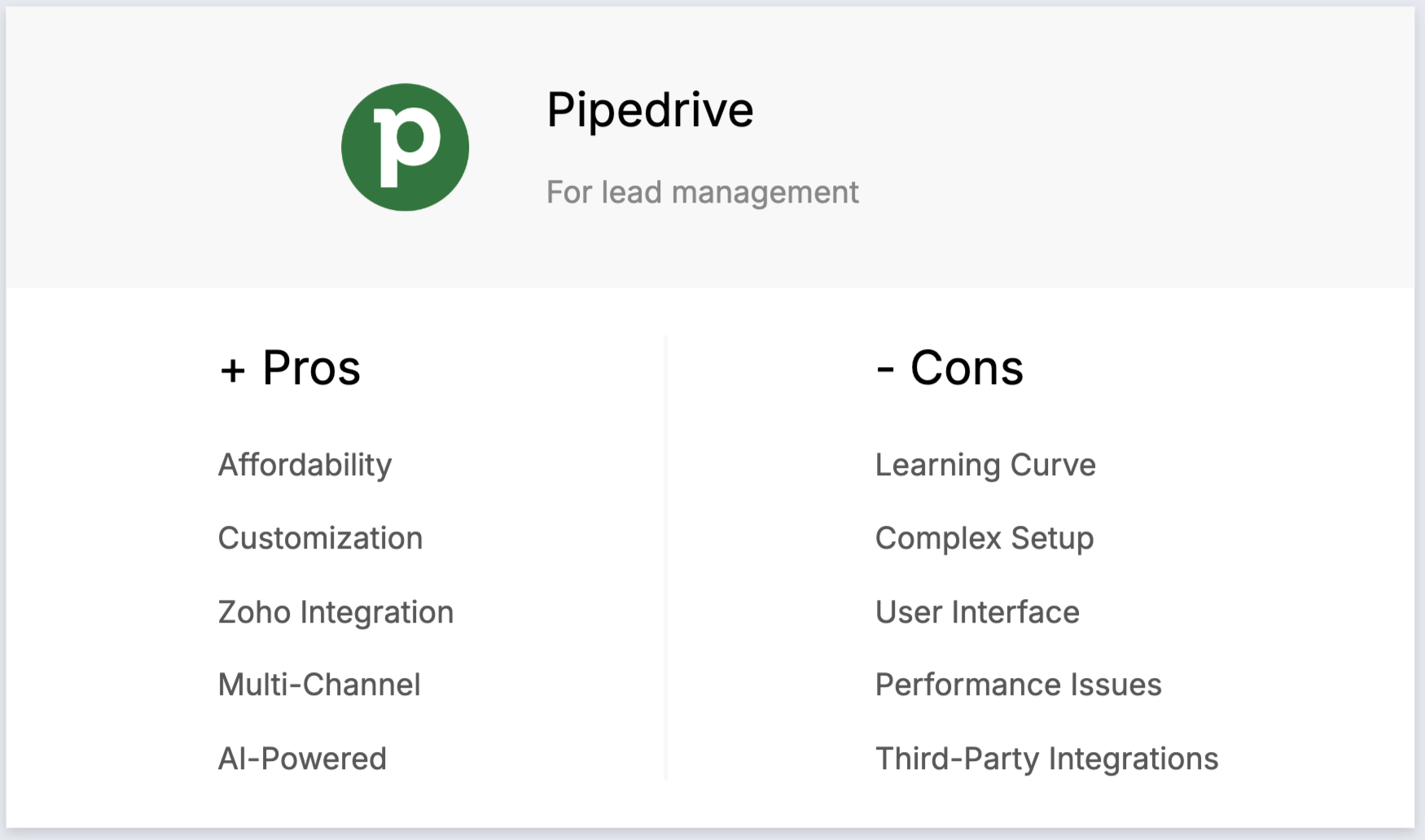
- Interface intuitiva: Pipedrive conhecido pela sua interface intuitiva e visualmente apelativa, facilitando a navegação e a gestão dos pipelines de vendas pelos utilizadores.
- Foco no pipeline de vendas: Pipedrive projetado especificamente para gerenciar pipelines de vendas, oferecendo uma abordagem visual que ajuda as equipas de vendas a acompanhar negócios e atividades de forma eficaz.
- Personalização: Pipedrive um alto grau de personalização, possibilitando aos utilizadores adaptar a plataforma aos seus processos de vendas específicos com campos e fluxos de trabalho personalizados.
- Preço inicial acessível: Pipedrive preços competitivos para o nível básico, tornando-o acessível para pequenas e médias empresas.
- Recursos de automação: Pipedrive ferramentas de automação que ajudam a otimizar tarefas repetitivas, como enviar e-mails de acompanhamento e mover negócios pelo pipeline.
Contras
- Caro para equipas maiores: os custos podem aumentar rapidamente para equipas de 20 a 50 pessoas, especialmente quando são necessários recursos avançados.
- Recursos avançados limitados: Pipedrive alguns dos recursos mais avançados de CRM, como automação de marketing abrangente e recursos de IA, que estão disponíveis em outras plataformas.
- Relatórios básicos nos níveis inferiores: os recursos de relatórios e análises nos planos básicos são um pouco limitados, exigindo atualizações caras para acessar insights mais aprofundados.
- Sem marketing por e-mail integrado: Pipedrive inclui funcionalidades integradas de marketing por e-mail, exigindo que os utilizadores integrem ferramentas de e-mail de terceiros.
- Integração limitada com o LinkedIn: Ao contrário folk , Pipedrive integração perfeita com o LinkedIn, tornando a prospecção mais desafiadora para as equipas de vendas.
Preço e planos
Os planos de assinatura anual Pipedrive podem se tornar caros para equipas de médio porte:
- Plano Essential: a partir de US$ 24 por utilizador, por mês.
- Plano avançado: a partir de US$ 44 por utilizador, por mês.
- Plano de energia: a partir de US$ 79 por utilizador, por mês.
- Plano empresarial: a partir de US$ 129 por utilizador, por mês.
3. Zoho
Zoho é um sistema CRM abrangente com forte foco em vendas, que inclui orquestração de jornadas, gestão de processos de vendas e automação de fluxos de trabalho, embora possa ser complexo para equipas que procuram simplicidade.

Principais características
- Automação de vendas: automatiza tarefas de vendas, como gestão de leads, acompanhamento de negócios e ações de acompanhamento.
- dashboards relatórios personalizáveis: permite aos utilizadores criar e personalizar dashboards relatórios para análises aprofundadas.
- Comunicação multicanal: integra-se com e-mail, telefone, redes sociais e chat ao vivo para gerir as interações com os clientes.
- Gestão de leads e contactos: gere informações de clientes, acompanha interações e segmenta contactos para campanhas direcionadas.
- Automação do fluxo de trabalho: automatiza tarefas e processos rotineiros para melhorar a eficiência e reduzir o esforço manual.

Prós
- Conjunto abrangente de funcionalidades: Zoho oferece funcionalidades extensas nas áreas de vendas, marketing e atendimento ao cliente.
- Integração com Zoho : a integração perfeita com outros Zoho cria um ecossistema abrangente para gerenciar diferentes funções comerciais.
- Opções de personalização: Recursos abrangentes de personalização permitem que as empresas adaptem o CRM às suas necessidades específicas.
- Comunicação multicanal: Zoho suporta e-mail, telefone, redes sociais e chat ao vivo a partir de uma única plataforma.
- Recursos com tecnologia de IA: Zia, a assistente de IA, fornece insights inteligentes e análises preditivas.
Contras
- Curva de aprendizagem íngreme: as extensas opções de personalização podem ser exaustivas para equipas de 20 a 50 pessoas, exigindo um investimento significativo de tempo e formação.
- Configuração complexa: A configuração inicial pode ser complexa, particularmente desafiante para equipas de vendas em crescimento sem recursos de TI dedicados.
- Interface de utilizador desatualizada: alguns utilizadores consideram a interface menos moderna e intuitiva em comparação com plataformas como folk .
- Problemas de desempenho: Relatos ocasionais de desempenho lento, especialmente com conjuntos de dados maiores, podem prejudicar a produtividade da equipa.
- Integrações de terceiros limitadas: a integração com aplicações externas pode ser limitada em comparação com plataformas mais modernas.
Preço e planos
O plano gratuito Zoho é limitado a três utilizadores, insuficiente para equipas de 20 a 50 pessoas. Os planos de assinatura anual são:
- Padrão: US$ 20 por utilizador, por mês.
- Profissional: 35 por utilizador, por mês.
- Empresa:50 por utilizador, por mês.
4 HubSpot
O Hubspot CRM é uma plataforma fácil de usar que oferece ferramentas integradas para gerenciar vendas, marketing, atendimento ao cliente e operações, embora o preço seja proibitivo para equipes em crescimento.

Principais características
- Marketing Hub: Inclui marketing por e-mail, acompanhamento de anúncios, páginas de destino e ferramentas de geração de leads para uma captura e nutrição eficazes de leads.
- Centro de vendas: fornece acompanhamento de negócios, gestão de pipeline, automação de vendas e relatórios para otimizar o processo de vendas, desde o lead até o cliente.
- Centro de operações: sincroniza e automatiza processos de negócios em diferentes sistemas, garantindo uma gestão perfeita de leads.
- Pontuação de leads: priorize os leads com pontuação preditiva para melhorar a eficiência das vendas e concentrar-se em oportunidades de alto potencial.

Prós
- Interface intuitiva: a HubSpot é conhecida pela sua interface intuitiva e fácil de usar, tornando-a acessível para utilizadores de todos os níveis de habilidade.
- Plano gratuito completo: oferece uma versão gratuita robusta que inclui recursos essenciais de CRM, embora limitada para equipas maiores.
- Integração perfeita com ferramentas de marketing: o HubSpot integra-se perfeitamente com os seus hubs de marketing, vendas e serviços, criando uma plataforma unificada.
- Recursos de automação: fornece ferramentas de automação para marketing por e-mail, nutrição de leads e fluxos de trabalho de vendas.
- Suporte ao cliente robusto: a HubSpot oferece um excelente suporte ao cliente com vários canais disponíveis.
Contras
- Custo extremamente elevado para equipas: os preços da HubSpot tornam-se proibitivos para equipas de 20 a 50 pessoas, com planos profissionais a partir de US$ 450 por mês, independentemente do número de utilizadores.
- Personalização limitada em planos acessíveis: os planos gratuitos e de baixo custo têm opções de personalização bastante limitadas para equipas em crescimento.
- Complexidade nas funcionalidades avançadas: As funcionalidades avançadas requerem formação extensiva e tempo de configuração.
- Limites do marketing por e-mail: os limites do plano gratuito são insuficientes para equipas de vendas ativas com mais de 20 pessoas.
- Complementos caros: Muitos recursos úteis exigem complementos caros que rapidamente inflacionam o custo total.
Preço e planos
Os planos do hub de vendas da HubSpot tornam-se extremamente caros para equipas de médio porte:
- Inicial: US$ 15 por utilizador, por mês (recursos muito limitados).
- Profissional: US$ 450 no total por mês (independentemente do número de utilizadores - caro para equipas).
- Empresa: US$ 1 .500 no total por mês (proibitivamente caro para a maioria das equipas).
5. Salesforce
Salesforce é uma plataforma de CRM robusta projetada para grandes empresas, oferecendo ferramentas abrangentes para vendas, marketing, serviços e análises, mas muitas vezes excessivamente complexa e cara para equipas de 20 a 50 pessoas.

Principais características
- Personalização e escalabilidade: Salesforce uma ampla personalização com campos, objetos e fluxos de trabalho personalizados, embora essa complexidade possa ser excessiva para equipas de médio porte.
- Integração de Inteligência Artificial (IA): Salesforce fornece insights e automação baseados em IA para otimização de leads.
- Amplos recursos de integração: integre Salesforce milhares de aplicações de terceiros através do AppExchange.
- Análise e relatórios avançados: Ferramentas abrangentes de análise e relatórios para a tomada de decisões baseadas em dados.
- Acessibilidade móvel: Aplicação móvel robusta que oferece acesso completo ao CRM em dispositivos móveis.
Prós
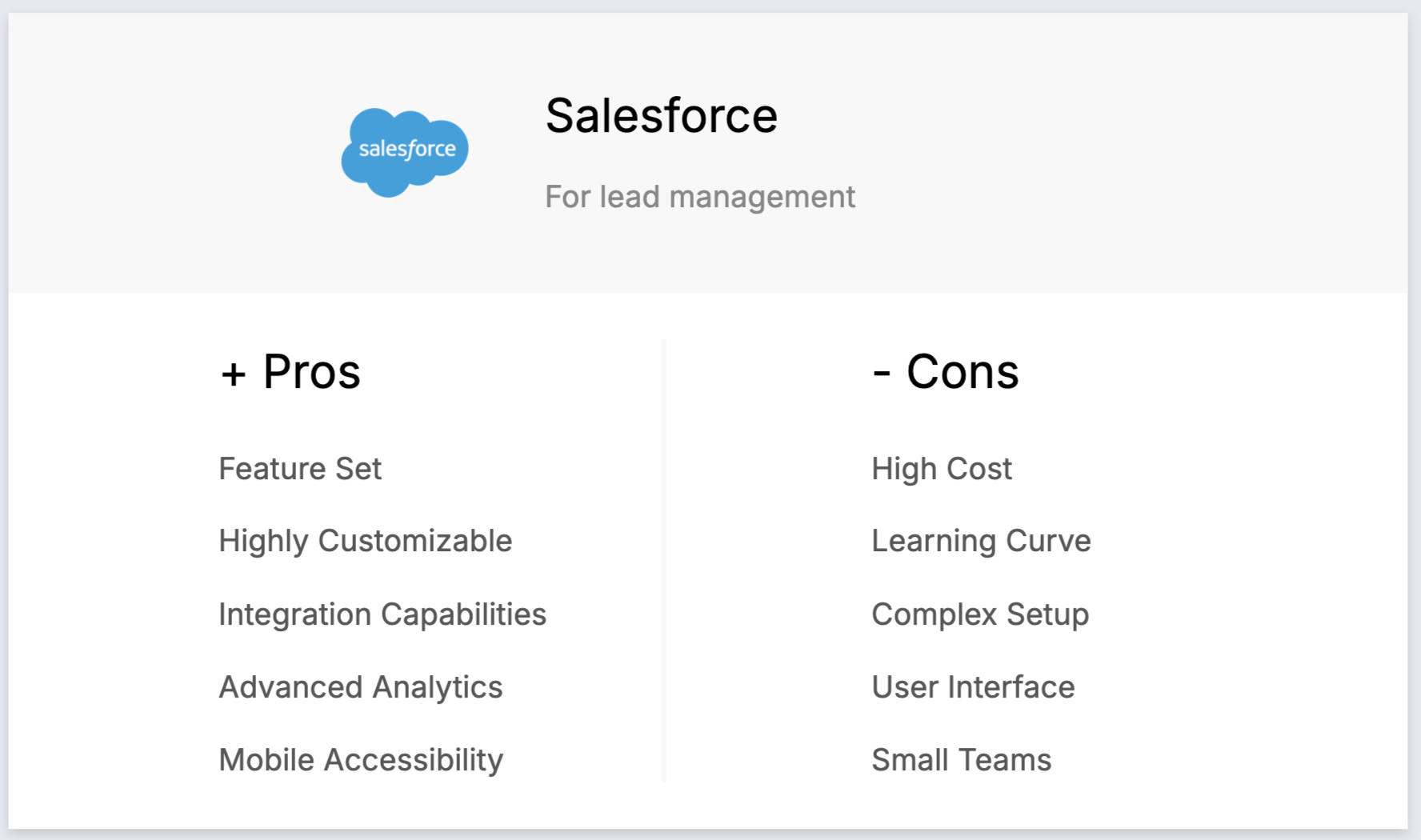
- Recursos de nível empresarial: Salesforce funcionalidades abrangentes para processos complexos de gestão de leads.
- Altamente personalizável: amplas capacidades de personalização para se adequar a processos empresariais específicos.
- Ecossistema de integração robusto: milhares de integrações disponíveis através do mercado AppExchange.
- Análise avançada: recursos sofisticados de relatórios e análises para insights baseados em dados.
- Plataforma móvel robusta: aplicação móvel completa para gestão de leads em movimento.
Contras
- Custo excessivo para equipas de médio porte: Salesforce proibitivamente caro para equipas de 20 a 50 pessoas, com taxas de licenciamento que podem facilmente exceder as restrições orçamentárias.
- Complexidade esmagadora: os recursos extensos da plataforma criam complexidade desnecessária para equipas de vendas de médio porte que precisam de simplicidade e eficiência.
- Requer conhecimentos especializados: a implementação e a gestão contínua muitas vezes exigem consultores certificados, o que acarreta custos significativos.
- Experiência do utilizador desatualizada: muitos utilizadores consideram a interface Salesforce menos intuitiva em comparação com alternativas modernas, como folk .
- Excesso para equipas em crescimento: os recursos empresariais Salesforce são excessivos para equipas de 20 a 50 pessoas que precisam de ferramentas focadas em gestão de leads.
Conclusão
Escolher o melhor CRM para gestão de leads é crucial para o sucesso de qualquer equipa de vendas com 20 a 50 pessoas. Após avaliar as principais opções disponíveis, folk surge como o vencedor indiscutível para equipas de vendas de médio porte que buscam um equilíbrio ideal entre funcionalidade, facilidade de uso e custo-benefício. Ao contrário de soluções empresariais dispendiosas, como Salesforce HubSpot, ou plataformas complexas, como Zoho, folk foi especificamente concebido para equipas em crescimento que precisam de recursos poderosos de gestão de leads sem complexidade desnecessária ou custos proibitivos. Com a sua integração perfeita com o LinkedIn, enriquecimento automatizado de contactos, recursos colaborativos e preços acessíveis a partir de apenas 20 dólares por utilizador por mês, folk oferece tudo o que a sua equipa de vendas precisa para otimizar a gestão de leads e impulsionar o crescimento. Comece por experimentar folk aqui.
👉🏼 Experimente folk para nunca perder um acompanhamento
Precisa de ajuda? Use a nossa ferramenta gratuita para encontrar o CRM ideal para si.
Perguntas frequentes
Qual é o melhor sistema de CRM para pequenas empresas?
O melhor CRM depende do tamanho da equipa, do orçamento e das ferramentas. Para equipas de 20 a 50 pessoas que precisam de gestão de leads e colaboração, folk oferece pipelines, importação do LinkedIn, sequências de e-mail e automação por US$ 20 a US$ 40 por utilizador por mês. Compare também Pipedrive, Zoho e o HubSpot.
Como escolher um CRM para uma equipa de vendas de 20 a 50 pessoas?
Defina os requisitos essenciais (pipelines, automação, análises, permissões), verifique as integrações, teste a usabilidade com uma demonstração, verifique os preços em escala e confirme a integração e o suporte. Selecione 2 a 3 fornecedores e faça um teste de 14 dias com dados e utilizadores reais.
Quais são as funcionalidades mais importantes para a gestão de leads?
Priorize o enriquecimento de contactos, o acompanhamento de negócios em múltiplos canais, o acompanhamento e sequências automatizadas, a sincronização de e-mails e LinkedIn, notas e tarefas partilhadas, pontuação de leads e relatórios/previsões. Garanta permissões baseadas em funções e fácil importação a partir de CSV.
Quanto custa um CRM para uma equipa de 20 a 50 pessoas?
Espere pagar entre US$ 20 e US$ 80 por utilizador por mês pela maioria das ferramentas. Exemplos: folk ; Pipedrive ; Zoho . Alguns pacotes cobram taxas fixas (HubSpot Pro US$ 450+/mês) ou taxas empresariais mais altas (Salesforce US$ 100+/utilizador/mês).
Descubra folk
Como o assistente de vendas que a sua equipa nunca teve