


Descubra folk o CRM para empresas impulsionadas por pessoas
Attio vs. ClickUp: Visão geral
Escolher o CRM certo pode fazer a diferença tanto nas operações comerciais quanto nas interações com os clientes. Attio e ClickUp são duas plataformas de CRM populares, cada uma oferecendo recursos distintos projetados para aumentar a produtividade e otimizar os fluxos de trabalho.
Enquanto o Attio se concentra em pipelines personalizáveis e automação de fluxo de trabalho, o ClickUp integra a gestão de tarefas com funcionalidades de CRM. Nesta publicação do blogue, compararemos os seus principais recursos, preços e benefícios para ajudá-lo a determinar qual plataforma melhor atende às necessidades do seu negócio.
Também apresentaremos folk , uma alternativa popular que é particularmente adequada para equipas de vendas de 20 a 50 pessoas que procuram uma solução de CRM intuitiva, mas poderosa.
| Pontos principais |
|---|
|
O que é o Attio?
A Attio é uma plataforma personalizável concebida para oferecer flexibilidade na gestão de relações com clientes e fluxos de trabalho. Permite aos utilizadores criar pipelines personalizados, gerir dados de clientes e acompanhar interações numa interface intuitiva.
Principais funcionalidades do Attio
- Pipelines personalizáveis: o Attio permite que os utilizadores personalizem totalmente os pipelines de vendas, criando etapas de negócios que correspondem a processos comerciais específicos.
- Gestão de contactos e empresas: Centraliza os dados de contactos e empresas, acompanhando automaticamente e-mails, notas e tarefas para uma visão abrangente das interações.
- Automação do fluxo de trabalho: os utilizadores podem automatizar tarefas como entrada de dados e acompanhamentos com base em gatilhos específicos, melhorando a eficiência.
- Gerenciador de tarefas e lembretes: ferramentas integradas ajudam os utilizadores a manterem-se atualizados sobre tarefas e acompanhamentos, garantindo que atividades importantes não sejam esquecidas.
O que é o ClickUp?
O ClickUp é uma plataforma de gestão de projetos e produtividade concebida para ajudar equipas e indivíduos a organizar tarefas, acompanhar o progresso e colaborar num único espaço de trabalho. Embora seja principalmente uma ferramenta de gestão de projetos, o ClickUp inclui alguns elementos de CRM.
Principais funcionalidades do ClickUp
- Gestão de tarefas: O ClickUp permite aos utilizadores criar, atribuir e acompanhar tarefas com estados personalizados, proporcionando flexibilidade na gestão de processos de trabalho em diferentes projetos.
- Visualizações personalizadas: a plataforma oferece várias visualizações, como listas, quadros, calendários e gráficos de Gantt, permitindo que os utilizadores visualizem tarefas e fluxos de trabalho num formato que se adapte às suas preferências.
- Acompanhamento de metas: os utilizadores podem definir, acompanhar e gerir metas no ClickUp, alinhando tarefas e projetos com objetivos mais amplos.
- Controlo de tempo: O ClickUp inclui uma funcionalidade integrada de controlo de tempo para registar o tempo gasto em tarefas, permitindo aos utilizadores monitorizar a produtividade ou as horas faturáveis.
- Automação do fluxo de trabalho: a automação no ClickUp permite que os utilizadores reduzam as tarefas manuais, configurando regras que acionam ações, como atualizações de estado ou notificações, com base em condições predefinidas.
- Campos personalizados: a plataforma permite que os utilizadores adicionem campos personalizados às tarefas, possibilitando-lhes acompanhar pontos de dados específicos ou categorizar tarefas de acordo com as suas necessidades.
Attio vs. ClickUp: Comparação de funcionalidades
Vamos analisar as principais funcionalidades de duas soluções de software CRM e examinar mais de perto as suas capacidades de automação de vendas, ferramentas de marketing por e-mail e gestão de contactos para equipas de vendas de média dimensão.
1. Gestão do pipeline de vendas
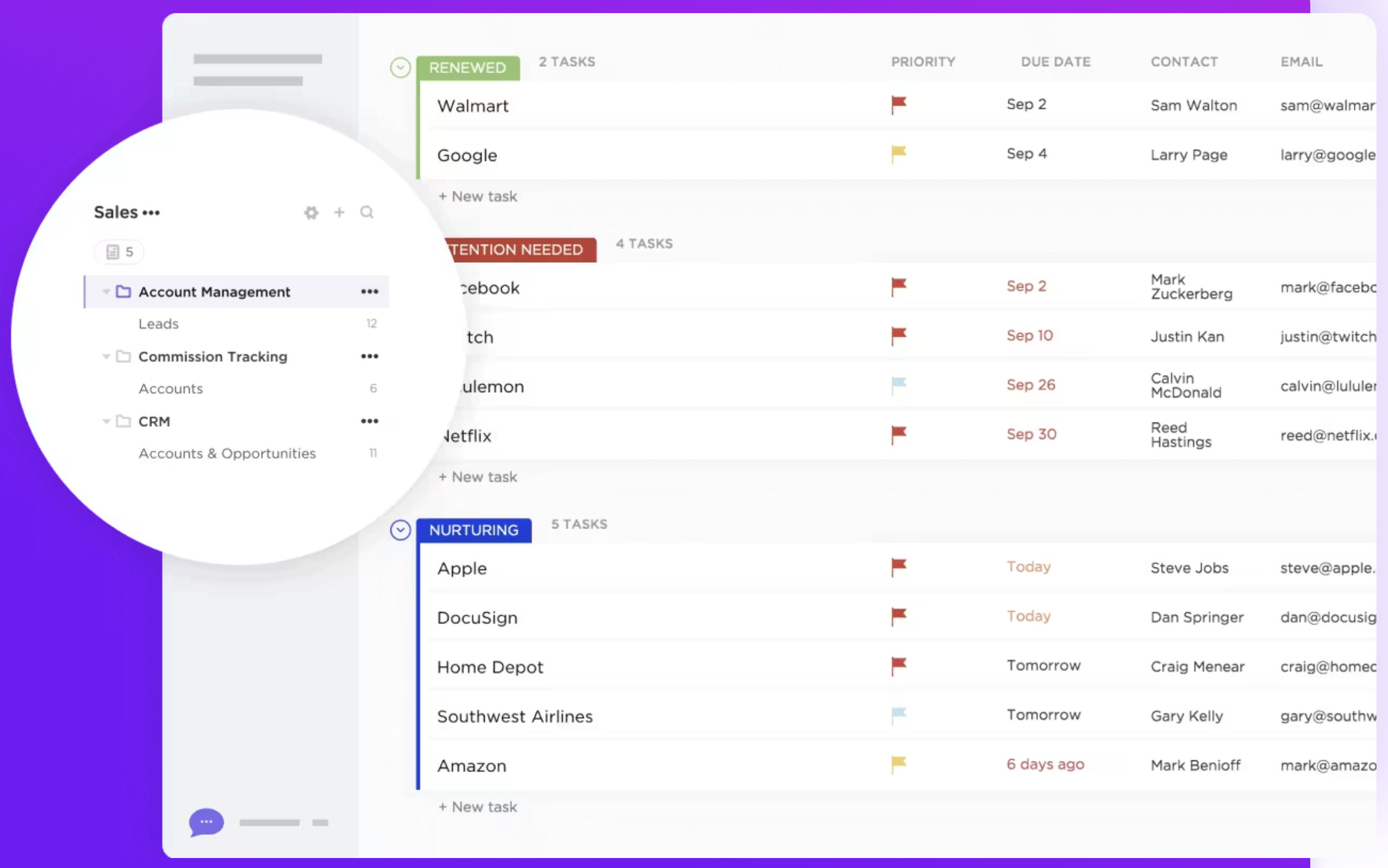
O sistema de gestão de pipeline da Attio é altamente personalizável, permitindo aos utilizadores criar etapas personalizadas que refletem os seus processos de vendas específicos. O sistema suporta uma visualização no estilo Kanban para visualizar a progressão do negócio e inclui gatilhos de automação em cada etapa para aumentar a produtividade. O ClickUp não possui um recurso dedicado de gestão de pipeline projetado especificamente para fins de vendas ou CRM, mas os utilizadores podem criar pipelines personalizáveis usando listas de tarefas, quadros e status personalizados. Enquanto o Attio se concentra em fornecer uma ferramenta robusta e especializada para gerir pipelines de vendas, o ClickUp oferece flexibilidade por meio de seus recursos versáteis de gestão de tarefas, que podem ser adaptados para o acompanhamento de vendas. No entanto, isso requer mais configuração manual e carece das funcionalidades especializadas centradas nas vendas encontradas no Attio. Em última análise, as empresas que procuram um CRM com forte ênfase na gestão do pipeline de vendas podem considerar o Attio mais alinhado com as suas necessidades, enquanto aquelas que procuram uma ferramenta de gestão de projetos mais ampla com capacidades de CRM podem preferir a abordagem adaptável do ClickUp.

2. Facilidade de utilização
O Attio oferece uma interface intuitiva projetada especificamente para tarefas de CRM, tornando mais fácil para os utilizadores gerirem as relações com os clientes. Em contrapartida, o ClickUp, embora versátil, pode ser complexo devido à sua ampla funcionalidade além do CRM, exigindo uma curva de aprendizagem mais acentuada para utilizadores focados exclusivamente na gestão de clientes.
3. Enriquecimento de contactos
O Attio enriquece automaticamente os registos de pessoas e empresas com dados úteis, como logótipos e fotos de perfil, aprimorando os perfis dos utilizadores sem necessidade de introdução manual. Esse recurso simplifica a gestão de dados e proporciona aos utilizadores uma compreensão mais rica dos seus contactos. O ClickUp não oferece um recurso de enriquecimento de contactos como parte de sua funcionalidade principal. Embora os utilizadores possam armazenar e organizar manualmente as informações de contacto usando campos personalizados e detalhes de tarefas, a plataforma não extrai automaticamente dados adicionais sobre contactos de fontes externas.
4. Divulgação
O Attio possui uma integração Outreach que permite aos utilizadores acionar respostas a sequências de e-mails e conectar a sua caixa de entrada para enviar mensagens diretamente da plataforma. O ClickUp não possui um recurso de outreach dedicado, exigindo a configuração manual de fluxos de trabalho personalizados para gerenciar a comunicação com contactos externos.
5. Automação
A funcionalidade de automação do Attio simplifica os fluxos de trabalho ao automatizar tarefas rotineiras, como introdução de dados e acompanhamentos, aumentando a eficiência. A automação do ClickUp é de uso geral, não sendo especificamente adaptada para funções de CRM, exigindo personalização adicional para necessidades avançadas de CRM, como nutrição de leads.
6. Integração
O Attio oferece integração perfeita com várias ferramentas para aprimorar as funcionalidades de CRM, garantindo um fluxo de dados suave e automação de processos. O ClickUp oferece integrações abrangentes em diferentes plataformas, embora nem todas sejam focadas em CRM, exigindo que os utilizadores as configurem para tarefas específicas de gestão de clientes.
7. Inteligência artificial
O Attio CRM integra IA para automatizar tarefas complexas, como classificar dados não estruturados e qualificar leads, aumentando a eficiência do CRM. A integração de IA do ClickUp, "Chat", conecta tarefas, documentos e pessoas, atuando como um gestor de conhecimento, mas não é especificamente focada em funcionalidades de CRM.
Comparação de preços e planos
Vamos analisar mais detalhadamente os preços e planos do Attio e do ClickUp para entender o seu valor para equipas de vendas em crescimento.
Preços Attio
A Attio tem um plano gratuito limitado a três licenças por mês. Depois disso, a assinatura anual é a seguinte.
- Mais: $34/assento/mês .
- Pró: 69 $/licença/mês .
- Empresa: US$ 119/licença/mês .

Preços do ClickUp
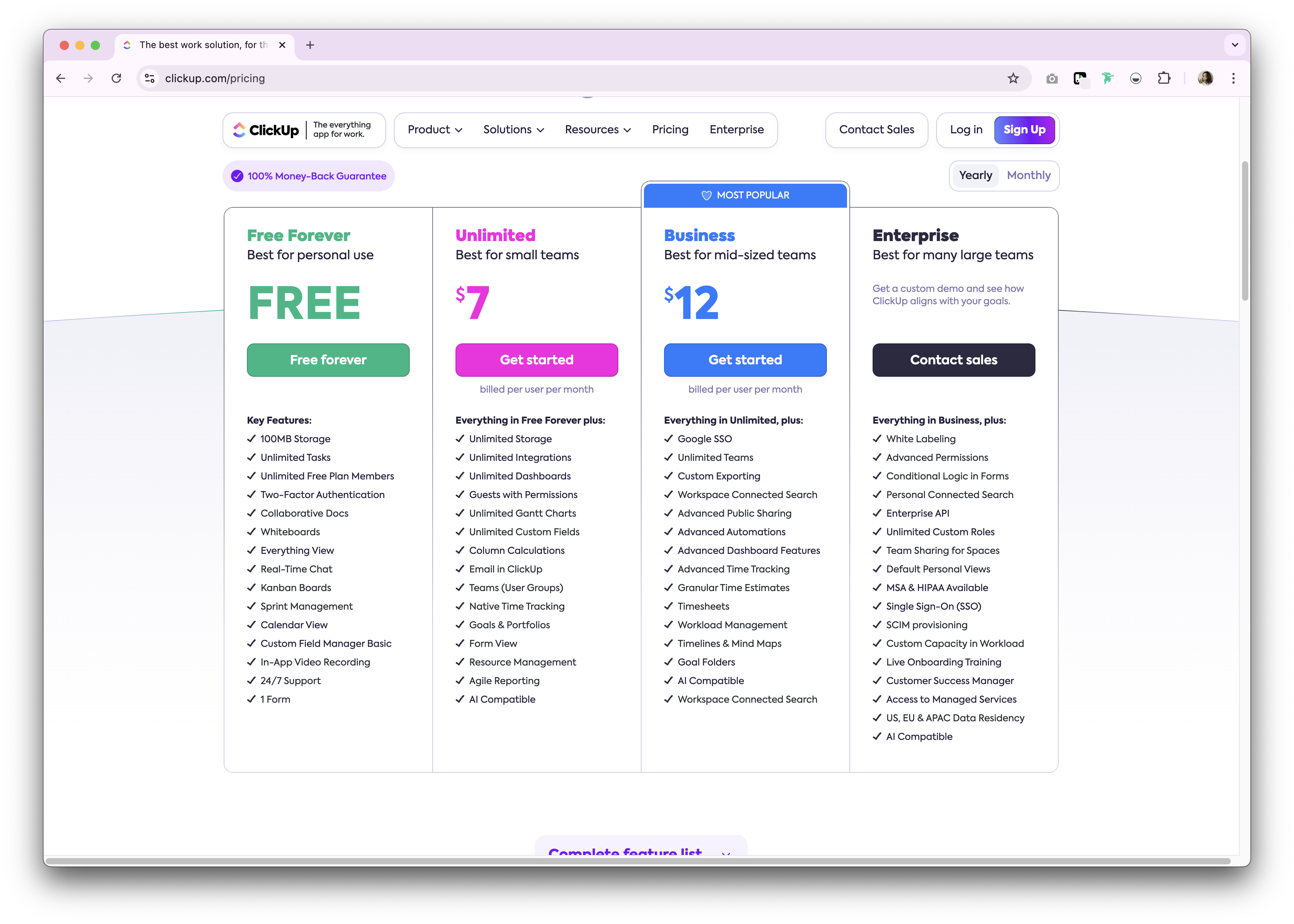
O ClickUp oferece um plano gratuito para uso pessoal. Premium estão disponíveis como planos de assinatura mensal e anual. A seguir, apresentamos uma visão geral dos planos de assinatura anual disponíveis.
- Ilimitado: US$ 7/utilizador/mês.
- Negócios: US$ 12/utilizador/mês.
- Empresa: Não divulgado.
Apresentando folk : a melhor alternativa ao Attio e ao ClickUp
Procurando uma alternativa acessível? Recomendamos folk como a melhor solução para equipas de vendas de 20 a 50 pessoas. Há uma razão pela qual folk uma plataforma de CRM premiada várias vezes e apreciada por seu sistema de CRM fácil de usar e pronto para uso, que se adapta perfeitamente a equipas de vendas de médio porte.
👉🏼 Experimente folk para gerir lembretes baseados em contactos ao mudar do Attio ou do ClickUp.

.png)
Principais características
- Facilidade de utilização e personalização: personalize facilmente os pipelines, dashboards, automação e sequências de e-mail, para que possa utilizá-los em todo o seu ciclo de vendas e gestão de pipeline, além de outras funções comerciais, como recrutamento, marketing e muito mais.
- Integração com redes sociais: importe pessoas e empresas do LinkedIn, Sales Navigator, Instagram e X com um clique, graças à extensão do Google Chrome folk.
- Sincronização de contactos do Gmail e Outlook: sincronização completa de e-mails, permitindo aos utilizadores gerir todas as comunicações diretamente a partir do CRM.
- Encontre endereços de e-mail com um clique: enriquecimento de contactos com tecnologia Apollo e Dropcontact possa preencher os dados em falta com um clique.
- Sequências de e-mail: Envie sequências de e-mail com lembretes caso os seus potenciais clientes não respondam aos seus primeiros e-mails. Inclui uma integração de IA que lhe permite personalizar e-mails em grande escala.
- Notas e lembretes: anexe notas diretamente ao perfil de um contacto no folk e aceda-as em qualquer lugar. Atribua lembretes para saber exatamente quando fazer o acompanhamento.
Preço e planos
folk um período de teste gratuito de 14 dias. Depois disso, há planos de assinatura mensais ou anuais acessíveis. O plano de assinatura anual é o seguinte.
- Padrão: US$ 20 por utilizador, por mês.
- Premium: US$ 40 por utilizador, por mês.
- Personalizado: a partir de US$ 80 por utilizador, por mês.

Attio vs. ClickUp: qual é o veredicto?
Entre o Attio e o ClickUp, fica claro que ambas as plataformas oferecem soluções robustas de CRM com funcionalidades exclusivas adaptadas às diferentes necessidades comerciais. A Attio se destaca em pipelines personalizáveis e automação de fluxo de trabalho, enquanto a ClickUp se destaca por seus recursos abrangentes de gerenciamento de tarefas. No entanto, para empresas que buscam uma abordagem mais personalizada para o gerenciamento de relacionamentos, folk se destaca como a melhor solução para equipas de 20 a 50 pessoas que estão a avaliar suas opções de CRM. Ele combina facilidade de uso com recursos poderosos de personalização, gerenciamento dedicado do pipeline de vendas e preços acessíveis que se adaptam perfeitamente às equipas de vendas em crescimento.
👉🏼 Experimente folk para comparar folk o Attio e o ClickUp e nunca mais perca um acompanhamento
Perguntas frequentes
O ClickUp é um CRM?
O ClickUp é principalmente uma ferramenta de gestão de projetos. Pode ser configurado como um CRM leve usando listas, quadros, campos personalizados e automações, mas carece de recursos nativos de pipeline de vendas e enriquecimento de contactos encontrados em CRMs dedicados.
Qual é a diferença entre o Attio e o ClickUp para equipas de vendas?
A Attio oferece funcionalidades específicas de CRM, como pipelines personalizáveis, enriquecimento e automação focada em vendas. A ClickUp oferece uma ampla gestão de trabalho com visualizações adaptáveis, mas requer configuração manual para imitar os fluxos de trabalho de CRM e carece de ferramentas de vendas especializadas.
Quanto custam o Attio e o ClickUp?
Preços anuais: Attio Plus US$ 34/usuário/mês, Pro US$ 69, Enterprise US$ 119 (plano gratuito para até 3 usuários). ClickUp Unlimited US$ 7/usuário/mês, Business US$ 12, Enterprise não divulgado. Os recursos variam de acordo com o plano.
Qual é uma boa alternativa ao Attio e ao ClickUp?
Para um CRM desenvolvido para equipas de 20 a 50 lugares, considere folk. Ele oferece pipelines personalizáveis, enriquecimento, sequências de e-mail e automação. Planos anuais: Standard US$ 20/usuário/mês, Premium , Personalizado a partir de US$ 80; 14 dias de teste gratuito.
Descubra folk
Como o assistente de vendas que a sua equipa nunca teve