


Descubra folk o CRM para empresas impulsionadas por pessoas
As startups em fase inicial muitas vezes se veem envolvidas num turbilhão de atividades, onde negócios podem escapar devido a acompanhamentos desorganizados espalhados por várias plataformas, como caixas de entrada, planilhas e ferramentas de colaboração. Um CRM para startups entra em cena para oferecer uma solução crucial: garantir que todas as interações, próximos passos e responsáveis permaneçam visíveis e facilmente acessíveis.
Neste cenário, a HubSpot e Close duas abordagens distintas para enfrentar os desafios que as startups enfrentam. A HubSpot opera com uma estratégia que prioriza o conjunto de ferramentas, enfatizando a automação profunda, o alinhamento de marketing e recursos abrangentes de relatórios. Por outro lado, Close uma mentalidade que prioriza as vendas, fornecendo um pipeline simplificado, configuração rápida e foco na disciplina de atividades.
Este artigo explora as principais diferenças entre o HubSpot e Close, destacando como elas afetam as operações diárias: desde a captura de contactos e a higiene do pipeline até a profundidade da automação, a clareza dos relatórios e o custo geral à medida que a sua equipa cresce.
O que é o HubSpot?
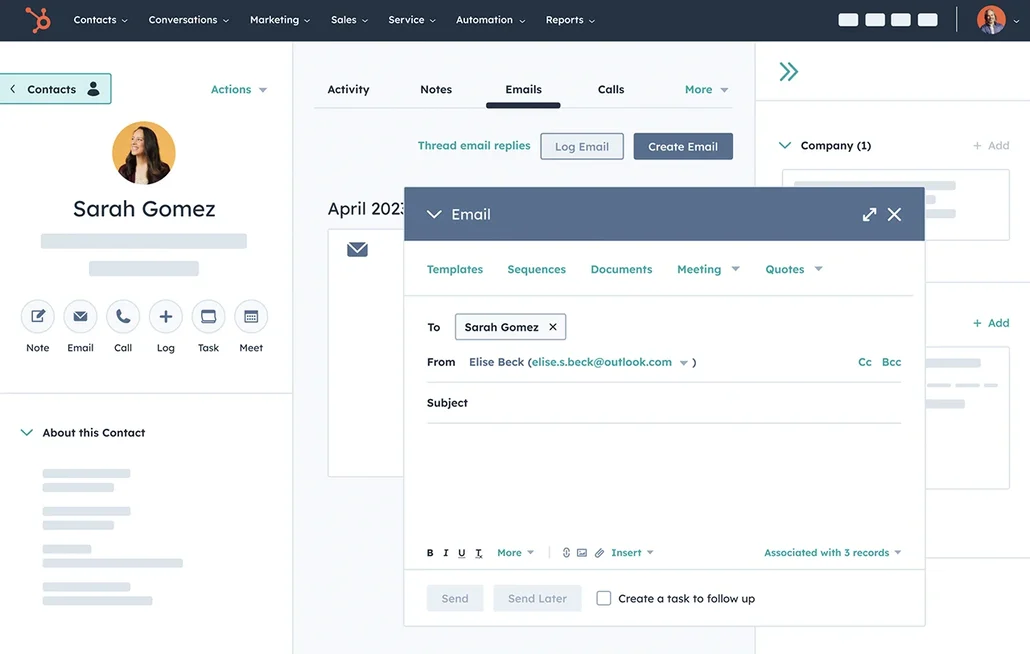
O HubSpot é uma plataforma abrangente de entrada no mercado que integra perfeitamente CRM, automação de marketing, ferramentas de vendas e atendimento ao cliente. É a escolha ideal para startups que procuram um sistema único para gerir o seu funil, desde a aquisição até à retenção, com recursos robustos de segmentação e relatórios. O CRM intuitivo permite uma fácil adoção inicial e pode evoluir para fluxos de trabalho avançados e atribuição à medida que as necessidades do negócio se expandem. É amplamente utilizado nos EUA e oferece compatibilidade com a maioria das ferramentas SaaS modernas. No entanto, tenha em atenção que os custos podem aumentar rapidamente ao utilizar vários hubs e níveis superiores.
O que é Close?
Close projetado especificamente para equipas de vendas de alta velocidade que prosperam com chamadas, e-mails e sequências. Ele atende startups envolvidas em movimentos de vendas outbound ou híbridas, oferecendo rastreamento robusto de atividades, chamadas integradas e fluxos de trabalho rápidos. A interface do utilizador minimiza a alternância entre guias, mantendo os representantes focados na execução. Além disso, Close os acompanhamentos e mantém a higiene do pipeline com configuração mínima. Ele é menos adequado para hierarquias de contas complexas ou relatórios de nível empresarial do que algumas plataformas maiores.

Comparação de funcionalidades do HubSpot e Close
Sincronização de e-mail e calendário
O HubSpot integra-se perfeitamente com o Gmail e o Office 365 através da integração do HubSpot Sales, permitindo que os e-mails sejam registados diretamente da sua caixa de entrada, enquanto acompanha as aberturas e os cliques. A funcionalidade de sincronização do calendário suporta tanto o Google Calendar como o Outlook Calendar, garantindo que as reuniões criadas no seu calendário aparecem na linha do tempo do registo relevante quando o contacto convidado está no CRM. Também pode agendar reuniões diretamente no HubSpot e enviá-las automaticamente para o seu calendário conectado. Isto cria um histórico de atividades unificado para e-mails e reuniões, mantendo os seus registos atualizados com o mínimo de esforço manual.
Close a contas de e-mail do Gmail ou Microsoft, sincronizando automaticamente as comunicações por e-mail com os leads e contactos apropriados. A conectividade com o calendário permite a sincronização de reuniões, exibindo eventos agendados no Close os seus registos relacionados. Esta integração consolida o histórico de contato e o contexto das reuniões, evitando a fragmentação entre caixas de entrada e calendários. É ideal para equipas dinâmicas que buscam um registro eficiente das atividades sem a necessidade de registro manual, garantindo que o cronograma permaneça eficaz para coaching, transferências e revisões do pipeline.
Limpe os dados de contacto com enriquecimento e deduplicação
A HubSpot oferece um recurso integrado de enriquecimento de dados que preenche automaticamente os detalhes da empresa e do contacto, minimizando registos incompletos e a necessidade de pesquisa manual. Os seus recursos de enriquecimento e intenção do comprador funcionam com um modelo de créditos, em que os créditos da HubSpot são necessários para determinados recursos premium . A gestão de duplicados identifica potenciais duplicados, permitindo uma fácil revisão e fusão de registos, o que ajuda a manter uma base de dados limpa. Este processo reduz os históricos de atividades fragmentados em várias entradas de contacto, levando a uma melhor segmentação, encaminhamento, relatórios e fiabilidade da automação.
Close a higiene dos dados, evitando duplicatas durante as importações e facilitando ações de mesclagem nativas para leads. O importador compara as entradas recebidas com os leads existentes, garantindo que as duplicatas sejam tratadas antes que comprometam a base de dados. Nos casos em que ocorrem duplicatas, os leads podem ser mesclados diretamente no aplicativo, consolidando a atividade em um único registo de destino. Além disso, o recurso AI Enrich Close preenche automaticamente os campos de leads e contactos no CRM, minimizando a tediosa entrada manual de dados e garantindo que os registos estejam suficientemente completos para um encaminhamento, personalização e relatórios eficazes.
Pipelines e visualizações flexíveis
A HubSpot promove a colaboração dentro de cada registo, incorporando atividades como notas, tarefas, chamadas, e-mails e reuniões. Os utilizadores podem criar tarefas diretamente a partir de um registo como parte de um fluxo de trabalho de atividades, garantindo que as próximas etapas permaneçam visíveis e atribuídas. Menções em atividades ou comentários notificam os colegas de equipa, facilitando transferências rápidas sem perder o contexto. As configurações de associação de atividades determinam quais registos vinculados compartilham o mesmo histórico de atividades, promovendo visibilidade consistente entre contactos, empresas, negócios e tickets. Essa estrutura auxilia no alinhamento entre equipas à medida que a carga de trabalho aumenta.
Close concebido para uma execução eficaz das vendas, oferecendo uma organização flexível através do Lead Status e do Smart Views. As equipas podem definir as etapas do pipeline utilizando status e, em seguida, criar Smart Views que destacam os leads mais relevantes com base em filtros e classificações específicos. Essas visualizações também podem servir como filas de trabalho para divulgação, revisões e priorização. Essa estratégia permanece simplificada, ao mesmo tempo que acomoda processos estruturados à medida que o volume aumenta, tornando-a ideal para startups que buscam clareza sem configurações complexas.
Colaboração em equipa
A HubSpot melhora a colaboração dentro de cada registo, integrando atividades como notas, tarefas, chamadas, e-mails e reuniões. As tarefas podem ser geradas diretamente a partir de um registo como parte de um fluxo de trabalho de atividades, garantindo que as próximas etapas permaneçam visíveis e atribuídas. As menções em atividades ou comentários notificam os colegas de equipa, facilitando transferências rápidas e mantendo o contexto. As configurações de associação de atividades determinam quais registos vinculados compartilham o mesmo histórico de atividades, garantindo visibilidade consistente entre contactos, empresas, negócios e tickets. Esse arranjo promove o alinhamento entre equipas à medida que a carga de trabalho aumenta.
Close a colaboração em equipa, proporcionando visibilidade partilhada sobre prazos, atividades e responsabilidades dos leads. Os registos consolidam chamadas, e-mails, SMS, notas e próximos passos num único local, evitando que o contexto se perca em threads fragmentadas. Os fluxos de trabalho de atribuição direcionam novos leads ou alterações de estado para o responsável apropriado, minimizando o número de acompanhamentos perdidos. As equipas podem padronizar os seus processos, alinhando os estados, as visualizações e as expectativas de atividade, garantindo uma execução consistente à medida que o número de funcionários aumenta.
Automação e integrações leves
A HubSpot aprimora a automação por meio de fluxos de trabalho que operam perfeitamente nos processos de marketing, vendas e serviços, complementados por um construtor visual fácil de usar para definir gatilhos e ações. Além disso, a plataforma integra-se com ferramentas externas através de gatilhos e ações do Zapier para contactos, empresas, negócios e objetos personalizados. Para aqueles que buscam um controlo mais granular, a HubSpot oferece APIs para desenvolvedores para criar integrações personalizadas e gerenciar a sincronização de dados. Essa combinação permite automações leves no início, seguidas por uma orquestração mais sofisticada à medida que sua pilha de tecnologia evolui, tudo isso mantendo a governança centralizada através de configurações de CRM e controles de automação.
Close concentra-se em fluxos de trabalho e sequências, permitindo que os acompanhamentos sejam executados automaticamente, sem tarefas manuais repetitivas. Os gatilhos podem inscrever contactos em sequências ou iniciar etapas quando as condições do lead se alinham, garantindo um alcance consistente em todo o funil de vendas. Close suporta a integração Zapier para ligações sem código a outras ferramentas, juntamente com uma API para integrações personalizadas mais complexas. As ações em massa facilitam as atualizações ou execuções em vários leads à medida que os processos escalam, tornando mais fácil começar com uma automação simples e expandir à medida que a sua startup cresce.
folk : O melhor CRM para startups em 2026
folk um CRM inovador concebido especificamente para startups que gerem relações através do Gmail, Google Calendar, LinkedIn e folhas de cálculo. Ele consolida contactos, empresas, negócios, notas, ficheiros e todas as interações num único espaço de trabalho simplificado, garantindo que o contexto do pipeline esteja ligado a conversas genuínas, em vez de estar espalhado por várias abas.
Principais funcionalidades que as startups adoram no folk
- Sincronização perfeita entre o Gmail e o Google Agenda para uma linha do tempo automática das atividades
- Captura de contactos habilitada pelo LinkedIn através de uma extensão do Chrome
- Enriquecimento de contactos para preencher rapidamente os dados em falta
- Desduplicação para manter uma base de dados limpa à medida que o seu volume aumenta
- Pipelines e campos personalizáveis para se alinhar com qualquer estratégia de entrada no mercado
Para startups, folk pela rapidez com que gera valor e pela facilidade de adoção no dia a dia. A configuração é rápida, os fluxos de trabalho permanecem adaptáveis e o contexto multicanal está prontamente disponível sem transformar o CRM em um pacote complicado. Isso leva a um acompanhamento mais consistente, dados mais limpos e visibilidade mais clara da receita com o mínimo de atrito.
👉 Experimente folk gratuitamente
Conclusão
Em resumo, o HubSpot se destaca por seu conjunto abrangente de recursos, automação profunda e relatórios detalhados, tornando-o ideal para startups que buscam uma solução completa e estão dispostas a investir mais à medida que crescem. Close um pipeline simplificado, feito sob medida para equipes de vendas de alta velocidade, mantendo um acompanhamento eficiente das atividades e uma execução rápida. No entanto, para equipes que priorizam integração perfeita de e-mail, automação e uma interface amigável, folk surge como a melhor opção. As suas capacidades multicanal e configuração rápida garantem dados limpos e um acompanhamento consistente, gerando resultados reais para as startups.
Comece o seu período de avaliação gratuita de 14 dias ou marque uma demonstração hoje mesmo.
Descubra folk
Como o assistente de vendas que a sua equipa nunca teve