


Discoverfolk 人材主導型ビジネス向けCRM
初期段階のスタートアップが製品で取引を失うことは稀だ。取引が流れてしまうのは、フォローアップがメールボックスやスプレッドシート、Slackのスレッドに散らばってしまうからだ。スタートアップ向けCRMが解決するのは一点:あらゆるやり取り、次のアクション、担当者が常に可視化され、素早く把握できることだ。
Salesforce 異なるアプローチでSalesforce 。Pipedrive 営業中心の哲学Pipedrive 、視覚的なパイプラインと効率化された活動追跡を重視しており、迅速なフォローアップと簡素化に重点を置くチームに最適です。一方、Salesforce 企業レベルでSalesforce 、厳格なガバナンスと複雑な収益管理を必要とする企業向けに、高度なカスタマイズ性と豊富な機能を提供しています。
この比較では、メール連携やデータ管理からパイプラインの柔軟性や自動化機能に至るまで、両CRMの日常的な違いを掘り下げ、スタートアップ企業が自社の成長段階に最適なツールを情報に基づいて選択できるよう支援します。
Pipedrive何ですか?
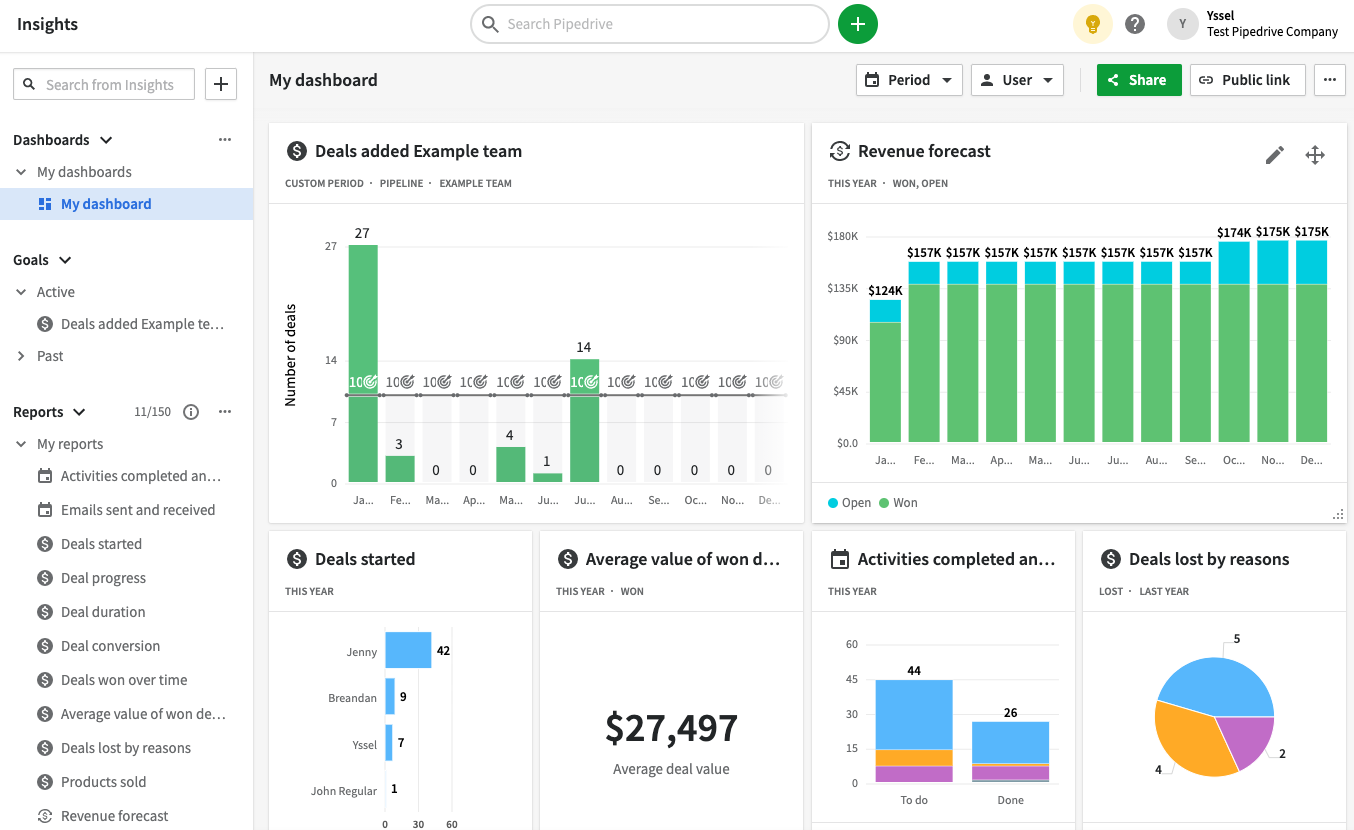
Pipedrive 、視覚的なパイプラインと厳密な活動追跡を中核とする営業中心のPipedrive 。取引主導型のアプローチを取るスタートアップに最適で、営業担当者が常に次のアクションを把握できるようにします。 設定は迅速で、ユーザーインターフェースは直感的、パイプラインも容易にカスタマイズ可能です。フォローアップとスピードを重視するアウトバウンド・インバウンド両方の営業チームに特に効果的です。大規模プラットフォームと比較するとマーケティング自動化機能は限定的ですが、他のマーケティングツールとの連携性は高い傾向にあります。
Salesforce何ですか?
Salesforce 広範なカスタマイズ、ガバナンス、複雑な収益業務に特化したSalesforce ズSalesforce 基本的なツールでは対応できなくなり、厳格な権限管理、高度なレポート機能、複数チームにわたるカスタマイズされたワークフローを必要とするスタートアップ企業に最適です。カスタムオブジェクトと自動化機能により、ほぼあらゆるデータモデルに対応可能です。さらに、米国市場において膨大なアプリとパートナーのエコシステムを誇ります。ただし、導入と継続的な管理作業は一般的なCRMよりも負荷が高く、コストが急激に増加する可能性があります。

PipedrPipedrive SalesforceのSalesforce比較
メールとカレンダーの同期
Pipedrive GmailとOutlookの両方Pipedrive メールを同期し、メッセージをCRMに統合して適切な担当者、組織、取引に紐付けます。カレンダー同期はGoogleとMicrosoftカレンダーに対応し、設定に応じて一方向または双方向の同期を提供します。これにより会議や活動がレコード上で一貫して可視化され、チームが継続的なフォローアップを維持できます。 その結果、手動での継続的な記録作業の煩わしさなく、常に最新の状態を保つ単一の活動タイムラインが実現します。利用可能機能は選択したプランや管理者設定によって異なる場合があります。
Salesforce OutlookおよびGmailを介した受信トレイとカレンダーの統合Salesforce 、Einstein Activity Captureによって強化されています。これによりメールやイベントが自動的にアクティビティタイムラインに記録されます。記録されたアクティビティは連絡先、見込み客、商談などの関連レコードと関連付けられ、繰り返しの手動入力なしでコンテキストを保持します。この統合は、メールや会議に大きく依存し、実際のやり取りと連動したCRMの可視性を必要とする営業チームにとって特に効果的です。通常、設定と権限はガバナンス要件に準拠するため管理者が処理します。
エンリッチメントと重複排除によるコンタクトデータのクリーンアップ
Pipedrive 、メールアドレスやドメインに関連付けられた公開情報を活用してレコードを充実させることでデータ品質をPipedrive 、個人や組織の不足情報を効果的に補完します。この手法により不完全な入力が最小限に抑えられ、セグメンテーションとアウトリーチ活動が強化されます。 さらに、重複管理機能により個人・組織・取引の統合が可能となり、活動履歴が複数レコードに分散することなく保持されます。CRMはマッチングルールで潜在的な重複を特定するため、データが精緻化されレポート精度が向上し、ルーティングエラーが減少します。
Salesforce 、マッチングおよび重複ルールによる統合的な重複Salesforce 、重複レコードの特定と作成防止を支援します。設定に応じて、これらのルールはユーザーへの警告、保存の阻止、または潜在的な重複レコードのレビュープロセスへの誘導が可能です。データ強化のため、Salesforce Data CloudエンリッチメントおよびAppExchangeデータプロバイダーを介して追加情報をSalesforce 、企業および連絡先の属性をプラットフォーム内に直接追加します。この組み合わせにより、包括的なレコードが確保され、チーム間の断片化が最小限に抑えられます。
柔軟なパイプラインとビュー
Pipedrive 、権限に基づいてチームメンバーがアクセスできるメモ、アクティビティ、コンテキストを通じて、レコード内で直接コラボレーションPipedrive 。メンションとコメント機能により、特定の項目に関する内部調整が容易になり、引き継ぎ時の外部スレッドが不要になります。可視性グループと権限セットは、データの閲覧や編集を許可されるユーザーを決定します。これはスタートアップがチームを拡大し、機密性の高い取引を管理する上で極めて重要です。このアプローチにより、過剰な情報共有のリスクなく共有コンテキストを維持し、アカウントの成長に伴いガバナンスが管理可能な状態を保ちます。
Salesforce 商談とステージベースの販売プロセスを通じてパイプラインSalesforce 、レコードタイプと独自の販売プロセスによる多様な動きを可能にします。ステージ、フィールド、ページレイアウトは、異なるセグメント、地域、製品ラインに合わせてカスタマイズ可能でありながら、一貫したレポート作成を保証します。このフレームワークは、承認や予測を伴う複雑なエンタープライズワークフローから単純なパイプラインまで対応します。標準化は堅牢ですが、軽量なCRMと比較すると初期設定はより手間がかかります。
チームコラボレーション
Pipedrive 、権限に応じてチームメンバーがアクセスできるメモ、アクティビティ、コンテキストを活用し、レコード内でのシームレスなコラボレーションをPipedrive 。メンションとコメント機能により、アイテム上で直接内部調整が可能となり、引き継ぎ時の外部コミュニケーションスレッドが不要になります。可視性グループと権限セットは、データの閲覧・編集権限を決定します。これはスタートアップがチームを拡大し、機密性の高い取引を扱う上で極めて重要です。このアプローチにより、不要な情報共有を避けつつコンテキストを共有できるため、アカウント規模の拡大に伴いガバナンスを管理しやすくします。
Salesforce Chatterを通じてレコード内で直接コラボレーションSalesforce 。更新情報、ディスカッション、コンテキストが一元化された場所に集約されます。レコードはChatterグループで共有可能であり、チームが特定のアカウントや商談について議論し調整することを可能にします。タスク、メモ、アクティビティ履歴が統合された運用基盤を形成し、業務の引き継ぎや部門横断的な可視性を実現します。さらに、権限と共有制御により、コラボレーションがセキュリティ要件に準拠した状態を維持します。
軽量な自動化と統合
Pipedrive 、連絡先・組織・活動・商談の作成・更新・削除といったアクションや日付ベースのトリガーによって起動する自動化Pipedrive 。これらの自動化機能は、設定に基づいてCRM項目の作成・更新や、連携メールアドレスからのメール送信といったタスクを実行できます。 統合に関しては、Zapierが双方向ワークフローを実現し、データをPipedrive プッシュPipedrive 他のアプリケーションへ送信Pipedrive できます。より高度な制御を求めるユーザー向けに、Pipedrive REST API Pipedrive REST API イベント駆動型統合のためのWebhookをサポートしています。これにより、軽量なスタートアップ向け自動化からより複雑な構築パスまで、幅広いニーズに対応します。
Salesforce自動化Salesforce を中心に展開され、レコード、承認、ルーティング、データ更新を含む宣言型ワークフローを実現します。 APIを介した統合構築が可能で、プラットフォームはイベント駆動型パターンによるリアルタイムの外部接続をサポートします。さらにAppExchangeエコシステムが自動化と統合機能を強化し、すべてを一から構築する必要性を解消します。この構成は、スケーラビリティ、高度なカスタマイズ、長期的なガバナンスを必要とするスタートアップに最適ですが、管理および実装の労力が増加するというトレードオフがあります。
folk :2026年スタートアップ向け最高のCRM
folk 、Gmail、Googleカレンダー、LinkedIn、スプレッドシートを通じて関係管理を行うスタートアップ向けに設計された最先端のfolk 連絡先、企業、商談、メモ、ファイル、やり取りを単一の合理化されたワークスペースに統合し、パイプラインのコンテキストが複数のタブに分散されることなく、実際の会話と常に連動した状態を保証します。
スタートアップがfolkに求める主な特徴
- GmailとGoogleカレンダーの同期による自動アクティビティタイムライン
- Chrome拡張機能によるLinkedIn対応の連絡先取得
- コンタクトエンリッチメントによる欠損データの迅速な補完
- ボリュームの増加に伴い、クリーンなデータベースを維持するための重複排除
- あらゆる市場投入戦略に合わせたカスタマイズ可能なパイプラインとフィールド
スタートアップ企業にとって、folk 価値実現までのスピードと日常的な使いやすさにfolk 。設定プロセスは迅速で、ワークフローは柔軟性を保ち、マルチチャネルのコンテキストにも容易にアクセスできます。これらはすべて、不要な機能でCRMを重くすることなく実現されます。その結果、より一貫したフォローアップ、クリーンなデータ、そして最小限の摩擦で明確な収益可視性が得られます。
結論
結論として、Pipedrive 効率的なメール連携とシンプルな設定を備えた、営業中心の合理化されたアプローチPipedrive 、迅速なフォローアップを重視するチームに最適です。Salesforceカスタマイズ性と企業レベルのガバナンスに優れていますが、スタートアップにとっては複雑でコストがかかる場合があります。しかし、メール連携、自動化、シーケンス機能を優先するチームにとっては、 folk が優れた選択肢として浮上します。マルチチャネルのやり取りを整理されたユーザーフレンドリーなインターフェースに統合し、不必要な複雑さなくシームレスなワークフローと一貫したフォローアップを保証します。
folk を発見
あなたのチームがこれまで持っていなかったような販売アシスタントのように