


Scopri folk il CRM per le aziende basate sulle persone
Nel mondo in rapida evoluzione delle startup, gestire in modo efficiente le relazioni con i clienti è più importante che mai. Un CRM ben implementato per le startup aiuta a semplificare le interazioni, assicurando che nulla sfugga al controllo nel caos dei team in crescita e dell'espansione della base clienti. Sia Salesforce monday Sales CRM soluzioni uniche per rispondere a questa esigenza, sebbene con approcci diversi su misura per filosofie operative distinte.
Salesforce come una soluzione CRM completa con ampie possibilità di personalizzazione, ideale per le aziende che richiedono una governance solida e flussi di lavoro complessi. D'altra parte, monday Sales CRM sull'efficienza operativa e sulla collaborazione, rivolgendosi ai team già integrati nell'ecosistema monday.com. Questo articolo approfondirà il confronto tra le caratteristiche di entrambe le piattaforme, esplorandone i punti di forza in aree quali la gestione dei dati, la collaborazione tra team, l'automazione e l'usabilità complessiva.
Comprendere queste sfumature è fondamentale per le startup che mirano a migliorare il coinvolgimento dei clienti e promuovere la crescita. Con il giusto CRM, le startup possono trasformare i propri processi, assicurandosi che ogni accordo venga monitorato, ogni interazione venga coltivata e ogni membro del team sia allineato verso obiettivi comuni.
Che cos'è Salesforce?
Salesforce un CRM robusto e di livello aziendale, progettato per un'ampia personalizzazione, governance e operazioni di fatturato complesse. È ideale per le startup che hanno superato gli strumenti di base e richiedono autorizzazioni rigorose, reportistica avanzata e flussi di lavoro personalizzati tra i team. La piattaforma si adatta a quasi tutti i modelli di dati grazie a oggetti personalizzati e automazione, e vanta un vasto ecosistema di applicazioni e partner nel mercato statunitense. Tuttavia, l'implementazione e gli sforzi amministrativi continui sono in genere superiori a quelli della maggior parte dei CRM e i costi possono aumentare rapidamente.

Che cos'è il lunedì?
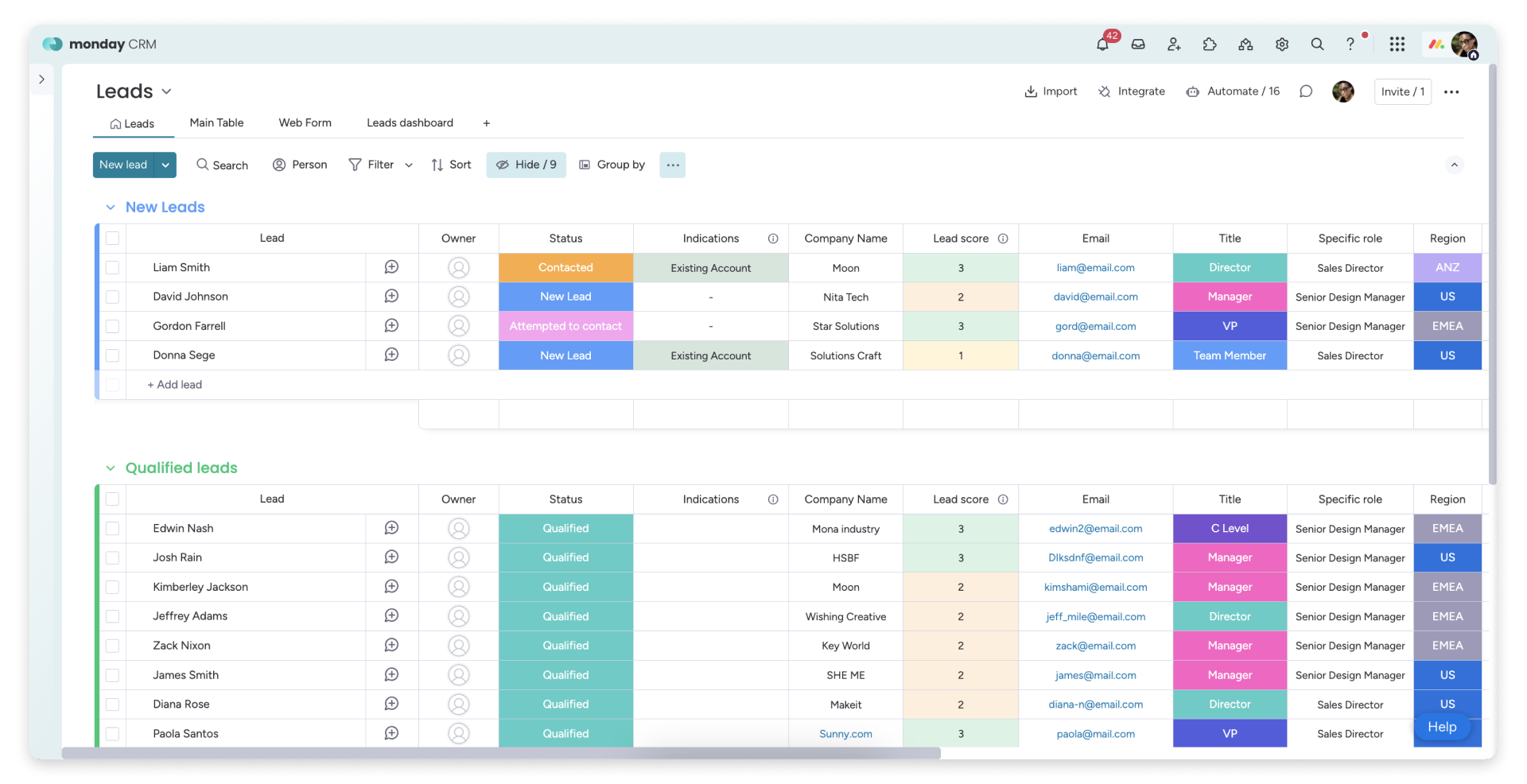
monday Sales CRM progettato per i team che già utilizzano monday.com per le loro operazioni. È adatto alle startup che desiderano gestire lead, trattative e processi post-vendita all'interno dello stesso framework di gestione del lavoro. I suoi punti di forza risiedono nella visibilità e nella collaborazione tra attività, pipeline e passaggi di consegne tra i team. La configurazione è rapida e può essere migliorata con automazioni per ridurre al minimo gli aggiornamenti manuali. Sebbene sia adatto ai team incentrati sulle operazioni, coloro che necessitano di analisi CRM approfondite e modelli di dati complessi potrebbero trovare necessario integrare strumenti aggiuntivi.
Confronto delle funzionalità di Salesforce monday
Sincronizzazione di e-mail e calendario
Salesforce connettività alla posta in arrivo e al calendario tramite l'integrazione con Outlook e Gmail, potenziata da Einstein Activity Capture, che registra automaticamente le e-mail e gli eventi nella cronologia delle attività. Queste attività registrate possono essere visualizzate nei record correlati, come contatti, lead e opportunità, garantendo che il contesto rimanga chiaro senza la necessità di un inserimento manuale costante. Questa configurazione è ideale per i team di vendita che fanno ampio uso di e-mail e riunioni e necessitano di una visibilità CRM collegata alle interazioni reali. La configurazione e le autorizzazioni sono solitamente gestite da un amministratore per allinearsi ai requisiti di governance.
monday Sales CRM le attività di posta elettronica e calendario tramite connessioni specializzate, garantendo che le comunicazioni rimangano visibili nella cronologia dei record. L'integrazione con Outlook collega le e-mail e i calendari a monday, consentendo flussi di lavoro basati sulle e-mail da una vista tabellare. Nel frattempo, l'integrazione con Google Calendar sincronizza gli eventi del calendario nella cronologia del CRM, centralizzando riunioni e punti di contatto. Il risultato è uno spazio unificato per rivedere le discussioni recenti e gli eventi imminenti, perfettamente adatto ai team che cercano un contesto CRM all'interno di un flusso di lavoro di gestione del lavoro.
Pulizia dei dati di contatto con arricchimento e deduplicazione
Salesforce solide funzionalità di gestione dei duplicati attraverso regole di corrispondenza e duplicazione, che consentono di rilevare e prevenire efficacemente i record duplicati. A seconda della configurazione, queste regole possono avvisare gli utenti, bloccare il salvataggio dei record o indirizzare i potenziali duplicati verso processi di revisione. Per l'arricchimento dei dati, Salesforce i record utilizzando gli arricchimenti Data Cloud e i provider di dati AppExchange che aggiungono attributi aziendali e di contatto direttamente all'interno della piattaforma. Questa sinergia garantisce che i record rimangano completi e riduce al minimo la frammentazione tra i team.
monday facilita la gestione dei duplicati con un flusso di unione che combina gli elementi preservandone la cronologia degli aggiornamenti. Le voci duplicate possono essere unite in un unico record primario, con i duplicati archiviati e i loro aggiornamenti trasferiti. Questa soluzione garantisce record puliti, soprattutto quando i lead o gli account provengono da più canali. Un approccio di questo tipo è particolarmente vantaggioso per le startup che dipendono da importazioni e integrazioni, poiché l'arricchimento dei dati proviene in genere dallo stack tecnologico, mentre monday dà la priorità ai campi strutturati e all'igiene dei dati.
Pipeline e viste flessibili
Salesforce la collaborazione senza soluzione di continuità sui record tramite Chatter, consentendo di conservare aggiornamenti, discussioni e contesto dei record in un unico luogo. Gli utenti possono condividere i record all'interno dei gruppi Chatter per promuovere le discussioni di gruppo e coordinare gli sforzi relativi a account o opportunità specifici. Grazie alle attività, alle note e alla cronologia delle attività, i team beneficiano di un livello operativo condiviso che migliora i passaggi di consegne e la visibilità interfunzionale, mentre le autorizzazioni e i controlli di condivisione mantengono l'allineamento con i requisiti di sicurezza.
monday Sales CRM le pipeline utilizzando una bacheca delle trattative progettata per il monitoraggio basato sulle fasi. La visualizzazione della pipeline Kanban consente di spostare facilmente le trattative da una fase all'altra con il drag-and-drop, rendendo lo stato delle trattative di facile interpretazione. Le fasi e le colonne possono essere personalizzate per allinearsi al processo di vendita di una startup senza necessità di configurazioni complesse. I filtri e le visualizzazioni consentono di distinguere tra attività in entrata, in uscita, rinnovi o attività dei partner, garantendo che la configurazione rimanga focalizzata sull'esecuzione operativa.
Collaborazione di gruppo
Salesforce la collaborazione direttamente sui record tramite Chatter, consentendo di centralizzare aggiornamenti, discussioni e informazioni contestuali in un'unica posizione. Gli utenti possono condividere i record nei gruppi Chatter, facilitando le discussioni e il coordinamento del team su account o opportunità specifici. Gli elenchi di attività, le note e la cronologia delle attività creano un livello operativo unificato per passaggi di consegne fluidi e una maggiore visibilità interfunzionale. Le autorizzazioni e i controlli di condivisione garantiscono che la collaborazione sia in linea con i protocolli di sicurezza.
monday è progettato appositamente per la collaborazione, garantendo che le attività CRM rimangano visibili a tutti i team senza la necessità di cambiare strumento. I record consentono aggiornamenti e discussioni relative all'elemento, mantenendo il contesto close o close account. Colonne chiare relative a proprietà, assegnazione e stato promuovono la responsabilità durante i passaggi di consegne. Le visualizzazioni condivise aiutano ad allineare vendite, successi e operazioni sulla stessa realtà della pipeline, mentre le autorizzazioni e le strutture del board mantengono una collaborazione organizzata man mano che il team si espande.
Automazione leggera e integrazioni
Salesforce ruota attorno Salesforce , che facilita i flussi di lavoro dichiarativi per registrazioni, approvazioni, instradamento e aggiornamenti dei dati. Le integrazioni possono essere realizzate tramite API, con modelli basati sugli eventi abilitati tramite eventi della piattaforma per la connettività esterna in tempo reale. L'ecosistema AppExchange migliora l'automazione e le integrazioni, consentendo di evitare di dover costruire tutto da zero. Questa configurazione è ideale per le startup che cercano scalabilità, ampia personalizzazione e governance sostenibile, anche se richiede un maggiore sforzo amministrativo e di implementazione.
monday offre automazione attraverso ricette integrate che attivano azioni basate su cambiamenti di stato, date imminenti o avanzamento degli elementi attraverso le fasi. Le integrazioni migliorano ulteriormente la funzionalità con connettori e flussi di lavoro senza codice, comprese le connessioni a Zapier per gli stack di startup più diffusi. Per requisiti più complessi, monday dispone di un'API GraphQL che consente la lettura e la scrittura programmatica dei dati, consentendo un approccio iniziale leggero che può essere scalato man mano che i processi evolvono. L'automazione rimane gestibile grazie alla sua dipendenza da una logica chiara.
folk : il miglior CRM per le startup nel 2026
folk un CRM innovativo progettato specificamente per le startup, che si integra perfettamente con Gmail, Google Calendar, LinkedIn e i fogli di calcolo. Consolida contatti, aziende, accordi, note, file e tutte le interazioni in un unico spazio di lavoro leggero, assicurando che il contesto della pipeline sia ancorato alle conversazioni reali piuttosto che disperso in più schede.
Le caratteristiche più apprezzate dalle startup in folk
- Cronologia automatica delle attività con sincronizzazione Gmail + Google Calendar
- Acquisizione dei contatti LinkedIn senza sforzo tramite un'estensione Chrome
- Arricchimento dei contatti per inserire rapidamente i dati mancanti
- Deduplicazione per mantenere pulito il database man mano che cresce
- Pipeline e campi personalizzabili per allinearsi a qualsiasi strategia di commercializzazione
Per le startup, folk nel garantire rapidità di ritorno sull'investimento e nel promuovere il coinvolgimento quotidiano. La configurazione è rapida, i flussi di lavoro rimangono adattabili e il contesto multicanale è immediatamente disponibile senza sovraccaricare gli utenti con una suite CRM ingombrante. Ciò porta a follow-up più coerenti, dati più puliti e una maggiore visibilità dei ricavi con attriti minimi.
Conclusione
In sintesi, Salesforce un'ampia personalizzazione e una governance solida, ideale per le startup di grandi dimensioni con flussi di lavoro complessi. monday Sales CRM in termini di efficienza operativa e collaborazione per i team che già utilizzano l'ecosistema monday.com. Tuttavia, per le startup che cercano un'integrazione perfetta con la posta elettronica, l'automazione e un'esperienza leggera, folk si presenta come la migliore alternativa. Consolida dati e interazioni in un unico spazio di lavoro, garantendo che i team rimangano coinvolti e mantengano registrazioni pulite con il minimo attrito. Prova la differenza con folk .
Inizia oggi stesso la tua prova gratuita di 14 giorni o prenota una demo.
Domande frequenti
Qual è il CRM più adatto alle startup che necessitano di un elevato livello di personalizzazione e governance?
Salesforce la soluzione ideale per le startup che necessitano di un’ampia personalizzazione, autorizzazioni rigorose e flussi di lavoro complessi, anche se in genere richiede un maggiore impegno nell’implementazione e comporta costi più elevati.
Quale CRM è più adatto ai team che utilizzano già monday.com?
monday Sales CRM i team integrati nell'ecosistema monday.com, offrendo una configurazione rapida, pipeline visibili e funzionalità di collaborazione integrate per i flussi di lavoro operativi.
Cosa rende folk valida alternativa per le startup?
folk una sincronizzazione perfetta con Gmail e Google Calendar, l'acquisizione dei dati da LinkedIn, l'arricchimento e la deduplicazione dei dati, oltre a flussi di lavoro snelli che consentono una configurazione rapida, dati più puliti e un coinvolgimento quotidiano costante senza onere amministrativo.
Ti presentiamo folk, il CRM basato sull'intelligenza artificiale per l'intero processo di vendita.