


Scopri folk il CRM per le aziende basate sulle persone
Salesforce ClickUp in sintesi
Quando si tratta di scegliere una piattaforma CRM, Salesforce ClickUp spiccano come scelte popolari. Salesforce nota per le sue solide funzionalità, pensate per le grandi imprese con strumenti completi per le vendite, il marketing e l'assistenza. ClickUp è nota per la sua versatilità e le sue capacità di integrazione, che la rendono attraente per le aziende alla ricerca di una soluzione flessibile e completa. In questo post del blog esploreremo le caratteristiche uniche, i prezzi e i vantaggi di entrambe le piattaforme.
Introdurremo anche folk come alternativa interessante da prendere in considerazione, in particolare per i team in crescita composti da 20-50 persone che cercano una soluzione CRM intuitiva che bilancia potenza e facilità d'uso.
| Punti principali |
|---|
|
Che cos'è Salesforce?
Salesforce è una solida piattaforma CRM per grandi imprese che offre strumenti per le vendite, il marketing, l'assistenza e l'analisi, con un'ampia scalabilità.
Caratteristiche principali di Salesforce
- Ecosistema completo: una piattaforma unificata che offre CRM, automazione del marketing, assistenza clienti e sviluppo di app personalizzate, adatta alle diverse esigenze delle grandi imprese.
- Personalizzazione e scalabilità: Salesforce altamente personalizzabile e scalabile, consentendo alle grandi organizzazioni di adattare la piattaforma a flussi di lavoro complessi e gestire una crescita significativa.
- Integrazione dell'intelligenza artificiale (AI): Salesforce offre analisi e automazione basate sull'intelligenza artificiale, fornendo approfondimenti che aiutano le grandi aziende a ottimizzare le loro strategie.
- Ampie capacità di integrazione: grazie ad AppExchange Salesforce, le grandi aziende possono integrare la piattaforma con un'ampia gamma di applicazioni di terze parti, garantendo un funzionamento senza soluzione di continuità tra diversi sistemi aziendali.
- Sicurezza e conformità di livello aziendale: Salesforce solide misure di sicurezza e funzionalità di conformità, fondamentali per le grandi organizzazioni che gestiscono dati sensibili dei clienti.
Cos'è ClickUp?
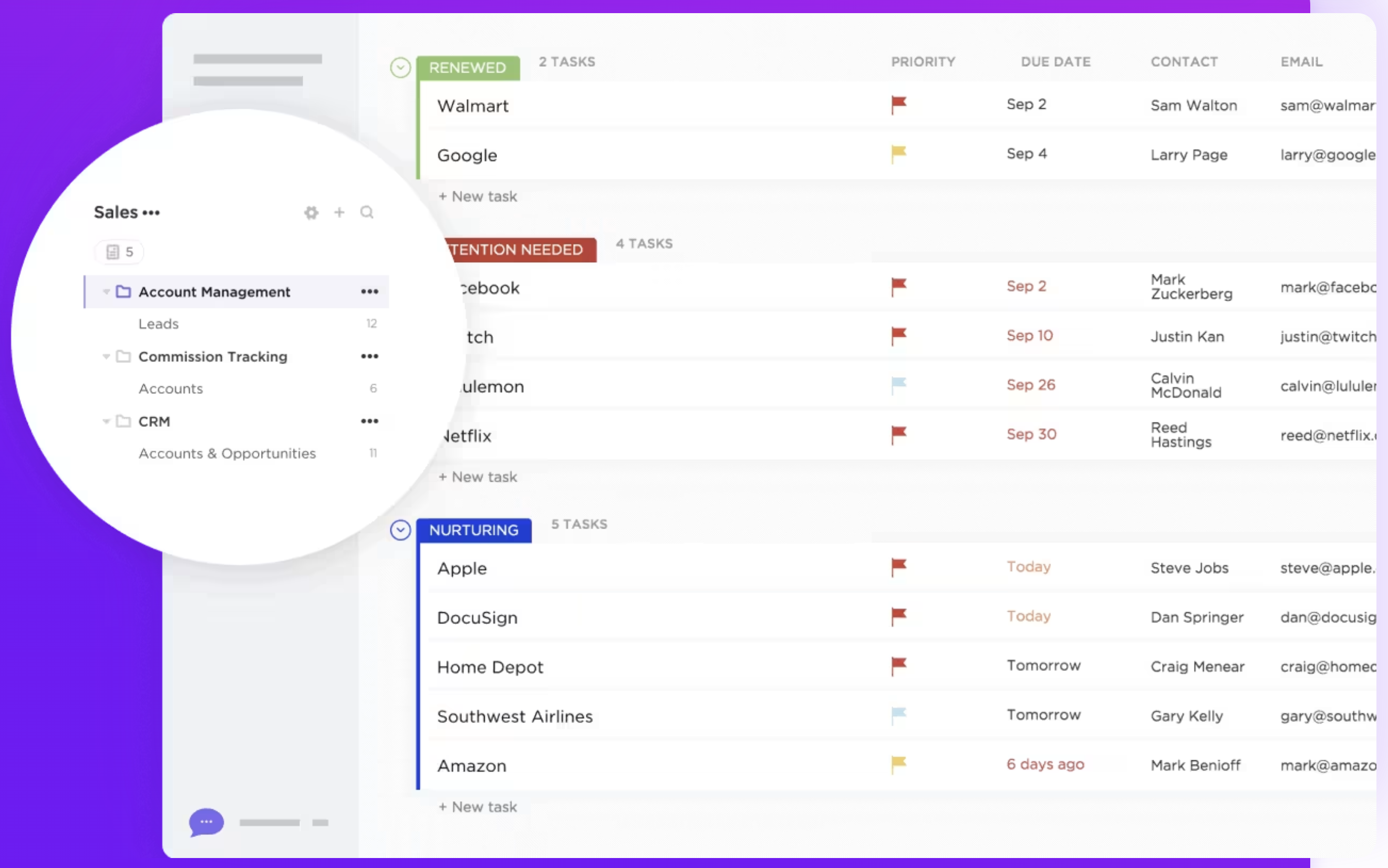
ClickUp è una piattaforma di gestione dei progetti e produttività progettata per aiutare team e singoli individui a organizzare le attività, monitorare i progressi e collaborare in un unico spazio di lavoro. Sebbene sia principalmente uno strumento di gestione dei progetti, ClickUp include alcuni elementi CRM.
Caratteristiche principali di ClickUp
- Gestione delle attività: ClickUp consente agli utenti di creare, assegnare e monitorare le attività con stati personalizzati, offrendo flessibilità nella gestione dei processi di lavoro in diversi progetti.
- Visualizzazioni personalizzate: la piattaforma offre diverse visualizzazioni, come elenchi, bacheche, calendari e diagrammi di Gantt, consentendo agli utenti di visualizzare le attività e i flussi di lavoro nel formato che preferiscono.
- Monitoraggio degli obiettivi: gli utenti possono impostare, monitorare e gestire gli obiettivi all'interno di ClickUp, allineando le attività e i progetti con obiettivi più ampi.
- Monitoraggio del tempo: ClickUp include una funzione integrata di monitoraggio del tempo per registrare il tempo dedicato alle attività, consentendo agli utenti di monitorare la produttività o le ore fatturabili.
- Automazione del flusso di lavoro: l'automazione in ClickUp consente agli utenti di ridurre le attività manuali impostando regole che attivano azioni, come aggiornamenti di stato o notifiche, in base a condizioni predefinite.
- Campi personalizzati: la piattaforma consente agli utenti di aggiungere campi personalizzati alle attività, permettendo loro di monitorare dati specifici o classificare le attività in base alle proprie esigenze.
Salesforce . ClickUp: confronto delle funzionalità
Analizziamo le caratteristiche principali di due soluzioni software CRM e diamo un'occhiata più da vicino alla loro automazione delle vendite, agli strumenti di email marketing e alla gestione dei contatti.
1. Gestione della pipeline di vendita
La funzione di gestione della pipeline Salesforce, nota come Pipeline Inspection, offre una visione completa delle opportunità di vendita consolidando metriche chiave, modifiche alle trattative e approfondimenti basati sull'intelligenza artificiale in un'unica interfaccia. Ciò consente ai team di vendita di monitorare in modo efficiente i progressi, identificare potenziali colli di bottiglia e prendere decisioni basate sui dati per migliorare le loro strategie di vendita.
ClickUp non dispone di una funzione di gestione della pipeline dedicata progettata specificamente per scopi di vendita o CRM. Tuttavia, gli utenti possono creare pipeline personalizzabili utilizzando elenchi di attività, bacheche e stati personalizzati. Questa flessibilità consente ai team di adattare il proprio flusso di lavoro alle loro esigenze specifiche, anche se può richiedere una configurazione più manuale e non offre le informazioni avanzate incentrate sulle vendite offerte da Salesforce. In sintesi, Salesforce uno strumento robusto e specializzato per la gestione delle pipeline di vendita, ideale per le aziende che cercano un'automazione completa delle vendite. ClickUp, sebbene versatile e altamente personalizzabile, potrebbe non fornire la stessa profondità di funzionalità specifiche per le vendite, ma può essere adattato per soddisfare varie esigenze di gestione dei progetti. Per team di medie dimensioni composti da 20-50 persone, folk emerge come la via di mezzo ideale, offrendo funzionalità dedicate alla pipeline di vendita senza la complessità delle soluzioni aziendali.
👉🏼 Prova folk per gestire una pipeline di vendita personalizzabile con attività di outreach assistite dall'intelligenza artificiale e follow-up automatizzati.

2. Facilità d'uso
Salesforce, pur essendo potente, ha una curva di apprendimento più ripida a causa delle sue numerose funzionalità e opzioni di personalizzazione. Al contrario, ClickUp offre un'interfaccia più intuitiva con una navigazione intuitiva, rendendo più facile per i team adottarlo e utilizzarlo rapidamente senza una formazione approfondita.
3. Arricchimento dei contatti
La funzione di arricchimento dei contatti Salesforce sfrutta strumenti come Data Cloud per migliorare e aggiornare automaticamente i record dei contatti in tempo reale, attingendo da fonti di dati verificate come LinkedIn e InsideView per fornire aggiornamenti in tempo reale. ClickUp non offre una funzione di arricchimento dei contatti come parte delle sue funzionalità principali. Sebbene gli utenti possano archiviare e organizzare manualmente le informazioni di contatto utilizzando campi personalizzati e dettagli delle attività, la piattaforma non recupera automaticamente dati aggiuntivi sui contatti da fonti esterne.
4. Sensibilizzazione
La soluzione di outreach Salesforce è basata sulle sue funzionalità di intelligenza artificiale, in particolare grazie all'integrazione di Einstein AI e alla lista Outreach che consente agli utenti di visualizzare i percorsi di cross-selling e i lead con cui devono interagire. ClickUp non dispone di una funzione di outreach dedicata specificamente progettata per la comunicazione con contatti esterni, come clienti o lead. Tuttavia, gli utenti possono gestire le attività di outreach utilizzando flussi di lavoro personalizzati che richiedono una configurazione manuale.
5. Automazione
Salesforce solide funzionalità di automazione progettate per semplificare i processi aziendali. Le sue capacità di automazione includono regole di flusso di lavoro e generatori di flussi, processi di approvazione e automazione AI tramite Einstein AI. Le capacità di automazione di ClickUp sono generiche e non specificamente adattate alle funzioni CRM come la lead nurturing o la segmentazione dei contatti, che potrebbero richiedere un'ulteriore personalizzazione per soddisfare esigenze CRM più avanzate.
6. Integrazione
Salesforce con un'ampia gamma di applicazioni di terze parti attraverso il suo marketplace AppExchange, consentendo agli utenti di collegare strumenti per l'automazione del marketing, il servizio clienti, l'analisi dei dati, la gestione dei progetti e la finanza. Tra le integrazioni più diffuse figurano piattaforme come Slack per la collaborazione in team e Mailchimp l'email marketing. ClickUp offre integrazioni con vari strumenti di terze parti, come Google Workspace, Slack, Zoom e Dropbox, per migliorare l'efficienza del flusso di lavoro e la collaborazione all'interno della piattaforma.
7. Intelligenza artificiale
Salesforce integra l'intelligenza artificiale attraverso la sua piattaforma Einstein, che migliora il processo decisionale fornendo analisi predittive, raccomandazioni intelligenti e approfondimenti automatizzati. Aiuta ad automatizzare attività quali il lead scoring, la previsione delle opportunità e l'inserimento dei dati, offrendo al contempo l'elaborazione del linguaggio naturale per l'analisi del sentiment dei clienti. L'integrazione dell'intelligenza artificiale di ClickUp è relativamente nuova e si presenta sotto forma di "Chat". Collega attività, documenti, persone e tutte le conoscenze della tua azienda con l'intelligenza artificiale. Utilizzando queste informazioni per diventare un gestore della conoscenza, ti aiuta a gestire le tue attività e a scrivere.
Confronto tra prezzi e piani
Diamo un'occhiata più da vicino ai prezzi e ai piani di Salesforce ClickUp.
Salesforce
I prezzi Salesforce Cloud sono i seguenti.
- Pacchetto iniziale: 25 $ al mese per utente, offre funzionalità CRM di base per piccole imprese
- Pro suite: 80 $/utente/mese include strumenti avanzati per aziende in crescita
- Piano Enterprise: 165 $/utente/mese offre ampie possibilità di personalizzazione e automazione per le grandi aziende
- Piano illimitato: 330 $/utente/mese offre funzionalità complete per le grandi imprese
- Einstein 1 Vendite: 500 $/utente/mese fornisce approfondimenti basati sull'intelligenza artificiale e funzionalità avanzate per le grandi imprese

Prezzi ClickUp
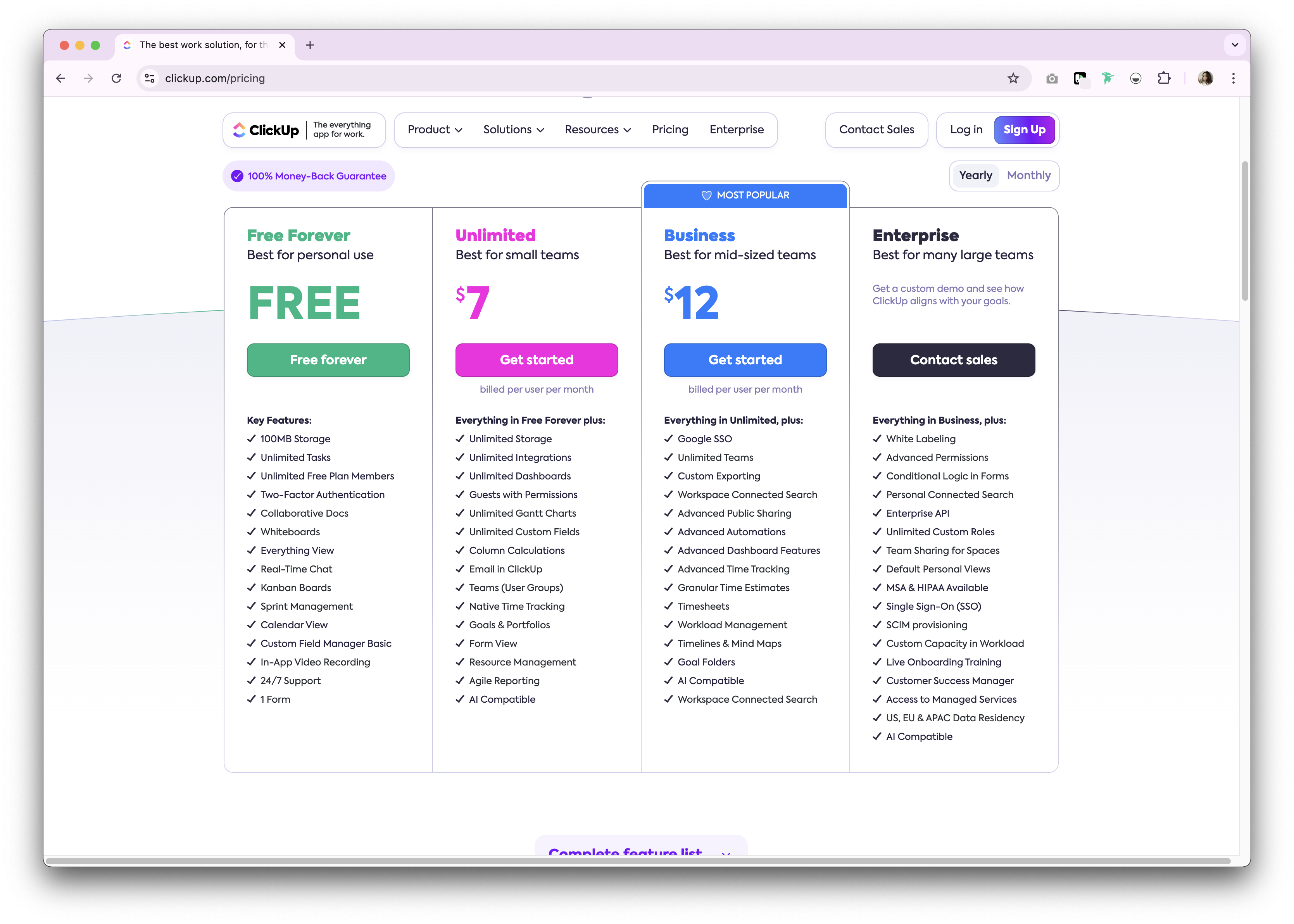
ClickUp offre un piano gratuito a tempo indeterminato per uso personale. Premium sono disponibili sia con abbonamento mensile che annuale. Di seguito è riportata una panoramica generale dei piani di abbonamento annuali disponibili.
- Illimitato: 7 $/utente/mese.
- Business: 12 $/utente/mese.
- Impresa: non divulgata.
Ti presentiamo folk : la migliore alternativa a Salesforce ClickUp
Cerchi un'alternativa conveniente perfetta per aziende in crescita con 20-50 dipendenti? Ti consigliamo folk. Una piattaforma CRM pluripremiata, apprezzata per il suo sistema CRM plug-and-play facile da usare, progettato specificamente per team di medie dimensioni che necessitano di funzionalità potenti senza la complessità delle soluzioni aziendali.

.png)
Caratteristiche principali
- Facilità d'uso e personalizzazione: personalizza facilmente le pipeline, dashboards, l'automazione e le sequenze di e-mail, in modo da poterli utilizzare in tutto il ciclo di vendita e nella gestione della pipeline, nonché in altre funzioni aziendali quali reclutamento, marketing e altro ancora.
- Integrazione con i social media: importa persone e aziende da LinkedIn, Sales Navigator, Instagram e X con un solo clic grazie all'estensione Google Chrome folk.
- Sincronizzazione dei contatti da Gmail e Outlook: sincronizzazione completa delle e-mail che consente agli utenti di gestire tutte le comunicazioni direttamente dal CRM.
- Trova gli indirizzi e-mail con un clic: arricchimento dei contatti fornito da Apollo e Dropcontact poter inserire i dati mancanti con un solo clic.
- Sequenze di email: invia sequenze di email con promemoria se i tuoi lead non rispondono alle tue prime email. Include un'integrazione AI che ti consente di personalizzare le email su larga scala.
- App mobile: accedi ai tuoi contatti e gestisci le tue relazioni ovunque ti trovi con l'appfolk .
Prezzi e piani
folk una prova gratuita di 14 giorni. Successivamente, sono disponibili convenienti piani di abbonamento mensili o annuali. Il piano di abbonamento annuale è il seguente.
- Standard: 20 $ per utente al mese.
- Premium: 40 $ al mese per utente.
- Personalizzato: a partire da 80 $ al mese per utente.

Salesforce . ClickUp: qual è il verdetto?
Tra Salesforce ClickUp, è chiaro che ciascuna piattaforma offre punti di forza unici. Salesforce un ecosistema completo e scalabile, che lo rende ideale per le grandi imprese con esigenze complesse. La versatilità e l'economicità di ClickUp soddisfano bene le esigenze dei team più piccoli che cercano una soluzione unificata per la gestione delle attività e dei progetti. Tuttavia, per le aziende in crescita con 20-50 dipendenti che necessitano di un approccio più personalizzato alla gestione delle relazioni, folk offre la soluzione ottimale, combinando la facilità d'uso con una potente personalizzazione progettata specificamente per i team di vendita di medie dimensioni che desiderano funzionalità di livello aziendale senza la complessità o i costi elevati.
👉🏼 Prova folk per ottenere un CRM facile da usare e conveniente che il tuo team potrà adottare in pochi minuti.
Domande frequenti
ClickUp è un CRM?
ClickUp è uno strumento di gestione dei progetti con alcune opzioni simili al CRM. Manca di pipeline di vendita native, arricchimento dei contatti e outreach. L'uso del CRM richiede campi personalizzati, visualizzazioni e automazioni, con reportistica di vendita limitata.
ClickUp si integra con Salesforce?
Sì. ClickUp offre Salesforce per collegare le attività alle opportunità e agli account, creare attività ClickUp da Salesforce e sincronizzare gli aggiornamenti. Connettori di terze parti come Zapier o Make possono estendere i flussi di lavoro.
Come si confrontano i prezzi Salesforce ClickUp?
Salesforce Cloud: Starter 25 $, Pro 80 $, Enterprise 165 $, Unlimited 330 $, Einstein 1 Sales 500 $ per utente/mese. ClickUp: gratuito; Unlimited 7 $, Business 12 $ per utente/mese; Enterprise personalizzato. I prezzi possono variare in base al periodo di fatturazione.
Qual è una buona alternativa a Salesforce ClickUp?
folk offre pipeline personalizzabili, arricchimento dei contatti, sincronizzazione delle e-mail e sequenze con automazione. Piani annuali: Standard 20 $/utente/mese, Premium , Personalizzato a partire da 80 $, più una prova di 14 giorni. Per saperne di più, visita il sito folk.
Scopri folk
Come l'assistente alle vendite che il tuo team non ha mai avuto